<!DOCTYPE html>
    <html lang="vi" xmlns="http://www.w3.org/1999/xhtml" prefix="og: http://ogp.me/ns#">
    <head>
<title>Hướng dẫn tạo sơ đồ tư duy trong Word</title>
<meta name="description" content="Hướng dẫn tạo sơ đồ tư duy trong Word - Savefile - Tin Tức -...">
<meta name="author" content=".: Nguoicodonvn2008.info - Cõi lòng người cô đơn :.">
<meta name="copyright" content=".: Nguoicodonvn2008.info - Cõi lòng người cô đơn :. [admin@nguoicodonvn2008.info]">
<meta name="robots" content="index, archive, follow, noodp">
<meta name="googlebot" content="index,archive,follow,noodp">
<meta name="msnbot" content="all,index,follow">
<meta name="generator" content="NukeViet v4.5">
<meta http-equiv="Content-Type" content="text/html; charset=utf-8">
<meta property="og:title" content="Hướng dẫn tạo sơ đồ tư duy trong Word">
<meta property="og:type" content="website">
<meta property="og:description" content="Savefile - Tin Tức - https&#x3A;&#x002F;&#x002F;www.nguoicodonvn2008.info&#x002F;vi&#x002F;news&#x002F;savefile&#x002F;kien-thuc-may-tinh&#x002F;huong-dan-tao-so-do-tu-duy-trong-word-9885.html">
<meta property="og:site_name" content=".&#x3A; Nguoicodonvn2008.info - Cõi lòng người cô đơn &#x3A;.">
<meta property="og:url" content="https://www.nguoicodonvn2008.info/vi/news/savefile/kien-thuc-may-tinh/huong-dan-tao-so-do-tu-duy-trong-word-9885.html">
<link rel="shortcut icon" href="https://www.nguoicodonvn2008.info/favicon.ico">
<link rel="canonical" href="https://www.nguoicodonvn2008.info/vi/news/savefile/kien-thuc-may-tinh/huong-dan-tao-so-do-tu-duy-trong-word-9885.html">
<link rel="alternate" href="https://www.nguoicodonvn2008.info/vi/news/rss/" title="Tin Tức" type="application/rss+xml">
<link rel="alternate" href="https://www.nguoicodonvn2008.info/vi/news/rss/karaoke-dual/" title="Tin Tức - Karaoke Dual" type="application/rss+xml">
<link rel="alternate" href="https://www.nguoicodonvn2008.info/vi/news/rss/nhac-tre/" title="Tin Tức - Nhạc trẻ" type="application/rss+xml">
<link rel="alternate" href="https://www.nguoicodonvn2008.info/vi/news/rss/tru-tinh/" title="Tin Tức - Trữ tình" type="application/rss+xml">
<link rel="alternate" href="https://www.nguoicodonvn2008.info/vi/news/rss/nuoc-ngoai/" title="Tin Tức - Nước ngoài" type="application/rss+xml">
<link rel="alternate" href="https://www.nguoicodonvn2008.info/vi/news/rss/remix/" title="Tin Tức - Remix" type="application/rss+xml">
<link rel="alternate" href="https://www.nguoicodonvn2008.info/vi/news/rss/tam-su-tinh-yeu/" title="Tin Tức - Tâm sự tình yêu" type="application/rss+xml">
<link rel="alternate" href="https://www.nguoicodonvn2008.info/vi/news/rss/tho-suu-tam/" title="Tin Tức - Thơ sưu tầm" type="application/rss+xml">
<link rel="alternate" href="https://www.nguoicodonvn2008.info/vi/news/rss/cuoc-song/" title="Tin Tức - Cuộc sống" type="application/rss+xml">
<link rel="alternate" href="https://www.nguoicodonvn2008.info/vi/news/rss/phan-mem/" title="Tin Tức - Phần mềm" type="application/rss+xml">
<link rel="alternate" href="https://www.nguoicodonvn2008.info/vi/news/rss/kien-thuc-may-tinh/" title="Tin Tức - Kiến thức máy tính" type="application/rss+xml">
<link rel="alternate" href="https://www.nguoicodonvn2008.info/vi/news/rss/hoc-tap/" title="Tin Tức - Học tập" type="application/rss+xml">
<link rel="alternate" href="https://www.nguoicodonvn2008.info/vi/news/rss/tai-lieu/" title="Tin Tức - Tài liệu" type="application/rss+xml">
<link rel="alternate" href="https://www.nguoicodonvn2008.info/vi/news/rss/de-thi/" title="Tin Tức - Đề thi" type="application/rss+xml">
<link rel="preload" as="style" href="https://www.nguoicodonvn2008.info/assets/css/font-awesome.min.css" type="text/css">
<link rel="preload" as="style" href="https://www.nguoicodonvn2008.info/themes/default/css/bootstrap.non-responsive.css" type="text/css">
<link rel="preload" as="style" href="https://www.nguoicodonvn2008.info/themes/default/css/style.css" type="text/css">
<link rel="preload" as="style" href="https://www.nguoicodonvn2008.info/themes/default/css/style.non-responsive.css" type="text/css">
<link rel="preload" as="style" href="https://www.nguoicodonvn2008.info/themes/default/css/news.css" type="text/css">
<link rel="preload" as="style" href="https://www.nguoicodonvn2008.info/themes/default/css/custom.css" type="text/css">
<link rel="preload" as="script" href="https://www.nguoicodonvn2008.info/assets/js/jquery/jquery.min.js" type="text/javascript">
<link rel="preload" as="script" href="https://www.nguoicodonvn2008.info/assets/js/language/vi.js" type="text/javascript">
<link rel="preload" as="script" href="https://www.nguoicodonvn2008.info/assets/js/DOMPurify/purify3.js" type="text/javascript">
<link rel="preload" as="script" href="https://www.nguoicodonvn2008.info/assets/js/global.js" type="text/javascript">
<link rel="preload" as="script" href="https://www.nguoicodonvn2008.info/assets/js/site.js" type="text/javascript">
<link rel="preload" as="script" href="https://www.nguoicodonvn2008.info/themes/default/js/news.js" type="text/javascript">
<link rel="preload" as="script" href="https://www.nguoicodonvn2008.info/themes/default/js/main.js" type="text/javascript">
<link rel="preload" as="script" href="https://www.nguoicodonvn2008.info/themes/default/js/custom.js" type="text/javascript">
<link rel="preload" as="script" href="https://www.nguoicodonvn2008.info/themes/default/js/bootstrap.min.js" type="text/javascript">
<link rel="stylesheet" href="https://www.nguoicodonvn2008.info/assets/css/font-awesome.min.css">
<link rel="stylesheet" href="https://www.nguoicodonvn2008.info/themes/default/css/bootstrap.non-responsive.css">
<link rel="stylesheet" href="https://www.nguoicodonvn2008.info/themes/default/css/style.css">
<link rel="stylesheet" href="https://www.nguoicodonvn2008.info/themes/default/css/style.non-responsive.css">
<link rel="StyleSheet" href="https://www.nguoicodonvn2008.info/themes/default/css/news.css">
<link rel="stylesheet" href="https://www.nguoicodonvn2008.info/themes/default/css/custom.css">
<style type="text/css">
	body{background: #fff;}
</style>
    </head>
    <body>
<div id="print">
	<div id="hd_print">
		<h2 class="pull-left">.&#x3A; Nguoicodonvn2008.info - Cõi lòng người cô đơn &#x3A;.</h2>
		<p class="pull-right"><a title=".&#x3A; Nguoicodonvn2008.info - Cõi lòng người cô đơn &#x3A;." href="https://www.nguoicodonvn2008.info/">https://www.nguoicodonvn2008.info</a></p>
	</div>
	<div class="clear"></div>
	<hr />
	<div id="content">
		<h1>Hướng dẫn tạo sơ đồ tư duy trong Word</h1>
		<ul class="list-inline">
			<li>Thứ tư - 26/02/2025 21:55</li>
			<li class="hidden-print txtrequired"><em class="fa fa-print">&nbsp;</em><a title="In ra" href="javascript:;" onclick="window.print()">In ra</a></li>
			<li class="hidden-print txtrequired"><em class="fa fa-power-off">&nbsp;</em><a title="Đóng cửa sổ này" href="javascript:;" onclick="window.close()">Đóng cửa sổ này</a></li>
		</ul>
		<div class="clear"></div>
		<div id="hometext">
		</div>
				<div class="imghome">
			<img alt="Hướng dẫn tạo sơ đồ tư duy trong Word" src="https://st.quantrimang.com/photos/image/2025/02/25/tao-so-do-tu-duy-word-1.jpg" width="460" class="img-thumbnail" />
		</div>
		<div class="clear"></div>
		<div id="bodytext" class="clearfix">
			<p style="text-align: justify;">Bản đồ tư duy cực kỳ hữu ích khi chúng ta cần ghi nhớ thông tin vì nội dung được thiết kế với phong cách trực quan nhất. Bạn sẽ thấy các liên kết giữa nội dung, dễ tổng hợp theo ý mình để đọc thông tin nhanh chóng hơn. Dưới đây là hướng dẫn tạo hồ sơ tư duy trong Word.</p>

<h2 style="text-align: justify;">Cách tạo sơ đồ tư duy trong Word</h2>

<p style="text-align: justify;"><strong>Bước 1:</strong></p>

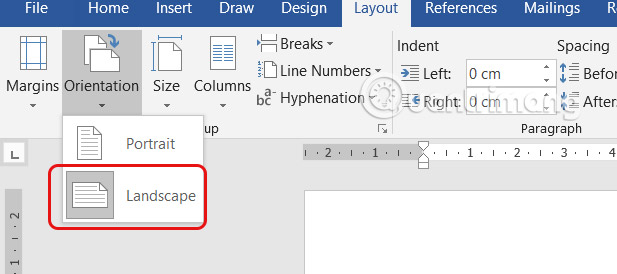
<p style="text-align: justify;">Trước hết chúng ta sẽ chuyển Word sang chế độ Landscape để trang trình bày rộng hơn.</p>

<div style="text-align: justify;">&nbsp;</div>

<p style="text-align: justify;"><img alt="Quay ngang tài liệu Word" data-i="0" data-src="https://st.quantrimang.com/photos/image/2025/02/25/tao-so-do-tu-duy-word-1.jpg" data-was-processed="true" height="266" src="https://st.quantrimang.com/photos/image/2025/02/25/tao-so-do-tu-duy-word-1.jpg" width="600" /></p>

<p style="text-align: justify;"><strong>Bước 2:</strong></p>

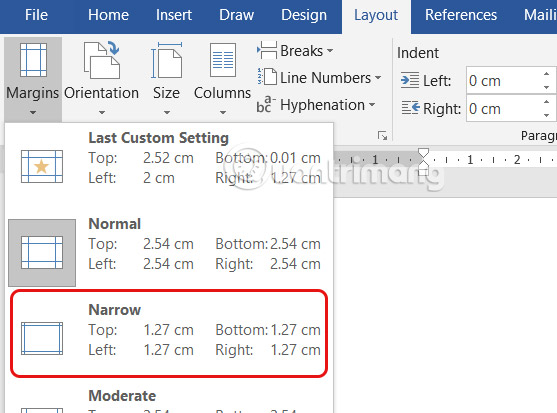
<p style="text-align: justify;">Nhấn tiếp vào Layout sau đó&nbsp;<strong>nhấn chọn vào Margins</strong>. Tiếp xuống ở bên dưới&nbsp;<strong>chọn Narrow</strong>&nbsp;để thu gọn lề trong Word.</p>

<p style="text-align: justify;"><img alt="Thu gọn lề trong Word" data-i="1" data-src="https://st.quantrimang.com/photos/image/2025/02/25/tao-so-do-tu-duy-word-2.jpg" data-was-processed="true" height="371" src="https://st.quantrimang.com/photos/image/2025/02/25/tao-so-do-tu-duy-word-2.jpg" width="500" /></p>

<p style="text-align: justify;"><strong>Bước 3:</strong></p>

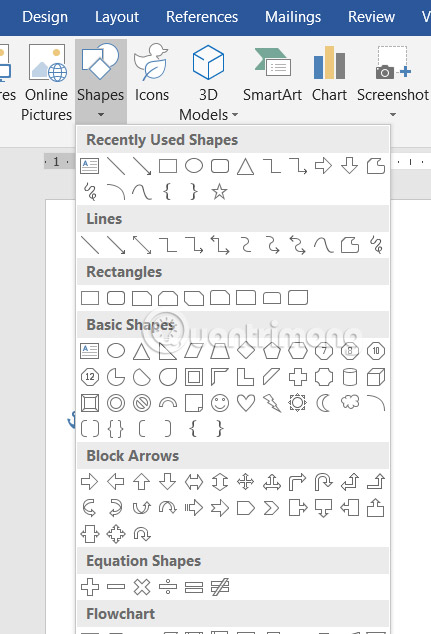
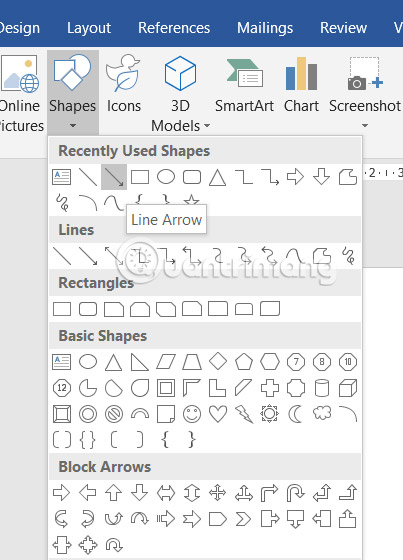
<p style="text-align: justify;">Nhập tiêu đề cho sơ đồ tư duy. Nhấn tiếp vào&nbsp;<strong>Insert và chọn Shapes</strong>&nbsp;để chọn hình dạng cần sử dụng trong sơ đồ tư duy của mình.</p>

<p style="text-align: justify;"><img alt="Chèn hình dạng vào Word" data-i="2" data-src="https://st.quantrimang.com/photos/image/2025/02/25/tao-so-do-tu-duy-word-3.jpg" data-was-processed="true" height="588" src="https://st.quantrimang.com/photos/image/2025/02/25/tao-so-do-tu-duy-word-3.jpg" width="400" /></p>

<p style="text-align: justify;">Nhấn vào hình dạng mới thêm rồi&nbsp;<strong>chọn Format và điều chỉnh Shape Fill và Shape Outline</strong>&nbsp;để sau đó bạn nhập chữ vào hình dạng để dễ đọc nội dung hơn.</p>

<p style="text-align: justify;"><img alt="Chỉnh định dạng hình khối trong Word" data-i="3" data-src="https://st.quantrimang.com/photos/image/2025/02/25/tao-so-do-tu-duy-word-4.jpg" data-was-processed="true" height="560" src="https://st.quantrimang.com/photos/image/2025/02/25/tao-so-do-tu-duy-word-4.jpg" width="350" /></p>

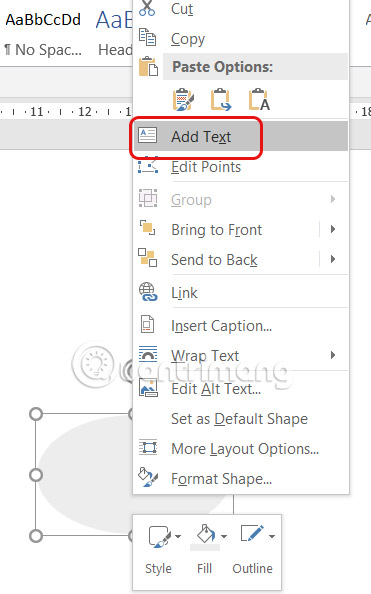
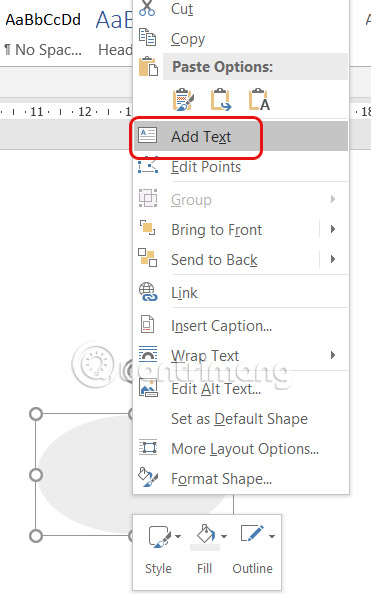
<p style="text-align: justify;">Tiếp tục&nbsp;<strong>chuột phải vào hình khối và chọn Add Text&nbsp;</strong>để chèn nội dung, rồi thực hiện chỉnh định dạng cho văn bản.</p>

<p style="text-align: justify;"><img alt="Chèn chữ vào hình khối Word" data-i="4" data-src="https://st.quantrimang.com/photos/image/2025/02/25/tao-so-do-tu-duy-word-8.jpg" data-was-processed="true" height="560" src="https://st.quantrimang.com/photos/image/2025/02/25/tao-so-do-tu-duy-word-8.jpg" width="350" /></p>

<p style="text-align: justify;"><strong>Bước 4:</strong></p>

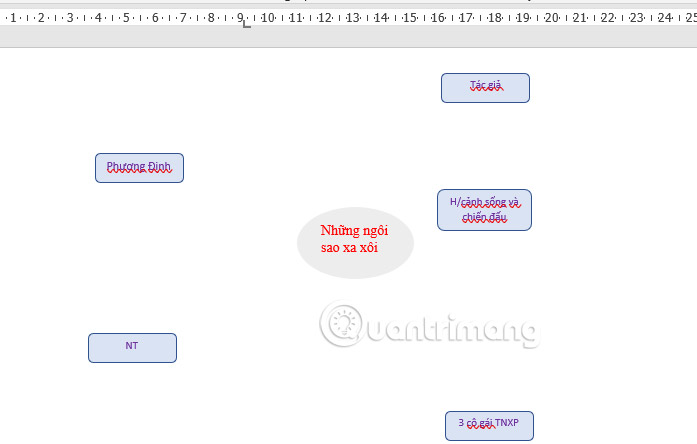
<p style="text-align: justify;">Bạn tiếp tục&nbsp;<strong>kẻ thêm các hình dạng khác cho Chủ đề và Chủ đề phụ</strong>&nbsp;trong sơ đồ tư duy của mình, tùy theo mục đích sáng tạo sơ đồ tư duy của mỗi người.</p>

<p style="text-align: justify;"><img alt="Kẻ sơ đồ trong Word" data-adbro-processed="true" data-i="5" data-src="https://st.quantrimang.com/photos/image/2025/02/25/tao-so-do-tu-duy-word-5.jpg" data-was-processed="true" height="350" src="https://st.quantrimang.com/photos/image/2025/02/25/tao-so-do-tu-duy-word-5.jpg" width="550" /></p>

<p style="text-align: justify;"><strong>Bước 5:</strong></p>

<p style="text-align: justify;">Để<strong>&nbsp;nối các nội dung với nhau</strong>, bạn cũng nhấn vào<strong>&nbsp;Inserts rồi chọn Shapes</strong>&nbsp;và chọn đường thẳng, hoặc chọn mũi tên hoặc kiểu nối khác bạn muốn sử dụng.</p>

<p style="text-align: justify;"><img alt="Tạo điểm nối nội dung" data-i="6" data-src="https://st.quantrimang.com/photos/image/2025/02/25/tao-so-do-tu-duy-word-6.jpg" data-was-processed="true" height="528" src="https://st.quantrimang.com/photos/image/2025/02/25/tao-so-do-tu-duy-word-6.jpg" width="380" /></p>

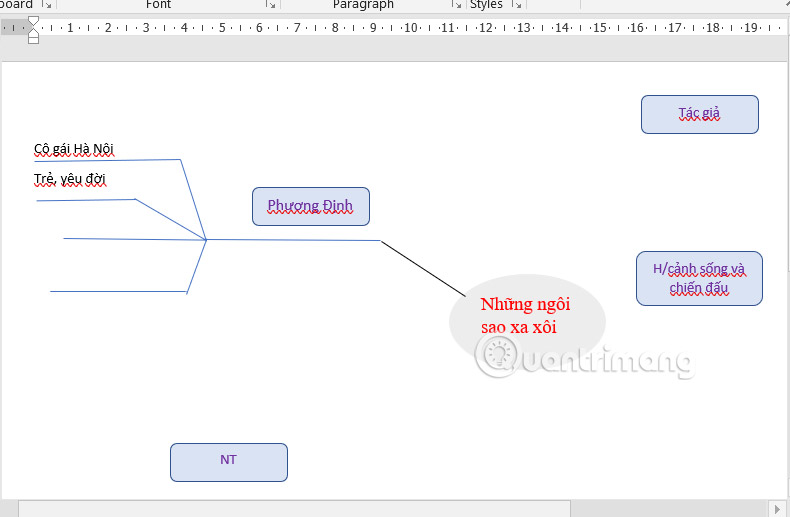
<p style="text-align: justify;">Bạn nối các nội dung, chủ đề với nhau để có được sơ đồ tư duy trên Word.</p>

<p style="text-align: justify;"><img alt="Sơ đồ tư duy trong Word" data-i="7" data-src="https://st.quantrimang.com/photos/image/2025/02/25/tao-so-do-tu-duy-word-7.jpg" data-was-processed="true" height="327" src="https://st.quantrimang.com/photos/image/2025/02/25/tao-so-do-tu-duy-word-7.jpg" width="500" /></p>

<div style="text-align: justify;">&nbsp;</div>
		</div>
				<div id="author">
						<p>
				<strong>Nguồn tin:</strong>
				Quantrimang.com:
			</p>
		</div>
	</div>
	<div id="footer" class="clearfix">
		<div id="url">
			<strong>URL của bản tin này: </strong><a href="https://www.nguoicodonvn2008.info/vi/news/savefile/kien-thuc-may-tinh/huong-dan-tao-so-do-tu-duy-trong-word-9885.html" title="Hướng dẫn tạo sơ đồ tư duy trong Word">https://www.nguoicodonvn2008.info/vi/news/savefile/kien-thuc-may-tinh/huong-dan-tao-so-do-tu-duy-trong-word-9885.html</a>

		</div>
		<div class="clear"></div>
		<div class="copyright">
			&copy; .&#x3A; Nguoicodonvn2008.info - Cõi lòng người cô đơn &#x3A;.
		</div>
		<div id="contact">
			<a href="mailto:admin@nguoicodonvn2008.info">admin@nguoicodonvn2008.info</a>
		</div>
	</div>
</div>
        <div id="timeoutsess" class="chromeframe">
            Bạn đã không sử dụng Site, <a onclick="timeoutsesscancel();" href="https://www.nguoicodonvn2008.info/#">Bấm vào đây để duy trì trạng thái đăng nhập</a>. Thời gian chờ: <span id="secField"> 60 </span> giây
        </div>
        <div id="openidResult" class="nv-alert" style="display:none"></div>
        <div id="openidBt" data-result="" data-redirect=""></div>
		</script>
		<div class="car-top">
  <span><img src="https://www.nguoicodonvn2008.info/themes/default/images/car.png" alt=""></span>
</div>
<script src="https://www.nguoicodonvn2008.info/assets/js/jquery/jquery.min.js"></script>
<script>var nv_base_siteurl="/",nv_lang_data="vi",nv_lang_interface="vi",nv_name_variable="nv",nv_fc_variable="op",nv_lang_variable="language",nv_module_name="news",nv_func_name="savefile",nv_is_user=0, nv_my_ofs=-4,nv_my_abbr="EDT",nv_cookie_prefix="nv4c_e856T",nv_check_pass_mstime=1738000,nv_area_admin=0,nv_safemode=0,theme_responsive=0,nv_recaptcha_ver=2,nv_recaptcha_sitekey="",nv_recaptcha_type="image",XSSsanitize=1;</script>
<script src="https://www.nguoicodonvn2008.info/assets/js/language/vi.js"></script>
<script src="https://www.nguoicodonvn2008.info/assets/js/DOMPurify/purify3.js"></script>
<script src="https://www.nguoicodonvn2008.info/assets/js/global.js"></script>
<script src="https://www.nguoicodonvn2008.info/assets/js/site.js"></script>
<script src="https://www.nguoicodonvn2008.info/themes/default/js/news.js"></script>
<script src="https://www.nguoicodonvn2008.info/themes/default/js/main.js"></script>
<script src="https://www.nguoicodonvn2008.info/themes/default/js/custom.js"></script>
<script type="application/ld+json">
        {
            "@context": "https://schema.org",
            "@type": "Organization",
            "url": "https://www.nguoicodonvn2008.info",
            "logo": "https://www.nguoicodonvn2008.info/uploads/angel.gif"
        }
        </script>
<script src="https://www.nguoicodonvn2008.info/themes/default/js/bootstrap.min.js"></script>
<script type="text/javascript">
var $scrolltop = $('.car-top');
$scrolltop.on('click', function () {
    $('html,body').animate({
        scrollTop: 0
    }, 800);
    $(this).addClass("car-run");
    setTimeout(function(){ $scrolltop.removeClass('car-run');}, 1000);
    return false;
});
$(window).on('scroll', function ()
{ 
    if($(window).scrollTop() >= 200)
    {
        $scrolltop.addClass("show");
        $scrolltop.addClass("car-down");
    }
    else
    {
       $scrolltop.removeClass("show");
       setTimeout(function(){ $scrolltop.removeClass('car-down');}, 300);
    }
});
</script>
</body>
</html>