<!DOCTYPE html>
    <html lang="vi" xmlns="http://www.w3.org/1999/xhtml" prefix="og: http://ogp.me/ns#">
    <head>
<title>Hướng dẫn tạo nhiều profile trên Firefox</title>
<meta name="description" content="Hướng dẫn tạo nhiều profile trên Firefox - Savefile - Tin Tức -...">
<meta name="author" content=".: Nguoicodonvn2008.info - Cõi lòng người cô đơn :.">
<meta name="copyright" content=".: Nguoicodonvn2008.info - Cõi lòng người cô đơn :. [admin@nguoicodonvn2008.info]">
<meta name="robots" content="index, archive, follow, noodp">
<meta name="googlebot" content="index,archive,follow,noodp">
<meta name="msnbot" content="all,index,follow">
<meta name="generator" content="NukeViet v4.5">
<meta http-equiv="Content-Type" content="text/html; charset=utf-8">
<meta property="og:title" content="Hướng dẫn tạo nhiều profile trên Firefox">
<meta property="og:type" content="website">
<meta property="og:description" content="Savefile - Tin Tức - https&#x3A;&#x002F;&#x002F;www.nguoicodonvn2008.info&#x002F;vi&#x002F;news&#x002F;savefile&#x002F;kien-thuc-may-tinh&#x002F;huong-dan-tao-nhieu-profile-tren-firefox-10759.html">
<meta property="og:site_name" content=".&#x3A; Nguoicodonvn2008.info - Cõi lòng người cô đơn &#x3A;.">
<meta property="og:url" content="https://www.nguoicodonvn2008.info/vi/news/savefile/kien-thuc-may-tinh/huong-dan-tao-nhieu-profile-tren-firefox-10759.html">
<link rel="shortcut icon" href="https://www.nguoicodonvn2008.info/favicon.ico">
<link rel="canonical" href="https://www.nguoicodonvn2008.info/vi/news/savefile/kien-thuc-may-tinh/huong-dan-tao-nhieu-profile-tren-firefox-10759.html">
<link rel="alternate" href="https://www.nguoicodonvn2008.info/vi/news/rss/" title="Tin Tức" type="application/rss+xml">
<link rel="alternate" href="https://www.nguoicodonvn2008.info/vi/news/rss/karaoke-dual/" title="Tin Tức - Karaoke Dual" type="application/rss+xml">
<link rel="alternate" href="https://www.nguoicodonvn2008.info/vi/news/rss/nhac-tre/" title="Tin Tức - Nhạc trẻ" type="application/rss+xml">
<link rel="alternate" href="https://www.nguoicodonvn2008.info/vi/news/rss/tru-tinh/" title="Tin Tức - Trữ tình" type="application/rss+xml">
<link rel="alternate" href="https://www.nguoicodonvn2008.info/vi/news/rss/nuoc-ngoai/" title="Tin Tức - Nước ngoài" type="application/rss+xml">
<link rel="alternate" href="https://www.nguoicodonvn2008.info/vi/news/rss/remix/" title="Tin Tức - Remix" type="application/rss+xml">
<link rel="alternate" href="https://www.nguoicodonvn2008.info/vi/news/rss/tam-su-tinh-yeu/" title="Tin Tức - Tâm sự tình yêu" type="application/rss+xml">
<link rel="alternate" href="https://www.nguoicodonvn2008.info/vi/news/rss/tho-suu-tam/" title="Tin Tức - Thơ sưu tầm" type="application/rss+xml">
<link rel="alternate" href="https://www.nguoicodonvn2008.info/vi/news/rss/cuoc-song/" title="Tin Tức - Cuộc sống" type="application/rss+xml">
<link rel="alternate" href="https://www.nguoicodonvn2008.info/vi/news/rss/phan-mem/" title="Tin Tức - Phần mềm" type="application/rss+xml">
<link rel="alternate" href="https://www.nguoicodonvn2008.info/vi/news/rss/kien-thuc-may-tinh/" title="Tin Tức - Kiến thức máy tính" type="application/rss+xml">
<link rel="alternate" href="https://www.nguoicodonvn2008.info/vi/news/rss/hoc-tap/" title="Tin Tức - Học tập" type="application/rss+xml">
<link rel="alternate" href="https://www.nguoicodonvn2008.info/vi/news/rss/tai-lieu/" title="Tin Tức - Tài liệu" type="application/rss+xml">
<link rel="alternate" href="https://www.nguoicodonvn2008.info/vi/news/rss/de-thi/" title="Tin Tức - Đề thi" type="application/rss+xml">
<link rel="preload" as="style" href="https://www.nguoicodonvn2008.info/assets/css/font-awesome.min.css" type="text/css">
<link rel="preload" as="style" href="https://www.nguoicodonvn2008.info/themes/default/css/bootstrap.non-responsive.css" type="text/css">
<link rel="preload" as="style" href="https://www.nguoicodonvn2008.info/themes/default/css/style.css" type="text/css">
<link rel="preload" as="style" href="https://www.nguoicodonvn2008.info/themes/default/css/style.non-responsive.css" type="text/css">
<link rel="preload" as="style" href="https://www.nguoicodonvn2008.info/themes/default/css/news.css" type="text/css">
<link rel="preload" as="style" href="https://www.nguoicodonvn2008.info/themes/default/css/custom.css" type="text/css">
<link rel="preload" as="script" href="https://www.nguoicodonvn2008.info/assets/js/jquery/jquery.min.js" type="text/javascript">
<link rel="preload" as="script" href="https://www.nguoicodonvn2008.info/assets/js/language/vi.js" type="text/javascript">
<link rel="preload" as="script" href="https://www.nguoicodonvn2008.info/assets/js/DOMPurify/purify3.js" type="text/javascript">
<link rel="preload" as="script" href="https://www.nguoicodonvn2008.info/assets/js/global.js" type="text/javascript">
<link rel="preload" as="script" href="https://www.nguoicodonvn2008.info/assets/js/site.js" type="text/javascript">
<link rel="preload" as="script" href="https://www.nguoicodonvn2008.info/themes/default/js/news.js" type="text/javascript">
<link rel="preload" as="script" href="https://www.nguoicodonvn2008.info/themes/default/js/main.js" type="text/javascript">
<link rel="preload" as="script" href="https://www.nguoicodonvn2008.info/themes/default/js/custom.js" type="text/javascript">
<link rel="preload" as="script" href="https://www.nguoicodonvn2008.info/themes/default/js/bootstrap.min.js" type="text/javascript">
<link rel="stylesheet" href="https://www.nguoicodonvn2008.info/assets/css/font-awesome.min.css">
<link rel="stylesheet" href="https://www.nguoicodonvn2008.info/themes/default/css/bootstrap.non-responsive.css">
<link rel="stylesheet" href="https://www.nguoicodonvn2008.info/themes/default/css/style.css">
<link rel="stylesheet" href="https://www.nguoicodonvn2008.info/themes/default/css/style.non-responsive.css">
<link rel="StyleSheet" href="https://www.nguoicodonvn2008.info/themes/default/css/news.css">
<link rel="stylesheet" href="https://www.nguoicodonvn2008.info/themes/default/css/custom.css">
<style type="text/css">
	body{background: #fff;}
</style>
    </head>
    <body>
<div id="print">
	<div id="hd_print">
		<h2 class="pull-left">.&#x3A; Nguoicodonvn2008.info - Cõi lòng người cô đơn &#x3A;.</h2>
		<p class="pull-right"><a title=".&#x3A; Nguoicodonvn2008.info - Cõi lòng người cô đơn &#x3A;." href="https://www.nguoicodonvn2008.info/">https://www.nguoicodonvn2008.info</a></p>
	</div>
	<div class="clear"></div>
	<hr />
	<div id="content">
		<h1>Hướng dẫn tạo nhiều profile trên Firefox</h1>
		<ul class="list-inline">
			<li>Thứ sáu - 11/07/2025 22:05</li>
			<li class="hidden-print txtrequired"><em class="fa fa-print">&nbsp;</em><a title="In ra" href="javascript:;" onclick="window.print()">In ra</a></li>
			<li class="hidden-print txtrequired"><em class="fa fa-power-off">&nbsp;</em><a title="Đóng cửa sổ này" href="javascript:;" onclick="window.close()">Đóng cửa sổ này</a></li>
		</ul>
		<div class="clear"></div>
		<div id="hometext">
		</div>
				<div class="imghome">
			<img alt="Hướng dẫn tạo nhiều profile trên Firefox" src="https://st.quantrimang.com/photos/image/2025/07/10/Firefox-quan-ly-ho-so-moi-6.jpg" width="460" class="img-thumbnail" />
		</div>
		<div class="clear"></div>
		<div id="bodytext" class="clearfix">
			<p style="text-align: justify;">Firefox cập nhật khá nhiều tính năng mới, trong đó có tạo nhiều profile riêng biệt. Tính năng ẩn này cho phép bạn tạo các phiên duyệt web hoàn toàn riêng biệt, mỗi phiên có cài đặt, lịch sử, tiện ích mở rộng và dấu trang riêng. Khi đó bạn có thể tách biệt công việc với những nội dung cá nhân. Dưới đây là hướng dẫn bật trình quản lý hồ sơ mới trên Firefox.</p>

<h2 style="text-align: justify;">Cách bật trình quản lý hồ sơ mới trên Firefox</h2>

<p style="text-align: justify;"><strong>Bước 1:</strong></p>

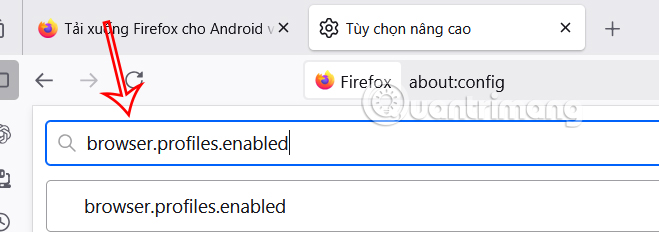
<p style="text-align: justify;">Tại giao diện trên Firefox, bạn&nbsp;<strong>nhập about:config</strong>&nbsp;vào thanh truy cập địa chỉ. Sau đó trong giao diện, chúng ta&nbsp;<strong>nhập browser.profiles.enabled</strong>&nbsp;để tìm kiếm.</p>

<p style="text-align: justify;"><img alt="Thiết lập Firefox" data-i="0" data-src="https://st.quantrimang.com/photos/image/2025/07/10/Firefox-quan-ly-ho-so-moi-1.jpg" data-was-processed="true" height="225" src="https://st.quantrimang.com/photos/image/2025/07/10/Firefox-quan-ly-ho-so-moi-1.jpg" width="640" /></p>

<p style="text-align: justify;"><strong>Bước 2:</strong></p>

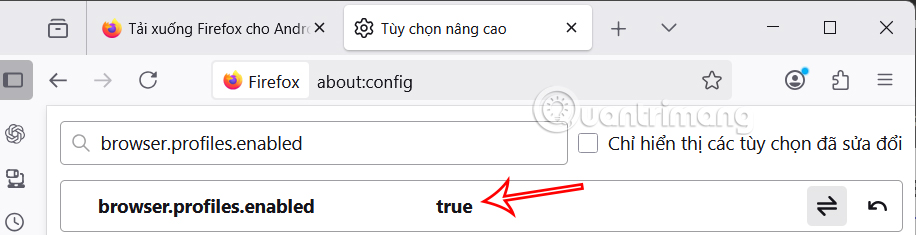
<p style="text-align: justify;">Hiển thị cấu hình thiết lập, chúng ta click chuột vào giá trị rồi&nbsp;<strong>chọn true&nbsp;</strong>để tiến hành kích hoạt. Sau đó khởi động lại trình duyệt để thay đổi.</p>

<p style="text-align: justify;"><img alt=" Bật nhiều hồ sơ trên Firefox" data-i="1" data-src="https://st.quantrimang.com/photos/image/2025/07/10/Firefox-quan-ly-ho-so-moi-2.jpg" data-was-processed="true" height="164" src="https://st.quantrimang.com/photos/image/2025/07/10/Firefox-quan-ly-ho-so-moi-2.jpg" width="640" /></p>

<p style="text-align: justify;"><strong>Bước 3:</strong></p>

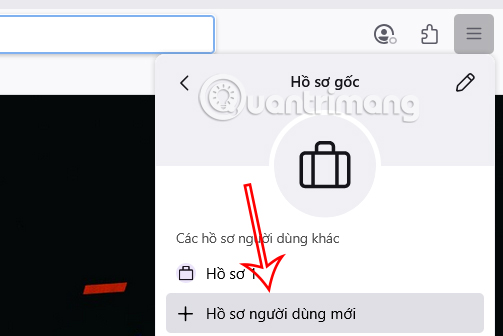
<p style="text-align: justify;">Nhấn vào<strong>&nbsp;biểu tượng 3 dấu gạch ngang</strong>&nbsp;rồi chọn&nbsp;<strong>Hồ sơ gốc</strong>, chọn tiếp<strong>&nbsp;Hồ sơ người dùng mới</strong>.</p>

<p style="text-align: justify;"><img alt="Hồ sơ người dùng mới trên Firefox" data-i="2" data-src="https://st.quantrimang.com/photos/image/2025/07/10/Firefox-quan-ly-ho-so-moi-3.jpg" data-was-processed="true" height="336" src="https://st.quantrimang.com/photos/image/2025/07/10/Firefox-quan-ly-ho-so-moi-3.jpg" width="503" /></p>

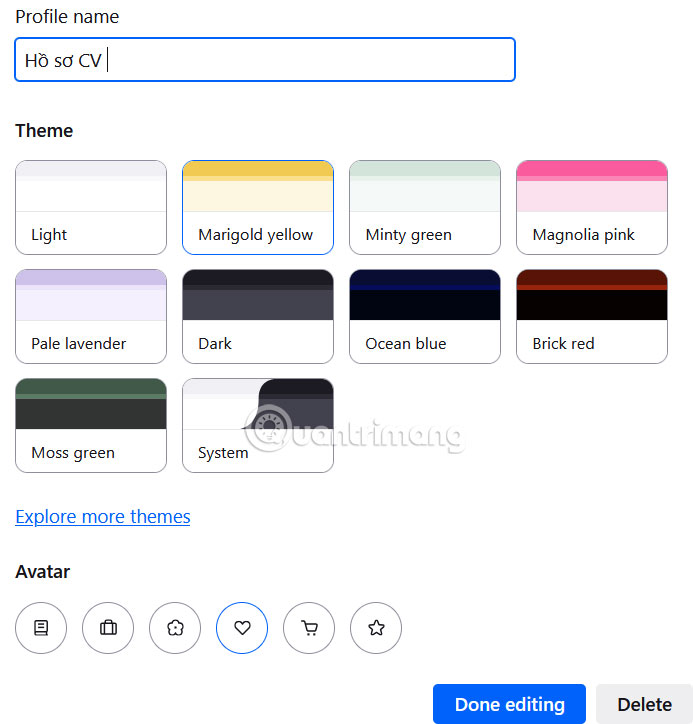
<p style="text-align: justify;">Lúc này hiển thị giao diện để chúng ta<strong>&nbsp;thiết lập hồ sơ mới trên Firefox</strong>. Bạn đặt tên cho hồ sơ mới này, chọn theme, icon hồ sơ rồi&nbsp;<strong>nhấn Done editing để lưu lại</strong>.</p>

<p style="text-align: justify;">Tiếp tục tạo hồ sơ mới trên Firefox như thao tác bên trên. Mọi cài đặt, tiện ích mở rộng, chủ đề hoặc lịch sử duyệt web trong một hồ sơ sẽ không ảnh hưởng đến các hồ sơ khác.</p>

<p style="text-align: justify;">&nbsp;</p>

<div style="text-align: justify;"><br />
<img alt="Tạo hồ sơ người dùng mới trên Firefox" data-adbro-processed="true" data-i="3" data-src="https://st.quantrimang.com/photos/image/2025/07/10/Firefox-quan-ly-ho-so-moi-4.jpg" data-was-processed="true" height="575" src="https://st.quantrimang.com/photos/image/2025/07/10/Firefox-quan-ly-ho-so-moi-4.jpg" width="550" /></div>

<p style="text-align: justify;"><strong>Bước 4:</strong></p>

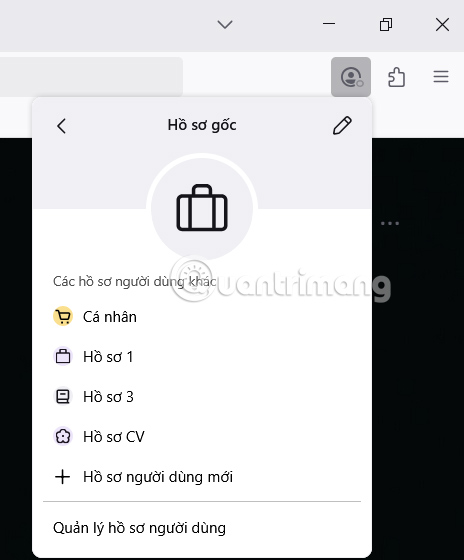
<p style="text-align: justify;">Để chuyển nhanh qua nhiều hồ sơ trên Firefox, nhấn vào ảnh đại diện rồi chọn hồ sơ bạn muốn truy cập.</p>

<p style="text-align: justify;"><img alt="Chuyển nhanh hồ sơ người dùng trên Firefox" data-i="4" data-src="https://st.quantrimang.com/photos/image/2025/07/10/Firefox-quan-ly-ho-so-moi-5.jpg" data-was-processed="true" height="560" src="https://st.quantrimang.com/photos/image/2025/07/10/Firefox-quan-ly-ho-so-moi-5.jpg" width="464" /></p>

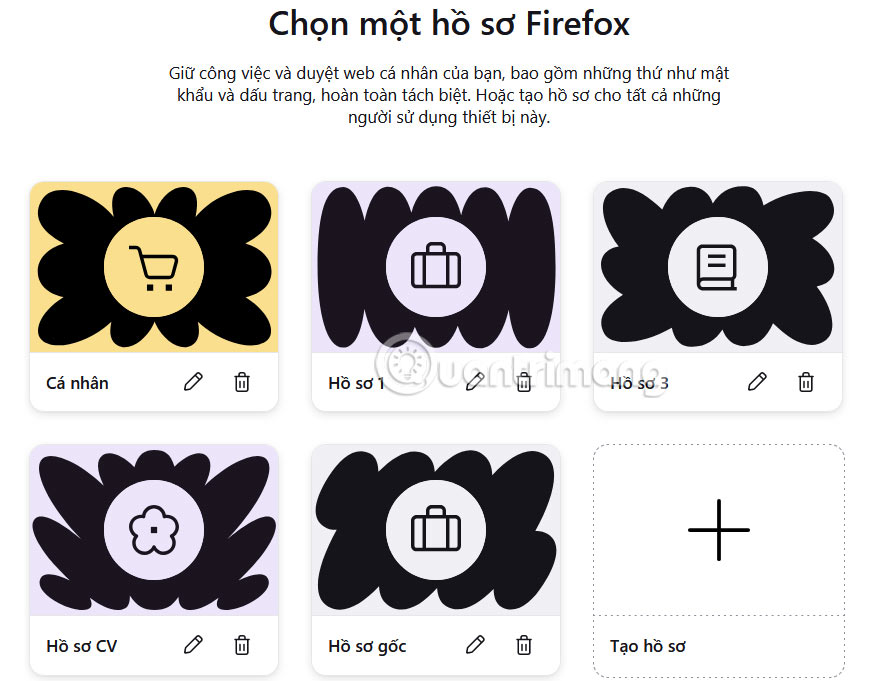
<p style="text-align: justify;">Nếu muốn&nbsp;<strong>tùy chỉnh hồ sơ tạo trên Firefox</strong>, bạn nhấn vào<strong>&nbsp;Quản lý hồ sơ người dùng</strong>.</p>

<p style="text-align: justify;">Trong giao diện bạn nhấn biểu tượng bút để chỉnh sửa, hoặc nhấn biểu tượng thùng rác để xóa hồ sơ tạo trên Firefox.</p>

<p style="text-align: justify;"><img alt="Quản lý hồ sơ người dùng trên Firefox" data-i="5" data-src="https://st.quantrimang.com/photos/image/2025/07/10/Firefox-quan-ly-ho-so-moi-6.jpg" data-was-processed="true" height="430" src="https://st.quantrimang.com/photos/image/2025/07/10/Firefox-quan-ly-ho-so-moi-6.jpg" width="550" /></p>

<div style="text-align: justify;">&nbsp;</div>
		</div>
				<div id="author">
						<p>
				<strong>Nguồn tin:</strong>
				Quantrimang.com:
			</p>
		</div>
	</div>
	<div id="footer" class="clearfix">
		<div id="url">
			<strong>URL của bản tin này: </strong><a href="https://www.nguoicodonvn2008.info/vi/news/savefile/kien-thuc-may-tinh/huong-dan-tao-nhieu-profile-tren-firefox-10759.html" title="Hướng dẫn tạo nhiều profile trên Firefox">https://www.nguoicodonvn2008.info/vi/news/savefile/kien-thuc-may-tinh/huong-dan-tao-nhieu-profile-tren-firefox-10759.html</a>

		</div>
		<div class="clear"></div>
		<div class="copyright">
			&copy; .&#x3A; Nguoicodonvn2008.info - Cõi lòng người cô đơn &#x3A;.
		</div>
		<div id="contact">
			<a href="mailto:admin@nguoicodonvn2008.info">admin@nguoicodonvn2008.info</a>
		</div>
	</div>
</div>
        <div id="timeoutsess" class="chromeframe">
            Bạn đã không sử dụng Site, <a onclick="timeoutsesscancel();" href="https://www.nguoicodonvn2008.info/#">Bấm vào đây để duy trì trạng thái đăng nhập</a>. Thời gian chờ: <span id="secField"> 60 </span> giây
        </div>
        <div id="openidResult" class="nv-alert" style="display:none"></div>
        <div id="openidBt" data-result="" data-redirect=""></div>
		</script>
		<div class="car-top">
  <span><img src="https://www.nguoicodonvn2008.info/themes/default/images/car.png" alt=""></span>
</div>
<script src="https://www.nguoicodonvn2008.info/assets/js/jquery/jquery.min.js"></script>
<script>var nv_base_siteurl="/",nv_lang_data="vi",nv_lang_interface="vi",nv_name_variable="nv",nv_fc_variable="op",nv_lang_variable="language",nv_module_name="news",nv_func_name="savefile",nv_is_user=0, nv_my_ofs=-4,nv_my_abbr="EDT",nv_cookie_prefix="nv4c_e856T",nv_check_pass_mstime=1738000,nv_area_admin=0,nv_safemode=0,theme_responsive=0,nv_recaptcha_ver=2,nv_recaptcha_sitekey="",nv_recaptcha_type="image",XSSsanitize=1;</script>
<script src="https://www.nguoicodonvn2008.info/assets/js/language/vi.js"></script>
<script src="https://www.nguoicodonvn2008.info/assets/js/DOMPurify/purify3.js"></script>
<script src="https://www.nguoicodonvn2008.info/assets/js/global.js"></script>
<script src="https://www.nguoicodonvn2008.info/assets/js/site.js"></script>
<script src="https://www.nguoicodonvn2008.info/themes/default/js/news.js"></script>
<script src="https://www.nguoicodonvn2008.info/themes/default/js/main.js"></script>
<script src="https://www.nguoicodonvn2008.info/themes/default/js/custom.js"></script>
<script type="application/ld+json">
        {
            "@context": "https://schema.org",
            "@type": "Organization",
            "url": "https://www.nguoicodonvn2008.info",
            "logo": "https://www.nguoicodonvn2008.info/uploads/angel.gif"
        }
        </script>
<script src="https://www.nguoicodonvn2008.info/themes/default/js/bootstrap.min.js"></script>
<script type="text/javascript">
var $scrolltop = $('.car-top');
$scrolltop.on('click', function () {
    $('html,body').animate({
        scrollTop: 0
    }, 800);
    $(this).addClass("car-run");
    setTimeout(function(){ $scrolltop.removeClass('car-run');}, 1000);
    return false;
});
$(window).on('scroll', function ()
{ 
    if($(window).scrollTop() >= 200)
    {
        $scrolltop.addClass("show");
        $scrolltop.addClass("car-down");
    }
    else
    {
       $scrolltop.removeClass("show");
       setTimeout(function(){ $scrolltop.removeClass('car-down');}, 300);
    }
});
</script>
</body>
</html>