<!DOCTYPE html>
    <html lang="vi" xmlns="http://www.w3.org/1999/xhtml" prefix="og: http://ogp.me/ns#">
    <head>
<title>Hướng dẫn lấy đường link trong Excel hoàn toàn tự động</title>
<meta name="description" content="Hướng dẫn lấy đường link trong Excel hoàn toàn tự động - Savefile - Tin Tức -...">
<meta name="author" content=".: Nguoicodonvn2008.info - Cõi lòng người cô đơn :.">
<meta name="copyright" content=".: Nguoicodonvn2008.info - Cõi lòng người cô đơn :. [admin@nguoicodonvn2008.info]">
<meta name="robots" content="index, archive, follow, noodp">
<meta name="googlebot" content="index,archive,follow,noodp">
<meta name="msnbot" content="all,index,follow">
<meta name="generator" content="NukeViet v4.5">
<meta http-equiv="Content-Type" content="text/html; charset=utf-8">
<meta property="og:title" content="Hướng dẫn lấy đường link trong Excel hoàn toàn tự động">
<meta property="og:type" content="website">
<meta property="og:description" content="Savefile - Tin Tức - https&#x3A;&#x002F;&#x002F;www.nguoicodonvn2008.info&#x002F;vi&#x002F;news&#x002F;savefile&#x002F;kien-thuc-may-tinh&#x002F;huong-dan-lay-duong-link-trong-excel-hoan-toan-tu-dong-8210.html">
<meta property="og:site_name" content=".&#x3A; Nguoicodonvn2008.info - Cõi lòng người cô đơn &#x3A;.">
<meta property="og:url" content="https://www.nguoicodonvn2008.info/vi/news/savefile/kien-thuc-may-tinh/huong-dan-lay-duong-link-trong-excel-hoan-toan-tu-dong-8210.html">
<link rel="shortcut icon" href="https://www.nguoicodonvn2008.info/favicon.ico">
<link rel="canonical" href="https://www.nguoicodonvn2008.info/vi/news/savefile/kien-thuc-may-tinh/huong-dan-lay-duong-link-trong-excel-hoan-toan-tu-dong-8210.html">
<link rel="alternate" href="https://www.nguoicodonvn2008.info/vi/news/rss/" title="Tin Tức" type="application/rss+xml">
<link rel="alternate" href="https://www.nguoicodonvn2008.info/vi/news/rss/karaoke-dual/" title="Tin Tức - Karaoke Dual" type="application/rss+xml">
<link rel="alternate" href="https://www.nguoicodonvn2008.info/vi/news/rss/nhac-tre/" title="Tin Tức - Nhạc trẻ" type="application/rss+xml">
<link rel="alternate" href="https://www.nguoicodonvn2008.info/vi/news/rss/tru-tinh/" title="Tin Tức - Trữ tình" type="application/rss+xml">
<link rel="alternate" href="https://www.nguoicodonvn2008.info/vi/news/rss/nuoc-ngoai/" title="Tin Tức - Nước ngoài" type="application/rss+xml">
<link rel="alternate" href="https://www.nguoicodonvn2008.info/vi/news/rss/remix/" title="Tin Tức - Remix" type="application/rss+xml">
<link rel="alternate" href="https://www.nguoicodonvn2008.info/vi/news/rss/tam-su-tinh-yeu/" title="Tin Tức - Tâm sự tình yêu" type="application/rss+xml">
<link rel="alternate" href="https://www.nguoicodonvn2008.info/vi/news/rss/tho-suu-tam/" title="Tin Tức - Thơ sưu tầm" type="application/rss+xml">
<link rel="alternate" href="https://www.nguoicodonvn2008.info/vi/news/rss/cuoc-song/" title="Tin Tức - Cuộc sống" type="application/rss+xml">
<link rel="alternate" href="https://www.nguoicodonvn2008.info/vi/news/rss/phan-mem/" title="Tin Tức - Phần mềm" type="application/rss+xml">
<link rel="alternate" href="https://www.nguoicodonvn2008.info/vi/news/rss/kien-thuc-may-tinh/" title="Tin Tức - Kiến thức máy tính" type="application/rss+xml">
<link rel="alternate" href="https://www.nguoicodonvn2008.info/vi/news/rss/hoc-tap/" title="Tin Tức - Học tập" type="application/rss+xml">
<link rel="alternate" href="https://www.nguoicodonvn2008.info/vi/news/rss/tai-lieu/" title="Tin Tức - Tài liệu" type="application/rss+xml">
<link rel="alternate" href="https://www.nguoicodonvn2008.info/vi/news/rss/de-thi/" title="Tin Tức - Đề thi" type="application/rss+xml">
<link rel="preload" as="style" href="https://www.nguoicodonvn2008.info/assets/css/font-awesome.min.css" type="text/css">
<link rel="preload" as="style" href="https://www.nguoicodonvn2008.info/themes/default/css/bootstrap.non-responsive.css" type="text/css">
<link rel="preload" as="style" href="https://www.nguoicodonvn2008.info/themes/default/css/style.css" type="text/css">
<link rel="preload" as="style" href="https://www.nguoicodonvn2008.info/themes/default/css/style.non-responsive.css" type="text/css">
<link rel="preload" as="style" href="https://www.nguoicodonvn2008.info/themes/default/css/news.css" type="text/css">
<link rel="preload" as="style" href="https://www.nguoicodonvn2008.info/themes/default/css/custom.css" type="text/css">
<link rel="preload" as="script" href="https://www.nguoicodonvn2008.info/assets/js/jquery/jquery.min.js" type="text/javascript">
<link rel="preload" as="script" href="https://www.nguoicodonvn2008.info/assets/js/language/vi.js" type="text/javascript">
<link rel="preload" as="script" href="https://www.nguoicodonvn2008.info/assets/js/DOMPurify/purify3.js" type="text/javascript">
<link rel="preload" as="script" href="https://www.nguoicodonvn2008.info/assets/js/global.js" type="text/javascript">
<link rel="preload" as="script" href="https://www.nguoicodonvn2008.info/assets/js/site.js" type="text/javascript">
<link rel="preload" as="script" href="https://www.nguoicodonvn2008.info/themes/default/js/news.js" type="text/javascript">
<link rel="preload" as="script" href="https://www.nguoicodonvn2008.info/themes/default/js/main.js" type="text/javascript">
<link rel="preload" as="script" href="https://www.nguoicodonvn2008.info/themes/default/js/custom.js" type="text/javascript">
<link rel="preload" as="script" href="https://www.nguoicodonvn2008.info/themes/default/js/bootstrap.min.js" type="text/javascript">
<link rel="stylesheet" href="https://www.nguoicodonvn2008.info/assets/css/font-awesome.min.css">
<link rel="stylesheet" href="https://www.nguoicodonvn2008.info/themes/default/css/bootstrap.non-responsive.css">
<link rel="stylesheet" href="https://www.nguoicodonvn2008.info/themes/default/css/style.css">
<link rel="stylesheet" href="https://www.nguoicodonvn2008.info/themes/default/css/style.non-responsive.css">
<link rel="StyleSheet" href="https://www.nguoicodonvn2008.info/themes/default/css/news.css">
<link rel="stylesheet" href="https://www.nguoicodonvn2008.info/themes/default/css/custom.css">
<style type="text/css">
	body{background: #fff;}
</style>
    </head>
    <body>
<div id="print">
	<div id="hd_print">
		<h2 class="pull-left">.&#x3A; Nguoicodonvn2008.info - Cõi lòng người cô đơn &#x3A;.</h2>
		<p class="pull-right"><a title=".&#x3A; Nguoicodonvn2008.info - Cõi lòng người cô đơn &#x3A;." href="https://www.nguoicodonvn2008.info/">https://www.nguoicodonvn2008.info</a></p>
	</div>
	<div class="clear"></div>
	<hr />
	<div id="content">
		<h1>Hướng dẫn lấy đường link trong Excel hoàn toàn tự động</h1>
		<ul class="list-inline">
			<li>Thứ năm - 21/03/2024 00:26</li>
			<li class="hidden-print txtrequired"><em class="fa fa-print">&nbsp;</em><a title="In ra" href="javascript:;" onclick="window.print()">In ra</a></li>
			<li class="hidden-print txtrequired"><em class="fa fa-power-off">&nbsp;</em><a title="Đóng cửa sổ này" href="javascript:;" onclick="window.close()">Đóng cửa sổ này</a></li>
		</ul>
		<div class="clear"></div>
		<div id="hometext">
		</div>
				<div class="imghome">
			<img alt="Hướng dẫn lấy đường link trong Excel hoàn toàn tự động" src="https://st.quantrimang.com/photos/image/2024/03/19/Excel-lay-duong-link-3.jpg" width="460" class="img-thumbnail" />
		</div>
		<div class="clear"></div>
		<div id="bodytext" class="clearfix">
			<p style="text-align: justify;">Thông thường khi&nbsp;chèn link trong Excel&nbsp;sẽ rút gọn, không hiển thị URL để tạo sự chuyên nghiệp và thẩm mỹ cho nội dung tài liệu. Vậy nếu bạn muốn lấy đường link trong Excel để phục vụ cho yêu cầu khác thì làm như nào? Có một số cách để bạn lấy đường link trong Excel, bao gồm công thức lấy link trong file. Dưới đây là các cách lấy link trong Excel.</p>

<h2 style="text-align: justify;">Cách 1: Sử dụng Edit Hyperlink lấy đường link Excel</h2>

<p style="text-align: justify;"><strong>Bước 1:</strong></p>

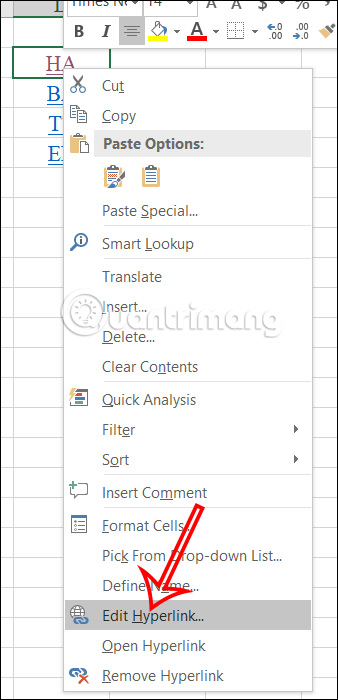
<p style="text-align: justify;">Tại ô muốn lấy đường link trong Excel bạn nhấn&nbsp;<strong>chuột phải</strong>&nbsp;rồi<strong>&nbsp;chọn Edit Hyperlink&nbsp;</strong>từ menu ngữ cảnh.</p>

<p style="text-align: justify;"><img alt="Sử dụng menu chuột phải " data-i="0" data-src="https://st.quantrimang.com/photos/image/2024/03/19/Excel-lay-duong-link-1.jpg" data-was-processed="true" height="621" src="https://st.quantrimang.com/photos/image/2024/03/19/Excel-lay-duong-link-1.jpg" width="300" /></p>

<p style="text-align: justify;"><strong>Bước 2:</strong></p>

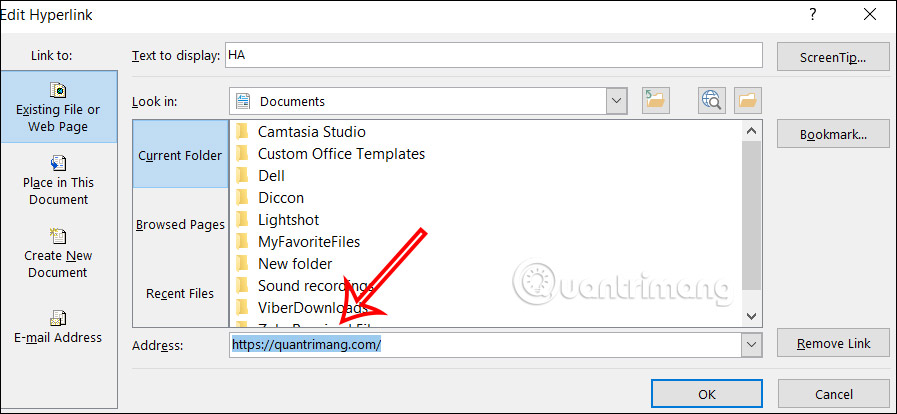
<p style="text-align: justify;">Lúc này hiển thị giao diện tùy chỉnh link chèn trong Excel. Bên dưới&nbsp;<strong>ô Address là link&nbsp;</strong>bạn cần lấy.</p>

<div style="text-align: justify;"><iframe allowtransparency="true" data-google-container-id="a!2" data-google-query-id="CIv4ndzBhIUDFdvcFgUdhw4BOA" data-load-complete="true" frameborder="0" height="0" hspace="0" id="aswift_1" marginheight="0" marginwidth="0" name="aswift_1" sandbox="" scrolling="no" vspace="0" width="694"></iframe></div>

<p style="text-align: justify;"><img alt="Hiển thị link trong Excel" data-i="1" data-src="https://st.quantrimang.com/photos/image/2024/03/19/Excel-lay-duong-link-2.jpg" data-was-processed="true" height="277" src="https://st.quantrimang.com/photos/image/2024/03/19/Excel-lay-duong-link-2.jpg" width="600" /></p>

<h2 style="text-align: justify;">Cách 2: Lấy link trong Excel tự động</h2>

<p style="text-align: justify;">Trong trường hợp file Excel có nhiều link chèn tài liệu thì việc sử dụng menu chuột phải tốn khá nhiều thời gian. Bạn nên sử dụng mã VBA để lấy link trong Excel tự động.</p>

<p style="text-align: justify;"><strong>Bước 1:</strong></p>

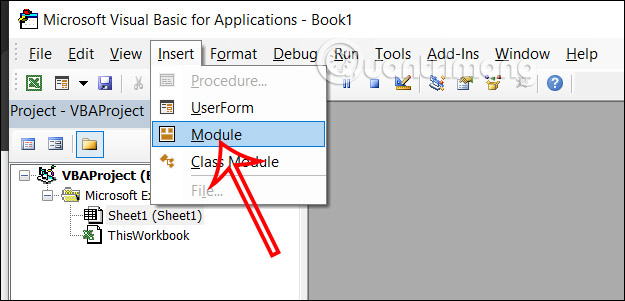
<p style="text-align: justify;">Tại giao diện Excel bạn nhấn&nbsp;<strong>tổ hợp phím Alt + F11</strong>&nbsp;để mở giao diện VBA trong Excel. Tiếp đến, ở giao diện như hình bạn nhấn vào&nbsp;<strong>Insert rồi chọn tiếp Module</strong>.</p>

<p style="text-align: justify;"><img alt="Giao diện VBA trong Excel" data-i="2" data-src="https://st.quantrimang.com/photos/image/2024/03/19/Excel-lay-duong-link-3.jpg" data-was-processed="true" height="301" src="https://st.quantrimang.com/photos/image/2024/03/19/Excel-lay-duong-link-3.jpg" width="625" /></p>

<p style="text-align: justify;"><strong>Bước 2:</strong></p>

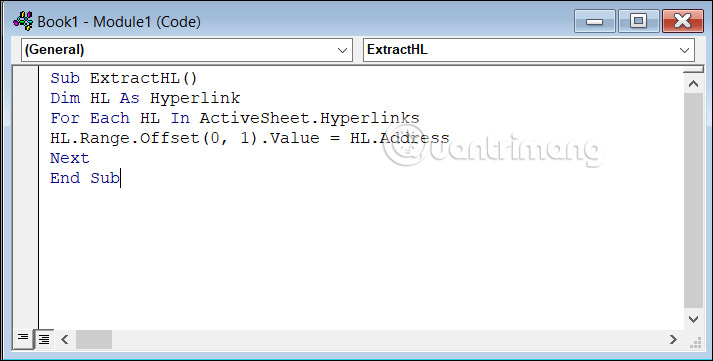
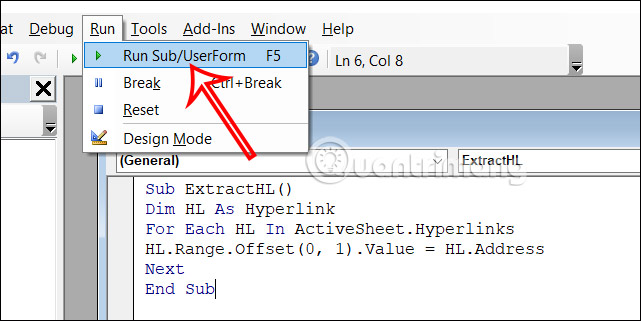
<p style="text-align: justify;">Hiển thị giao diện mới, chúng ta dán mã dưới đây vào giao diện.</p>

<pre id="pre0">
<code>Sub ExtractHL()

Dim HL As Hyperlink

For Each HL In ActiveSheet.Hyperlinks

HL.Range.Offset(0, 1).Value = HL.Address

Next

End Sub</code></pre>

<p style="text-align: justify;"><img alt="Nhập mã VBA trong Excel" data-adbro-processed="true" data-i="3" data-src="https://st.quantrimang.com/photos/image/2024/03/19/Excel-lay-duong-link-4.jpg" data-was-processed="true" height="304" src="https://st.quantrimang.com/photos/image/2024/03/19/Excel-lay-duong-link-4.jpg" width="600" /></p>

<p style="text-align: justify;">Sau đó chúng ta nhấn tiếp vào&nbsp;<strong>tab Run rồi chọn tiếp Run Sub/UserForm</strong>&nbsp;để chạy lệnh này.</p>

<div style="text-align: justify;"><iframe allowtransparency="true" data-google-container-id="a!3" data-google-query-id="CJT-ntzBhIUDFTXEFgUdN6YNug" data-load-complete="true" frameborder="0" height="0" hspace="0" id="aswift_2" marginheight="0" marginwidth="0" name="aswift_2" sandbox="" scrolling="no" vspace="0" width="694"></iframe></div>

<p style="text-align: justify;"><img alt="Chạy mã VBA trong Excel" data-i="4" data-src="https://st.quantrimang.com/photos/image/2024/03/19/Excel-lay-duong-link-5.jpg" data-was-processed="true" height="300" src="https://st.quantrimang.com/photos/image/2024/03/19/Excel-lay-duong-link-5.jpg" width="600" /></p>

<p style="text-align: justify;"><strong>Bước 3:</strong></p>

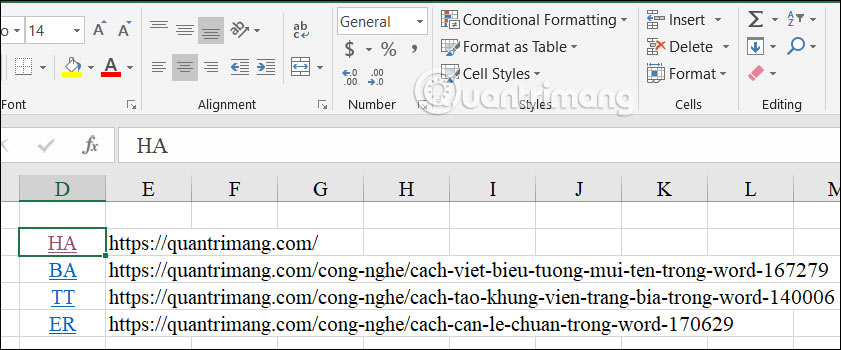
<p style="text-align: justify;">Bạn nhấn tổ hợp phím Alt + Q để đóng giao diện và sau đó bạn sẽ thấy toàn bộ đường link hiển thị ở cột bên cạnh như hình dưới đây.</p>

<p style="text-align: justify;"><img alt="Lấy đường link trong Excel tự động" data-i="5" data-src="https://st.quantrimang.com/photos/image/2024/03/19/Excel-lay-duong-link-6.jpg" data-was-processed="true" height="266" src="https://st.quantrimang.com/photos/image/2024/03/19/Excel-lay-duong-link-6.jpg" width="640" /></p>

<h2 style="text-align: justify;">Cách 3: Xuất đường link Excel bằng hàm tự tạo</h2>

<p style="text-align: justify;"><strong>Bước 1:</strong></p>

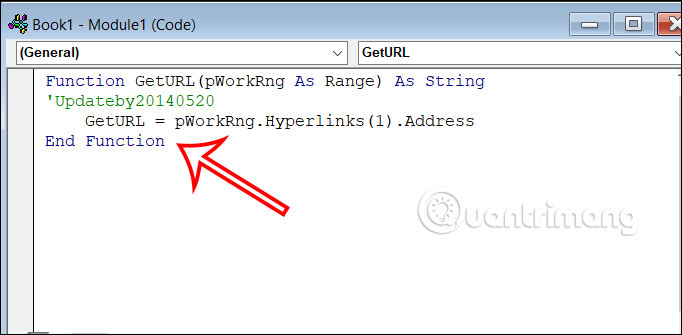
<p style="text-align: justify;">Chúng ta nhấn&nbsp;<strong>ALT+F11</strong>&nbsp;để mở hộp thoại Microsoft Visual Basic for Applications. Sau đó nhấn tiếp&nbsp;<strong>Insert &gt; Module</strong>&nbsp;và dán đoạn mã bên dưới.</p>

<pre id="pre1">
<code>Function GetURL(pWorkRng As Range) As String

&#039;Updateby20140520

GetURL = pWorkRng.Hyperlinks(1).Address

End Function</code></pre>

<p style="text-align: justify;"><img alt="Hàm tự tạo Excel" data-i="6" data-src="https://st.quantrimang.com/photos/image/2024/03/19/Excel-lay-duong-link-7.jpg" data-was-processed="true" height="295" src="https://st.quantrimang.com/photos/image/2024/03/19/Excel-lay-duong-link-7.jpg" width="600" /></p>

<p style="text-align: justify;"><strong>Bước 2:</strong></p>

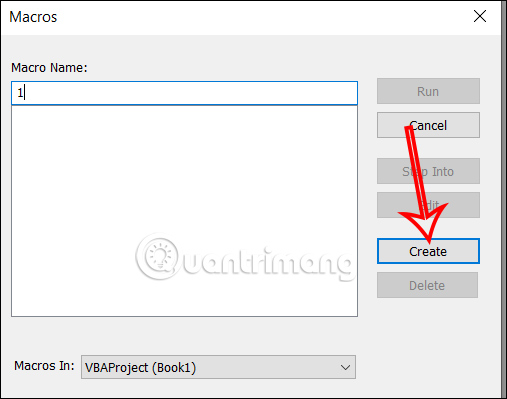
<p style="text-align: justify;">Tiếp đến nhấn vào&nbsp;<strong>biểu tượng run&nbsp;</strong>ở bên trên rồi lưu lại đoạn mã VBA này lại.&nbsp;<strong>Nhập tên rồi nhấn Create</strong>&nbsp;để lưu lại mã, rồi nhấn lại run để khởi chạy.</p>

<p style="text-align: justify;"><img alt="Lưu mã VBA trong Excel" data-i="7" data-src="https://st.quantrimang.com/photos/image/2024/03/19/Excel-lay-duong-link-8.jpg" data-was-processed="true" height="399" src="https://st.quantrimang.com/photos/image/2024/03/19/Excel-lay-duong-link-8.jpg" width="507" /></p>

<p style="text-align: justify;"><strong>Bước 3:</strong></p>

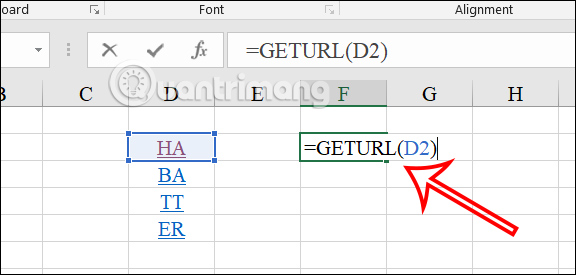
<p style="text-align: justify;">Quay trở lại giao diện bảng dữ liệu, tại ô hiển thị đường link bạn&nbsp;<strong>nhập công thức =GetURL(ô chứa link)</strong>&nbsp;như hình dưới đây rồi nhấn Enter để thực hiện.</p>

<div style="text-align: justify;"><iframe allowtransparency="true" data-google-container-id="a!4" data-google-query-id="CIDXg93BhIUDFRnNFgUdvk0NnQ" data-load-complete="true" frameborder="0" height="0" hspace="0" id="aswift_3" marginheight="0" marginwidth="0" name="aswift_3" sandbox="" scrolling="no" vspace="0" width="694"></iframe></div>

<p style="text-align: justify;"><img alt="Công thức lấy link trong Excel" data-i="8" data-src="https://st.quantrimang.com/photos/image/2024/03/19/Excel-lay-duong-link-9.jpg" data-was-processed="true" height="275" src="https://st.quantrimang.com/photos/image/2024/03/19/Excel-lay-duong-link-9.jpg" width="576" /></p>

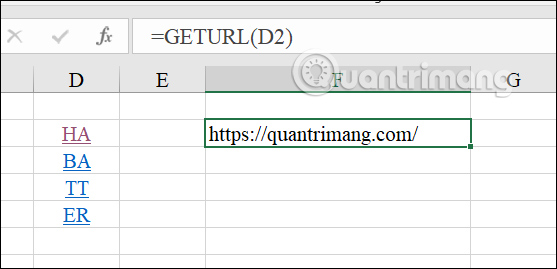
<p style="text-align: justify;">Ngay lập tức bạn đã có được đường link trong Excel từ nội dung chèn trong bảng dữ liệu.</p>

<p style="text-align: justify;"><img alt="Hiển thị đường link trong Excel" data-i="9" data-src="https://st.quantrimang.com/photos/image/2024/03/19/Excel-lay-duong-link-10.jpg" data-was-processed="true" height="269" src="https://st.quantrimang.com/photos/image/2024/03/19/Excel-lay-duong-link-10.jpg" width="557" /></p>

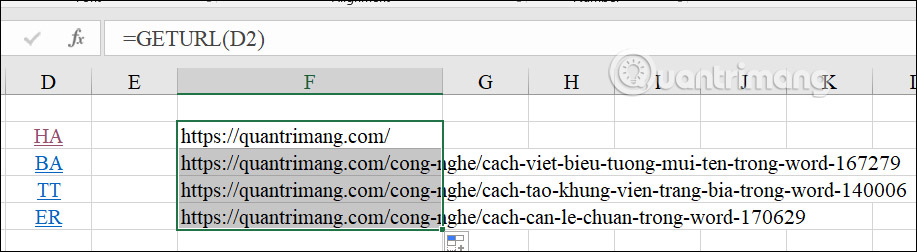
<p style="text-align: justify;">Bạn chỉ cần kéo ô kết quả đầu tiên xuống dưới để lấy link còn lại là được.</p>

<p style="text-align: justify;"><img alt="Lấy link trong Excel bằng hàm tự tạo" data-i="10" data-src="https://st.quantrimang.com/photos/image/2024/03/19/Excel-lay-duong-link-11.jpg" data-was-processed="true" height="176" src="https://st.quantrimang.com/photos/image/2024/03/19/Excel-lay-duong-link-11.jpg" width="640" /></p>

<div style="text-align: justify;">&nbsp;</div>
		</div>
				<div id="author">
						<p>
				<strong>Nguồn tin:</strong>
				Quantrimang.com
			</p>
		</div>
	</div>
	<div id="footer" class="clearfix">
		<div id="url">
			<strong>URL của bản tin này: </strong><a href="https://www.nguoicodonvn2008.info/vi/news/savefile/kien-thuc-may-tinh/huong-dan-lay-duong-link-trong-excel-hoan-toan-tu-dong-8210.html" title="Hướng dẫn lấy đường link trong Excel hoàn toàn tự động">https://www.nguoicodonvn2008.info/vi/news/savefile/kien-thuc-may-tinh/huong-dan-lay-duong-link-trong-excel-hoan-toan-tu-dong-8210.html</a>

		</div>
		<div class="clear"></div>
		<div class="copyright">
			&copy; .&#x3A; Nguoicodonvn2008.info - Cõi lòng người cô đơn &#x3A;.
		</div>
		<div id="contact">
			<a href="mailto:admin@nguoicodonvn2008.info">admin@nguoicodonvn2008.info</a>
		</div>
	</div>
</div>
        <div id="timeoutsess" class="chromeframe">
            Bạn đã không sử dụng Site, <a onclick="timeoutsesscancel();" href="https://www.nguoicodonvn2008.info/#">Bấm vào đây để duy trì trạng thái đăng nhập</a>. Thời gian chờ: <span id="secField"> 60 </span> giây
        </div>
        <div id="openidResult" class="nv-alert" style="display:none"></div>
        <div id="openidBt" data-result="" data-redirect=""></div>
		</script>
		<div class="car-top">
  <span><img src="https://www.nguoicodonvn2008.info/themes/default/images/car.png" alt=""></span>
</div>
<div id="run_cronjobs" style="visibility:hidden;display:none;"><img alt="cron" src="/index.php?second=cronjobs&amp;p=e4vuc3Oc" width="1" height="1" /></div>
<script src="https://www.nguoicodonvn2008.info/assets/js/jquery/jquery.min.js"></script>
<script>var nv_base_siteurl="/",nv_lang_data="vi",nv_lang_interface="vi",nv_name_variable="nv",nv_fc_variable="op",nv_lang_variable="language",nv_module_name="news",nv_func_name="savefile",nv_is_user=0, nv_my_ofs=-4,nv_my_abbr="EDT",nv_cookie_prefix="nv4c_e856T",nv_check_pass_mstime=1738000,nv_area_admin=0,nv_safemode=0,theme_responsive=0,nv_recaptcha_ver=2,nv_recaptcha_sitekey="",nv_recaptcha_type="image",XSSsanitize=1;</script>
<script src="https://www.nguoicodonvn2008.info/assets/js/language/vi.js"></script>
<script src="https://www.nguoicodonvn2008.info/assets/js/DOMPurify/purify3.js"></script>
<script src="https://www.nguoicodonvn2008.info/assets/js/global.js"></script>
<script src="https://www.nguoicodonvn2008.info/assets/js/site.js"></script>
<script src="https://www.nguoicodonvn2008.info/themes/default/js/news.js"></script>
<script src="https://www.nguoicodonvn2008.info/themes/default/js/main.js"></script>
<script src="https://www.nguoicodonvn2008.info/themes/default/js/custom.js"></script>
<script type="application/ld+json">
        {
            "@context": "https://schema.org",
            "@type": "Organization",
            "url": "https://www.nguoicodonvn2008.info",
            "logo": "https://www.nguoicodonvn2008.info/uploads/angel.gif"
        }
        </script>
<script src="https://www.nguoicodonvn2008.info/themes/default/js/bootstrap.min.js"></script>
<script type="text/javascript">
var $scrolltop = $('.car-top');
$scrolltop.on('click', function () {
    $('html,body').animate({
        scrollTop: 0
    }, 800);
    $(this).addClass("car-run");
    setTimeout(function(){ $scrolltop.removeClass('car-run');}, 1000);
    return false;
});
$(window).on('scroll', function ()
{ 
    if($(window).scrollTop() >= 200)
    {
        $scrolltop.addClass("show");
        $scrolltop.addClass("car-down");
    }
    else
    {
       $scrolltop.removeClass("show");
       setTimeout(function(){ $scrolltop.removeClass('car-down');}, 300);
    }
});
</script>
</body>
</html>