<!DOCTYPE html>
    <html lang="vi" xmlns="http://www.w3.org/1999/xhtml" prefix="og: http://ogp.me/ns#">
    <head>
<title>Hướng dẫn kích hoạt ứng dụng tự mở lại trên Windows 11</title>
<meta name="description" content="Hướng dẫn kích hoạt ứng dụng tự mở lại trên Windows 11 - Savefile - Tin Tức -...">
<meta name="author" content=".: Nguoicodonvn2008.info - Cõi lòng người cô đơn :.">
<meta name="copyright" content=".: Nguoicodonvn2008.info - Cõi lòng người cô đơn :. [admin@nguoicodonvn2008.info]">
<meta name="robots" content="index, archive, follow, noodp">
<meta name="googlebot" content="index,archive,follow,noodp">
<meta name="msnbot" content="all,index,follow">
<meta name="generator" content="NukeViet v4.5">
<meta http-equiv="Content-Type" content="text/html; charset=utf-8">
<meta property="og:title" content="Hướng dẫn kích hoạt ứng dụng tự mở lại trên Windows 11">
<meta property="og:type" content="website">
<meta property="og:description" content="Savefile - Tin Tức - https&#x3A;&#x002F;&#x002F;www.nguoicodonvn2008.info&#x002F;vi&#x002F;news&#x002F;savefile&#x002F;kien-thuc-may-tinh&#x002F;huong-dan-kich-hoat-ung-dung-tu-mo-lai-tren-windows-11-11895.html">
<meta property="og:site_name" content=".&#x3A; Nguoicodonvn2008.info - Cõi lòng người cô đơn &#x3A;.">
<meta property="og:url" content="https://www.nguoicodonvn2008.info/vi/news/savefile/kien-thuc-may-tinh/huong-dan-kich-hoat-ung-dung-tu-mo-lai-tren-windows-11-11895.html">
<link rel="shortcut icon" href="https://www.nguoicodonvn2008.info/favicon.ico">
<link rel="canonical" href="https://www.nguoicodonvn2008.info/vi/news/savefile/kien-thuc-may-tinh/huong-dan-kich-hoat-ung-dung-tu-mo-lai-tren-windows-11-11895.html">
<link rel="alternate" href="https://www.nguoicodonvn2008.info/vi/news/rss/" title="Tin Tức" type="application/rss+xml">
<link rel="alternate" href="https://www.nguoicodonvn2008.info/vi/news/rss/karaoke-dual/" title="Tin Tức - Karaoke Dual" type="application/rss+xml">
<link rel="alternate" href="https://www.nguoicodonvn2008.info/vi/news/rss/nhac-tre/" title="Tin Tức - Nhạc trẻ" type="application/rss+xml">
<link rel="alternate" href="https://www.nguoicodonvn2008.info/vi/news/rss/tru-tinh/" title="Tin Tức - Trữ tình" type="application/rss+xml">
<link rel="alternate" href="https://www.nguoicodonvn2008.info/vi/news/rss/nuoc-ngoai/" title="Tin Tức - Nước ngoài" type="application/rss+xml">
<link rel="alternate" href="https://www.nguoicodonvn2008.info/vi/news/rss/remix/" title="Tin Tức - Remix" type="application/rss+xml">
<link rel="alternate" href="https://www.nguoicodonvn2008.info/vi/news/rss/tam-su-tinh-yeu/" title="Tin Tức - Tâm sự tình yêu" type="application/rss+xml">
<link rel="alternate" href="https://www.nguoicodonvn2008.info/vi/news/rss/tho-suu-tam/" title="Tin Tức - Thơ sưu tầm" type="application/rss+xml">
<link rel="alternate" href="https://www.nguoicodonvn2008.info/vi/news/rss/cuoc-song/" title="Tin Tức - Cuộc sống" type="application/rss+xml">
<link rel="alternate" href="https://www.nguoicodonvn2008.info/vi/news/rss/phan-mem/" title="Tin Tức - Phần mềm" type="application/rss+xml">
<link rel="alternate" href="https://www.nguoicodonvn2008.info/vi/news/rss/kien-thuc-may-tinh/" title="Tin Tức - Kiến thức máy tính" type="application/rss+xml">
<link rel="alternate" href="https://www.nguoicodonvn2008.info/vi/news/rss/hoc-tap/" title="Tin Tức - Học tập" type="application/rss+xml">
<link rel="alternate" href="https://www.nguoicodonvn2008.info/vi/news/rss/tai-lieu/" title="Tin Tức - Tài liệu" type="application/rss+xml">
<link rel="alternate" href="https://www.nguoicodonvn2008.info/vi/news/rss/de-thi/" title="Tin Tức - Đề thi" type="application/rss+xml">
<link rel="preload" as="style" href="https://www.nguoicodonvn2008.info/assets/css/font-awesome.min.css" type="text/css">
<link rel="preload" as="style" href="https://www.nguoicodonvn2008.info/themes/default/css/bootstrap.non-responsive.css" type="text/css">
<link rel="preload" as="style" href="https://www.nguoicodonvn2008.info/themes/default/css/style.css" type="text/css">
<link rel="preload" as="style" href="https://www.nguoicodonvn2008.info/themes/default/css/style.non-responsive.css" type="text/css">
<link rel="preload" as="style" href="https://www.nguoicodonvn2008.info/themes/default/css/news.css" type="text/css">
<link rel="preload" as="style" href="https://www.nguoicodonvn2008.info/themes/default/css/custom.css" type="text/css">
<link rel="preload" as="script" href="https://www.nguoicodonvn2008.info/assets/js/jquery/jquery.min.js" type="text/javascript">
<link rel="preload" as="script" href="https://www.nguoicodonvn2008.info/assets/js/language/vi.js" type="text/javascript">
<link rel="preload" as="script" href="https://www.nguoicodonvn2008.info/assets/js/DOMPurify/purify3.js" type="text/javascript">
<link rel="preload" as="script" href="https://www.nguoicodonvn2008.info/assets/js/global.js" type="text/javascript">
<link rel="preload" as="script" href="https://www.nguoicodonvn2008.info/assets/js/site.js" type="text/javascript">
<link rel="preload" as="script" href="https://www.nguoicodonvn2008.info/themes/default/js/news.js" type="text/javascript">
<link rel="preload" as="script" href="https://www.nguoicodonvn2008.info/themes/default/js/main.js" type="text/javascript">
<link rel="preload" as="script" href="https://www.nguoicodonvn2008.info/themes/default/js/custom.js" type="text/javascript">
<link rel="preload" as="script" href="https://www.nguoicodonvn2008.info/themes/default/js/bootstrap.min.js" type="text/javascript">
<link rel="stylesheet" href="https://www.nguoicodonvn2008.info/assets/css/font-awesome.min.css">
<link rel="stylesheet" href="https://www.nguoicodonvn2008.info/themes/default/css/bootstrap.non-responsive.css">
<link rel="stylesheet" href="https://www.nguoicodonvn2008.info/themes/default/css/style.css">
<link rel="stylesheet" href="https://www.nguoicodonvn2008.info/themes/default/css/style.non-responsive.css">
<link rel="StyleSheet" href="https://www.nguoicodonvn2008.info/themes/default/css/news.css">
<link rel="stylesheet" href="https://www.nguoicodonvn2008.info/themes/default/css/custom.css">
<style type="text/css">
	body{background: #fff;}
</style>
    </head>
    <body>
<div id="print">
	<div id="hd_print">
		<h2 class="pull-left">.&#x3A; Nguoicodonvn2008.info - Cõi lòng người cô đơn &#x3A;.</h2>
		<p class="pull-right"><a title=".&#x3A; Nguoicodonvn2008.info - Cõi lòng người cô đơn &#x3A;." href="https://www.nguoicodonvn2008.info/">https://www.nguoicodonvn2008.info</a></p>
	</div>
	<div class="clear"></div>
	<hr />
	<div id="content">
		<h1>Hướng dẫn kích hoạt ứng dụng tự mở lại trên Windows 11</h1>
		<ul class="list-inline">
			<li>Thứ ba - 16/12/2025 21:58</li>
			<li class="hidden-print txtrequired"><em class="fa fa-print">&nbsp;</em><a title="In ra" href="javascript:;" onclick="window.print()">In ra</a></li>
			<li class="hidden-print txtrequired"><em class="fa fa-power-off">&nbsp;</em><a title="Đóng cửa sổ này" href="javascript:;" onclick="window.close()">Đóng cửa sổ này</a></li>
		</ul>
		<div class="clear"></div>
		<div id="hometext">
		</div>
				<div class="imghome">
			<img alt="Hướng dẫn kích hoạt ứng dụng tự mở lại trên Windows 11" src="https://st.quantrimang.com/photos/image/2025/12/15/bat-ung-dung-tu-mo-lai-Windows-4.jpg" width="460" class="img-thumbnail" />
		</div>
		<div class="clear"></div>
		<div id="bodytext" class="clearfix">
			<p style="text-align: justify;">Windows có rất nhiều tính năng ẩn và tính năng tự mở lại ứng dụng là một trong những tính năng đó. Tính năng này giúp tự động mở ứng dụng với trạng thái trước đó sau khi hệ thống khởi động lại. Điều này có thể giúp bạn tiết kiệm thời gian hơn khi không phải thực hiện theo thủ công. Dưới đây là hướng dẫn kích hoạt ứng dụng tự mở lại trên Windows 11.</p>

<div style="text-align: justify;">&nbsp;</div>

<h2 style="text-align: justify;">Cách kích hoạt ứng dụng tự mở lại trên Windows 11</h2>

<p style="text-align: justify;"><strong>Bước 1:</strong></p>

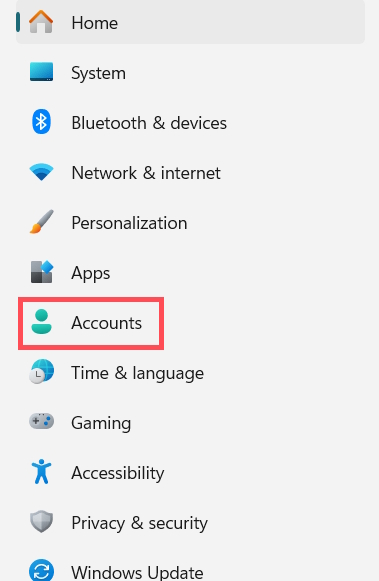
<p style="text-align: justify;">Bạn<strong>&nbsp;mở Settings</strong>&nbsp;trên máy tính sau đó chúng ta chọn<strong>&nbsp;mục Account</strong>&nbsp;ở góc trái giao diện.</p>

<p style="text-align: justify;"><img alt="Account trên Windows " data-i="0" data-src="https://st.quantrimang.com/photos/image/2025/12/15/bat-ung-dung-tu-mo-lai-Windows-1.jpg" data-was-processed="true" height="506" src="https://st.quantrimang.com/photos/image/2025/12/15/bat-ung-dung-tu-mo-lai-Windows-1.jpg" width="330" /></p>

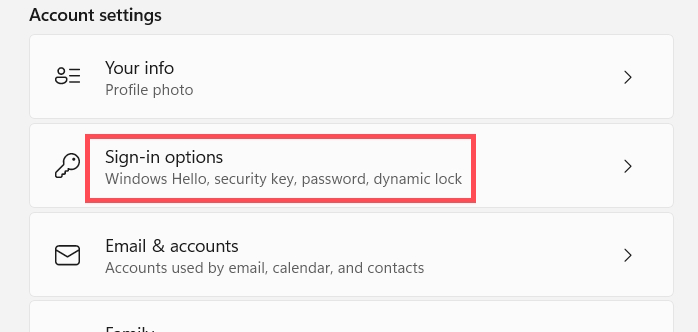
<p style="text-align: justify;">Nhìn sang nội dung bên cạnh bạn&nbsp;<strong>nhấn tiếp vào Sign-in options</strong>&nbsp;để chúng ta tiến hành điều chỉnh thiết lập.</p>

<p style="text-align: justify;"><img alt="Sign-in options Windows " data-i="1" data-src="https://st.quantrimang.com/photos/image/2025/12/15/bat-ung-dung-tu-mo-lai-Windows-2.jpg" data-was-processed="true" height="285" src="https://st.quantrimang.com/photos/image/2025/12/15/bat-ung-dung-tu-mo-lai-Windows-2.jpg" width="600" /></p>

<p style="text-align: justify;"><strong>Bước 2:</strong></p>

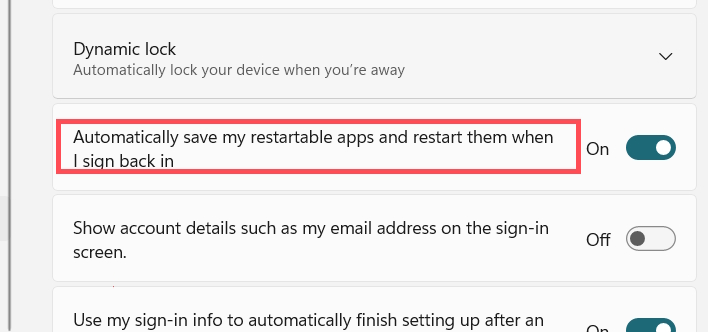
<p style="text-align: justify;">Trong giao diện thiết lập mới người dùng kéo xuống&nbsp;<strong>mục Additional settings</strong>, sau đó chúng ta&nbsp;<strong>kích hoạt Automatically save my restartable apps and restart them when I sign back in</strong>&nbsp;để bật chế độ mở lại ứng dụng trên Windows khi bạn đăng nhập lại tài khoản.</p>

<p style="text-align: justify;"><img alt="Bật mở lại ứng dụng khi đăng nhập lại Windows" data-i="2" data-src="https://st.quantrimang.com/photos/image/2025/12/15/bat-ung-dung-tu-mo-lai-Windows-3.jpg" data-was-processed="true" height="281" src="https://st.quantrimang.com/photos/image/2025/12/15/bat-ung-dung-tu-mo-lai-Windows-3.jpg" width="600" /></p>

<p style="text-align: justify;">Khi bật tùy chọn này, Windows sẽ cố gắng lưu và khôi phục các ứng dụng được hỗ trợ khi bạn đăng nhập sau khi khởi động lại.</p>

<p style="text-align: justify;"><strong>Bước 3:</strong></p>

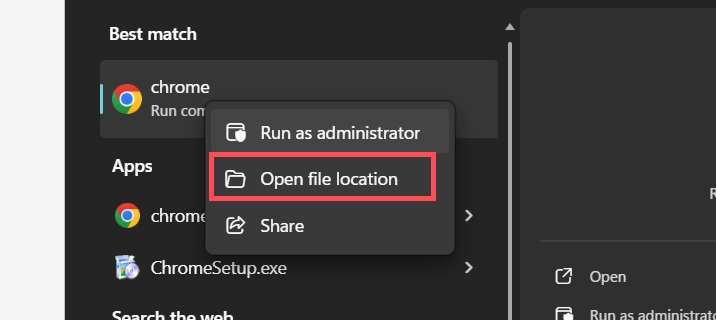
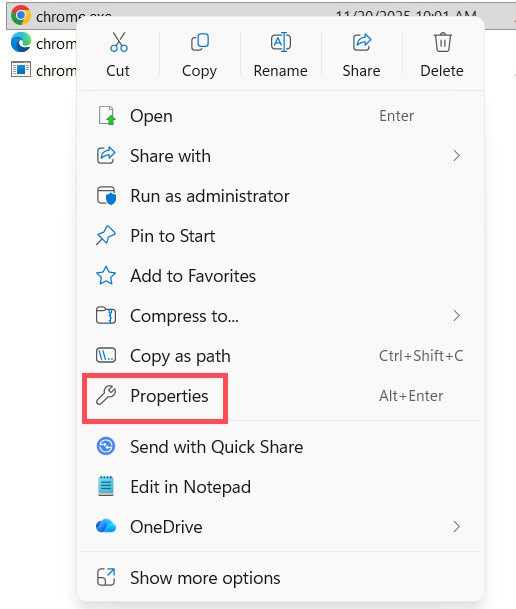
<p style="text-align: justify;">Mở thư mục lưu trữ dữ liệu của ứng dụng bạn muốn sử dụng chế độ mở lại khi đăng nhập lại tài khoản. Nhấn chuột phải vào icon ứng dụng sau đó bạn&nbsp;<strong>chọn Open file location</strong>.</p>

<p style="text-align: justify;"><img alt="Mở thư mục ứng dụng máy tính" data-i="3" data-src="https://st.quantrimang.com/photos/image/2025/12/15/bat-ung-dung-tu-mo-lai-Windows-4.jpg" data-was-processed="true" height="286" src="https://st.quantrimang.com/photos/image/2025/12/15/bat-ung-dung-tu-mo-lai-Windows-4.jpg" width="640" /></p>

<p style="text-align: justify;">Trong giao diện mới bạn nhấn chuột phải vào file cài đặt ứng dụng rồi&nbsp;<strong>chọn Properties</strong>.</p>

<p style="text-align: justify;"><img alt="Mở thuộc tính ứng dụng" data-i="4" data-src="https://st.quantrimang.com/photos/image/2025/12/15/bat-ung-dung-tu-mo-lai-Windows-5.jpg" data-was-processed="true" height="472" src="https://st.quantrimang.com/photos/image/2025/12/15/bat-ung-dung-tu-mo-lai-Windows-5.jpg" width="400" /></p>

<p style="text-align: justify;"><strong>Bước 4:</strong></p>

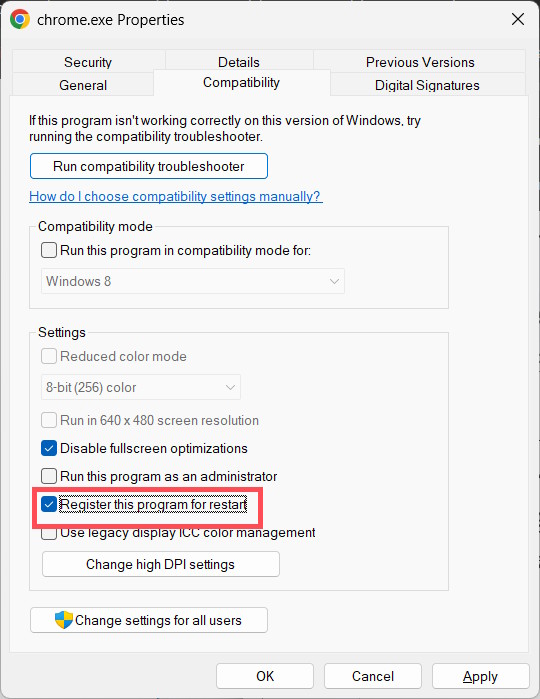
<p style="text-align: justify;">Chúng nhấn vào&nbsp;<strong>tab Compatibility</strong>, sau đó&nbsp;<strong>tích chọn vào Register this program for restart</strong>.</p>

<p style="text-align: justify;"><img alt="Kích hoạt ứng dụng mở lại khi đăng nhập lại Windows" data-i="5" data-src="https://st.quantrimang.com/photos/image/2025/12/15/bat-ung-dung-tu-mo-lai-Windows-6.jpg" data-was-processed="true" height="518" src="https://st.quantrimang.com/photos/image/2025/12/15/bat-ung-dung-tu-mo-lai-Windows-6.jpg" width="400" /></p>

<p style="text-align: justify;">Như vậy ứng dụng sẽ tự động mở lại với trạng thái trước đó mỗi khi hệ thống khởi động lại. Mặc dù tính năng này hữu ích, nhưng một số ứng dụng có thể không hỗ trợ. Trong trường hợp đó, bạn sẽ không tìm thấy tùy chọn đăng ký trong tab tương thích.</p>
		</div>
				<div id="author">
						<p>
				<strong>Nguồn tin:</strong>
				Quantrimang.com:
			</p>
		</div>
	</div>
	<div id="footer" class="clearfix">
		<div id="url">
			<strong>URL của bản tin này: </strong><a href="https://www.nguoicodonvn2008.info/vi/news/savefile/kien-thuc-may-tinh/huong-dan-kich-hoat-ung-dung-tu-mo-lai-tren-windows-11-11895.html" title="Hướng dẫn kích hoạt ứng dụng tự mở lại trên Windows 11">https://www.nguoicodonvn2008.info/vi/news/savefile/kien-thuc-may-tinh/huong-dan-kich-hoat-ung-dung-tu-mo-lai-tren-windows-11-11895.html</a>

		</div>
		<div class="clear"></div>
		<div class="copyright">
			&copy; .&#x3A; Nguoicodonvn2008.info - Cõi lòng người cô đơn &#x3A;.
		</div>
		<div id="contact">
			<a href="mailto:admin@nguoicodonvn2008.info">admin@nguoicodonvn2008.info</a>
		</div>
	</div>
</div>
        <div id="timeoutsess" class="chromeframe">
            Bạn đã không sử dụng Site, <a onclick="timeoutsesscancel();" href="https://www.nguoicodonvn2008.info/#">Bấm vào đây để duy trì trạng thái đăng nhập</a>. Thời gian chờ: <span id="secField"> 60 </span> giây
        </div>
        <div id="openidResult" class="nv-alert" style="display:none"></div>
        <div id="openidBt" data-result="" data-redirect=""></div>
		</script>
		<div class="car-top">
  <span><img src="https://www.nguoicodonvn2008.info/themes/default/images/car.png" alt=""></span>
</div>
<script src="https://www.nguoicodonvn2008.info/assets/js/jquery/jquery.min.js"></script>
<script>var nv_base_siteurl="/",nv_lang_data="vi",nv_lang_interface="vi",nv_name_variable="nv",nv_fc_variable="op",nv_lang_variable="language",nv_module_name="news",nv_func_name="savefile",nv_is_user=0, nv_my_ofs=-4,nv_my_abbr="EDT",nv_cookie_prefix="nv4c_e856T",nv_check_pass_mstime=1738000,nv_area_admin=0,nv_safemode=0,theme_responsive=0,nv_recaptcha_ver=2,nv_recaptcha_sitekey="",nv_recaptcha_type="image",XSSsanitize=1;</script>
<script src="https://www.nguoicodonvn2008.info/assets/js/language/vi.js"></script>
<script src="https://www.nguoicodonvn2008.info/assets/js/DOMPurify/purify3.js"></script>
<script src="https://www.nguoicodonvn2008.info/assets/js/global.js"></script>
<script src="https://www.nguoicodonvn2008.info/assets/js/site.js"></script>
<script src="https://www.nguoicodonvn2008.info/themes/default/js/news.js"></script>
<script src="https://www.nguoicodonvn2008.info/themes/default/js/main.js"></script>
<script src="https://www.nguoicodonvn2008.info/themes/default/js/custom.js"></script>
<script type="application/ld+json">
        {
            "@context": "https://schema.org",
            "@type": "Organization",
            "url": "https://www.nguoicodonvn2008.info",
            "logo": "https://www.nguoicodonvn2008.info/uploads/angel.gif"
        }
        </script>
<script src="https://www.nguoicodonvn2008.info/themes/default/js/bootstrap.min.js"></script>
<script type="text/javascript">
var $scrolltop = $('.car-top');
$scrolltop.on('click', function () {
    $('html,body').animate({
        scrollTop: 0
    }, 800);
    $(this).addClass("car-run");
    setTimeout(function(){ $scrolltop.removeClass('car-run');}, 1000);
    return false;
});
$(window).on('scroll', function ()
{ 
    if($(window).scrollTop() >= 200)
    {
        $scrolltop.addClass("show");
        $scrolltop.addClass("car-down");
    }
    else
    {
       $scrolltop.removeClass("show");
       setTimeout(function(){ $scrolltop.removeClass('car-down');}, 300);
    }
});
</script>
</body>
</html>