<!DOCTYPE html>
    <html lang="vi" xmlns="http://www.w3.org/1999/xhtml" prefix="og: http://ogp.me/ns#">
    <head>
<title>Hướng dẫn gỡ cài đặt phần mềm trên Ubuntu</title>
<meta name="description" content="Hướng dẫn gỡ cài đặt phần mềm trên Ubuntu - Savefile - Tin Tức -...">
<meta name="author" content=".: Nguoicodonvn2008.info - Cõi lòng người cô đơn :.">
<meta name="copyright" content=".: Nguoicodonvn2008.info - Cõi lòng người cô đơn :. [admin@nguoicodonvn2008.info]">
<meta name="robots" content="index, archive, follow, noodp">
<meta name="googlebot" content="index,archive,follow,noodp">
<meta name="msnbot" content="all,index,follow">
<meta name="generator" content="NukeViet v4.5">
<meta http-equiv="Content-Type" content="text/html; charset=utf-8">
<meta property="og:title" content="Hướng dẫn gỡ cài đặt phần mềm trên Ubuntu">
<meta property="og:type" content="website">
<meta property="og:description" content="Savefile - Tin Tức - https&#x3A;&#x002F;&#x002F;www.nguoicodonvn2008.info&#x002F;vi&#x002F;news&#x002F;savefile&#x002F;kien-thuc-may-tinh&#x002F;huong-dan-go-cai-dat-phan-mem-tren-ubuntu-8706.html">
<meta property="og:site_name" content=".&#x3A; Nguoicodonvn2008.info - Cõi lòng người cô đơn &#x3A;.">
<meta property="og:url" content="https://www.nguoicodonvn2008.info/vi/news/savefile/kien-thuc-may-tinh/huong-dan-go-cai-dat-phan-mem-tren-ubuntu-8706.html">
<link rel="shortcut icon" href="https://www.nguoicodonvn2008.info/favicon.ico">
<link rel="canonical" href="https://www.nguoicodonvn2008.info/vi/news/savefile/kien-thuc-may-tinh/huong-dan-go-cai-dat-phan-mem-tren-ubuntu-8706.html">
<link rel="alternate" href="https://www.nguoicodonvn2008.info/vi/news/rss/" title="Tin Tức" type="application/rss+xml">
<link rel="alternate" href="https://www.nguoicodonvn2008.info/vi/news/rss/karaoke-dual/" title="Tin Tức - Karaoke Dual" type="application/rss+xml">
<link rel="alternate" href="https://www.nguoicodonvn2008.info/vi/news/rss/nhac-tre/" title="Tin Tức - Nhạc trẻ" type="application/rss+xml">
<link rel="alternate" href="https://www.nguoicodonvn2008.info/vi/news/rss/tru-tinh/" title="Tin Tức - Trữ tình" type="application/rss+xml">
<link rel="alternate" href="https://www.nguoicodonvn2008.info/vi/news/rss/nuoc-ngoai/" title="Tin Tức - Nước ngoài" type="application/rss+xml">
<link rel="alternate" href="https://www.nguoicodonvn2008.info/vi/news/rss/remix/" title="Tin Tức - Remix" type="application/rss+xml">
<link rel="alternate" href="https://www.nguoicodonvn2008.info/vi/news/rss/tam-su-tinh-yeu/" title="Tin Tức - Tâm sự tình yêu" type="application/rss+xml">
<link rel="alternate" href="https://www.nguoicodonvn2008.info/vi/news/rss/tho-suu-tam/" title="Tin Tức - Thơ sưu tầm" type="application/rss+xml">
<link rel="alternate" href="https://www.nguoicodonvn2008.info/vi/news/rss/cuoc-song/" title="Tin Tức - Cuộc sống" type="application/rss+xml">
<link rel="alternate" href="https://www.nguoicodonvn2008.info/vi/news/rss/phan-mem/" title="Tin Tức - Phần mềm" type="application/rss+xml">
<link rel="alternate" href="https://www.nguoicodonvn2008.info/vi/news/rss/kien-thuc-may-tinh/" title="Tin Tức - Kiến thức máy tính" type="application/rss+xml">
<link rel="alternate" href="https://www.nguoicodonvn2008.info/vi/news/rss/hoc-tap/" title="Tin Tức - Học tập" type="application/rss+xml">
<link rel="alternate" href="https://www.nguoicodonvn2008.info/vi/news/rss/tai-lieu/" title="Tin Tức - Tài liệu" type="application/rss+xml">
<link rel="alternate" href="https://www.nguoicodonvn2008.info/vi/news/rss/de-thi/" title="Tin Tức - Đề thi" type="application/rss+xml">
<link rel="preload" as="style" href="https://www.nguoicodonvn2008.info/assets/css/font-awesome.min.css" type="text/css">
<link rel="preload" as="style" href="https://www.nguoicodonvn2008.info/themes/default/css/bootstrap.non-responsive.css" type="text/css">
<link rel="preload" as="style" href="https://www.nguoicodonvn2008.info/themes/default/css/style.css" type="text/css">
<link rel="preload" as="style" href="https://www.nguoicodonvn2008.info/themes/default/css/style.non-responsive.css" type="text/css">
<link rel="preload" as="style" href="https://www.nguoicodonvn2008.info/themes/default/css/news.css" type="text/css">
<link rel="preload" as="style" href="https://www.nguoicodonvn2008.info/themes/default/css/custom.css" type="text/css">
<link rel="preload" as="script" href="https://www.nguoicodonvn2008.info/assets/js/jquery/jquery.min.js" type="text/javascript">
<link rel="preload" as="script" href="https://www.nguoicodonvn2008.info/assets/js/language/vi.js" type="text/javascript">
<link rel="preload" as="script" href="https://www.nguoicodonvn2008.info/assets/js/DOMPurify/purify3.js" type="text/javascript">
<link rel="preload" as="script" href="https://www.nguoicodonvn2008.info/assets/js/global.js" type="text/javascript">
<link rel="preload" as="script" href="https://www.nguoicodonvn2008.info/assets/js/site.js" type="text/javascript">
<link rel="preload" as="script" href="https://www.nguoicodonvn2008.info/themes/default/js/news.js" type="text/javascript">
<link rel="preload" as="script" href="https://www.nguoicodonvn2008.info/themes/default/js/main.js" type="text/javascript">
<link rel="preload" as="script" href="https://www.nguoicodonvn2008.info/themes/default/js/custom.js" type="text/javascript">
<link rel="preload" as="script" href="https://www.nguoicodonvn2008.info/themes/default/js/bootstrap.min.js" type="text/javascript">
<link rel="stylesheet" href="https://www.nguoicodonvn2008.info/assets/css/font-awesome.min.css">
<link rel="stylesheet" href="https://www.nguoicodonvn2008.info/themes/default/css/bootstrap.non-responsive.css">
<link rel="stylesheet" href="https://www.nguoicodonvn2008.info/themes/default/css/style.css">
<link rel="stylesheet" href="https://www.nguoicodonvn2008.info/themes/default/css/style.non-responsive.css">
<link rel="StyleSheet" href="https://www.nguoicodonvn2008.info/themes/default/css/news.css">
<link rel="stylesheet" href="https://www.nguoicodonvn2008.info/themes/default/css/custom.css">
<style type="text/css">
	body{background: #fff;}
</style>
    </head>
    <body>
<div id="print">
	<div id="hd_print">
		<h2 class="pull-left">.&#x3A; Nguoicodonvn2008.info - Cõi lòng người cô đơn &#x3A;.</h2>
		<p class="pull-right"><a title=".&#x3A; Nguoicodonvn2008.info - Cõi lòng người cô đơn &#x3A;." href="https://www.nguoicodonvn2008.info/">https://www.nguoicodonvn2008.info</a></p>
	</div>
	<div class="clear"></div>
	<hr />
	<div id="content">
		<h1>Hướng dẫn gỡ cài đặt phần mềm trên Ubuntu</h1>
		<ul class="list-inline">
			<li>Thứ năm - 18/07/2024 23:47</li>
			<li class="hidden-print txtrequired"><em class="fa fa-print">&nbsp;</em><a title="In ra" href="javascript:;" onclick="window.print()">In ra</a></li>
			<li class="hidden-print txtrequired"><em class="fa fa-power-off">&nbsp;</em><a title="Đóng cửa sổ này" href="javascript:;" onclick="window.close()">Đóng cửa sổ này</a></li>
		</ul>
		<div class="clear"></div>
		<div id="hometext">
		</div>
				<div class="imghome">
			<img alt="Hướng dẫn gỡ cài đặt phần mềm trên Ubuntu" src="https://st.quantrimang.com/photos/image/2023/06/21/go-bo-phan-mem-tren-ubuntu-7.jpg" width="460" class="img-thumbnail" />
		</div>
		<div class="clear"></div>
		<div id="bodytext" class="clearfix">
			<p style="text-align: justify;">Bài viết này mô tả việc gỡ bỏ phần mềm mà bạn không cần nữa khỏi hệ thống&nbsp;Ubuntu. Có 2 cách để loại bỏ phần mềm. Đó là thông qua giao diện người dùng đồ họa (Ubuntu Software Manager) và dòng lệnh (Terminal).</p>

<p style="text-align: justify;">Xin lưu ý rằng bạn cần có quyền quản trị để cài đặt/gỡ cài đặt bất kỳ phần mềm nào khỏi Ubuntu. Bài viết đã chạy và thử nghiệm các lệnh, cũng như quy trình được đề cập trong bài viết này trên Ubuntu 22.04 và Ubuntu 20.04.</p>

<div style="text-align: justify;">&nbsp;</div>

<h2 style="text-align: justify;">Gỡ cài đặt ứng dụng thông qua Ubuntu Software Manager</h2>

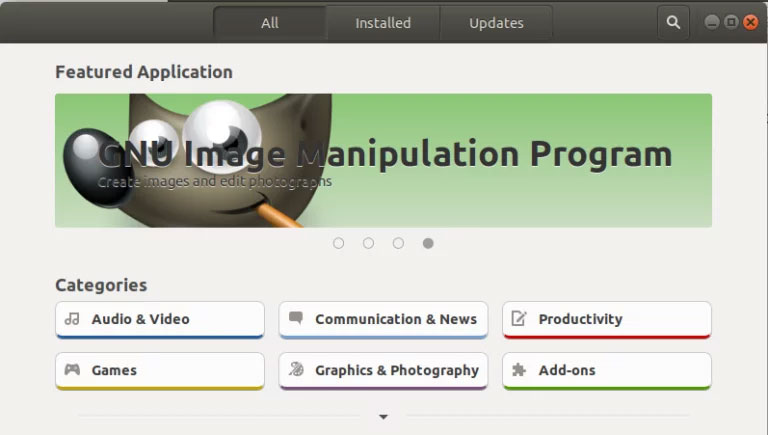
<p style="text-align: justify;">Một cách để gỡ cài đặt phần mềm khỏi máy tính của bạn là thông qua Ubuntu Software Manager. Nhấp vào biểu tượng&nbsp;<strong>Ubuntu Software</strong>&nbsp;trên thanh công cụ&nbsp;<strong>Activities</strong>; thao tác này sẽ mở Ubuntu Software Manager qua đó bạn có thể tìm kiếm, cài đặt và gỡ cài đặt phần mềm khỏi máy tính của mình.</p>

<figure>
<div style="text-align: justify;"><img alt="Ubuntu Software Center" data-i="0" data-src="https://st.quantrimang.com/photos/image/2023/06/21/go-bo-phan-mem-tren-ubuntu-1.jpg" data-was-processed="true" height="60" src="https://st.quantrimang.com/photos/image/2023/06/21/go-bo-phan-mem-tren-ubuntu-1.jpg" width="62" /></div>

<figcaption>
<div style="text-align: justify;">Ubuntu Software Center</div>
</figcaption>
</figure>

<p style="text-align: justify;">Sau đó nhấp vào tab&nbsp;<strong>Installed</strong>&nbsp;từ chế độ xem sau để liệt kê tất cả các ứng dụng được cài đặt trên hệ thống Ubuntu của bạn:</p>

<figure>
<div style="text-align: justify;"><img alt="Ubuntu Software Manager" data-i="1" data-src="https://st.quantrimang.com/photos/image/2023/06/21/go-bo-phan-mem-tren-ubuntu-2.jpg" data-was-processed="true" height="435" src="https://st.quantrimang.com/photos/image/2023/06/21/go-bo-phan-mem-tren-ubuntu-2.jpg" width="768" /></div>

<figcaption>
<div style="text-align: justify;">Ubuntu Software Manager</div>
</figcaption>
</figure>

<div style="text-align: justify;">&nbsp;</div>

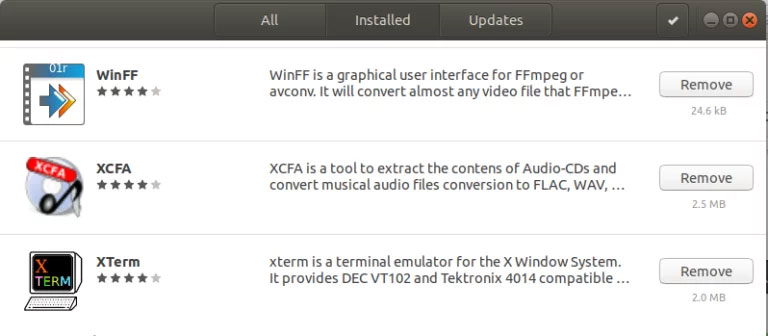
<p style="text-align: justify;">Từ danh sách ứng dụng, hãy tra cứu ứng dụng bạn muốn gỡ cài đặt rồi nhấp vào nút&nbsp;<strong>Remove</strong>.</p>

<figure>
<div style="text-align: justify;"><img alt="Danh sách các ứng dụng đã cài đặt" data-adbro-processed="true" data-i="2" data-src="https://st.quantrimang.com/photos/image/2023/06/21/go-bo-phan-mem-tren-ubuntu-3.jpg" data-was-processed="true" height="336" src="https://st.quantrimang.com/photos/image/2023/06/21/go-bo-phan-mem-tren-ubuntu-3.jpg" width="768" /></div>

<figcaption>
<div style="text-align: justify;">Danh sách các ứng dụng đã cài đặt</div>
</figcaption>
</figure>

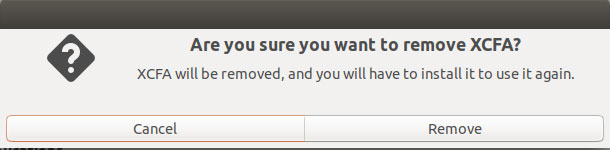
<p style="text-align: justify;">Ví dụ này đang xóa phần mềm có tên XCFA khỏi hệ thống của mình bằng cách nhấp vào nút&nbsp;<strong>Remove.</strong>&nbsp;Khi bạn cố gắng xóa một ứng dụng, loại thông báo xác nhận sau đây sẽ xuất hiện:</p>

<figure>
<div style="text-align: justify;"><img alt="Gỡ cài đặt ứng dụng" data-i="3" data-src="https://st.quantrimang.com/photos/image/2023/06/21/go-bo-phan-mem-tren-ubuntu-4.jpg" data-was-processed="true" height="150" src="https://st.quantrimang.com/photos/image/2023/06/21/go-bo-phan-mem-tren-ubuntu-4.jpg" width="610" /></div>

<figcaption>
<div style="text-align: justify;">Gỡ cài đặt ứng dụng</div>
</figcaption>
</figure>

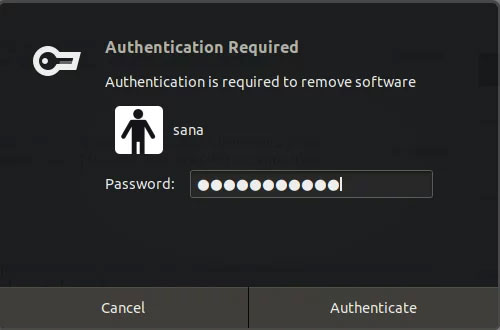
<p style="text-align: justify;">Nhấp vào nút&nbsp;<strong>Remove</strong>&nbsp;khi bạn chắc chắn muốn xóa ứng dụng đã chọn. Khi bạn làm như vậy, hộp thoại xác thực sau sẽ xuất hiện vì chỉ người dùng được ủy quyền mới có thể xóa ứng dụng khỏi Ubuntu:</p>

<figure>
<div style="text-align: justify;"><img alt="Xác nhận đặc quyền của quản trị viên" data-i="4" data-src="https://st.quantrimang.com/photos/image/2023/06/21/go-bo-phan-mem-tren-ubuntu-5.jpg" data-was-processed="true" height="330" src="https://st.quantrimang.com/photos/image/2023/06/21/go-bo-phan-mem-tren-ubuntu-5.jpg" width="500" /></div>

<figcaption>
<div style="text-align: justify;">Xác nhận đặc quyền của quản trị viên</div>
</figcaption>
</figure>

<p style="text-align: justify;">Nhập mật khẩu cho admin hoặc người dùng sudo, sau đó nhấp vào nút&nbsp;<strong>Authenticate.</strong></p>

<p style="text-align: justify;">Phần mềm đã chọn sẽ bị xóa khỏi hệ thống của bạn.</p>

<h2 style="text-align: justify;">Gỡ cài đặt ứng dụng thông qua dòng lệnh</h2>

<p style="text-align: justify;">Bạn có thể xóa phần mềm đã cài đặt khỏi hệ thống của mình thông qua các lệnh&nbsp;<strong>apt-get remove</strong>&nbsp;và&nbsp;<strong>apt-get purge</strong>&nbsp;dưới dạng sudo. Nhưng trước tiên, bạn cần biết chính xác tên gói mà bạn đã cài đặt phần mềm.</p>

<div style="text-align: justify;">&nbsp;</div>

<p style="text-align: justify;">Lệnh sau sẽ liệt kê tất cả các gói được cài đặt trên hệ thống của bạn:</p>

<pre id="pre0">
<code>$ dpkg --list</code></pre>

<p style="text-align: justify;">Bạn có thể muốn sao chép tên gói chính xác, chọn nó, bấm chuột phải, sau đó sao chép nó từ danh sách dpkg để sử dụng tiếp.</p>

<h3 style="text-align: justify;">Sử dụng lệnh apt-get remove</h3>

<p style="text-align: justify;">Lệnh apt-get remove sẽ xóa phần mềm khỏi hệ thống của bạn nhưng vẫn giữ các file cấu hình cũng như mọi plugin và cài đặt mà bạn có thể đã cài đặt sau này. Điều này giúp giữ nguyên cài đặt khi bạn muốn cài đặt lại phần mềm.</p>

<p style="text-align: justify;">Chạy lệnh sau dưới dạng sudo để gỡ bỏ phần mềm:</p>

<pre id="pre1">
<code>$ sudo apt-get remove package-name</code></pre>

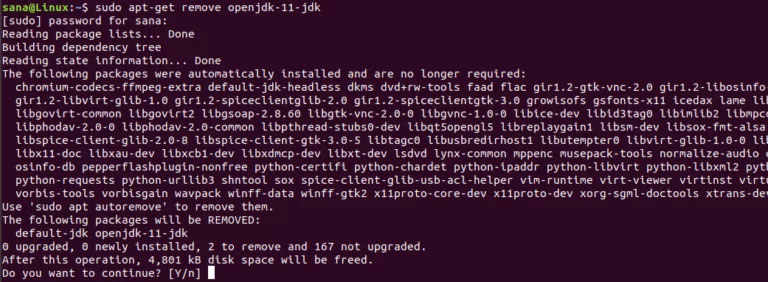
<p style="text-align: justify;">Bạn sẽ được hỏi mật khẩu cho sudo và cung cấp thông tin về những gì sẽ bị xóa khỏi hệ thống.</p>

<p style="text-align: justify;">Ví dụ này sẽ xóa gói OpenJDK có tên “openjdk-11-jdk” khỏi hệ thống.</p>

<figure>
<div style="text-align: justify;"><img alt="Gỡ cài đặt gói Ubuntu bằng apt" data-i="5" data-src="https://st.quantrimang.com/photos/image/2023/06/21/go-bo-phan-mem-tren-ubuntu-6.jpg" data-was-processed="true" height="282" src="https://st.quantrimang.com/photos/image/2023/06/21/go-bo-phan-mem-tren-ubuntu-6.jpg" width="768" /></div>

<figcaption>
<div style="text-align: justify;">Gỡ cài đặt gói Ubuntu bằng apt</div>
</figcaption>
</figure>

<p style="text-align: justify;">Hệ thống cũng sẽ đưa ra tùy chọn&nbsp;<strong>y/n</strong>&nbsp;để xác nhận lại quy trình gỡ cài đặt. Khi bạn nhấp vào&nbsp;<strong>Y</strong>, quá trình sẽ bắt đầu và phần mềm sẽ bị xóa khỏi hệ thống của bạn.</p>

<h3 style="text-align: justify;">Sử dụng lệnh apt-get purge</h3>

<p style="text-align: justify;">Nếu bạn muốn xóa hoàn toàn một ứng dụng khỏi hệ thống của mình, đồng thời xóa mọi cài đặt được cá nhân hóa, tốt nhất bạn nên sử dụng lệnh apt-get purge.</p>

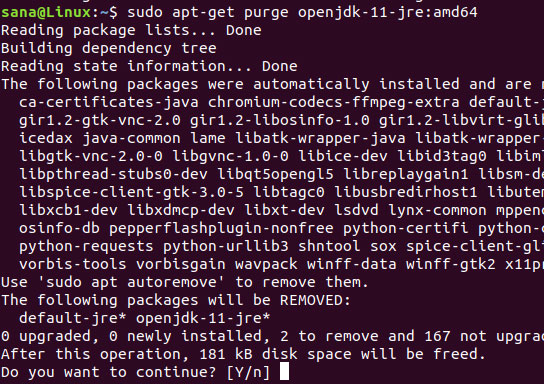
<p style="text-align: justify;">Ví dụ này sẽ xóa gói OpenJDK có tên “openjdk-11-jdk:amd64” khỏi hệ thống.</p>

<p style="text-align: justify;">Chạy lệnh sau dưới dạng sudo để gỡ bỏ phần mềm:</p>

<pre id="pre2">
<code>$ sudo apt-get purge package-name</code></pre>

<p style="text-align: justify;">Bạn sẽ được hỏi mật khẩu cho sudo và cung cấp thông tin về những gì sẽ bị xóa khỏi hệ thống.</p>

<figure>
<div style="text-align: justify;"><img alt="Xóa hoàn toàn ứng dụng bằng apt-get purge" data-i="6" data-src="https://st.quantrimang.com/photos/image/2023/06/21/go-bo-phan-mem-tren-ubuntu-7.jpg" data-was-processed="true" height="384" src="https://st.quantrimang.com/photos/image/2023/06/21/go-bo-phan-mem-tren-ubuntu-7.jpg" width="544" /></div>

<figcaption>
<div style="text-align: justify;">Xóa hoàn toàn ứng dụng bằng apt-get purge</div>
</figcaption>
</figure>

<p style="text-align: justify;">Hệ thống cũng sẽ đưa ra tùy chọn y/n để xác nhận lại quy trình gỡ cài đặt. Khi bạn nhấp vào&nbsp;<strong>Y</strong>, quá trình sẽ bắt đầu và phần mềm sẽ bị xóa khỏi hệ thống của bạn.</p>

<div style="text-align: justify;">&nbsp;</div>
		</div>
				<div id="author">
						<p>
				<strong>Nguồn tin:</strong>
				Quantrimang.com:
			</p>
		</div>
	</div>
	<div id="footer" class="clearfix">
		<div id="url">
			<strong>URL của bản tin này: </strong><a href="https://www.nguoicodonvn2008.info/vi/news/savefile/kien-thuc-may-tinh/huong-dan-go-cai-dat-phan-mem-tren-ubuntu-8706.html" title="Hướng dẫn gỡ cài đặt phần mềm trên Ubuntu">https://www.nguoicodonvn2008.info/vi/news/savefile/kien-thuc-may-tinh/huong-dan-go-cai-dat-phan-mem-tren-ubuntu-8706.html</a>

		</div>
		<div class="clear"></div>
		<div class="copyright">
			&copy; .&#x3A; Nguoicodonvn2008.info - Cõi lòng người cô đơn &#x3A;.
		</div>
		<div id="contact">
			<a href="mailto:admin@nguoicodonvn2008.info">admin@nguoicodonvn2008.info</a>
		</div>
	</div>
</div>
        <div id="timeoutsess" class="chromeframe">
            Bạn đã không sử dụng Site, <a onclick="timeoutsesscancel();" href="https://www.nguoicodonvn2008.info/#">Bấm vào đây để duy trì trạng thái đăng nhập</a>. Thời gian chờ: <span id="secField"> 60 </span> giây
        </div>
        <div id="openidResult" class="nv-alert" style="display:none"></div>
        <div id="openidBt" data-result="" data-redirect=""></div>
		</script>
		<div class="car-top">
  <span><img src="https://www.nguoicodonvn2008.info/themes/default/images/car.png" alt=""></span>
</div>
<div id="run_cronjobs" style="visibility:hidden;display:none;"><img alt="cron" src="/index.php?second=cronjobs&amp;p=d790Dof1" width="1" height="1" /></div>
<script src="https://www.nguoicodonvn2008.info/assets/js/jquery/jquery.min.js"></script>
<script>var nv_base_siteurl="/",nv_lang_data="vi",nv_lang_interface="vi",nv_name_variable="nv",nv_fc_variable="op",nv_lang_variable="language",nv_module_name="news",nv_func_name="savefile",nv_is_user=0, nv_my_ofs=-4,nv_my_abbr="EDT",nv_cookie_prefix="nv4c_e856T",nv_check_pass_mstime=1738000,nv_area_admin=0,nv_safemode=0,theme_responsive=0,nv_recaptcha_ver=2,nv_recaptcha_sitekey="",nv_recaptcha_type="image",XSSsanitize=1;</script>
<script src="https://www.nguoicodonvn2008.info/assets/js/language/vi.js"></script>
<script src="https://www.nguoicodonvn2008.info/assets/js/DOMPurify/purify3.js"></script>
<script src="https://www.nguoicodonvn2008.info/assets/js/global.js"></script>
<script src="https://www.nguoicodonvn2008.info/assets/js/site.js"></script>
<script src="https://www.nguoicodonvn2008.info/themes/default/js/news.js"></script>
<script src="https://www.nguoicodonvn2008.info/themes/default/js/main.js"></script>
<script src="https://www.nguoicodonvn2008.info/themes/default/js/custom.js"></script>
<script type="application/ld+json">
        {
            "@context": "https://schema.org",
            "@type": "Organization",
            "url": "https://www.nguoicodonvn2008.info",
            "logo": "https://www.nguoicodonvn2008.info/uploads/angel.gif"
        }
        </script>
<script src="https://www.nguoicodonvn2008.info/themes/default/js/bootstrap.min.js"></script>
<script type="text/javascript">
var $scrolltop = $('.car-top');
$scrolltop.on('click', function () {
    $('html,body').animate({
        scrollTop: 0
    }, 800);
    $(this).addClass("car-run");
    setTimeout(function(){ $scrolltop.removeClass('car-run');}, 1000);
    return false;
});
$(window).on('scroll', function ()
{ 
    if($(window).scrollTop() >= 200)
    {
        $scrolltop.addClass("show");
        $scrolltop.addClass("car-down");
    }
    else
    {
       $scrolltop.removeClass("show");
       setTimeout(function(){ $scrolltop.removeClass('car-down');}, 300);
    }
});
</script>
</body>
</html>