<!DOCTYPE html>
    <html lang="vi" xmlns="http://www.w3.org/1999/xhtml" prefix="og: http://ogp.me/ns#">
    <head>
<title>Hướng dẫn cài đặt Dota Underlords trên máy tính</title>
<meta name="description" content="Hướng dẫn cài đặt Dota Underlords trên máy tính - Savefile - Tin Tức -...">
<meta name="author" content=".: Nguoicodonvn2008.info - Cõi lòng người cô đơn :.">
<meta name="copyright" content=".: Nguoicodonvn2008.info - Cõi lòng người cô đơn :. [admin@nguoicodonvn2008.info]">
<meta name="robots" content="index, archive, follow, noodp">
<meta name="googlebot" content="index,archive,follow,noodp">
<meta name="msnbot" content="all,index,follow">
<meta name="generator" content="NukeViet v4.5">
<meta http-equiv="Content-Type" content="text/html; charset=utf-8">
<meta property="og:title" content="Hướng dẫn cài đặt Dota Underlords trên máy tính">
<meta property="og:type" content="website">
<meta property="og:description" content="Savefile - Tin Tức - https&#x3A;&#x002F;&#x002F;www.nguoicodonvn2008.info&#x002F;vi&#x002F;news&#x002F;savefile&#x002F;kien-thuc-may-tinh&#x002F;huong-dan-cai-dat-dota-underlords-tren-may-tinh-113.html">
<meta property="og:site_name" content=".&#x3A; Nguoicodonvn2008.info - Cõi lòng người cô đơn &#x3A;.">
<meta property="og:url" content="https://www.nguoicodonvn2008.info/vi/news/savefile/kien-thuc-may-tinh/huong-dan-cai-dat-dota-underlords-tren-may-tinh-113.html">
<link rel="shortcut icon" href="https://www.nguoicodonvn2008.info/favicon.ico">
<link rel="canonical" href="https://www.nguoicodonvn2008.info/vi/news/savefile/kien-thuc-may-tinh/huong-dan-cai-dat-dota-underlords-tren-may-tinh-113.html">
<link rel="alternate" href="https://www.nguoicodonvn2008.info/vi/news/rss/" title="Tin Tức" type="application/rss+xml">
<link rel="alternate" href="https://www.nguoicodonvn2008.info/vi/news/rss/karaoke-dual/" title="Tin Tức - Karaoke Dual" type="application/rss+xml">
<link rel="alternate" href="https://www.nguoicodonvn2008.info/vi/news/rss/nhac-tre/" title="Tin Tức - Nhạc trẻ" type="application/rss+xml">
<link rel="alternate" href="https://www.nguoicodonvn2008.info/vi/news/rss/tru-tinh/" title="Tin Tức - Trữ tình" type="application/rss+xml">
<link rel="alternate" href="https://www.nguoicodonvn2008.info/vi/news/rss/nuoc-ngoai/" title="Tin Tức - Nước ngoài" type="application/rss+xml">
<link rel="alternate" href="https://www.nguoicodonvn2008.info/vi/news/rss/remix/" title="Tin Tức - Remix" type="application/rss+xml">
<link rel="alternate" href="https://www.nguoicodonvn2008.info/vi/news/rss/tam-su-tinh-yeu/" title="Tin Tức - Tâm sự tình yêu" type="application/rss+xml">
<link rel="alternate" href="https://www.nguoicodonvn2008.info/vi/news/rss/tho-suu-tam/" title="Tin Tức - Thơ sưu tầm" type="application/rss+xml">
<link rel="alternate" href="https://www.nguoicodonvn2008.info/vi/news/rss/cuoc-song/" title="Tin Tức - Cuộc sống" type="application/rss+xml">
<link rel="alternate" href="https://www.nguoicodonvn2008.info/vi/news/rss/phan-mem/" title="Tin Tức - Phần mềm" type="application/rss+xml">
<link rel="alternate" href="https://www.nguoicodonvn2008.info/vi/news/rss/kien-thuc-may-tinh/" title="Tin Tức - Kiến thức máy tính" type="application/rss+xml">
<link rel="alternate" href="https://www.nguoicodonvn2008.info/vi/news/rss/hoc-tap/" title="Tin Tức - Học tập" type="application/rss+xml">
<link rel="alternate" href="https://www.nguoicodonvn2008.info/vi/news/rss/tai-lieu/" title="Tin Tức - Tài liệu" type="application/rss+xml">
<link rel="alternate" href="https://www.nguoicodonvn2008.info/vi/news/rss/de-thi/" title="Tin Tức - Đề thi" type="application/rss+xml">
<link rel="preload" as="style" href="https://www.nguoicodonvn2008.info/assets/css/font-awesome.min.css" type="text/css">
<link rel="preload" as="style" href="https://www.nguoicodonvn2008.info/themes/default/css/bootstrap.non-responsive.css" type="text/css">
<link rel="preload" as="style" href="https://www.nguoicodonvn2008.info/themes/default/css/style.css" type="text/css">
<link rel="preload" as="style" href="https://www.nguoicodonvn2008.info/themes/default/css/style.non-responsive.css" type="text/css">
<link rel="preload" as="style" href="https://www.nguoicodonvn2008.info/themes/default/css/news.css" type="text/css">
<link rel="preload" as="style" href="https://www.nguoicodonvn2008.info/themes/default/css/custom.css" type="text/css">
<link rel="preload" as="script" href="https://www.nguoicodonvn2008.info/assets/js/jquery/jquery.min.js" type="text/javascript">
<link rel="preload" as="script" href="https://www.nguoicodonvn2008.info/assets/js/language/vi.js" type="text/javascript">
<link rel="preload" as="script" href="https://www.nguoicodonvn2008.info/assets/js/DOMPurify/purify3.js" type="text/javascript">
<link rel="preload" as="script" href="https://www.nguoicodonvn2008.info/assets/js/global.js" type="text/javascript">
<link rel="preload" as="script" href="https://www.nguoicodonvn2008.info/assets/js/site.js" type="text/javascript">
<link rel="preload" as="script" href="https://www.nguoicodonvn2008.info/themes/default/js/news.js" type="text/javascript">
<link rel="preload" as="script" href="https://www.nguoicodonvn2008.info/themes/default/js/main.js" type="text/javascript">
<link rel="preload" as="script" href="https://www.nguoicodonvn2008.info/themes/default/js/custom.js" type="text/javascript">
<link rel="preload" as="script" href="https://www.nguoicodonvn2008.info/themes/default/js/bootstrap.min.js" type="text/javascript">
<link rel="stylesheet" href="https://www.nguoicodonvn2008.info/assets/css/font-awesome.min.css">
<link rel="stylesheet" href="https://www.nguoicodonvn2008.info/themes/default/css/bootstrap.non-responsive.css">
<link rel="stylesheet" href="https://www.nguoicodonvn2008.info/themes/default/css/style.css">
<link rel="stylesheet" href="https://www.nguoicodonvn2008.info/themes/default/css/style.non-responsive.css">
<link rel="StyleSheet" href="https://www.nguoicodonvn2008.info/themes/default/css/news.css">
<link rel="stylesheet" href="https://www.nguoicodonvn2008.info/themes/default/css/custom.css">
<style type="text/css">
	body{background: #fff;}
</style>
    </head>
    <body>
<div id="print">
	<div id="hd_print">
		<h2 class="pull-left">.&#x3A; Nguoicodonvn2008.info - Cõi lòng người cô đơn &#x3A;.</h2>
		<p class="pull-right"><a title=".&#x3A; Nguoicodonvn2008.info - Cõi lòng người cô đơn &#x3A;." href="https://www.nguoicodonvn2008.info/">https://www.nguoicodonvn2008.info</a></p>
	</div>
	<div class="clear"></div>
	<hr />
	<div id="content">
		<h1>Hướng dẫn cài đặt Dota Underlords trên máy tính</h1>
		<ul class="list-inline">
			<li>Thứ ba - 18/06/2019 01:29</li>
			<li class="hidden-print txtrequired"><em class="fa fa-print">&nbsp;</em><a title="In ra" href="javascript:;" onclick="window.print()">In ra</a></li>
			<li class="hidden-print txtrequired"><em class="fa fa-power-off">&nbsp;</em><a title="Đóng cửa sổ này" href="javascript:;" onclick="window.close()">Đóng cửa sổ này</a></li>
		</ul>
		<div class="clear"></div>
		<div id="hometext">
		</div>
				<div class="imghome">
			<img alt="Hướng dẫn cài đặt Dota Underlords trên máy tính" src="https://st.quantrimang.com/photos/image/2019/06/18/Dota-Underlords-4.jpg" width="460" class="img-thumbnail" />
		</div>
		<div class="clear"></div>
		<div id="bodytext" class="clearfix">
			<p>Dota Underlords là một tựa game mới ra mắt trên nền Dota 2 của Valve và đang trong giai đoạn beta thử nghiệm trước mắt. Dota Underlords có lối chơi xếp cờ giống Dota Auto Chess, bạn chỉ cần&nbsp;</p>

<p>Cách tải và chơi Dota Underlords trên máy tính khá đặc biệt, tuy mới chỉ trong giai đoạn thử nghiệm nhưng tựa game này đã nhận được nhiều đánh giá tích cực từ game thủ. Xem hướng dẫn dưới đây để tải Dota Underlords trên PC nhé.Cách cài Dota Underlords trên PC</p>

<p>Để tải Dota Underlords trong thời gian hiện tại, bạn sẽ phải có Battle Pass trước để tham gia giai đoạn thử nghiệm sớm. Trong thời gian sắp tới thì giai đoạn thử nghiệm sẽ được mở hoàn toàn miễn phí ngay trong client của Dota 2. Bạn có thể log vào Dota 2 trước để tải Dota Underlords về Steam của mình.</p>

<p><strong>Bước 1:</strong>&nbsp;Đầu tiên hãy vào thư viện game của bạn trong Steam và mở Dota 2 lên, nếu chưa có thì bạn phải tải Dota 2 về.</p>

<p><img alt="Dota 2" data-i="0" data-src="https://st.quantrimang.com/photos/image/2019/06/18/Dota-Underlords-3.jpg" data-was-processed="true" height="350" src="https://st.quantrimang.com/photos/image/2019/06/18/Dota-Underlords-3.jpg" width="640" /></p>

<p>Trong giao diện chính của Dota 2, bạn phải mua The International Battle Pass 2019. Bấm Purchase Battle Pass để mua.</p>

<p><img alt="Mua Battle Pass" data-i="1" data-src="https://st.quantrimang.com/photos/image/2019/06/18/Dota-Underlords-0.jpg" data-was-processed="true" height="360" src="https://st.quantrimang.com/photos/image/2019/06/18/Dota-Underlords-0.jpg" width="640" /></p>

<p>Khi đã mua Battle Pass bạn sẽ thấy xuất hiện nút Add to Steam Library, bấm vào đó để cài Dota Underlords.</p>

<p><img alt="Add Dota Underlords " data-i="2" data-src="https://st.quantrimang.com/photos/image/2019/06/18/Dota-Underlords-1.jpg" data-was-processed="true" height="360" src="https://st.quantrimang.com/photos/image/2019/06/18/Dota-Underlords-1.jpg" width="640" /></p>

<p>Nếu thấy thông báo như ở dưới hình này là bạn đã thành công.</p>

<p><img alt="Thêm Dota Underlords thành công" data-i="3" data-src="https://st.quantrimang.com/photos/image/2019/06/18/Dota-Underlords-2.jpg" data-was-processed="true" height="362" src="https://st.quantrimang.com/photos/image/2019/06/18/Dota-Underlords-2.jpg" width="640" /></p>

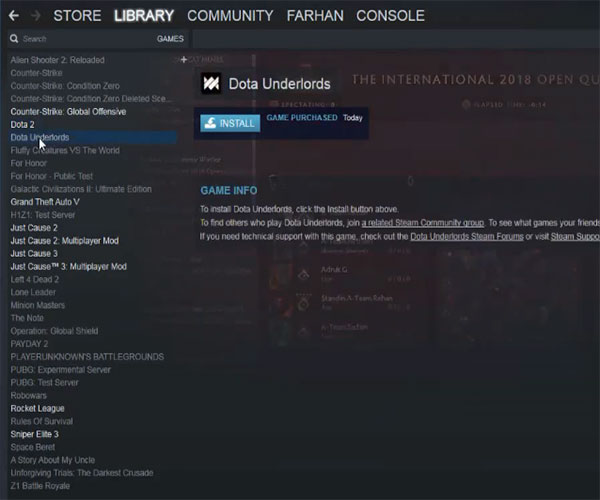
<p>Sau đó bạn vào&nbsp;<strong>Library</strong>&nbsp;trên&nbsp;<strong>Steam</strong>&nbsp;của mình và bấm&nbsp;<strong>Install</strong>&nbsp;để cài đặt và chơi Dota Underlords trên máy tính.</p>

<p><img alt="Cài Dota Underlords" data-i="4" data-src="https://st.quantrimang.com/photos/image/2019/06/18/Dota-Underlords-4.jpg" data-was-processed="true" height="500" src="https://st.quantrimang.com/photos/image/2019/06/18/Dota-Underlords-4.jpg" width="600" /></p>

<p>Dự kiến đối với game thủ không có Battle Pass, Valve cũng sẽ mở cửa miễn phí ngay trong thời gian sắp tới. Đối với bản iOS và Android, mọi người cũng phải chờ trong thời gian sắp tới để Valve ra mắt chung với bản PC miễn phí trong thời gian sắp tới (sẽ được cập nhật khi game chính thức open).</p>

<p>Khi đã chính thức ra mắt, Dota Underlords sẽ được chơi miễn phí và liên kết nhiều hệ máy với nhau (PC, iOS, Android). Đồng nghĩa với việc bạn có thể chơi chung với nhau ở cả chế độ thường và xếp hạng.</p>

<p>Như vậy với hướng dẫn tải Dota Underlords ở trên bài viết này, bạn có thể trải nghiệm sớm phiên bản thử nghiệm của Dota Underlords trên máy tính của mình rồi.</p>
		</div>
				<div id="author">
						<p>
				<strong>Nguồn tin:</strong>
				Quantrimang.com
			</p>
		</div>
	</div>
	<div id="footer" class="clearfix">
		<div id="url">
			<strong>URL của bản tin này: </strong><a href="https://www.nguoicodonvn2008.info/vi/news/savefile/kien-thuc-may-tinh/huong-dan-cai-dat-dota-underlords-tren-may-tinh-113.html" title="Hướng dẫn cài đặt Dota Underlords trên máy tính">https://www.nguoicodonvn2008.info/vi/news/savefile/kien-thuc-may-tinh/huong-dan-cai-dat-dota-underlords-tren-may-tinh-113.html</a>

		</div>
		<div class="clear"></div>
		<div class="copyright">
			&copy; .&#x3A; Nguoicodonvn2008.info - Cõi lòng người cô đơn &#x3A;.
		</div>
		<div id="contact">
			<a href="mailto:admin@nguoicodonvn2008.info">admin@nguoicodonvn2008.info</a>
		</div>
	</div>
</div>
        <div id="timeoutsess" class="chromeframe">
            Bạn đã không sử dụng Site, <a onclick="timeoutsesscancel();" href="https://www.nguoicodonvn2008.info/#">Bấm vào đây để duy trì trạng thái đăng nhập</a>. Thời gian chờ: <span id="secField"> 60 </span> giây
        </div>
        <div id="openidResult" class="nv-alert" style="display:none"></div>
        <div id="openidBt" data-result="" data-redirect=""></div>
		</script>
		<div class="car-top">
  <span><img src="https://www.nguoicodonvn2008.info/themes/default/images/car.png" alt=""></span>
</div>
<script src="https://www.nguoicodonvn2008.info/assets/js/jquery/jquery.min.js"></script>
<script>var nv_base_siteurl="/",nv_lang_data="vi",nv_lang_interface="vi",nv_name_variable="nv",nv_fc_variable="op",nv_lang_variable="language",nv_module_name="news",nv_func_name="savefile",nv_is_user=0, nv_my_ofs=-4,nv_my_abbr="EDT",nv_cookie_prefix="nv4c_e856T",nv_check_pass_mstime=1738000,nv_area_admin=0,nv_safemode=0,theme_responsive=0,nv_recaptcha_ver=2,nv_recaptcha_sitekey="",nv_recaptcha_type="image",XSSsanitize=1;</script>
<script src="https://www.nguoicodonvn2008.info/assets/js/language/vi.js"></script>
<script src="https://www.nguoicodonvn2008.info/assets/js/DOMPurify/purify3.js"></script>
<script src="https://www.nguoicodonvn2008.info/assets/js/global.js"></script>
<script src="https://www.nguoicodonvn2008.info/assets/js/site.js"></script>
<script src="https://www.nguoicodonvn2008.info/themes/default/js/news.js"></script>
<script src="https://www.nguoicodonvn2008.info/themes/default/js/main.js"></script>
<script src="https://www.nguoicodonvn2008.info/themes/default/js/custom.js"></script>
<script type="application/ld+json">
        {
            "@context": "https://schema.org",
            "@type": "Organization",
            "url": "https://www.nguoicodonvn2008.info",
            "logo": "https://www.nguoicodonvn2008.info/uploads/angel.gif"
        }
        </script>
<script src="https://www.nguoicodonvn2008.info/themes/default/js/bootstrap.min.js"></script>
<script type="text/javascript">
var $scrolltop = $('.car-top');
$scrolltop.on('click', function () {
    $('html,body').animate({
        scrollTop: 0
    }, 800);
    $(this).addClass("car-run");
    setTimeout(function(){ $scrolltop.removeClass('car-run');}, 1000);
    return false;
});
$(window).on('scroll', function ()
{ 
    if($(window).scrollTop() >= 200)
    {
        $scrolltop.addClass("show");
        $scrolltop.addClass("car-down");
    }
    else
    {
       $scrolltop.removeClass("show");
       setTimeout(function(){ $scrolltop.removeClass('car-down');}, 300);
    }
});
</script>
</body>
</html>