<!DOCTYPE html>
    <html lang="vi" xmlns="http://www.w3.org/1999/xhtml" prefix="og: http://ogp.me/ns#">
    <head>
<title>Hiển thị thông tin BIOS trên Windows 10 bằng Command Prompt</title>
<meta name="description" content="Hiển thị thông tin BIOS trên Windows 10 bằng Command Prompt - Savefile - Tin Tức -...">
<meta name="author" content=".: Nguoicodonvn2008.info - Cõi lòng người cô đơn :.">
<meta name="copyright" content=".: Nguoicodonvn2008.info - Cõi lòng người cô đơn :. [admin@nguoicodonvn2008.info]">
<meta name="robots" content="index, archive, follow, noodp">
<meta name="googlebot" content="index,archive,follow,noodp">
<meta name="msnbot" content="all,index,follow">
<meta name="generator" content="NukeViet v4.5">
<meta http-equiv="Content-Type" content="text/html; charset=utf-8">
<meta property="og:title" content="Hiển thị thông tin BIOS trên Windows 10 bằng Command Prompt">
<meta property="og:type" content="website">
<meta property="og:description" content="Savefile - Tin Tức - https&#x3A;&#x002F;&#x002F;www.nguoicodonvn2008.info&#x002F;vi&#x002F;news&#x002F;savefile&#x002F;kien-thuc-may-tinh&#x002F;hien-thi-thong-tin-bios-tren-windows-10-bang-command-prompt-7618.html">
<meta property="og:site_name" content=".&#x3A; Nguoicodonvn2008.info - Cõi lòng người cô đơn &#x3A;.">
<meta property="og:url" content="https://www.nguoicodonvn2008.info/vi/news/savefile/kien-thuc-may-tinh/hien-thi-thong-tin-bios-tren-windows-10-bang-command-prompt-7618.html">
<link rel="shortcut icon" href="https://www.nguoicodonvn2008.info/favicon.ico">
<link rel="canonical" href="https://www.nguoicodonvn2008.info/vi/news/savefile/kien-thuc-may-tinh/hien-thi-thong-tin-bios-tren-windows-10-bang-command-prompt-7618.html">
<link rel="alternate" href="https://www.nguoicodonvn2008.info/vi/news/rss/" title="Tin Tức" type="application/rss+xml">
<link rel="alternate" href="https://www.nguoicodonvn2008.info/vi/news/rss/karaoke-dual/" title="Tin Tức - Karaoke Dual" type="application/rss+xml">
<link rel="alternate" href="https://www.nguoicodonvn2008.info/vi/news/rss/nhac-tre/" title="Tin Tức - Nhạc trẻ" type="application/rss+xml">
<link rel="alternate" href="https://www.nguoicodonvn2008.info/vi/news/rss/tru-tinh/" title="Tin Tức - Trữ tình" type="application/rss+xml">
<link rel="alternate" href="https://www.nguoicodonvn2008.info/vi/news/rss/nuoc-ngoai/" title="Tin Tức - Nước ngoài" type="application/rss+xml">
<link rel="alternate" href="https://www.nguoicodonvn2008.info/vi/news/rss/remix/" title="Tin Tức - Remix" type="application/rss+xml">
<link rel="alternate" href="https://www.nguoicodonvn2008.info/vi/news/rss/tam-su-tinh-yeu/" title="Tin Tức - Tâm sự tình yêu" type="application/rss+xml">
<link rel="alternate" href="https://www.nguoicodonvn2008.info/vi/news/rss/tho-suu-tam/" title="Tin Tức - Thơ sưu tầm" type="application/rss+xml">
<link rel="alternate" href="https://www.nguoicodonvn2008.info/vi/news/rss/cuoc-song/" title="Tin Tức - Cuộc sống" type="application/rss+xml">
<link rel="alternate" href="https://www.nguoicodonvn2008.info/vi/news/rss/phan-mem/" title="Tin Tức - Phần mềm" type="application/rss+xml">
<link rel="alternate" href="https://www.nguoicodonvn2008.info/vi/news/rss/kien-thuc-may-tinh/" title="Tin Tức - Kiến thức máy tính" type="application/rss+xml">
<link rel="alternate" href="https://www.nguoicodonvn2008.info/vi/news/rss/hoc-tap/" title="Tin Tức - Học tập" type="application/rss+xml">
<link rel="alternate" href="https://www.nguoicodonvn2008.info/vi/news/rss/tai-lieu/" title="Tin Tức - Tài liệu" type="application/rss+xml">
<link rel="alternate" href="https://www.nguoicodonvn2008.info/vi/news/rss/de-thi/" title="Tin Tức - Đề thi" type="application/rss+xml">
<link rel="preload" as="style" href="https://www.nguoicodonvn2008.info/assets/css/font-awesome.min.css" type="text/css">
<link rel="preload" as="style" href="https://www.nguoicodonvn2008.info/themes/default/css/bootstrap.non-responsive.css" type="text/css">
<link rel="preload" as="style" href="https://www.nguoicodonvn2008.info/themes/default/css/style.css" type="text/css">
<link rel="preload" as="style" href="https://www.nguoicodonvn2008.info/themes/default/css/style.non-responsive.css" type="text/css">
<link rel="preload" as="style" href="https://www.nguoicodonvn2008.info/themes/default/css/news.css" type="text/css">
<link rel="preload" as="style" href="https://www.nguoicodonvn2008.info/themes/default/css/custom.css" type="text/css">
<link rel="preload" as="script" href="https://www.nguoicodonvn2008.info/assets/js/jquery/jquery.min.js" type="text/javascript">
<link rel="preload" as="script" href="https://www.nguoicodonvn2008.info/assets/js/language/vi.js" type="text/javascript">
<link rel="preload" as="script" href="https://www.nguoicodonvn2008.info/assets/js/DOMPurify/purify3.js" type="text/javascript">
<link rel="preload" as="script" href="https://www.nguoicodonvn2008.info/assets/js/global.js" type="text/javascript">
<link rel="preload" as="script" href="https://www.nguoicodonvn2008.info/assets/js/site.js" type="text/javascript">
<link rel="preload" as="script" href="https://www.nguoicodonvn2008.info/themes/default/js/news.js" type="text/javascript">
<link rel="preload" as="script" href="https://www.nguoicodonvn2008.info/themes/default/js/main.js" type="text/javascript">
<link rel="preload" as="script" href="https://www.nguoicodonvn2008.info/themes/default/js/custom.js" type="text/javascript">
<link rel="preload" as="script" href="https://www.nguoicodonvn2008.info/themes/default/js/bootstrap.min.js" type="text/javascript">
<link rel="stylesheet" href="https://www.nguoicodonvn2008.info/assets/css/font-awesome.min.css">
<link rel="stylesheet" href="https://www.nguoicodonvn2008.info/themes/default/css/bootstrap.non-responsive.css">
<link rel="stylesheet" href="https://www.nguoicodonvn2008.info/themes/default/css/style.css">
<link rel="stylesheet" href="https://www.nguoicodonvn2008.info/themes/default/css/style.non-responsive.css">
<link rel="StyleSheet" href="https://www.nguoicodonvn2008.info/themes/default/css/news.css">
<link rel="stylesheet" href="https://www.nguoicodonvn2008.info/themes/default/css/custom.css">
<style type="text/css">
	body{background: #fff;}
</style>
    </head>
    <body>
<div id="print">
	<div id="hd_print">
		<h2 class="pull-left">.&#x3A; Nguoicodonvn2008.info - Cõi lòng người cô đơn &#x3A;.</h2>
		<p class="pull-right"><a title=".&#x3A; Nguoicodonvn2008.info - Cõi lòng người cô đơn &#x3A;." href="https://www.nguoicodonvn2008.info/">https://www.nguoicodonvn2008.info</a></p>
	</div>
	<div class="clear"></div>
	<hr />
	<div id="content">
		<h1>Hiển thị thông tin BIOS trên Windows 10 bằng Command Prompt</h1>
		<ul class="list-inline">
			<li>Thứ hai - 09/10/2023 09:58</li>
			<li class="hidden-print txtrequired"><em class="fa fa-print">&nbsp;</em><a title="In ra" href="javascript:;" onclick="window.print()">In ra</a></li>
			<li class="hidden-print txtrequired"><em class="fa fa-power-off">&nbsp;</em><a title="Đóng cửa sổ này" href="javascript:;" onclick="window.close()">Đóng cửa sổ này</a></li>
		</ul>
		<div class="clear"></div>
		<div id="hometext">
		</div>
				<div class="imghome">
			<img alt="Hiển thị thông tin BIOS trên Windows 10 bằng Command Prompt" src="https://st.quantrimang.com/photos/image/2023/10/09/hien-thi-thong-tin-bios-tren-windows-10-bang-command-prompt-2.jpg" width="460" class="img-thumbnail" />
		</div>
		<div class="clear"></div>
		<div id="bodytext" class="clearfix">
			<p style="text-align: justify;">Mỗi máy tính đều có&nbsp;BIOS&nbsp;để khởi động máy tính. Chúng ta có thể cấu hình các cài đặt phần cứng khác nhau trong BIOS. Để&nbsp;truy cập BIOS, nhấn phím&nbsp;<strong>F2, F12</strong>&nbsp;hoặc&nbsp;<strong>DEL</strong>&nbsp;tùy theo nhà sản xuất máy tính.</p>

<p style="text-align: justify;">Theo định nghĩa, Basic Input/ Output System (BIOS) là một tập hợp các hướng dẫn máy tính trong firmware kiểm soát đầu vào và đầu ra của máy tính. Nó có thể được coi là một chuỗi các thuật toán để phần cứng của máy tính hoạt động tương ứng, được điều khiển bởi phần mềm. bộ vi xử lý trong máy tính cũng thực hiện các chức năng của nó với sự trợ giúp của BIOS.</p>

<p style="text-align: justify;">Một số thông tin trong BIOS có giá trị và đôi khi được người dùng cần đến. Điều này bao gồm số sê-ri máy tính, tag asset, phiên bản BIOS, v.v... Vấn đề là người dùng phải&nbsp;khởi động lại máy tínhh để truy cập BIOS. Nó không thể được truy cập trực tiếp từ Windows.</p>

<p style="text-align: justify;">Có một cách để chúng ta có thể trích xuất một số thông tin hữu ích từ BIOS máy tính.</p>

<h2 style="text-align: justify;">Xem thông tin BIOS từ bên trong Windows 10 bằng Command Prompt</h2>

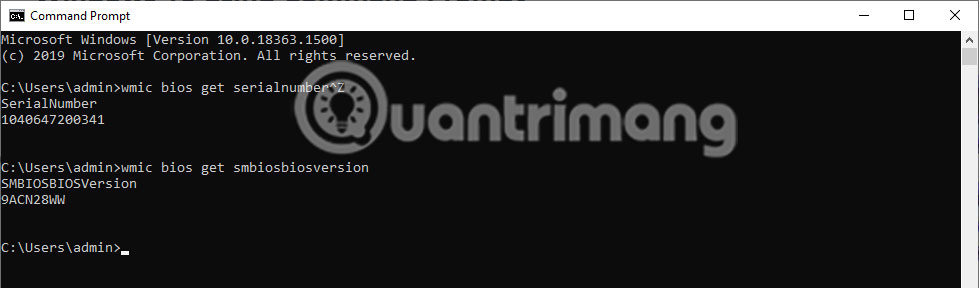
<p style="text-align: justify;">Để chỉ lấy số sê-ri, hãy sử dụng lệnh sau:</p>

<pre id="pre0">
<code>wmic bios get serialnumber</code></pre>

<p style="text-align: justify;"><img alt="Lấy số sê-ri" data-i="0" data-src="https://st.quantrimang.com/photos/image/2023/10/09/hien-thi-thong-tin-bios-tren-windows-10-bang-command-prompt-1.jpg" data-was-processed="true" height="129" src="https://st.quantrimang.com/photos/image/2023/10/09/hien-thi-thong-tin-bios-tren-windows-10-bang-command-prompt-1.jpg" width="650" /></p>

<p style="text-align: justify;">Nếu bạn muốn lấy thông tin phiên bản BIOS, hãy nhập lệnh sau:</p>

<pre id="pre1">
<code>wmic bios get smbiosbiosversion</code></pre>

<p style="text-align: justify;"><img alt="Thông tin phiên bản BIOS" data-i="1" data-src="https://st.quantrimang.com/photos/image/2023/10/09/hien-thi-thong-tin-bios-tren-windows-10-bang-command-prompt-2.jpg" data-was-processed="true" height="191" src="https://st.quantrimang.com/photos/image/2023/10/09/hien-thi-thong-tin-bios-tren-windows-10-bang-command-prompt-2.jpg" width="650" /></p>

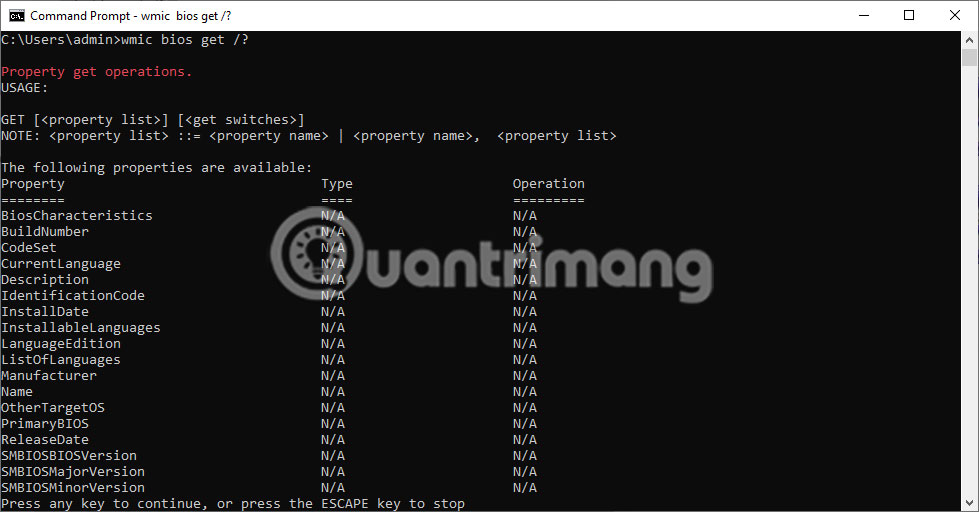
<p style="text-align: justify;">Một số thông tin cá nhân có thể được lấy từ BIOS. Một danh sách được tạo tự động bằng lệnh sau để gợi ý những lệnh bạn có thể nhập để nhận thông tin liên quan:</p>

<pre id="pre2">
<code>wmic bios get /? </code></pre>

<p style="text-align: justify;"><img alt="Một số thông tin cá nhân có thể được lấy từ BIOS" data-i="2" data-src="https://st.quantrimang.com/photos/image/2023/10/09/hien-thi-thong-tin-bios-tren-windows-10-bang-command-prompt-3.jpg" data-was-processed="true" height="340" src="https://st.quantrimang.com/photos/image/2023/10/09/hien-thi-thong-tin-bios-tren-windows-10-bang-command-prompt-3.jpg" width="650" /></p>

<p style="text-align: justify;">Trong hình ảnh hiển thị ở trên, có thể thấy lệnh đã hiển thị danh sách các từ có thể thay thế cho dấu&nbsp;<strong>“/?”</strong>&nbsp;trong lệnh&nbsp;<strong>wmic bios get /?</strong>. Ví dụ, nếu bạn muốn biết trạng thái của máy, chỉ cần nhập lệnh sau:</p>

<pre id="pre3">
<code>wmic bios get status </code></pre>

<p style="text-align: justify;"><img alt="Trạng thái của máy" data-i="3" data-src="https://st.quantrimang.com/photos/image/2023/10/09/hien-thi-thong-tin-bios-tren-windows-10-bang-command-prompt-4.jpg" data-was-processed="true" height="123" src="https://st.quantrimang.com/photos/image/2023/10/09/hien-thi-thong-tin-bios-tren-windows-10-bang-command-prompt-4.jpg" width="650" /></p>

<p style="text-align: justify;">Hơn nữa, một thông tin hữu ích khác có thể thu được là bộ nhớ (RAM) của máy tính. Điều này có thể được lấy từ bên trong Windows Command Prompt bằng lệnh sau:</p>

<pre id="pre4">
<code>wmic memorychip get capacity</code></pre>

<p style="text-align: justify;"><img alt="Bộ nhớ (RAM) của máy tính" data-i="4" data-src="https://st.quantrimang.com/photos/image/2023/10/09/hien-thi-thong-tin-bios-tren-windows-10-bang-command-prompt-5.jpg" data-was-processed="true" height="119" src="https://st.quantrimang.com/photos/image/2023/10/09/hien-thi-thong-tin-bios-tren-windows-10-bang-command-prompt-5.jpg" width="650" /></p>

<p style="text-align: justify;">Thông tin hiển thị sẽ là thông tin của từng thẻ nhớ riêng lẻ và số lượng sẽ được hiển thị theo byte, như ví dụ dưới đây:</p>

<p style="text-align: justify;">Hy vọng phương pháp trên sẽ hữu ích nếu bạn muốn lấy thông tin từ BIOS khi chạy Windows 10 và không muốn khởi động lại máy tính.</p>
		</div>
				<div id="author">
						<p>
				<strong>Nguồn tin:</strong>
				Quantrimang.com
			</p>
		</div>
	</div>
	<div id="footer" class="clearfix">
		<div id="url">
			<strong>URL của bản tin này: </strong><a href="https://www.nguoicodonvn2008.info/vi/news/savefile/kien-thuc-may-tinh/hien-thi-thong-tin-bios-tren-windows-10-bang-command-prompt-7618.html" title="Hiển thị thông tin BIOS trên Windows 10 bằng Command Prompt">https://www.nguoicodonvn2008.info/vi/news/savefile/kien-thuc-may-tinh/hien-thi-thong-tin-bios-tren-windows-10-bang-command-prompt-7618.html</a>

		</div>
		<div class="clear"></div>
		<div class="copyright">
			&copy; .&#x3A; Nguoicodonvn2008.info - Cõi lòng người cô đơn &#x3A;.
		</div>
		<div id="contact">
			<a href="mailto:admin@nguoicodonvn2008.info">admin@nguoicodonvn2008.info</a>
		</div>
	</div>
</div>
        <div id="timeoutsess" class="chromeframe">
            Bạn đã không sử dụng Site, <a onclick="timeoutsesscancel();" href="https://www.nguoicodonvn2008.info/#">Bấm vào đây để duy trì trạng thái đăng nhập</a>. Thời gian chờ: <span id="secField"> 60 </span> giây
        </div>
        <div id="openidResult" class="nv-alert" style="display:none"></div>
        <div id="openidBt" data-result="" data-redirect=""></div>
		</script>
		<div class="car-top">
  <span><img src="https://www.nguoicodonvn2008.info/themes/default/images/car.png" alt=""></span>
</div>
<script src="https://www.nguoicodonvn2008.info/assets/js/jquery/jquery.min.js"></script>
<script>var nv_base_siteurl="/",nv_lang_data="vi",nv_lang_interface="vi",nv_name_variable="nv",nv_fc_variable="op",nv_lang_variable="language",nv_module_name="news",nv_func_name="savefile",nv_is_user=0, nv_my_ofs=-4,nv_my_abbr="EDT",nv_cookie_prefix="nv4c_e856T",nv_check_pass_mstime=1738000,nv_area_admin=0,nv_safemode=0,theme_responsive=0,nv_recaptcha_ver=2,nv_recaptcha_sitekey="",nv_recaptcha_type="image",XSSsanitize=1;</script>
<script src="https://www.nguoicodonvn2008.info/assets/js/language/vi.js"></script>
<script src="https://www.nguoicodonvn2008.info/assets/js/DOMPurify/purify3.js"></script>
<script src="https://www.nguoicodonvn2008.info/assets/js/global.js"></script>
<script src="https://www.nguoicodonvn2008.info/assets/js/site.js"></script>
<script src="https://www.nguoicodonvn2008.info/themes/default/js/news.js"></script>
<script src="https://www.nguoicodonvn2008.info/themes/default/js/main.js"></script>
<script src="https://www.nguoicodonvn2008.info/themes/default/js/custom.js"></script>
<script type="application/ld+json">
        {
            "@context": "https://schema.org",
            "@type": "Organization",
            "url": "https://www.nguoicodonvn2008.info",
            "logo": "https://www.nguoicodonvn2008.info/uploads/angel.gif"
        }
        </script>
<script src="https://www.nguoicodonvn2008.info/themes/default/js/bootstrap.min.js"></script>
<script type="text/javascript">
var $scrolltop = $('.car-top');
$scrolltop.on('click', function () {
    $('html,body').animate({
        scrollTop: 0
    }, 800);
    $(this).addClass("car-run");
    setTimeout(function(){ $scrolltop.removeClass('car-run');}, 1000);
    return false;
});
$(window).on('scroll', function ()
{ 
    if($(window).scrollTop() >= 200)
    {
        $scrolltop.addClass("show");
        $scrolltop.addClass("car-down");
    }
    else
    {
       $scrolltop.removeClass("show");
       setTimeout(function(){ $scrolltop.removeClass('car-down');}, 300);
    }
});
</script>
</body>
</html>