<!DOCTYPE html>
    <html lang="vi" xmlns="http://www.w3.org/1999/xhtml" prefix="og: http://ogp.me/ns#">
    <head>
<title>Hãy ngừng sử dụng những công thức này&#x3A; Excel macro sẽ làm việc đó thay bạn&#33;</title>
<meta name="description" content="Hãy ngừng sử dụng những công thức này&#x3A; Excel macro sẽ làm việc đó thay bạn&#33; - Savefile - Tin Tức -...">
<meta name="author" content=".: Nguoicodonvn2008.info - Cõi lòng người cô đơn :.">
<meta name="copyright" content=".: Nguoicodonvn2008.info - Cõi lòng người cô đơn :. [admin@nguoicodonvn2008.info]">
<meta name="robots" content="index, archive, follow, noodp">
<meta name="googlebot" content="index,archive,follow,noodp">
<meta name="msnbot" content="all,index,follow">
<meta name="generator" content="NukeViet v4.5">
<meta http-equiv="Content-Type" content="text/html; charset=utf-8">
<meta property="og:title" content="Hãy ngừng sử dụng những công thức này&#x3A; Excel macro sẽ làm việc đó thay bạn&#33;">
<meta property="og:type" content="website">
<meta property="og:description" content="Savefile - Tin Tức -...">
<meta property="og:site_name" content=".&#x3A; Nguoicodonvn2008.info - Cõi lòng người cô đơn &#x3A;.">
<meta property="og:url" content="https://www.nguoicodonvn2008.info/vi/news/savefile/kien-thuc-may-tinh/hay-ngung-su-dung-nhung-cong-thuc-nay-excel-macro-se-lam-viec-do-thay-ban-11101.html">
<link rel="shortcut icon" href="https://www.nguoicodonvn2008.info/favicon.ico">
<link rel="canonical" href="https://www.nguoicodonvn2008.info/vi/news/savefile/kien-thuc-may-tinh/hay-ngung-su-dung-nhung-cong-thuc-nay-excel-macro-se-lam-viec-do-thay-ban-11101.html">
<link rel="alternate" href="https://www.nguoicodonvn2008.info/vi/news/rss/" title="Tin Tức" type="application/rss+xml">
<link rel="alternate" href="https://www.nguoicodonvn2008.info/vi/news/rss/karaoke-dual/" title="Tin Tức - Karaoke Dual" type="application/rss+xml">
<link rel="alternate" href="https://www.nguoicodonvn2008.info/vi/news/rss/nhac-tre/" title="Tin Tức - Nhạc trẻ" type="application/rss+xml">
<link rel="alternate" href="https://www.nguoicodonvn2008.info/vi/news/rss/tru-tinh/" title="Tin Tức - Trữ tình" type="application/rss+xml">
<link rel="alternate" href="https://www.nguoicodonvn2008.info/vi/news/rss/nuoc-ngoai/" title="Tin Tức - Nước ngoài" type="application/rss+xml">
<link rel="alternate" href="https://www.nguoicodonvn2008.info/vi/news/rss/remix/" title="Tin Tức - Remix" type="application/rss+xml">
<link rel="alternate" href="https://www.nguoicodonvn2008.info/vi/news/rss/tam-su-tinh-yeu/" title="Tin Tức - Tâm sự tình yêu" type="application/rss+xml">
<link rel="alternate" href="https://www.nguoicodonvn2008.info/vi/news/rss/tho-suu-tam/" title="Tin Tức - Thơ sưu tầm" type="application/rss+xml">
<link rel="alternate" href="https://www.nguoicodonvn2008.info/vi/news/rss/cuoc-song/" title="Tin Tức - Cuộc sống" type="application/rss+xml">
<link rel="alternate" href="https://www.nguoicodonvn2008.info/vi/news/rss/phan-mem/" title="Tin Tức - Phần mềm" type="application/rss+xml">
<link rel="alternate" href="https://www.nguoicodonvn2008.info/vi/news/rss/kien-thuc-may-tinh/" title="Tin Tức - Kiến thức máy tính" type="application/rss+xml">
<link rel="alternate" href="https://www.nguoicodonvn2008.info/vi/news/rss/hoc-tap/" title="Tin Tức - Học tập" type="application/rss+xml">
<link rel="alternate" href="https://www.nguoicodonvn2008.info/vi/news/rss/tai-lieu/" title="Tin Tức - Tài liệu" type="application/rss+xml">
<link rel="alternate" href="https://www.nguoicodonvn2008.info/vi/news/rss/de-thi/" title="Tin Tức - Đề thi" type="application/rss+xml">
<link rel="preload" as="style" href="https://www.nguoicodonvn2008.info/assets/css/font-awesome.min.css" type="text/css">
<link rel="preload" as="style" href="https://www.nguoicodonvn2008.info/themes/default/css/bootstrap.non-responsive.css" type="text/css">
<link rel="preload" as="style" href="https://www.nguoicodonvn2008.info/themes/default/css/style.css" type="text/css">
<link rel="preload" as="style" href="https://www.nguoicodonvn2008.info/themes/default/css/style.non-responsive.css" type="text/css">
<link rel="preload" as="style" href="https://www.nguoicodonvn2008.info/themes/default/css/news.css" type="text/css">
<link rel="preload" as="style" href="https://www.nguoicodonvn2008.info/themes/default/css/custom.css" type="text/css">
<link rel="preload" as="script" href="https://www.nguoicodonvn2008.info/assets/js/jquery/jquery.min.js" type="text/javascript">
<link rel="preload" as="script" href="https://www.nguoicodonvn2008.info/assets/js/language/vi.js" type="text/javascript">
<link rel="preload" as="script" href="https://www.nguoicodonvn2008.info/assets/js/DOMPurify/purify3.js" type="text/javascript">
<link rel="preload" as="script" href="https://www.nguoicodonvn2008.info/assets/js/global.js" type="text/javascript">
<link rel="preload" as="script" href="https://www.nguoicodonvn2008.info/assets/js/site.js" type="text/javascript">
<link rel="preload" as="script" href="https://www.nguoicodonvn2008.info/themes/default/js/news.js" type="text/javascript">
<link rel="preload" as="script" href="https://www.nguoicodonvn2008.info/themes/default/js/main.js" type="text/javascript">
<link rel="preload" as="script" href="https://www.nguoicodonvn2008.info/themes/default/js/custom.js" type="text/javascript">
<link rel="preload" as="script" href="https://www.nguoicodonvn2008.info/themes/default/js/bootstrap.min.js" type="text/javascript">
<link rel="stylesheet" href="https://www.nguoicodonvn2008.info/assets/css/font-awesome.min.css">
<link rel="stylesheet" href="https://www.nguoicodonvn2008.info/themes/default/css/bootstrap.non-responsive.css">
<link rel="stylesheet" href="https://www.nguoicodonvn2008.info/themes/default/css/style.css">
<link rel="stylesheet" href="https://www.nguoicodonvn2008.info/themes/default/css/style.non-responsive.css">
<link rel="StyleSheet" href="https://www.nguoicodonvn2008.info/themes/default/css/news.css">
<link rel="stylesheet" href="https://www.nguoicodonvn2008.info/themes/default/css/custom.css">
<style type="text/css">
	body{background: #fff;}
</style>
    </head>
    <body>
<div id="print">
	<div id="hd_print">
		<h2 class="pull-left">.&#x3A; Nguoicodonvn2008.info - Cõi lòng người cô đơn &#x3A;.</h2>
		<p class="pull-right"><a title=".&#x3A; Nguoicodonvn2008.info - Cõi lòng người cô đơn &#x3A;." href="https://www.nguoicodonvn2008.info/">https://www.nguoicodonvn2008.info</a></p>
	</div>
	<div class="clear"></div>
	<hr />
	<div id="content">
		<h1>Hãy ngừng sử dụng những công thức này&#x3A; Excel macro sẽ làm việc đó thay bạn&#33;</h1>
		<ul class="list-inline">
			<li>Thứ hai - 08/09/2025 23:53</li>
			<li class="hidden-print txtrequired"><em class="fa fa-print">&nbsp;</em><a title="In ra" href="javascript:;" onclick="window.print()">In ra</a></li>
			<li class="hidden-print txtrequired"><em class="fa fa-power-off">&nbsp;</em><a title="Đóng cửa sổ này" href="javascript:;" onclick="window.close()">Đóng cửa sổ này</a></li>
		</ul>
		<div class="clear"></div>
		<div id="hometext">
		</div>
				<div class="imghome">
			<img alt="Hãy ngừng sử dụng những công thức này&#x3A; Excel macro sẽ làm việc đó thay bạn&#33;" src="https://st.quantrimang.com/photos/image/2025/09/08/dung-excel-macro-thay-nhung-cong-thuc-nay-1.jpg" width="460" class="img-thumbnail" />
		</div>
		<div class="clear"></div>
		<div id="bodytext" class="clearfix">
			<p style="text-align: justify;">Công thức Excel rất mạnh mẽ, nhưng chúng cũng có những hạn chế riêng. Trước đây, mọi người thường dựa vào các công thức lồng nhau phức tạp, mất rất nhiều thời gian để xây dựng và khó khắc phục sự cố, nhưng giờ đây họ bắt đầu dựa nhiều hơn vào macro. Công thức không phải là xấu - chúng rất tốt cho các phép tính chính xác và thao tác dữ liệu. Nhưng khi bạn xử lý các tác vụ lặp đi lặp lại bao gồm nhiều bước, thay đổi định dạng hoặc những hành động cần thực hiện trên nhiều trang tính khác nhau, macro sẽ hợp lý hơn.</p>

<div style="text-align: justify;">&nbsp;</div>

<h2 style="text-align: justify;">Những macro thường được dùng thay thế công thức</h2>

<h3 style="text-align: justify;">3 macro thiết yếu nhất xử lý những tác vụ lặp đi lặp lại</h3>

<figure>
<div style="text-align: justify;"><img alt="Danh sách macro trong Excel." data-adbro-processed="true" data-i="0" data-src="https://st.quantrimang.com/photos/image/2025/09/08/dung-excel-macro-thay-nhung-cong-thuc-nay-1.jpg" data-was-processed="true" height="550" src="https://st.quantrimang.com/photos/image/2025/09/08/dung-excel-macro-thay-nhung-cong-thuc-nay-1.jpg" width="825" /></div>

<figcaption>
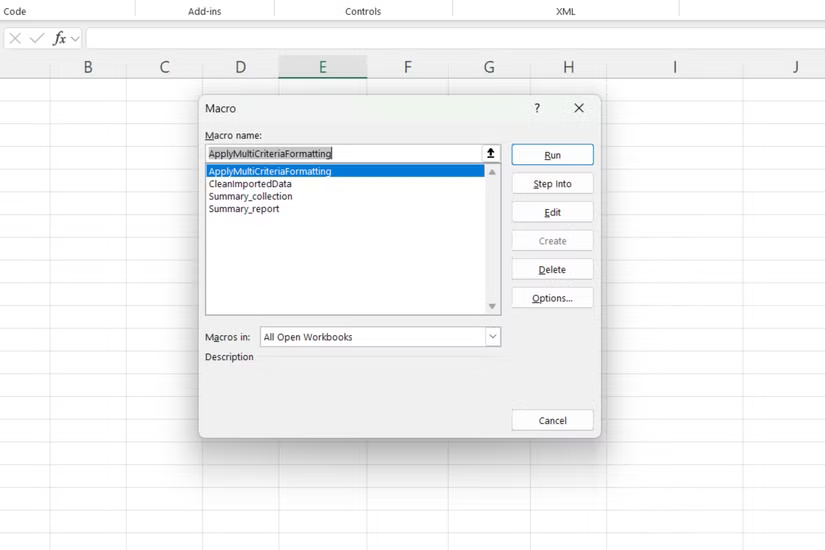
<div style="text-align: justify;">Danh sách macro trong Excel.</div>
</figcaption>
</figure>

<p style="text-align: justify;">Theo thời gian, nhiều người đã xây dựng được một bộ sưu tập các macro xử lý những công việc lặp đi lặp lại mà họ từng gặp khó khăn. Chúng không cầu kỳ hay phức tạp, mà chỉ là những giải pháp thiết thực giúp họ khỏi việc lặp đi lặp lại cùng một công việc tẻ nhạt.</p>

<p style="text-align: justify;">Macro được sử dụng nhiều nhất sẽ tự động làm sạch dữ liệu đã nhập. Có thể sử dụng nó để loại bỏ khoảng trắng thừa và làm sạch dữ liệu bằng&nbsp;hàm TRIMRANGE, chuyển đổi văn bản sang chữ hoa chữ thường và chuẩn hóa định dạng ngày tháng trên nhiều cột.</p>

<p style="text-align: justify;">Một macro khác được tin dùng là hợp nhất dữ liệu từ nhiều trang tính thành một báo cáo tóm tắt. Nó lấy các phạm vi cụ thể từ nhiều bảng tính khác nhau, áp dụng định dạng nhất quán và tạo ra một tổng quan rõ ràng. Macro này rất hữu ích khi xử lý các báo cáo hàng tháng cần cùng một cấu trúc mỗi lần.</p>

<p style="text-align: justify;">Cũng có thể tạo một macro áp dụng các quy tắc định dạng có điều kiện dựa trên nhiều tiêu chí - một việc khá rắc rối khi bạn cố gắng xây dựng nó bằng các công thức lồng nhau. Macro có thể xem xét nhiều cột, áp dụng các bảng màu khác nhau và thậm chí thêm những thanh dữ liệu hoặc biểu tượng tùy thuộc vào giá trị tìm thấy.</p>

<p style="text-align: justify;">Điều tuyệt vời nhất về các macro này là sau khi được thiết lập, bất kỳ ai trong nhóm cũng có thể sử dụng chúng. Bạn không cần phải hiểu logic cơ bản - chỉ cần chạy macro và nhận được kết quả nhất quán mỗi lần.</p>

<h2 style="text-align: justify;">Một chút VBA giúp macro mạnh mẽ hơn</h2>

<h3 style="text-align: justify;">Những tinh chỉnh code đơn giản giúp biến đổi các macro đã ghi cơ bản</h3>

<figure>
<div style="text-align: justify;"><img alt="" data-i="1" data-src="https://st.quantrimang.com/photos/image/2025/09/08/dung-excel-macro-thay-nhung-cong-thuc-nay-2.jpg" data-was-processed="true" height="422" src="https://st.quantrimang.com/photos/image/2025/09/08/dung-excel-macro-thay-nhung-cong-thuc-nay-2.jpg" width="750" /></div>
</figure>

<figure>
<div style="text-align: justify;"><img alt="" data-i="2" data-src="https://st.quantrimang.com/photos/image/2025/09/08/dung-excel-macro-thay-nhung-cong-thuc-nay-3.jpg" data-was-processed="true" height="422" src="https://st.quantrimang.com/photos/image/2025/09/08/dung-excel-macro-thay-nhung-cong-thuc-nay-3.jpg" width="750" /></div>
</figure>

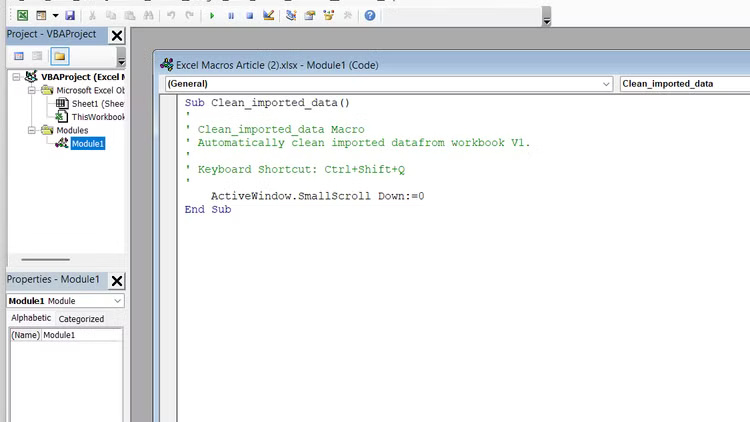
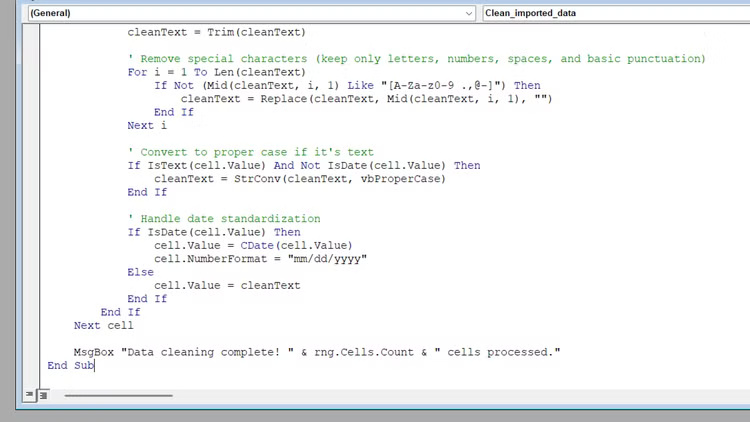
<p style="text-align: justify;">Mặc dù các macro đã ghi hoạt động rất tốt ngay khi cài đặt, nhưng việc học một chút về lập trình&nbsp;VBA trong Excel&nbsp;sẽ đưa chúng lên một tầm cao mới. Bạn không cần phải trở thành chuyên gia lập trình - chỉ cần hiểu một vài khái niệm cơ bản cũng có thể giúp macro thông minh và linh hoạt hơn.</p>

<p style="text-align: justify;">Trình ghi macro tạo ra code chức năng, nhưng thường không hiệu quả và thiếu linh hoạt. Nó ghi lại các tham chiếu ô tuyệt đối và đôi khi là những lệnh bổ sung không cần thiết, điều này có thể làm chậm mọi thứ. Với một chút hiểu biết về VBA, bạn có thể tinh chỉnh các macro của mình để xử lý những phạm vi khác nhau một cách linh hoạt và chạy nhanh hơn.</p>

<p style="text-align: justify;">Sau đây là cách bắt đầu chỉnh sửa các macro đã ghi của bạn:</p>

<ol>
	<li style="text-align: justify;">Vào&nbsp;<strong>Developer &gt; Macros</strong>&nbsp;và chọn macro của bạn.</li>
	<li style="text-align: justify;">Nhấp vào&nbsp;<strong>Edit</strong>&nbsp;để mở trình soạn thảo VBA.</li>
	<li style="text-align: justify;">Tìm các tham chiếu ô được mã hóa cứng như Range(&quot;A1:C10&quot;).</li>
	<li style="text-align: justify;">Thay thế chúng bằng các tham chiếu động bằng&nbsp;<strong>CurrentRegion</strong>&nbsp;hoặc&nbsp;<strong>End(xlDown).</strong></li>
	<li style="text-align: justify;">Thêm cách xử lý lỗi đơn giản với&nbsp;<strong>On Error Resume Next</strong>.</li>
</ol>

<p style="text-align: justify;">Một trong những cải tiến lớn nhất bạn có thể thực hiện là thêm đầu vào của người dùng. Thay vì sử dụng các macro riêng biệt cho các tình huống khác nhau, hãy sử dụng&nbsp;<strong>InputBox</strong>&nbsp;để cho phép người dùng chỉ định phạm vi hoặc tiêu chí. Điều này biến một macro đã ghi cứng nhắc thành một công cụ linh hoạt.</p>

<p style="text-align: justify;">Thêm các vòng lặp cơ bản cũng làm cho những macro mạnh mẽ hơn. Một vòng lặp&nbsp;<strong>For Each</strong>&nbsp;đơn giản có thể xử lý nhiều trang tính hoặc phạm vi mà không cần ghi lại các hành động riêng biệt cho từng trang tính hoặc phạm vi.</p>

<p style="text-align: justify;">Trình soạn thảo VBA ban đầu có thể trông khá phức tạp, nhưng hãy bắt đầu từ những bước nhỏ. Thay đổi tham chiếu ô tại đây, thêm hộp thông báo tại đó. Khi thấy những thay đổi nhỏ này cải thiện macro của mình như thế nào, bạn sẽ muốn tìm hiểu thêm.</p>

<h2 style="text-align: justify;">Macro không phải là phép thuật, nhưng chúng gần như vậy</h2>

<h3 style="text-align: justify;">Tìm kiếm sự cân bằng phù hợp giữa tự động hóa và công thức</h3>

<p style="text-align: justify;">Macro sẽ không thay thế mọi công thức trong bộ công cụ Excel, nhưng chúng hữu ích để xử lý các tác vụ lặp đi lặp lại, nhiều bước mà nếu không sẽ ngốn hết thời gian của bạn. Điều quan trọng là biết khi nào nên sử dụng từng công cụ. Công thức hoàn hảo cho các phép tính cần cập nhật tự động. Macro vượt trội trong các quy trình làm việc phức tạp liên quan đến nhiều thao tác trên các phần khác nhau của workbook.</p>

<p style="text-align: justify;">Hãy bắt đầu với công cụ ghi macro đơn giản, sau đó dần dần thêm các tinh chỉnh VBA khi bạn đã quen. Chẳng bao lâu nữa, bạn sẽ có một bộ sưu tập các công cụ tự động hóa tùy chỉnh giúp Excel hoạt động chính xác theo cách mình cần.</p>
		</div>
				<div id="author">
						<p>
				<strong>Nguồn tin:</strong>
				Quantrimang.com:
			</p>
		</div>
	</div>
	<div id="footer" class="clearfix">
		<div id="url">
			<strong>URL của bản tin này: </strong><a href="https://www.nguoicodonvn2008.info/vi/news/savefile/kien-thuc-may-tinh/hay-ngung-su-dung-nhung-cong-thuc-nay-excel-macro-se-lam-viec-do-thay-ban-11101.html" title="Hãy ngừng sử dụng những công thức này&#x3A; Excel macro sẽ làm việc đó thay bạn&#33;">https://www.nguoicodonvn2008.info/vi/news/savefile/kien-thuc-may-tinh/hay-ngung-su-dung-nhung-cong-thuc-nay-excel-macro-se-lam-viec-do-thay-ban-11101.html</a>

		</div>
		<div class="clear"></div>
		<div class="copyright">
			&copy; .&#x3A; Nguoicodonvn2008.info - Cõi lòng người cô đơn &#x3A;.
		</div>
		<div id="contact">
			<a href="mailto:admin@nguoicodonvn2008.info">admin@nguoicodonvn2008.info</a>
		</div>
	</div>
</div>
        <div id="timeoutsess" class="chromeframe">
            Bạn đã không sử dụng Site, <a onclick="timeoutsesscancel();" href="https://www.nguoicodonvn2008.info/#">Bấm vào đây để duy trì trạng thái đăng nhập</a>. Thời gian chờ: <span id="secField"> 60 </span> giây
        </div>
        <div id="openidResult" class="nv-alert" style="display:none"></div>
        <div id="openidBt" data-result="" data-redirect=""></div>
		</script>
		<div class="car-top">
  <span><img src="https://www.nguoicodonvn2008.info/themes/default/images/car.png" alt=""></span>
</div>
<div id="run_cronjobs" style="visibility:hidden;display:none;"><img alt="cron" src="/index.php?second=cronjobs&amp;p=g516BH3j" width="1" height="1" /></div>
<script src="https://www.nguoicodonvn2008.info/assets/js/jquery/jquery.min.js"></script>
<script>var nv_base_siteurl="/",nv_lang_data="vi",nv_lang_interface="vi",nv_name_variable="nv",nv_fc_variable="op",nv_lang_variable="language",nv_module_name="news",nv_func_name="savefile",nv_is_user=0, nv_my_ofs=-4,nv_my_abbr="EDT",nv_cookie_prefix="nv4c_e856T",nv_check_pass_mstime=1738000,nv_area_admin=0,nv_safemode=0,theme_responsive=0,nv_recaptcha_ver=2,nv_recaptcha_sitekey="",nv_recaptcha_type="image",XSSsanitize=1;</script>
<script src="https://www.nguoicodonvn2008.info/assets/js/language/vi.js"></script>
<script src="https://www.nguoicodonvn2008.info/assets/js/DOMPurify/purify3.js"></script>
<script src="https://www.nguoicodonvn2008.info/assets/js/global.js"></script>
<script src="https://www.nguoicodonvn2008.info/assets/js/site.js"></script>
<script src="https://www.nguoicodonvn2008.info/themes/default/js/news.js"></script>
<script src="https://www.nguoicodonvn2008.info/themes/default/js/main.js"></script>
<script src="https://www.nguoicodonvn2008.info/themes/default/js/custom.js"></script>
<script type="application/ld+json">
        {
            "@context": "https://schema.org",
            "@type": "Organization",
            "url": "https://www.nguoicodonvn2008.info",
            "logo": "https://www.nguoicodonvn2008.info/uploads/angel.gif"
        }
        </script>
<script src="https://www.nguoicodonvn2008.info/themes/default/js/bootstrap.min.js"></script>
<script type="text/javascript">
var $scrolltop = $('.car-top');
$scrolltop.on('click', function () {
    $('html,body').animate({
        scrollTop: 0
    }, 800);
    $(this).addClass("car-run");
    setTimeout(function(){ $scrolltop.removeClass('car-run');}, 1000);
    return false;
});
$(window).on('scroll', function ()
{ 
    if($(window).scrollTop() >= 200)
    {
        $scrolltop.addClass("show");
        $scrolltop.addClass("car-down");
    }
    else
    {
       $scrolltop.removeClass("show");
       setTimeout(function(){ $scrolltop.removeClass('car-down');}, 300);
    }
});
</script>
</body>
</html>