<!DOCTYPE html>
    <html lang="vi" xmlns="http://www.w3.org/1999/xhtml" prefix="og: http://ogp.me/ns#">
    <head>
<title>Hàm ROUND trong SQL Server</title>
<meta name="description" content="Hàm ROUND trong SQL Server - Savefile - Tin Tức - https&#x3A;&#x002F;&#x002F;www.nguoicodonvn2008.info&#x002F;vi&#x002F;news&#x002F;savefile&#x002F;kien-thuc-may-tinh&#x002F;ham-round-trong-sql-server-8886.html">
<meta name="author" content=".: Nguoicodonvn2008.info - Cõi lòng người cô đơn :.">
<meta name="copyright" content=".: Nguoicodonvn2008.info - Cõi lòng người cô đơn :. [admin@nguoicodonvn2008.info]">
<meta name="robots" content="index, archive, follow, noodp">
<meta name="googlebot" content="index,archive,follow,noodp">
<meta name="msnbot" content="all,index,follow">
<meta name="generator" content="NukeViet v4.5">
<meta http-equiv="Content-Type" content="text/html; charset=utf-8">
<meta property="og:title" content="Hàm ROUND trong SQL Server">
<meta property="og:type" content="website">
<meta property="og:description" content="Savefile - Tin Tức - https&#x3A;&#x002F;&#x002F;www.nguoicodonvn2008.info&#x002F;vi&#x002F;news&#x002F;savefile&#x002F;kien-thuc-may-tinh&#x002F;ham-round-trong-sql-server-8886.html">
<meta property="og:site_name" content=".&#x3A; Nguoicodonvn2008.info - Cõi lòng người cô đơn &#x3A;.">
<meta property="og:url" content="https://www.nguoicodonvn2008.info/vi/news/savefile/kien-thuc-may-tinh/ham-round-trong-sql-server-8886.html">
<link rel="shortcut icon" href="https://www.nguoicodonvn2008.info/favicon.ico">
<link rel="canonical" href="https://www.nguoicodonvn2008.info/vi/news/savefile/kien-thuc-may-tinh/ham-round-trong-sql-server-8886.html">
<link rel="alternate" href="https://www.nguoicodonvn2008.info/vi/news/rss/" title="Tin Tức" type="application/rss+xml">
<link rel="alternate" href="https://www.nguoicodonvn2008.info/vi/news/rss/karaoke-dual/" title="Tin Tức - Karaoke Dual" type="application/rss+xml">
<link rel="alternate" href="https://www.nguoicodonvn2008.info/vi/news/rss/nhac-tre/" title="Tin Tức - Nhạc trẻ" type="application/rss+xml">
<link rel="alternate" href="https://www.nguoicodonvn2008.info/vi/news/rss/tru-tinh/" title="Tin Tức - Trữ tình" type="application/rss+xml">
<link rel="alternate" href="https://www.nguoicodonvn2008.info/vi/news/rss/nuoc-ngoai/" title="Tin Tức - Nước ngoài" type="application/rss+xml">
<link rel="alternate" href="https://www.nguoicodonvn2008.info/vi/news/rss/remix/" title="Tin Tức - Remix" type="application/rss+xml">
<link rel="alternate" href="https://www.nguoicodonvn2008.info/vi/news/rss/tam-su-tinh-yeu/" title="Tin Tức - Tâm sự tình yêu" type="application/rss+xml">
<link rel="alternate" href="https://www.nguoicodonvn2008.info/vi/news/rss/tho-suu-tam/" title="Tin Tức - Thơ sưu tầm" type="application/rss+xml">
<link rel="alternate" href="https://www.nguoicodonvn2008.info/vi/news/rss/cuoc-song/" title="Tin Tức - Cuộc sống" type="application/rss+xml">
<link rel="alternate" href="https://www.nguoicodonvn2008.info/vi/news/rss/phan-mem/" title="Tin Tức - Phần mềm" type="application/rss+xml">
<link rel="alternate" href="https://www.nguoicodonvn2008.info/vi/news/rss/kien-thuc-may-tinh/" title="Tin Tức - Kiến thức máy tính" type="application/rss+xml">
<link rel="alternate" href="https://www.nguoicodonvn2008.info/vi/news/rss/hoc-tap/" title="Tin Tức - Học tập" type="application/rss+xml">
<link rel="alternate" href="https://www.nguoicodonvn2008.info/vi/news/rss/tai-lieu/" title="Tin Tức - Tài liệu" type="application/rss+xml">
<link rel="alternate" href="https://www.nguoicodonvn2008.info/vi/news/rss/de-thi/" title="Tin Tức - Đề thi" type="application/rss+xml">
<link rel="preload" as="style" href="https://www.nguoicodonvn2008.info/assets/css/font-awesome.min.css" type="text/css">
<link rel="preload" as="style" href="https://www.nguoicodonvn2008.info/themes/default/css/bootstrap.non-responsive.css" type="text/css">
<link rel="preload" as="style" href="https://www.nguoicodonvn2008.info/themes/default/css/style.css" type="text/css">
<link rel="preload" as="style" href="https://www.nguoicodonvn2008.info/themes/default/css/style.non-responsive.css" type="text/css">
<link rel="preload" as="style" href="https://www.nguoicodonvn2008.info/themes/default/css/news.css" type="text/css">
<link rel="preload" as="style" href="https://www.nguoicodonvn2008.info/themes/default/css/custom.css" type="text/css">
<link rel="preload" as="script" href="https://www.nguoicodonvn2008.info/assets/js/jquery/jquery.min.js" type="text/javascript">
<link rel="preload" as="script" href="https://www.nguoicodonvn2008.info/assets/js/language/vi.js" type="text/javascript">
<link rel="preload" as="script" href="https://www.nguoicodonvn2008.info/assets/js/DOMPurify/purify3.js" type="text/javascript">
<link rel="preload" as="script" href="https://www.nguoicodonvn2008.info/assets/js/global.js" type="text/javascript">
<link rel="preload" as="script" href="https://www.nguoicodonvn2008.info/assets/js/site.js" type="text/javascript">
<link rel="preload" as="script" href="https://www.nguoicodonvn2008.info/themes/default/js/news.js" type="text/javascript">
<link rel="preload" as="script" href="https://www.nguoicodonvn2008.info/themes/default/js/main.js" type="text/javascript">
<link rel="preload" as="script" href="https://www.nguoicodonvn2008.info/themes/default/js/custom.js" type="text/javascript">
<link rel="preload" as="script" href="https://www.nguoicodonvn2008.info/themes/default/js/bootstrap.min.js" type="text/javascript">
<link rel="stylesheet" href="https://www.nguoicodonvn2008.info/assets/css/font-awesome.min.css">
<link rel="stylesheet" href="https://www.nguoicodonvn2008.info/themes/default/css/bootstrap.non-responsive.css">
<link rel="stylesheet" href="https://www.nguoicodonvn2008.info/themes/default/css/style.css">
<link rel="stylesheet" href="https://www.nguoicodonvn2008.info/themes/default/css/style.non-responsive.css">
<link rel="StyleSheet" href="https://www.nguoicodonvn2008.info/themes/default/css/news.css">
<link rel="stylesheet" href="https://www.nguoicodonvn2008.info/themes/default/css/custom.css">
<style type="text/css">
	body{background: #fff;}
</style>
    </head>
    <body>
<div id="print">
	<div id="hd_print">
		<h2 class="pull-left">.&#x3A; Nguoicodonvn2008.info - Cõi lòng người cô đơn &#x3A;.</h2>
		<p class="pull-right"><a title=".&#x3A; Nguoicodonvn2008.info - Cõi lòng người cô đơn &#x3A;." href="https://www.nguoicodonvn2008.info/">https://www.nguoicodonvn2008.info</a></p>
	</div>
	<div class="clear"></div>
	<hr />
	<div id="content">
		<h1>Hàm ROUND trong SQL Server</h1>
		<ul class="list-inline">
			<li>Thứ ba - 20/08/2024 23:53</li>
			<li class="hidden-print txtrequired"><em class="fa fa-print">&nbsp;</em><a title="In ra" href="javascript:;" onclick="window.print()">In ra</a></li>
			<li class="hidden-print txtrequired"><em class="fa fa-power-off">&nbsp;</em><a title="Đóng cửa sổ này" href="javascript:;" onclick="window.close()">Đóng cửa sổ này</a></li>
		</ul>
		<div class="clear"></div>
		<div id="hometext">
		</div>
				<div class="imghome">
			<img alt="Hàm ROUND trong SQL Server" src="https://st.quantrimang.com/photos/image/2019/02/22/ham-round-3.jpg" width="460" class="img-thumbnail" />
		</div>
		<div class="clear"></div>
		<div id="bodytext" class="clearfix">
			<p style="text-align: justify;"><strong>ROUND trong SQL Server</strong>&nbsp;là gì?&nbsp;<strong>Cách dùng hàm ROUND trong SQL Server</strong>&nbsp;như thế nào? Hãy cùng Quantrimang.com tìm hiểu nhé!</p>

<p style="text-align: justify;"><strong>Hàm ROUND&nbsp;</strong>được dùng để làm tròn trong SQL Server. Bạn sẽ dùng nó mỗi khi cần làm tròn một số cụ thể sang số thập phân được chỉ định.</p>

<p style="text-align: justify;"><strong>Đặc điểm chính của hàm ROUND trong SQL Server</strong></p>

<ul>
	<li style="text-align: justify;">Hàm này được dùng để làm tròn một số cụ thể sang số thập phân được chỉ định.</li>
	<li style="text-align: justify;">Hàm này chỉ chấp nhận tất cả các kiểu số, bao gồm số dương, âm và 0.</li>
	<li style="text-align: justify;">Hàm này chấp nhận phân số.</li>
	<li style="text-align: justify;">Hàm này luôn trả về số sau khi đã làm tròn tới số thập phân được chỉ định.</li>
</ul>

<p style="text-align: justify;"><strong>Cú pháp hàm làm tròn trong SQL Server</strong></p>

<p style="text-align: justify;"><code>ROUND(number, decimals, operation)</code></p>

<p style="text-align: justify;"><strong>Tham số:</strong></p>

<p style="text-align: justify;">Phương thức này chấp nhận 3 tham số, cụ thể như sau:</p>

<ul>
	<li style="text-align: justify;"><strong>Number</strong>: Số cần làm tròn.</li>
	<li style="text-align: justify;"><strong>Decimals</strong>: Số chữ số thập phân được chỉ định để làm tròn số.</li>
	<li style="text-align: justify;"><strong>Operation</strong>: Đây là tham số tùy chọn. Nếu giá trị bằng 0, nó làm tròn kết quả thành số thập phân. Nếu giá trị khác 0, nó sẽ cắt kết quả thành số thập phân. Giá trị mặc định là 0.</li>
</ul>

<p style="text-align: justify;"><strong>Nguyên tắc làm tròn số</strong>:</p>

<p style="text-align: justify;">Khi bạn làm tròn số, hệ thống sẽ kiểm tra số ở vị trí (decimal + 1):</p>

<ul>
	<li style="text-align: justify;">Nếu số đó lớn hơn 4 thì số ở vị trí decimal sẽ cộng thêm 1. Các số ở phía sau thành 0</li>
	<li style="text-align: justify;">Nếu số đó nhỏ hơn 5 thì số ở vị trí decimal sẽ giữ nguyên. Các số ở phía sau thành 0</li>
</ul>

<p style="text-align: justify;">Ví dụ chúng ta có một số thập phân là 423.3241</p>

<p style="text-align: justify;"><img alt="" data-i="0" data-src="https://st.quantrimang.com/photos/image/2019/02/22/ham-round-2.jpg" data-was-processed="true" height="70" src="https://st.quantrimang.com/photos/image/2019/02/22/ham-round-2.jpg" width="400" /></p>

<ul>
	<li style="text-align: justify;">SELECT ROUND(423.3241, -2) có kết quả là 400.0000</li>
	<li style="text-align: justify;">SELECT ROUND(423.3241, -1) có kết quả là 420.0000</li>
	<li style="text-align: justify;">SELECT ROUND(423.3241, 0) có kết quả là 423.0000</li>
	<li style="text-align: justify;">SELECT ROUND(423.3241, 1) có kết quả là 423.3000</li>
	<li style="text-align: justify;">SELECT ROUND(423.3241, 2) có kết quả là 423.3200</li>
	<li style="text-align: justify;">SELECT ROUND(423.3241, 3) có kết quả là 423.3240</li>
	<li style="text-align: justify;">SELECT ROUND(423.3241, 4) có kết quả là 423.3241</li>
</ul>

<div style="text-align: justify;">&nbsp;</div>

<p style="text-align: justify;"><strong>Lưu ý</strong>:</p>

<ul>
	<li style="text-align: justify;">Xem thêm hàm&nbsp;CEILING&nbsp;và&nbsp;FLOOR.</li>
	<li style="text-align: justify;">Hàm ROUND có thể được sử dụng trong các phiên bản sau của SQL Server: SQL Server 2017, SQL Server 2016, SQL Server 2014, SQL Server 2012, SQL Server 2008 R2, SQL Server 2008, SQL Server 2005.</li>
</ul>

<h2 style="text-align: justify;">Ví dụ</h2>

<p style="text-align: justify;">Hãy xem và khám phá một số ví dụ về hàm ROUND trong SQL Server.</p>

<p style="text-align: justify;"><strong>Ví dụ 1: Làm tròn các số</strong></p>

<pre id="pre0" style="text-align: justify;">
SELECT ROUND(125.315, 2);Result: 125.320 (kết quả được làm tròn vì tham số thứ 3 bị bỏ qua)SELECT ROUND(125.315, 2, 0);Result: 125.320 (kết quả được làm tròn vì tham số thứ 3 là 0)SELECT ROUND(125.315, 2, 1);Result: 125.310 (kết quả bị cắt bớt vì tham số thứ 3 khác 0)SELECT ROUND(125.315, 1);Result: 125.300 (kết quả được làm tròn vì tham số thứ 3 bị bỏ qua)SELECT ROUND(125.315, 0);Result: 125.000 (kết quả được làm tròn vì tham số thứ 3 bị bỏ qua)SELECT ROUND(125.315, -1);Result: 130.000 (kết quả được làm tròn vì tham số thứ 3 bị bỏ qua)SELECT ROUND(125.315, -2);Result: 100.000 (kết quả được làm tròn vì tham số thứ 3 bị bỏ qua)</pre>

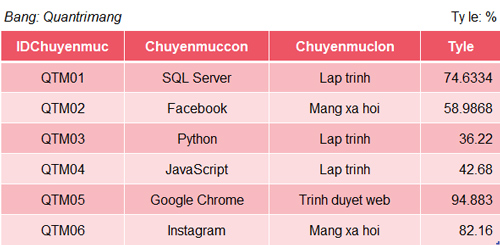
<p style="text-align: justify;"><strong>Ví dụ 2: Ta có bảng dữ liệu sau</strong></p>

<p style="text-align: justify;"><strong><img alt="" data-i="1" data-src="https://st.quantrimang.com/photos/image/2019/02/22/ham-round-3.jpg" data-was-processed="true" height="245" src="https://st.quantrimang.com/photos/image/2019/02/22/ham-round-3.jpg" width="500" /></strong></p>

<p style="text-align: justify;">1. Lấy cột chuyên mục con và tỷ lệ của trang web, làm tròn tỷ lệ đến số thập phân thứ 2</p>

<pre id="pre1" style="text-align: justify;">
SELECT Chuyenmuccon, ROUND(Tyle, 2) AS TylemoiFROM Quantrimang;Result:Chuyenmuccon              TylemoiSQL Server                74.63Facebook                  58.99Python                    36.22JavaScript                42.68 Google Chrome             94.88 Instagram                 82.16</pre>

<p style="text-align: justify;">2. Lấy cột chuyên mục con và tỷ lệ của Lập trình trên trang web, làm tròn tỷ lệ đến phần số nguyên</p>

<pre id="pre2" style="text-align: justify;">
SELECT Chuyenmuccon, ROUND(Tyle, 0) AS TylemoiFROM QuantrimangWHERE Chuyenmuclon=&quot;Lap trinh&quot;;Result:Chuyenmuccon              TylemoiSQL Server                75Python                    36JavaScript                43</pre>

<div style="text-align: justify;">&nbsp;</div>

<h2 style="text-align: justify;">Sử dụng ROUND SQL với độ chính xác số âm</h2>

<p style="text-align: justify;">ROUND() cung cấp một chức năng khác khi tham số chính xác là một số âm. Ở ví dụ bên dưới, bạn có thể nhân số gần nhất với 100 bằng ROUND(value, -2). Chúng ta sẽ dùng một truy vấn tương tự với ví dụ trước đó để hiện chức năng này:</p>

<pre id="pre3" style="text-align: justify;">
SELECT 12345 as Value, ROUND(12345,-2) AS &quot;Round(value,-2)&quot;
UNION
SELECT 12355 as Value, ROUND(12355,-2) AS &quot;Round(value,-2)&quot;
UNION
SELECT 12350 as Value, ROUND(12350,-2) AS &quot;Round(value,-2)&quot;
UNION
SELECT 101 as Value, ROUND(101,-2) AS &quot;Round(value,-2)&quot;
UNION
SELECT 199 as Value, ROUND(199,-2) AS &quot;Round(value,-2)&quot;
UNION
SELECT 99 as Value, ROUND(99,-2) AS &quot;Round(value,-2)&quot;</pre>

<p style="text-align: justify;">Truy vấn hiện tại được thực thi trong MS SQL Server. Ở đây, chúng ta cũng sử dụng dữ liệu không đổi để trình bày cách hàm ROUND() hoạt động. Bạn có thể thấy một tham số chính xác của -2 hoạt động trên những giá trị khác nhau. Kết quả của ROUND(value, -2) là bội số gần nhất của 100 so với giá trị này. Bạn có thể thấy kết quả ở truy vấn bên dưới:</p>

<p style="text-align: justify;">Như bạn thấy dùng hàm làm tròn SQL ROUND() không quá khó. Chỉ cần nắm được những kiến thức cơ bản trên, bạn có thể sử dụng chúng thành thạo bất cứ khi nào cần.</p>

<div style="text-align: justify;">&nbsp;</div>
		</div>
				<div id="author">
						<p>
				<strong>Nguồn tin:</strong>
				Quantrimang.com:
			</p>
		</div>
	</div>
	<div id="footer" class="clearfix">
		<div id="url">
			<strong>URL của bản tin này: </strong><a href="https://www.nguoicodonvn2008.info/vi/news/savefile/kien-thuc-may-tinh/ham-round-trong-sql-server-8886.html" title="Hàm ROUND trong SQL Server">https://www.nguoicodonvn2008.info/vi/news/savefile/kien-thuc-may-tinh/ham-round-trong-sql-server-8886.html</a>

		</div>
		<div class="clear"></div>
		<div class="copyright">
			&copy; .&#x3A; Nguoicodonvn2008.info - Cõi lòng người cô đơn &#x3A;.
		</div>
		<div id="contact">
			<a href="mailto:admin@nguoicodonvn2008.info">admin@nguoicodonvn2008.info</a>
		</div>
	</div>
</div>
        <div id="timeoutsess" class="chromeframe">
            Bạn đã không sử dụng Site, <a onclick="timeoutsesscancel();" href="https://www.nguoicodonvn2008.info/#">Bấm vào đây để duy trì trạng thái đăng nhập</a>. Thời gian chờ: <span id="secField"> 60 </span> giây
        </div>
        <div id="openidResult" class="nv-alert" style="display:none"></div>
        <div id="openidBt" data-result="" data-redirect=""></div>
		</script>
		<div class="car-top">
  <span><img src="https://www.nguoicodonvn2008.info/themes/default/images/car.png" alt=""></span>
</div>
<script src="https://www.nguoicodonvn2008.info/assets/js/jquery/jquery.min.js"></script>
<script>var nv_base_siteurl="/",nv_lang_data="vi",nv_lang_interface="vi",nv_name_variable="nv",nv_fc_variable="op",nv_lang_variable="language",nv_module_name="news",nv_func_name="savefile",nv_is_user=0, nv_my_ofs=-4,nv_my_abbr="EDT",nv_cookie_prefix="nv4c_e856T",nv_check_pass_mstime=1738000,nv_area_admin=0,nv_safemode=0,theme_responsive=0,nv_recaptcha_ver=2,nv_recaptcha_sitekey="",nv_recaptcha_type="image",XSSsanitize=1;</script>
<script src="https://www.nguoicodonvn2008.info/assets/js/language/vi.js"></script>
<script src="https://www.nguoicodonvn2008.info/assets/js/DOMPurify/purify3.js"></script>
<script src="https://www.nguoicodonvn2008.info/assets/js/global.js"></script>
<script src="https://www.nguoicodonvn2008.info/assets/js/site.js"></script>
<script src="https://www.nguoicodonvn2008.info/themes/default/js/news.js"></script>
<script src="https://www.nguoicodonvn2008.info/themes/default/js/main.js"></script>
<script src="https://www.nguoicodonvn2008.info/themes/default/js/custom.js"></script>
<script type="application/ld+json">
        {
            "@context": "https://schema.org",
            "@type": "Organization",
            "url": "https://www.nguoicodonvn2008.info",
            "logo": "https://www.nguoicodonvn2008.info/uploads/angel.gif"
        }
        </script>
<script src="https://www.nguoicodonvn2008.info/themes/default/js/bootstrap.min.js"></script>
<script type="text/javascript">
var $scrolltop = $('.car-top');
$scrolltop.on('click', function () {
    $('html,body').animate({
        scrollTop: 0
    }, 800);
    $(this).addClass("car-run");
    setTimeout(function(){ $scrolltop.removeClass('car-run');}, 1000);
    return false;
});
$(window).on('scroll', function ()
{ 
    if($(window).scrollTop() >= 200)
    {
        $scrolltop.addClass("show");
        $scrolltop.addClass("car-down");
    }
    else
    {
       $scrolltop.removeClass("show");
       setTimeout(function(){ $scrolltop.removeClass('car-down');}, 300);
    }
});
</script>
</body>
</html>