<!DOCTYPE html>
    <html lang="vi" xmlns="http://www.w3.org/1999/xhtml" prefix="og: http://ogp.me/ns#">
    <head>
<title>Hàm INDIRECT trong Excel</title>
<meta name="description" content="Hàm INDIRECT trong Excel - Savefile - Tin Tức - https&#x3A;&#x002F;&#x002F;www.nguoicodonvn2008.info&#x002F;vi&#x002F;news&#x002F;savefile&#x002F;kien-thuc-may-tinh&#x002F;ham-indirect-trong-excel-6485.html">
<meta name="author" content=".: Nguoicodonvn2008.info - Cõi lòng người cô đơn :.">
<meta name="copyright" content=".: Nguoicodonvn2008.info - Cõi lòng người cô đơn :. [admin@nguoicodonvn2008.info]">
<meta name="robots" content="index, archive, follow, noodp">
<meta name="googlebot" content="index,archive,follow,noodp">
<meta name="msnbot" content="all,index,follow">
<meta name="generator" content="NukeViet v4.5">
<meta http-equiv="Content-Type" content="text/html; charset=utf-8">
<meta property="og:title" content="Hàm INDIRECT trong Excel">
<meta property="og:type" content="website">
<meta property="og:description" content="Savefile - Tin Tức - https&#x3A;&#x002F;&#x002F;www.nguoicodonvn2008.info&#x002F;vi&#x002F;news&#x002F;savefile&#x002F;kien-thuc-may-tinh&#x002F;ham-indirect-trong-excel-6485.html">
<meta property="og:site_name" content=".&#x3A; Nguoicodonvn2008.info - Cõi lòng người cô đơn &#x3A;.">
<meta property="og:url" content="https://www.nguoicodonvn2008.info/vi/news/savefile/kien-thuc-may-tinh/ham-indirect-trong-excel-6485.html">
<link rel="shortcut icon" href="https://www.nguoicodonvn2008.info/favicon.ico">
<link rel="canonical" href="https://www.nguoicodonvn2008.info/vi/news/savefile/kien-thuc-may-tinh/ham-indirect-trong-excel-6485.html">
<link rel="alternate" href="https://www.nguoicodonvn2008.info/vi/news/rss/" title="Tin Tức" type="application/rss+xml">
<link rel="alternate" href="https://www.nguoicodonvn2008.info/vi/news/rss/karaoke-dual/" title="Tin Tức - Karaoke Dual" type="application/rss+xml">
<link rel="alternate" href="https://www.nguoicodonvn2008.info/vi/news/rss/nhac-tre/" title="Tin Tức - Nhạc trẻ" type="application/rss+xml">
<link rel="alternate" href="https://www.nguoicodonvn2008.info/vi/news/rss/tru-tinh/" title="Tin Tức - Trữ tình" type="application/rss+xml">
<link rel="alternate" href="https://www.nguoicodonvn2008.info/vi/news/rss/nuoc-ngoai/" title="Tin Tức - Nước ngoài" type="application/rss+xml">
<link rel="alternate" href="https://www.nguoicodonvn2008.info/vi/news/rss/remix/" title="Tin Tức - Remix" type="application/rss+xml">
<link rel="alternate" href="https://www.nguoicodonvn2008.info/vi/news/rss/tam-su-tinh-yeu/" title="Tin Tức - Tâm sự tình yêu" type="application/rss+xml">
<link rel="alternate" href="https://www.nguoicodonvn2008.info/vi/news/rss/tho-suu-tam/" title="Tin Tức - Thơ sưu tầm" type="application/rss+xml">
<link rel="alternate" href="https://www.nguoicodonvn2008.info/vi/news/rss/cuoc-song/" title="Tin Tức - Cuộc sống" type="application/rss+xml">
<link rel="alternate" href="https://www.nguoicodonvn2008.info/vi/news/rss/phan-mem/" title="Tin Tức - Phần mềm" type="application/rss+xml">
<link rel="alternate" href="https://www.nguoicodonvn2008.info/vi/news/rss/kien-thuc-may-tinh/" title="Tin Tức - Kiến thức máy tính" type="application/rss+xml">
<link rel="alternate" href="https://www.nguoicodonvn2008.info/vi/news/rss/hoc-tap/" title="Tin Tức - Học tập" type="application/rss+xml">
<link rel="alternate" href="https://www.nguoicodonvn2008.info/vi/news/rss/tai-lieu/" title="Tin Tức - Tài liệu" type="application/rss+xml">
<link rel="alternate" href="https://www.nguoicodonvn2008.info/vi/news/rss/de-thi/" title="Tin Tức - Đề thi" type="application/rss+xml">
<link rel="preload" as="style" href="https://www.nguoicodonvn2008.info/assets/css/font-awesome.min.css" type="text/css">
<link rel="preload" as="style" href="https://www.nguoicodonvn2008.info/themes/default/css/bootstrap.non-responsive.css" type="text/css">
<link rel="preload" as="style" href="https://www.nguoicodonvn2008.info/themes/default/css/style.css" type="text/css">
<link rel="preload" as="style" href="https://www.nguoicodonvn2008.info/themes/default/css/style.non-responsive.css" type="text/css">
<link rel="preload" as="style" href="https://www.nguoicodonvn2008.info/themes/default/css/news.css" type="text/css">
<link rel="preload" as="style" href="https://www.nguoicodonvn2008.info/themes/default/css/custom.css" type="text/css">
<link rel="preload" as="script" href="https://www.nguoicodonvn2008.info/assets/js/jquery/jquery.min.js" type="text/javascript">
<link rel="preload" as="script" href="https://www.nguoicodonvn2008.info/assets/js/language/vi.js" type="text/javascript">
<link rel="preload" as="script" href="https://www.nguoicodonvn2008.info/assets/js/DOMPurify/purify3.js" type="text/javascript">
<link rel="preload" as="script" href="https://www.nguoicodonvn2008.info/assets/js/global.js" type="text/javascript">
<link rel="preload" as="script" href="https://www.nguoicodonvn2008.info/assets/js/site.js" type="text/javascript">
<link rel="preload" as="script" href="https://www.nguoicodonvn2008.info/themes/default/js/news.js" type="text/javascript">
<link rel="preload" as="script" href="https://www.nguoicodonvn2008.info/themes/default/js/main.js" type="text/javascript">
<link rel="preload" as="script" href="https://www.nguoicodonvn2008.info/themes/default/js/custom.js" type="text/javascript">
<link rel="preload" as="script" href="https://www.nguoicodonvn2008.info/themes/default/js/bootstrap.min.js" type="text/javascript">
<link rel="stylesheet" href="https://www.nguoicodonvn2008.info/assets/css/font-awesome.min.css">
<link rel="stylesheet" href="https://www.nguoicodonvn2008.info/themes/default/css/bootstrap.non-responsive.css">
<link rel="stylesheet" href="https://www.nguoicodonvn2008.info/themes/default/css/style.css">
<link rel="stylesheet" href="https://www.nguoicodonvn2008.info/themes/default/css/style.non-responsive.css">
<link rel="StyleSheet" href="https://www.nguoicodonvn2008.info/themes/default/css/news.css">
<link rel="stylesheet" href="https://www.nguoicodonvn2008.info/themes/default/css/custom.css">
<style type="text/css">
	body{background: #fff;}
</style>
    </head>
    <body>
<div id="print">
	<div id="hd_print">
		<h2 class="pull-left">.&#x3A; Nguoicodonvn2008.info - Cõi lòng người cô đơn &#x3A;.</h2>
		<p class="pull-right"><a title=".&#x3A; Nguoicodonvn2008.info - Cõi lòng người cô đơn &#x3A;." href="https://www.nguoicodonvn2008.info/">https://www.nguoicodonvn2008.info</a></p>
	</div>
	<div class="clear"></div>
	<hr />
	<div id="content">
		<h1>Hàm INDIRECT trong Excel</h1>
		<ul class="list-inline">
			<li>Thứ hai - 19/12/2022 23:59</li>
			<li class="hidden-print txtrequired"><em class="fa fa-print">&nbsp;</em><a title="In ra" href="javascript:;" onclick="window.print()">In ra</a></li>
			<li class="hidden-print txtrequired"><em class="fa fa-power-off">&nbsp;</em><a title="Đóng cửa sổ này" href="javascript:;" onclick="window.close()">Đóng cửa sổ này</a></li>
		</ul>
		<div class="clear"></div>
		<div id="hometext">
		</div>
				<div class="imghome">
			<img alt="Hàm INDIRECT trong Excel" src="https://st.quantrimang.com/photos/image/2022/12/19/ham-indirect-excel-1.jpg" width="460" class="img-thumbnail" />
		</div>
		<div class="clear"></div>
		<div id="bodytext" class="clearfix">
			<p style="text-align: justify;"><strong>Hàm INDIRECT trong Excel</strong>&nbsp;giúp bạn tham chiếu dữ liệu dễ dàng khi cần. Dưới đây là chi tiết&nbsp;<strong>cách dùng hàm INDIRECT trong Excel</strong>.</p>

<p style="text-align: justify;"><img alt="Hàm INDIRECT trong Excel" data-i="0" data-src="https://st.quantrimang.com/photos/image/2022/12/19/excel-indirect-7.jpg" data-was-processed="true" height="340" src="https://st.quantrimang.com/photos/image/2022/12/19/excel-indirect-7.jpg" width="650" /></p>

<h2 style="text-align: justify;">Hàm INDIRECT trong Excel là gì?</h2>

<p style="text-align: justify;"><strong>Hàm INDIRECT trong Excel</strong>&nbsp;trả về một tham chiếu ô hợp lệ từ chuỗi văn bản được cung cấp.&nbsp;<strong>INDIRECT</strong>&nbsp;hữu ích khi bạn muốn tập hợp một giá trị văn bản có thể được sử dụng làm tham chiếu hợp lệ.</p>

<ul>
	<li style="text-align: justify;">Mục đích: Tạo một tham chiếu từ văn bản.</li>
	<li style="text-align: justify;">Giá trị trả về: Một tham chiếu worksheet hợp lệ.</li>
	<li style="text-align: justify;">Đối số:
	<ul>
		<li>ref_text - Tham chiếu được cung cấp dưới dạng text.</li>
		<li>a1 - (tùy chọn) Một giá trị boolean để chỉ tham chiếu kiểu A1 hay R1C1.</li>
		<li>Mặc định là&nbsp;<code>TRUE = A1 style</code>.</li>
	</ul>
	</li>
	<li style="text-align: justify;">Công thức:&nbsp;<code>=INDIRECT(ref_text, &#91;a1&#93;)</code></li>
</ul>

<h2 style="text-align: justify;">Lưu ý khi sử dụng hàm INDIRECT trong Excel</h2>

<p style="text-align: justify;">Hàm INDIRECT trả về một tham chiếu ô hợp lệ từ một chuỗi text được cung cấp. INDIRECT hữu ích khi bạn cần xây dựng một giá trị text bằng cách nối các chuỗi văn bản riêng biệt mà có thể được phiên dịch thành một tham chiếu ô hợp lệ.</p>

<p style="text-align: justify;">INDIRECT tính hai đối số,&nbsp;<code>ref_text</code>&nbsp;và&nbsp;<code>a1</code>. Ref_text là chuỗi văn bản để đánh giá dưới dạng tham chiếu. A1 chỉ kiểu tham chiếu cho giá trị văn bản sắp tới. Khi a1 là TRUE (giá trị mặc định), kiểu là A1. Khi a1 là FALSE, kiểu là R1C1. Ví dụ:</p>

<pre id="pre0">
<code>=INDIRECT(&quot;A1&quot;) // Trả tham chiếu giống =A1
=INDIRECT(&quot;R1C1&quot;,FALSE) // Trả tham chiếu giống =R1C1</code></pre>

<p style="text-align: justify;">Mục đích của INDIRECT ban đầu có vẻ khó hiểu nhưng có nhiều tính huống bạn cần tạo một tham chiếu từ văn bản, bao gồm:</p>

<ul>
	<li style="text-align: justify;">Một công thức tên sheet có thể tùy biến.</li>
	<li style="text-align: justify;">Một công thức có thể tập hợp một tham chiếu ô từ từng đoạn text nhỏ.</li>
	<li style="text-align: justify;">Một tham chiếu cố định sẽ không thay đổi ngay cả khi các hàng hoặc cột bị xóa.</li>
	<li style="text-align: justify;">Tạo các mảng số với hàm ROW trong công thức phức tạp.</li>
</ul>

<p style="text-align: justify;"><strong>Lưu ý:&nbsp;</strong>INDIRECT là một hàm không ổn định nên có thể làm chậm tiến độ của bạn khi xử lý các worksheet lớn hoặc phức tạp. Vì thế, hãy dùng nó thật cẩn thận.</p>

<h3 style="text-align: justify;">Ví dụ 1 - Tên worksheet có thể tùy biến</h3>

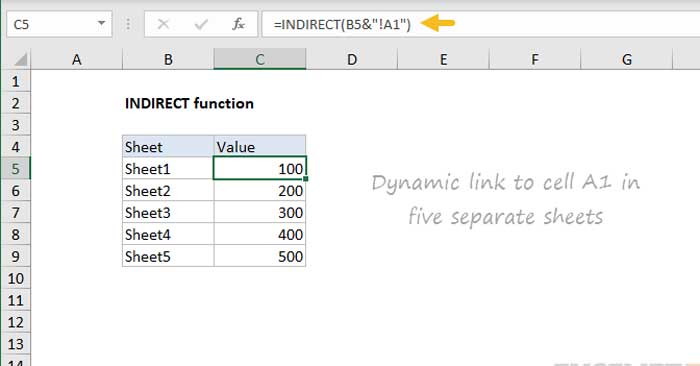
<p style="text-align: justify;">Ở ví dụ trên, INDIRECT được thiết lập để dùng một tên sheet có thể tùy biến như sau:</p>

<pre id="pre1">
<code>=INDIRECT(B5&amp;&quot;!A1&quot;) // Tên trang tính trong B6 là biến</code></pre>

<p style="text-align: justify;">Công thức trong B5, được sao chép xuống, nối văn bản trong B5 với chuỗi &quot;!A1&quot; và trả về kết quả là INDIRECT. Hàm INDIRECT sau đó đánh giá văn bản và chuyển đổi nó thành một tham chiếu phù hợp. Kết quả trong C5:C9 là các giá trị từ ô A1 trong 5 trang tính được liệt kê trong cột B.</p>

<h3 style="text-align: justify;">Ví dụ 2 - Bảng tra cứu có thể tùy biến</h3>

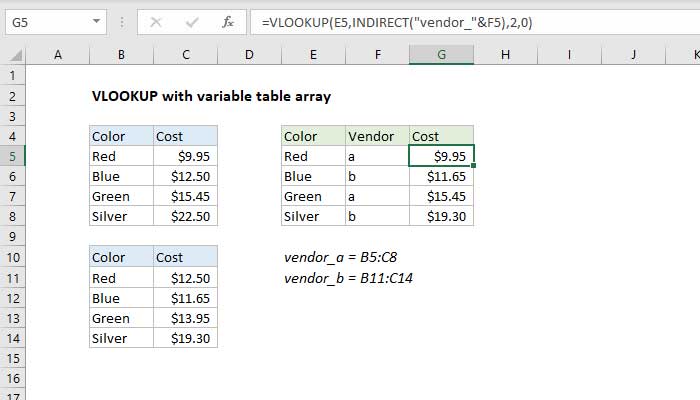
<p style="text-align: justify;">Trong worksheet bên dưới, VLOOKUP được dùng để tính chi phí cho hai nhà cung cấp, A và B. Sử dụng nhà cung cấp ở cột F, VLOOKUP tự động dùng bảng chính xác này:</p>

<p style="text-align: justify;"><img alt="Ví dụ về cách dùng hàm INDIRECT" data-i="1" data-src="https://st.quantrimang.com/photos/image/2022/12/19/ham-indirect-excel-1.jpg" data-was-processed="true" height="371" src="https://st.quantrimang.com/photos/image/2022/12/19/ham-indirect-excel-1.jpg" width="650" /></p>

<p style="text-align: justify;">Công thức ở G5 là:</p>

<pre id="pre2" style="text-align: justify;">
=VLOOKUP(E5,INDIRECT(&quot;vendor_&quot;&amp;F5),2,0)</pre>

<h3 style="text-align: justify;">Ví dụ 3: Tham chiếu cố định</h3>

<p style="text-align: justify;">Tham chiếu được tạo bởi INDIRECT sẽ không thay đổi ngay cả khi ô, hàng hoặc cột được chèn hoặc xóa. Ví dụ, công thức bên dưới sẽ luôn tham chiếu tới 100 hàng đầu tiên của cột A, ngay cả khi các hàng trong phạm vi đó bị xóa hoặc được chèn:</p>

<pre id="pre3" style="text-align: justify;">
=INDIRECT(&quot;A1:A100&quot;) // sẽ không thay đổi</pre>

<h2 style="text-align: justify;">Lưu ý khi dùng hàm INDIRECT trong Microsoft Excel</h2>

<ul>
	<li style="text-align: justify;">Các tham chiếu do INDIRECT tạo được đánh giá tại thời gian thực và nội dung của tham chiếu cũng được hiển thị.</li>
	<li style="text-align: justify;">Khi ref_text là một tham chiếu bên ngoài dẫn tới một workbook khác, workbook đó phải mở được.</li>
	<li style="text-align: justify;">a1 là tùy chọn. Khi bị bỏ qua, a1 là tham chiếu kiểu TRUE = A1.</li>
	<li style="text-align: justify;">Khi a1 được thiết lập là FALSE, INDIRECT sẽ tạo một tham chiếu kiểu R1C1.</li>
</ul>
		</div>
				<div id="author">
						<p>
				<strong>Nguồn tin:</strong>
				Quantrimang.com
			</p>
		</div>
	</div>
	<div id="footer" class="clearfix">
		<div id="url">
			<strong>URL của bản tin này: </strong><a href="https://www.nguoicodonvn2008.info/vi/news/savefile/kien-thuc-may-tinh/ham-indirect-trong-excel-6485.html" title="Hàm INDIRECT trong Excel">https://www.nguoicodonvn2008.info/vi/news/savefile/kien-thuc-may-tinh/ham-indirect-trong-excel-6485.html</a>

		</div>
		<div class="clear"></div>
		<div class="copyright">
			&copy; .&#x3A; Nguoicodonvn2008.info - Cõi lòng người cô đơn &#x3A;.
		</div>
		<div id="contact">
			<a href="mailto:admin@nguoicodonvn2008.info">admin@nguoicodonvn2008.info</a>
		</div>
	</div>
</div>
        <div id="timeoutsess" class="chromeframe">
            Bạn đã không sử dụng Site, <a onclick="timeoutsesscancel();" href="https://www.nguoicodonvn2008.info/#">Bấm vào đây để duy trì trạng thái đăng nhập</a>. Thời gian chờ: <span id="secField"> 60 </span> giây
        </div>
        <div id="openidResult" class="nv-alert" style="display:none"></div>
        <div id="openidBt" data-result="" data-redirect=""></div>
		</script>
		<div class="car-top">
  <span><img src="https://www.nguoicodonvn2008.info/themes/default/images/car.png" alt=""></span>
</div>
<script src="https://www.nguoicodonvn2008.info/assets/js/jquery/jquery.min.js"></script>
<script>var nv_base_siteurl="/",nv_lang_data="vi",nv_lang_interface="vi",nv_name_variable="nv",nv_fc_variable="op",nv_lang_variable="language",nv_module_name="news",nv_func_name="savefile",nv_is_user=0, nv_my_ofs=-4,nv_my_abbr="EDT",nv_cookie_prefix="nv4c_e856T",nv_check_pass_mstime=1738000,nv_area_admin=0,nv_safemode=0,theme_responsive=0,nv_recaptcha_ver=2,nv_recaptcha_sitekey="",nv_recaptcha_type="image",XSSsanitize=1;</script>
<script src="https://www.nguoicodonvn2008.info/assets/js/language/vi.js"></script>
<script src="https://www.nguoicodonvn2008.info/assets/js/DOMPurify/purify3.js"></script>
<script src="https://www.nguoicodonvn2008.info/assets/js/global.js"></script>
<script src="https://www.nguoicodonvn2008.info/assets/js/site.js"></script>
<script src="https://www.nguoicodonvn2008.info/themes/default/js/news.js"></script>
<script src="https://www.nguoicodonvn2008.info/themes/default/js/main.js"></script>
<script src="https://www.nguoicodonvn2008.info/themes/default/js/custom.js"></script>
<script type="application/ld+json">
        {
            "@context": "https://schema.org",
            "@type": "Organization",
            "url": "https://www.nguoicodonvn2008.info",
            "logo": "https://www.nguoicodonvn2008.info/uploads/angel.gif"
        }
        </script>
<script src="https://www.nguoicodonvn2008.info/themes/default/js/bootstrap.min.js"></script>
<script type="text/javascript">
var $scrolltop = $('.car-top');
$scrolltop.on('click', function () {
    $('html,body').animate({
        scrollTop: 0
    }, 800);
    $(this).addClass("car-run");
    setTimeout(function(){ $scrolltop.removeClass('car-run');}, 1000);
    return false;
});
$(window).on('scroll', function ()
{ 
    if($(window).scrollTop() >= 200)
    {
        $scrolltop.addClass("show");
        $scrolltop.addClass("car-down");
    }
    else
    {
       $scrolltop.removeClass("show");
       setTimeout(function(){ $scrolltop.removeClass('car-down');}, 300);
    }
});
</script>
</body>
</html>