<!DOCTYPE html>
    <html lang="vi" xmlns="http://www.w3.org/1999/xhtml" prefix="og: http://ogp.me/ns#">
    <head>
<title>Form - Biểu mẫu trong CSS</title>
<meta name="description" content="Form - Biểu mẫu trong CSS - Savefile - Tin Tức - https&#x3A;&#x002F;&#x002F;www.nguoicodonvn2008.info&#x002F;vi&#x002F;news&#x002F;savefile&#x002F;kien-thuc-may-tinh&#x002F;form-bieu-mau-trong-css-7540.html">
<meta name="author" content=".: Nguoicodonvn2008.info - Cõi lòng người cô đơn :.">
<meta name="copyright" content=".: Nguoicodonvn2008.info - Cõi lòng người cô đơn :. [admin@nguoicodonvn2008.info]">
<meta name="robots" content="index, archive, follow, noodp">
<meta name="googlebot" content="index,archive,follow,noodp">
<meta name="msnbot" content="all,index,follow">
<meta name="generator" content="NukeViet v4.5">
<meta http-equiv="Content-Type" content="text/html; charset=utf-8">
<meta property="og:title" content="Form - Biểu mẫu trong CSS">
<meta property="og:type" content="website">
<meta property="og:description" content="Savefile - Tin Tức - https&#x3A;&#x002F;&#x002F;www.nguoicodonvn2008.info&#x002F;vi&#x002F;news&#x002F;savefile&#x002F;kien-thuc-may-tinh&#x002F;form-bieu-mau-trong-css-7540.html">
<meta property="og:site_name" content=".&#x3A; Nguoicodonvn2008.info - Cõi lòng người cô đơn &#x3A;.">
<meta property="og:url" content="https://www.nguoicodonvn2008.info/vi/news/savefile/kien-thuc-may-tinh/form-bieu-mau-trong-css-7540.html">
<link rel="shortcut icon" href="https://www.nguoicodonvn2008.info/favicon.ico">
<link rel="canonical" href="https://www.nguoicodonvn2008.info/vi/news/savefile/kien-thuc-may-tinh/form-bieu-mau-trong-css-7540.html">
<link rel="alternate" href="https://www.nguoicodonvn2008.info/vi/news/rss/" title="Tin Tức" type="application/rss+xml">
<link rel="alternate" href="https://www.nguoicodonvn2008.info/vi/news/rss/karaoke-dual/" title="Tin Tức - Karaoke Dual" type="application/rss+xml">
<link rel="alternate" href="https://www.nguoicodonvn2008.info/vi/news/rss/nhac-tre/" title="Tin Tức - Nhạc trẻ" type="application/rss+xml">
<link rel="alternate" href="https://www.nguoicodonvn2008.info/vi/news/rss/tru-tinh/" title="Tin Tức - Trữ tình" type="application/rss+xml">
<link rel="alternate" href="https://www.nguoicodonvn2008.info/vi/news/rss/nuoc-ngoai/" title="Tin Tức - Nước ngoài" type="application/rss+xml">
<link rel="alternate" href="https://www.nguoicodonvn2008.info/vi/news/rss/remix/" title="Tin Tức - Remix" type="application/rss+xml">
<link rel="alternate" href="https://www.nguoicodonvn2008.info/vi/news/rss/tam-su-tinh-yeu/" title="Tin Tức - Tâm sự tình yêu" type="application/rss+xml">
<link rel="alternate" href="https://www.nguoicodonvn2008.info/vi/news/rss/tho-suu-tam/" title="Tin Tức - Thơ sưu tầm" type="application/rss+xml">
<link rel="alternate" href="https://www.nguoicodonvn2008.info/vi/news/rss/cuoc-song/" title="Tin Tức - Cuộc sống" type="application/rss+xml">
<link rel="alternate" href="https://www.nguoicodonvn2008.info/vi/news/rss/phan-mem/" title="Tin Tức - Phần mềm" type="application/rss+xml">
<link rel="alternate" href="https://www.nguoicodonvn2008.info/vi/news/rss/kien-thuc-may-tinh/" title="Tin Tức - Kiến thức máy tính" type="application/rss+xml">
<link rel="alternate" href="https://www.nguoicodonvn2008.info/vi/news/rss/hoc-tap/" title="Tin Tức - Học tập" type="application/rss+xml">
<link rel="alternate" href="https://www.nguoicodonvn2008.info/vi/news/rss/tai-lieu/" title="Tin Tức - Tài liệu" type="application/rss+xml">
<link rel="alternate" href="https://www.nguoicodonvn2008.info/vi/news/rss/de-thi/" title="Tin Tức - Đề thi" type="application/rss+xml">
<link rel="preload" as="style" href="https://www.nguoicodonvn2008.info/assets/css/font-awesome.min.css" type="text/css">
<link rel="preload" as="style" href="https://www.nguoicodonvn2008.info/themes/default/css/bootstrap.non-responsive.css" type="text/css">
<link rel="preload" as="style" href="https://www.nguoicodonvn2008.info/themes/default/css/style.css" type="text/css">
<link rel="preload" as="style" href="https://www.nguoicodonvn2008.info/themes/default/css/style.non-responsive.css" type="text/css">
<link rel="preload" as="style" href="https://www.nguoicodonvn2008.info/themes/default/css/news.css" type="text/css">
<link rel="preload" as="style" href="https://www.nguoicodonvn2008.info/themes/default/css/custom.css" type="text/css">
<link rel="preload" as="script" href="https://www.nguoicodonvn2008.info/assets/js/jquery/jquery.min.js" type="text/javascript">
<link rel="preload" as="script" href="https://www.nguoicodonvn2008.info/assets/js/language/vi.js" type="text/javascript">
<link rel="preload" as="script" href="https://www.nguoicodonvn2008.info/assets/js/DOMPurify/purify3.js" type="text/javascript">
<link rel="preload" as="script" href="https://www.nguoicodonvn2008.info/assets/js/global.js" type="text/javascript">
<link rel="preload" as="script" href="https://www.nguoicodonvn2008.info/assets/js/site.js" type="text/javascript">
<link rel="preload" as="script" href="https://www.nguoicodonvn2008.info/themes/default/js/news.js" type="text/javascript">
<link rel="preload" as="script" href="https://www.nguoicodonvn2008.info/themes/default/js/main.js" type="text/javascript">
<link rel="preload" as="script" href="https://www.nguoicodonvn2008.info/themes/default/js/custom.js" type="text/javascript">
<link rel="preload" as="script" href="https://www.nguoicodonvn2008.info/themes/default/js/bootstrap.min.js" type="text/javascript">
<link rel="stylesheet" href="https://www.nguoicodonvn2008.info/assets/css/font-awesome.min.css">
<link rel="stylesheet" href="https://www.nguoicodonvn2008.info/themes/default/css/bootstrap.non-responsive.css">
<link rel="stylesheet" href="https://www.nguoicodonvn2008.info/themes/default/css/style.css">
<link rel="stylesheet" href="https://www.nguoicodonvn2008.info/themes/default/css/style.non-responsive.css">
<link rel="StyleSheet" href="https://www.nguoicodonvn2008.info/themes/default/css/news.css">
<link rel="stylesheet" href="https://www.nguoicodonvn2008.info/themes/default/css/custom.css">
<style type="text/css">
	body{background: #fff;}
</style>
    </head>
    <body>
<div id="print">
	<div id="hd_print">
		<h2 class="pull-left">.&#x3A; Nguoicodonvn2008.info - Cõi lòng người cô đơn &#x3A;.</h2>
		<p class="pull-right"><a title=".&#x3A; Nguoicodonvn2008.info - Cõi lòng người cô đơn &#x3A;." href="https://www.nguoicodonvn2008.info/">https://www.nguoicodonvn2008.info</a></p>
	</div>
	<div class="clear"></div>
	<hr />
	<div id="content">
		<h1>Form - Biểu mẫu trong CSS</h1>
		<ul class="list-inline">
			<li>Thứ hai - 18/09/2023 10:19</li>
			<li class="hidden-print txtrequired"><em class="fa fa-print">&nbsp;</em><a title="In ra" href="javascript:;" onclick="window.print()">In ra</a></li>
			<li class="hidden-print txtrequired"><em class="fa fa-power-off">&nbsp;</em><a title="Đóng cửa sổ này" href="javascript:;" onclick="window.close()">Đóng cửa sổ này</a></li>
		</ul>
		<div class="clear"></div>
		<div id="hometext">
		</div>
				<div class="imghome">
			<img alt="Form - Biểu mẫu trong CSS" src="https://st.quantrimang.com/photos/image/2019/04/19/form-trong-css-14.gif" width="460" class="img-thumbnail" />
		</div>
		<div class="clear"></div>
		<div id="bodytext" class="clearfix">
			<p style="text-align: justify;"><strong>Form CSS</strong>&nbsp;là gì? Nếu đã dùng CSS thẻ input thành thạo, giờ là lúc bạn nên học cách tạo biểu mẫu.</p>

<p style="text-align: justify;">Biểu mẫu web là thành phần phổ biến trong mọi thiết kế trang web. Nó xuất hiện dưới mọi hình thức, từ một trường biểu mẫu tìm kiếm tới biểu mẫu liên hệ và bộ lọc dữ liệu phức tạp. Biết cách dùng CSS để tạo kiểu và làm việc với những nhân tố này, bạn sẽ có các giải pháp tốt hơn cho những vấn đề thường gặp trong khi lập trình hàng ngày, và có thể cải thiện trải nghiệm người dùng cho web của bạn.</p>

<p style="text-align: justify;">Hướng dẫn này bao gồm kiến thức cơ bản và ví dụ minh họa về biểu mẫu CSS hay form HTML đẹp cho web mà yêu cầu dữ liệu người dùng khác nhau. Về cơ bản, biểu mẫu sẽ dùng các trường văn bản, nút radio, ô tích, lựa chọn menu thả xuống, vùng văn bản và các nút gửi &amp; reset. Bạn sẽ thiết kế cũng như tạo kiểu biểu mẫu cùng các thành phần của nó bằng cách thiết lập lại kiểu với thuộc tính appearance, thiết lập kiểu nhất quán riêng cho biểu mẫu, thêm vị trí cho câu trả lời và nhiều hơn thế nữa.</p>

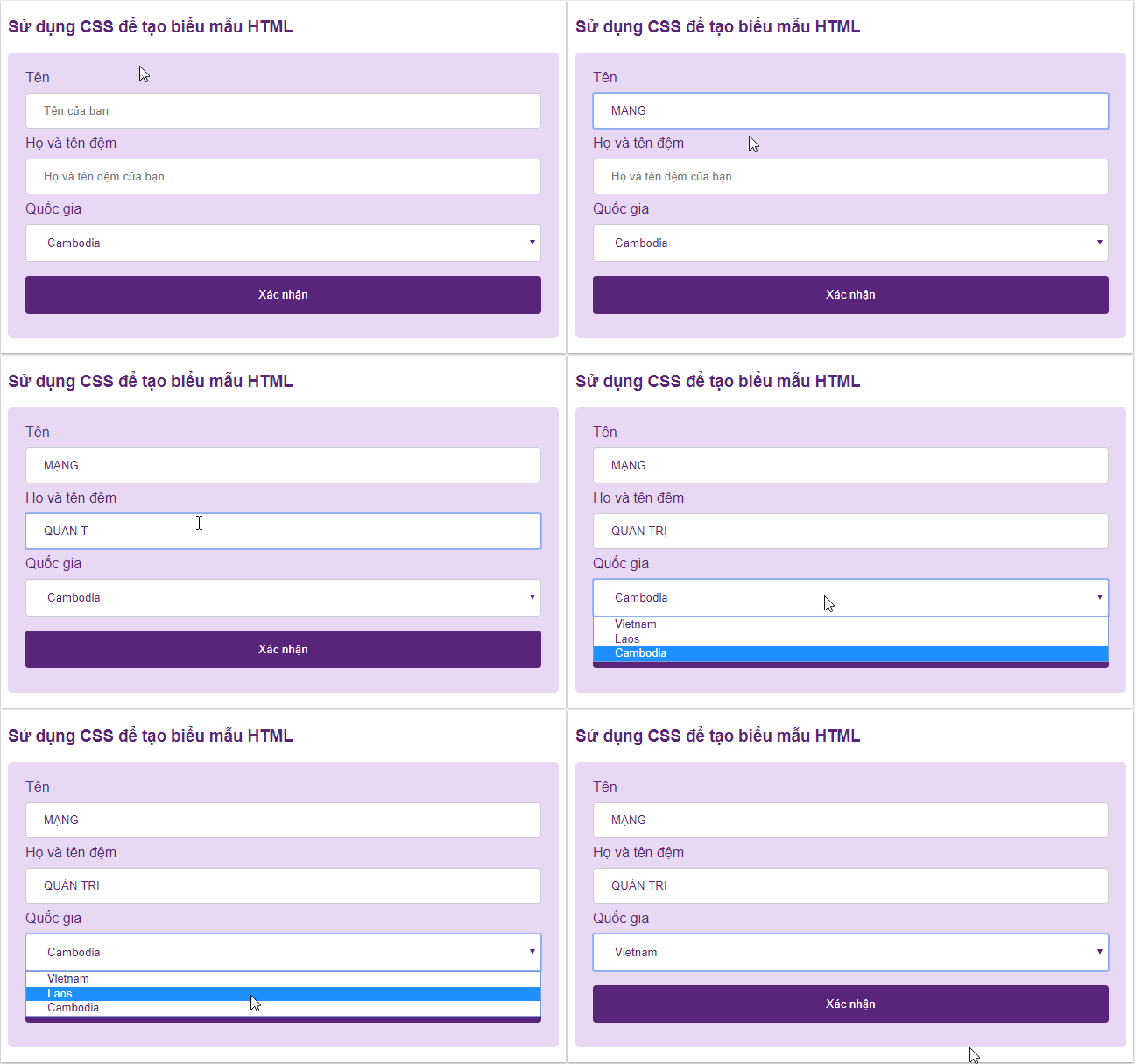
<p style="text-align: justify;">Ở bài viết này, Quantrimang.com sẽ hướng dẫn bạn cách xây dựng phần giao diện hiển thị của một biểu mẫu cơ bản. Giao diện này có thể được làm khá đẹp mắt với CSS, dạng như này:</p>

<p style="text-align: justify;"><img alt="" data-i="0" data-src="https://st.quantrimang.com/photos/image/2019/04/19/form-trong-css-1.gif" data-was-processed="true" height="405" src="https://st.quantrimang.com/photos/image/2019/04/19/form-trong-css-1.gif" width="648" /></p>

<h2 style="text-align: justify;">Định dạng các phần trong biểu mẫu</h2>

<h3 style="text-align: justify;">Trường nhập vào</h3>

<p style="text-align: justify;">Sử dụng thuộc tính width để xác định chiều rộng của trường nhập vào:</p>

<pre id="pre0" style="text-align: justify;">
input {  width: 100%;}</pre>

<p style="text-align: justify;"><img alt="" data-i="1" data-src="https://st.quantrimang.com/photos/image/2019/04/19/form-trong-css-2.gif" data-was-processed="true" height="79" src="https://st.quantrimang.com/photos/image/2019/04/19/form-trong-css-2.gif" width="650" /></p>

<p style="text-align: justify;">Code này sẽ áp dụng với tất cả phần tử &lt;input&gt;. Nếu bạn muốn định style cho một kiểu input cụ thể thì có thể sử dụng&nbsp;<a href="https://quantrimang.com/hoc/attribute-selector-trong-css-163136" title="Bộ chọn thuộc tính - Attribute Selector trong CSS">Attribute Selector</a>:</p>

<ul>
	<li style="text-align: justify;"><em>input&#91;type=text&#93;:</em>&nbsp;định kiểu cho tất cả các trường có thuộc tính type, giá trị text.</li>
	<li style="text-align: justify;"><em>input&#91;type=password&#93;:</em>&nbsp;định kiểu cho tất cả các trường có thuộc tính type, giá trị password.</li>
	<li style="text-align: justify;"><em>input&#91;type=number&#93;:</em>&nbsp;định kiểu cho tất cả các trường có thuộc tính type, giá trị number.</li>
</ul>

<h3 style="text-align: justify;">Thêm padding và margin cho trường nhập vào</h3>

<pre id="pre1" style="text-align: justify;">
input&#91;type=text&#93; {  width: 100%;  padding: 12px 20px;  margin: 8px 0;  box-sizing: border-box;}</pre>

<p style="text-align: justify;">Sử dụng thuộc tính padding để không gian bên trong trường văn bản rộng rãi hơn. Bạn cũng nên sử dụng thêm margin để có không gian bên ngoài các trường, giúp các trường cách nhau một khoảng nhất định.</p>

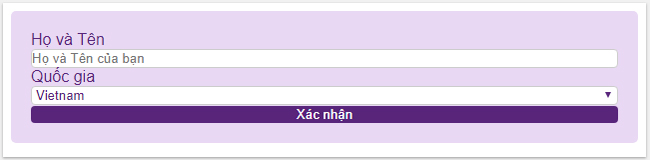
<p style="text-align: justify;"><strong>Form không có padding và margin:</strong></p>

<p style="text-align: justify;"><img alt="" data-i="2" data-src="https://st.quantrimang.com/photos/image/2019/04/19/form-trong-css-3.jpg" data-was-processed="true" height="160" src="https://st.quantrimang.com/photos/image/2019/04/19/form-trong-css-3.jpg" width="650" /></p>

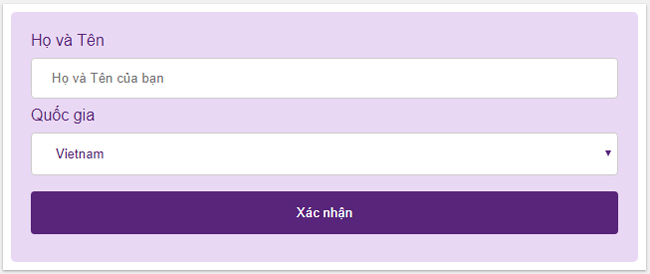
<p style="text-align: justify;"><strong>Form có cả padding và margin:</strong></p>

<p style="text-align: justify;"><img alt="" data-i="3" data-src="https://st.quantrimang.com/photos/image/2019/04/19/form-trong-css-6.jpg" data-was-processed="true" height="274" src="https://st.quantrimang.com/photos/image/2019/04/19/form-trong-css-6.jpg" width="650" /></p>

<p style="text-align: justify;">Bổ sung thêm thuộc tính&nbsp;<em>box-sizing:border-box</em>&nbsp;để cho phép phần padding và đường viền của box nằm trọn trong kích thước phần tử đã được định sẵn.</p>

<p style="text-align: justify;">Code đơn giản như này để bạn xem thêm, hãy thử thay đổi các giá trị để thấy sự khác biệt:</p>

<pre id="pre2" style="text-align: justify;">
&lt;!DOCTYPE html&gt;&lt;html&gt;&lt;head&gt;&lt;style&gt; input&#91;type=text&#93; {  width: 100%;  padding: 12px 20px;  margin: 8px 0;  box-sizing: border-box;}&lt;/style&gt;&lt;/head&gt;&lt;body&gt;&lt;form&gt;  &lt;label for=&quot;fname&quot;&gt;Tên&lt;/label&gt;  &lt;input type=&quot;text&quot; id=&quot;fname&quot; name=&quot;fname&quot;&gt;  &lt;label for=&quot;lname&quot;&gt;Họ và tên&lt;/label&gt;  &lt;input type=&quot;text&quot; id=&quot;lname&quot; name=&quot;lname&quot;&gt;&lt;/form&gt;&lt;/body&gt;&lt;/html&gt;</pre>

<h3 style="text-align: justify;">Định dạng Border</h3>

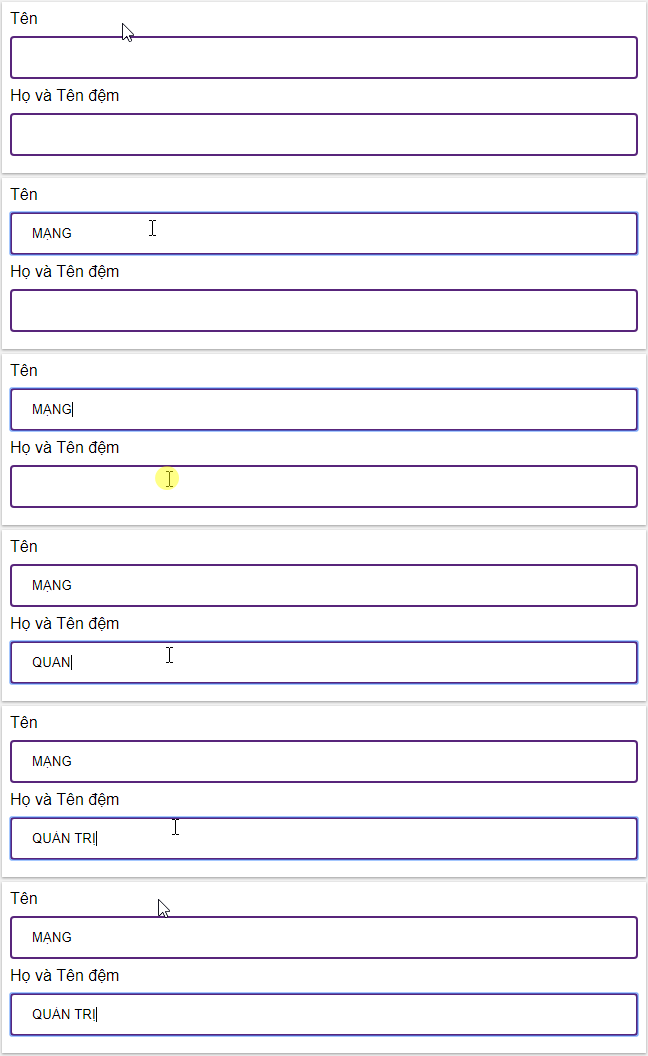
<p style="text-align: justify;">Sử dụng thuộc tính border để thay đổi kích cỡ và màu đường viền, kết hợp với thuộc tính border-radius để định dạng bo tròn góc cạnh.</p>

<pre id="pre3" style="text-align: justify;">
input&#91;type=text&#93; {  border: 2px solid purple;  border-radius: 4px;}</pre>

<p style="text-align: justify;"><img alt="" data-i="4" data-src="https://st.quantrimang.com/photos/image/2019/04/19/form-trong-css-4.gif" data-was-processed="true" height="176" src="https://st.quantrimang.com/photos/image/2019/04/19/form-trong-css-4.gif" width="648" /></p>

<p style="text-align: justify;"><strong>Ví dụ:</strong></p>

<pre id="pre4" style="text-align: justify;">
&lt;!DOCTYPE html&gt;&lt;html&gt;&lt;head&gt;&lt;style&gt; input&#91;type=text&#93; {  width: 100%;  padding: 12px 20px;  margin: 8px 0;  box-sizing: border-box;  border: 2px solid #58257b;  border-radius: 4px;}&lt;/style&gt;&lt;/head&gt;&lt;body&gt;&lt;form&gt;  &lt;label for=&quot;fname&quot;&gt;Tên&lt;/label&gt;  &lt;input type=&quot;text&quot; id=&quot;fname&quot; name=&quot;fname&quot;&gt;  &lt;label for=&quot;lname&quot;&gt;Họ và Tên đệm&lt;/label&gt;  &lt;input type=&quot;text&quot; id=&quot;lname&quot; name=&quot;lname&quot;&gt;&lt;/form&gt;&lt;/body&gt;&lt;/html&gt;</pre>

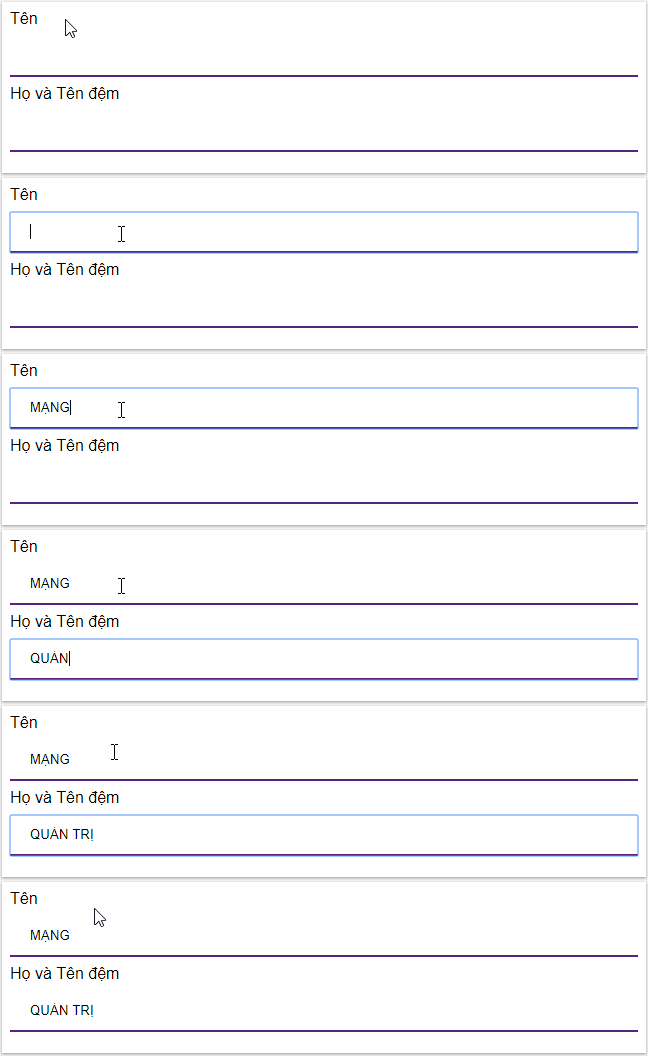
<p style="text-align: justify;">Nếu bạn chỉ muốn để khung chỉ có đường viền phía dưới thì sử dụng thuộc tính&nbsp;<em>border-bottom:</em></p>

<p style="text-align: justify;"><img alt="" data-i="5" data-src="https://st.quantrimang.com/photos/image/2019/04/19/form-trong-css-5.gif" data-was-processed="true" height="176" src="https://st.quantrimang.com/photos/image/2019/04/19/form-trong-css-5.gif" width="648" /></p>

<pre id="pre5" style="text-align: justify;">
input&#91;type=text&#93; {  border: none;  border-bottom: 2px solid purple;}</pre>

<h3 style="text-align: justify;">Định dạng màu sắc</h3>

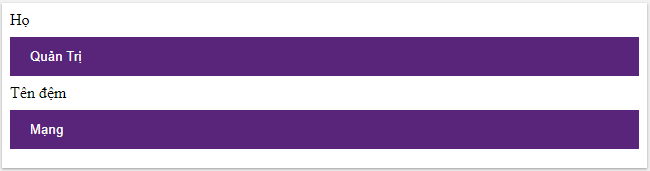
<p style="text-align: justify;">Sử dụng thuộc tính&nbsp;<em>background-color</em>&nbsp;để thêm màu nền cho trường nhập vào và thuộc tính color để thay đổi màu văn bản:</p>

<pre id="pre6" style="text-align: justify;">
input&#91;type=text&#93; {  background-color: #58257b;  color: white}</pre>

<p style="text-align: justify;"><img alt="" data-i="6" data-src="https://st.quantrimang.com/photos/image/2019/04/19/form-trong-css-7.jpg" data-was-processed="true" height="171" src="https://st.quantrimang.com/photos/image/2019/04/19/form-trong-css-7.jpg" width="650" /></p>

<p style="text-align: justify;"><strong>Ví dụ:</strong></p>

<pre id="pre7" style="text-align: justify;">
&lt;!DOCTYPE html&gt;&lt;html&gt;&lt;head&gt;&lt;style&gt; input&#91;type=text&#93; {  width: 100%;  padding: 12px 20px;  margin: 8px 0;  box-sizing: border-box;  border: none;  background-color: #58257b;  color: white}&lt;/style&gt;&lt;/head&gt;&lt;body&gt;&lt;form&gt;  &lt;label for=&quot;lname&quot;&gt;Họ&lt;/label&gt;  &lt;input type=&quot;text&quot; id=&quot;lname&quot; name=&quot;lname&quot; value=&quot;Quản Trị&quot;&gt;  &lt;label for=&quot;fname&quot;&gt;Tên đệm&lt;/label&gt;  &lt;input type=&quot;text&quot; id=&quot;fname&quot; name=&quot;fname&quot; value=&quot;Mạng&quot;&gt;&lt;/form&gt;&lt;/body&gt;&lt;/html&gt;</pre>

<h3 style="text-align: justify;">Tạo ấn tượng cho trường nhập vào</h3>

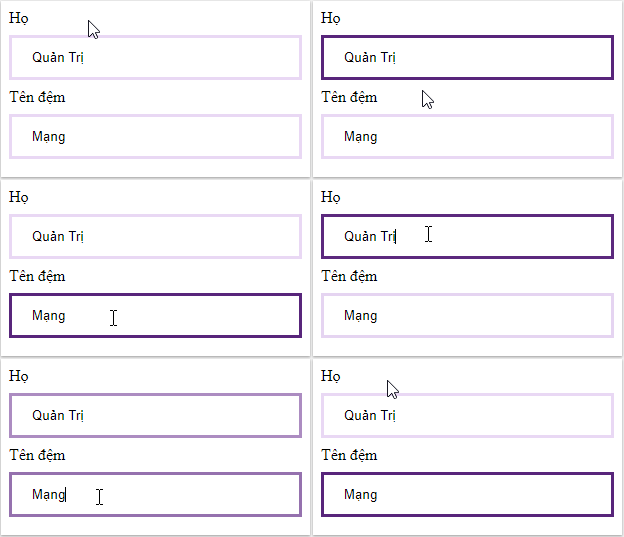
<p style="text-align: justify;">Theo mặc định, một số trình duyệt sẽ thêm một đường viền màu xanh xung quanh trường nhập khi người dùng click vào để điền thông tin. Bạn có thể loại bỏ điều này bằng cách thêm thuộc tính&nbsp;<em>outline:none.</em></p>

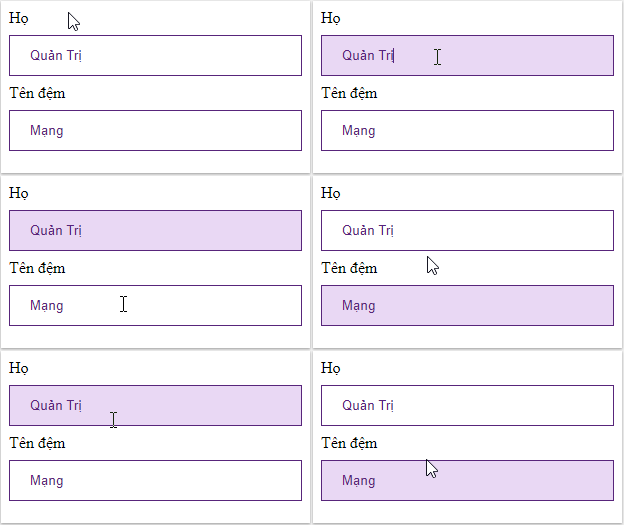
<p style="text-align: justify;">Nên sử dụng selector&nbsp;<em>:focus</em>&nbsp;để tạo ấn tượng cho trường input, gây sự chú ý đến người dùng khi họ nhấp chuột vào ô:</p>

<table>
	<tbody>
		<tr>
			<td style="text-align: justify;"><strong>Sử dụng background màu khác</strong></td>
			<td style="text-align: justify;"><strong>Nhấn mạnh bằng đường viền border</strong></td>
		</tr>
		<tr>
			<td>
			<pre id="pre8" style="text-align: justify;">
input&#91;type=text&#93;:focus {  background-color: lightblue;}</pre>
			</td>
			<td>
			<pre id="pre9" style="text-align: justify;">
input&#91;type=text&#93;:focus {  border: 3px solid #555;}</pre>
			</td>
		</tr>
		<tr>
			<td style="text-align: justify;"><img alt="" data-i="7" data-src="https://st.quantrimang.com/photos/image/2019/04/19/form-trong-css-8.gif" data-was-processed="true" height="175" src="https://st.quantrimang.com/photos/image/2019/04/19/form-trong-css-8.gif" width="312" /></td>
			<td style="text-align: justify;"><img alt="" data-i="8" data-src="https://st.quantrimang.com/photos/image/2019/04/19/form-trong-css-9.gif" height="179" src="https://st.quantrimang.com/photos/image/holder.png" width="312" /></td>
		</tr>
		<tr>
			<td>
			<pre id="pre10" style="text-align: justify;">
input&#91;type=text&#93; {  width: 100%;  padding: 12px 20px;  margin: 8px 0;  box-sizing: border-box;  border: 1px solid #58257b;  outline: none;}input&#91;type=text&#93;:focus {  background-color: #e9d8f4;}</pre>
			</td>
			<td>
			<p style="text-align: justify;">Thêm thuộc tính&nbsp;<em>transition</em>&nbsp;CSS để làm động màu đường viền (mất 0,5 giây để thay đổi màu khi click chuột vào).</p>

			<pre id="pre11" style="text-align: justify;">
input&#91;type=text&#93; {  width: 100%;  padding: 12px 20px;  margin: 8px 0;  box-sizing: border-box;  border: 3px solid #e9d8f4;  -webkit-transition: 0.5s;  transition: 0.5s;  outline: none;}input&#91;type=text&#93;:focus {border: 3px solid #58257b;}</pre>
			</td>
		</tr>
	</tbody>
</table>

<h3 style="text-align: justify;">Trường nhập vào có icon/image</h3>

<p style="text-align: justify;">Bạn có thể thêm một icon hoặc hình ảnh vào trường input, thường thì đặt ở đầu để biểu bị mục đích của trường, sử dụng thuộc tính&nbsp;<em>background-image</em>&nbsp;và định vị nó bằng thuộc tính&nbsp;<em>background-position.</em>&nbsp;Lưu ý, đặt kích thước padding trái đủ rộng để có không gian cho biểu tượng. Ví dụ dễ thấy nhất là icon kính lúp trước mỗi thanh tìm kiếm trên các website:</p>

<pre id="pre12" style="text-align: justify;">
input&#91;type=text&#93; {  background-color: white;  background-image: url(&#039;searchicon.png&#039;);  background-position: 10px 10px;   background-repeat: no-repeat;  padding-left: 40px;}</pre>

<p style="text-align: justify;"><img alt="" data-i="9" data-src="https://st.quantrimang.com/photos/image/2019/04/19/form-trong-css-10.gif" data-was-processed="true" height="56" src="https://st.quantrimang.com/photos/image/2019/04/19/form-trong-css-10.gif" width="632" /></p>

<p style="text-align: justify;"><strong>Ví dụ:</strong></p>

<pre id="pre13" style="text-align: justify;">
&lt;!DOCTYPE html&gt;&lt;html&gt;&lt;head&gt;&lt;style&gt; input&#91;type=text&#93; {  width: 100%;  box-sizing: border-box;  border: 2px solid #ccc;  border-radius: 4px;  font-size: 16px;  background-color: white;  background-image: url(&#039;searchicon.png&#039;);  background-position: 10px 10px;   background-repeat: no-repeat;  padding: 12px 20px 12px 40px;}&lt;/style&gt;&lt;/head&gt;&lt;body&gt;&lt;form&gt;  &lt;input type=&quot;text&quot; name=&quot;search&quot; placeholder=&quot;Search..&quot;&gt;&lt;/form&gt;&lt;/body&gt;&lt;/html&gt;</pre>

<h3 style="text-align: justify;">Hiệu ứng cho ô tìm kiếm</h3>

<p style="text-align: justify;">Để tạo một điểm nhấn ở đây, hãy sử dụng thuộc tính transition CSS để tạo hiệu ứng, làm ô tìm kiếm kéo dài ra sau khi được người dùng click vào, nhìn khá đẹp mắt.</p>

<pre id="pre14" style="text-align: justify;">
input&#91;type=text&#93; {  -webkit-transition: width 0.4s ease-in-out;  transition: width 0.4s ease-in-out;}input&#91;type=text&#93;:focus {  width: 100%;}</pre>

<p style="text-align: justify;"><img alt="" data-i="10" data-src="https://st.quantrimang.com/photos/image/2019/04/19/form-trong-css-11.gif" data-was-processed="true" height="89" src="https://st.quantrimang.com/photos/image/2019/04/19/form-trong-css-11.gif" width="636" /></p>

<p style="text-align: justify;"><strong>Ví dụ:</strong></p>

<pre id="pre15" style="text-align: justify;">
&lt;!DOCTYPE html&gt;&lt;html&gt;&lt;head&gt;&lt;style&gt; input&#91;type=text&#93; {  width: 130px;  box-sizing: border-box;  border: 2px solid #ccc;  border-radius: 4px;  font-size: 16px;  background-color: white;  background-image: url(&#039;searchicon.png&#039;);  background-position: 10px 10px;   background-repeat: no-repeat;  padding: 12px 20px 12px 40px;  -webkit-transition: width 0.4s ease-in-out;  transition: width 0.4s ease-in-out;}input&#91;type=text&#93;:focus {  width: 100%;}&lt;/style&gt;&lt;/head&gt;&lt;body&gt;&lt;form&gt;  &lt;input type=&quot;text&quot; name=&quot;search&quot; placeholder=&quot;Search..&quot;&gt;&lt;/form&gt;&lt;/body&gt;&lt;/html&gt;</pre>

<h3 style="text-align: justify;">Định dạng hộp textarea</h3>

<p style="text-align: justify;">Sử dụng thuộc tính resize để cố định kích thước hộp textarea.</p>

<pre id="pre16" style="text-align: justify;">
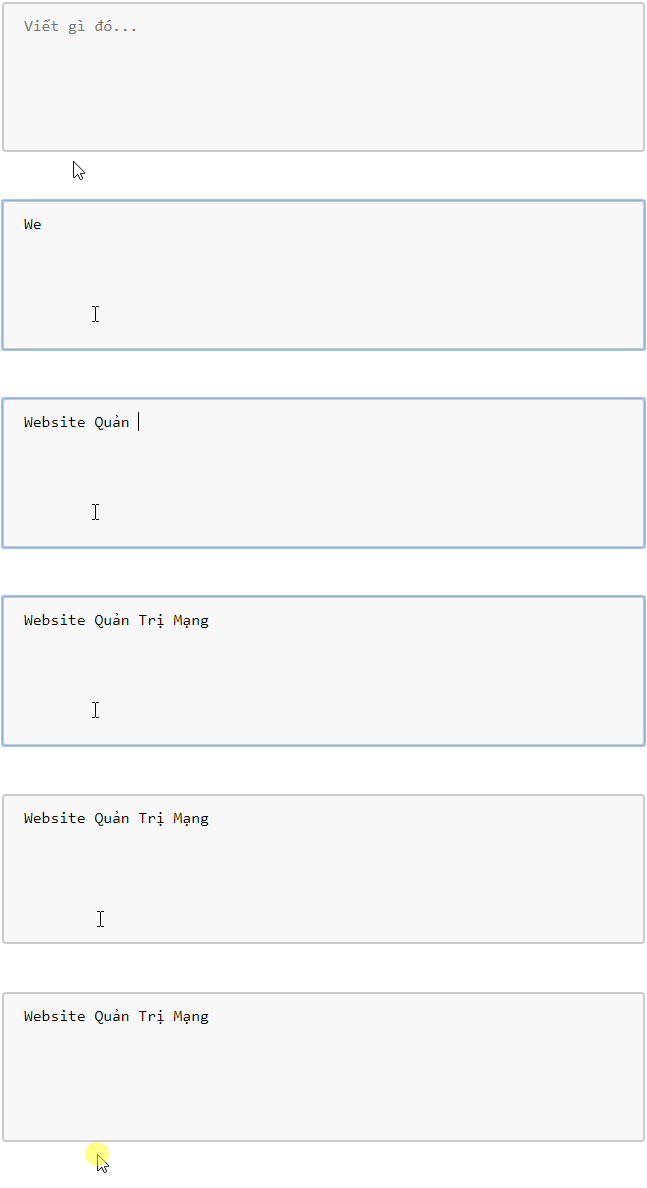
textarea {  width: 100%;  height: 150px;  padding: 12px 20px;  box-sizing: border-box;  border: 2px solid #ccc;  border-radius: 4px;  background-color: #f8f8f8;  resize: none;}</pre>

<p style="text-align: justify;"><img alt="" data-i="11" data-src="https://st.quantrimang.com/photos/image/2019/04/19/form-trong-css-14.gif" data-was-processed="true" height="198" src="https://st.quantrimang.com/photos/image/2019/04/19/form-trong-css-14.gif" width="647" /></p>

<p style="text-align: justify;"><strong>Ví dụ</strong>:</p>

<pre id="pre17" style="text-align: justify;">
&lt;!DOCTYPE html&gt;&lt;html&gt;&lt;head&gt;&lt;style&gt; textarea {  width: 100%;  height: 150px;  padding: 12px 20px;  box-sizing: border-box;  border: 2px solid #ccc;  border-radius: 4px;  background-color: #f8f8f8;  font-size: 16px;  resize: none;}&lt;/style&gt;&lt;/head&gt;&lt;body&gt;&lt;form&gt;  &lt;textarea placeholder=&quot;Viết gì đó...&quot;&gt;&lt;/textarea&gt;&lt;/form&gt;&lt;/body&gt;&lt;/html&gt;</pre>

<h3 style="text-align: justify;">Định dạng biểu mẫu dạng chọn</h3>

<pre id="pre18" style="text-align: justify;">
select {  width: 100%;  padding: 16px 20px;  border: none;  border-radius: 4px;  background-color: #f1f1f1;}</pre>

<p style="text-align: justify;"><img alt="" data-i="12" data-src="https://st.quantrimang.com/photos/image/2019/04/19/form-trong-css-12.gif" data-was-processed="true" height="110" src="https://st.quantrimang.com/photos/image/2019/04/19/form-trong-css-12.gif" width="657" /></p>

<pre id="pre19" style="text-align: justify;">
&lt;!DOCTYPE html&gt;&lt;html&gt;&lt;head&gt;&lt;style&gt; select {  width: 100%;  padding: 16px 20px;  border: none;  border-radius: 4px;  background-color: #f1f1f1;}&lt;/style&gt;&lt;/head&gt;&lt;body&gt;&lt;form&gt;  &lt;select id=&quot;country&quot; name=&quot;country&quot;&gt;    &lt;option value=&quot;vietnam&quot;&gt;Vietnam&lt;/option&gt;    &lt;option value=&quot;laos&quot;&gt;Laos&lt;/option&gt;    &lt;option value=&quot;cambodia&quot;&gt;Cambodia&lt;/option&gt;  &lt;/select&gt;&lt;/form&gt;&lt;/body&gt;&lt;/html&gt;</pre>

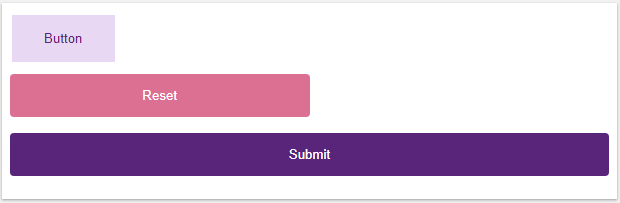
<h3 style="text-align: justify;">Định dạng cho button</h3>

<p style="text-align: justify;"><img alt="" data-i="13" data-src="https://st.quantrimang.com/photos/image/2019/04/19/form-trong-css-13.png" data-was-processed="true" height="203" src="https://st.quantrimang.com/photos/image/2019/04/19/form-trong-css-13.png" width="620" /></p>

<pre id="pre20" style="text-align: justify;">
&lt;!DOCTYPE html&gt;&lt;html&gt;&lt;head&gt;&lt;style&gt; input&#91;type=button&#93; {  background-color: #e9d8f4;  border: none;  color: #58257b;  padding: 16px 32px;  text-decoration: none;  margin: 4px 2px;  cursor: pointer;}input&#91;type=reset&#93; {  width: 50%;  background-color: #db7093;  color: white;  padding: 14px 20px;  margin: 8px 0;  border: none;  border-radius: 4px;  cursor: pointer;}input&#91;type=submit&#93; {  width: 100%;  background-color: #58257b;  color: white;  padding: 14px 20px;  margin: 8px 0;  border: none;  border-radius: 4px;  cursor: pointer;}&lt;/style&gt;&lt;/head&gt;&lt;body&gt;&lt;input type=&quot;button&quot; value=&quot;Button&quot;&gt;&lt;br&gt;&lt;input type=&quot;reset&quot; value=&quot;Reset&quot;&gt;&lt;br&gt;&lt;input type=&quot;submit&quot; value=&quot;Submit&quot;&gt;&lt;/body&gt;&lt;/html&gt;</pre>

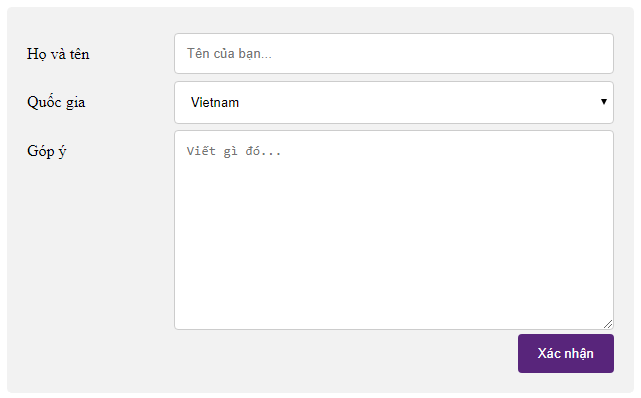
<h2 style="text-align: justify;">Form kiểu mẫu</h2>

<p style="text-align: justify;"><img alt="" data-i="14" data-src="https://st.quantrimang.com/photos/image/2019/04/19/form-trong-css-15.png" data-was-processed="true" height="398" src="https://st.quantrimang.com/photos/image/2019/04/19/form-trong-css-15.png" width="641" /></p>

<pre id="pre21" style="text-align: justify;">
&lt;!DOCTYPE html&gt;&lt;html&gt;&lt;head&gt;&lt;style&gt;* {  box-sizing: border-box;}input&#91;type=text&#93;, select, textarea {  width: 100%;  padding: 12px;  border: 1px solid #ccc;  border-radius: 4px;  resize: vertical;}label {  padding: 12px 12px 12px 0;  display: inline-block;}input&#91;type=submit&#93; {  background-color: #58257b;  color: white;  padding: 12px 20px;  border: none;  border-radius: 4px;  cursor: pointer;  float: right;}input&#91;type=submit&#93;:hover {  background-color: #45a049;}.container {  border-radius: 5px;  background-color: #f2f2f2;  padding: 20px;}.col-25 {  float: left;  width: 25%;  margin-top: 6px;}.col-75 {  float: left;  width: 75%;  margin-top: 6px;}.row:after {  content: &quot;&quot;;  display: table;  clear: both;}/* Bố cục linh hoạt: khi màn hình có chiều rộng dưới 600px thì hai cột chồng lên nhau thay vì nằm cạnh nhau */@media screen and (max-width: 600px) {  .col-25, .col-75, input&#91;type=submit&#93; {    width: 100%;    margin-top: 0;}}&lt;/style&gt;&lt;/head&gt;&lt;body&gt;&lt;div class=&quot;container&quot;&gt;  &lt;form action=&quot;/action_page.php&quot;&gt;  &lt;div class=&quot;row&quot;&gt;    &lt;div class=&quot;col-25&quot;&gt;      &lt;label for=&quot;fname&quot;&gt;Họ và tên&lt;/label&gt;    &lt;/div&gt;    &lt;div class=&quot;col-75&quot;&gt;      &lt;input type=&quot;text&quot; id=&quot;fname&quot; name=&quot;firstname&quot; placeholder=&quot;Tên của bạn&quot;&gt;    &lt;/div&gt;  &lt;/div&gt;  &lt;div class=&quot;row&quot;&gt;    &lt;div class=&quot;col-25&quot;&gt;    &lt;label for=&quot;country&quot;&gt;Quốc gia&lt;/label&gt;    &lt;/div&gt;    &lt;div class=&quot;col-75&quot;&gt;      &lt;select id=&quot;country&quot; name=&quot;country&quot;&gt;        &lt;option value=&quot;vietnam&quot;&gt;Vietnam&lt;/option&gt;        &lt;option value=&quot;laos&quot;&gt;Laos&lt;/option&gt;        &lt;option value=&quot;cambodia&quot;&gt;Cambodia&lt;/option&gt;      &lt;/select&gt;    &lt;/div&gt;  &lt;/div&gt;  &lt;div class=&quot;row&quot;&gt;    &lt;div class=&quot;col-25&quot;&gt;      &lt;label for=&quot;subject&quot;&gt;Góp ý&lt;/label&gt;    &lt;/div&gt;    &lt;div class=&quot;col-75&quot;&gt;      &lt;textarea id=&quot;subject&quot; name=&quot;subject&quot; placeholder=&quot;Viết gì đó...&quot;       style=&quot;height:200px&quot;&gt;&lt;/textarea&gt;    &lt;/div&gt;  &lt;/div&gt;  &lt;div class=&quot;row&quot;&gt;      &lt;input type=&quot;submit&quot; value=&quot;Xác nhận&quot;&gt;  &lt;/div&gt;  &lt;/form&gt;&lt;/div&gt;&lt;/body&gt;&lt;/html&gt;</pre>

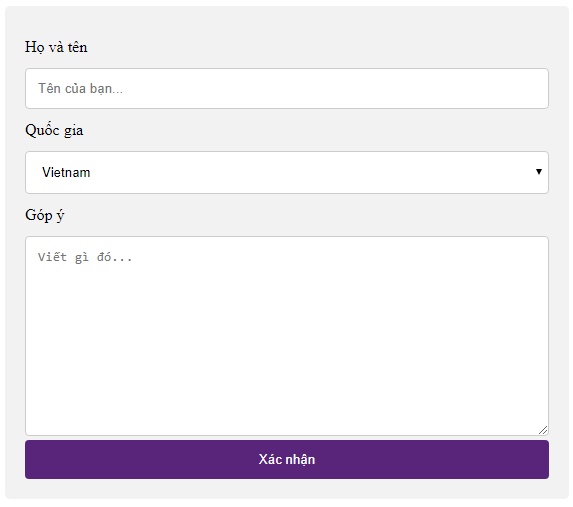
<p style="text-align: justify;">Thử thay đổi kích thước trình duyệt, khi màn hình có chiều rộng dưới 600px thì hai cột sẽ chồng lên nhau thay vì nằm cạnh nhau:</p>

<p style="text-align: justify;"><img alt="" data-i="15" data-src="https://st.quantrimang.com/photos/image/2019/04/19/form-trong-css-16.png" data-was-processed="true" height="507" src="https://st.quantrimang.com/photos/image/2019/04/19/form-trong-css-16.png" width="573" /></p>

<p style="text-align: justify;">Bạn có thể copy từng ví dụ để tự mình thử định dạng từng phần một của biểu mẫu, hoặc lấy thẳng ví dụ kiểu mẫu cuối cùng để làm form cho website của chính mình.</p>

<h2 style="text-align: justify;">Đầu vào không thể tùy biến</h2>

<p style="text-align: justify;">Tạo kiểu các thành phần biểu mẫu từ trước tới nay đã là một nhiệm vụ yêu cầu cao. Hiện người dùng có một số thành phần không có nhiều quyền kiểm soát khi tạo kiểu. Ví dụ:</p>

<ol>
	<li style="text-align: justify;">&lt;input type=&quot;color&quot;&gt;</li>
	<li style="text-align: justify;">&lt;input type=&quot;file&quot;&gt;</li>
	<li style="text-align: justify;">&lt;progress&gt;</li>
	<li style="text-align: justify;">&lt;option&gt;, &lt;optgroup&gt;, &lt;datalist&gt;</li>
</ol>

<p style="text-align: justify;">Những thành phần này được cung cấp bởi trình duyệt và được tạo kiểu dựa trên hệ điều hành. Cách duy nhất để tạo kiểu những thành phần này là dùng các điều khiển tùy biến, do những thành phần HTML tạo ra, chẳng hạn như div, span…</p>

<p style="text-align: justify;">Ví dụ, khi tạo kiểu&nbsp;<strong>&lt;input type=&quot;file&quot;&gt;</strong>, bạn có thể ẩn đầu vào mặc định và dùng một nút bấm tùy chỉnh.</p>

<p style="text-align: justify;">Các điều khiển tùy chỉnh cho những thành phần biểu mẫu được phát triển cho những thư viện JavaScript chính. Bạn có thể tìm thấy chúng trên GitHub.</p>

<p style="text-align: justify;">Giờ bạn đã hiểu cách tạo kiểu những thành phần biểu mẫu đơn giản tới phức tạp và cách dùng các điều khiển tùy biến khi các trường input trên trình duyệt khó tạo kiểu.</p>

<p style="text-align: justify;">Hi vọng bài viết giúp bạn nắm rõ về Form trong CSS. Chúc bạn học CSS thật vui!</p>
		</div>
				<div id="author">
						<p>
				<strong>Nguồn tin:</strong>
				Quantrimang.com
			</p>
		</div>
	</div>
	<div id="footer" class="clearfix">
		<div id="url">
			<strong>URL của bản tin này: </strong><a href="https://www.nguoicodonvn2008.info/vi/news/savefile/kien-thuc-may-tinh/form-bieu-mau-trong-css-7540.html" title="Form - Biểu mẫu trong CSS">https://www.nguoicodonvn2008.info/vi/news/savefile/kien-thuc-may-tinh/form-bieu-mau-trong-css-7540.html</a>

		</div>
		<div class="clear"></div>
		<div class="copyright">
			&copy; .&#x3A; Nguoicodonvn2008.info - Cõi lòng người cô đơn &#x3A;.
		</div>
		<div id="contact">
			<a href="mailto:admin@nguoicodonvn2008.info">admin@nguoicodonvn2008.info</a>
		</div>
	</div>
</div>
        <div id="timeoutsess" class="chromeframe">
            Bạn đã không sử dụng Site, <a onclick="timeoutsesscancel();" href="https://www.nguoicodonvn2008.info/#">Bấm vào đây để duy trì trạng thái đăng nhập</a>. Thời gian chờ: <span id="secField"> 60 </span> giây
        </div>
        <div id="openidResult" class="nv-alert" style="display:none"></div>
        <div id="openidBt" data-result="" data-redirect=""></div>
		</script>
		<div class="car-top">
  <span><img src="https://www.nguoicodonvn2008.info/themes/default/images/car.png" alt=""></span>
</div>
<script src="https://www.nguoicodonvn2008.info/assets/js/jquery/jquery.min.js"></script>
<script>var nv_base_siteurl="/",nv_lang_data="vi",nv_lang_interface="vi",nv_name_variable="nv",nv_fc_variable="op",nv_lang_variable="language",nv_module_name="news",nv_func_name="savefile",nv_is_user=0, nv_my_ofs=-4,nv_my_abbr="EDT",nv_cookie_prefix="nv4c_e856T",nv_check_pass_mstime=1738000,nv_area_admin=0,nv_safemode=0,theme_responsive=0,nv_recaptcha_ver=2,nv_recaptcha_sitekey="",nv_recaptcha_type="image",XSSsanitize=1;</script>
<script src="https://www.nguoicodonvn2008.info/assets/js/language/vi.js"></script>
<script src="https://www.nguoicodonvn2008.info/assets/js/DOMPurify/purify3.js"></script>
<script src="https://www.nguoicodonvn2008.info/assets/js/global.js"></script>
<script src="https://www.nguoicodonvn2008.info/assets/js/site.js"></script>
<script src="https://www.nguoicodonvn2008.info/themes/default/js/news.js"></script>
<script src="https://www.nguoicodonvn2008.info/themes/default/js/main.js"></script>
<script src="https://www.nguoicodonvn2008.info/themes/default/js/custom.js"></script>
<script type="application/ld+json">
        {
            "@context": "https://schema.org",
            "@type": "Organization",
            "url": "https://www.nguoicodonvn2008.info",
            "logo": "https://www.nguoicodonvn2008.info/uploads/angel.gif"
        }
        </script>
<script src="https://www.nguoicodonvn2008.info/themes/default/js/bootstrap.min.js"></script>
<script type="text/javascript">
var $scrolltop = $('.car-top');
$scrolltop.on('click', function () {
    $('html,body').animate({
        scrollTop: 0
    }, 800);
    $(this).addClass("car-run");
    setTimeout(function(){ $scrolltop.removeClass('car-run');}, 1000);
    return false;
});
$(window).on('scroll', function ()
{ 
    if($(window).scrollTop() >= 200)
    {
        $scrolltop.addClass("show");
        $scrolltop.addClass("car-down");
    }
    else
    {
       $scrolltop.removeClass("show");
       setTimeout(function(){ $scrolltop.removeClass('car-down');}, 300);
    }
});
</script>
</body>
</html>