<!DOCTYPE html>
    <html lang="vi" xmlns="http://www.w3.org/1999/xhtml" prefix="og: http://ogp.me/ns#">
    <head>
<title>Files UWP&#x3A; Ứng dụng quản lý tệp mới, hiện đại dành riêng cho Windows 10</title>
<meta name="description" content="Files UWP&#x3A; Ứng dụng quản lý tệp mới, hiện đại dành riêng cho Windows 10 - Savefile - Tin Tức -...">
<meta name="author" content=".: Nguoicodonvn2008.info - Cõi lòng người cô đơn :.">
<meta name="copyright" content=".: Nguoicodonvn2008.info - Cõi lòng người cô đơn :. [admin@nguoicodonvn2008.info]">
<meta name="robots" content="index, archive, follow, noodp">
<meta name="googlebot" content="index,archive,follow,noodp">
<meta name="msnbot" content="all,index,follow">
<meta name="generator" content="NukeViet v4.5">
<meta http-equiv="Content-Type" content="text/html; charset=utf-8">
<meta property="og:title" content="Files UWP&#x3A; Ứng dụng quản lý tệp mới, hiện đại dành riêng cho Windows 10">
<meta property="og:type" content="website">
<meta property="og:description" content="Savefile - Tin Tức - https&#x3A;&#x002F;&#x002F;www.nguoicodonvn2008.info&#x002F;vi&#x002F;news&#x002F;savefile&#x002F;kien-thuc-may-tinh&#x002F;files-uwp-ung-dung-quan-ly-tep-moi-hien-dai-danh-rieng-cho-windows-10-2187.html">
<meta property="og:site_name" content=".&#x3A; Nguoicodonvn2008.info - Cõi lòng người cô đơn &#x3A;.">
<meta property="og:url" content="https://www.nguoicodonvn2008.info/vi/news/savefile/kien-thuc-may-tinh/files-uwp-ung-dung-quan-ly-tep-moi-hien-dai-danh-rieng-cho-windows-10-2187.html">
<link rel="shortcut icon" href="https://www.nguoicodonvn2008.info/favicon.ico">
<link rel="canonical" href="https://www.nguoicodonvn2008.info/vi/news/savefile/kien-thuc-may-tinh/files-uwp-ung-dung-quan-ly-tep-moi-hien-dai-danh-rieng-cho-windows-10-2187.html">
<link rel="alternate" href="https://www.nguoicodonvn2008.info/vi/news/rss/" title="Tin Tức" type="application/rss+xml">
<link rel="alternate" href="https://www.nguoicodonvn2008.info/vi/news/rss/karaoke-dual/" title="Tin Tức - Karaoke Dual" type="application/rss+xml">
<link rel="alternate" href="https://www.nguoicodonvn2008.info/vi/news/rss/nhac-tre/" title="Tin Tức - Nhạc trẻ" type="application/rss+xml">
<link rel="alternate" href="https://www.nguoicodonvn2008.info/vi/news/rss/tru-tinh/" title="Tin Tức - Trữ tình" type="application/rss+xml">
<link rel="alternate" href="https://www.nguoicodonvn2008.info/vi/news/rss/nuoc-ngoai/" title="Tin Tức - Nước ngoài" type="application/rss+xml">
<link rel="alternate" href="https://www.nguoicodonvn2008.info/vi/news/rss/remix/" title="Tin Tức - Remix" type="application/rss+xml">
<link rel="alternate" href="https://www.nguoicodonvn2008.info/vi/news/rss/tam-su-tinh-yeu/" title="Tin Tức - Tâm sự tình yêu" type="application/rss+xml">
<link rel="alternate" href="https://www.nguoicodonvn2008.info/vi/news/rss/tho-suu-tam/" title="Tin Tức - Thơ sưu tầm" type="application/rss+xml">
<link rel="alternate" href="https://www.nguoicodonvn2008.info/vi/news/rss/cuoc-song/" title="Tin Tức - Cuộc sống" type="application/rss+xml">
<link rel="alternate" href="https://www.nguoicodonvn2008.info/vi/news/rss/phan-mem/" title="Tin Tức - Phần mềm" type="application/rss+xml">
<link rel="alternate" href="https://www.nguoicodonvn2008.info/vi/news/rss/kien-thuc-may-tinh/" title="Tin Tức - Kiến thức máy tính" type="application/rss+xml">
<link rel="alternate" href="https://www.nguoicodonvn2008.info/vi/news/rss/hoc-tap/" title="Tin Tức - Học tập" type="application/rss+xml">
<link rel="alternate" href="https://www.nguoicodonvn2008.info/vi/news/rss/tai-lieu/" title="Tin Tức - Tài liệu" type="application/rss+xml">
<link rel="alternate" href="https://www.nguoicodonvn2008.info/vi/news/rss/de-thi/" title="Tin Tức - Đề thi" type="application/rss+xml">
<link rel="preload" as="style" href="https://www.nguoicodonvn2008.info/assets/css/font-awesome.min.css" type="text/css">
<link rel="preload" as="style" href="https://www.nguoicodonvn2008.info/themes/default/css/bootstrap.non-responsive.css" type="text/css">
<link rel="preload" as="style" href="https://www.nguoicodonvn2008.info/themes/default/css/style.css" type="text/css">
<link rel="preload" as="style" href="https://www.nguoicodonvn2008.info/themes/default/css/style.non-responsive.css" type="text/css">
<link rel="preload" as="style" href="https://www.nguoicodonvn2008.info/themes/default/css/news.css" type="text/css">
<link rel="preload" as="style" href="https://www.nguoicodonvn2008.info/themes/default/css/custom.css" type="text/css">
<link rel="preload" as="script" href="https://www.nguoicodonvn2008.info/assets/js/jquery/jquery.min.js" type="text/javascript">
<link rel="preload" as="script" href="https://www.nguoicodonvn2008.info/assets/js/language/vi.js" type="text/javascript">
<link rel="preload" as="script" href="https://www.nguoicodonvn2008.info/assets/js/DOMPurify/purify3.js" type="text/javascript">
<link rel="preload" as="script" href="https://www.nguoicodonvn2008.info/assets/js/global.js" type="text/javascript">
<link rel="preload" as="script" href="https://www.nguoicodonvn2008.info/assets/js/site.js" type="text/javascript">
<link rel="preload" as="script" href="https://www.nguoicodonvn2008.info/themes/default/js/news.js" type="text/javascript">
<link rel="preload" as="script" href="https://www.nguoicodonvn2008.info/themes/default/js/main.js" type="text/javascript">
<link rel="preload" as="script" href="https://www.nguoicodonvn2008.info/themes/default/js/custom.js" type="text/javascript">
<link rel="preload" as="script" href="https://www.nguoicodonvn2008.info/themes/default/js/bootstrap.min.js" type="text/javascript">
<link rel="stylesheet" href="https://www.nguoicodonvn2008.info/assets/css/font-awesome.min.css">
<link rel="stylesheet" href="https://www.nguoicodonvn2008.info/themes/default/css/bootstrap.non-responsive.css">
<link rel="stylesheet" href="https://www.nguoicodonvn2008.info/themes/default/css/style.css">
<link rel="stylesheet" href="https://www.nguoicodonvn2008.info/themes/default/css/style.non-responsive.css">
<link rel="StyleSheet" href="https://www.nguoicodonvn2008.info/themes/default/css/news.css">
<link rel="stylesheet" href="https://www.nguoicodonvn2008.info/themes/default/css/custom.css">
<style type="text/css">
	body{background: #fff;}
</style>
    </head>
    <body>
<div id="print">
	<div id="hd_print">
		<h2 class="pull-left">.&#x3A; Nguoicodonvn2008.info - Cõi lòng người cô đơn &#x3A;.</h2>
		<p class="pull-right"><a title=".&#x3A; Nguoicodonvn2008.info - Cõi lòng người cô đơn &#x3A;." href="https://www.nguoicodonvn2008.info/">https://www.nguoicodonvn2008.info</a></p>
	</div>
	<div class="clear"></div>
	<hr />
	<div id="content">
		<h1>Files UWP&#x3A; Ứng dụng quản lý tệp mới, hiện đại dành riêng cho Windows 10</h1>
		<ul class="list-inline">
			<li>Thứ tư - 10/06/2020 00:53</li>
			<li class="hidden-print txtrequired"><em class="fa fa-print">&nbsp;</em><a title="In ra" href="javascript:;" onclick="window.print()">In ra</a></li>
			<li class="hidden-print txtrequired"><em class="fa fa-power-off">&nbsp;</em><a title="Đóng cửa sổ này" href="javascript:;" onclick="window.close()">Đóng cửa sổ này</a></li>
		</ul>
		<div class="clear"></div>
		<div id="hometext">
		</div>
				<div class="imghome">
			<img alt="Files UWP&#x3A; Ứng dụng quản lý tệp mới, hiện đại dành riêng cho Windows 10" src="https://st.quantrimang.com/photos/image/2020/06/10/files-uwp-ung-dung-quan-ly-tep-cho-windows-101.jpg" width="460" class="img-thumbnail" />
		</div>
		<div class="clear"></div>
		<div id="bodytext" class="clearfix">
			<p style="text-align: justify;">Bạn đã chán ngấy sử dụng File Explorer, hay chỉ đơn giản là muốn tìm kiếm một trải nghiệm mới, hãy thử tham khảo Files UWP. Files UWP là ứng dụng quản lý tệp của bên thứ ba dành riêng cho Windows 10 mà bạn có thể sử dụng thay thế cho công cụ&nbsp;File Explorer&nbsp;tích hợp.</p>

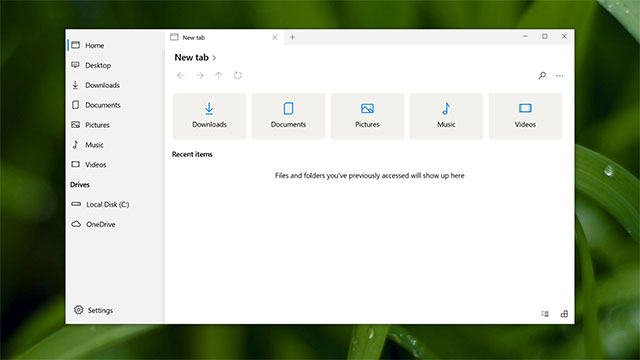
<p style="text-align: justify;">Ứng dụng này về cơ bản vẫn sẽ cung cấp cho bạn một giao diện trực quan để truy cập vào các tập tin hệ thống, nhưng đã được “hiện đại hóa” với triết lý thiết kế Fluent Design, cùng sự góp mặt của hàng loạt tính năng bổ sung khác mà File Explorer không hỗ trợ.</p>

<figure>
<div style="text-align: justify;"><img alt="Files UWP" data-i="0" data-src="https://st.quantrimang.com/photos/image/2020/06/10/files-uwp-ung-dung-quan-ly-tep-cho-windows-101.jpg" data-was-processed="true" height="360" src="https://st.quantrimang.com/photos/image/2020/06/10/files-uwp-ung-dung-quan-ly-tep-cho-windows-101.jpg" width="640" /></div>

<figcaption>
<div style="text-align: justify;">Files UWP</div>
</figcaption>
</figure>

<p style="text-align: justify;">Files UWP chỉ vừa được ra mắt và hiện đang ở chế độ preview, cung cấp giao diện dựa trên trên nền tảng các tab xếp chồng lên nhau, với nhiều chế độ bố cục khác nhau để người dùng lựa chọn. Theo tuyên bố của nhà phát triển, hiệu năng truy cập tệp của Files UWP trên môi trường Windows 10 là “không có đối thủ”, và một số thử nghiệm thực tế cho thấy nhận định này không phải không có cơ sở.</p>

<p style="text-align: center;"><iframe allowfullscreen="allowfullscreen" data-src="https://www.nguoicodonvn2008.info//www.youtube.com/embed/NtR3XoVA9b8" data-was-processed="true" frameborder="0" height="350" scrolling="no" src="https://www.youtube.com/embed/NtR3XoVA9b8" width="480"></iframe></p>

<p style="text-align: justify;">Ứng dụng này là nguồn mở hoàn toàn và kho lưu trữ code của nó hiện có sẵn trên GitHub. Luke Blevins, nhà phát triển đứng sau ứng dụng, đã kêu gọi cộng đồng nhà phát triển ứng dụng Windows trên toàn thế giới hỗ trợ cho dự án này thông qua các feedback items hoặc pull requests trên GitHub để giúp cho ứng dụng trở nên hoàn hảo hơn.</p>

<p style="text-align: justify;">Hiện tại, mục tiêu của tác giả Luke Blevins là triển khai thêm một số tính năng chính mang tính nền tảng như khả năng hỗ trợ OneDrive tốt hơn, tùy chọn tìm kiếm và hỗ trợ cho WSL trong tương lai gần. Nếu mọi chuyện diễn ra đúng kế hoạch, Files UWP sẽ bước ra khỏi chế độ preview trong vài tháng tới.</p>

<p style="text-align: justify;">Bạn có thể tải xuống và cài đặt ứng dụng Files UWP miễn phí từ Microsoft Store:</p>

<ul>
	<li style="text-align: justify;">Mã nguồn của Files UWP: https://github.com/files-community/files-uwp</li>
	<li style="text-align: justify;">Tải Files UWP trên Microsoft Store.:</li>
</ul>

<div style="text-align: justify;"><strong><span style="color:rgb(231, 76, 60);">https://www.microsoft.com/en-us/p/files-uwp-preview/9nghp3dx8hdx?ocid=AID2000142_aff_7593_1243925&amp;tduid=(ir__k9fj1do1zskftizhkk0sohzz0e2xn6ukuetfxgfd00)(7593)(1243925)(TnL5HPStwNw-t8.5AV35JkPw.QDQg8vg5g)()&amp;ranMID=24542&amp;ranEAID=TnL5HPStwNw&amp;ranSiteID=TnL5HPStwNw-t8.5AV35JkPw.QDQg8vg5g&amp;epi=TnL5HPStwNw-t8.5AV35JkPw.QDQg8vg5g&amp;irgwc=1&amp;irclickid=_k9fj1do1zskftizhkk0sohzz0e2xn6ukuetfxgfd00&amp;activetab=pivot:overviewtab</span></strong></div>
		</div>
				<div id="author">
						<p>
				<strong>Nguồn tin:</strong>
				Quantrimang.com
			</p>
		</div>
	</div>
	<div id="footer" class="clearfix">
		<div id="url">
			<strong>URL của bản tin này: </strong><a href="https://www.nguoicodonvn2008.info/vi/news/savefile/kien-thuc-may-tinh/files-uwp-ung-dung-quan-ly-tep-moi-hien-dai-danh-rieng-cho-windows-10-2187.html" title="Files UWP&#x3A; Ứng dụng quản lý tệp mới, hiện đại dành riêng cho Windows 10">https://www.nguoicodonvn2008.info/vi/news/savefile/kien-thuc-may-tinh/files-uwp-ung-dung-quan-ly-tep-moi-hien-dai-danh-rieng-cho-windows-10-2187.html</a>

		</div>
		<div class="clear"></div>
		<div class="copyright">
			&copy; .&#x3A; Nguoicodonvn2008.info - Cõi lòng người cô đơn &#x3A;.
		</div>
		<div id="contact">
			<a href="mailto:admin@nguoicodonvn2008.info">admin@nguoicodonvn2008.info</a>
		</div>
	</div>
</div>
        <div id="timeoutsess" class="chromeframe">
            Bạn đã không sử dụng Site, <a onclick="timeoutsesscancel();" href="https://www.nguoicodonvn2008.info/#">Bấm vào đây để duy trì trạng thái đăng nhập</a>. Thời gian chờ: <span id="secField"> 60 </span> giây
        </div>
        <div id="openidResult" class="nv-alert" style="display:none"></div>
        <div id="openidBt" data-result="" data-redirect=""></div>
		</script>
		<div class="car-top">
  <span><img src="https://www.nguoicodonvn2008.info/themes/default/images/car.png" alt=""></span>
</div>
<script src="https://www.nguoicodonvn2008.info/assets/js/jquery/jquery.min.js"></script>
<script>var nv_base_siteurl="/",nv_lang_data="vi",nv_lang_interface="vi",nv_name_variable="nv",nv_fc_variable="op",nv_lang_variable="language",nv_module_name="news",nv_func_name="savefile",nv_is_user=0, nv_my_ofs=-4,nv_my_abbr="EDT",nv_cookie_prefix="nv4c_e856T",nv_check_pass_mstime=1738000,nv_area_admin=0,nv_safemode=0,theme_responsive=0,nv_recaptcha_ver=2,nv_recaptcha_sitekey="",nv_recaptcha_type="image",XSSsanitize=1;</script>
<script src="https://www.nguoicodonvn2008.info/assets/js/language/vi.js"></script>
<script src="https://www.nguoicodonvn2008.info/assets/js/DOMPurify/purify3.js"></script>
<script src="https://www.nguoicodonvn2008.info/assets/js/global.js"></script>
<script src="https://www.nguoicodonvn2008.info/assets/js/site.js"></script>
<script src="https://www.nguoicodonvn2008.info/themes/default/js/news.js"></script>
<script src="https://www.nguoicodonvn2008.info/themes/default/js/main.js"></script>
<script src="https://www.nguoicodonvn2008.info/themes/default/js/custom.js"></script>
<script type="application/ld+json">
        {
            "@context": "https://schema.org",
            "@type": "Organization",
            "url": "https://www.nguoicodonvn2008.info",
            "logo": "https://www.nguoicodonvn2008.info/uploads/angel.gif"
        }
        </script>
<script src="https://www.nguoicodonvn2008.info/themes/default/js/bootstrap.min.js"></script>
<script type="text/javascript">
var $scrolltop = $('.car-top');
$scrolltop.on('click', function () {
    $('html,body').animate({
        scrollTop: 0
    }, 800);
    $(this).addClass("car-run");
    setTimeout(function(){ $scrolltop.removeClass('car-run');}, 1000);
    return false;
});
$(window).on('scroll', function ()
{ 
    if($(window).scrollTop() >= 200)
    {
        $scrolltop.addClass("show");
        $scrolltop.addClass("car-down");
    }
    else
    {
       $scrolltop.removeClass("show");
       setTimeout(function(){ $scrolltop.removeClass('car-down');}, 300);
    }
});
</script>
</body>
</html>