<!DOCTYPE html>
    <html lang="vi" xmlns="http://www.w3.org/1999/xhtml" prefix="og: http://ogp.me/ns#">
    <head>
<title>File INDD là gì?</title>
<meta name="description" content="File INDD là gì? - Savefile - Tin Tức - https&#x3A;&#x002F;&#x002F;www.nguoicodonvn2008.info&#x002F;vi&#x002F;news&#x002F;savefile&#x002F;kien-thuc-may-tinh&#x002F;file-indd-la-gi-2993.html">
<meta name="author" content=".: Nguoicodonvn2008.info - Cõi lòng người cô đơn :.">
<meta name="copyright" content=".: Nguoicodonvn2008.info - Cõi lòng người cô đơn :. [admin@nguoicodonvn2008.info]">
<meta name="robots" content="index, archive, follow, noodp">
<meta name="googlebot" content="index,archive,follow,noodp">
<meta name="msnbot" content="all,index,follow">
<meta name="generator" content="NukeViet v4.5">
<meta http-equiv="Content-Type" content="text/html; charset=utf-8">
<meta property="og:title" content="File INDD là gì?">
<meta property="og:type" content="website">
<meta property="og:description" content="Savefile - Tin Tức - https&#x3A;&#x002F;&#x002F;www.nguoicodonvn2008.info&#x002F;vi&#x002F;news&#x002F;savefile&#x002F;kien-thuc-may-tinh&#x002F;file-indd-la-gi-2993.html">
<meta property="og:site_name" content=".&#x3A; Nguoicodonvn2008.info - Cõi lòng người cô đơn &#x3A;.">
<meta property="og:url" content="https://www.nguoicodonvn2008.info/vi/news/savefile/kien-thuc-may-tinh/file-indd-la-gi-2993.html">
<link rel="shortcut icon" href="https://www.nguoicodonvn2008.info/favicon.ico">
<link rel="canonical" href="https://www.nguoicodonvn2008.info/vi/news/savefile/kien-thuc-may-tinh/file-indd-la-gi-2993.html">
<link rel="alternate" href="https://www.nguoicodonvn2008.info/vi/news/rss/" title="Tin Tức" type="application/rss+xml">
<link rel="alternate" href="https://www.nguoicodonvn2008.info/vi/news/rss/karaoke-dual/" title="Tin Tức - Karaoke Dual" type="application/rss+xml">
<link rel="alternate" href="https://www.nguoicodonvn2008.info/vi/news/rss/nhac-tre/" title="Tin Tức - Nhạc trẻ" type="application/rss+xml">
<link rel="alternate" href="https://www.nguoicodonvn2008.info/vi/news/rss/tru-tinh/" title="Tin Tức - Trữ tình" type="application/rss+xml">
<link rel="alternate" href="https://www.nguoicodonvn2008.info/vi/news/rss/nuoc-ngoai/" title="Tin Tức - Nước ngoài" type="application/rss+xml">
<link rel="alternate" href="https://www.nguoicodonvn2008.info/vi/news/rss/remix/" title="Tin Tức - Remix" type="application/rss+xml">
<link rel="alternate" href="https://www.nguoicodonvn2008.info/vi/news/rss/tam-su-tinh-yeu/" title="Tin Tức - Tâm sự tình yêu" type="application/rss+xml">
<link rel="alternate" href="https://www.nguoicodonvn2008.info/vi/news/rss/tho-suu-tam/" title="Tin Tức - Thơ sưu tầm" type="application/rss+xml">
<link rel="alternate" href="https://www.nguoicodonvn2008.info/vi/news/rss/cuoc-song/" title="Tin Tức - Cuộc sống" type="application/rss+xml">
<link rel="alternate" href="https://www.nguoicodonvn2008.info/vi/news/rss/phan-mem/" title="Tin Tức - Phần mềm" type="application/rss+xml">
<link rel="alternate" href="https://www.nguoicodonvn2008.info/vi/news/rss/kien-thuc-may-tinh/" title="Tin Tức - Kiến thức máy tính" type="application/rss+xml">
<link rel="alternate" href="https://www.nguoicodonvn2008.info/vi/news/rss/hoc-tap/" title="Tin Tức - Học tập" type="application/rss+xml">
<link rel="alternate" href="https://www.nguoicodonvn2008.info/vi/news/rss/tai-lieu/" title="Tin Tức - Tài liệu" type="application/rss+xml">
<link rel="alternate" href="https://www.nguoicodonvn2008.info/vi/news/rss/de-thi/" title="Tin Tức - Đề thi" type="application/rss+xml">
<link rel="preload" as="style" href="https://www.nguoicodonvn2008.info/assets/css/font-awesome.min.css" type="text/css">
<link rel="preload" as="style" href="https://www.nguoicodonvn2008.info/themes/default/css/bootstrap.non-responsive.css" type="text/css">
<link rel="preload" as="style" href="https://www.nguoicodonvn2008.info/themes/default/css/style.css" type="text/css">
<link rel="preload" as="style" href="https://www.nguoicodonvn2008.info/themes/default/css/style.non-responsive.css" type="text/css">
<link rel="preload" as="style" href="https://www.nguoicodonvn2008.info/themes/default/css/news.css" type="text/css">
<link rel="preload" as="style" href="https://www.nguoicodonvn2008.info/themes/default/css/custom.css" type="text/css">
<link rel="preload" as="script" href="https://www.nguoicodonvn2008.info/assets/js/jquery/jquery.min.js" type="text/javascript">
<link rel="preload" as="script" href="https://www.nguoicodonvn2008.info/assets/js/language/vi.js" type="text/javascript">
<link rel="preload" as="script" href="https://www.nguoicodonvn2008.info/assets/js/DOMPurify/purify3.js" type="text/javascript">
<link rel="preload" as="script" href="https://www.nguoicodonvn2008.info/assets/js/global.js" type="text/javascript">
<link rel="preload" as="script" href="https://www.nguoicodonvn2008.info/assets/js/site.js" type="text/javascript">
<link rel="preload" as="script" href="https://www.nguoicodonvn2008.info/themes/default/js/news.js" type="text/javascript">
<link rel="preload" as="script" href="https://www.nguoicodonvn2008.info/themes/default/js/main.js" type="text/javascript">
<link rel="preload" as="script" href="https://www.nguoicodonvn2008.info/themes/default/js/custom.js" type="text/javascript">
<link rel="preload" as="script" href="https://www.nguoicodonvn2008.info/themes/default/js/bootstrap.min.js" type="text/javascript">
<link rel="stylesheet" href="https://www.nguoicodonvn2008.info/assets/css/font-awesome.min.css">
<link rel="stylesheet" href="https://www.nguoicodonvn2008.info/themes/default/css/bootstrap.non-responsive.css">
<link rel="stylesheet" href="https://www.nguoicodonvn2008.info/themes/default/css/style.css">
<link rel="stylesheet" href="https://www.nguoicodonvn2008.info/themes/default/css/style.non-responsive.css">
<link rel="StyleSheet" href="https://www.nguoicodonvn2008.info/themes/default/css/news.css">
<link rel="stylesheet" href="https://www.nguoicodonvn2008.info/themes/default/css/custom.css">
<style type="text/css">
	body{background: #fff;}
</style>
    </head>
    <body>
<div id="print">
	<div id="hd_print">
		<h2 class="pull-left">.&#x3A; Nguoicodonvn2008.info - Cõi lòng người cô đơn &#x3A;.</h2>
		<p class="pull-right"><a title=".&#x3A; Nguoicodonvn2008.info - Cõi lòng người cô đơn &#x3A;." href="https://www.nguoicodonvn2008.info/">https://www.nguoicodonvn2008.info</a></p>
	</div>
	<div class="clear"></div>
	<hr />
	<div id="content">
		<h1>File INDD là gì?</h1>
		<ul class="list-inline">
			<li>Thứ bảy - 31/10/2020 00:54</li>
			<li class="hidden-print txtrequired"><em class="fa fa-print">&nbsp;</em><a title="In ra" href="javascript:;" onclick="window.print()">In ra</a></li>
			<li class="hidden-print txtrequired"><em class="fa fa-power-off">&nbsp;</em><a title="Đóng cửa sổ này" href="javascript:;" onclick="window.close()">Đóng cửa sổ này</a></li>
		</ul>
		<div class="clear"></div>
		<div id="hometext">
		</div>
				<div class="imghome">
			<img alt="File INDD là gì?" src="https://st.quantrimang.com/photos/image/2020/10/30/file-indd-1.jpg" width="460" class="img-thumbnail" />
		</div>
		<div class="clear"></div>
		<div id="bodytext" class="clearfix">
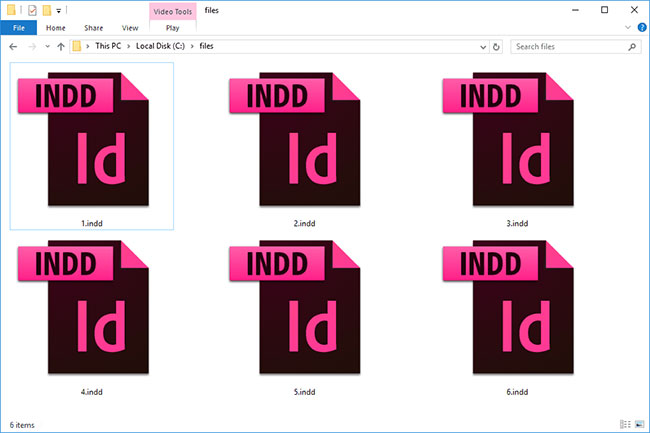
			<p style="text-align: justify;">File có phần mở rộng INDD là file InDesign Document, được tạo và sử dụng phổ biến nhất trong Adobe InDesign. File lưu trữ nội dung trang, thông tin định dạng, file, v.v...</p>

<p style="text-align: justify;">InDesign sử dụng các file này khi sản xuất báo, sách, tài liệu quảng cáo và những bố cục chuyên nghiệp khác. Một số file InDesign Document có thể chỉ sử dụng 3 chữ cái trong phần mở rộng file, là .IND, nhưng chúng vẫn ở cùng một định dạng.</p>

<p style="text-align: justify;">File IDLK là file InDesign Lock được tạo tự động khi file INDD đang được sử dụng trong InDesign. Chúng tương tự như file INDD nhưng có nghĩa là file InDesign Template, được sử dụng khi bạn muốn tạo nhiều trang có định dạng tương tự.</p>

<figure>
<div style="text-align: justify;"><img alt="File có phần mở rộng INDD là file InDesign Document, được tạo và sử dụng phổ biến nhất trong Adobe InDesign" data-i="0" data-src="https://st.quantrimang.com/photos/image/2020/10/30/file-indd-1.jpg" data-was-processed="true" height="433" src="https://st.quantrimang.com/photos/image/2020/10/30/file-indd-1.jpg" width="650" /></div>

<figcaption>
<div style="text-align: justify;">File có phần mở rộng INDD là file InDesign Document, được tạo và sử dụng phổ biến nhất trong Adobe InDesign</div>
</figcaption>
</figure>

<h2 style="text-align: justify;">Cách mở file INDD</h2>

<p style="text-align: justify;">Adobe InDesign&nbsp;là phần mềm chính được sử dụng để làm việc với các file INDD. Tuy nhiên, bạn cũng có thể xem file loại này bằng&nbsp;Adobe InCopy&nbsp;và&nbsp;QuarkXPress&nbsp;(với&nbsp;plugin IDMarkz, trước đây là ID2Q).</p>

<p style="text-align: justify;">WeAllEdit là một trình xem khác mà bạn có thể đăng ký để xem và thực hiện các thay đổi đối với file INDD thông qua trang web. Tuy nhiên, tùy chọn này không miễn phí.</p>

<p style="text-align: justify;">InDesign không chỉ hỗ trợ INDD và INDT mà còn hỗ trợ InDesign Book (INDB), QuarkXPress (QXD và QXT), InDesign CS3 Interchange (INX), cũng như các định dạng file InDesign khác như INDP, INDL và IDAP. Bạn cũng có thể sử dụng file JOBOPTIONS với chương trình này.</p>

<div style="text-align: justify;">&nbsp;</div>

<h2 style="text-align: justify;">Cách chuyển đổi file INDD</h2>

<p style="text-align: justify;">Sử dụng trình xem INDD hoặc trình chỉnh sửa từ bên trên sẽ cho phép bạn chuyển đổi file INDD sang định dạng khác, nhưng như bạn sẽ thấy bên dưới, một số chuyển đổi yêu cầu nhiều công việc hơn một chút.</p>

<p style="text-align: justify;">File INDD thường được chuyển đổi thành PDF. Cả InDesign và WeAllEdit đều có thể làm được điều đó.</p>

<p style="text-align: justify;">Cũng trong InDesign, trong menu&nbsp;<strong>File &gt; Export</strong>, là tùy chọn để xuất file INDD sang JPG, EPS,&nbsp;EPUB, SWF, FLA, HTML,&nbsp;XML&nbsp;và IDML. Bạn có thể chọn định dạng để chuyển đổi file INDD sang bằng cách thay đổi tùy chọn&nbsp;<strong>&quot;Save as type&quot;</strong>.</p>

<figure>
<div style="text-align: justify;"><img alt="InDesign cho phép chuyển đổi file INDD" data-i="1" data-src="https://st.quantrimang.com/photos/image/2020/10/30/file-indd-2.jpg" data-was-processed="true" height="272" src="https://st.quantrimang.com/photos/image/2020/10/30/file-indd-2.jpg" width="650" /></div>

<figcaption>
<div style="text-align: justify;">InDesign cho phép chuyển đổi file INDD</div>
</figcaption>
</figure>

<p style="text-align: justify;">Nếu đang chuyển đổi INDD sang JPG, bạn sẽ thấy rằng có một số tùy chọn tùy chỉnh mà bạn có thể chọn như chỉ xuất một vùng chọn hoặc toàn bộ tài liệu. Bạn cũng có thể thay đổi chất lượng và độ phân giải hình ảnh.</p>

<p style="text-align: justify;">Bạn cũng có thể chuyển đổi file INDD sang định dạng Microsoft Word như DOC hoặc DOCX, nhưng sự khác biệt về định dạng có thể khiến kết quả trông không chuẩn. Tuy nhiên, nếu bạn muốn làm điều này, trước tiên bạn nên xuất INDD sang PDF (sử dụng InDesign) và sau đó đưa file PDF đó vào trình chuyển đổi PDF sang Word để kết thúc quá trình chuyển đổi.</p>

<p style="text-align: justify;">InDesign không có tùy chọn xuất INDD sang PPTX cụ thể để sử dụng tài liệu với PowerPoint. Tuy nhiên, tương tự như những gì được giải thích ở trên về cách sử dụng file với Word, hãy bắt đầu bằng cách xuất file sang PDF. Sau đó, mở file PDF bằng&nbsp;Adobe Acrobat&nbsp;và sử dụng menu&nbsp;<strong>File &gt; Save As Other &gt; Microsoft PowerPoint Presentation</strong>&nbsp;của Acrobat để lưu nó dưới dạng file PPTX.</p>

<p style="text-align: justify;">Nếu cần file PPTX ở định dạng MS PowerPoint khác như PPT, bạn có thể sử dụng chính PowerPoint hoặc trình chuyển đổi tài liệu miễn phí để chuyển đổi file.</p>

<p style="text-align: justify;">iXentric SaveBack&nbsp;chuyển đổi INDD thành IDML nếu bạn cần sử dụng file trong InDesign CS4 trở lên. File IDML là file Adobe InDesign Markup Language được nén ở dạng ZIP sử dụng file XML để đại diện cho tài liệu InDesign.</p>

<p style="text-align: justify;">Nếu bạn đang sử dụng máy Mac, file có thể được chuyển đổi thành PSD để dùng trong&nbsp;Adobe Photoshop. Tuy nhiên, bạn không thể làm điều này với InDesign hoặc bất kỳ chương trình nào khác được đề cập ở trên.</p>

<p style="text-align: justify;">Bạn có thể sửa một file INDD bị hỏng bằng Stellar Phoenix InDesign Repair. Nó sẽ giúp bạn khôi phục mọi layer, văn bản, đối tượng, bookmark,&nbsp;hyperlink (siêu liên kết)&nbsp;và những thứ tương tự.</p>

<ul>
	<li style="text-align: justify;">Tải Stellar Phoenix InDesign Repair</li>
</ul>

<pre id="pre0">
<code>http://www.tucows.com/preview/1594376/Stellar-Phoenix-InDesign-Repair</code></pre>
		</div>
				<div id="author">
						<p>
				<strong>Nguồn tin:</strong>
				Quantrimang.com
			</p>
		</div>
	</div>
	<div id="footer" class="clearfix">
		<div id="url">
			<strong>URL của bản tin này: </strong><a href="https://www.nguoicodonvn2008.info/vi/news/savefile/kien-thuc-may-tinh/file-indd-la-gi-2993.html" title="File INDD là gì?">https://www.nguoicodonvn2008.info/vi/news/savefile/kien-thuc-may-tinh/file-indd-la-gi-2993.html</a>

		</div>
		<div class="clear"></div>
		<div class="copyright">
			&copy; .&#x3A; Nguoicodonvn2008.info - Cõi lòng người cô đơn &#x3A;.
		</div>
		<div id="contact">
			<a href="mailto:admin@nguoicodonvn2008.info">admin@nguoicodonvn2008.info</a>
		</div>
	</div>
</div>
        <div id="timeoutsess" class="chromeframe">
            Bạn đã không sử dụng Site, <a onclick="timeoutsesscancel();" href="https://www.nguoicodonvn2008.info/#">Bấm vào đây để duy trì trạng thái đăng nhập</a>. Thời gian chờ: <span id="secField"> 60 </span> giây
        </div>
        <div id="openidResult" class="nv-alert" style="display:none"></div>
        <div id="openidBt" data-result="" data-redirect=""></div>
		</script>
		<div class="car-top">
  <span><img src="https://www.nguoicodonvn2008.info/themes/default/images/car.png" alt=""></span>
</div>
<script src="https://www.nguoicodonvn2008.info/assets/js/jquery/jquery.min.js"></script>
<script>var nv_base_siteurl="/",nv_lang_data="vi",nv_lang_interface="vi",nv_name_variable="nv",nv_fc_variable="op",nv_lang_variable="language",nv_module_name="news",nv_func_name="savefile",nv_is_user=0, nv_my_ofs=-4,nv_my_abbr="EDT",nv_cookie_prefix="nv4c_e856T",nv_check_pass_mstime=1738000,nv_area_admin=0,nv_safemode=0,theme_responsive=0,nv_recaptcha_ver=2,nv_recaptcha_sitekey="",nv_recaptcha_type="image",XSSsanitize=1;</script>
<script src="https://www.nguoicodonvn2008.info/assets/js/language/vi.js"></script>
<script src="https://www.nguoicodonvn2008.info/assets/js/DOMPurify/purify3.js"></script>
<script src="https://www.nguoicodonvn2008.info/assets/js/global.js"></script>
<script src="https://www.nguoicodonvn2008.info/assets/js/site.js"></script>
<script src="https://www.nguoicodonvn2008.info/themes/default/js/news.js"></script>
<script src="https://www.nguoicodonvn2008.info/themes/default/js/main.js"></script>
<script src="https://www.nguoicodonvn2008.info/themes/default/js/custom.js"></script>
<script type="application/ld+json">
        {
            "@context": "https://schema.org",
            "@type": "Organization",
            "url": "https://www.nguoicodonvn2008.info",
            "logo": "https://www.nguoicodonvn2008.info/uploads/angel.gif"
        }
        </script>
<script src="https://www.nguoicodonvn2008.info/themes/default/js/bootstrap.min.js"></script>
<script type="text/javascript">
var $scrolltop = $('.car-top');
$scrolltop.on('click', function () {
    $('html,body').animate({
        scrollTop: 0
    }, 800);
    $(this).addClass("car-run");
    setTimeout(function(){ $scrolltop.removeClass('car-run');}, 1000);
    return false;
});
$(window).on('scroll', function ()
{ 
    if($(window).scrollTop() >= 200)
    {
        $scrolltop.addClass("show");
        $scrolltop.addClass("car-down");
    }
    else
    {
       $scrolltop.removeClass("show");
       setTimeout(function(){ $scrolltop.removeClass('car-down');}, 300);
    }
});
</script>
</body>
</html>