<!DOCTYPE html>
    <html lang="vi" xmlns="http://www.w3.org/1999/xhtml" prefix="og: http://ogp.me/ns#">
    <head>
<title>Excel 2019 &#40;Phần 28&#41;&#x3A; What-if Analysis &#40;Phân tích Nếu-thì&#41;</title>
<meta name="description" content="Excel 2019 &#40;Phần 28&#41;&#x3A; What-if Analysis &#40;Phân tích Nếu-thì&#41; - Savefile - Tin Tức -...">
<meta name="author" content=".: Nguoicodonvn2008.info - Cõi lòng người cô đơn :.">
<meta name="copyright" content=".: Nguoicodonvn2008.info - Cõi lòng người cô đơn :. [admin@nguoicodonvn2008.info]">
<meta name="robots" content="index, archive, follow, noodp">
<meta name="googlebot" content="index,archive,follow,noodp">
<meta name="msnbot" content="all,index,follow">
<meta name="generator" content="NukeViet v4.5">
<meta http-equiv="Content-Type" content="text/html; charset=utf-8">
<meta property="og:title" content="Excel 2019 &#40;Phần 28&#41;&#x3A; What-if Analysis &#40;Phân tích Nếu-thì&#41;">
<meta property="og:type" content="website">
<meta property="og:description" content="Savefile - Tin Tức - https&#x3A;&#x002F;&#x002F;www.nguoicodonvn2008.info&#x002F;vi&#x002F;news&#x002F;savefile&#x002F;kien-thuc-may-tinh&#x002F;excel-2019-phan-28-what-if-analysis-phan-tich-neu-thi-5334.html">
<meta property="og:site_name" content=".&#x3A; Nguoicodonvn2008.info - Cõi lòng người cô đơn &#x3A;.">
<meta property="og:url" content="https://www.nguoicodonvn2008.info/vi/news/savefile/kien-thuc-may-tinh/excel-2019-phan-28-what-if-analysis-phan-tich-neu-thi-5334.html">
<link rel="shortcut icon" href="https://www.nguoicodonvn2008.info/favicon.ico">
<link rel="canonical" href="https://www.nguoicodonvn2008.info/vi/news/savefile/kien-thuc-may-tinh/excel-2019-phan-28-what-if-analysis-phan-tich-neu-thi-5334.html">
<link rel="alternate" href="https://www.nguoicodonvn2008.info/vi/news/rss/" title="Tin Tức" type="application/rss+xml">
<link rel="alternate" href="https://www.nguoicodonvn2008.info/vi/news/rss/karaoke-dual/" title="Tin Tức - Karaoke Dual" type="application/rss+xml">
<link rel="alternate" href="https://www.nguoicodonvn2008.info/vi/news/rss/nhac-tre/" title="Tin Tức - Nhạc trẻ" type="application/rss+xml">
<link rel="alternate" href="https://www.nguoicodonvn2008.info/vi/news/rss/tru-tinh/" title="Tin Tức - Trữ tình" type="application/rss+xml">
<link rel="alternate" href="https://www.nguoicodonvn2008.info/vi/news/rss/nuoc-ngoai/" title="Tin Tức - Nước ngoài" type="application/rss+xml">
<link rel="alternate" href="https://www.nguoicodonvn2008.info/vi/news/rss/remix/" title="Tin Tức - Remix" type="application/rss+xml">
<link rel="alternate" href="https://www.nguoicodonvn2008.info/vi/news/rss/tam-su-tinh-yeu/" title="Tin Tức - Tâm sự tình yêu" type="application/rss+xml">
<link rel="alternate" href="https://www.nguoicodonvn2008.info/vi/news/rss/tho-suu-tam/" title="Tin Tức - Thơ sưu tầm" type="application/rss+xml">
<link rel="alternate" href="https://www.nguoicodonvn2008.info/vi/news/rss/cuoc-song/" title="Tin Tức - Cuộc sống" type="application/rss+xml">
<link rel="alternate" href="https://www.nguoicodonvn2008.info/vi/news/rss/phan-mem/" title="Tin Tức - Phần mềm" type="application/rss+xml">
<link rel="alternate" href="https://www.nguoicodonvn2008.info/vi/news/rss/kien-thuc-may-tinh/" title="Tin Tức - Kiến thức máy tính" type="application/rss+xml">
<link rel="alternate" href="https://www.nguoicodonvn2008.info/vi/news/rss/hoc-tap/" title="Tin Tức - Học tập" type="application/rss+xml">
<link rel="alternate" href="https://www.nguoicodonvn2008.info/vi/news/rss/tai-lieu/" title="Tin Tức - Tài liệu" type="application/rss+xml">
<link rel="alternate" href="https://www.nguoicodonvn2008.info/vi/news/rss/de-thi/" title="Tin Tức - Đề thi" type="application/rss+xml">
<link rel="preload" as="style" href="https://www.nguoicodonvn2008.info/assets/css/font-awesome.min.css" type="text/css">
<link rel="preload" as="style" href="https://www.nguoicodonvn2008.info/themes/default/css/bootstrap.non-responsive.css" type="text/css">
<link rel="preload" as="style" href="https://www.nguoicodonvn2008.info/themes/default/css/style.css" type="text/css">
<link rel="preload" as="style" href="https://www.nguoicodonvn2008.info/themes/default/css/style.non-responsive.css" type="text/css">
<link rel="preload" as="style" href="https://www.nguoicodonvn2008.info/themes/default/css/news.css" type="text/css">
<link rel="preload" as="style" href="https://www.nguoicodonvn2008.info/themes/default/css/custom.css" type="text/css">
<link rel="preload" as="script" href="https://www.nguoicodonvn2008.info/assets/js/jquery/jquery.min.js" type="text/javascript">
<link rel="preload" as="script" href="https://www.nguoicodonvn2008.info/assets/js/language/vi.js" type="text/javascript">
<link rel="preload" as="script" href="https://www.nguoicodonvn2008.info/assets/js/DOMPurify/purify3.js" type="text/javascript">
<link rel="preload" as="script" href="https://www.nguoicodonvn2008.info/assets/js/global.js" type="text/javascript">
<link rel="preload" as="script" href="https://www.nguoicodonvn2008.info/assets/js/site.js" type="text/javascript">
<link rel="preload" as="script" href="https://www.nguoicodonvn2008.info/themes/default/js/news.js" type="text/javascript">
<link rel="preload" as="script" href="https://www.nguoicodonvn2008.info/themes/default/js/main.js" type="text/javascript">
<link rel="preload" as="script" href="https://www.nguoicodonvn2008.info/themes/default/js/custom.js" type="text/javascript">
<link rel="preload" as="script" href="https://www.nguoicodonvn2008.info/themes/default/js/bootstrap.min.js" type="text/javascript">
<link rel="stylesheet" href="https://www.nguoicodonvn2008.info/assets/css/font-awesome.min.css">
<link rel="stylesheet" href="https://www.nguoicodonvn2008.info/themes/default/css/bootstrap.non-responsive.css">
<link rel="stylesheet" href="https://www.nguoicodonvn2008.info/themes/default/css/style.css">
<link rel="stylesheet" href="https://www.nguoicodonvn2008.info/themes/default/css/style.non-responsive.css">
<link rel="StyleSheet" href="https://www.nguoicodonvn2008.info/themes/default/css/news.css">
<link rel="stylesheet" href="https://www.nguoicodonvn2008.info/themes/default/css/custom.css">
<style type="text/css">
	body{background: #fff;}
</style>
    </head>
    <body>
<div id="print">
	<div id="hd_print">
		<h2 class="pull-left">.&#x3A; Nguoicodonvn2008.info - Cõi lòng người cô đơn &#x3A;.</h2>
		<p class="pull-right"><a title=".&#x3A; Nguoicodonvn2008.info - Cõi lòng người cô đơn &#x3A;." href="https://www.nguoicodonvn2008.info/">https://www.nguoicodonvn2008.info</a></p>
	</div>
	<div class="clear"></div>
	<hr />
	<div id="content">
		<h1>Excel 2019 &#40;Phần 28&#41;&#x3A; What-if Analysis &#40;Phân tích Nếu-thì&#41;</h1>
		<ul class="list-inline">
			<li>Thứ năm - 24/03/2022 23:53</li>
			<li class="hidden-print txtrequired"><em class="fa fa-print">&nbsp;</em><a title="In ra" href="javascript:;" onclick="window.print()">In ra</a></li>
			<li class="hidden-print txtrequired"><em class="fa fa-power-off">&nbsp;</em><a title="Đóng cửa sổ này" href="javascript:;" onclick="window.close()">Đóng cửa sổ này</a></li>
		</ul>
		<div class="clear"></div>
		<div id="hometext">
		</div>
				<div class="imghome">
			<img alt="Excel 2019 &#40;Phần 28&#41;&#x3A; What-if Analysis &#40;Phân tích Nếu-thì&#41;" src="https://st.quantrimang.com/photos/image/2022/03/25/what-if-analysis-phan-tich-neu-thi-12.png" width="460" class="img-thumbnail" />
		</div>
		<div class="clear"></div>
		<div id="bodytext" class="clearfix">
			<p style="text-align: justify;">Excel&nbsp;bao gồm các công cụ mạnh mẽ để thực hiện những phép tính toán học phức tạp, bao gồm cả What-if Analysis (Phân tích Nếu-thì). Tính năng này có thể giúp bạn thử nghiệm và trả lời các câu hỏi với dữ liệu của mình, ngay cả khi dữ liệu chưa đầy đủ. Trong bài viết này, bạn sẽ học cách sử dụng một công cụ phân tích có tên là Goal Seek.</p>

<h2 style="text-align: justify;">Goal Seek</h2>

<p style="text-align: justify;">Bất cứ khi nào bạn tạo một công thức hoặc hàm trong Excel, bạn đều phải kết hợp các phần khác nhau lại để tính toán kết quả. Goal Seek hoạt động theo cách ngược lại: Nó cho phép bạn bắt đầu với kết quả mong muốn và công cụ sẽ tính toán giá trị đầu vào cung cấp cho bạn kết quả đó. Bài viết sẽ sử dụng một vài ví dụ để chỉ ra cách sử dụng Goal Seek.</p>

<h3 style="text-align: justify;">Ví dụ 1 về cách sử dụng Goal Seek</h3>

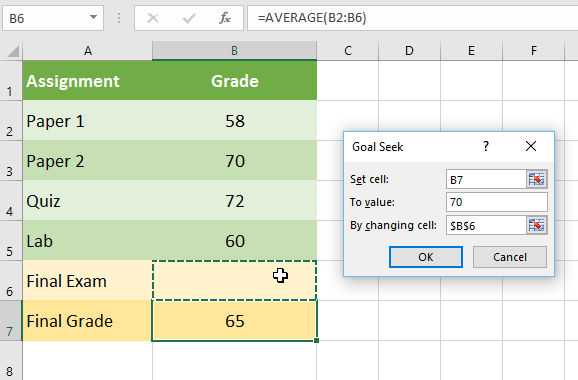
<p style="text-align: justify;">Giả sử bạn đã đăng ký vào một lớp học. Bạn hiện có 65 điểm và bạn cần đạt ít nhất 70 điểm để qua môn này. May mắn thay, bạn có một bài tập cuối cùng có thể giúp nâng mức điểm trung bình. Bạn có thể sử dụng Goal Seek để tìm ra điểm bạn cần đạt trong bài tập cuối cùng để qua môn này.</p>

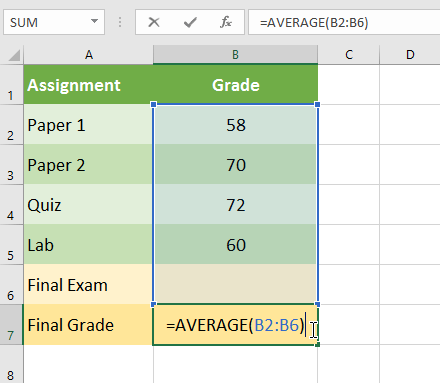
<p style="text-align: justify;">Trong hình ảnh bên dưới, bạn có thể thấy rằng điểm của 4 bài tập đầu tiên là 58, 70, 72 và 60. Mặc dù chưa biết bài thứ 5 sẽ có điểm số như thế nào, nhưng bạn có thể viết một công thức - hoặc hàm - để tính ra được điểm số cuối cùng cần đạt. Trong trường hợp này, mỗi bài tập có trọng số như nhau, vì vậy tất cả những gì chúng ta phải làm là tính trung bình cho cả 5 đầu điểm bằng cách nhập&nbsp;<strong>=AVERAGE(B2:B6).</strong>&nbsp;Khi sử dụng Goal Seek, ô B6 sẽ hiển thị điểm tối thiểu cần đạt được cho bài tập cuối cùng đó.</p>

<p style="text-align: justify;"><img alt="" data-i="0" data-src="https://st.quantrimang.com/photos/image/2022/03/25/what-if-analysis-phan-tich-neu-thi-1.png" data-was-processed="true" height="383" src="https://st.quantrimang.com/photos/image/2022/03/25/what-if-analysis-phan-tich-neu-thi-1.png" width="440" /></p>

<p style="text-align: justify;">1. Chọn ô có giá trị bạn muốn thay đổi. Bất cứ khi nào sử dụng Goal Seek, bạn sẽ cần chọn một ô đã chứa công thức hoặc hàm. Ví dụ sẽ chọn ô B7 vì nó chứa công thức&nbsp;<strong>=AVERAGE(B2:B6).</strong></p>

<p style="text-align: justify;"><img alt="" data-i="1" data-src="https://st.quantrimang.com/photos/image/2022/03/25/what-if-analysis-phan-tich-neu-thi-2.png" data-was-processed="true" height="383" src="https://st.quantrimang.com/photos/image/2022/03/25/what-if-analysis-phan-tich-neu-thi-2.png" width="440" /></p>

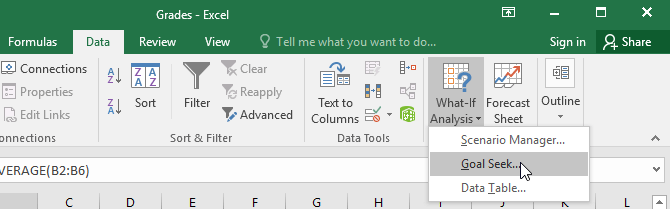
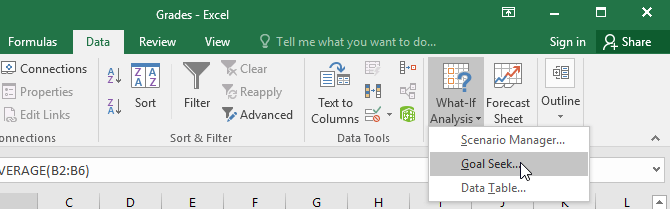
<p style="text-align: justify;">2. Từ tab&nbsp;<strong>Data</strong>, hãy nhấp vào lệnh&nbsp;<strong>What-If Analysis</strong>, sau đó chọn&nbsp;<strong>Goal Seek</strong>&nbsp;từ menu drop-down.</p>

<p style="text-align: justify;"><img alt="" data-i="2" data-src="https://st.quantrimang.com/photos/image/2022/03/25/what-if-analysis-phan-tich-neu-thi-3.png" data-was-processed="true" height="203" src="https://st.quantrimang.com/photos/image/2022/03/25/what-if-analysis-phan-tich-neu-thi-3.png" width="650" /></p>

<p style="text-align: justify;">3. Một hộp thoại sẽ xuất hiện với ba trường. Trường đầu tiên,&nbsp;<strong>Set cell:</strong>, sẽ chứa kết quả mong muốn. Trong ví dụ, ô B7 đã được chọn.</p>

<p style="text-align: justify;">Trường thứ hai,&nbsp;<strong>To value:</strong>, là kết quả mong muốn. Ví dụ sẽ nhập&nbsp;<strong>70</strong>&nbsp;vì cần ít nhất kiếm được số đó để vượt qua lớp học.</p>

<p style="text-align: justify;">Trường thứ ba,&nbsp;<strong>By changing cell:</strong>, là ô mà Goal Seek sẽ đặt câu trả lời của nó. Ví dụ sẽ chọn ô&nbsp;<strong>B6</strong>&nbsp;vì ta muốn xác định điểm cần đạt được trong bài tập cuối cùng.</p>

<p style="text-align: justify;">4. Khi bạn hoàn tất, hãy nhấp vào&nbsp;<strong>OK.</strong></p>

<p style="text-align: justify;"><strong><img alt="" data-i="3" data-src="https://st.quantrimang.com/photos/image/2022/03/25/what-if-analysis-phan-tich-neu-thi-4.png" data-was-processed="true" height="380" src="https://st.quantrimang.com/photos/image/2022/03/25/what-if-analysis-phan-tich-neu-thi-4.png" width="578" /></strong></p>

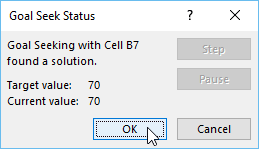
<p style="text-align: justify;">5. Hộp thoại sẽ cho bạn biết liệu Goal Seek có thể tìm ra đáp án hay không. Bấm&nbsp;<strong>OK.</strong></p>

<p style="text-align: justify;"><strong><img alt="" data-i="4" data-src="https://st.quantrimang.com/photos/image/2022/03/25/what-if-analysis-phan-tich-neu-thi-5.png" data-was-processed="true" height="149" src="https://st.quantrimang.com/photos/image/2022/03/25/what-if-analysis-phan-tich-neu-thi-5.png" width="259" /></strong></p>

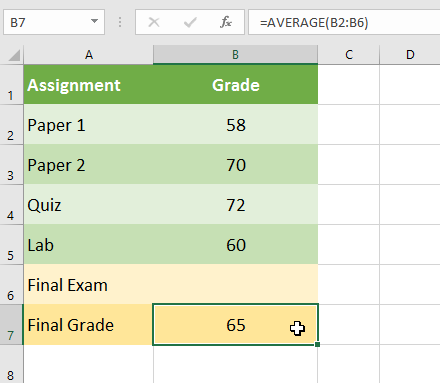
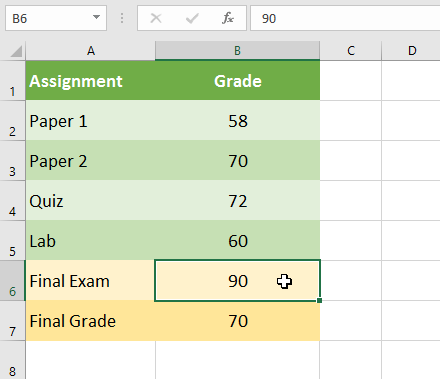
<p style="text-align: justify;">6. Kết quả sẽ xuất hiện trong ô được chỉ định. Trong ví dụ, Goal Seek đã tính toán rằng sẽ cần phải đạt ít nhất 90 điểm trong bài tập cuối cùng để qua môn.</p>

<p style="text-align: justify;"><img alt="" data-i="5" data-src="https://st.quantrimang.com/photos/image/2022/03/25/what-if-analysis-phan-tich-neu-thi-6.png" data-was-processed="true" height="379" src="https://st.quantrimang.com/photos/image/2022/03/25/what-if-analysis-phan-tich-neu-thi-6.png" width="440" /></p>

<h3 style="text-align: justify;">Ví dụ 2 về cách sử dụng Goal Seek</h3>

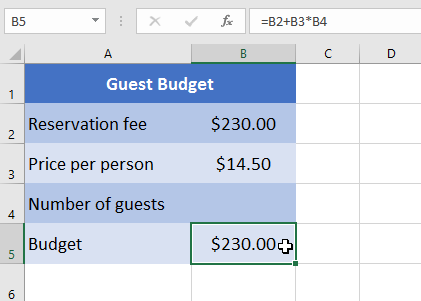
<p style="text-align: justify;">Giả sử bạn đang lên kế hoạch cho một sự kiện và muốn mời nhiều người nhất có thể mà không vượt quá ngân sách $500. Bạn có thể sử dụng Goal Seek để tìm ra số lượng người cần mời. Trong ví dụ dưới đây, ô B5 chứa công thức&nbsp;<strong>=B2+B3*B4</strong>&nbsp;để tính tổng chi phí đặt phòng cộng với chi phí cho mỗi người.</p>

<p style="text-align: justify;">1. Chọn ô có giá trị bạn muốn thay đổi. Ví dụ sẽ chọn ô B5.</p>

<p style="text-align: justify;"><img alt="" data-i="6" data-src="https://st.quantrimang.com/photos/image/2022/03/25/what-if-analysis-phan-tich-neu-thi-7.png" data-was-processed="true" height="301" src="https://st.quantrimang.com/photos/image/2022/03/25/what-if-analysis-phan-tich-neu-thi-7.png" width="421" /></p>

<p style="text-align: justify;">2. Từ tab&nbsp;<strong>Data</strong>, hãy nhấp vào lệnh&nbsp;<strong>What-If Analysis</strong>, sau đó chọn&nbsp;<strong>Goal Seek</strong>&nbsp;từ menu drop-down.</p>

<p style="text-align: justify;"><img alt="" data-i="7" data-src="https://st.quantrimang.com/photos/image/2022/03/25/what-if-analysis-phan-tich-neu-thi-8.png" data-was-processed="true" height="203" src="https://st.quantrimang.com/photos/image/2022/03/25/what-if-analysis-phan-tich-neu-thi-8.png" width="650" /></p>

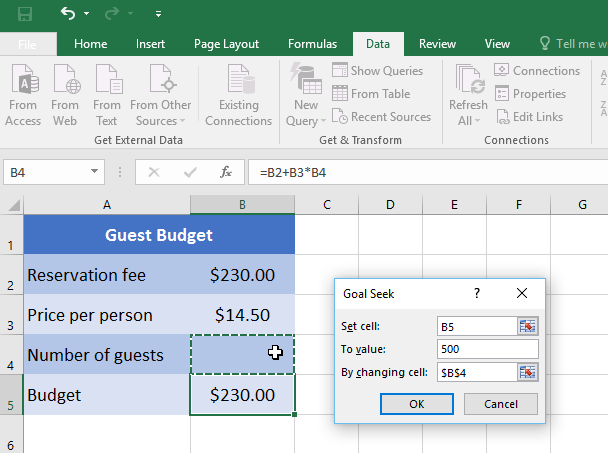
<p style="text-align: justify;">3. Một hộp thoại sẽ xuất hiện với ba trường. Trường đầu tiên,&nbsp;<strong>Set cell:</strong>, sẽ chứa kết quả mong muốn. Trong ví dụ, ô B5 đã được chọn.</p>

<p style="text-align: justify;">Trường thứ hai,&nbsp;<strong>To value:</strong>, là kết quả mong muốn. Ví dụ sẽ nhập 500 vì chỉ muốn chi tiêu $500.</p>

<p style="text-align: justify;">Trường thứ ba,&nbsp;<strong>By changing cell:</strong>, là ô mà Goal Seek sẽ đặt câu trả lời của nó. Ví dụ sẽ chọn ô B4 vì muốn biết có thể mời bao nhiêu khách mà không phải chi nhiều hơn $500.</p>

<p style="text-align: justify;">4. Khi bạn hoàn tất, hãy nhấp vào&nbsp;<strong>OK.</strong></p>

<p style="text-align: justify;"><strong><img alt="" data-i="8" data-src="https://st.quantrimang.com/photos/image/2022/03/25/what-if-analysis-phan-tich-neu-thi-9.png" data-was-processed="true" height="453" src="https://st.quantrimang.com/photos/image/2022/03/25/what-if-analysis-phan-tich-neu-thi-9.png" width="608" /></strong></p>

<p style="text-align: justify;">5. Hộp thoại sẽ cho bạn biết liệu Goal Seek có thể tìm ra đáp án hay không. Bấm&nbsp;<strong>OK.</strong></p>

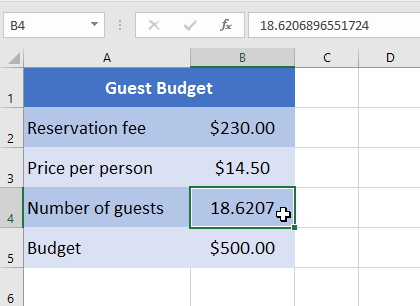
<p style="text-align: justify;">6. Kết quả sẽ xuất hiện trong ô được chỉ định. Trong ví dụ, Goal Seek đã tính toán câu trả lời là khoảng&nbsp;<strong>18,62.</strong>&nbsp;Trong trường hợp này, câu trả lời cuối cùng cần phải là một số nguyên, vì vậy cần làm tròn câu trả lời lên hoặc xuống. Vì làm tròn lên sẽ vượt quá ngân sách, nên ví dụ sẽ làm tròn xuống còn&nbsp;<strong>18</strong>&nbsp;khách.</p>

<p style="text-align: justify;"><img alt="" data-i="9" data-src="https://st.quantrimang.com/photos/image/2022/03/25/what-if-analysis-phan-tich-neu-thi-10.png" data-was-processed="true" height="306" src="https://st.quantrimang.com/photos/image/2022/03/25/what-if-analysis-phan-tich-neu-thi-10.png" width="420" /></p>

<p style="text-align: justify;">Như bạn có thể thấy trong ví dụ trên, một số tình huống sẽ yêu cầu câu trả lời là một số nguyên. Nếu Goal Seek cung cấp cho bạn một số thập phân, bạn sẽ cần làm tròn lên hoặc xuống, tùy thuộc vào tình huống.</p>

<h2 style="text-align: justify;">Các loại phân tích what-if khác</h2>

<p style="text-align: justify;">Đối với các dự án nâng cao hơn, bạn có thể muốn xem xét những loại phân tích giả định khác: Kịch bản và bảng dữ liệu. Thay vì bắt đầu từ kết quả mong muốn và làm việc ngược lại, như với Goal Seek, các tùy chọn này cho phép bạn kiểm tra nhiều giá trị và xem kết quả thay đổi như thế nào.</p>

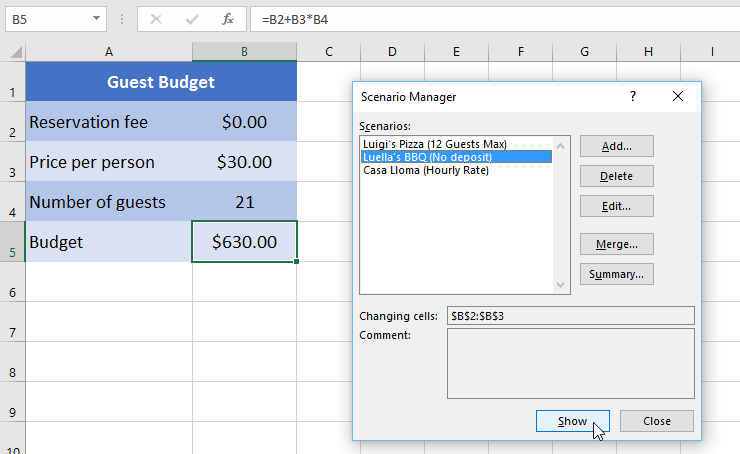
<p style="text-align: justify;">Các kịch bản cho phép bạn thay thế các giá trị cho nhiều ô (tối đa 32) cùng một lúc. Bạn có thể tạo bao nhiêu kịch bản tùy thích và sau đó so sánh chúng mà không cần thay đổi các giá trị theo cách thủ công. Ví dụ dưới đây đang sử dụng các tình huống để so sánh những địa điểm khác nhau cho một sự kiện sắp tới.</p>

<p style="text-align: justify;"><img alt="" data-i="10" data-src="https://st.quantrimang.com/photos/image/2022/03/25/what-if-analysis-phan-tich-neu-thi-11.png" data-was-processed="true" height="399" src="https://st.quantrimang.com/photos/image/2022/03/25/what-if-analysis-phan-tich-neu-thi-11.png" width="650" /></p>

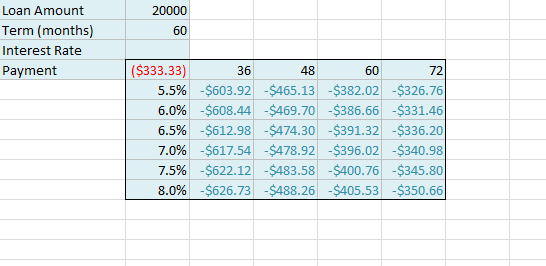
<p style="text-align: justify;">Bảng dữ liệu cho phép bạn lấy một hoặc hai biến trong công thức và thay thế chúng bằng nhiều giá trị khác nhau tùy thích, sau đó xem kết quả trong bảng. Tùy chọn này đặc biệt mạnh mẽ vì nó hiển thị nhiều kết quả cùng một lúc, không giống như các kịch bản hoặc Goal Seek. Trong ví dụ dưới đây, có thể xem 24 kết quả có khả năng xảy ra đối với khoản vay mua ô tô.</p>

<p style="text-align: justify;"><img alt="" data-i="11" data-src="https://st.quantrimang.com/photos/image/2022/03/25/what-if-analysis-phan-tich-neu-thi-12.png" data-was-processed="true" height="266" src="https://st.quantrimang.com/photos/image/2022/03/25/what-if-analysis-phan-tich-neu-thi-12.png" width="546" /></p>
		</div>
				<div id="author">
						<p>
				<strong>Nguồn tin:</strong>
				Quantrimang.com
			</p>
		</div>
	</div>
	<div id="footer" class="clearfix">
		<div id="url">
			<strong>URL của bản tin này: </strong><a href="https://www.nguoicodonvn2008.info/vi/news/savefile/kien-thuc-may-tinh/excel-2019-phan-28-what-if-analysis-phan-tich-neu-thi-5334.html" title="Excel 2019 &#40;Phần 28&#41;&#x3A; What-if Analysis &#40;Phân tích Nếu-thì&#41;">https://www.nguoicodonvn2008.info/vi/news/savefile/kien-thuc-may-tinh/excel-2019-phan-28-what-if-analysis-phan-tich-neu-thi-5334.html</a>

		</div>
		<div class="clear"></div>
		<div class="copyright">
			&copy; .&#x3A; Nguoicodonvn2008.info - Cõi lòng người cô đơn &#x3A;.
		</div>
		<div id="contact">
			<a href="mailto:admin@nguoicodonvn2008.info">admin@nguoicodonvn2008.info</a>
		</div>
	</div>
</div>
        <div id="timeoutsess" class="chromeframe">
            Bạn đã không sử dụng Site, <a onclick="timeoutsesscancel();" href="https://www.nguoicodonvn2008.info/#">Bấm vào đây để duy trì trạng thái đăng nhập</a>. Thời gian chờ: <span id="secField"> 60 </span> giây
        </div>
        <div id="openidResult" class="nv-alert" style="display:none"></div>
        <div id="openidBt" data-result="" data-redirect=""></div>
		</script>
		<div class="car-top">
  <span><img src="https://www.nguoicodonvn2008.info/themes/default/images/car.png" alt=""></span>
</div>
<div id="run_cronjobs" style="visibility:hidden;display:none;"><img alt="cron" src="/index.php?second=cronjobs&amp;p=z10A5uW0" width="1" height="1" /></div>
<script src="https://www.nguoicodonvn2008.info/assets/js/jquery/jquery.min.js"></script>
<script>var nv_base_siteurl="/",nv_lang_data="vi",nv_lang_interface="vi",nv_name_variable="nv",nv_fc_variable="op",nv_lang_variable="language",nv_module_name="news",nv_func_name="savefile",nv_is_user=0, nv_my_ofs=-4,nv_my_abbr="EDT",nv_cookie_prefix="nv4c_e856T",nv_check_pass_mstime=1738000,nv_area_admin=0,nv_safemode=0,theme_responsive=0,nv_recaptcha_ver=2,nv_recaptcha_sitekey="",nv_recaptcha_type="image",XSSsanitize=1;</script>
<script src="https://www.nguoicodonvn2008.info/assets/js/language/vi.js"></script>
<script src="https://www.nguoicodonvn2008.info/assets/js/DOMPurify/purify3.js"></script>
<script src="https://www.nguoicodonvn2008.info/assets/js/global.js"></script>
<script src="https://www.nguoicodonvn2008.info/assets/js/site.js"></script>
<script src="https://www.nguoicodonvn2008.info/themes/default/js/news.js"></script>
<script src="https://www.nguoicodonvn2008.info/themes/default/js/main.js"></script>
<script src="https://www.nguoicodonvn2008.info/themes/default/js/custom.js"></script>
<script type="application/ld+json">
        {
            "@context": "https://schema.org",
            "@type": "Organization",
            "url": "https://www.nguoicodonvn2008.info",
            "logo": "https://www.nguoicodonvn2008.info/uploads/angel.gif"
        }
        </script>
<script src="https://www.nguoicodonvn2008.info/themes/default/js/bootstrap.min.js"></script>
<script type="text/javascript">
var $scrolltop = $('.car-top');
$scrolltop.on('click', function () {
    $('html,body').animate({
        scrollTop: 0
    }, 800);
    $(this).addClass("car-run");
    setTimeout(function(){ $scrolltop.removeClass('car-run');}, 1000);
    return false;
});
$(window).on('scroll', function ()
{ 
    if($(window).scrollTop() >= 200)
    {
        $scrolltop.addClass("show");
        $scrolltop.addClass("car-down");
    }
    else
    {
       $scrolltop.removeClass("show");
       setTimeout(function(){ $scrolltop.removeClass('car-down');}, 300);
    }
});
</script>
</body>
</html>