<!DOCTYPE html>
    <html lang="vi" xmlns="http://www.w3.org/1999/xhtml" prefix="og: http://ogp.me/ns#">
    <head>
<title>Dùng thử Disk Usage, công cụ phân tích dung lượng ổ cứng mới trên Windows 10</title>
<meta name="description" content="Dùng thử Disk Usage, công cụ phân tích dung lượng ổ cứng mới trên Windows 10 - Savefile - Tin Tức -...">
<meta name="author" content=".: Nguoicodonvn2008.info - Cõi lòng người cô đơn :.">
<meta name="copyright" content=".: Nguoicodonvn2008.info - Cõi lòng người cô đơn :. [admin@nguoicodonvn2008.info]">
<meta name="robots" content="index, archive, follow, noodp">
<meta name="googlebot" content="index,archive,follow,noodp">
<meta name="msnbot" content="all,index,follow">
<meta name="generator" content="NukeViet v4.5">
<meta http-equiv="Content-Type" content="text/html; charset=utf-8">
<meta property="og:title" content="Dùng thử Disk Usage, công cụ phân tích dung lượng ổ cứng mới trên Windows 10">
<meta property="og:type" content="website">
<meta property="og:description" content="Savefile - Tin Tức -...">
<meta property="og:site_name" content=".&#x3A; Nguoicodonvn2008.info - Cõi lòng người cô đơn &#x3A;.">
<meta property="og:url" content="https://www.nguoicodonvn2008.info/vi/news/savefile/kien-thuc-may-tinh/dung-thu-disk-usage-cong-cu-phan-tich-dung-luong-o-cung-moi-tren-windows-10-3249.html">
<link rel="shortcut icon" href="https://www.nguoicodonvn2008.info/favicon.ico">
<link rel="canonical" href="https://www.nguoicodonvn2008.info/vi/news/savefile/kien-thuc-may-tinh/dung-thu-disk-usage-cong-cu-phan-tich-dung-luong-o-cung-moi-tren-windows-10-3249.html">
<link rel="alternate" href="https://www.nguoicodonvn2008.info/vi/news/rss/" title="Tin Tức" type="application/rss+xml">
<link rel="alternate" href="https://www.nguoicodonvn2008.info/vi/news/rss/karaoke-dual/" title="Tin Tức - Karaoke Dual" type="application/rss+xml">
<link rel="alternate" href="https://www.nguoicodonvn2008.info/vi/news/rss/nhac-tre/" title="Tin Tức - Nhạc trẻ" type="application/rss+xml">
<link rel="alternate" href="https://www.nguoicodonvn2008.info/vi/news/rss/tru-tinh/" title="Tin Tức - Trữ tình" type="application/rss+xml">
<link rel="alternate" href="https://www.nguoicodonvn2008.info/vi/news/rss/nuoc-ngoai/" title="Tin Tức - Nước ngoài" type="application/rss+xml">
<link rel="alternate" href="https://www.nguoicodonvn2008.info/vi/news/rss/remix/" title="Tin Tức - Remix" type="application/rss+xml">
<link rel="alternate" href="https://www.nguoicodonvn2008.info/vi/news/rss/tam-su-tinh-yeu/" title="Tin Tức - Tâm sự tình yêu" type="application/rss+xml">
<link rel="alternate" href="https://www.nguoicodonvn2008.info/vi/news/rss/tho-suu-tam/" title="Tin Tức - Thơ sưu tầm" type="application/rss+xml">
<link rel="alternate" href="https://www.nguoicodonvn2008.info/vi/news/rss/cuoc-song/" title="Tin Tức - Cuộc sống" type="application/rss+xml">
<link rel="alternate" href="https://www.nguoicodonvn2008.info/vi/news/rss/phan-mem/" title="Tin Tức - Phần mềm" type="application/rss+xml">
<link rel="alternate" href="https://www.nguoicodonvn2008.info/vi/news/rss/kien-thuc-may-tinh/" title="Tin Tức - Kiến thức máy tính" type="application/rss+xml">
<link rel="alternate" href="https://www.nguoicodonvn2008.info/vi/news/rss/hoc-tap/" title="Tin Tức - Học tập" type="application/rss+xml">
<link rel="alternate" href="https://www.nguoicodonvn2008.info/vi/news/rss/tai-lieu/" title="Tin Tức - Tài liệu" type="application/rss+xml">
<link rel="alternate" href="https://www.nguoicodonvn2008.info/vi/news/rss/de-thi/" title="Tin Tức - Đề thi" type="application/rss+xml">
<link rel="preload" as="style" href="https://www.nguoicodonvn2008.info/assets/css/font-awesome.min.css" type="text/css">
<link rel="preload" as="style" href="https://www.nguoicodonvn2008.info/themes/default/css/bootstrap.non-responsive.css" type="text/css">
<link rel="preload" as="style" href="https://www.nguoicodonvn2008.info/themes/default/css/style.css" type="text/css">
<link rel="preload" as="style" href="https://www.nguoicodonvn2008.info/themes/default/css/style.non-responsive.css" type="text/css">
<link rel="preload" as="style" href="https://www.nguoicodonvn2008.info/themes/default/css/news.css" type="text/css">
<link rel="preload" as="style" href="https://www.nguoicodonvn2008.info/themes/default/css/custom.css" type="text/css">
<link rel="preload" as="script" href="https://www.nguoicodonvn2008.info/assets/js/jquery/jquery.min.js" type="text/javascript">
<link rel="preload" as="script" href="https://www.nguoicodonvn2008.info/assets/js/language/vi.js" type="text/javascript">
<link rel="preload" as="script" href="https://www.nguoicodonvn2008.info/assets/js/DOMPurify/purify3.js" type="text/javascript">
<link rel="preload" as="script" href="https://www.nguoicodonvn2008.info/assets/js/global.js" type="text/javascript">
<link rel="preload" as="script" href="https://www.nguoicodonvn2008.info/assets/js/site.js" type="text/javascript">
<link rel="preload" as="script" href="https://www.nguoicodonvn2008.info/themes/default/js/news.js" type="text/javascript">
<link rel="preload" as="script" href="https://www.nguoicodonvn2008.info/themes/default/js/main.js" type="text/javascript">
<link rel="preload" as="script" href="https://www.nguoicodonvn2008.info/themes/default/js/custom.js" type="text/javascript">
<link rel="preload" as="script" href="https://www.nguoicodonvn2008.info/themes/default/js/bootstrap.min.js" type="text/javascript">
<link rel="stylesheet" href="https://www.nguoicodonvn2008.info/assets/css/font-awesome.min.css">
<link rel="stylesheet" href="https://www.nguoicodonvn2008.info/themes/default/css/bootstrap.non-responsive.css">
<link rel="stylesheet" href="https://www.nguoicodonvn2008.info/themes/default/css/style.css">
<link rel="stylesheet" href="https://www.nguoicodonvn2008.info/themes/default/css/style.non-responsive.css">
<link rel="StyleSheet" href="https://www.nguoicodonvn2008.info/themes/default/css/news.css">
<link rel="stylesheet" href="https://www.nguoicodonvn2008.info/themes/default/css/custom.css">
<style type="text/css">
	body{background: #fff;}
</style>
    </head>
    <body>
<div id="print">
	<div id="hd_print">
		<h2 class="pull-left">.&#x3A; Nguoicodonvn2008.info - Cõi lòng người cô đơn &#x3A;.</h2>
		<p class="pull-right"><a title=".&#x3A; Nguoicodonvn2008.info - Cõi lòng người cô đơn &#x3A;." href="https://www.nguoicodonvn2008.info/">https://www.nguoicodonvn2008.info</a></p>
	</div>
	<div class="clear"></div>
	<hr />
	<div id="content">
		<h1>Dùng thử Disk Usage, công cụ phân tích dung lượng ổ cứng mới trên Windows 10</h1>
		<ul class="list-inline">
			<li>Thứ ba - 15/12/2020 23:51</li>
			<li class="hidden-print txtrequired"><em class="fa fa-print">&nbsp;</em><a title="In ra" href="javascript:;" onclick="window.print()">In ra</a></li>
			<li class="hidden-print txtrequired"><em class="fa fa-power-off">&nbsp;</em><a title="Đóng cửa sổ này" href="javascript:;" onclick="window.close()">Đóng cửa sổ này</a></li>
		</ul>
		<div class="clear"></div>
		<div id="hometext">
		</div>
				<div class="imghome">
			<img alt="Dùng thử Disk Usage, công cụ phân tích dung lượng ổ cứng mới trên Windows 10" src="https://st.quantrimang.com/photos/image/2020/12/16/su-dung-disk-usage-1.jpg" width="460" class="img-thumbnail" />
		</div>
		<div class="clear"></div>
		<div id="bodytext" class="clearfix">
			<p style="text-align: justify;">Microsoft đang tạo ra một tiện ích dòng lệnh Disk Usage tích hợp sẵn để báo cáo dung lượng ổ đĩa mà một thư mục sử dụng.</p>

<p style="text-align: justify;">Theo thời gian, việc hết dung lượng lưu trữ và không biết chương trình hoặc file nào đang sử dụng hết dung lượng ổ cứng là điều thường thấy. Trước đây, người dùng cần tải các công cụ miễn phí như TreeSize để liệt kê các thư mục sử dụng nhiều dung lượng nhất.</p>

<div style="text-align: justify;">&nbsp;</div>

<p style="text-align: justify;">Trong khi thử nghiệm với các bản Windows 10 Insider mới 20277 và 21277 được phát hành vào tuần trước, một số người phát hiện ra rằng Microsoft đã âm thầm giới thiệu tiện ích Disk Usage mới. Tiện ích này có thể quét toàn bộ ổ đĩa hoặc các thư mục được chỉ định và báo cáo số lượng từng thư mục đang sử dụng.</p>

<h2 style="text-align: justify;">Disk Usage, công cụ phân tích dung lượng ổ cứng mới trên Windows 10</h2>

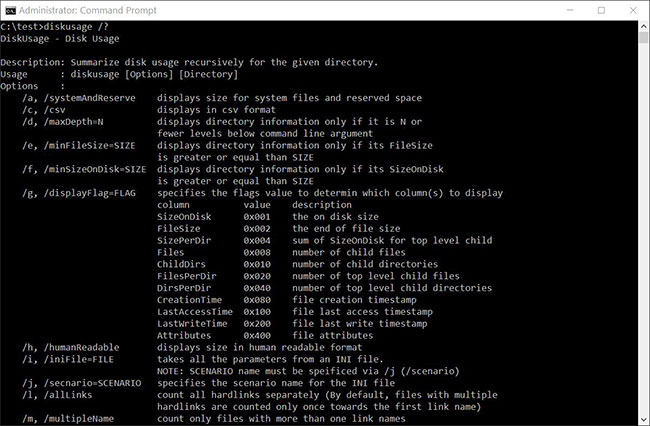
<p style="text-align: justify;">Disk Usage nằm trong&nbsp;<strong>C:\Windows\System32\diskusage.exe</strong>&nbsp;và sẽ hiển thị hướng dẫn sử dụng khi nhập&nbsp;<strong>diskusage /?</strong>, như hình dưới đây.</p>

<figure>
<div style="text-align: justify;"><img alt="Hướng dẫn sử dụng Disk Usage" data-i="0" data-src="https://st.quantrimang.com/photos/image/2020/12/16/su-dung-disk-usage-1.jpg" data-was-processed="true" height="426" src="https://st.quantrimang.com/photos/image/2020/12/16/su-dung-disk-usage-1.jpg" width="650" /></div>

<figcaption>
<div style="text-align: justify;">Hướng dẫn sử dụng Disk Usage</div>
</figcaption>
</figure>

<p style="text-align: justify;">Chương trình này đang ở đầu giai đoạn phát triển, một số tính năng hoạt động không như mong đợi và có vài lỗi chính tả trong hướng dẫn sử dụng.</p>

<p style="text-align: justify;">Đối với những người quan tâm, dưới đây là hướng dẫn sử dụng đầy đủ:</p>

<pre id="pre0">
<code>DiskUsage - Disk Usage
 Description: Summarize disk usage recursively for the given directory.
 Usage      : diskusage &#91;Options&#93; &#91;Directory&#93;
 Options    :
     /a, /systemAndReserve    displays size for system files and reserved space
     /c, /csv                 displays in csv format
     /d, /maxDepth=N          displays directory information only if it is N or
                              fewer levels below command line argument
     /e, /minFileSize=SIZE    displays directory information only if its FileSize
                              is greater or equal than SIZE
     /f, /minSizeOnDisk=SIZE  displays directory information only if its SizeOnDisk
                              is greater or equal than SIZE
     /g, /displayFlag=FLAG    specifies the flags value to determin which column(s) to display
                              column          value    description
                              SizeOnDisk      0x001    the on disk size
                              FileSize        0x002    the end of file size
                              SizePerDir      0x004    sum of SizeOnDisk for top level child
                              Files           0x008    number of child files
                              ChildDirs       0x010    number of child directories
                              FilesPerDir     0x020    number of top level child files
                              DirsPerDir      0x040    number of top level child directories
                              CreationTime    0x080    file creation timestamp
                              LastAccessTime  0x100    file last access timestamp
                              LastWriteTime   0x200    file last write timestamp
                              Attributes      0x400    file attributes
     /h, /humanReadable       displays size in human readable format
     /i, /iniFile=FILE        takes all the parameters from an INI file.
                              NOTE: SCENARIO name must be speificed via /j (/scenario)
     /j, /secnario=SCENARIO   specifies the scenario name for the INI file
     /l, /allLinks            count all hardlinks separately (By default, files with multiple
                              hardlinks are counted only once towards the first link name)
     /m, /multipleName        count only files with more than one link names
     /n, /nameFilter=FILTER   count only files whose name matches the name filter
     /p, /preferredPath=PATH  count files with multiple link names towards the first link that&#039;s
                              under PATH if it exists
                              NOTE: This options must not be specified togerther
                              with /l (/allLinks)
     /q, /virtual             recurse into virtual directories
     /r, /skipReparse         skip recursing into reparse directories
     /s, /skipResurse         skip recursing into child directories when calculating sizes
     /t, /TopDirectory=N      displays Top N directories by SizeOnDisk in descending order
     /u, /TopFile=N           displays Top N files by SizeOnDisk in descending order
     /v, /verbose             displays verbose error information
     /x, /clearDefault        do not display the default selected columns</code></pre>

<h2 style="text-align: justify;">Thử nghiệm tiện ích Disk Usage mới</h2>

<p style="text-align: justify;">Công cụ Disk Usage mới của Microsoft đang trong giai đoạn phát triển ban đầu, vì vậy nó còn khá cơ bản. Hãy cùng xem nó hoạt động như thế nào.</p>

<p style="text-align: justify;">Theo mặc định, khi chạy Disk Usage, nó sẽ báo cáo dung lượng file và thư mục theo byte, điều này không hữu ích bằng việc hiển thị dung lượng theo MB, GB, v.v... Rất may, Microsoft đã bao gồm đối số&nbsp;<strong>a /h</strong>&nbsp;để hiển thị dung lượng mà con người có thể đọc được. sử dụng trong các ví dụ bên dưới.</p>

<div style="text-align: justify;">&nbsp;</div>

<p style="text-align: justify;">Khi chạy thử nghiệm này trên một&nbsp;máy ảo, ví dụ không có nhiều dữ liệu hoặc các chương trình lớn được cài đặt, vì vậy bài viết đã thử nghiệm nó với thư mục&nbsp;<strong>C:\Windows.</strong></p>

<p style="text-align: justify;">Vì công cụ này yêu cầu đặc quyền quản trị, trước tiên bạn phải&nbsp;mở Command Prompt với quyền admin trên Windows 10&nbsp;trước khi sử dụng diskusage.exe, nếu không nó sẽ hiển thị lỗi.</p>

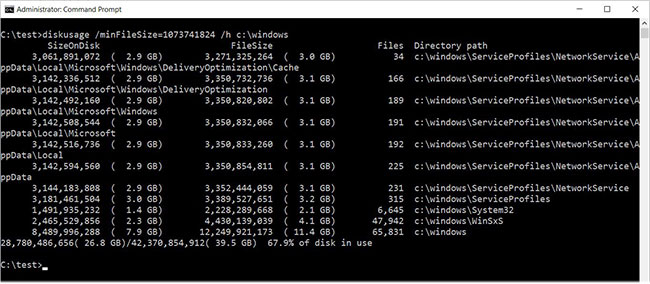
<p style="text-align: justify;">Để xem các thư mục trong C:\Windows có dung lượng lớn hơn 1GB, ví dụ đã chạy lệnh sau:</p>

<pre id="pre1">
<code>diskusage /minFileSize=1073741824 /h c:\windows</code></pre>

<p style="text-align: justify;">Như bạn có thể thấy bên dưới, Disk Usage đã liệt kê tất cả các thư mục, bao gồm cả thư mục C:\Windows, có dung lượng lớn hơn 1GB.</p>

<figure>
<div style="text-align: justify;"><img alt="Các thư mục có dung lượng lớn hơn 1GB trong C:\Windows" data-i="1" data-src="https://st.quantrimang.com/photos/image/2020/12/16/su-dung-disk-usage-2.jpg" data-was-processed="true" height="284" src="https://st.quantrimang.com/photos/image/2020/12/16/su-dung-disk-usage-2.jpg" width="650" /></div>

<figcaption>
<div style="text-align: justify;">Các thư mục có dung lượng lớn hơn 1GB trong C:\Windows</div>
</figcaption>
</figure>

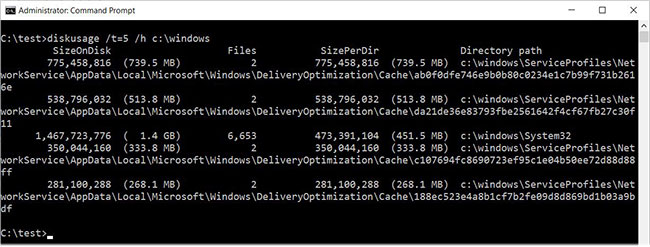
<p style="text-align: justify;">Disk Usage cũng bao gồm tính năng liệt kê N (số) thư mục hàng đầu trên ổ hoặc trong một thư mục được chỉ định. Để thực hiện việc này, bạn sử dụng lệnh&nbsp;<strong>/t=&#91;number&#93;</strong>&nbsp;như sau:</p>

<pre id="pre2">
<code>diskusage /t=5 /h c:\windows</code></pre>

<p style="text-align: justify;">Thật không may, đầu ra của lệnh này không như mong đợi. Như bạn có thể thấy bên dưới, nó hiển thị một danh sách được sắp xếp gồm 5 thư mục, nhưng dựa trên các lệnh trước đó, chúng không phải là những thư mục mà ví dụ mong đợi.</p>

<figure>
<div style="text-align: justify;"><img alt="5 thư mục có dung lượng lớn nhất trong C:\Windows" data-i="2" data-src="https://st.quantrimang.com/photos/image/2020/12/16/su-dung-disk-usage-3.jpg" data-was-processed="true" height="247" src="https://st.quantrimang.com/photos/image/2020/12/16/su-dung-disk-usage-3.jpg" width="650" /></div>

<figcaption>
<div style="text-align: justify;">5 thư mục có dung lượng lớn nhất trong C:\Windows</div>
</figcaption>
</figure>

<p style="text-align: justify;">Bài viết đoán rằng lệnh trên hiển thị các thư mục lớn nhất, mà không xem xét những file trong thư mục con của chúng.</p>

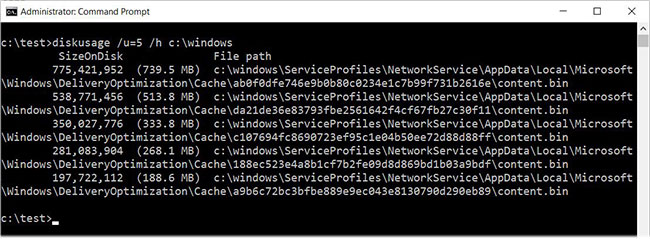
<p style="text-align: justify;">Disk Usage cũng bao gồm các tính năng khác như liệt kê những file có dung lượng lớn nhất bằng cách sử dụng tùy chọn&nbsp;<strong>/u</strong>, như được hiển thị trong lệnh sau:</p>

<pre id="pre3">
<code>diskusage /u=5 /h c:\windows</code></pre>

<p style="text-align: justify;">Như bạn có thể thấy bên dưới, thay vì hiển thị 5 thư mục lớn nhất, Disk Usage hiển thị 5 file lớn nhất.</p>

<figure>
<div style="text-align: justify;"><img alt="5 file có dung lượng lớn nhất trong C:\Windows" data-i="3" data-src="https://st.quantrimang.com/photos/image/2020/12/16/su-dung-disk-usage-4.jpg" data-was-processed="true" height="239" src="https://st.quantrimang.com/photos/image/2020/12/16/su-dung-disk-usage-4.jpg" width="650" /></div>

<figcaption>
<div style="text-align: justify;">5 file có dung lượng lớn nhất trong C:\Windows</div>
</figcaption>
</figure>

<p style="text-align: justify;">Các tính năng khác có trong Disk Usage bao gồm tạo file cấu hình có chứa các tùy chọn bạn muốn sử dụng tự động, tùy chỉnh đầu ra và khả năng bỏ qua các loại thư mục khác nhau.</p>

<p style="text-align: justify;">Như đã nói trước đây, Disk Usage vẫn đang trong giai đoạn khởi đầu và không có thông tin về thời điểm nó sẽ xuất hiện chính thức. Bạn có thể kiểm tra nó ngay bây giờ bằng cách cài đặt các bản build Windows 10 Insider mới nhất.</p>
		</div>
				<div id="author">
						<p>
				<strong>Nguồn tin:</strong>
				Quantrimang.com
			</p>
		</div>
	</div>
	<div id="footer" class="clearfix">
		<div id="url">
			<strong>URL của bản tin này: </strong><a href="https://www.nguoicodonvn2008.info/vi/news/savefile/kien-thuc-may-tinh/dung-thu-disk-usage-cong-cu-phan-tich-dung-luong-o-cung-moi-tren-windows-10-3249.html" title="Dùng thử Disk Usage, công cụ phân tích dung lượng ổ cứng mới trên Windows 10">https://www.nguoicodonvn2008.info/vi/news/savefile/kien-thuc-may-tinh/dung-thu-disk-usage-cong-cu-phan-tich-dung-luong-o-cung-moi-tren-windows-10-3249.html</a>

		</div>
		<div class="clear"></div>
		<div class="copyright">
			&copy; .&#x3A; Nguoicodonvn2008.info - Cõi lòng người cô đơn &#x3A;.
		</div>
		<div id="contact">
			<a href="mailto:admin@nguoicodonvn2008.info">admin@nguoicodonvn2008.info</a>
		</div>
	</div>
</div>
        <div id="timeoutsess" class="chromeframe">
            Bạn đã không sử dụng Site, <a onclick="timeoutsesscancel();" href="https://www.nguoicodonvn2008.info/#">Bấm vào đây để duy trì trạng thái đăng nhập</a>. Thời gian chờ: <span id="secField"> 60 </span> giây
        </div>
        <div id="openidResult" class="nv-alert" style="display:none"></div>
        <div id="openidBt" data-result="" data-redirect=""></div>
		</script>
		<div class="car-top">
  <span><img src="https://www.nguoicodonvn2008.info/themes/default/images/car.png" alt=""></span>
</div>
<script src="https://www.nguoicodonvn2008.info/assets/js/jquery/jquery.min.js"></script>
<script>var nv_base_siteurl="/",nv_lang_data="vi",nv_lang_interface="vi",nv_name_variable="nv",nv_fc_variable="op",nv_lang_variable="language",nv_module_name="news",nv_func_name="savefile",nv_is_user=0, nv_my_ofs=-4,nv_my_abbr="EDT",nv_cookie_prefix="nv4c_e856T",nv_check_pass_mstime=1738000,nv_area_admin=0,nv_safemode=0,theme_responsive=0,nv_recaptcha_ver=2,nv_recaptcha_sitekey="",nv_recaptcha_type="image",XSSsanitize=1;</script>
<script src="https://www.nguoicodonvn2008.info/assets/js/language/vi.js"></script>
<script src="https://www.nguoicodonvn2008.info/assets/js/DOMPurify/purify3.js"></script>
<script src="https://www.nguoicodonvn2008.info/assets/js/global.js"></script>
<script src="https://www.nguoicodonvn2008.info/assets/js/site.js"></script>
<script src="https://www.nguoicodonvn2008.info/themes/default/js/news.js"></script>
<script src="https://www.nguoicodonvn2008.info/themes/default/js/main.js"></script>
<script src="https://www.nguoicodonvn2008.info/themes/default/js/custom.js"></script>
<script type="application/ld+json">
        {
            "@context": "https://schema.org",
            "@type": "Organization",
            "url": "https://www.nguoicodonvn2008.info",
            "logo": "https://www.nguoicodonvn2008.info/uploads/angel.gif"
        }
        </script>
<script src="https://www.nguoicodonvn2008.info/themes/default/js/bootstrap.min.js"></script>
<script type="text/javascript">
var $scrolltop = $('.car-top');
$scrolltop.on('click', function () {
    $('html,body').animate({
        scrollTop: 0
    }, 800);
    $(this).addClass("car-run");
    setTimeout(function(){ $scrolltop.removeClass('car-run');}, 1000);
    return false;
});
$(window).on('scroll', function ()
{ 
    if($(window).scrollTop() >= 200)
    {
        $scrolltop.addClass("show");
        $scrolltop.addClass("car-down");
    }
    else
    {
       $scrolltop.removeClass("show");
       setTimeout(function(){ $scrolltop.removeClass('car-down');}, 300);
    }
});
</script>
</body>
</html>