<!DOCTYPE html>
    <html lang="vi" xmlns="http://www.w3.org/1999/xhtml" prefix="og: http://ogp.me/ns#">
    <head>
<title>Dùng SSH để xác thực không cần mật khẩu vào GitHub</title>
<meta name="description" content="Dùng SSH để xác thực không cần mật khẩu vào GitHub - Savefile - Tin Tức -...">
<meta name="author" content=".: Nguoicodonvn2008.info - Cõi lòng người cô đơn :.">
<meta name="copyright" content=".: Nguoicodonvn2008.info - Cõi lòng người cô đơn :. [admin@nguoicodonvn2008.info]">
<meta name="robots" content="index, archive, follow, noodp">
<meta name="googlebot" content="index,archive,follow,noodp">
<meta name="msnbot" content="all,index,follow">
<meta name="generator" content="NukeViet v4.5">
<meta http-equiv="Content-Type" content="text/html; charset=utf-8">
<meta property="og:title" content="Dùng SSH để xác thực không cần mật khẩu vào GitHub">
<meta property="og:type" content="website">
<meta property="og:description" content="Savefile - Tin Tức - https&#x3A;&#x002F;&#x002F;www.nguoicodonvn2008.info&#x002F;vi&#x002F;news&#x002F;savefile&#x002F;kien-thuc-may-tinh&#x002F;dung-ssh-de-xac-thuc-khong-can-mat-khau-vao-github-7192.html">
<meta property="og:site_name" content=".&#x3A; Nguoicodonvn2008.info - Cõi lòng người cô đơn &#x3A;.">
<meta property="og:url" content="https://www.nguoicodonvn2008.info/vi/news/savefile/kien-thuc-may-tinh/dung-ssh-de-xac-thuc-khong-can-mat-khau-vao-github-7192.html">
<link rel="shortcut icon" href="https://www.nguoicodonvn2008.info/favicon.ico">
<link rel="canonical" href="https://www.nguoicodonvn2008.info/vi/news/savefile/kien-thuc-may-tinh/dung-ssh-de-xac-thuc-khong-can-mat-khau-vao-github-7192.html">
<link rel="alternate" href="https://www.nguoicodonvn2008.info/vi/news/rss/" title="Tin Tức" type="application/rss+xml">
<link rel="alternate" href="https://www.nguoicodonvn2008.info/vi/news/rss/karaoke-dual/" title="Tin Tức - Karaoke Dual" type="application/rss+xml">
<link rel="alternate" href="https://www.nguoicodonvn2008.info/vi/news/rss/nhac-tre/" title="Tin Tức - Nhạc trẻ" type="application/rss+xml">
<link rel="alternate" href="https://www.nguoicodonvn2008.info/vi/news/rss/tru-tinh/" title="Tin Tức - Trữ tình" type="application/rss+xml">
<link rel="alternate" href="https://www.nguoicodonvn2008.info/vi/news/rss/nuoc-ngoai/" title="Tin Tức - Nước ngoài" type="application/rss+xml">
<link rel="alternate" href="https://www.nguoicodonvn2008.info/vi/news/rss/remix/" title="Tin Tức - Remix" type="application/rss+xml">
<link rel="alternate" href="https://www.nguoicodonvn2008.info/vi/news/rss/tam-su-tinh-yeu/" title="Tin Tức - Tâm sự tình yêu" type="application/rss+xml">
<link rel="alternate" href="https://www.nguoicodonvn2008.info/vi/news/rss/tho-suu-tam/" title="Tin Tức - Thơ sưu tầm" type="application/rss+xml">
<link rel="alternate" href="https://www.nguoicodonvn2008.info/vi/news/rss/cuoc-song/" title="Tin Tức - Cuộc sống" type="application/rss+xml">
<link rel="alternate" href="https://www.nguoicodonvn2008.info/vi/news/rss/phan-mem/" title="Tin Tức - Phần mềm" type="application/rss+xml">
<link rel="alternate" href="https://www.nguoicodonvn2008.info/vi/news/rss/kien-thuc-may-tinh/" title="Tin Tức - Kiến thức máy tính" type="application/rss+xml">
<link rel="alternate" href="https://www.nguoicodonvn2008.info/vi/news/rss/hoc-tap/" title="Tin Tức - Học tập" type="application/rss+xml">
<link rel="alternate" href="https://www.nguoicodonvn2008.info/vi/news/rss/tai-lieu/" title="Tin Tức - Tài liệu" type="application/rss+xml">
<link rel="alternate" href="https://www.nguoicodonvn2008.info/vi/news/rss/de-thi/" title="Tin Tức - Đề thi" type="application/rss+xml">
<link rel="preload" as="style" href="https://www.nguoicodonvn2008.info/assets/css/font-awesome.min.css" type="text/css">
<link rel="preload" as="style" href="https://www.nguoicodonvn2008.info/themes/default/css/bootstrap.non-responsive.css" type="text/css">
<link rel="preload" as="style" href="https://www.nguoicodonvn2008.info/themes/default/css/style.css" type="text/css">
<link rel="preload" as="style" href="https://www.nguoicodonvn2008.info/themes/default/css/style.non-responsive.css" type="text/css">
<link rel="preload" as="style" href="https://www.nguoicodonvn2008.info/themes/default/css/news.css" type="text/css">
<link rel="preload" as="style" href="https://www.nguoicodonvn2008.info/themes/default/css/custom.css" type="text/css">
<link rel="preload" as="script" href="https://www.nguoicodonvn2008.info/assets/js/jquery/jquery.min.js" type="text/javascript">
<link rel="preload" as="script" href="https://www.nguoicodonvn2008.info/assets/js/language/vi.js" type="text/javascript">
<link rel="preload" as="script" href="https://www.nguoicodonvn2008.info/assets/js/DOMPurify/purify3.js" type="text/javascript">
<link rel="preload" as="script" href="https://www.nguoicodonvn2008.info/assets/js/global.js" type="text/javascript">
<link rel="preload" as="script" href="https://www.nguoicodonvn2008.info/assets/js/site.js" type="text/javascript">
<link rel="preload" as="script" href="https://www.nguoicodonvn2008.info/themes/default/js/news.js" type="text/javascript">
<link rel="preload" as="script" href="https://www.nguoicodonvn2008.info/themes/default/js/main.js" type="text/javascript">
<link rel="preload" as="script" href="https://www.nguoicodonvn2008.info/themes/default/js/custom.js" type="text/javascript">
<link rel="preload" as="script" href="https://www.nguoicodonvn2008.info/themes/default/js/bootstrap.min.js" type="text/javascript">
<link rel="stylesheet" href="https://www.nguoicodonvn2008.info/assets/css/font-awesome.min.css">
<link rel="stylesheet" href="https://www.nguoicodonvn2008.info/themes/default/css/bootstrap.non-responsive.css">
<link rel="stylesheet" href="https://www.nguoicodonvn2008.info/themes/default/css/style.css">
<link rel="stylesheet" href="https://www.nguoicodonvn2008.info/themes/default/css/style.non-responsive.css">
<link rel="StyleSheet" href="https://www.nguoicodonvn2008.info/themes/default/css/news.css">
<link rel="stylesheet" href="https://www.nguoicodonvn2008.info/themes/default/css/custom.css">
<style type="text/css">
	body{background: #fff;}
</style>
    </head>
    <body>
<div id="print">
	<div id="hd_print">
		<h2 class="pull-left">.&#x3A; Nguoicodonvn2008.info - Cõi lòng người cô đơn &#x3A;.</h2>
		<p class="pull-right"><a title=".&#x3A; Nguoicodonvn2008.info - Cõi lòng người cô đơn &#x3A;." href="https://www.nguoicodonvn2008.info/">https://www.nguoicodonvn2008.info</a></p>
	</div>
	<div class="clear"></div>
	<hr />
	<div id="content">
		<h1>Dùng SSH để xác thực không cần mật khẩu vào GitHub</h1>
		<ul class="list-inline">
			<li>Thứ tư - 21/06/2023 01:30</li>
			<li class="hidden-print txtrequired"><em class="fa fa-print">&nbsp;</em><a title="In ra" href="javascript:;" onclick="window.print()">In ra</a></li>
			<li class="hidden-print txtrequired"><em class="fa fa-power-off">&nbsp;</em><a title="Đóng cửa sổ này" href="javascript:;" onclick="window.close()">Đóng cửa sổ này</a></li>
		</ul>
		<div class="clear"></div>
		<div id="hometext">
		</div>
				<div class="imghome">
			<img alt="Dùng SSH để xác thực không cần mật khẩu vào GitHub" src="https://st.quantrimang.com/photos/image/2023/06/21/khoa-ssh.jpg" width="460" class="img-thumbnail" />
		</div>
		<div class="clear"></div>
		<div id="bodytext" class="clearfix">
			<p style="text-align: justify;">Bằng<strong>&nbsp;cách dùng xác thực không mật khẩu qua SSH để đăng nhập GitHub</strong>, bạn sẽ tiết kiệm được rất nhiều thời gian. Dưới đây là hướng dẫn chi tiết.</p>

<p style="text-align: justify;"><img alt="Lập trình trên GitHub" data-i="0" data-src="https://st.quantrimang.com/photos/image/2023/06/21/GitHub-SSH-key-7.jpg" data-was-processed="true" height="340" src="https://st.quantrimang.com/photos/image/2023/06/21/GitHub-SSH-key-7.jpg" width="650" /></p>

<p style="text-align: justify;"><strong>Xác thực trên&nbsp;<a data-type="internal" href="https://quantrimang.com/lang-cong-nghe/github-cho-phep-viet-code-truc-tiep-ngay-trong-trinh-duyet-171650" rel="noopener" target="_blank" title="GitHub tung ra tính năng mới cho phép viết code trực tiếp ngay trong trình duyệt">GitHub&nbsp;</a></strong>&nbsp;thường liên quan tới việc dùng một token truy cập hoặc mật khẩu. Tuy nhiên, những phương thức này có thể không thuận tiện và kém bảo mật, nhất là khi truy cập GitHub từ nhiều thiết bị.</p>

<p style="text-align: justify;">GitHub cung cấp lựa chọn dùng Secure Shell (SSH) để xác thực. SSH trình bày một giao thức mạng an toàn cho truy cập máy từ xa. Tính năng này đặc biệt đáng giá trong nhiều tình huống đòi hỏi truy cập từ xa tự động hoặc thường xuyên.</p>

<h2 style="text-align: justify;">Xác thực SSH là gì?</h2>

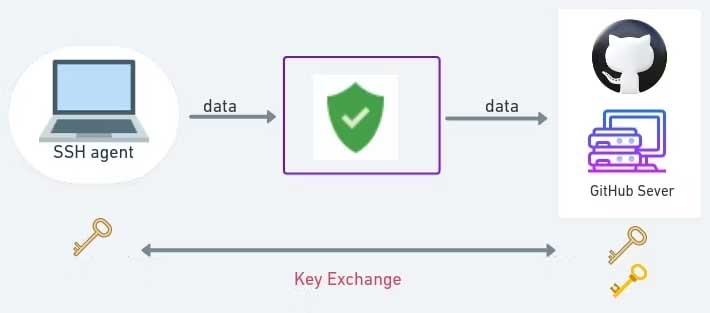
<p style="text-align: justify;">Xác thực với SSH liên quan tới việc dùng các khóa mật mã thiết lập kết nối an toàn (tunnel) giữa một client (máy cục bộ) và server (GitHub).</p>

<p style="text-align: justify;">Khi dùng SSH cho GitHub, một người dùng tạo một cặp khóa SSH - một khóa công khai và một khóa riêng tư. Khóa công khai được upload lên tài khoản GitHub của người dùng, còn khóa riêng tư vẫn được lưu an toàn trên máy cục bộ của người dùng.</p>

<p style="text-align: justify;"><img alt="Xác thực SSH là gì?" data-i="1" data-src="https://st.quantrimang.com/photos/image/2023/06/21/GitHub-thay-doi-khoa.jpg" data-was-processed="true" height="287" src="https://st.quantrimang.com/photos/image/2023/06/21/GitHub-thay-doi-khoa.jpg" width="650" /></p>

<p style="text-align: justify;">Quá trình này có thể được ví như khái niệm về ổ khóa và chìa khóa. Khóa công khai (khóa) nhằm mục đích chia sẻ công khai và lưu trữ an toàn ở phía máy chủ. Nó hoạt động như một đối trọng với khóa cá nhân, cho phép máy chủ xác minh danh tính của máy cục bộ của bạn. Ngược lại, khóa riêng (key) hoạt động như một mã định danh duy nhất được lưu trữ riêng trên máy cục bộ của bạn, cho phép xác thực thành công với máy chủ.</p>

<p style="text-align: justify;">Trong khi xác thực trên GitHub, máy cục bộ hiện khóa riêng như một bằng chứng nhận dạng. Server này kiểm tra xem liệu khóa công khai tương ứng được liên kết với tài khoản GitHub của bạn có khớp với khóa riêng tư được cung cấp hay không. Nếu các khóa khớp nhau, server cấp quyền truy cập, thiết lập kết nối được mã hóa và an toàn cho giao tiếp.</p>

<h2 style="text-align: justify;">Thiết lập SSH cho GitHub</h2>

<p style="text-align: justify;">Ở phần này, bạn sẽ thấy cách thiết lập SSH đê xác thực với GitHub.</p>

<h3 style="text-align: justify;">1. Tạo cặp khóa SSH</h3>

<p style="text-align: justify;">Quá trình tạo cặp khóa SSH là bước đầu tiên dùng SSH cho việc xác thực.</p>

<p style="text-align: justify;">1. Mở terminal hoặc cửa sổ nhắc lệnh.</p>

<p style="text-align: justify;">2. Chạy lệnh tạo cặp khóa&nbsp;<strong>SSH&nbsp;</strong>mới sau:</p>

<pre id="pre0">
<code>ssh-keygen -t rsa -b 4096 -C &quot;youremail@domain.com&quot;</code></pre>

<p style="text-align: justify;">3. Bạn sẽ được nhắc nhập một vị trí file để lưu cặp khóa. Nhấn&nbsp;<strong>Enter</strong>&nbsp;để chấp nhận vị trí mặc định (<strong>~/.ssh/id_rsa</strong>) hoặc xác định một vị trí tùy biến.</p>

<pre id="pre1">
<code> &gt; Generating public/private rsa key pair.
 &gt; Enter file in which to save the key (/home/vagrant/.ssh/id_rsa):</code></pre>

<p style="text-align: justify;">4. Tiếp theo, bạn sẽ được yêu cầu nhập một passphrase. Dù là tùy chọn, thêm một passpharase hoạt động như một cấp bảo mật bổ sung. Đảm bảo bạn nhớ passphrase.</p>

<pre id="pre2">
<code> &gt; Enter passphrase (empty for no passphrase): 
 &gt; Enter same passphrase again:</code></pre>

<p style="text-align: justify;">5. Sau khi tạo cặp khóa, bạn sẽ thấy 2 file ở id_rsa (khóa riêng tư) và id_rsa.pub (khóa công khai).</p>

<pre id="pre3">
<code> &gt; Your identification has been saved in /home/vagrant/.ssh/id_rsa.
 &gt; Your public key has been saved in /home/vagrant/.ssh/id_rsa.pub.</code></pre>

<p style="text-align: justify;">6. Sau khi hoàn thành, fingerprint các phím và ảnh nghệ thuật ngẫu nhiên được hiển thị.</p>

<p style="text-align: justify;">7. Cuối cùng, bạn sẽ cần nội dung của khóa công khai để thêm GitHub. Chạy lệnh sau để tải nội dung:</p>

<pre id="pre4">
<code> cat ~/.ssh/id_rsa.pub</code></pre>

<p style="text-align: justify;">Đảm bảo chỉ định đường dẫn (ở đây là ~/.ssh/id_rsa.pub), bạn đã dùng khi tạo các khóa.</p>

<p style="text-align: justify;">Sao chép nội dung tới vị trí an toàn và tạm thời để sử dụng sau.</p>

<h3 style="text-align: justify;">2. Thêm khóa công khai cho GitHub</h3>

<p style="text-align: justify;">Giờ bạn đã tạo một cặp khóa SSH, bạn cần thêm khóa công khai vào tài khoản GitHub.</p>

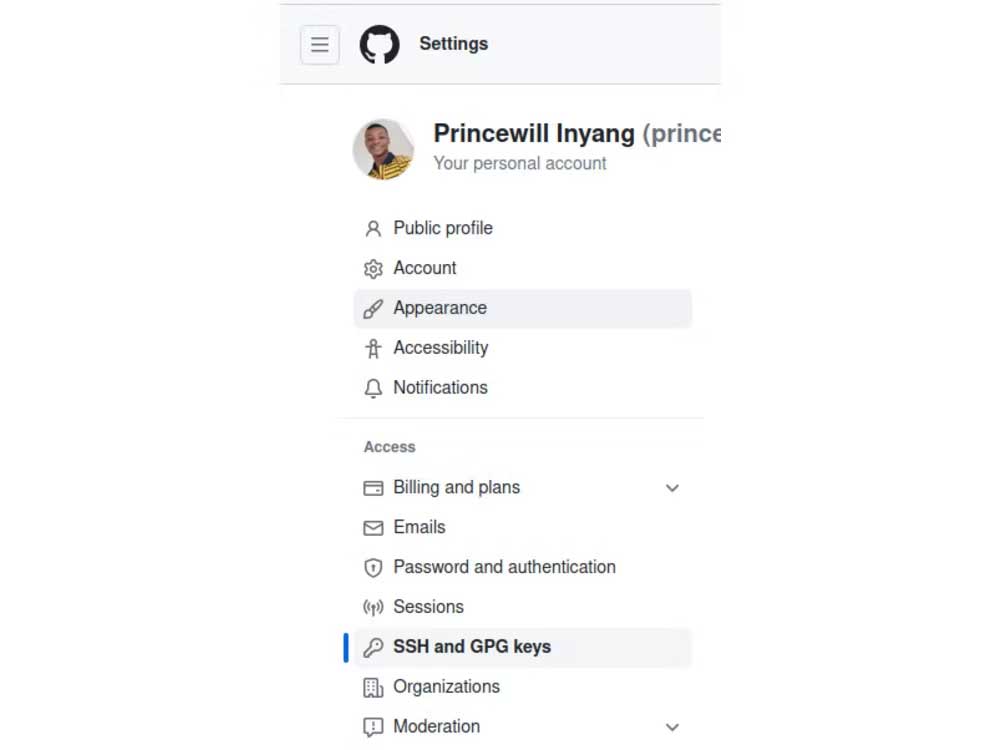
<p style="text-align: justify;">1. Đăng nhập tài khoản GitHub và tới<strong>&nbsp;Account Settings</strong>.</p>

<p style="text-align: justify;">2. Click<strong>&nbsp;SSH and GPG keys&nbsp;</strong>ở thanh bên trái.</p>

<p style="text-align: justify;"><img alt="Cài đặt GitHub" data-i="2" data-src="https://st.quantrimang.com/photos/image/2023/06/21/github-setting.jpg" data-was-processed="true" height="488" src="https://st.quantrimang.com/photos/image/2023/06/21/github-setting.jpg" width="650" /></p>

<p style="text-align: justify;">3. Click&nbsp;<strong>New SSH key</strong>.</p>

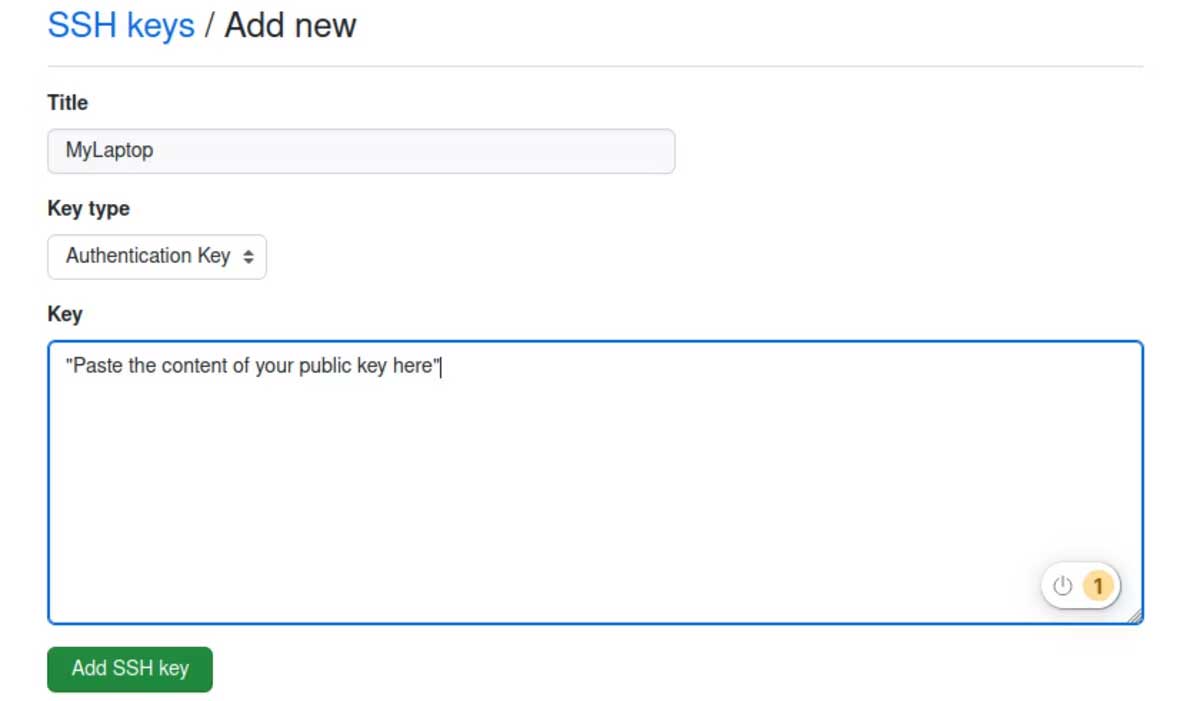
<p style="text-align: justify;">4. Đặt tiêu đề&nbsp;<strong>(Title)</strong>&nbsp;cho&nbsp;<strong>SSH key</strong>.</p>

<p style="text-align: justify;">5. Dán nội dung khóa công khai vào trường&nbsp;<strong>Key.</strong></p>

<p style="text-align: justify;"><strong><img alt="Khóa SSH" data-i="3" data-src="https://st.quantrimang.com/photos/image/2023/06/21/SSH-Key.jpg" data-was-processed="true" height="380" src="https://st.quantrimang.com/photos/image/2023/06/21/SSH-Key.jpg" width="650" /></strong></p>

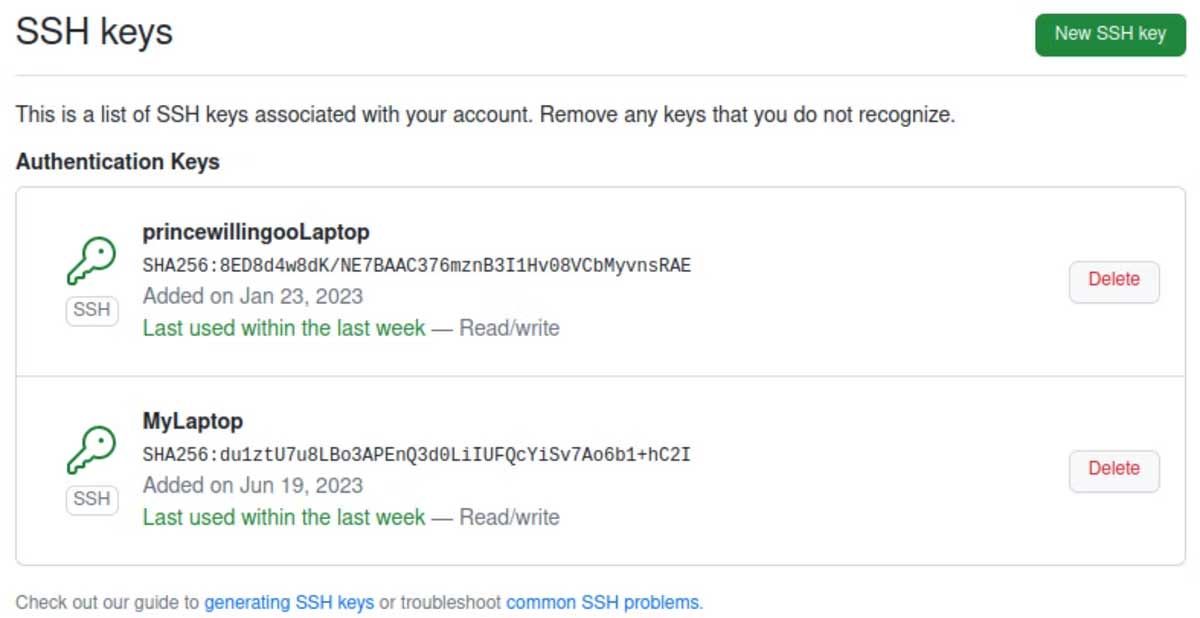
<p style="text-align: justify;">6. Cuối cùng, click<strong>&nbsp;Add SSH key</strong>&nbsp;để lưu khóa SSH vào tài khoản GitHub của bạn.</p>

<p style="text-align: justify;"><img alt="Khóa SSH" data-i="4" data-src="https://st.quantrimang.com/photos/image/2023/06/21/khoa-ssh.jpg" data-was-processed="true" height="335" src="https://st.quantrimang.com/photos/image/2023/06/21/khoa-ssh.jpg" width="650" /></p>

<p style="text-align: justify;">Bạn đã thành công xuất khóa công khai sang GitHub Account cá nhân.</p>

<h3 style="text-align: justify;">3. Cấu hình SSH Agent</h3>

<p style="text-align: justify;">SSH Agent là một chương trình giúp quản lý các khóa SSH và cung cấp một cách an toàn để lưu và sử dụng chúng. Nó hoạt động như một trung gian giữa máy cục bộ của bạn và máy chủ từ xa trong quá trình xác thực SSH. Điều này giúp bạn quản lý nhiều khóa SSH cho các tài khoản GitHub khác nhau.</p>

<p style="text-align: justify;">1. Đảm bảo SSH Agent đang chạy.</p>

<pre id="pre5">
<code>$ eval &quot;$(ssh-agent -s)&quot;
&gt; Agent pid 2757</code></pre>

<p style="text-align: justify;">Thêm khóa riêng tư cho SSH Agent</p>

<pre id="pre6">
<code> $ ssh-add ~/.ssh/id_rsa
 &gt; Enter passphrase for /home/vagrant/.ssh/id_rsa: 
 &gt; Identity added: /home/vagrant/.ssh/id_rsa (/home/vagrant/.ssh/id_rsa)</code></pre>

<p style="text-align: justify;">Bạn đã thành công cấu hình một SSH Agent để quản lý khóa.</p>

<h3 style="text-align: justify;">4. Kiểm tra kết nối SSH</h3>

<p style="text-align: justify;">Giờ bạn có thể kiểm tra để xác minh kết nối SSH được thiết lập đúng cách. Bạn có thể xác thực trên GitHub bằng SSH.</p>

<p style="text-align: justify;">Chạy lệnh bên dưới để kiểm tra kết nối SSH với GitHub.</p>

<pre id="pre7">
<code>ssh -T git@github.com</code></pre>

<p style="text-align: justify;">Nếu mọi thứ đều ổn, bạn sẽ thấy cảnh báo liên quan tới fingerprint. Xác nhận fingerprint và nhập&nbsp;<strong>yes</strong>&nbsp;để tiếp tục.</p>

<pre id="pre8">
<code>  &gt; The authenticity of host &#039;github.com (140.92.130.4)&#039; can&#039;t be established.
  &gt; ECDSA key fingerprint is SHA256:p2QAMXNIC1TJYWeIOttrVc98/R1BUFWu3/LiyKgUfQM.
  &gt; Are you sure you want to continue connecting (yes/no)?</code></pre>

<p style="text-align: justify;">Sau khi nhập&nbsp;<strong>yes</strong>, bạn sẽ thấy kết quả tương tự như bên dưới.</p>

<pre id="pre9">
<code>  &gt; Warning: Permanently added &#039;github.com,140.92.130.4&#039; (ECDSA) to the list of known hosts.
  &gt; Hi princewillingoo! You&#039;ve successfully authenticated, but GitHub does not provide shell access.</code></pre>

<p style="text-align: justify;">Điều này cho biết xác thực đã thành công.</p>

<h2 style="text-align: justify;">Quản lý repository bằng SSH</h2>

<p style="text-align: justify;">Cấu hình SSH cho phép bạn quản lý các repository nếu không phải lo lắng về rắc rối liên quan tới mật khẩu và token truy cập.</p>

<h3 style="text-align: justify;">Đặt URL từ xa</h3>

<pre id="pre10">
<code>git remote set-url origin git@github.com:&lt;username&gt;/&lt;repository&gt;.git</code></pre>

<h3 style="text-align: justify;">Nhân bản repository</h3>

<pre id="pre11">
<code>git clone git@github.com:&lt;username&gt;/&lt;repository&gt;.git</code></pre>

<h3 style="text-align: justify;">Đẩy thay đổi vào repository</h3>

<pre id="pre12">
<code>git push origin &lt;branch&gt;</code></pre>

<h3 style="text-align: justify;">Đặt thay đổi từ một repository</h3>

<pre id="pre13">
<code>git pull origin &lt;branch&gt;</code></pre>

<h3 style="text-align: justify;">Lấy thay đổi từ repository</h3>

<pre id="pre14">
<code>git pull origin &lt;branch&gt;</code></pre>

<h2 style="text-align: justify;">Ưu điểm dùng SSH xác thực mật khẩu</h2>

<p style="text-align: justify;">Dùng SSH xác thực cung cấp một số ưu điểm nổi bật so với những phương thức xác thực dựa trên mật khẩu, bao gồm:</p>

<ul>
	<li style="text-align: justify;">Xác thực SSH loại bỏ nhu cầu cần thiết cho mật khẩu, giảm rủi ro bị đánh cắp danh tính.</li>
	<li style="text-align: justify;">Sử dụng các khóa mật mã giúp nó miễn nhiễm với các vụ tấn công nguy hiểm, an toàn hơn so với dùng mật khẩu.</li>
	<li style="text-align: justify;">Nếu khóa riêng tư bị xâm phạm, bạn có thể thu hồi và thay thế nó, khiến khóa bị xâm phạm trở nên vô dụng.</li>
</ul>

<p style="text-align: justify;">Vì lí do này, xác thực SSH thường là lựa chọn tốt hơn so với xác thực bằng mật khẩu.</p>

<h2 style="text-align: justify;">Áp dụng thực tiễn tốt nhất và khắc phục sự cố</h2>

<p style="text-align: justify;">Để đảm bảo thiết lập SSH mượt mà và an toàn, bạn nên làm theo những cách áp dụng tốt nhất và biết các lỗi phổ biến có thể xảy ra cùng giải pháp khắc phục chúng.</p>

<ol>
	<li style="text-align: justify;">Luôn đặt passphrase để bổ sung thêm một lớp bảo mật.</li>
	<li style="text-align: justify;">Luân phiên thay đổi phím và sao lưu thường xuyên.</li>
	<li style="text-align: justify;">Xác nhận từng bước để tránh lỗi phần quyền hoặc cấu hình SSH agent.</li>
</ol>

<p style="text-align: justify;">Bằng cách tuân thủ các phương pháp hay nhất này, bạn có thể tự tin sử dụng xác thực SSH cho GitHub.</p>
		</div>
				<div id="author">
						<p>
				<strong>Nguồn tin:</strong>
				Quantrimang.com
			</p>
		</div>
	</div>
	<div id="footer" class="clearfix">
		<div id="url">
			<strong>URL của bản tin này: </strong><a href="https://www.nguoicodonvn2008.info/vi/news/savefile/kien-thuc-may-tinh/dung-ssh-de-xac-thuc-khong-can-mat-khau-vao-github-7192.html" title="Dùng SSH để xác thực không cần mật khẩu vào GitHub">https://www.nguoicodonvn2008.info/vi/news/savefile/kien-thuc-may-tinh/dung-ssh-de-xac-thuc-khong-can-mat-khau-vao-github-7192.html</a>

		</div>
		<div class="clear"></div>
		<div class="copyright">
			&copy; .&#x3A; Nguoicodonvn2008.info - Cõi lòng người cô đơn &#x3A;.
		</div>
		<div id="contact">
			<a href="mailto:admin@nguoicodonvn2008.info">admin@nguoicodonvn2008.info</a>
		</div>
	</div>
</div>
        <div id="timeoutsess" class="chromeframe">
            Bạn đã không sử dụng Site, <a onclick="timeoutsesscancel();" href="https://www.nguoicodonvn2008.info/#">Bấm vào đây để duy trì trạng thái đăng nhập</a>. Thời gian chờ: <span id="secField"> 60 </span> giây
        </div>
        <div id="openidResult" class="nv-alert" style="display:none"></div>
        <div id="openidBt" data-result="" data-redirect=""></div>
		</script>
		<div class="car-top">
  <span><img src="https://www.nguoicodonvn2008.info/themes/default/images/car.png" alt=""></span>
</div>
<script src="https://www.nguoicodonvn2008.info/assets/js/jquery/jquery.min.js"></script>
<script>var nv_base_siteurl="/",nv_lang_data="vi",nv_lang_interface="vi",nv_name_variable="nv",nv_fc_variable="op",nv_lang_variable="language",nv_module_name="news",nv_func_name="savefile",nv_is_user=0, nv_my_ofs=-4,nv_my_abbr="EDT",nv_cookie_prefix="nv4c_e856T",nv_check_pass_mstime=1738000,nv_area_admin=0,nv_safemode=0,theme_responsive=0,nv_recaptcha_ver=2,nv_recaptcha_sitekey="",nv_recaptcha_type="image",XSSsanitize=1;</script>
<script src="https://www.nguoicodonvn2008.info/assets/js/language/vi.js"></script>
<script src="https://www.nguoicodonvn2008.info/assets/js/DOMPurify/purify3.js"></script>
<script src="https://www.nguoicodonvn2008.info/assets/js/global.js"></script>
<script src="https://www.nguoicodonvn2008.info/assets/js/site.js"></script>
<script src="https://www.nguoicodonvn2008.info/themes/default/js/news.js"></script>
<script src="https://www.nguoicodonvn2008.info/themes/default/js/main.js"></script>
<script src="https://www.nguoicodonvn2008.info/themes/default/js/custom.js"></script>
<script type="application/ld+json">
        {
            "@context": "https://schema.org",
            "@type": "Organization",
            "url": "https://www.nguoicodonvn2008.info",
            "logo": "https://www.nguoicodonvn2008.info/uploads/angel.gif"
        }
        </script>
<script src="https://www.nguoicodonvn2008.info/themes/default/js/bootstrap.min.js"></script>
<script type="text/javascript">
var $scrolltop = $('.car-top');
$scrolltop.on('click', function () {
    $('html,body').animate({
        scrollTop: 0
    }, 800);
    $(this).addClass("car-run");
    setTimeout(function(){ $scrolltop.removeClass('car-run');}, 1000);
    return false;
});
$(window).on('scroll', function ()
{ 
    if($(window).scrollTop() >= 200)
    {
        $scrolltop.addClass("show");
        $scrolltop.addClass("car-down");
    }
    else
    {
       $scrolltop.removeClass("show");
       setTimeout(function(){ $scrolltop.removeClass('car-down');}, 300);
    }
});
</script>
</body>
</html>