<!DOCTYPE html>
    <html lang="vi" xmlns="http://www.w3.org/1999/xhtml" prefix="og: http://ogp.me/ns#">
    <head>
<title>Điểm số ẩn này cho biết máy tính chạy Windows tốt như thế nào</title>
<meta name="description" content="Điểm số ẩn này cho biết máy tính chạy Windows tốt như thế nào - Savefile - Tin Tức -...">
<meta name="author" content=".: Nguoicodonvn2008.info - Cõi lòng người cô đơn :.">
<meta name="copyright" content=".: Nguoicodonvn2008.info - Cõi lòng người cô đơn :. [admin@nguoicodonvn2008.info]">
<meta name="robots" content="index, archive, follow, noodp">
<meta name="googlebot" content="index,archive,follow,noodp">
<meta name="msnbot" content="all,index,follow">
<meta name="generator" content="NukeViet v4.5">
<meta http-equiv="Content-Type" content="text/html; charset=utf-8">
<meta property="og:title" content="Điểm số ẩn này cho biết máy tính chạy Windows tốt như thế nào">
<meta property="og:type" content="website">
<meta property="og:description" content="Savefile - Tin Tức - https&#x3A;&#x002F;&#x002F;www.nguoicodonvn2008.info&#x002F;vi&#x002F;news&#x002F;savefile&#x002F;kien-thuc-may-tinh&#x002F;diem-so-an-nay-cho-biet-may-tinh-chay-windows-tot-nhu-the-nao-8926.html">
<meta property="og:site_name" content=".&#x3A; Nguoicodonvn2008.info - Cõi lòng người cô đơn &#x3A;.">
<meta property="og:url" content="https://www.nguoicodonvn2008.info/vi/news/savefile/kien-thuc-may-tinh/diem-so-an-nay-cho-biet-may-tinh-chay-windows-tot-nhu-the-nao-8926.html">
<link rel="shortcut icon" href="https://www.nguoicodonvn2008.info/favicon.ico">
<link rel="canonical" href="https://www.nguoicodonvn2008.info/vi/news/savefile/kien-thuc-may-tinh/diem-so-an-nay-cho-biet-may-tinh-chay-windows-tot-nhu-the-nao-8926.html">
<link rel="alternate" href="https://www.nguoicodonvn2008.info/vi/news/rss/" title="Tin Tức" type="application/rss+xml">
<link rel="alternate" href="https://www.nguoicodonvn2008.info/vi/news/rss/karaoke-dual/" title="Tin Tức - Karaoke Dual" type="application/rss+xml">
<link rel="alternate" href="https://www.nguoicodonvn2008.info/vi/news/rss/nhac-tre/" title="Tin Tức - Nhạc trẻ" type="application/rss+xml">
<link rel="alternate" href="https://www.nguoicodonvn2008.info/vi/news/rss/tru-tinh/" title="Tin Tức - Trữ tình" type="application/rss+xml">
<link rel="alternate" href="https://www.nguoicodonvn2008.info/vi/news/rss/nuoc-ngoai/" title="Tin Tức - Nước ngoài" type="application/rss+xml">
<link rel="alternate" href="https://www.nguoicodonvn2008.info/vi/news/rss/remix/" title="Tin Tức - Remix" type="application/rss+xml">
<link rel="alternate" href="https://www.nguoicodonvn2008.info/vi/news/rss/tam-su-tinh-yeu/" title="Tin Tức - Tâm sự tình yêu" type="application/rss+xml">
<link rel="alternate" href="https://www.nguoicodonvn2008.info/vi/news/rss/tho-suu-tam/" title="Tin Tức - Thơ sưu tầm" type="application/rss+xml">
<link rel="alternate" href="https://www.nguoicodonvn2008.info/vi/news/rss/cuoc-song/" title="Tin Tức - Cuộc sống" type="application/rss+xml">
<link rel="alternate" href="https://www.nguoicodonvn2008.info/vi/news/rss/phan-mem/" title="Tin Tức - Phần mềm" type="application/rss+xml">
<link rel="alternate" href="https://www.nguoicodonvn2008.info/vi/news/rss/kien-thuc-may-tinh/" title="Tin Tức - Kiến thức máy tính" type="application/rss+xml">
<link rel="alternate" href="https://www.nguoicodonvn2008.info/vi/news/rss/hoc-tap/" title="Tin Tức - Học tập" type="application/rss+xml">
<link rel="alternate" href="https://www.nguoicodonvn2008.info/vi/news/rss/tai-lieu/" title="Tin Tức - Tài liệu" type="application/rss+xml">
<link rel="alternate" href="https://www.nguoicodonvn2008.info/vi/news/rss/de-thi/" title="Tin Tức - Đề thi" type="application/rss+xml">
<link rel="preload" as="style" href="https://www.nguoicodonvn2008.info/assets/css/font-awesome.min.css" type="text/css">
<link rel="preload" as="style" href="https://www.nguoicodonvn2008.info/themes/default/css/bootstrap.non-responsive.css" type="text/css">
<link rel="preload" as="style" href="https://www.nguoicodonvn2008.info/themes/default/css/style.css" type="text/css">
<link rel="preload" as="style" href="https://www.nguoicodonvn2008.info/themes/default/css/style.non-responsive.css" type="text/css">
<link rel="preload" as="style" href="https://www.nguoicodonvn2008.info/themes/default/css/news.css" type="text/css">
<link rel="preload" as="style" href="https://www.nguoicodonvn2008.info/themes/default/css/custom.css" type="text/css">
<link rel="preload" as="script" href="https://www.nguoicodonvn2008.info/assets/js/jquery/jquery.min.js" type="text/javascript">
<link rel="preload" as="script" href="https://www.nguoicodonvn2008.info/assets/js/language/vi.js" type="text/javascript">
<link rel="preload" as="script" href="https://www.nguoicodonvn2008.info/assets/js/DOMPurify/purify3.js" type="text/javascript">
<link rel="preload" as="script" href="https://www.nguoicodonvn2008.info/assets/js/global.js" type="text/javascript">
<link rel="preload" as="script" href="https://www.nguoicodonvn2008.info/assets/js/site.js" type="text/javascript">
<link rel="preload" as="script" href="https://www.nguoicodonvn2008.info/themes/default/js/news.js" type="text/javascript">
<link rel="preload" as="script" href="https://www.nguoicodonvn2008.info/themes/default/js/main.js" type="text/javascript">
<link rel="preload" as="script" href="https://www.nguoicodonvn2008.info/themes/default/js/custom.js" type="text/javascript">
<link rel="preload" as="script" href="https://www.nguoicodonvn2008.info/themes/default/js/bootstrap.min.js" type="text/javascript">
<link rel="stylesheet" href="https://www.nguoicodonvn2008.info/assets/css/font-awesome.min.css">
<link rel="stylesheet" href="https://www.nguoicodonvn2008.info/themes/default/css/bootstrap.non-responsive.css">
<link rel="stylesheet" href="https://www.nguoicodonvn2008.info/themes/default/css/style.css">
<link rel="stylesheet" href="https://www.nguoicodonvn2008.info/themes/default/css/style.non-responsive.css">
<link rel="StyleSheet" href="https://www.nguoicodonvn2008.info/themes/default/css/news.css">
<link rel="stylesheet" href="https://www.nguoicodonvn2008.info/themes/default/css/custom.css">
<style type="text/css">
	body{background: #fff;}
</style>
    </head>
    <body>
<div id="print">
	<div id="hd_print">
		<h2 class="pull-left">.&#x3A; Nguoicodonvn2008.info - Cõi lòng người cô đơn &#x3A;.</h2>
		<p class="pull-right"><a title=".&#x3A; Nguoicodonvn2008.info - Cõi lòng người cô đơn &#x3A;." href="https://www.nguoicodonvn2008.info/">https://www.nguoicodonvn2008.info</a></p>
	</div>
	<div class="clear"></div>
	<hr />
	<div id="content">
		<h1>Điểm số ẩn này cho biết máy tính chạy Windows tốt như thế nào</h1>
		<ul class="list-inline">
			<li>Thứ tư - 28/08/2024 23:35</li>
			<li class="hidden-print txtrequired"><em class="fa fa-print">&nbsp;</em><a title="In ra" href="javascript:;" onclick="window.print()">In ra</a></li>
			<li class="hidden-print txtrequired"><em class="fa fa-power-off">&nbsp;</em><a title="Đóng cửa sổ này" href="javascript:;" onclick="window.close()">Đóng cửa sổ này</a></li>
		</ul>
		<div class="clear"></div>
		<div id="hometext">
		</div>
				<div class="imghome">
			<img alt="Điểm số ẩn này cho biết máy tính chạy Windows tốt như thế nào" src="https://st.quantrimang.com/photos/image/2024/08/28/diem-so-cho-biet-may-tinh-chay-windows-tot-nhu-the-nao-1.jpg" width="460" class="img-thumbnail" />
		</div>
		<div class="clear"></div>
		<div id="bodytext" class="clearfix">
			<p style="text-align: justify;">Nếu bạn đang thắc mắc PC chạy Windows của mình hoạt động tốt như thế nào, hãy chạy Windows Experience Index (WEI). Công cụ này đánh giá nhiều thành phần phần cứng khác nhau và chấm điểm chúng theo thang điểm từ 1,0 đến 9,9. Sau đây là cách chạy công cụ và ý nghĩa của các điểm số khác nhau.</p>

<h2 style="text-align: justify;">Cách kiểm tra điểm Windows Experience bằng PowerShell</h2>

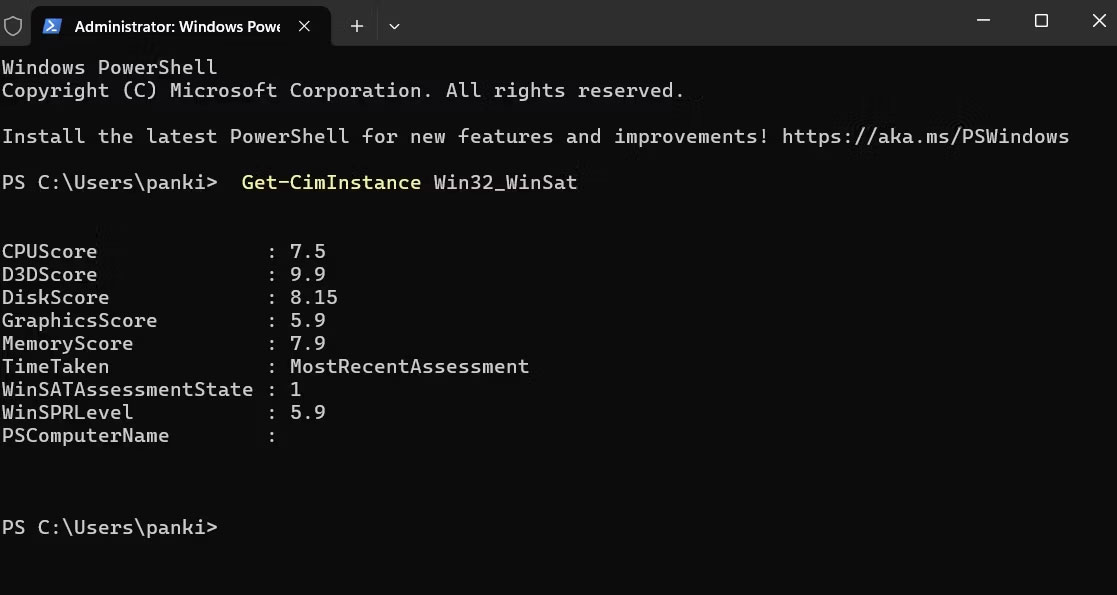
<p style="text-align: justify;">Windows Experience Index là hệ thống xếp hạng đánh giá hiệu suất máy tính dựa trên nhiều thành phần phần cứng khác nhau, chẳng hạn như&nbsp;CPU,&nbsp;RAM, card đồ họa và ổ cứng. Mặc dù WEI không còn được sử dụng tích cực trong các phiên bản Windows mới, nhưng bạn vẫn có thể kiểm tra điểm hiệu suất hệ thống của mình bằng&nbsp;PowerShell. Sau đây là cách thực hiện:</p>

<ol>
	<li style="text-align: justify;">Nhấn&nbsp;<strong>Windows + S</strong>&nbsp;để mở menu tìm kiếm.</li>
	<li style="text-align: justify;">Nhập&nbsp;<strong>PowerShell</strong>&nbsp;vào hộp và chọn&nbsp;<strong>Run as Administrator</strong>.</li>
	<li style="text-align: justify;">Chọn&nbsp;<strong>Yes</strong>&nbsp;khi lời nhắc&nbsp;User Account Control (UAC)&nbsp;xuất hiện.</li>
	<li style="text-align: justify;">Trong bảng điều khiển, nhập lệnh sau và nhấn&nbsp;<strong>Enter</strong>:</li>
</ol>

<pre id="pre0">
<code>Get-CimInstance Win32_WinSat</code></pre>

<figure>
<div style="text-align: justify;"><img alt="Kết quả Windows Experience Index trong cửa sổ PowerShell" data-i="0" data-src="https://st.quantrimang.com/photos/image/2024/08/28/diem-so-cho-biet-may-tinh-chay-windows-tot-nhu-the-nao-1.jpg" data-was-processed="true" height="595" src="https://st.quantrimang.com/photos/image/2024/08/28/diem-so-cho-biet-may-tinh-chay-windows-tot-nhu-the-nao-1.jpg" width="1117" /></div>

<figcaption>
<div style="text-align: justify;">Kết quả Windows Experience Index trong cửa sổ PowerShell</div>
</figcaption>
</figure>

<div style="text-align: justify;">&nbsp;</div>

<p style="text-align: justify;">Bây giờ, PowerShell sẽ hiển thị điểm WEI và các thông tin liên quan khác.</p>

<h2 style="text-align: justify;">Ý nghĩa của điểm Windows Experience trên PC</h2>

<p style="text-align: justify;">Chỉ số trải nghiệm Windows đánh giá hiệu suất tổng thể của PC bằng điểm WinSPRLevel. Điểm này dựa trên xếp hạng riêng của phần cứng, bao gồm CPU, bộ nhớ, card đồ họa và ổ cứng chính.</p>

<p style="text-align: justify;">Điểm WEI cao hơn có nghĩa là PC của bạn được trang bị tốt hơn để xử lý các tác vụ đòi hỏi khắt khe như chơi game, chỉnh sửa video hoặc chạy nhiều chương trình cùng lúc. Ví dụ, nếu điểm đồ họa cao, hệ thống của bạn có thể sẽ cung cấp hình ảnh mượt mà hơn trong các game và những ứng dụng đồ họa chuyên sâu khác.</p>

<figure>
<div style="text-align: justify;"><br />
<img alt="" data-adbro-processed="true" data-i="1" data-src="https://st.quantrimang.com/photos/image/2024/08/28/diem-so-cho-biet-may-tinh-chay-windows-tot-nhu-the-nao-2.jpg" data-was-processed="true" height="1000" src="https://st.quantrimang.com/photos/image/2024/08/28/diem-so-cho-biet-may-tinh-chay-windows-tot-nhu-the-nao-2.jpg" width="1500" /></div>
</figure>

<p style="text-align: justify;">Tuy nhiên, điều quan trọng cần nhớ là điểm WEI chỉ là một yếu tố trong việc đánh giá hiệu suất PC tổng thể. Các khía cạnh khác, chẳng hạn như tối ưu hóa phần mềm, bảo trì hệ thống và thậm chí những tác vụ cụ thể mà bạn thực hiện, cũng đóng vai trò quan trọng.</p>

<p style="text-align: justify;">Với WEI, bạn có thể xem chi tiết hiệu suất phần cứng của máy tính và đảm bảo nó đáp ứng nhu cầu của bạn. Tuy nhiên, nếu cần số liệu hoặc chẩn đoán hiệu suất nâng cao hơn, bạn nên sử dụng các công cụ phân tích hệ thống của bên thứ ba hoặc phần mềm đánh giá chuẩn trên PC Windows của mình.</p>
		</div>
				<div id="author">
						<p>
				<strong>Nguồn tin:</strong>
				Quantrimang.com:
			</p>
		</div>
	</div>
	<div id="footer" class="clearfix">
		<div id="url">
			<strong>URL của bản tin này: </strong><a href="https://www.nguoicodonvn2008.info/vi/news/savefile/kien-thuc-may-tinh/diem-so-an-nay-cho-biet-may-tinh-chay-windows-tot-nhu-the-nao-8926.html" title="Điểm số ẩn này cho biết máy tính chạy Windows tốt như thế nào">https://www.nguoicodonvn2008.info/vi/news/savefile/kien-thuc-may-tinh/diem-so-an-nay-cho-biet-may-tinh-chay-windows-tot-nhu-the-nao-8926.html</a>

		</div>
		<div class="clear"></div>
		<div class="copyright">
			&copy; .&#x3A; Nguoicodonvn2008.info - Cõi lòng người cô đơn &#x3A;.
		</div>
		<div id="contact">
			<a href="mailto:admin@nguoicodonvn2008.info">admin@nguoicodonvn2008.info</a>
		</div>
	</div>
</div>
        <div id="timeoutsess" class="chromeframe">
            Bạn đã không sử dụng Site, <a onclick="timeoutsesscancel();" href="https://www.nguoicodonvn2008.info/#">Bấm vào đây để duy trì trạng thái đăng nhập</a>. Thời gian chờ: <span id="secField"> 60 </span> giây
        </div>
        <div id="openidResult" class="nv-alert" style="display:none"></div>
        <div id="openidBt" data-result="" data-redirect=""></div>
		</script>
		<div class="car-top">
  <span><img src="https://www.nguoicodonvn2008.info/themes/default/images/car.png" alt=""></span>
</div>
<div id="run_cronjobs" style="visibility:hidden;display:none;"><img alt="cron" src="/index.php?second=cronjobs&amp;p=s2Z8DkDy" width="1" height="1" /></div>
<script src="https://www.nguoicodonvn2008.info/assets/js/jquery/jquery.min.js"></script>
<script>var nv_base_siteurl="/",nv_lang_data="vi",nv_lang_interface="vi",nv_name_variable="nv",nv_fc_variable="op",nv_lang_variable="language",nv_module_name="news",nv_func_name="savefile",nv_is_user=0, nv_my_ofs=-4,nv_my_abbr="EDT",nv_cookie_prefix="nv4c_e856T",nv_check_pass_mstime=1738000,nv_area_admin=0,nv_safemode=0,theme_responsive=0,nv_recaptcha_ver=2,nv_recaptcha_sitekey="",nv_recaptcha_type="image",XSSsanitize=1;</script>
<script src="https://www.nguoicodonvn2008.info/assets/js/language/vi.js"></script>
<script src="https://www.nguoicodonvn2008.info/assets/js/DOMPurify/purify3.js"></script>
<script src="https://www.nguoicodonvn2008.info/assets/js/global.js"></script>
<script src="https://www.nguoicodonvn2008.info/assets/js/site.js"></script>
<script src="https://www.nguoicodonvn2008.info/themes/default/js/news.js"></script>
<script src="https://www.nguoicodonvn2008.info/themes/default/js/main.js"></script>
<script src="https://www.nguoicodonvn2008.info/themes/default/js/custom.js"></script>
<script type="application/ld+json">
        {
            "@context": "https://schema.org",
            "@type": "Organization",
            "url": "https://www.nguoicodonvn2008.info",
            "logo": "https://www.nguoicodonvn2008.info/uploads/angel.gif"
        }
        </script>
<script src="https://www.nguoicodonvn2008.info/themes/default/js/bootstrap.min.js"></script>
<script type="text/javascript">
var $scrolltop = $('.car-top');
$scrolltop.on('click', function () {
    $('html,body').animate({
        scrollTop: 0
    }, 800);
    $(this).addClass("car-run");
    setTimeout(function(){ $scrolltop.removeClass('car-run');}, 1000);
    return false;
});
$(window).on('scroll', function ()
{ 
    if($(window).scrollTop() >= 200)
    {
        $scrolltop.addClass("show");
        $scrolltop.addClass("car-down");
    }
    else
    {
       $scrolltop.removeClass("show");
       setTimeout(function(){ $scrolltop.removeClass('car-down');}, 300);
    }
});
</script>
</body>
</html>