<!DOCTYPE html>
    <html lang="vi" xmlns="http://www.w3.org/1999/xhtml" prefix="og: http://ogp.me/ns#">
    <head>
<title>Dịch vụ RASMAN bị treo do lỗi cập nhật Windows 10 1903</title>
<meta name="description" content="Dịch vụ RASMAN bị treo do lỗi cập nhật Windows 10 1903 - Savefile - Tin Tức -...">
<meta name="author" content=".: Nguoicodonvn2008.info - Cõi lòng người cô đơn :.">
<meta name="copyright" content=".: Nguoicodonvn2008.info - Cõi lòng người cô đơn :. [admin@nguoicodonvn2008.info]">
<meta name="robots" content="index, archive, follow, noodp">
<meta name="googlebot" content="index,archive,follow,noodp">
<meta name="msnbot" content="all,index,follow">
<meta name="generator" content="NukeViet v4.5">
<meta http-equiv="Content-Type" content="text/html; charset=utf-8">
<meta property="og:title" content="Dịch vụ RASMAN bị treo do lỗi cập nhật Windows 10 1903">
<meta property="og:type" content="website">
<meta property="og:description" content="Savefile - Tin Tức - https&#x3A;&#x002F;&#x002F;www.nguoicodonvn2008.info&#x002F;vi&#x002F;news&#x002F;savefile&#x002F;kien-thuc-may-tinh&#x002F;dich-vu-rasman-bi-treo-do-loi-cap-nhat-windows-10-1903-318.html">
<meta property="og:site_name" content=".&#x3A; Nguoicodonvn2008.info - Cõi lòng người cô đơn &#x3A;.">
<meta property="og:url" content="https://www.nguoicodonvn2008.info/vi/news/savefile/kien-thuc-may-tinh/dich-vu-rasman-bi-treo-do-loi-cap-nhat-windows-10-1903-318.html">
<link rel="shortcut icon" href="https://www.nguoicodonvn2008.info/favicon.ico">
<link rel="canonical" href="https://www.nguoicodonvn2008.info/vi/news/savefile/kien-thuc-may-tinh/dich-vu-rasman-bi-treo-do-loi-cap-nhat-windows-10-1903-318.html">
<link rel="alternate" href="https://www.nguoicodonvn2008.info/vi/news/rss/" title="Tin Tức" type="application/rss+xml">
<link rel="alternate" href="https://www.nguoicodonvn2008.info/vi/news/rss/karaoke-dual/" title="Tin Tức - Karaoke Dual" type="application/rss+xml">
<link rel="alternate" href="https://www.nguoicodonvn2008.info/vi/news/rss/nhac-tre/" title="Tin Tức - Nhạc trẻ" type="application/rss+xml">
<link rel="alternate" href="https://www.nguoicodonvn2008.info/vi/news/rss/tru-tinh/" title="Tin Tức - Trữ tình" type="application/rss+xml">
<link rel="alternate" href="https://www.nguoicodonvn2008.info/vi/news/rss/nuoc-ngoai/" title="Tin Tức - Nước ngoài" type="application/rss+xml">
<link rel="alternate" href="https://www.nguoicodonvn2008.info/vi/news/rss/remix/" title="Tin Tức - Remix" type="application/rss+xml">
<link rel="alternate" href="https://www.nguoicodonvn2008.info/vi/news/rss/tam-su-tinh-yeu/" title="Tin Tức - Tâm sự tình yêu" type="application/rss+xml">
<link rel="alternate" href="https://www.nguoicodonvn2008.info/vi/news/rss/tho-suu-tam/" title="Tin Tức - Thơ sưu tầm" type="application/rss+xml">
<link rel="alternate" href="https://www.nguoicodonvn2008.info/vi/news/rss/cuoc-song/" title="Tin Tức - Cuộc sống" type="application/rss+xml">
<link rel="alternate" href="https://www.nguoicodonvn2008.info/vi/news/rss/phan-mem/" title="Tin Tức - Phần mềm" type="application/rss+xml">
<link rel="alternate" href="https://www.nguoicodonvn2008.info/vi/news/rss/kien-thuc-may-tinh/" title="Tin Tức - Kiến thức máy tính" type="application/rss+xml">
<link rel="alternate" href="https://www.nguoicodonvn2008.info/vi/news/rss/hoc-tap/" title="Tin Tức - Học tập" type="application/rss+xml">
<link rel="alternate" href="https://www.nguoicodonvn2008.info/vi/news/rss/tai-lieu/" title="Tin Tức - Tài liệu" type="application/rss+xml">
<link rel="alternate" href="https://www.nguoicodonvn2008.info/vi/news/rss/de-thi/" title="Tin Tức - Đề thi" type="application/rss+xml">
<link rel="preload" as="style" href="https://www.nguoicodonvn2008.info/assets/css/font-awesome.min.css" type="text/css">
<link rel="preload" as="style" href="https://www.nguoicodonvn2008.info/themes/default/css/bootstrap.non-responsive.css" type="text/css">
<link rel="preload" as="style" href="https://www.nguoicodonvn2008.info/themes/default/css/style.css" type="text/css">
<link rel="preload" as="style" href="https://www.nguoicodonvn2008.info/themes/default/css/style.non-responsive.css" type="text/css">
<link rel="preload" as="style" href="https://www.nguoicodonvn2008.info/themes/default/css/news.css" type="text/css">
<link rel="preload" as="style" href="https://www.nguoicodonvn2008.info/themes/default/css/custom.css" type="text/css">
<link rel="preload" as="script" href="https://www.nguoicodonvn2008.info/assets/js/jquery/jquery.min.js" type="text/javascript">
<link rel="preload" as="script" href="https://www.nguoicodonvn2008.info/assets/js/language/vi.js" type="text/javascript">
<link rel="preload" as="script" href="https://www.nguoicodonvn2008.info/assets/js/DOMPurify/purify3.js" type="text/javascript">
<link rel="preload" as="script" href="https://www.nguoicodonvn2008.info/assets/js/global.js" type="text/javascript">
<link rel="preload" as="script" href="https://www.nguoicodonvn2008.info/assets/js/site.js" type="text/javascript">
<link rel="preload" as="script" href="https://www.nguoicodonvn2008.info/themes/default/js/news.js" type="text/javascript">
<link rel="preload" as="script" href="https://www.nguoicodonvn2008.info/themes/default/js/main.js" type="text/javascript">
<link rel="preload" as="script" href="https://www.nguoicodonvn2008.info/themes/default/js/custom.js" type="text/javascript">
<link rel="preload" as="script" href="https://www.nguoicodonvn2008.info/themes/default/js/bootstrap.min.js" type="text/javascript">
<link rel="stylesheet" href="https://www.nguoicodonvn2008.info/assets/css/font-awesome.min.css">
<link rel="stylesheet" href="https://www.nguoicodonvn2008.info/themes/default/css/bootstrap.non-responsive.css">
<link rel="stylesheet" href="https://www.nguoicodonvn2008.info/themes/default/css/style.css">
<link rel="stylesheet" href="https://www.nguoicodonvn2008.info/themes/default/css/style.non-responsive.css">
<link rel="StyleSheet" href="https://www.nguoicodonvn2008.info/themes/default/css/news.css">
<link rel="stylesheet" href="https://www.nguoicodonvn2008.info/themes/default/css/custom.css">
<style type="text/css">
	body{background: #fff;}
</style>
    </head>
    <body>
<div id="print">
	<div id="hd_print">
		<h2 class="pull-left">.&#x3A; Nguoicodonvn2008.info - Cõi lòng người cô đơn &#x3A;.</h2>
		<p class="pull-right"><a title=".&#x3A; Nguoicodonvn2008.info - Cõi lòng người cô đơn &#x3A;." href="https://www.nguoicodonvn2008.info/">https://www.nguoicodonvn2008.info</a></p>
	</div>
	<div class="clear"></div>
	<hr />
	<div id="content">
		<h1>Dịch vụ RASMAN bị treo do lỗi cập nhật Windows 10 1903</h1>
		<ul class="list-inline">
			<li>Thứ hai - 01/07/2019 01:12</li>
			<li class="hidden-print txtrequired"><em class="fa fa-print">&nbsp;</em><a title="In ra" href="javascript:;" onclick="window.print()">In ra</a></li>
			<li class="hidden-print txtrequired"><em class="fa fa-power-off">&nbsp;</em><a title="Đóng cửa sổ này" href="javascript:;" onclick="window.close()">Đóng cửa sổ này</a></li>
		</ul>
		<div class="clear"></div>
		<div id="hometext">
		</div>
				<div class="imghome">
			<img alt="Dịch vụ RASMAN bị treo do lỗi cập nhật Windows 10 1903" src="https://st.quantrimang.com/photos/image/2019/07/01/dich-vu-rasman-bi-treo-do-loi-cap-nhat-windows-10-19032.jpg" width="460" class="img-thumbnail" />
		</div>
		<div class="clear"></div>
		<div id="bodytext" class="clearfix">
			<p>Trong một thông báo mới được đưa ra gần đây, Microsoft đã xác nhận rằng bản cập nhật Windows 10 May 2019 Update (phiên bản 1903) có thể gây lỗi cho dịch vụ Trình quản lý kết nối truy cập từ xa (Remote Access Connection Manager - RASMAN) trên một số thiết bị.</p>

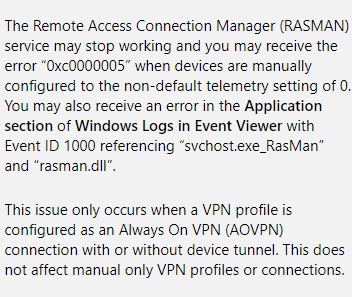
<p>Microsoft cho biết các máy tính đang chạy trên nền tảng Windows 10 phiên bản 1903, đặc biệt là đã cài đặt bản cập nhật KB4497935 sẽ có nguy cơ cao gặp phải lỗi này. Ngoài ra theo tổng hợp của đội ngũ Windows, trong đa số trường hợp đã được ghi nhận, dịch vụ (RASMAN) sẽ đột ngột ngừng hoạt động và quản trị viên hoặc người dùng trên hệ thống sẽ nhận được thông báo lỗi 0xc0000005. Lỗi này xảy ra khi máy tính được cấu hình thủ công với cài đặt từ xa không mặc định là 0.</p>

<p><img alt="Xác nhận lỗi từ phía Microsoft " data-i="0" data-src="https://st.quantrimang.com/photos/image/2019/07/01/dich-vu-rasman-bi-treo-do-loi-cap-nhat-windows-10-19031.jpg" data-was-processed="true" height="297" src="https://st.quantrimang.com/photos/image/2019/07/01/dich-vu-rasman-bi-treo-do-loi-cap-nhat-windows-10-19031.jpg" width="352" /><br  />
<em>Xác nhận lỗi từ phía Microsoft&nbsp;</em></p>

<p>&quot;Bạn cũng có thể gặp phải một lỗi khác xuất hiện ở mục Ứng dụng (<strong>Application</strong>) của Nhật ký Windows (<strong>Windows Logs</strong>) trong công cụ&nbsp;<strong>Event Viewer</strong>, với Event ID 1000 và tham chiếu trên các tệp “svchost.exe_RasMan” và “rasman.dll”, phía Microsoft cho biết.</p>

<p>Một điều quan trọng cần lưu ý, đó là sự cố nêu trên thường chỉ xảy ra khi cấu hình VPN được thiết lập ở trạng thái&nbsp;<strong>Always On VPN (AOVPN)</strong>&nbsp;có hoặc không có device tunnel. Trong khi đó, không có sự cố tương tự được khi nhận với trường hợp các cấu hình hoặc kết nối VPN được thiết lập thủ công hoàn toàn.<br  />
<br  />
<strong>Khắc phục sự cố với Trình quản lý kết nối truy cập từ xa (RASMAN)</strong></p>

<p>Để khắc phục sự cố này, bạn có thể đặt giá trị mới cho các tùy chọn cài đặt chính sách nhóm (group policy) như sau:</p>

<ul>
	<li><strong>Group Policy Path</strong>&nbsp;(đường dẫn chính sách nhóm): Computer Configuration\Administrative Templates\Windows Components\Data Collection and Preview Builds\Allow Telemetry</li>
	<li><strong>Safe Policy Setting</strong>&nbsp;(cài đặt chính sách an toàn):&nbsp;<strong>Enabled</strong>&nbsp;(kích hoạt) và đặt thành giá trị 1 (Basic - Cơ bản), hoặc 2 (Enhanced - Nâng cao), hoặc 3 (Full - Đầy đủ).</li>
</ul>

<p>Hoặc bạn có thể thực hiện các thay đổi sau đây đối với Registry:</p>

<ul>
	<li>SubKey: HKEY_LOCAL_MACHINE\SOFTWARE\Policies\Microsoft\Windows\DataCollection</li>
	<li>Thiết lập (setting): AllowTelemetry</li>
	<li>Loại (Type): REG_DWORD</li>
	<li>Giá trị (value): 1, 2 hoặc 3</li>
</ul>

<p>Sau khi áp dụng các thay đổi cho&nbsp;<a href="https://quantrimang.com/10-thiet-lap-group-policy-tren-windows-can-thuc-hien-ngay-139553" title="10 thiết lập Group Policy quan trọng trên Windows cần thực hiện ngay">group policy</a>&nbsp;hoặc Registry, bạn hãy khởi động lại dịch vụ RASMAN để áp dụng mọi thay đổi.</p>

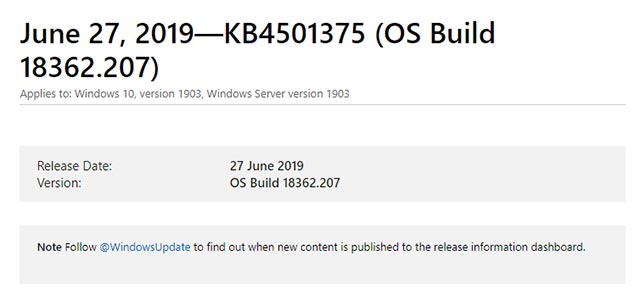
<p>Windows 10 KB4497935 được phát hành chính thức vào ngày 27 tháng 6 vừa qua với một số thay đổi đáng chú ý, bao gồm tính năng Night light tiện dụng, một số cải tiến về thao tác cuộn theo chương trình trong Internet Explorer từ phiên bản 11 trở lên.</p>

<p><img alt="Windows 10 KB4497935" data-i="1" data-src="https://st.quantrimang.com/photos/image/2019/07/01/dich-vu-rasman-bi-treo-do-loi-cap-nhat-windows-10-19032.jpg" data-was-processed="true" height="300" src="https://st.quantrimang.com/photos/image/2019/07/01/dich-vu-rasman-bi-treo-do-loi-cap-nhat-windows-10-19032.jpg" width="640" /><em>Windows 10 KB4497935</em></p>

<p>Bên cạnh đó, Microsoft cũng đã khắc phục thành công các sự cố tồn đọng với Internet Explorer và lỗi ngắt kết nối khi sử dụng phần mềm fitness trên điện thoại Android với ứng dụng Your Phone.</p>
		</div>
				<div id="author">
						<p>
				<strong>Nguồn tin:</strong>
				Quantrimang.com
			</p>
		</div>
	</div>
	<div id="footer" class="clearfix">
		<div id="url">
			<strong>URL của bản tin này: </strong><a href="https://www.nguoicodonvn2008.info/vi/news/savefile/kien-thuc-may-tinh/dich-vu-rasman-bi-treo-do-loi-cap-nhat-windows-10-1903-318.html" title="Dịch vụ RASMAN bị treo do lỗi cập nhật Windows 10 1903">https://www.nguoicodonvn2008.info/vi/news/savefile/kien-thuc-may-tinh/dich-vu-rasman-bi-treo-do-loi-cap-nhat-windows-10-1903-318.html</a>

		</div>
		<div class="clear"></div>
		<div class="copyright">
			&copy; .&#x3A; Nguoicodonvn2008.info - Cõi lòng người cô đơn &#x3A;.
		</div>
		<div id="contact">
			<a href="mailto:admin@nguoicodonvn2008.info">admin@nguoicodonvn2008.info</a>
		</div>
	</div>
</div>
        <div id="timeoutsess" class="chromeframe">
            Bạn đã không sử dụng Site, <a onclick="timeoutsesscancel();" href="https://www.nguoicodonvn2008.info/#">Bấm vào đây để duy trì trạng thái đăng nhập</a>. Thời gian chờ: <span id="secField"> 60 </span> giây
        </div>
        <div id="openidResult" class="nv-alert" style="display:none"></div>
        <div id="openidBt" data-result="" data-redirect=""></div>
		</script>
		<div class="car-top">
  <span><img src="https://www.nguoicodonvn2008.info/themes/default/images/car.png" alt=""></span>
</div>
<div id="run_cronjobs" style="visibility:hidden;display:none;"><img alt="cron" src="/index.php?second=cronjobs&amp;p=u8VtHICP" width="1" height="1" /></div>
<script src="https://www.nguoicodonvn2008.info/assets/js/jquery/jquery.min.js"></script>
<script>var nv_base_siteurl="/",nv_lang_data="vi",nv_lang_interface="vi",nv_name_variable="nv",nv_fc_variable="op",nv_lang_variable="language",nv_module_name="news",nv_func_name="savefile",nv_is_user=0, nv_my_ofs=-4,nv_my_abbr="EDT",nv_cookie_prefix="nv4c_e856T",nv_check_pass_mstime=1738000,nv_area_admin=0,nv_safemode=0,theme_responsive=0,nv_recaptcha_ver=2,nv_recaptcha_sitekey="",nv_recaptcha_type="image",XSSsanitize=1;</script>
<script src="https://www.nguoicodonvn2008.info/assets/js/language/vi.js"></script>
<script src="https://www.nguoicodonvn2008.info/assets/js/DOMPurify/purify3.js"></script>
<script src="https://www.nguoicodonvn2008.info/assets/js/global.js"></script>
<script src="https://www.nguoicodonvn2008.info/assets/js/site.js"></script>
<script src="https://www.nguoicodonvn2008.info/themes/default/js/news.js"></script>
<script src="https://www.nguoicodonvn2008.info/themes/default/js/main.js"></script>
<script src="https://www.nguoicodonvn2008.info/themes/default/js/custom.js"></script>
<script type="application/ld+json">
        {
            "@context": "https://schema.org",
            "@type": "Organization",
            "url": "https://www.nguoicodonvn2008.info",
            "logo": "https://www.nguoicodonvn2008.info/uploads/angel.gif"
        }
        </script>
<script src="https://www.nguoicodonvn2008.info/themes/default/js/bootstrap.min.js"></script>
<script type="text/javascript">
var $scrolltop = $('.car-top');
$scrolltop.on('click', function () {
    $('html,body').animate({
        scrollTop: 0
    }, 800);
    $(this).addClass("car-run");
    setTimeout(function(){ $scrolltop.removeClass('car-run');}, 1000);
    return false;
});
$(window).on('scroll', function ()
{ 
    if($(window).scrollTop() >= 200)
    {
        $scrolltop.addClass("show");
        $scrolltop.addClass("car-down");
    }
    else
    {
       $scrolltop.removeClass("show");
       setTimeout(function(){ $scrolltop.removeClass('car-down');}, 300);
    }
});
</script>
</body>
</html>