<!DOCTYPE html>
    <html lang="vi" xmlns="http://www.w3.org/1999/xhtml" prefix="og: http://ogp.me/ns#">
    <head>
<title>Đánh giá Kaspersky Security Cloud Free&#x3A; Công cụ bảo vệ đầy đủ tính năng nhất cho Windows 10</title>
<meta name="description" content="Đánh giá Kaspersky Security Cloud Free&#x3A; Công cụ bảo vệ đầy đủ tính năng nhất cho Windows 10 - Savefile - Tin Tức -...">
<meta name="author" content=".: Nguoicodonvn2008.info - Cõi lòng người cô đơn :.">
<meta name="copyright" content=".: Nguoicodonvn2008.info - Cõi lòng người cô đơn :. [admin@nguoicodonvn2008.info]">
<meta name="robots" content="index, archive, follow, noodp">
<meta name="googlebot" content="index,archive,follow,noodp">
<meta name="msnbot" content="all,index,follow">
<meta name="generator" content="NukeViet v4.5">
<meta http-equiv="Content-Type" content="text/html; charset=utf-8">
<meta property="og:title" content="Đánh giá Kaspersky Security Cloud Free&#x3A; Công cụ bảo vệ đầy đủ tính năng nhất cho Windows 10">
<meta property="og:type" content="website">
<meta property="og:description" content="Savefile - Tin Tức -...">
<meta property="og:site_name" content=".&#x3A; Nguoicodonvn2008.info - Cõi lòng người cô đơn &#x3A;.">
<meta property="og:url" content="https://www.nguoicodonvn2008.info/vi/news/savefile/kien-thuc-may-tinh/danh-gia-kaspersky-security-cloud-free-cong-cu-bao-ve-day-du-tinh-nang-nhat-cho-windows-10-3041.html">
<link rel="shortcut icon" href="https://www.nguoicodonvn2008.info/favicon.ico">
<link rel="canonical" href="https://www.nguoicodonvn2008.info/vi/news/savefile/kien-thuc-may-tinh/danh-gia-kaspersky-security-cloud-free-cong-cu-bao-ve-day-du-tinh-nang-nhat-cho-windows-10-3041.html">
<link rel="alternate" href="https://www.nguoicodonvn2008.info/vi/news/rss/" title="Tin Tức" type="application/rss+xml">
<link rel="alternate" href="https://www.nguoicodonvn2008.info/vi/news/rss/karaoke-dual/" title="Tin Tức - Karaoke Dual" type="application/rss+xml">
<link rel="alternate" href="https://www.nguoicodonvn2008.info/vi/news/rss/nhac-tre/" title="Tin Tức - Nhạc trẻ" type="application/rss+xml">
<link rel="alternate" href="https://www.nguoicodonvn2008.info/vi/news/rss/tru-tinh/" title="Tin Tức - Trữ tình" type="application/rss+xml">
<link rel="alternate" href="https://www.nguoicodonvn2008.info/vi/news/rss/nuoc-ngoai/" title="Tin Tức - Nước ngoài" type="application/rss+xml">
<link rel="alternate" href="https://www.nguoicodonvn2008.info/vi/news/rss/remix/" title="Tin Tức - Remix" type="application/rss+xml">
<link rel="alternate" href="https://www.nguoicodonvn2008.info/vi/news/rss/tam-su-tinh-yeu/" title="Tin Tức - Tâm sự tình yêu" type="application/rss+xml">
<link rel="alternate" href="https://www.nguoicodonvn2008.info/vi/news/rss/tho-suu-tam/" title="Tin Tức - Thơ sưu tầm" type="application/rss+xml">
<link rel="alternate" href="https://www.nguoicodonvn2008.info/vi/news/rss/cuoc-song/" title="Tin Tức - Cuộc sống" type="application/rss+xml">
<link rel="alternate" href="https://www.nguoicodonvn2008.info/vi/news/rss/phan-mem/" title="Tin Tức - Phần mềm" type="application/rss+xml">
<link rel="alternate" href="https://www.nguoicodonvn2008.info/vi/news/rss/kien-thuc-may-tinh/" title="Tin Tức - Kiến thức máy tính" type="application/rss+xml">
<link rel="alternate" href="https://www.nguoicodonvn2008.info/vi/news/rss/hoc-tap/" title="Tin Tức - Học tập" type="application/rss+xml">
<link rel="alternate" href="https://www.nguoicodonvn2008.info/vi/news/rss/tai-lieu/" title="Tin Tức - Tài liệu" type="application/rss+xml">
<link rel="alternate" href="https://www.nguoicodonvn2008.info/vi/news/rss/de-thi/" title="Tin Tức - Đề thi" type="application/rss+xml">
<link rel="preload" as="style" href="https://www.nguoicodonvn2008.info/assets/css/font-awesome.min.css" type="text/css">
<link rel="preload" as="style" href="https://www.nguoicodonvn2008.info/themes/default/css/bootstrap.non-responsive.css" type="text/css">
<link rel="preload" as="style" href="https://www.nguoicodonvn2008.info/themes/default/css/style.css" type="text/css">
<link rel="preload" as="style" href="https://www.nguoicodonvn2008.info/themes/default/css/style.non-responsive.css" type="text/css">
<link rel="preload" as="style" href="https://www.nguoicodonvn2008.info/themes/default/css/news.css" type="text/css">
<link rel="preload" as="style" href="https://www.nguoicodonvn2008.info/themes/default/css/custom.css" type="text/css">
<link rel="preload" as="script" href="https://www.nguoicodonvn2008.info/assets/js/jquery/jquery.min.js" type="text/javascript">
<link rel="preload" as="script" href="https://www.nguoicodonvn2008.info/assets/js/language/vi.js" type="text/javascript">
<link rel="preload" as="script" href="https://www.nguoicodonvn2008.info/assets/js/DOMPurify/purify3.js" type="text/javascript">
<link rel="preload" as="script" href="https://www.nguoicodonvn2008.info/assets/js/global.js" type="text/javascript">
<link rel="preload" as="script" href="https://www.nguoicodonvn2008.info/assets/js/site.js" type="text/javascript">
<link rel="preload" as="script" href="https://www.nguoicodonvn2008.info/themes/default/js/news.js" type="text/javascript">
<link rel="preload" as="script" href="https://www.nguoicodonvn2008.info/themes/default/js/main.js" type="text/javascript">
<link rel="preload" as="script" href="https://www.nguoicodonvn2008.info/themes/default/js/custom.js" type="text/javascript">
<link rel="preload" as="script" href="https://www.nguoicodonvn2008.info/themes/default/js/bootstrap.min.js" type="text/javascript">
<link rel="stylesheet" href="https://www.nguoicodonvn2008.info/assets/css/font-awesome.min.css">
<link rel="stylesheet" href="https://www.nguoicodonvn2008.info/themes/default/css/bootstrap.non-responsive.css">
<link rel="stylesheet" href="https://www.nguoicodonvn2008.info/themes/default/css/style.css">
<link rel="stylesheet" href="https://www.nguoicodonvn2008.info/themes/default/css/style.non-responsive.css">
<link rel="StyleSheet" href="https://www.nguoicodonvn2008.info/themes/default/css/news.css">
<link rel="stylesheet" href="https://www.nguoicodonvn2008.info/themes/default/css/custom.css">
<style type="text/css">
	body{background: #fff;}
</style>
    </head>
    <body>
<div id="print">
	<div id="hd_print">
		<h2 class="pull-left">.&#x3A; Nguoicodonvn2008.info - Cõi lòng người cô đơn &#x3A;.</h2>
		<p class="pull-right"><a title=".&#x3A; Nguoicodonvn2008.info - Cõi lòng người cô đơn &#x3A;." href="https://www.nguoicodonvn2008.info/">https://www.nguoicodonvn2008.info</a></p>
	</div>
	<div class="clear"></div>
	<hr />
	<div id="content">
		<h1>Đánh giá Kaspersky Security Cloud Free&#x3A; Công cụ bảo vệ đầy đủ tính năng nhất cho Windows 10</h1>
		<ul class="list-inline">
			<li>Thứ sáu - 06/11/2020 23:55</li>
			<li class="hidden-print txtrequired"><em class="fa fa-print">&nbsp;</em><a title="In ra" href="javascript:;" onclick="window.print()">In ra</a></li>
			<li class="hidden-print txtrequired"><em class="fa fa-power-off">&nbsp;</em><a title="Đóng cửa sổ này" href="javascript:;" onclick="window.close()">Đóng cửa sổ này</a></li>
		</ul>
		<div class="clear"></div>
		<div id="hometext">
		</div>
				<div class="imghome">
			<img alt="Đánh giá Kaspersky Security Cloud Free&#x3A; Công cụ bảo vệ đầy đủ tính năng nhất cho Windows 10" src="https://st.quantrimang.com/photos/image/2020/11/05/kaspersky-security-cloud-free-5.jpg" width="460" class="img-thumbnail" />
		</div>
		<div class="clear"></div>
		<div id="bodytext" class="clearfix">
			<p style="text-align: justify;">Kaspersky Security Cloud Free bao gồm các tính năng bảo mật cốt lõi giúp bảo vệ máy tính của bạn chống lại virus, phần mềm gián điệp,&nbsp;ransomware, trang web lừa đảo &amp; nguy hiểm và nhiều thứ khó chịu hơn.</p>

<p style="text-align: justify;">Tính năng bảo vệ bằng mật khẩu cũng được bao gồm trong phiên bản miễn phí, đảm bảo rằng không có phần mềm độc hại nào có thể ngăn chặn hoặc chấm dứt Kaspersky. Không cần phải lo lắng về các bản cập nhật vì nó cũng hỗ trợ cập nhật tự động.</p>

<p style="text-align: justify;">Tính năng quét đám mây cũng có sẵn trong Kaspersky Free, cho phép người dùng sử dụng KSN Network. Cùng với sản phẩm diệt virus, bạn cũng nhận được tiện ích mở rộng trình duyệt web của Kaspersky được gọi là Kaspersky Protection và các công nghệ khác như URL Advisor và Trusted URLs.</p>

<div style="text-align: justify;">Tải Kaspersky Security Cloud Free&nbsp;<br />
<strong><span style="color:rgb(192, 57, 43);">https://www.kaspersky.com/free-cloud-antivirus</span></strong></div>

<h2 style="text-align: justify;">Các tính năng của Kaspersky Security Cloud Free</h2>

<p style="text-align: justify;">Trong số 3 nút xuất hiện ở dưới cùng bên trái của chương trình, hãy nhấp vào nút hình bánh răng để mở trình hướng dẫn cài đặt Kaspersky.</p>

<p style="text-align: justify;">Settings được chia thành 5 phần.</p>

<ul>
	<li style="text-align: justify;">General</li>
	<li style="text-align: justify;">Protection</li>
	<li style="text-align: justify;">Performance</li>
	<li style="text-align: justify;">Scan</li>
	<li style="text-align: justify;">Additional</li>
</ul>

<div style="text-align: justify;">&nbsp;</div>

<h3 style="text-align: justify;">General</h3>

<figure>
<div style="text-align: justify;"><img alt="Tab General" data-i="0" data-src="https://st.quantrimang.com/photos/image/2020/11/05/kaspersky-security-cloud-free-1.jpg" data-was-processed="true" height="486" src="https://st.quantrimang.com/photos/image/2020/11/05/kaspersky-security-cloud-free-1.jpg" width="650" /></div>

<figcaption>
<div style="text-align: justify;">Tab General</div>
</figcaption>
</figure>

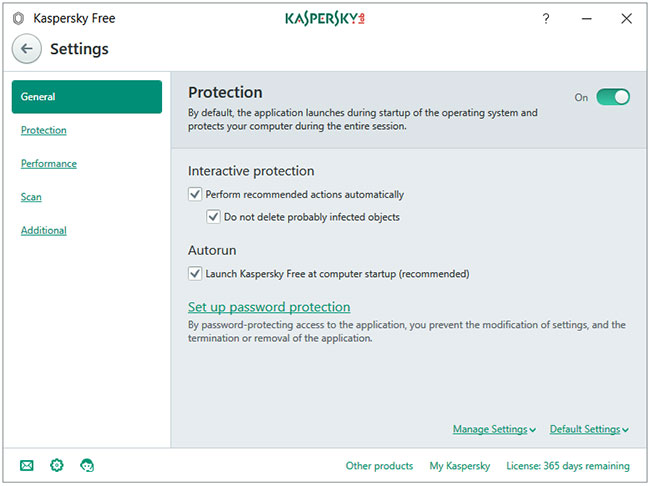
<p style="text-align: justify;">Tab&nbsp;<strong>General</strong>&nbsp;sẽ mở phần cài đặt chung. Nút&nbsp;<strong>Protection</strong>&nbsp;để bật hoặc tắt chương trình. Tùy chọn&nbsp;<strong>Set up password protection</strong>&nbsp;cho phép bạn đặt mật khẩu cho&nbsp;<strong>Kaspersky Settings.</strong>&nbsp;Kích hoạt tính năng này có nghĩa là không có phần mềm độc hại hoặc người dùng máy tính nào có thể tự động tắt Kaspersky Protection (cần nhập mật khẩu để chỉnh sửa Settings).</p>

<h3 style="text-align: justify;">Protection</h3>

<figure>
<div style="text-align: justify;"><img alt="Tab Protection" data-i="1" data-src="https://st.quantrimang.com/photos/image/2020/11/05/kaspersky-security-cloud-free-2.jpg" data-was-processed="true" height="489" src="https://st.quantrimang.com/photos/image/2020/11/05/kaspersky-security-cloud-free-2.jpg" width="650" /></div>

<figcaption>
<div style="text-align: justify;">Tab Protection</div>
</figcaption>
</figure>

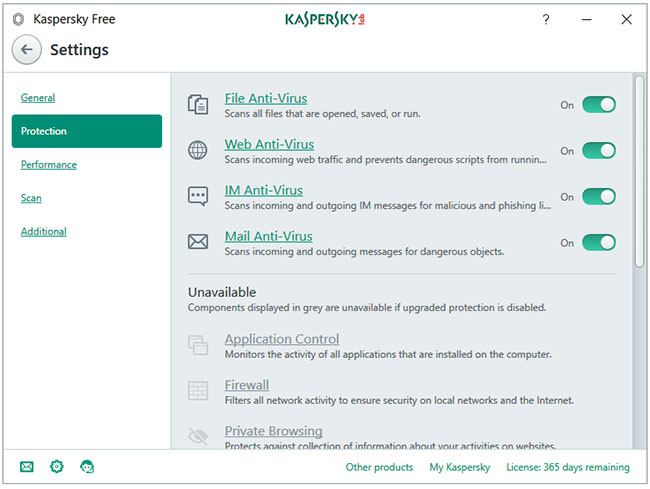
<p style="text-align: justify;">Tab quan trọng nhất trong chương trình là&nbsp;<strong>Protection.</strong>&nbsp;Kaspersky Free có tất cả 4 lá chắn chống virus -&nbsp;<strong>File Anti-Virus, Web Anti-Virus, IM Anti-Virus</strong>&nbsp;và<strong>&nbsp;Mail Anti-Virus.</strong></p>

<div style="text-align: justify;">&nbsp;</div>

<h3 style="text-align: justify;">Performance</h3>

<figure>
<div style="text-align: justify;"><img alt="Tab Performance" data-i="2" data-src="https://st.quantrimang.com/photos/image/2020/11/05/kaspersky-security-cloud-free-3.jpg" data-was-processed="true" height="485" src="https://st.quantrimang.com/photos/image/2020/11/05/kaspersky-security-cloud-free-3.jpg" width="650" /></div>

<figcaption>
<div style="text-align: justify;">Tab Performance</div>
</figcaption>
</figure>

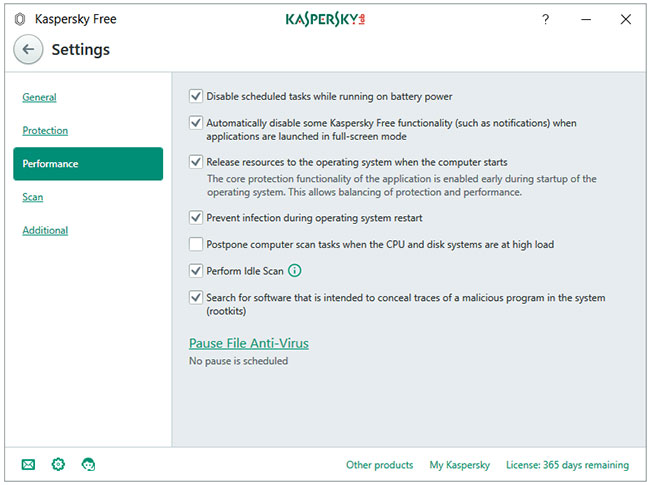
<p style="text-align: justify;">Tab&nbsp;<strong>Performance</strong>&nbsp;có một danh sách các tùy chọn mà bạn có thể cấu hình để tối ưu hóa&nbsp;<strong>Kaspersky Free for Performance</strong>. Chỉ cần không nhấp vào tùy chọn cuối cùng có tên là&nbsp;<strong>Pause File Ant-Virus</strong>. Các cài đặt mặc định đã rất tốt rồi.</p>

<h3 style="text-align: justify;">Scan</h3>

<figure>
<div style="text-align: justify;"><img alt="Tab Scan" data-i="3" data-src="https://st.quantrimang.com/photos/image/2020/11/05/kaspersky-security-cloud-free-4.jpg" data-was-processed="true" height="487" src="https://st.quantrimang.com/photos/image/2020/11/05/kaspersky-security-cloud-free-4.jpg" width="650" /></div>

<figcaption>
<div style="text-align: justify;">Tab Scan</div>
</figcaption>
</figure>

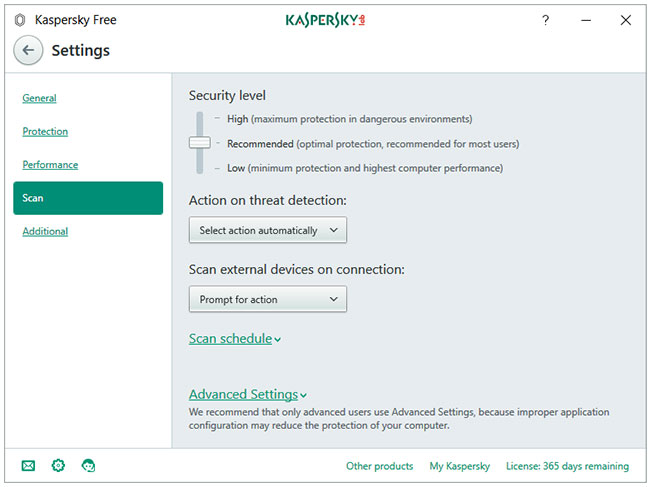
<p style="text-align: justify;">Nhấp vào tab bên&nbsp;<strong>Scan</strong>&nbsp;sẽ mở cửa sổ cài đặt&nbsp;<strong>Scan</strong>&nbsp;chuyên dụng. Bạn có thể cấu hình cài đặt cho&nbsp;<strong>Security level, Action on threat detection, Scan external devices on connection, Scan schedule</strong>&nbsp;và<strong>&nbsp;Advanced Settings</strong>.</p>

<p style="text-align: justify;">Nhấp vào phần&nbsp;<strong>Scan</strong>&nbsp;trong màn hình chính của Kaspersky Free sẽ mở ra cửa sổ với 4 tùy chọn quét -&nbsp;<strong>Full Scan, Quick Scan, Selective Scan</strong>&nbsp;và<strong>&nbsp;External Device Scan</strong>. Liên kết&nbsp;<strong>Task Manager</strong>&nbsp;hiển thị tất cả các sự kiện liên quan đến việc quét trong một dòng thời gian. Bạn có thể lên lịch quét bằng cách nhấp vào liên kết&nbsp;<strong>Scan schedule</strong>&nbsp;được đặt ở cuối sidebar bên trái.</p>

<p style="text-align: justify;">Bạn có thể cấu hình Kaspersky để thực hiện một trong các hành động khi phát hiện mối đe dọa.</p>

<h3 style="text-align: justify;">Additional</h3>

<figure>
<div style="text-align: justify;"><img alt="Cửa sổ cài đặt Additional" data-i="4" data-src="https://st.quantrimang.com/photos/image/2020/11/05/kaspersky-security-cloud-free-5.jpg" data-was-processed="true" height="484" src="https://st.quantrimang.com/photos/image/2020/11/05/kaspersky-security-cloud-free-5.jpg" width="650" /></div>

<figcaption>
<div style="text-align: justify;">Cửa sổ cài đặt Additional</div>
</figcaption>
</figure>

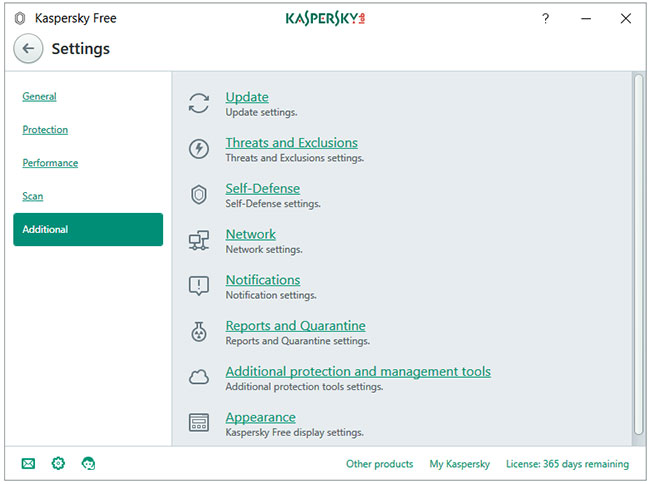
<p style="text-align: justify;">Cửa sổ cài đặt&nbsp;<strong>Additional</strong>&nbsp;chứa tất cả các cài đặt chương trình bổ sung ở một nơi. Quét toàn bộ và quét nhanh có thể được lên lịch chạy tự động. Các thiết bị bên ngoài có thể được quét tự động khi được kết nối. Plugin/add-on/extension của trình duyệt Kaspersky Protection bổ sung thêm một lớp bảo vệ chống lại các mối đe dọa dựa trên web. Nó chứa các mô-đun sau -&nbsp;<strong>Safe Money, Virtual Keyboard</strong>&nbsp;và<strong>&nbsp;Block Dangerous Websites</strong>.</p>

<div style="text-align: justify;">&nbsp;</div>

<h3 style="text-align: justify;">More Tools</h3>

<p style="text-align: justify;">Nút&nbsp;<strong>More Tools</strong>&nbsp;trên màn hình chính hoạt động giống như quảng cáo cho phiên bản chuyên nghiệp. Nhấp vào nút đó sẽ dẫn người dùng đến cửa sổ&nbsp;<strong>Tools</strong>, nơi bạn sẽ thấy rằng hầu hết các thành phần chuyển sang màu xám, tức là không khả dụng.</p>

<p style="text-align: justify;">Các công cụ có sẵn cho người dùng miễn phí là:</p>

<ul>
	<li style="text-align: justify;">Cloud Protection</li>
	<li style="text-align: justify;">On-Screen Keyboard</li>
	<li style="text-align: justify;">Quarantine</li>
</ul>

<h2 style="text-align: justify;">VPN Kaspersky Secure Connection</h2>

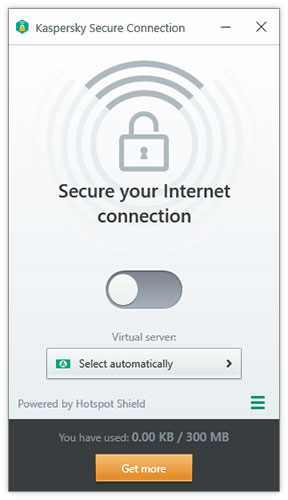
<p style="text-align: justify;">Kaspersky Free cài đặt một chương trình VPN miễn phí có tên&nbsp;<strong>Kaspersky Secure Connection</strong>, được cung cấp bởi Hotspot Shield. Giới hạn dữ liệu miễn phí là 300MB mỗi ngày.</p>

<figure>
<div style="text-align: justify;"><img alt="VPN Kaspersky Secure Connection" data-i="5" data-src="https://st.quantrimang.com/photos/image/2020/11/05/kaspersky-security-cloud-free-6.jpg" data-was-processed="true" height="500" src="https://st.quantrimang.com/photos/image/2020/11/05/kaspersky-security-cloud-free-6.jpg" width="288" /></div>

<figcaption>
<div style="text-align: justify;">VPN Kaspersky Secure Connection</div>
</figcaption>
</figure>

<h2 style="text-align: justify;">Tác động hệ thống và việc sử dụng tài nguyên</h2>

<h3 style="text-align: justify;">Sử dụng ổ cứng</h3>

<p style="text-align: justify;">Trình cài đặt có dung lượng khoảng 120MB. Sau khi cài đặt và cập nhật, Kaspersky Free Antivirus sử dụng khoảng 1,5GB dung lượng ổ đĩa.</p>

<h3 style="text-align: justify;">Sử dụng CPU và RAM khi không hoạt động</h3>

<p style="text-align: justify;">Tất cả các quy trình Kaspersky kết hợp sử dụng khoảng 50MB RAM khi chương trình hoạt động ở chế độ nền. Mức sử dụng CPU ổn định ở 0%.</p>

<h3 style="text-align: justify;">Sử dụng CPU và RAM khi quét</h3>

<p style="text-align: justify;">Kaspersky sử dụng CPU cao khi bạn bắt đầu quét thủ công, dao động từ 20 đến 60% (hầu hết nằm trong khoảng 35%). Kaspersky sử dụng ít hơn 100MB RAM khi quét máy tính để tìm phần mềm độc hại.</p>

<h2 style="text-align: justify;">Giao diện người dùng và tính dễ sử dụng</h2>

<p style="text-align: justify;">Kaspersky sử dụng theme dễ chịu cho mắt. Mọi thứ được tổ chức rất tốt. Có nhiều cài đặt dành cho hầu hết mọi thứ và việc tiếp cận chúng không khó chút nào.</p>

<p style="text-align: justify;">Không có quảng cáo. Vài tháng một lần, bạn sẽ nhận được một gợi ý nâng cấp lên gói Internet Security của Kaspersky, không có gì khác.</p>
		</div>
				<div id="author">
						<p>
				<strong>Nguồn tin:</strong>
				Quantrimang.com
			</p>
		</div>
	</div>
	<div id="footer" class="clearfix">
		<div id="url">
			<strong>URL của bản tin này: </strong><a href="https://www.nguoicodonvn2008.info/vi/news/savefile/kien-thuc-may-tinh/danh-gia-kaspersky-security-cloud-free-cong-cu-bao-ve-day-du-tinh-nang-nhat-cho-windows-10-3041.html" title="Đánh giá Kaspersky Security Cloud Free&#x3A; Công cụ bảo vệ đầy đủ tính năng nhất cho Windows 10">https://www.nguoicodonvn2008.info/vi/news/savefile/kien-thuc-may-tinh/danh-gia-kaspersky-security-cloud-free-cong-cu-bao-ve-day-du-tinh-nang-nhat-cho-windows-10-3041.html</a>

		</div>
		<div class="clear"></div>
		<div class="copyright">
			&copy; .&#x3A; Nguoicodonvn2008.info - Cõi lòng người cô đơn &#x3A;.
		</div>
		<div id="contact">
			<a href="mailto:admin@nguoicodonvn2008.info">admin@nguoicodonvn2008.info</a>
		</div>
	</div>
</div>
        <div id="timeoutsess" class="chromeframe">
            Bạn đã không sử dụng Site, <a onclick="timeoutsesscancel();" href="https://www.nguoicodonvn2008.info/#">Bấm vào đây để duy trì trạng thái đăng nhập</a>. Thời gian chờ: <span id="secField"> 60 </span> giây
        </div>
        <div id="openidResult" class="nv-alert" style="display:none"></div>
        <div id="openidBt" data-result="" data-redirect=""></div>
		</script>
		<div class="car-top">
  <span><img src="https://www.nguoicodonvn2008.info/themes/default/images/car.png" alt=""></span>
</div>
<script src="https://www.nguoicodonvn2008.info/assets/js/jquery/jquery.min.js"></script>
<script>var nv_base_siteurl="/",nv_lang_data="vi",nv_lang_interface="vi",nv_name_variable="nv",nv_fc_variable="op",nv_lang_variable="language",nv_module_name="news",nv_func_name="savefile",nv_is_user=0, nv_my_ofs=-4,nv_my_abbr="EDT",nv_cookie_prefix="nv4c_e856T",nv_check_pass_mstime=1738000,nv_area_admin=0,nv_safemode=0,theme_responsive=0,nv_recaptcha_ver=2,nv_recaptcha_sitekey="",nv_recaptcha_type="image",XSSsanitize=1;</script>
<script src="https://www.nguoicodonvn2008.info/assets/js/language/vi.js"></script>
<script src="https://www.nguoicodonvn2008.info/assets/js/DOMPurify/purify3.js"></script>
<script src="https://www.nguoicodonvn2008.info/assets/js/global.js"></script>
<script src="https://www.nguoicodonvn2008.info/assets/js/site.js"></script>
<script src="https://www.nguoicodonvn2008.info/themes/default/js/news.js"></script>
<script src="https://www.nguoicodonvn2008.info/themes/default/js/main.js"></script>
<script src="https://www.nguoicodonvn2008.info/themes/default/js/custom.js"></script>
<script type="application/ld+json">
        {
            "@context": "https://schema.org",
            "@type": "Organization",
            "url": "https://www.nguoicodonvn2008.info",
            "logo": "https://www.nguoicodonvn2008.info/uploads/angel.gif"
        }
        </script>
<script src="https://www.nguoicodonvn2008.info/themes/default/js/bootstrap.min.js"></script>
<script type="text/javascript">
var $scrolltop = $('.car-top');
$scrolltop.on('click', function () {
    $('html,body').animate({
        scrollTop: 0
    }, 800);
    $(this).addClass("car-run");
    setTimeout(function(){ $scrolltop.removeClass('car-run');}, 1000);
    return false;
});
$(window).on('scroll', function ()
{ 
    if($(window).scrollTop() >= 200)
    {
        $scrolltop.addClass("show");
        $scrolltop.addClass("car-down");
    }
    else
    {
       $scrolltop.removeClass("show");
       setTimeout(function(){ $scrolltop.removeClass('car-down');}, 300);
    }
});
</script>
</body>
</html>