<!DOCTYPE html>
    <html lang="vi" xmlns="http://www.w3.org/1999/xhtml" prefix="og: http://ogp.me/ns#">
    <head>
<title>Công cụ Windows sắp ra mắt này sẽ giúp người dùng dễ dàng chuyển sang PC mới</title>
<meta name="description" content="Công cụ Windows sắp ra mắt này sẽ giúp người dùng dễ dàng chuyển sang PC mới - Savefile - Tin Tức -...">
<meta name="author" content=".: Nguoicodonvn2008.info - Cõi lòng người cô đơn :.">
<meta name="copyright" content=".: Nguoicodonvn2008.info - Cõi lòng người cô đơn :. [admin@nguoicodonvn2008.info]">
<meta name="robots" content="index, archive, follow, noodp">
<meta name="googlebot" content="index,archive,follow,noodp">
<meta name="msnbot" content="all,index,follow">
<meta name="generator" content="NukeViet v4.5">
<meta http-equiv="Content-Type" content="text/html; charset=utf-8">
<meta property="og:title" content="Công cụ Windows sắp ra mắt này sẽ giúp người dùng dễ dàng chuyển sang PC mới">
<meta property="og:type" content="website">
<meta property="og:description" content="Savefile - Tin Tức -...">
<meta property="og:site_name" content=".&#x3A; Nguoicodonvn2008.info - Cõi lòng người cô đơn &#x3A;.">
<meta property="og:url" content="https://www.nguoicodonvn2008.info/vi/news/savefile/kien-thuc-may-tinh/cong-cu-windows-sap-ra-mat-nay-se-giup-nguoi-dung-de-dang-chuyen-sang-pc-moi-10408.html">
<link rel="shortcut icon" href="https://www.nguoicodonvn2008.info/favicon.ico">
<link rel="canonical" href="https://www.nguoicodonvn2008.info/vi/news/savefile/kien-thuc-may-tinh/cong-cu-windows-sap-ra-mat-nay-se-giup-nguoi-dung-de-dang-chuyen-sang-pc-moi-10408.html">
<link rel="alternate" href="https://www.nguoicodonvn2008.info/vi/news/rss/" title="Tin Tức" type="application/rss+xml">
<link rel="alternate" href="https://www.nguoicodonvn2008.info/vi/news/rss/karaoke-dual/" title="Tin Tức - Karaoke Dual" type="application/rss+xml">
<link rel="alternate" href="https://www.nguoicodonvn2008.info/vi/news/rss/nhac-tre/" title="Tin Tức - Nhạc trẻ" type="application/rss+xml">
<link rel="alternate" href="https://www.nguoicodonvn2008.info/vi/news/rss/tru-tinh/" title="Tin Tức - Trữ tình" type="application/rss+xml">
<link rel="alternate" href="https://www.nguoicodonvn2008.info/vi/news/rss/nuoc-ngoai/" title="Tin Tức - Nước ngoài" type="application/rss+xml">
<link rel="alternate" href="https://www.nguoicodonvn2008.info/vi/news/rss/remix/" title="Tin Tức - Remix" type="application/rss+xml">
<link rel="alternate" href="https://www.nguoicodonvn2008.info/vi/news/rss/tam-su-tinh-yeu/" title="Tin Tức - Tâm sự tình yêu" type="application/rss+xml">
<link rel="alternate" href="https://www.nguoicodonvn2008.info/vi/news/rss/tho-suu-tam/" title="Tin Tức - Thơ sưu tầm" type="application/rss+xml">
<link rel="alternate" href="https://www.nguoicodonvn2008.info/vi/news/rss/cuoc-song/" title="Tin Tức - Cuộc sống" type="application/rss+xml">
<link rel="alternate" href="https://www.nguoicodonvn2008.info/vi/news/rss/phan-mem/" title="Tin Tức - Phần mềm" type="application/rss+xml">
<link rel="alternate" href="https://www.nguoicodonvn2008.info/vi/news/rss/kien-thuc-may-tinh/" title="Tin Tức - Kiến thức máy tính" type="application/rss+xml">
<link rel="alternate" href="https://www.nguoicodonvn2008.info/vi/news/rss/hoc-tap/" title="Tin Tức - Học tập" type="application/rss+xml">
<link rel="alternate" href="https://www.nguoicodonvn2008.info/vi/news/rss/tai-lieu/" title="Tin Tức - Tài liệu" type="application/rss+xml">
<link rel="alternate" href="https://www.nguoicodonvn2008.info/vi/news/rss/de-thi/" title="Tin Tức - Đề thi" type="application/rss+xml">
<link rel="preload" as="style" href="https://www.nguoicodonvn2008.info/assets/css/font-awesome.min.css" type="text/css">
<link rel="preload" as="style" href="https://www.nguoicodonvn2008.info/themes/default/css/bootstrap.non-responsive.css" type="text/css">
<link rel="preload" as="style" href="https://www.nguoicodonvn2008.info/themes/default/css/style.css" type="text/css">
<link rel="preload" as="style" href="https://www.nguoicodonvn2008.info/themes/default/css/style.non-responsive.css" type="text/css">
<link rel="preload" as="style" href="https://www.nguoicodonvn2008.info/themes/default/css/news.css" type="text/css">
<link rel="preload" as="style" href="https://www.nguoicodonvn2008.info/themes/default/css/custom.css" type="text/css">
<link rel="preload" as="script" href="https://www.nguoicodonvn2008.info/assets/js/jquery/jquery.min.js" type="text/javascript">
<link rel="preload" as="script" href="https://www.nguoicodonvn2008.info/assets/js/language/vi.js" type="text/javascript">
<link rel="preload" as="script" href="https://www.nguoicodonvn2008.info/assets/js/DOMPurify/purify3.js" type="text/javascript">
<link rel="preload" as="script" href="https://www.nguoicodonvn2008.info/assets/js/global.js" type="text/javascript">
<link rel="preload" as="script" href="https://www.nguoicodonvn2008.info/assets/js/site.js" type="text/javascript">
<link rel="preload" as="script" href="https://www.nguoicodonvn2008.info/themes/default/js/news.js" type="text/javascript">
<link rel="preload" as="script" href="https://www.nguoicodonvn2008.info/themes/default/js/main.js" type="text/javascript">
<link rel="preload" as="script" href="https://www.nguoicodonvn2008.info/themes/default/js/custom.js" type="text/javascript">
<link rel="preload" as="script" href="https://www.nguoicodonvn2008.info/themes/default/js/bootstrap.min.js" type="text/javascript">
<link rel="stylesheet" href="https://www.nguoicodonvn2008.info/assets/css/font-awesome.min.css">
<link rel="stylesheet" href="https://www.nguoicodonvn2008.info/themes/default/css/bootstrap.non-responsive.css">
<link rel="stylesheet" href="https://www.nguoicodonvn2008.info/themes/default/css/style.css">
<link rel="stylesheet" href="https://www.nguoicodonvn2008.info/themes/default/css/style.non-responsive.css">
<link rel="StyleSheet" href="https://www.nguoicodonvn2008.info/themes/default/css/news.css">
<link rel="stylesheet" href="https://www.nguoicodonvn2008.info/themes/default/css/custom.css">
<style type="text/css">
	body{background: #fff;}
</style>
    </head>
    <body>
<div id="print">
	<div id="hd_print">
		<h2 class="pull-left">.&#x3A; Nguoicodonvn2008.info - Cõi lòng người cô đơn &#x3A;.</h2>
		<p class="pull-right"><a title=".&#x3A; Nguoicodonvn2008.info - Cõi lòng người cô đơn &#x3A;." href="https://www.nguoicodonvn2008.info/">https://www.nguoicodonvn2008.info</a></p>
	</div>
	<div class="clear"></div>
	<hr />
	<div id="content">
		<h1>Công cụ Windows sắp ra mắt này sẽ giúp người dùng dễ dàng chuyển sang PC mới</h1>
		<ul class="list-inline">
			<li>Thứ hai - 19/05/2025 23:13</li>
			<li class="hidden-print txtrequired"><em class="fa fa-print">&nbsp;</em><a title="In ra" href="javascript:;" onclick="window.print()">In ra</a></li>
			<li class="hidden-print txtrequired"><em class="fa fa-power-off">&nbsp;</em><a title="Đóng cửa sổ này" href="javascript:;" onclick="window.close()">Đóng cửa sổ này</a></li>
		</ul>
		<div class="clear"></div>
		<div id="hometext">
		</div>
				<div class="imghome">
			<img alt="Công cụ Windows sắp ra mắt này sẽ giúp người dùng dễ dàng chuyển sang PC mới" src="https://st.quantrimang.com/photos/image/2025/05/20/cong-cu-windows-giup-de-chuyen-sang-pc-moi-1.jpg" width="460" class="img-thumbnail" />
		</div>
		<div class="clear"></div>
		<div id="bodytext" class="clearfix">
			<p style="text-align: justify;">Việc chuyển sang một&nbsp;&nbsp;PC&nbsp;khác có thể rất phiền phức trừ khi bạn quyết định cắm ổ lưu trữ. Microsoft hiện đã được phát hiện đang thử nghiệm tính năng truyền dữ liệu không dây giúp việc chuyển đổi PC trở nên dễ dàng.</p>

<h2 style="text-align: justify;">Việc truyền dữ liệu giữa các PC sẽ sớm trở nên dễ dàng</h2>

<p style="text-align: justify;">Windows đã có ứng dụng sao lưu tích hợp cho phép bạn nhanh chóng khôi phục file và cài đặt từ PC cũ qua OneDrive. Tuy nhiên, tính năng này không phải là giải pháp hoàn hảo và trừ khi bạn có nhiều dung lượng lưu trữ OneDrive, tính năng này sẽ không hữu ích lắm ngoại trừ việc đưa cài đặt Windows của bạn sang.</p>

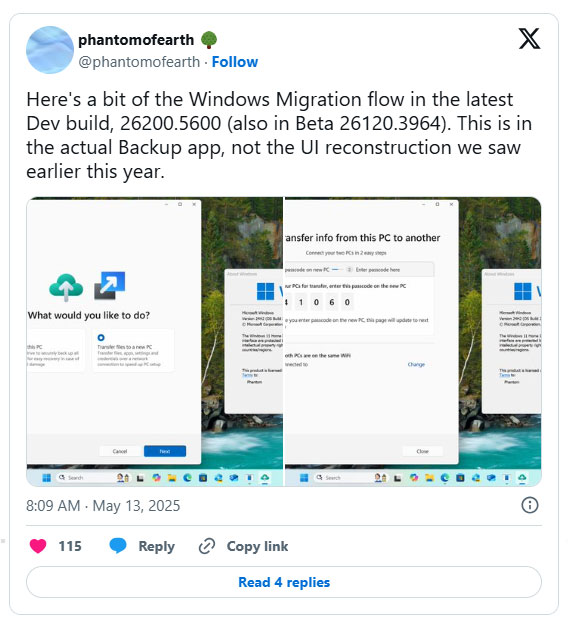
<p style="text-align: justify;">Theo Phantom of Earth on X phát hiện, có một tùy chọn mới để chuyển file sang PC mới (<strong>Transfer files to a new PC</strong>) trong ứng dụng Windows Backup. Đây không phải là cách truyền dữ liệu đám mây thông thường của bạn, mà có vẻ như là cơ chế truyền dữ liệu không dây mới giữa hai PC Windows được kết nối với cùng một mạng Wi-Fi. Khi một PC khởi tạo quá trình truyền, bạn sẽ nhận được mật mã gồm 6 chữ số để nhập vào PC thứ hai để kết nối.</p>

<figure>
<div style="text-align: justify;"><img alt="" data-i="0" data-src="https://st.quantrimang.com/photos/image/2025/05/20/cong-cu-windows-giup-de-chuyen-sang-pc-moi-1.jpg" data-was-processed="true" height="630" src="https://st.quantrimang.com/photos/image/2025/05/20/cong-cu-windows-giup-de-chuyen-sang-pc-moi-1.jpg" width="568" /></div>
</figure>

<p style="text-align: justify;">Phần mô tả lưu ý rằng tính năng này có thể truyền file, ứng dụng, cài đặt và thông tin xác thực qua mạng. Để hiểu rõ hơn, ứng dụng Windows Backup hiện tại chỉ cho phép bạn sao lưu các file từ thư mục Desktop, Documents và Pictures vào OneDrive và ghi nhớ những ứng dụng đã cài đặt, tùy chọn ứng dụng đã ghim, tài khoản, mật khẩu mạng Wi-Fi, thông tin đăng nhập khác cũng như cài đặt và tùy chọn Windows của bạn.</p>

<p style="text-align: justify;">Nếu được triển khai, đây sẽ là trải nghiệm tốt hơn đáng kể khi chuyển từ PC cũ sang PC mới. Hiện tại, ngay cả khi đã sao lưu mọi thứ bằng Windows Backup, bạn vẫn phải cài đặt thủ công tất cả các ứng dụng sau khi chuyển đổi. Cách tốt nhất để sao chép cài đặt Windows là di chuyển toàn bộ ổ lưu trữ giữa các&nbsp;&nbsp;máy tính&nbsp;hoặc sao chép ổ lưu trữ hiện tại của bạn.</p>

<p style="text-align: justify;">Windows đã có công cụ truyền file để truyền dữ liệu giữa hai PC trước đây. Windows Easy Transfer ra mắt trong Windows XP Service Pack 2 và có trong hệ điều hành cho đến Windows 8.1. Công cụ này cho phép bạn truyền dữ liệu giữa hai PC bằng kết nối mạng, thiết bị lưu trữ ngoài như USB hoặc CD/DVD hoặc qua cáp USB đặc biệt được thiết kế để truyền dữ liệu trực tiếp giữa hai PC.</p>

<h2 style="text-align: justify;">Bản ghi việc phát hành tính năng của Microsoft</h2>

<p style="text-align: justify;">Với việc Nearby Share, công cụ truyền dữ liệu không dây tích hợp của Windows 11, không đáng tin cậy như thế nào, thì đây có thể là một nỗ lực khác để cuối cùng khắc phục được những vấn đề về truyền dữ liệu không dây của Windows. Tuy nhiên, đừng quá hy vọng cho đến khi tính năng này bắt đầu triển khai trong bản build ổn định của Windows 11.</p>

<p style="text-align: justify;">Thật không may, Microsoft đã có một bản ghi phát hành các tính năng khá không ổn định được phát hiện trong quá trình thử nghiệm. Vì vậy, một tính năng sao lưu của Windows được phát hiện, không nhất thiết nó sẽ có mặt trong các bản phát hành ổn định.</p>

<p style="text-align: justify;">Với việc&nbsp;Windows 10 đang sắp bị ngừng hỗ trợ, tính năng mới ít nhất sẽ giúp quá trình di chuyển sang Windows 11 dễ dàng hơn. Với những cảnh báo mới cho người dùng Windows 10, Microsoft đang rất muốn mọi người nâng cấp lên hệ điều hành mới nhất của mình.</p>

<div style="text-align: justify;">&nbsp;</div>
		</div>
				<div id="author">
						<p>
				<strong>Nguồn tin:</strong>
				Quantrimang.com:
			</p>
		</div>
	</div>
	<div id="footer" class="clearfix">
		<div id="url">
			<strong>URL của bản tin này: </strong><a href="https://www.nguoicodonvn2008.info/vi/news/savefile/kien-thuc-may-tinh/cong-cu-windows-sap-ra-mat-nay-se-giup-nguoi-dung-de-dang-chuyen-sang-pc-moi-10408.html" title="Công cụ Windows sắp ra mắt này sẽ giúp người dùng dễ dàng chuyển sang PC mới">https://www.nguoicodonvn2008.info/vi/news/savefile/kien-thuc-may-tinh/cong-cu-windows-sap-ra-mat-nay-se-giup-nguoi-dung-de-dang-chuyen-sang-pc-moi-10408.html</a>

		</div>
		<div class="clear"></div>
		<div class="copyright">
			&copy; .&#x3A; Nguoicodonvn2008.info - Cõi lòng người cô đơn &#x3A;.
		</div>
		<div id="contact">
			<a href="mailto:admin@nguoicodonvn2008.info">admin@nguoicodonvn2008.info</a>
		</div>
	</div>
</div>
        <div id="timeoutsess" class="chromeframe">
            Bạn đã không sử dụng Site, <a onclick="timeoutsesscancel();" href="https://www.nguoicodonvn2008.info/#">Bấm vào đây để duy trì trạng thái đăng nhập</a>. Thời gian chờ: <span id="secField"> 60 </span> giây
        </div>
        <div id="openidResult" class="nv-alert" style="display:none"></div>
        <div id="openidBt" data-result="" data-redirect=""></div>
		</script>
		<div class="car-top">
  <span><img src="https://www.nguoicodonvn2008.info/themes/default/images/car.png" alt=""></span>
</div>
<script src="https://www.nguoicodonvn2008.info/assets/js/jquery/jquery.min.js"></script>
<script>var nv_base_siteurl="/",nv_lang_data="vi",nv_lang_interface="vi",nv_name_variable="nv",nv_fc_variable="op",nv_lang_variable="language",nv_module_name="news",nv_func_name="savefile",nv_is_user=0, nv_my_ofs=-4,nv_my_abbr="EDT",nv_cookie_prefix="nv4c_e856T",nv_check_pass_mstime=1738000,nv_area_admin=0,nv_safemode=0,theme_responsive=0,nv_recaptcha_ver=2,nv_recaptcha_sitekey="",nv_recaptcha_type="image",XSSsanitize=1;</script>
<script src="https://www.nguoicodonvn2008.info/assets/js/language/vi.js"></script>
<script src="https://www.nguoicodonvn2008.info/assets/js/DOMPurify/purify3.js"></script>
<script src="https://www.nguoicodonvn2008.info/assets/js/global.js"></script>
<script src="https://www.nguoicodonvn2008.info/assets/js/site.js"></script>
<script src="https://www.nguoicodonvn2008.info/themes/default/js/news.js"></script>
<script src="https://www.nguoicodonvn2008.info/themes/default/js/main.js"></script>
<script src="https://www.nguoicodonvn2008.info/themes/default/js/custom.js"></script>
<script type="application/ld+json">
        {
            "@context": "https://schema.org",
            "@type": "Organization",
            "url": "https://www.nguoicodonvn2008.info",
            "logo": "https://www.nguoicodonvn2008.info/uploads/angel.gif"
        }
        </script>
<script src="https://www.nguoicodonvn2008.info/themes/default/js/bootstrap.min.js"></script>
<script type="text/javascript">
var $scrolltop = $('.car-top');
$scrolltop.on('click', function () {
    $('html,body').animate({
        scrollTop: 0
    }, 800);
    $(this).addClass("car-run");
    setTimeout(function(){ $scrolltop.removeClass('car-run');}, 1000);
    return false;
});
$(window).on('scroll', function ()
{ 
    if($(window).scrollTop() >= 200)
    {
        $scrolltop.addClass("show");
        $scrolltop.addClass("car-down");
    }
    else
    {
       $scrolltop.removeClass("show");
       setTimeout(function(){ $scrolltop.removeClass('car-down');}, 300);
    }
});
</script>
</body>
</html>