<!DOCTYPE html>
    <html lang="vi" xmlns="http://www.w3.org/1999/xhtml" prefix="og: http://ogp.me/ns#">
    <head>
<title>Công cụ Snipping Tool trên Windows 11 được bổ sung tính năng quay video màn hình hữu ích</title>
<meta name="description" content="Công cụ Snipping Tool trên Windows 11 được bổ sung tính năng quay video màn hình hữu ích - Savefile - Tin Tức -...">
<meta name="author" content=".: Nguoicodonvn2008.info - Cõi lòng người cô đơn :.">
<meta name="copyright" content=".: Nguoicodonvn2008.info - Cõi lòng người cô đơn :. [admin@nguoicodonvn2008.info]">
<meta name="robots" content="index, archive, follow, noodp">
<meta name="googlebot" content="index,archive,follow,noodp">
<meta name="msnbot" content="all,index,follow">
<meta name="generator" content="NukeViet v4.5">
<meta http-equiv="Content-Type" content="text/html; charset=utf-8">
<meta property="og:title" content="Công cụ Snipping Tool trên Windows 11 được bổ sung tính năng quay video màn hình hữu ích">
<meta property="og:type" content="website">
<meta property="og:description" content="Savefile - Tin Tức -...">
<meta property="og:site_name" content=".&#x3A; Nguoicodonvn2008.info - Cõi lòng người cô đơn &#x3A;.">
<meta property="og:url" content="https://www.nguoicodonvn2008.info/vi/news/savefile/kien-thuc-may-tinh/cong-cu-snipping-tool-tren-windows-11-duoc-bo-sung-tinh-nang-quay-video-man-hinh-huu-ich-10614.html">
<link rel="shortcut icon" href="https://www.nguoicodonvn2008.info/favicon.ico">
<link rel="canonical" href="https://www.nguoicodonvn2008.info/vi/news/savefile/kien-thuc-may-tinh/cong-cu-snipping-tool-tren-windows-11-duoc-bo-sung-tinh-nang-quay-video-man-hinh-huu-ich-10614.html">
<link rel="alternate" href="https://www.nguoicodonvn2008.info/vi/news/rss/" title="Tin Tức" type="application/rss+xml">
<link rel="alternate" href="https://www.nguoicodonvn2008.info/vi/news/rss/karaoke-dual/" title="Tin Tức - Karaoke Dual" type="application/rss+xml">
<link rel="alternate" href="https://www.nguoicodonvn2008.info/vi/news/rss/nhac-tre/" title="Tin Tức - Nhạc trẻ" type="application/rss+xml">
<link rel="alternate" href="https://www.nguoicodonvn2008.info/vi/news/rss/tru-tinh/" title="Tin Tức - Trữ tình" type="application/rss+xml">
<link rel="alternate" href="https://www.nguoicodonvn2008.info/vi/news/rss/nuoc-ngoai/" title="Tin Tức - Nước ngoài" type="application/rss+xml">
<link rel="alternate" href="https://www.nguoicodonvn2008.info/vi/news/rss/remix/" title="Tin Tức - Remix" type="application/rss+xml">
<link rel="alternate" href="https://www.nguoicodonvn2008.info/vi/news/rss/tam-su-tinh-yeu/" title="Tin Tức - Tâm sự tình yêu" type="application/rss+xml">
<link rel="alternate" href="https://www.nguoicodonvn2008.info/vi/news/rss/tho-suu-tam/" title="Tin Tức - Thơ sưu tầm" type="application/rss+xml">
<link rel="alternate" href="https://www.nguoicodonvn2008.info/vi/news/rss/cuoc-song/" title="Tin Tức - Cuộc sống" type="application/rss+xml">
<link rel="alternate" href="https://www.nguoicodonvn2008.info/vi/news/rss/phan-mem/" title="Tin Tức - Phần mềm" type="application/rss+xml">
<link rel="alternate" href="https://www.nguoicodonvn2008.info/vi/news/rss/kien-thuc-may-tinh/" title="Tin Tức - Kiến thức máy tính" type="application/rss+xml">
<link rel="alternate" href="https://www.nguoicodonvn2008.info/vi/news/rss/hoc-tap/" title="Tin Tức - Học tập" type="application/rss+xml">
<link rel="alternate" href="https://www.nguoicodonvn2008.info/vi/news/rss/tai-lieu/" title="Tin Tức - Tài liệu" type="application/rss+xml">
<link rel="alternate" href="https://www.nguoicodonvn2008.info/vi/news/rss/de-thi/" title="Tin Tức - Đề thi" type="application/rss+xml">
<link rel="preload" as="style" href="https://www.nguoicodonvn2008.info/assets/css/font-awesome.min.css" type="text/css">
<link rel="preload" as="style" href="https://www.nguoicodonvn2008.info/themes/default/css/bootstrap.non-responsive.css" type="text/css">
<link rel="preload" as="style" href="https://www.nguoicodonvn2008.info/themes/default/css/style.css" type="text/css">
<link rel="preload" as="style" href="https://www.nguoicodonvn2008.info/themes/default/css/style.non-responsive.css" type="text/css">
<link rel="preload" as="style" href="https://www.nguoicodonvn2008.info/themes/default/css/news.css" type="text/css">
<link rel="preload" as="style" href="https://www.nguoicodonvn2008.info/themes/default/css/custom.css" type="text/css">
<link rel="preload" as="script" href="https://www.nguoicodonvn2008.info/assets/js/jquery/jquery.min.js" type="text/javascript">
<link rel="preload" as="script" href="https://www.nguoicodonvn2008.info/assets/js/language/vi.js" type="text/javascript">
<link rel="preload" as="script" href="https://www.nguoicodonvn2008.info/assets/js/DOMPurify/purify3.js" type="text/javascript">
<link rel="preload" as="script" href="https://www.nguoicodonvn2008.info/assets/js/global.js" type="text/javascript">
<link rel="preload" as="script" href="https://www.nguoicodonvn2008.info/assets/js/site.js" type="text/javascript">
<link rel="preload" as="script" href="https://www.nguoicodonvn2008.info/themes/default/js/news.js" type="text/javascript">
<link rel="preload" as="script" href="https://www.nguoicodonvn2008.info/themes/default/js/main.js" type="text/javascript">
<link rel="preload" as="script" href="https://www.nguoicodonvn2008.info/themes/default/js/custom.js" type="text/javascript">
<link rel="preload" as="script" href="https://www.nguoicodonvn2008.info/themes/default/js/bootstrap.min.js" type="text/javascript">
<link rel="stylesheet" href="https://www.nguoicodonvn2008.info/assets/css/font-awesome.min.css">
<link rel="stylesheet" href="https://www.nguoicodonvn2008.info/themes/default/css/bootstrap.non-responsive.css">
<link rel="stylesheet" href="https://www.nguoicodonvn2008.info/themes/default/css/style.css">
<link rel="stylesheet" href="https://www.nguoicodonvn2008.info/themes/default/css/style.non-responsive.css">
<link rel="StyleSheet" href="https://www.nguoicodonvn2008.info/themes/default/css/news.css">
<link rel="stylesheet" href="https://www.nguoicodonvn2008.info/themes/default/css/custom.css">
<style type="text/css">
	body{background: #fff;}
</style>
    </head>
    <body>
<div id="print">
	<div id="hd_print">
		<h2 class="pull-left">.&#x3A; Nguoicodonvn2008.info - Cõi lòng người cô đơn &#x3A;.</h2>
		<p class="pull-right"><a title=".&#x3A; Nguoicodonvn2008.info - Cõi lòng người cô đơn &#x3A;." href="https://www.nguoicodonvn2008.info/">https://www.nguoicodonvn2008.info</a></p>
	</div>
	<div class="clear"></div>
	<hr />
	<div id="content">
		<h1>Công cụ Snipping Tool trên Windows 11 được bổ sung tính năng quay video màn hình hữu ích</h1>
		<ul class="list-inline">
			<li>Thứ sáu - 20/06/2025 23:44</li>
			<li class="hidden-print txtrequired"><em class="fa fa-print">&nbsp;</em><a title="In ra" href="javascript:;" onclick="window.print()">In ra</a></li>
			<li class="hidden-print txtrequired"><em class="fa fa-power-off">&nbsp;</em><a title="Đóng cửa sổ này" href="javascript:;" onclick="window.close()">Đóng cửa sổ này</a></li>
		</ul>
		<div class="clear"></div>
		<div id="hometext">
		</div>
				<div class="imghome">
			<img alt="Công cụ Snipping Tool trên Windows 11 được bổ sung tính năng quay video màn hình hữu ích" src="https://st.quantrimang.com/photos/image/2025/06/20/snipping-tools-co-the-luu-tru-du-lieu-ma-nguoi-dung-da-xoa3.jpg" width="460" class="img-thumbnail" />
		</div>
		<div class="clear"></div>
		<div id="bodytext" class="clearfix">
			<div class="ckeditor-html5-audio" style="text-align: center;">
<audio controls="controls" controlslist="nodownload" src="https://st.quantrimang.com/photos/media/2025/06/20/196100-2025620139.mp3">&nbsp;</audio>
</div>

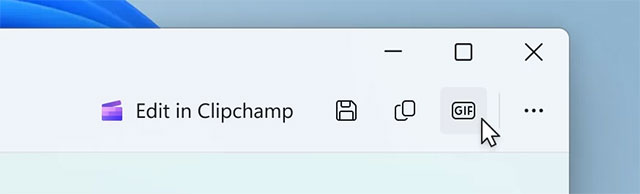
<p style="text-align: justify;">Tháng trước, thông tin về việc ứng dụng Snipping Tool - công cụ chụp ảnh và ghi màn hình mặc định của Windows 11 - được bổ sung tính năng lưu bản ghi dưới dạng GIF đã thu hút nhiều sự quan tâm. Hôm nay, Microsoft chính thức công bố tính năng này đang được triển khai cho người dùng thuộc chương trình Windows Insider trên kênh Dev và Canary. Đáng chú ý, bản cập nhật mới nhất còn cải tiến menu ngữ cảnh và bổ sung tính năng hỗ trợ truy cập.</p>

<p style="text-align: justify;"><img alt="" data-i="0" data-src="https://st.quantrimang.com/photos/image/2025/06/20/snipping-tools-co-the-luu-tru-du-lieu-ma-nguoi-dung-da-xoa3.jpg" data-was-processed="true" height="194" src="https://st.quantrimang.com/photos/image/2025/06/20/snipping-tools-co-the-luu-tru-du-lieu-ma-nguoi-dung-da-xoa3.jpg" width="640" /></p>

<h2 style="text-align: justify;">Cách xuất file GIF đơn giản</h2>

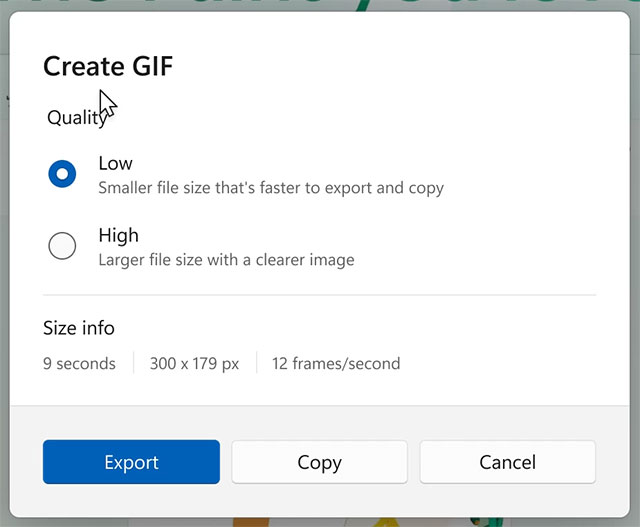
<p style="text-align: justify;">Khởi động ghi màn hình như thông thường, sau khi hoàn tất nhấp vào nút GIF ở góc phải trên cùng của trình chỉnh sửa. Ứng dụng sẽ yêu cầu bạn chọn chất lượng GIF và hiển thị thông tin kích thước: thời lượng, độ phân giải và tốc độ khung hình (FPS). Chỉ cần nhấn Xuất (lưu thành file) hoặc Sao chép (đưa vào bộ nhớ tạm).</p>

<p style="text-align: justify;"><img alt="" data-i="1" data-src="https://st.quantrimang.com/photos/image/2025/06/20/snipping-tools-co-the-luu-tru-du-lieu-ma-nguoi-dung-da-xoa4.jpg" data-was-processed="true" height="527" src="https://st.quantrimang.com/photos/image/2025/06/20/snipping-tools-co-the-luu-tru-du-lieu-ma-nguoi-dung-da-xoa4.jpg" width="640" /></p>

<p style="text-align: justify;">Tuy nhiên hiện tại, tính năng xuất GIF chỉ hỗ trợ video tối đa 30 giây. Với bản ghi dài hơn, ứng dụng sẽ tự động cắt chỉ giữ lại 30 giây đầu tiên.</p>

<h2 style="text-align: justify;">Các triển khai và kích hoạt thủ công</h2>

<p style="text-align: justify;">Tính năng này khả dụng từ phiên bản Snipping Tool 11.2505.21.0. Nếu chưa nhận được bản cập nhật này dù máy tính đã tham gia kênh Canary/Dev, người dùng có thể kích hoạt thủ công bằng công cụ ViveTool:</p>

<ol>
	<li aria-level="1" style="text-align: justify;">Tải ViveTool từ GitHub&nbsp;và giải nén vào thư mục dễ truy cập</li>
</ol>

<div style="text-align: justify;"><span style="color:rgb(231, 76, 60);"><strong>https://github.com/thebookisclosed/ViVe/releases</strong></span></div>

<ol>
	<li aria-level="1" style="text-align: justify;">Mở&nbsp;<strong>Command Prompt&nbsp;</strong>với&nbsp;<strong>quyền Quản trị viên&nbsp;</strong>(<strong>Administrator</strong>)</li>
	<li aria-level="1" style="text-align: justify;">Dùng lệnh CD để chuyển đến thư mục chứa ViveTool (ví dụ:&nbsp;<strong>CD C:\Vive</strong>&nbsp;)</li>
	<li aria-level="1" style="text-align: justify;">Nhập lệnh:&nbsp;<strong>vivetool /enable /id:47081492</strong>&nbsp;rồi nhấn&nbsp;<strong>Enter</strong></li>
	<li aria-level="1" style="text-align: justify;">Khởi động lại máy tính</li>
</ol>

<p style="text-align: justify;">Thông tin chính thức về tính năng mới đã được đăng tải trên Windows Blogs . Trước đó, Snipping Tool cũng được bổ sung tính năng &quot;Ảnh chụp hoàn hảo&quot; (Perfect Screenshot) - tự động căn chỉnh vùng chụp theo hình dạng vật thể như bảng biểu và biểu đồ.</p>

<div style="text-align: justify;">&nbsp;</div>
		</div>
				<div id="author">
						<p>
				<strong>Nguồn tin:</strong>
				Quantrimang.com::
			</p>
		</div>
	</div>
	<div id="footer" class="clearfix">
		<div id="url">
			<strong>URL của bản tin này: </strong><a href="https://www.nguoicodonvn2008.info/vi/news/savefile/kien-thuc-may-tinh/cong-cu-snipping-tool-tren-windows-11-duoc-bo-sung-tinh-nang-quay-video-man-hinh-huu-ich-10614.html" title="Công cụ Snipping Tool trên Windows 11 được bổ sung tính năng quay video màn hình hữu ích">https://www.nguoicodonvn2008.info/vi/news/savefile/kien-thuc-may-tinh/cong-cu-snipping-tool-tren-windows-11-duoc-bo-sung-tinh-nang-quay-video-man-hinh-huu-ich-10614.html</a>

		</div>
		<div class="clear"></div>
		<div class="copyright">
			&copy; .&#x3A; Nguoicodonvn2008.info - Cõi lòng người cô đơn &#x3A;.
		</div>
		<div id="contact">
			<a href="mailto:admin@nguoicodonvn2008.info">admin@nguoicodonvn2008.info</a>
		</div>
	</div>
</div>
        <div id="timeoutsess" class="chromeframe">
            Bạn đã không sử dụng Site, <a onclick="timeoutsesscancel();" href="https://www.nguoicodonvn2008.info/#">Bấm vào đây để duy trì trạng thái đăng nhập</a>. Thời gian chờ: <span id="secField"> 60 </span> giây
        </div>
        <div id="openidResult" class="nv-alert" style="display:none"></div>
        <div id="openidBt" data-result="" data-redirect=""></div>
		</script>
		<div class="car-top">
  <span><img src="https://www.nguoicodonvn2008.info/themes/default/images/car.png" alt=""></span>
</div>
<div id="run_cronjobs" style="visibility:hidden;display:none;"><img alt="cron" src="/index.php?second=cronjobs&amp;p=b9lDB48W" width="1" height="1" /></div>
<script src="https://www.nguoicodonvn2008.info/assets/js/jquery/jquery.min.js"></script>
<script>var nv_base_siteurl="/",nv_lang_data="vi",nv_lang_interface="vi",nv_name_variable="nv",nv_fc_variable="op",nv_lang_variable="language",nv_module_name="news",nv_func_name="savefile",nv_is_user=0, nv_my_ofs=-4,nv_my_abbr="EDT",nv_cookie_prefix="nv4c_e856T",nv_check_pass_mstime=1738000,nv_area_admin=0,nv_safemode=0,theme_responsive=0,nv_recaptcha_ver=2,nv_recaptcha_sitekey="",nv_recaptcha_type="image",XSSsanitize=1;</script>
<script src="https://www.nguoicodonvn2008.info/assets/js/language/vi.js"></script>
<script src="https://www.nguoicodonvn2008.info/assets/js/DOMPurify/purify3.js"></script>
<script src="https://www.nguoicodonvn2008.info/assets/js/global.js"></script>
<script src="https://www.nguoicodonvn2008.info/assets/js/site.js"></script>
<script src="https://www.nguoicodonvn2008.info/themes/default/js/news.js"></script>
<script src="https://www.nguoicodonvn2008.info/themes/default/js/main.js"></script>
<script src="https://www.nguoicodonvn2008.info/themes/default/js/custom.js"></script>
<script type="application/ld+json">
        {
            "@context": "https://schema.org",
            "@type": "Organization",
            "url": "https://www.nguoicodonvn2008.info",
            "logo": "https://www.nguoicodonvn2008.info/uploads/angel.gif"
        }
        </script>
<script src="https://www.nguoicodonvn2008.info/themes/default/js/bootstrap.min.js"></script>
<script type="text/javascript">
var $scrolltop = $('.car-top');
$scrolltop.on('click', function () {
    $('html,body').animate({
        scrollTop: 0
    }, 800);
    $(this).addClass("car-run");
    setTimeout(function(){ $scrolltop.removeClass('car-run');}, 1000);
    return false;
});
$(window).on('scroll', function ()
{ 
    if($(window).scrollTop() >= 200)
    {
        $scrolltop.addClass("show");
        $scrolltop.addClass("car-down");
    }
    else
    {
       $scrolltop.removeClass("show");
       setTimeout(function(){ $scrolltop.removeClass('car-down');}, 300);
    }
});
</script>
</body>
</html>