<!DOCTYPE html>
    <html lang="vi" xmlns="http://www.w3.org/1999/xhtml" prefix="og: http://ogp.me/ns#">
    <head>
<title>Có thể vô hiệu hóa Services Windows 11 nào để tăng hiệu suất?</title>
<meta name="description" content="Có thể vô hiệu hóa Services Windows 11 nào để tăng hiệu suất? - Savefile - Tin Tức -...">
<meta name="author" content=".: Nguoicodonvn2008.info - Cõi lòng người cô đơn :.">
<meta name="copyright" content=".: Nguoicodonvn2008.info - Cõi lòng người cô đơn :. [admin@nguoicodonvn2008.info]">
<meta name="robots" content="index, archive, follow, noodp">
<meta name="googlebot" content="index,archive,follow,noodp">
<meta name="msnbot" content="all,index,follow">
<meta name="generator" content="NukeViet v4.5">
<meta http-equiv="Content-Type" content="text/html; charset=utf-8">
<meta property="og:title" content="Có thể vô hiệu hóa Services Windows 11 nào để tăng hiệu suất?">
<meta property="og:type" content="website">
<meta property="og:description" content="Savefile - Tin Tức - https&#x3A;&#x002F;&#x002F;www.nguoicodonvn2008.info&#x002F;vi&#x002F;news&#x002F;savefile&#x002F;kien-thuc-may-tinh&#x002F;co-the-vo-hieu-hoa-services-windows-11-nao-de-tang-hieu-suat-11059.html">
<meta property="og:site_name" content=".&#x3A; Nguoicodonvn2008.info - Cõi lòng người cô đơn &#x3A;.">
<meta property="og:url" content="https://www.nguoicodonvn2008.info/vi/news/savefile/kien-thuc-may-tinh/co-the-vo-hieu-hoa-services-windows-11-nao-de-tang-hieu-suat-11059.html">
<link rel="shortcut icon" href="https://www.nguoicodonvn2008.info/favicon.ico">
<link rel="canonical" href="https://www.nguoicodonvn2008.info/vi/news/savefile/kien-thuc-may-tinh/co-the-vo-hieu-hoa-services-windows-11-nao-de-tang-hieu-suat-11059.html">
<link rel="alternate" href="https://www.nguoicodonvn2008.info/vi/news/rss/" title="Tin Tức" type="application/rss+xml">
<link rel="alternate" href="https://www.nguoicodonvn2008.info/vi/news/rss/karaoke-dual/" title="Tin Tức - Karaoke Dual" type="application/rss+xml">
<link rel="alternate" href="https://www.nguoicodonvn2008.info/vi/news/rss/nhac-tre/" title="Tin Tức - Nhạc trẻ" type="application/rss+xml">
<link rel="alternate" href="https://www.nguoicodonvn2008.info/vi/news/rss/tru-tinh/" title="Tin Tức - Trữ tình" type="application/rss+xml">
<link rel="alternate" href="https://www.nguoicodonvn2008.info/vi/news/rss/nuoc-ngoai/" title="Tin Tức - Nước ngoài" type="application/rss+xml">
<link rel="alternate" href="https://www.nguoicodonvn2008.info/vi/news/rss/remix/" title="Tin Tức - Remix" type="application/rss+xml">
<link rel="alternate" href="https://www.nguoicodonvn2008.info/vi/news/rss/tam-su-tinh-yeu/" title="Tin Tức - Tâm sự tình yêu" type="application/rss+xml">
<link rel="alternate" href="https://www.nguoicodonvn2008.info/vi/news/rss/tho-suu-tam/" title="Tin Tức - Thơ sưu tầm" type="application/rss+xml">
<link rel="alternate" href="https://www.nguoicodonvn2008.info/vi/news/rss/cuoc-song/" title="Tin Tức - Cuộc sống" type="application/rss+xml">
<link rel="alternate" href="https://www.nguoicodonvn2008.info/vi/news/rss/phan-mem/" title="Tin Tức - Phần mềm" type="application/rss+xml">
<link rel="alternate" href="https://www.nguoicodonvn2008.info/vi/news/rss/kien-thuc-may-tinh/" title="Tin Tức - Kiến thức máy tính" type="application/rss+xml">
<link rel="alternate" href="https://www.nguoicodonvn2008.info/vi/news/rss/hoc-tap/" title="Tin Tức - Học tập" type="application/rss+xml">
<link rel="alternate" href="https://www.nguoicodonvn2008.info/vi/news/rss/tai-lieu/" title="Tin Tức - Tài liệu" type="application/rss+xml">
<link rel="alternate" href="https://www.nguoicodonvn2008.info/vi/news/rss/de-thi/" title="Tin Tức - Đề thi" type="application/rss+xml">
<link rel="preload" as="style" href="https://www.nguoicodonvn2008.info/assets/css/font-awesome.min.css" type="text/css">
<link rel="preload" as="style" href="https://www.nguoicodonvn2008.info/themes/default/css/bootstrap.non-responsive.css" type="text/css">
<link rel="preload" as="style" href="https://www.nguoicodonvn2008.info/themes/default/css/style.css" type="text/css">
<link rel="preload" as="style" href="https://www.nguoicodonvn2008.info/themes/default/css/style.non-responsive.css" type="text/css">
<link rel="preload" as="style" href="https://www.nguoicodonvn2008.info/themes/default/css/news.css" type="text/css">
<link rel="preload" as="style" href="https://www.nguoicodonvn2008.info/themes/default/css/custom.css" type="text/css">
<link rel="preload" as="script" href="https://www.nguoicodonvn2008.info/assets/js/jquery/jquery.min.js" type="text/javascript">
<link rel="preload" as="script" href="https://www.nguoicodonvn2008.info/assets/js/language/vi.js" type="text/javascript">
<link rel="preload" as="script" href="https://www.nguoicodonvn2008.info/assets/js/DOMPurify/purify3.js" type="text/javascript">
<link rel="preload" as="script" href="https://www.nguoicodonvn2008.info/assets/js/global.js" type="text/javascript">
<link rel="preload" as="script" href="https://www.nguoicodonvn2008.info/assets/js/site.js" type="text/javascript">
<link rel="preload" as="script" href="https://www.nguoicodonvn2008.info/themes/default/js/news.js" type="text/javascript">
<link rel="preload" as="script" href="https://www.nguoicodonvn2008.info/themes/default/js/main.js" type="text/javascript">
<link rel="preload" as="script" href="https://www.nguoicodonvn2008.info/themes/default/js/custom.js" type="text/javascript">
<link rel="preload" as="script" href="https://www.nguoicodonvn2008.info/themes/default/js/bootstrap.min.js" type="text/javascript">
<link rel="stylesheet" href="https://www.nguoicodonvn2008.info/assets/css/font-awesome.min.css">
<link rel="stylesheet" href="https://www.nguoicodonvn2008.info/themes/default/css/bootstrap.non-responsive.css">
<link rel="stylesheet" href="https://www.nguoicodonvn2008.info/themes/default/css/style.css">
<link rel="stylesheet" href="https://www.nguoicodonvn2008.info/themes/default/css/style.non-responsive.css">
<link rel="StyleSheet" href="https://www.nguoicodonvn2008.info/themes/default/css/news.css">
<link rel="stylesheet" href="https://www.nguoicodonvn2008.info/themes/default/css/custom.css">
<style type="text/css">
	body{background: #fff;}
</style>
    </head>
    <body>
<div id="print">
	<div id="hd_print">
		<h2 class="pull-left">.&#x3A; Nguoicodonvn2008.info - Cõi lòng người cô đơn &#x3A;.</h2>
		<p class="pull-right"><a title=".&#x3A; Nguoicodonvn2008.info - Cõi lòng người cô đơn &#x3A;." href="https://www.nguoicodonvn2008.info/">https://www.nguoicodonvn2008.info</a></p>
	</div>
	<div class="clear"></div>
	<hr />
	<div id="content">
		<h1>Có thể vô hiệu hóa Services Windows 11 nào để tăng hiệu suất?</h1>
		<ul class="list-inline">
			<li>Thứ tư - 03/09/2025 23:12</li>
			<li class="hidden-print txtrequired"><em class="fa fa-print">&nbsp;</em><a title="In ra" href="javascript:;" onclick="window.print()">In ra</a></li>
			<li class="hidden-print txtrequired"><em class="fa fa-power-off">&nbsp;</em><a title="Đóng cửa sổ này" href="javascript:;" onclick="window.close()">Đóng cửa sổ này</a></li>
		</ul>
		<div class="clear"></div>
		<div id="hometext">
		</div>
				<div class="imghome">
			<img alt="Có thể vô hiệu hóa Services Windows 11 nào để tăng hiệu suất?" src="https://st.quantrimang.com/photos/image/2025/08/29/Services-Windows-11-tat-dich-vu-8.jpg" width="460" class="img-thumbnail" />
		</div>
		<div class="clear"></div>
		<div id="bodytext" class="clearfix">
			<p style="text-align: justify;">Không phải tất cả các&nbsp;Service Windows 11&nbsp;đều quan trọng để khởi chạy máy tính. Một số dịch vụ chạy như bloatware có thể ảnh hưởng đến hiệu suất máy tính và không an toàn cho dữ liệu cá nhân, quyền riêng tư. Bài viết dưới đây sẽ hướng dẫn bạn vô hiệu hóa một số Services Windows để tăng cường hiệu suất máy tính và bảo vệ quyền riêng tư.</p>

<div style="text-align: justify;">&nbsp;</div>

<h2 style="text-align: justify;">Hướng dẫn vô hiệu hóa Services Windows 11</h2>

<p style="text-align: justify;"><strong>Bước 1:</strong></p>

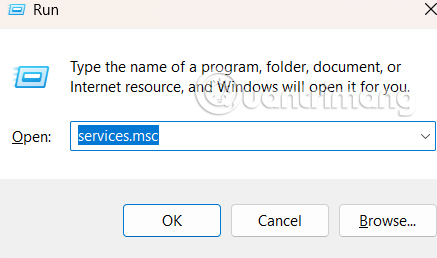
<p style="text-align: justify;">Bạn&nbsp;<strong>nhập services.msc vào thanh Run</strong>&nbsp;trên máy tính để truy cập Windows Services.</p>

<p style="text-align: justify;"><img alt="Khởi chạy dịch vụ " data-i="0" data-src="https://st.quantrimang.com/photos/image/2025/08/29/Services-Windows-11-tat-dich-vu-4.jpg" data-was-processed="true" height="258" src="https://st.quantrimang.com/photos/image/2025/08/29/Services-Windows-11-tat-dich-vu-4.jpg" width="437" /></p>

<p style="text-align: justify;"><strong>Bước 2:</strong></p>

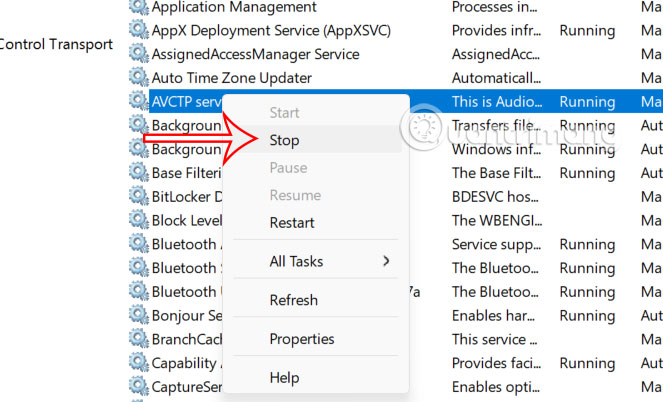
<p style="text-align: justify;">Chuyển sang giao diện các dịch vụ đang chạy trên Windows. Chúng ta chỉ cần nhấn chuột phải vào dịch vụ muốn vô hiệu hóa rồi chọn Stop trong danh sách hiển thị.</p>

<p style="text-align: justify;"><img alt="Dừng dịch vụ Services Windows 11" data-adbro-processed="true" data-i="1" data-src="https://st.quantrimang.com/photos/image/2025/08/29/Services-Windows-11-tat-dich-vu-2.jpg" data-was-processed="true" height="334" src="https://st.quantrimang.com/photos/image/2025/08/29/Services-Windows-11-tat-dich-vu-2.jpg" width="550" /></p>

<div style="text-align: justify;">&nbsp;</div>

<p style="text-align: justify;"><strong>Bước 3:</strong></p>

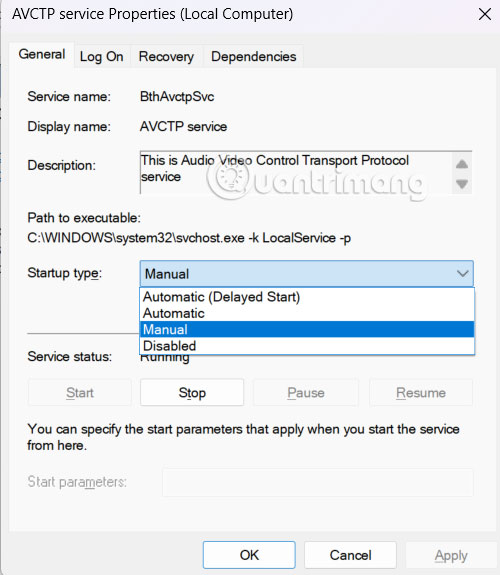
<p style="text-align: justify;">Hoặc bạn click đúp vào dịch vụ rồi chọn có khởi động một dịch vụ hay không. Nếu bạn muốn tắt một dịch vụ trong thời gian dài, hãy<strong>&nbsp;đổi Startup type thành Manual</strong>.</p>

<p style="text-align: justify;"><img alt="Chỉnh dừng dịch vụ Windows" data-i="2" data-src="https://st.quantrimang.com/photos/image/2025/08/29/Services-Windows-11-tat-dich-vu-5.jpg" data-was-processed="true" height="460" src="https://st.quantrimang.com/photos/image/2025/08/29/Services-Windows-11-tat-dich-vu-5.jpg" width="400" /></p>

<h2 style="text-align: justify;">Windows Services nên dừng để tăng hiệu suất</h2>

<p style="text-align: justify;"><strong>Microsoft Telemetry Data</strong></p>

<p style="text-align: justify;">Microsoft Telemetry Data thu thập dữ liệu phân tích và hiệu suất từ ​​nhiều máy tính trên toàn thế giới. Microsoft thông báo dữ liệu được thu thập ẩn danh, nhưng về cơ bản mọi thông tin vẫn đang được thu thập. Dịch vụ này cũng có thể gây hao tổn đáng kể hiệu suất, đặc biệt là trên các máy tính cũ. Việc tắt nó không gây ảnh hưởng gì đến hoạt động của máy tính.</p>

<div style="text-align: justify;">Linh kiện máy tính</div>

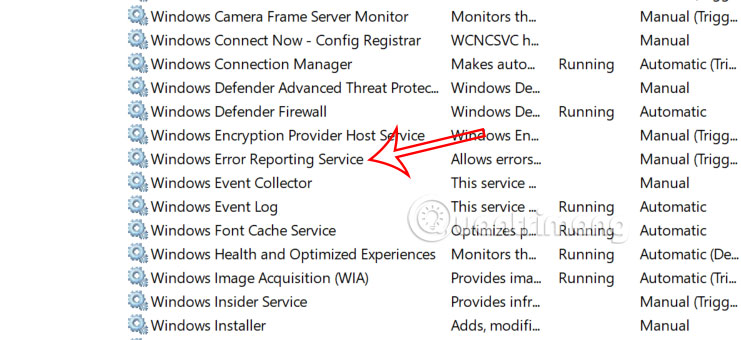
<p style="text-align: justify;"><strong>Error Reporting</strong></p>

<p style="text-align: justify;">Windows Error Reporting Service để Microsoft thu thập dữ liệu về sự cố và lỗi. Bất cứ khi nào có sự cố, một báo cáo sẽ được gửi đến Microsoft. Đây là một dịch vụ thu thập dữ liệu nhưng không nhất thiết phải duy trì.</p>

<p style="text-align: justify;"><img alt="Error Reporting" data-i="3" data-src="https://st.quantrimang.com/photos/image/2025/08/29/Services-Windows-11-tat-dich-vu-6.jpg" data-was-processed="true" height="294" src="https://st.quantrimang.com/photos/image/2025/08/29/Services-Windows-11-tat-dich-vu-6.jpg" width="640" /></p>

<div style="text-align: justify;">&nbsp;</div>

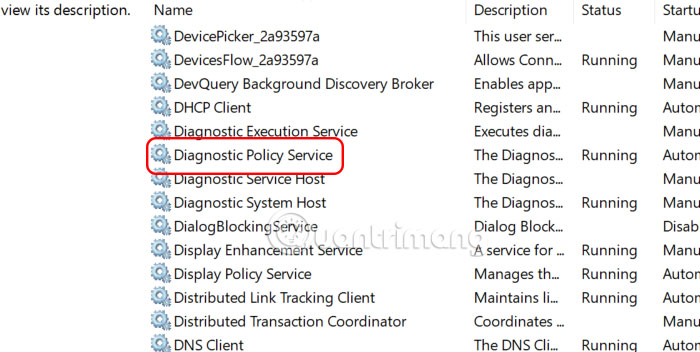
<p style="text-align: justify;"><strong>Diagnostic Policy Service</strong></p>

<p style="text-align: justify;">Cũng tương như dịch vụ Error Reporting, việc sử dụng dịch vụ Diagnostic Policy Service không cần thiết. Các dịch vụ tương tự mà bạn cũng có thể vô hiệu hóa ở đây như Diagnostic System Host, Diagnostic Service Host, Diagnostic Execution Service.</p>

<p style="text-align: justify;"><img alt="Diagnostic Policy Service" data-i="4" data-src="https://st.quantrimang.com/photos/image/2025/08/29/Services-Windows-11-tat-dich-vu-7.jpg" data-was-processed="true" height="277" src="https://st.quantrimang.com/photos/image/2025/08/29/Services-Windows-11-tat-dich-vu-7.jpg" width="550" /></p>

<p style="text-align: justify;"><strong>Optimize Drives</strong></p>

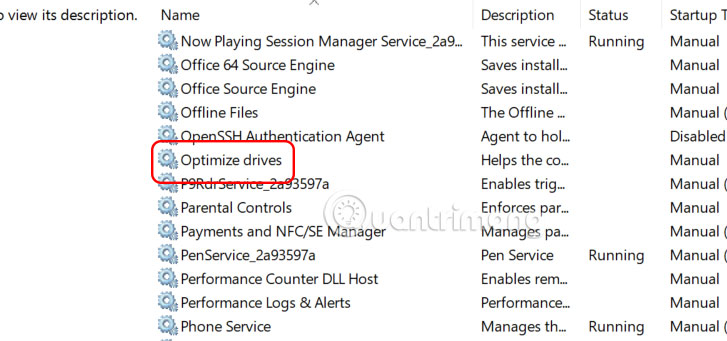
<p style="text-align: justify;">Việc chống phân mảnh ổ cứng là việc bạn thực hiện khá thường xuyên. Windows hiện cung cấp dịch vụ này để thực hiện tự động, và thường sẽ được kích hoạt nếu máy tính của bạn đang ở chế độ chờ. Chống phân mảnh là một quá trình khá phức tạp vì ảnh hưởng tới hiệu suất. Nên nếu bạn nhớ để thực hiện theo cách thủ công định kỳ thì nên tắt dịch vụ này.</p>

<div style="text-align: justify;">Linh kiện máy tính</div>

<p style="text-align: justify;"><img alt="Optimize Drives" data-i="5" data-src="https://st.quantrimang.com/photos/image/2025/08/29/Services-Windows-11-tat-dich-vu-8.jpg" data-was-processed="true" height="281" src="https://st.quantrimang.com/photos/image/2025/08/29/Services-Windows-11-tat-dich-vu-8.jpg" width="600" /></p>

<p style="text-align: justify;"><strong>Optional Services</strong></p>

<p style="text-align: justify;">Một số dịch vụ ảnh hưởng máy tính nếu bạn sử dụng một chức năng nhất định, và có thể bị vô hiệu hóa nếu không sử dụng những chức năng đó.</p>

<ul>
	<li style="text-align: justify;">Phone Service: Dịch vụ này kết nối điện thoại với máy tính. Bạn có thể tắt nó nếu không cần thiết.</li>
	<li style="text-align: justify;">Print Spooler: Bạn có thể tắt tính năng này một cách an toàn nếu không sử dụng máy in.</li>
	<li style="text-align: justify;">Geolocation Services: Nếu bạn không sử dụng bản đồ và không muốn bị theo dõi, hãy tắt dịch vụ này.</li>
</ul>

<div style="text-align: justify;">&nbsp;</div>
		</div>
				<div id="author">
						<p>
				<strong>Nguồn tin:</strong>
				Quantrimang.com:
			</p>
		</div>
	</div>
	<div id="footer" class="clearfix">
		<div id="url">
			<strong>URL của bản tin này: </strong><a href="https://www.nguoicodonvn2008.info/vi/news/savefile/kien-thuc-may-tinh/co-the-vo-hieu-hoa-services-windows-11-nao-de-tang-hieu-suat-11059.html" title="Có thể vô hiệu hóa Services Windows 11 nào để tăng hiệu suất?">https://www.nguoicodonvn2008.info/vi/news/savefile/kien-thuc-may-tinh/co-the-vo-hieu-hoa-services-windows-11-nao-de-tang-hieu-suat-11059.html</a>

		</div>
		<div class="clear"></div>
		<div class="copyright">
			&copy; .&#x3A; Nguoicodonvn2008.info - Cõi lòng người cô đơn &#x3A;.
		</div>
		<div id="contact">
			<a href="mailto:admin@nguoicodonvn2008.info">admin@nguoicodonvn2008.info</a>
		</div>
	</div>
</div>
        <div id="timeoutsess" class="chromeframe">
            Bạn đã không sử dụng Site, <a onclick="timeoutsesscancel();" href="https://www.nguoicodonvn2008.info/#">Bấm vào đây để duy trì trạng thái đăng nhập</a>. Thời gian chờ: <span id="secField"> 60 </span> giây
        </div>
        <div id="openidResult" class="nv-alert" style="display:none"></div>
        <div id="openidBt" data-result="" data-redirect=""></div>
		</script>
		<div class="car-top">
  <span><img src="https://www.nguoicodonvn2008.info/themes/default/images/car.png" alt=""></span>
</div>
<script src="https://www.nguoicodonvn2008.info/assets/js/jquery/jquery.min.js"></script>
<script>var nv_base_siteurl="/",nv_lang_data="vi",nv_lang_interface="vi",nv_name_variable="nv",nv_fc_variable="op",nv_lang_variable="language",nv_module_name="news",nv_func_name="savefile",nv_is_user=0, nv_my_ofs=-4,nv_my_abbr="EDT",nv_cookie_prefix="nv4c_e856T",nv_check_pass_mstime=1738000,nv_area_admin=0,nv_safemode=0,theme_responsive=0,nv_recaptcha_ver=2,nv_recaptcha_sitekey="",nv_recaptcha_type="image",XSSsanitize=1;</script>
<script src="https://www.nguoicodonvn2008.info/assets/js/language/vi.js"></script>
<script src="https://www.nguoicodonvn2008.info/assets/js/DOMPurify/purify3.js"></script>
<script src="https://www.nguoicodonvn2008.info/assets/js/global.js"></script>
<script src="https://www.nguoicodonvn2008.info/assets/js/site.js"></script>
<script src="https://www.nguoicodonvn2008.info/themes/default/js/news.js"></script>
<script src="https://www.nguoicodonvn2008.info/themes/default/js/main.js"></script>
<script src="https://www.nguoicodonvn2008.info/themes/default/js/custom.js"></script>
<script type="application/ld+json">
        {
            "@context": "https://schema.org",
            "@type": "Organization",
            "url": "https://www.nguoicodonvn2008.info",
            "logo": "https://www.nguoicodonvn2008.info/uploads/angel.gif"
        }
        </script>
<script src="https://www.nguoicodonvn2008.info/themes/default/js/bootstrap.min.js"></script>
<script type="text/javascript">
var $scrolltop = $('.car-top');
$scrolltop.on('click', function () {
    $('html,body').animate({
        scrollTop: 0
    }, 800);
    $(this).addClass("car-run");
    setTimeout(function(){ $scrolltop.removeClass('car-run');}, 1000);
    return false;
});
$(window).on('scroll', function ()
{ 
    if($(window).scrollTop() >= 200)
    {
        $scrolltop.addClass("show");
        $scrolltop.addClass("car-down");
    }
    else
    {
       $scrolltop.removeClass("show");
       setTimeout(function(){ $scrolltop.removeClass('car-down');}, 300);
    }
});
</script>
</body>
</html>