<!DOCTYPE html>
    <html lang="vi" xmlns="http://www.w3.org/1999/xhtml" prefix="og: http://ogp.me/ns#">
    <head>
<title>Clipboard History&#x3A; Tính năng cực hữu ích nhưng thường “bị bỏ quên” trên Windows</title>
<meta name="description" content="Clipboard History&#x3A; Tính năng cực hữu ích nhưng thường “bị bỏ quên” trên Windows - Savefile - Tin Tức -...">
<meta name="author" content=".: Nguoicodonvn2008.info - Cõi lòng người cô đơn :.">
<meta name="copyright" content=".: Nguoicodonvn2008.info - Cõi lòng người cô đơn :. [admin@nguoicodonvn2008.info]">
<meta name="robots" content="index, archive, follow, noodp">
<meta name="googlebot" content="index,archive,follow,noodp">
<meta name="msnbot" content="all,index,follow">
<meta name="generator" content="NukeViet v4.5">
<meta http-equiv="Content-Type" content="text/html; charset=utf-8">
<meta property="og:title" content="Clipboard History&#x3A; Tính năng cực hữu ích nhưng thường “bị bỏ quên” trên Windows">
<meta property="og:type" content="website">
<meta property="og:description" content="Savefile - Tin Tức -...">
<meta property="og:site_name" content=".&#x3A; Nguoicodonvn2008.info - Cõi lòng người cô đơn &#x3A;.">
<meta property="og:url" content="https://www.nguoicodonvn2008.info/vi/news/savefile/kien-thuc-may-tinh/clipboard-history-tinh-nang-cuc-huu-ich-nhung-thuong-bi-bo-quen-tren-windows-11314.html">
<link rel="shortcut icon" href="https://www.nguoicodonvn2008.info/favicon.ico">
<link rel="canonical" href="https://www.nguoicodonvn2008.info/vi/news/savefile/kien-thuc-may-tinh/clipboard-history-tinh-nang-cuc-huu-ich-nhung-thuong-bi-bo-quen-tren-windows-11314.html">
<link rel="alternate" href="https://www.nguoicodonvn2008.info/vi/news/rss/" title="Tin Tức" type="application/rss+xml">
<link rel="alternate" href="https://www.nguoicodonvn2008.info/vi/news/rss/karaoke-dual/" title="Tin Tức - Karaoke Dual" type="application/rss+xml">
<link rel="alternate" href="https://www.nguoicodonvn2008.info/vi/news/rss/nhac-tre/" title="Tin Tức - Nhạc trẻ" type="application/rss+xml">
<link rel="alternate" href="https://www.nguoicodonvn2008.info/vi/news/rss/tru-tinh/" title="Tin Tức - Trữ tình" type="application/rss+xml">
<link rel="alternate" href="https://www.nguoicodonvn2008.info/vi/news/rss/nuoc-ngoai/" title="Tin Tức - Nước ngoài" type="application/rss+xml">
<link rel="alternate" href="https://www.nguoicodonvn2008.info/vi/news/rss/remix/" title="Tin Tức - Remix" type="application/rss+xml">
<link rel="alternate" href="https://www.nguoicodonvn2008.info/vi/news/rss/tam-su-tinh-yeu/" title="Tin Tức - Tâm sự tình yêu" type="application/rss+xml">
<link rel="alternate" href="https://www.nguoicodonvn2008.info/vi/news/rss/tho-suu-tam/" title="Tin Tức - Thơ sưu tầm" type="application/rss+xml">
<link rel="alternate" href="https://www.nguoicodonvn2008.info/vi/news/rss/cuoc-song/" title="Tin Tức - Cuộc sống" type="application/rss+xml">
<link rel="alternate" href="https://www.nguoicodonvn2008.info/vi/news/rss/phan-mem/" title="Tin Tức - Phần mềm" type="application/rss+xml">
<link rel="alternate" href="https://www.nguoicodonvn2008.info/vi/news/rss/kien-thuc-may-tinh/" title="Tin Tức - Kiến thức máy tính" type="application/rss+xml">
<link rel="alternate" href="https://www.nguoicodonvn2008.info/vi/news/rss/hoc-tap/" title="Tin Tức - Học tập" type="application/rss+xml">
<link rel="alternate" href="https://www.nguoicodonvn2008.info/vi/news/rss/tai-lieu/" title="Tin Tức - Tài liệu" type="application/rss+xml">
<link rel="alternate" href="https://www.nguoicodonvn2008.info/vi/news/rss/de-thi/" title="Tin Tức - Đề thi" type="application/rss+xml">
<link rel="preload" as="style" href="https://www.nguoicodonvn2008.info/assets/css/font-awesome.min.css" type="text/css">
<link rel="preload" as="style" href="https://www.nguoicodonvn2008.info/themes/default/css/bootstrap.non-responsive.css" type="text/css">
<link rel="preload" as="style" href="https://www.nguoicodonvn2008.info/themes/default/css/style.css" type="text/css">
<link rel="preload" as="style" href="https://www.nguoicodonvn2008.info/themes/default/css/style.non-responsive.css" type="text/css">
<link rel="preload" as="style" href="https://www.nguoicodonvn2008.info/themes/default/css/news.css" type="text/css">
<link rel="preload" as="style" href="https://www.nguoicodonvn2008.info/themes/default/css/custom.css" type="text/css">
<link rel="preload" as="script" href="https://www.nguoicodonvn2008.info/assets/js/jquery/jquery.min.js" type="text/javascript">
<link rel="preload" as="script" href="https://www.nguoicodonvn2008.info/assets/js/language/vi.js" type="text/javascript">
<link rel="preload" as="script" href="https://www.nguoicodonvn2008.info/assets/js/DOMPurify/purify3.js" type="text/javascript">
<link rel="preload" as="script" href="https://www.nguoicodonvn2008.info/assets/js/global.js" type="text/javascript">
<link rel="preload" as="script" href="https://www.nguoicodonvn2008.info/assets/js/site.js" type="text/javascript">
<link rel="preload" as="script" href="https://www.nguoicodonvn2008.info/themes/default/js/news.js" type="text/javascript">
<link rel="preload" as="script" href="https://www.nguoicodonvn2008.info/themes/default/js/main.js" type="text/javascript">
<link rel="preload" as="script" href="https://www.nguoicodonvn2008.info/themes/default/js/custom.js" type="text/javascript">
<link rel="preload" as="script" href="https://www.nguoicodonvn2008.info/themes/default/js/bootstrap.min.js" type="text/javascript">
<link rel="stylesheet" href="https://www.nguoicodonvn2008.info/assets/css/font-awesome.min.css">
<link rel="stylesheet" href="https://www.nguoicodonvn2008.info/themes/default/css/bootstrap.non-responsive.css">
<link rel="stylesheet" href="https://www.nguoicodonvn2008.info/themes/default/css/style.css">
<link rel="stylesheet" href="https://www.nguoicodonvn2008.info/themes/default/css/style.non-responsive.css">
<link rel="StyleSheet" href="https://www.nguoicodonvn2008.info/themes/default/css/news.css">
<link rel="stylesheet" href="https://www.nguoicodonvn2008.info/themes/default/css/custom.css">
<style type="text/css">
	body{background: #fff;}
</style>
    </head>
    <body>
<div id="print">
	<div id="hd_print">
		<h2 class="pull-left">.&#x3A; Nguoicodonvn2008.info - Cõi lòng người cô đơn &#x3A;.</h2>
		<p class="pull-right"><a title=".&#x3A; Nguoicodonvn2008.info - Cõi lòng người cô đơn &#x3A;." href="https://www.nguoicodonvn2008.info/">https://www.nguoicodonvn2008.info</a></p>
	</div>
	<div class="clear"></div>
	<hr />
	<div id="content">
		<h1>Clipboard History&#x3A; Tính năng cực hữu ích nhưng thường “bị bỏ quên” trên Windows</h1>
		<ul class="list-inline">
			<li>Thứ ba - 07/10/2025 22:53</li>
			<li class="hidden-print txtrequired"><em class="fa fa-print">&nbsp;</em><a title="In ra" href="javascript:;" onclick="window.print()">In ra</a></li>
			<li class="hidden-print txtrequired"><em class="fa fa-power-off">&nbsp;</em><a title="Đóng cửa sổ này" href="javascript:;" onclick="window.close()">Đóng cửa sổ này</a></li>
		</ul>
		<div class="clear"></div>
		<div id="hometext">
		</div>
				<div class="imghome">
			<img alt="Clipboard History&#x3A; Tính năng cực hữu ích nhưng thường “bị bỏ quên” trên Windows" src="https://st.quantrimang.com/photos/image/2025/09/27/clipboard-history-tinh-nang-cuc-huu-ich1.jpg" width="460" class="img-thumbnail" />
		</div>
		<div class="clear"></div>
		<div id="bodytext" class="clearfix">
			<div class="ckeditor-html5-audio" style="text-align: center;">
<audio controls="controls" controlslist="nodownload" src="https://st.quantrimang.com/photos/media/2025/10/07/211290-20251071838.mp3">&nbsp;</audio>
</div>

<p style="text-align: justify;">Khi quảng bá Windows, Microsoft thường tập trung làm nổi bật những tính năng “hào nhoáng” và được cho là mang tính đột phá. Gần đây, có thể kể đến Windows Recall đầy tranh cãi hay Copilot tích hợp AI. Nhưng thông thường, chính những tính năng nhỏ bé, ít được nhắc đến mới thật sự tạo nên sự khác biệt trong hiệu suất làm việc hàng ngày.</p>

<div style="text-align: justify;">&nbsp;</div>

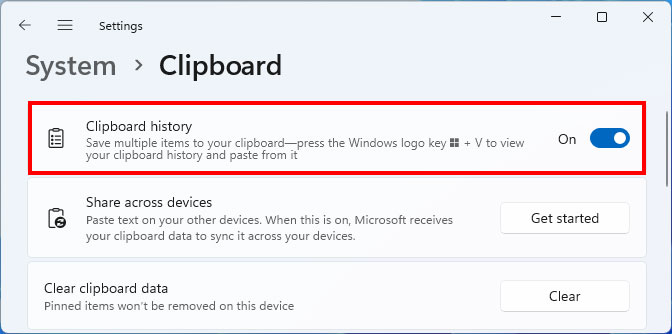
<p style="text-align: justify;">Một ví dụ điển hình là&nbsp;<strong>Clipboard History</strong>&nbsp;trên Windows 10 và 11. Đây là tính năng mà Microsoft chưa thực sự làm tốt trong việc quảng bá, mặc dù nó đã được giới thiệu thử nghiệm từ hơn bảy năm trước và chính thức phát hành trong bản cập nhật Windows 10 tháng 10/2018. Trên thực tế, chúng ta đã có một hướng dẫn ngắn về cách sử dụng Clipboard History từ năm 2022. Nhưng nếu bạn không có thời gian đọc, chỉ cần nhấn tổ hợp phím&nbsp;<strong>Win + V</strong>&nbsp;là sẽ hiểu ngay cách thức hoạt động của tính năng này.</p>

<p style="text-align: justify;"><img alt="Clipboard History" data-adbro-processed="true" data-i="0" data-src="https://st.quantrimang.com/photos/image/2025/09/27/clipboard-history-tinh-nang-cuc-huu-ich1.jpg" data-was-processed="true" height="334" src="https://st.quantrimang.com/photos/image/2025/09/27/clipboard-history-tinh-nang-cuc-huu-ich1.jpg" width="672" /></p>

<p style="text-align: justify;">Thông thường, sao chép – dán (copy – paste) được thực hiện bằng&nbsp;<strong>Ctrl + C</strong>&nbsp;và&nbsp;<strong>Ctrl + V</strong>&nbsp;. Tuy nhiên, cách này chỉ cho phép lưu trữ duy nhất một mục. Nếu bạn sao chép nội dung mới, nội dung trước đó sẽ bị ghi đè. Đây chính là lúc&nbsp;<strong>Clipboard History</strong>&nbsp;phát huy tác dụng – nó giống như một phiên bản “nâng cấp” của thao tác copy – paste truyền thống.</p>

<div style="text-align: justify;">&nbsp;</div>

<p style="text-align: justify;">Clipboard History có thể lưu tối đa&nbsp;<strong>25 mục</strong>&nbsp;, bao gồm cả văn bản, hình ảnh, emoji… Bạn có thể ghim những mục thường dùng và xóa thủ công những gì không cần nữa. Cách sử dụng cũng rất trực quan: chỉ cần đặt con trỏ ở vị trí muốn dán, nhấn&nbsp;<strong>Win + V</strong>&nbsp;rồi chọn nội dung cần chèn.</p>

<p style="text-align: justify;">Một điểm cộng lớn cho những ai dùng tài khoản Microsoft trên nhiều thiết bị là&nbsp;<strong>Clipboard History có thể đồng bộ xuyên suốt</strong>&nbsp;. Bạn chỉ cần bật tính năng này trong phần Cài đặt Windows, rất hữu ích nếu hay làm việc linh hoạt giữa nhiều máy. Ngoài ra, Clipboard History còn tích hợp tốt với&nbsp;<strong>Microsoft PowerToys</strong>&nbsp;thông qua tiện ích Advanced Paste – nơi có thể bật thêm các tính năng AI nâng cao nhờ OpenAI. Một công cụ bên thứ ba là&nbsp;<strong>WindowSill</strong>&nbsp;cũng đã tích hợp cùng Clipboard History, mở rộng thêm nhiều khả năng mới.</p>

<p style="text-align: justify;">Cá nhân tôi sử dụng Clipboard History thường xuyên, cả trên máy cá nhân lẫn công việc. Việc viết bài và cần trích dẫn lại các nội dung cũ nhiều lần trở nên nhanh chóng hơn rất nhiều. Nếu chỉ dựa vào Ctrl + C, Ctrl + V truyền thống, chắc chắn hiệu suất của tôi sẽ giảm đi rõ rệt. Ai biết tính năng này thì coi như đã nắm trong tay “vũ khí tối thượng” hỗ trợ công việc, còn ai chưa dùng thì sẽ đều rất bất ngờ khi biết được hiệu quả nó mang lại.</p>

<p style="text-align: justify;">Clipboard History thực sự là một&nbsp;<strong>công cụ năng suất thiết yếu</strong>&nbsp;trong Windows. Có thể Microsoft cho rằng nó chưa đủ “hào nhoáng” để quảng bá rầm rộ, nhưng theo em, nó còn hữu ích hơn nhiều so với những tính năng AI mà hãng đang cố gắng áp đặt cho người dùng dưới danh nghĩa “năng suất”.</p>
		</div>
				<div id="author">
						<p>
				<strong>Nguồn tin:</strong>
				Quantrimang.com:
			</p>
		</div>
	</div>
	<div id="footer" class="clearfix">
		<div id="url">
			<strong>URL của bản tin này: </strong><a href="https://www.nguoicodonvn2008.info/vi/news/savefile/kien-thuc-may-tinh/clipboard-history-tinh-nang-cuc-huu-ich-nhung-thuong-bi-bo-quen-tren-windows-11314.html" title="Clipboard History&#x3A; Tính năng cực hữu ích nhưng thường “bị bỏ quên” trên Windows">https://www.nguoicodonvn2008.info/vi/news/savefile/kien-thuc-may-tinh/clipboard-history-tinh-nang-cuc-huu-ich-nhung-thuong-bi-bo-quen-tren-windows-11314.html</a>

		</div>
		<div class="clear"></div>
		<div class="copyright">
			&copy; .&#x3A; Nguoicodonvn2008.info - Cõi lòng người cô đơn &#x3A;.
		</div>
		<div id="contact">
			<a href="mailto:admin@nguoicodonvn2008.info">admin@nguoicodonvn2008.info</a>
		</div>
	</div>
</div>
        <div id="timeoutsess" class="chromeframe">
            Bạn đã không sử dụng Site, <a onclick="timeoutsesscancel();" href="https://www.nguoicodonvn2008.info/#">Bấm vào đây để duy trì trạng thái đăng nhập</a>. Thời gian chờ: <span id="secField"> 60 </span> giây
        </div>
        <div id="openidResult" class="nv-alert" style="display:none"></div>
        <div id="openidBt" data-result="" data-redirect=""></div>
		</script>
		<div class="car-top">
  <span><img src="https://www.nguoicodonvn2008.info/themes/default/images/car.png" alt=""></span>
</div>
<script src="https://www.nguoicodonvn2008.info/assets/js/jquery/jquery.min.js"></script>
<script>var nv_base_siteurl="/",nv_lang_data="vi",nv_lang_interface="vi",nv_name_variable="nv",nv_fc_variable="op",nv_lang_variable="language",nv_module_name="news",nv_func_name="savefile",nv_is_user=0, nv_my_ofs=-4,nv_my_abbr="EDT",nv_cookie_prefix="nv4c_e856T",nv_check_pass_mstime=1738000,nv_area_admin=0,nv_safemode=0,theme_responsive=0,nv_recaptcha_ver=2,nv_recaptcha_sitekey="",nv_recaptcha_type="image",XSSsanitize=1;</script>
<script src="https://www.nguoicodonvn2008.info/assets/js/language/vi.js"></script>
<script src="https://www.nguoicodonvn2008.info/assets/js/DOMPurify/purify3.js"></script>
<script src="https://www.nguoicodonvn2008.info/assets/js/global.js"></script>
<script src="https://www.nguoicodonvn2008.info/assets/js/site.js"></script>
<script src="https://www.nguoicodonvn2008.info/themes/default/js/news.js"></script>
<script src="https://www.nguoicodonvn2008.info/themes/default/js/main.js"></script>
<script src="https://www.nguoicodonvn2008.info/themes/default/js/custom.js"></script>
<script type="application/ld+json">
        {
            "@context": "https://schema.org",
            "@type": "Organization",
            "url": "https://www.nguoicodonvn2008.info",
            "logo": "https://www.nguoicodonvn2008.info/uploads/angel.gif"
        }
        </script>
<script src="https://www.nguoicodonvn2008.info/themes/default/js/bootstrap.min.js"></script>
<script type="text/javascript">
var $scrolltop = $('.car-top');
$scrolltop.on('click', function () {
    $('html,body').animate({
        scrollTop: 0
    }, 800);
    $(this).addClass("car-run");
    setTimeout(function(){ $scrolltop.removeClass('car-run');}, 1000);
    return false;
});
$(window).on('scroll', function ()
{ 
    if($(window).scrollTop() >= 200)
    {
        $scrolltop.addClass("show");
        $scrolltop.addClass("car-down");
    }
    else
    {
       $scrolltop.removeClass("show");
       setTimeout(function(){ $scrolltop.removeClass('car-down');}, 300);
    }
});
</script>
</body>
</html>