<!DOCTYPE html>
    <html lang="vi" xmlns="http://www.w3.org/1999/xhtml" prefix="og: http://ogp.me/ns#">
    <head>
<title>Cấu trúc &#40;Struct&#41; trong lập trình C</title>
<meta name="description" content="Cấu trúc &#40;Struct&#41; trong lập trình C - Savefile - Tin Tức -...">
<meta name="author" content=".: Nguoicodonvn2008.info - Cõi lòng người cô đơn :.">
<meta name="copyright" content=".: Nguoicodonvn2008.info - Cõi lòng người cô đơn :. [admin@nguoicodonvn2008.info]">
<meta name="robots" content="index, archive, follow, noodp">
<meta name="googlebot" content="index,archive,follow,noodp">
<meta name="msnbot" content="all,index,follow">
<meta name="generator" content="NukeViet v4.5">
<meta http-equiv="Content-Type" content="text/html; charset=utf-8">
<meta property="og:title" content="Cấu trúc &#40;Struct&#41; trong lập trình C">
<meta property="og:type" content="website">
<meta property="og:description" content="Savefile - Tin Tức - https&#x3A;&#x002F;&#x002F;www.nguoicodonvn2008.info&#x002F;vi&#x002F;news&#x002F;savefile&#x002F;kien-thuc-may-tinh&#x002F;cau-truc-struct-trong-lap-trinh-c-6630.html">
<meta property="og:site_name" content=".&#x3A; Nguoicodonvn2008.info - Cõi lòng người cô đơn &#x3A;.">
<meta property="og:url" content="https://www.nguoicodonvn2008.info/vi/news/savefile/kien-thuc-may-tinh/cau-truc-struct-trong-lap-trinh-c-6630.html">
<link rel="shortcut icon" href="https://www.nguoicodonvn2008.info/favicon.ico">
<link rel="canonical" href="https://www.nguoicodonvn2008.info/vi/news/savefile/kien-thuc-may-tinh/cau-truc-struct-trong-lap-trinh-c-6630.html">
<link rel="alternate" href="https://www.nguoicodonvn2008.info/vi/news/rss/" title="Tin Tức" type="application/rss+xml">
<link rel="alternate" href="https://www.nguoicodonvn2008.info/vi/news/rss/karaoke-dual/" title="Tin Tức - Karaoke Dual" type="application/rss+xml">
<link rel="alternate" href="https://www.nguoicodonvn2008.info/vi/news/rss/nhac-tre/" title="Tin Tức - Nhạc trẻ" type="application/rss+xml">
<link rel="alternate" href="https://www.nguoicodonvn2008.info/vi/news/rss/tru-tinh/" title="Tin Tức - Trữ tình" type="application/rss+xml">
<link rel="alternate" href="https://www.nguoicodonvn2008.info/vi/news/rss/nuoc-ngoai/" title="Tin Tức - Nước ngoài" type="application/rss+xml">
<link rel="alternate" href="https://www.nguoicodonvn2008.info/vi/news/rss/remix/" title="Tin Tức - Remix" type="application/rss+xml">
<link rel="alternate" href="https://www.nguoicodonvn2008.info/vi/news/rss/tam-su-tinh-yeu/" title="Tin Tức - Tâm sự tình yêu" type="application/rss+xml">
<link rel="alternate" href="https://www.nguoicodonvn2008.info/vi/news/rss/tho-suu-tam/" title="Tin Tức - Thơ sưu tầm" type="application/rss+xml">
<link rel="alternate" href="https://www.nguoicodonvn2008.info/vi/news/rss/cuoc-song/" title="Tin Tức - Cuộc sống" type="application/rss+xml">
<link rel="alternate" href="https://www.nguoicodonvn2008.info/vi/news/rss/phan-mem/" title="Tin Tức - Phần mềm" type="application/rss+xml">
<link rel="alternate" href="https://www.nguoicodonvn2008.info/vi/news/rss/kien-thuc-may-tinh/" title="Tin Tức - Kiến thức máy tính" type="application/rss+xml">
<link rel="alternate" href="https://www.nguoicodonvn2008.info/vi/news/rss/hoc-tap/" title="Tin Tức - Học tập" type="application/rss+xml">
<link rel="alternate" href="https://www.nguoicodonvn2008.info/vi/news/rss/tai-lieu/" title="Tin Tức - Tài liệu" type="application/rss+xml">
<link rel="alternate" href="https://www.nguoicodonvn2008.info/vi/news/rss/de-thi/" title="Tin Tức - Đề thi" type="application/rss+xml">
<link rel="preload" as="style" href="https://www.nguoicodonvn2008.info/assets/css/font-awesome.min.css" type="text/css">
<link rel="preload" as="style" href="https://www.nguoicodonvn2008.info/themes/default/css/bootstrap.non-responsive.css" type="text/css">
<link rel="preload" as="style" href="https://www.nguoicodonvn2008.info/themes/default/css/style.css" type="text/css">
<link rel="preload" as="style" href="https://www.nguoicodonvn2008.info/themes/default/css/style.non-responsive.css" type="text/css">
<link rel="preload" as="style" href="https://www.nguoicodonvn2008.info/themes/default/css/news.css" type="text/css">
<link rel="preload" as="style" href="https://www.nguoicodonvn2008.info/themes/default/css/custom.css" type="text/css">
<link rel="preload" as="script" href="https://www.nguoicodonvn2008.info/assets/js/jquery/jquery.min.js" type="text/javascript">
<link rel="preload" as="script" href="https://www.nguoicodonvn2008.info/assets/js/language/vi.js" type="text/javascript">
<link rel="preload" as="script" href="https://www.nguoicodonvn2008.info/assets/js/DOMPurify/purify3.js" type="text/javascript">
<link rel="preload" as="script" href="https://www.nguoicodonvn2008.info/assets/js/global.js" type="text/javascript">
<link rel="preload" as="script" href="https://www.nguoicodonvn2008.info/assets/js/site.js" type="text/javascript">
<link rel="preload" as="script" href="https://www.nguoicodonvn2008.info/themes/default/js/news.js" type="text/javascript">
<link rel="preload" as="script" href="https://www.nguoicodonvn2008.info/themes/default/js/main.js" type="text/javascript">
<link rel="preload" as="script" href="https://www.nguoicodonvn2008.info/themes/default/js/custom.js" type="text/javascript">
<link rel="preload" as="script" href="https://www.nguoicodonvn2008.info/themes/default/js/bootstrap.min.js" type="text/javascript">
<link rel="stylesheet" href="https://www.nguoicodonvn2008.info/assets/css/font-awesome.min.css">
<link rel="stylesheet" href="https://www.nguoicodonvn2008.info/themes/default/css/bootstrap.non-responsive.css">
<link rel="stylesheet" href="https://www.nguoicodonvn2008.info/themes/default/css/style.css">
<link rel="stylesheet" href="https://www.nguoicodonvn2008.info/themes/default/css/style.non-responsive.css">
<link rel="StyleSheet" href="https://www.nguoicodonvn2008.info/themes/default/css/news.css">
<link rel="stylesheet" href="https://www.nguoicodonvn2008.info/themes/default/css/custom.css">
<style type="text/css">
	body{background: #fff;}
</style>
    </head>
    <body>
<div id="print">
	<div id="hd_print">
		<h2 class="pull-left">.&#x3A; Nguoicodonvn2008.info - Cõi lòng người cô đơn &#x3A;.</h2>
		<p class="pull-right"><a title=".&#x3A; Nguoicodonvn2008.info - Cõi lòng người cô đơn &#x3A;." href="https://www.nguoicodonvn2008.info/">https://www.nguoicodonvn2008.info</a></p>
	</div>
	<div class="clear"></div>
	<hr />
	<div id="content">
		<h1>Cấu trúc &#40;Struct&#41; trong lập trình C</h1>
		<ul class="list-inline">
			<li>Thứ hai - 30/01/2023 01:01</li>
			<li class="hidden-print txtrequired"><em class="fa fa-print">&nbsp;</em><a title="In ra" href="javascript:;" onclick="window.print()">In ra</a></li>
			<li class="hidden-print txtrequired"><em class="fa fa-power-off">&nbsp;</em><a title="Đóng cửa sổ này" href="javascript:;" onclick="window.close()">Đóng cửa sổ này</a></li>
		</ul>
		<div class="clear"></div>
		<div id="hometext">
		</div>
				<div class="imghome">
			<img alt="Cấu trúc &#40;Struct&#41; trong lập trình C" src="https://st.quantrimang.com/photos/image/2018/08/02/cau-truc-struct-trong-lap-trinh-c-1.jpg" width="460" class="img-thumbnail" />
		</div>
		<div class="clear"></div>
		<div id="bodytext" class="clearfix">
			<p style="text-align: justify;"><strong>Cấu trúc (Struct) trong C</strong>&nbsp;là gì? Bạn cần biết những gì để&nbsp;<strong>dùng Struct hiệu quả trong C</strong>? Hãy cùng Quantrimang.com tìm hiểu nhé!</p>

<p style="text-align: justify;">Các mảng trong C cho phép bạn định nghĩa một vài loại biến có thể giữ giá trị của một vài thành phần cùng kiểu dữ liệu. Nhưng&nbsp;<strong>structure - cấu trúc</strong>&nbsp;là một loại dữ liệu khác trong&nbsp;ngôn ngữ lập trình C, cho phép bạn kết hợp các dữ liệu khác kiểu nhau.</p>

<p style="text-align: justify;">Cấu trúc được sử dụng để biểu diễn một bản ghi. Giả sử bạn muốn lưu trữ giá trị của một quyển sách trong thư viện của bạn. Bạn có thể lưu trữ các thuộc tính của sách sau đây:</p>

<ul>
	<li style="text-align: justify;">Tiêu đề</li>
	<li style="text-align: justify;">Tác giả</li>
	<li style="text-align: justify;">Chủ đề</li>
	<li style="text-align: justify;">ID (giống như là mã số sinh viên của bạn)</li>
</ul>

<h2 style="text-align: justify;">Định nghĩa một cấu trúc trong C</h2>

<p style="text-align: justify;">Để định nghĩa cấu trúc, bạn phải sử dụng câu lệnh struct. Câu lệnh&nbsp;<strong>struct</strong>&nbsp;định nghĩa một kiểu dữ liệu mới, với hơn một thành phần trong chương trình của bạn. Dạng tổng quát của câu lệnh struct như sau đây:</p>

<pre id="pre0" style="text-align: justify;">
struct &#91;ten_cau_truc&#93;
{
   phan dinh nghia thanh vien cau truc;
   phan dinh nghia thanh vien cau truc;
   ...
   phan dinh nghia thanh vien cau truc;
} &#91;mot hoac nhieu bien cau truc&#93;;  </pre>

<p style="text-align: justify;">Một&nbsp;<strong>ten_cau_truc</strong>&nbsp;có thể tùy chọn và một thành phần định nghĩa là các biến thường như int i, float j hoặc một định nghĩa biến khác... Tại phần cuối cùng của định nghĩa cấu trúc, trước dấu chấm phẩy, bạn có thể xác định một hoặc nhiều biến cấu trúc (tùy chọn). Dưới đây là cách khai báo biến structure Book:</p>

<pre id="pre1" style="text-align: justify;">
struct Books
{
   char  tieude&#91;50&#93;;
   char  tacgia&#91;50&#93;;
   char  chude&#91;100&#93;;
   int   id;
} book;  </pre>

<h2 style="text-align: justify;">Truy cập các thành phần của cấu trúc trong C</h2>

<p style="text-align: justify;">Để truy cập bất kỳ thành phần nào của cấu trúc, bạn sử dụng&nbsp;<strong>toán tử truy cập phần tử</strong>. Dưới đây là ví dụ cho cách sử dụng cấu trúc:</p>

<pre id="pre2" style="text-align: justify;">
#include &lt;stdio.h&gt;
#include &lt;string.h&gt;
struct Books
{
   char  tieude&#91;50&#93;;
   char  tacgia&#91;50&#93;;
   char  chude&#91;100&#93;;
   int   id;
};
int main( )
{
   struct Books Book1;        /* Khai bao Book1 la cua kieu Book */
   struct Books Book2;        /* Khai bao Book2 la cua kieu Book */
   /* thong tin chi tiet quyen sach thu nhat */
   strcpy( Book1.tieude, &quot;Lap trinh C&quot;);
   strcpy( Book1.tacgia, &quot;Pham Van At&quot;); 
   strcpy( Book1.chude, &quot;Ngon ngu lap trinh C&quot;);
   Book1.id = 1234567;

   /* thong tin chi tiet quyen sach thu hai */
   strcpy( Book2.tieude, &quot;Toi thay hoa vang tren co xanh&quot;);
   strcpy( Book2.tacgia, &quot;Nguyen Nhat Anh&quot;);
   strcpy( Book2.chude, &quot;Van hoc&quot;);
   Book2.id = 6677028;
   /* hien thi thong tin Book1 */
   printf( &quot;Tieu de cua Book1 la: %s\n&quot;, Book1.tieude);
   printf( &quot;Tac gia cua Book1 la: %s\n&quot;, Book1.tacgia);
   printf( &quot;Chu de cua Book1 la: %s\n&quot;, Book1.chude);
   printf( &quot;ID cua Book1 la: %d\n&quot;, Book1.id);

   /* hien thi thong tin Book2 */
   printf( &quot;Tieu de cua Book2 la: %s\n&quot;, Book2.tieude);
   printf( &quot;Tac gia cua Book2 la: %s\n&quot;, Book2.tacgia);
   printf( &quot;Chu de cua Book2 la: %s\n&quot;, Book2.chude);
   printf( &quot;ID cua Book2 la: %d\n&quot;, Book2.id);
   printf(&quot;\n===========================\n&quot;);
   printf(&quot;QTM chuc cac ban hoc tot! \n&quot;);

   return 0;
}</pre>

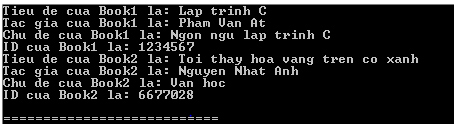
<p style="text-align: justify;">Biên dịch và chạy chương trình C trên sẽ cho kết quả:</p>

<p style="text-align: justify;"><img alt="Truy cập các thành phần của cấu trúc trong C" data-i="0" data-src="https://st.quantrimang.com/photos/image/2018/08/02/cau-truc-struct-trong-lap-trinh-c-1.jpg" data-was-processed="true" height="124" src="https://st.quantrimang.com/photos/image/2018/08/02/cau-truc-struct-trong-lap-trinh-c-1.jpg" width="454" /></p>

<h2 style="text-align: justify;">Các cấu trúc như các tham số hàm</h2>

<p style="text-align: justify;">Bạn có thể đặt cấu trúc như một tham số của hàm theo cách dễ dàng như các biến khác hay con trỏ. Truy cập biến cấu trúc như ví dụ dưới đây:</p>

<pre id="pre3" style="text-align: justify;">
#include &lt;stdio.h&gt;
#include &lt;string.h&gt;
struct Books
{
   char  tieude&#91;50&#93;;
   char  tacgia&#91;50&#93;;
   char  chude&#91;100&#93;;
   int   id;
};

/* khai bao ham */
void inthongtinsach( struct Books book );
int main( )
{
   struct Books Book1;        /* Khai bao Book1 la cua kieu Book */
   struct Books Book2;        /* Khai bao Book2 la cua kieu Book */
   /* thong tin chi tiet quyen sach thu nhat */
   strcpy( Book1.tieude, &quot;Lap trinh C&quot;);
   strcpy( Book1.tacgia, &quot;Pham Van At&quot;); 
   strcpy( Book1.chude, &quot;Ngon ngu lap trinh C&quot;);
   Book1.id = 1234567;

   /* thong tin chi tiet quyen sach thu hai */
   strcpy( Book2.tieude, &quot;Toi thay hoa vang tren co xanh&quot;);
   strcpy( Book2.tacgia, &quot;Nguyen Nhat Anh&quot;);
   strcpy( Book2.chude, &quot;Van hoc&quot;);
   Book2.id = 6677028;
   /* hien thi thong tin Book1 */
   inthongtinsach( Book1 );

   /* hien thi thong tin Book2 */
   inthongtinsach( Book2 );
   printf(&quot;\n===========================\n&quot;);
   printf(&quot;QTM chuc cac ban hoc tot! \n&quot;);

   return 0;
}
void inthongtinsach( struct Books book )
{
   printf( &quot;Tieu de sach: %s\n&quot;, book.tieude);
   printf( &quot;Tac gia: %s\n&quot;, book.tacgia);
   printf( &quot;Chu de: %s\n&quot;, book.chude);
   printf( &quot;Book ID: %d\n&quot;, book.id);
}</pre>

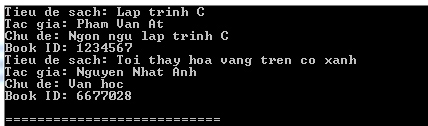
<p style="text-align: justify;">Biên dịch và chạy chương trình C trên sẽ cho kết quả:</p>

<p style="text-align: justify;"><img alt="Các cấu trúc như các tham số hàm" data-i="1" data-src="https://st.quantrimang.com/photos/image/2018/08/02/cau-truc-struct-trong-lap-trinh-c-2.jpg" data-was-processed="true" height="126" src="https://st.quantrimang.com/photos/image/2018/08/02/cau-truc-struct-trong-lap-trinh-c-2.jpg" width="428" /></p>

<h2 style="text-align: justify;">Con trỏ tới cấu trúc</h2>

<p style="text-align: justify;">Bạn có thể định nghĩa con trỏ cấu trúc theo cách bạn định nghĩa các loại con trỏ khác như sau:</p>

<pre id="pre4" style="text-align: justify;">
struct Books *struct_pointer;</pre>

<p style="text-align: justify;">Bây giờ bạn có thể lưu địa chỉ của biến cấu trúc trong biến con trỏ được định nghĩa ở trên. Để tìm địa chỉ của một biến cấu trúc, đặt toán tử &amp; trước tên cấu trúc như sau:</p>

<pre id="pre5" style="text-align: justify;">
struct_pointer = &amp;Book1;</pre>

<p style="text-align: justify;">Để truy cập vào thành phần của một structure sử dụng con trỏ tới structure đó, bạn phải sử dụng toán tử -&gt; như sau:</p>

<pre id="pre6" style="text-align: justify;">
struct_pointer-&gt;tieude;</pre>

<p style="text-align: justify;">Bây giờ chúng ta viết lại ví dụ trên sử dụng con trỏ cấu trúc, hy vọng điều này sẽ dễ dàng cho bạn để hiểu khái niệm này:</p>

<pre id="pre7" style="text-align: justify;">
#include &lt;stdio.h&gt;
#include &lt;string.h&gt;
struct Books
{
   char  tieude&#91;50&#93;;
   char  tacgia&#91;50&#93;;
   char  chude&#91;100&#93;;
   int   id;
};

/* khai bao ham */
void inthongtinsach( struct Books *book );
int main( )
{
   struct Books Book1;        /* Khai bao Book1 la cua kieu Book */
   struct Books Book2;        /* Khai bao Book2 la cua kieu Book */
   /* thong tin chi tiet quyen sach thu nhat */
   strcpy( Book1.tieude, &quot;Lap trinh C&quot;);
   strcpy( Book1.tacgia, &quot;Pham Van At&quot;); 
   strcpy( Book1.chude, &quot;Ngon ngu lap trinh C&quot;);
   Book1.id = 1234567;

   /* thong tin chi tiet quyen sach thu hai */
   strcpy( Book2.tieude, &quot;Toi thay hoa vang tren co xanh&quot;);
   strcpy( Book2.tacgia, &quot;Nguyen Nhat Anh&quot;);
   strcpy( Book2.chude, &quot;Van hoc&quot;);
   Book2.id = 6677028;
   /* in thong tin Book1 bang cach truyen dia chi cua Book1 */
   inthongtinsach( &amp;Book1 );

   /* in thong tin Book2 bang cach truyen dia chi cua Book2 */
   inthongtinsach( &amp;Book2 );
   printf(&quot;\n===========================\n&quot;);
   printf(&quot;QTM chuc cac ban hoc tot! \n&quot;);

   return 0;
}
void inthongtinsach( struct Books *book )
{
   printf( &quot;Tieu de sach: %s\n&quot;, book-&gt;tieude);
   printf( &quot;Tac gia: %s\n&quot;, book-&gt;tacgia);
   printf( &quot;Chu de: %s\n&quot;, book-&gt;chude);
   printf( &quot;Book ID: %d\n&quot;, book-&gt;id);
}</pre>

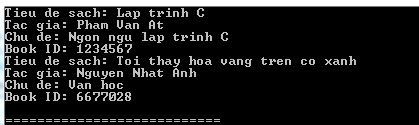
<p style="text-align: justify;">Biên dịch và chạy chương trình C trên sẽ cho kết quả:</p>

<p style="text-align: justify;"><img alt="Con trỏ tới cấu trúc" data-i="2" data-src="https://st.quantrimang.com/photos/image/2018/08/02/cau-truc-struct-trong-lap-trinh-c-3.jpg" data-was-processed="true" height="125" src="https://st.quantrimang.com/photos/image/2018/08/02/cau-truc-struct-trong-lap-trinh-c-3.jpg" width="419" /></p>

<h2 style="text-align: justify;">Các trường bit (Bit Fields) trong C</h2>

<p style="text-align: justify;">Các&nbsp;<strong>trường bit</strong>&nbsp;cho phép đóng gói dữ liệu trong một cấu trúc. Nó giúp tối ưu hóa bộ nhớ.</p>

<p style="text-align: justify;">C cho phép bạn thực hiện điều này trong một định nghĩa cấu trúc bởi việc đặt:&nbsp;<strong>độ dài bit sau biến</strong>. Ví dụ:</p>

<pre id="pre8" style="text-align: justify;">
struct packed_struct {
  unsigned int f1:1;
  unsigned int f2:1;
  unsigned int f3:1;
  unsigned int f4:1;
  unsigned int type:4;
  unsigned int my_int:9;
} pack;</pre>

<p style="text-align: justify;">Ở đây, packed_struct chứa 6 phần tử: 4 phần tử f1..f4 là 1 bit, một type là 4 bit và một my_int 9 bit.</p>

<p style="text-align: justify;">C tự động đóng gói các trường bit trên càng gọn càng tốt, miễn là chiều dài tối đa của trường này nhỏ hơn hoặc bằng với chiều dài từ nguyên của máy tính. Bạn sẽ tìm hiểu về các trường bit trong một chương riêng.</p>

<h2 style="text-align: justify;">Chỉnh sửa các giá trị</h2>

<p style="text-align: justify;">Nếu muốn thay đổi/chỉnh sửa một giá trị, bạn có thể dùng cú pháp dot (.). Để chỉnh sửa một giá trị chuỗi, hàm&nbsp;<code>strcpy()</code>&nbsp;một lần nữa lại hữu ích:</p>

<pre id="pre9" style="text-align: justify;">
#include &lt;stdio.h&gt;
#include &lt;string.h&gt;

// Tạo một cấu trúc
struct myStructure {
  int myNum;
  char myLetter;
  char myString&#91;30&#93;;
};

int main() {
  // Tạo một biến cấu trúc và gắn giá trị cho nó
  struct myStructure s1 = {13, &#039;B&#039;, &quot;Some text&quot;};
  // Chỉnh sửa giá trị
  s1.myNum = 30;
  s1.myLetter = &#039;C&#039;;
  strcpy(s1.myString, &quot;Something else&quot;);

  // In giá trị
  printf(&quot;%d %c %s&quot;, s1.myNum, s1.myLetter, s1.myString);

  return 0;
}</pre>

<p style="text-align: justify;">Chỉnh sửa các giá trị đặc biệt hữu ích khi bạn sao chép các giá trị cấu trúc:</p>

<p style="text-align: justify;">Ví dụ:</p>

<pre id="pre10" style="text-align: justify;">
#include &lt;stdio.h&gt;
#include &lt;string.h&gt;

struct myStructure {
  int myNum;
  char myLetter;
  char myString&#91;30&#93;;
};

int main() {
  // Tạo một biến struct và gắn giá trị cho nó
  struct myStructure s1 = {13, &#039;B&#039;, &quot;Some text&quot;};

  // Tạo biến cấu trúc khác
  struct myStructure s2;

  // Sao chép giá trị s1 sang s2
  s2 = s1;

  // Thay đổi giá trị s2
  s2.myNum = 30;
  s2.myLetter = &#039;C&#039;;
  strcpy(s2.myString, &quot;Something else&quot;);

  // In các giá trị
  printf(&quot;%d %c %s\n&quot;, s1.myNum, s1.myLetter, s1.myString);
  printf(&quot;%d %c %s\n&quot;, s2.myNum, s2.myLetter, s2.myString);
  return 0;</pre>

<div style="text-align: justify;">&nbsp;</div>
		</div>
				<div id="author">
						<p>
				<strong>Nguồn tin:</strong>
				Quantrimang.com
			</p>
		</div>
	</div>
	<div id="footer" class="clearfix">
		<div id="url">
			<strong>URL của bản tin này: </strong><a href="https://www.nguoicodonvn2008.info/vi/news/savefile/kien-thuc-may-tinh/cau-truc-struct-trong-lap-trinh-c-6630.html" title="Cấu trúc &#40;Struct&#41; trong lập trình C">https://www.nguoicodonvn2008.info/vi/news/savefile/kien-thuc-may-tinh/cau-truc-struct-trong-lap-trinh-c-6630.html</a>

		</div>
		<div class="clear"></div>
		<div class="copyright">
			&copy; .&#x3A; Nguoicodonvn2008.info - Cõi lòng người cô đơn &#x3A;.
		</div>
		<div id="contact">
			<a href="mailto:admin@nguoicodonvn2008.info">admin@nguoicodonvn2008.info</a>
		</div>
	</div>
</div>
        <div id="timeoutsess" class="chromeframe">
            Bạn đã không sử dụng Site, <a onclick="timeoutsesscancel();" href="https://www.nguoicodonvn2008.info/#">Bấm vào đây để duy trì trạng thái đăng nhập</a>. Thời gian chờ: <span id="secField"> 60 </span> giây
        </div>
        <div id="openidResult" class="nv-alert" style="display:none"></div>
        <div id="openidBt" data-result="" data-redirect=""></div>
		</script>
		<div class="car-top">
  <span><img src="https://www.nguoicodonvn2008.info/themes/default/images/car.png" alt=""></span>
</div>
<script src="https://www.nguoicodonvn2008.info/assets/js/jquery/jquery.min.js"></script>
<script>var nv_base_siteurl="/",nv_lang_data="vi",nv_lang_interface="vi",nv_name_variable="nv",nv_fc_variable="op",nv_lang_variable="language",nv_module_name="news",nv_func_name="savefile",nv_is_user=0, nv_my_ofs=-4,nv_my_abbr="EDT",nv_cookie_prefix="nv4c_e856T",nv_check_pass_mstime=1738000,nv_area_admin=0,nv_safemode=0,theme_responsive=0,nv_recaptcha_ver=2,nv_recaptcha_sitekey="",nv_recaptcha_type="image",XSSsanitize=1;</script>
<script src="https://www.nguoicodonvn2008.info/assets/js/language/vi.js"></script>
<script src="https://www.nguoicodonvn2008.info/assets/js/DOMPurify/purify3.js"></script>
<script src="https://www.nguoicodonvn2008.info/assets/js/global.js"></script>
<script src="https://www.nguoicodonvn2008.info/assets/js/site.js"></script>
<script src="https://www.nguoicodonvn2008.info/themes/default/js/news.js"></script>
<script src="https://www.nguoicodonvn2008.info/themes/default/js/main.js"></script>
<script src="https://www.nguoicodonvn2008.info/themes/default/js/custom.js"></script>
<script type="application/ld+json">
        {
            "@context": "https://schema.org",
            "@type": "Organization",
            "url": "https://www.nguoicodonvn2008.info",
            "logo": "https://www.nguoicodonvn2008.info/uploads/angel.gif"
        }
        </script>
<script src="https://www.nguoicodonvn2008.info/themes/default/js/bootstrap.min.js"></script>
<script type="text/javascript">
var $scrolltop = $('.car-top');
$scrolltop.on('click', function () {
    $('html,body').animate({
        scrollTop: 0
    }, 800);
    $(this).addClass("car-run");
    setTimeout(function(){ $scrolltop.removeClass('car-run');}, 1000);
    return false;
});
$(window).on('scroll', function ()
{ 
    if($(window).scrollTop() >= 200)
    {
        $scrolltop.addClass("show");
        $scrolltop.addClass("car-down");
    }
    else
    {
       $scrolltop.removeClass("show");
       setTimeout(function(){ $scrolltop.removeClass('car-down');}, 300);
    }
});
</script>
</body>
</html>