<!DOCTYPE html>
    <html lang="vi" xmlns="http://www.w3.org/1999/xhtml" prefix="og: http://ogp.me/ns#">
    <head>
<title>Cập nhật Linux kernel trên Ubuntu thông qua UKUU</title>
<meta name="description" content="Cập nhật Linux kernel trên Ubuntu thông qua UKUU - Savefile - Tin Tức -...">
<meta name="author" content=".: Nguoicodonvn2008.info - Cõi lòng người cô đơn :.">
<meta name="copyright" content=".: Nguoicodonvn2008.info - Cõi lòng người cô đơn :. [admin@nguoicodonvn2008.info]">
<meta name="robots" content="index, archive, follow, noodp">
<meta name="googlebot" content="index,archive,follow,noodp">
<meta name="msnbot" content="all,index,follow">
<meta name="generator" content="NukeViet v4.5">
<meta http-equiv="Content-Type" content="text/html; charset=utf-8">
<meta property="og:title" content="Cập nhật Linux kernel trên Ubuntu thông qua UKUU">
<meta property="og:type" content="website">
<meta property="og:description" content="Savefile - Tin Tức - https&#x3A;&#x002F;&#x002F;www.nguoicodonvn2008.info&#x002F;vi&#x002F;news&#x002F;savefile&#x002F;kien-thuc-may-tinh&#x002F;cap-nhat-linux-kernel-tren-ubuntu-thong-qua-ukuu-232.html">
<meta property="og:site_name" content=".&#x3A; Nguoicodonvn2008.info - Cõi lòng người cô đơn &#x3A;.">
<meta property="og:url" content="https://www.nguoicodonvn2008.info/vi/news/savefile/kien-thuc-may-tinh/cap-nhat-linux-kernel-tren-ubuntu-thong-qua-ukuu-232.html">
<link rel="shortcut icon" href="https://www.nguoicodonvn2008.info/favicon.ico">
<link rel="canonical" href="https://www.nguoicodonvn2008.info/vi/news/savefile/kien-thuc-may-tinh/cap-nhat-linux-kernel-tren-ubuntu-thong-qua-ukuu-232.html">
<link rel="alternate" href="https://www.nguoicodonvn2008.info/vi/news/rss/" title="Tin Tức" type="application/rss+xml">
<link rel="alternate" href="https://www.nguoicodonvn2008.info/vi/news/rss/karaoke-dual/" title="Tin Tức - Karaoke Dual" type="application/rss+xml">
<link rel="alternate" href="https://www.nguoicodonvn2008.info/vi/news/rss/nhac-tre/" title="Tin Tức - Nhạc trẻ" type="application/rss+xml">
<link rel="alternate" href="https://www.nguoicodonvn2008.info/vi/news/rss/tru-tinh/" title="Tin Tức - Trữ tình" type="application/rss+xml">
<link rel="alternate" href="https://www.nguoicodonvn2008.info/vi/news/rss/nuoc-ngoai/" title="Tin Tức - Nước ngoài" type="application/rss+xml">
<link rel="alternate" href="https://www.nguoicodonvn2008.info/vi/news/rss/remix/" title="Tin Tức - Remix" type="application/rss+xml">
<link rel="alternate" href="https://www.nguoicodonvn2008.info/vi/news/rss/tam-su-tinh-yeu/" title="Tin Tức - Tâm sự tình yêu" type="application/rss+xml">
<link rel="alternate" href="https://www.nguoicodonvn2008.info/vi/news/rss/tho-suu-tam/" title="Tin Tức - Thơ sưu tầm" type="application/rss+xml">
<link rel="alternate" href="https://www.nguoicodonvn2008.info/vi/news/rss/cuoc-song/" title="Tin Tức - Cuộc sống" type="application/rss+xml">
<link rel="alternate" href="https://www.nguoicodonvn2008.info/vi/news/rss/phan-mem/" title="Tin Tức - Phần mềm" type="application/rss+xml">
<link rel="alternate" href="https://www.nguoicodonvn2008.info/vi/news/rss/kien-thuc-may-tinh/" title="Tin Tức - Kiến thức máy tính" type="application/rss+xml">
<link rel="alternate" href="https://www.nguoicodonvn2008.info/vi/news/rss/hoc-tap/" title="Tin Tức - Học tập" type="application/rss+xml">
<link rel="alternate" href="https://www.nguoicodonvn2008.info/vi/news/rss/tai-lieu/" title="Tin Tức - Tài liệu" type="application/rss+xml">
<link rel="alternate" href="https://www.nguoicodonvn2008.info/vi/news/rss/de-thi/" title="Tin Tức - Đề thi" type="application/rss+xml">
<link rel="preload" as="style" href="https://www.nguoicodonvn2008.info/assets/css/font-awesome.min.css" type="text/css">
<link rel="preload" as="style" href="https://www.nguoicodonvn2008.info/themes/default/css/bootstrap.non-responsive.css" type="text/css">
<link rel="preload" as="style" href="https://www.nguoicodonvn2008.info/themes/default/css/style.css" type="text/css">
<link rel="preload" as="style" href="https://www.nguoicodonvn2008.info/themes/default/css/style.non-responsive.css" type="text/css">
<link rel="preload" as="style" href="https://www.nguoicodonvn2008.info/themes/default/css/news.css" type="text/css">
<link rel="preload" as="style" href="https://www.nguoicodonvn2008.info/themes/default/css/custom.css" type="text/css">
<link rel="preload" as="script" href="https://www.nguoicodonvn2008.info/assets/js/jquery/jquery.min.js" type="text/javascript">
<link rel="preload" as="script" href="https://www.nguoicodonvn2008.info/assets/js/language/vi.js" type="text/javascript">
<link rel="preload" as="script" href="https://www.nguoicodonvn2008.info/assets/js/DOMPurify/purify3.js" type="text/javascript">
<link rel="preload" as="script" href="https://www.nguoicodonvn2008.info/assets/js/global.js" type="text/javascript">
<link rel="preload" as="script" href="https://www.nguoicodonvn2008.info/assets/js/site.js" type="text/javascript">
<link rel="preload" as="script" href="https://www.nguoicodonvn2008.info/themes/default/js/news.js" type="text/javascript">
<link rel="preload" as="script" href="https://www.nguoicodonvn2008.info/themes/default/js/main.js" type="text/javascript">
<link rel="preload" as="script" href="https://www.nguoicodonvn2008.info/themes/default/js/custom.js" type="text/javascript">
<link rel="preload" as="script" href="https://www.nguoicodonvn2008.info/themes/default/js/bootstrap.min.js" type="text/javascript">
<link rel="stylesheet" href="https://www.nguoicodonvn2008.info/assets/css/font-awesome.min.css">
<link rel="stylesheet" href="https://www.nguoicodonvn2008.info/themes/default/css/bootstrap.non-responsive.css">
<link rel="stylesheet" href="https://www.nguoicodonvn2008.info/themes/default/css/style.css">
<link rel="stylesheet" href="https://www.nguoicodonvn2008.info/themes/default/css/style.non-responsive.css">
<link rel="StyleSheet" href="https://www.nguoicodonvn2008.info/themes/default/css/news.css">
<link rel="stylesheet" href="https://www.nguoicodonvn2008.info/themes/default/css/custom.css">
<style type="text/css">
	body{background: #fff;}
</style>
    </head>
    <body>
<div id="print">
	<div id="hd_print">
		<h2 class="pull-left">.&#x3A; Nguoicodonvn2008.info - Cõi lòng người cô đơn &#x3A;.</h2>
		<p class="pull-right"><a title=".&#x3A; Nguoicodonvn2008.info - Cõi lòng người cô đơn &#x3A;." href="https://www.nguoicodonvn2008.info/">https://www.nguoicodonvn2008.info</a></p>
	</div>
	<div class="clear"></div>
	<hr />
	<div id="content">
		<h1>Cập nhật Linux kernel trên Ubuntu thông qua UKUU</h1>
		<ul class="list-inline">
			<li>Thứ năm - 27/06/2019 05:15</li>
			<li class="hidden-print txtrequired"><em class="fa fa-print">&nbsp;</em><a title="In ra" href="javascript:;" onclick="window.print()">In ra</a></li>
			<li class="hidden-print txtrequired"><em class="fa fa-power-off">&nbsp;</em><a title="Đóng cửa sổ này" href="javascript:;" onclick="window.close()">Đóng cửa sổ này</a></li>
		</ul>
		<div class="clear"></div>
		<div id="hometext">
		</div>
				<div class="imghome">
			<img alt="Cập nhật Linux kernel trên Ubuntu thông qua UKUU" src="https://st.quantrimang.com/photos/image/2019/06/27/cap-nhat-linux-kernel-bang-ukuu-12.jpg" width="460" class="img-thumbnail" />
		</div>
		<div class="clear"></div>
		<div id="bodytext" class="clearfix">
			<p>trên Ubuntu là cốt lõi của hệ điều hành này. Nó là interface trung gian giữa phần cứng máy tính và các ứng dụng phần mềm. Khi công nghệ phát triển, các bản vá mới được giới thiệu để tăng cường chức năng, tính bảo mật và tốc độ của hệ điều hành. Do đó, bạn nên liên tục kiểm tra các bản cập nhật kernel và nâng cấp lên bản cập nhật phù hợp.</p>

<p>Trong bài viết này,&nbsp;<strong>Quantrimang.com</strong>&nbsp;sẽ mô tả cách người dùng có thể cập nhật Kernel lên phiên bản mới hơn thông qua tiện ích UKUU, bao gồm cài đặt phần mềm trên hệ thống, sau đó tải xuống và cập nhật kernel. UKUU (hay Ubuntu Kernel Update Utility) được sử dụng để cài đặt các Linux kernel chính trên những bản phân phối dựa trên&nbsp;Ubuntu. Các gói kernel được tải xuống và cài đặt từ&nbsp;<strong>kernel.ubfox.com.</strong></p>

<p>Các lệnh và quy trình được đề cập trong bài viết này chạy trên hệ thống Ubuntu 18.04 LTS. Hãy làm theo các bước sau để cập nhật Linux kernel trên Ubuntu.<br  />
Bước 1: Xác nhận phiên bản kernel hiện tại</p>

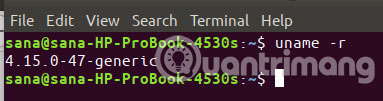
<p>Trước khi chuyển sang phiên bản mới, trước tiên, bạn hãy xác định xem phiên bản kernel nào đang chạy trên Ubuntu. Mở công cụ dòng lệnh trên Ubuntu, Terminal, thông qua tìm kiếm&nbsp;<strong>Application Launcher</strong>&nbsp;trên hệ thống hoặc phím tắt&nbsp;<code>Ctrl</code>+<code>Alt</code>+<code>T</code>. Sau đó nhập lệnh sau:</p>

<pre id="pre0">
<code>$ uname -r</code></pre>

<p>Đầu ra lệnh sẽ cho biết phiên bản kernel hiện tại của bạn.</p>

<p><img alt="Phiên bản kernel hiện tại" data-i="0" data-src="https://st.quantrimang.com/photos/image/2019/06/27/cap-nhat-linux-kernel-bang-ukuu-1.jpg" data-was-processed="true" height="101" src="https://st.quantrimang.com/photos/image/2019/06/27/cap-nhat-linux-kernel-bang-ukuu-1.jpg" width="383" /></p>

<p>Bây giờ, bạn đã biết phiên bản kernel của mình và có thể quyết định phiên bản nào muốn cập nhật.</p>

<h2 id="mcetoc_1debf50vp1">Bước 2: Thêm TeeJee PPA để cài đặt UKUU từ đó</h2>

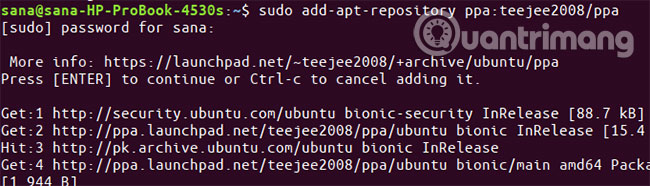
<p>Tiện ích UKUU không có sẵn trên kho chính thức của Ubuntu nhưng TeeJee PPA là nơi bạn sẽ tìm thấy phiên bản mới nhất của UKUU. Trong ứng dụng Terminal, nhập lệnh sudo sau để thêm TeeJee PPA vào hệ thống:</p>

<pre id="pre1">
<code>$ sudo add-apt-repository ppa:teejee2008/ppa</code></pre>

<p><img alt="Thêm TeeJee PPA" data-i="1" data-src="https://st.quantrimang.com/photos/image/2019/06/27/cap-nhat-linux-kernel-bang-ukuu-2.jpg" data-was-processed="true" height="157" src="https://st.quantrimang.com/photos/image/2019/06/27/cap-nhat-linux-kernel-bang-ukuu-2.jpg" width="550" /></p>

<p>Nhập mật khẩu cho sudo, sau đó kho PPA sẽ được thêm vào hệ thống.</p>

<p><strong>Mẹo</strong>: Thay vì nhập lệnh, bạn có thể sao chép lệnh từ đây và dán vào Terminal bằng cách sử dụng&nbsp;<code>Ctrl</code>+<code>Shift</code>+<code>V</code>&nbsp;hoặc bằng cách sử dụng tùy chọn&nbsp;<strong>Paste</strong>&nbsp;từ menu chuột phải.</p>

<h2 id="mcetoc_1debf50vq2">Bước 3: Cập nhật chỉ mục kho lưu trữ cục bộ</h2>

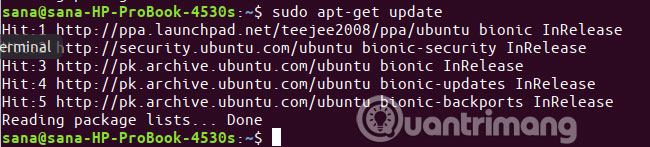
<p>Bước tiếp theo là cập nhật chỉ mục kho lưu trữ hệ thống thông qua lệnh sau:</p>

<pre id="pre2">
<code>$ sudo apt-get update</code></pre>

<p>Điều này giúp bạn cài đặt phiên bản mới nhất của một phần mềm từ Internet.</p>

<p><img alt="Cập nhật chỉ mục kho lưu trữ cục bộ" data-i="2" data-src="https://st.quantrimang.com/photos/image/2019/06/27/cap-nhat-linux-kernel-bang-ukuu-3.jpg" data-was-processed="true" height="147" src="https://st.quantrimang.com/photos/image/2019/06/27/cap-nhat-linux-kernel-bang-ukuu-3.jpg" width="650" /></p>

<h2 id="mcetoc_1debf50vq3">Bước 4: Cài đặt UKUU thông qua apt-get</h2>

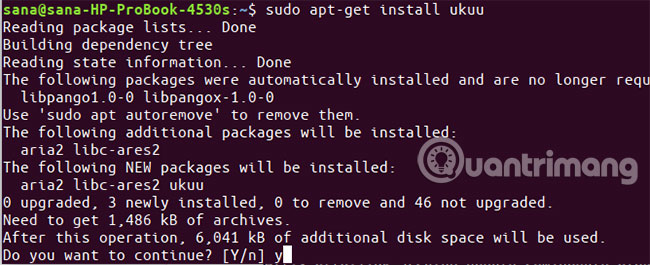
<p>Bây giờ, bạn đã hoàn thành việc thêm PPA, hãy sử dụng lệnh&nbsp;<strong>sudo apt-get</strong>&nbsp;sau đây để cài đặt UKUU vào hệ thống:</p>

<pre id="pre3">
<code>$ sudo apt-get install ukuu</code></pre>

<p><img alt="Cài đặt UKUU" data-i="3" data-src="https://st.quantrimang.com/photos/image/2019/06/27/cap-nhat-linux-kernel-bang-ukuu-4.jpg" data-was-processed="true" height="265" src="https://st.quantrimang.com/photos/image/2019/06/27/cap-nhat-linux-kernel-bang-ukuu-4.jpg" width="650" /></p>

<p>Hệ thống có thể hỏi bạn mật khẩu sudo và cũng cung cấp cho bạn tùy chọn&nbsp;<strong>Y/N</strong>&nbsp;để tiếp tục cài đặt. Nhập&nbsp;<strong>Y</strong>&nbsp;và sau đó nhấn&nbsp;<code>Enter</code>. UKUU sau đó sẽ được cài đặt trên hệ thống. Tuy nhiên, quá trình này có thể mất một chút thời gian tùy thuộc vào tốc độ Internet của bạn.</p>

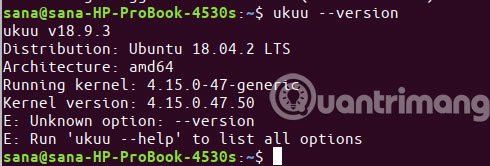
<p>Bạn có thể xác minh phiên bản nào được cài đặt trên hệ thống của mình bằng cách chạy lệnh sau:</p>

<pre id="pre4">
<code>$ ukuu --version</code></pre>

<p><img alt="Xác minh phiên bản UKUU được cài đặt" data-i="4" data-src="https://st.quantrimang.com/photos/image/2019/06/27/cap-nhat-linux-kernel-bang-ukuu-5.jpg" data-was-processed="true" height="166" src="https://st.quantrimang.com/photos/image/2019/06/27/cap-nhat-linux-kernel-bang-ukuu-5.jpg" width="490" /></p>
&nbsp;

<h2 id="mcetoc_1debf50vq4">Bước 5: Khởi chạy UKUU</h2>

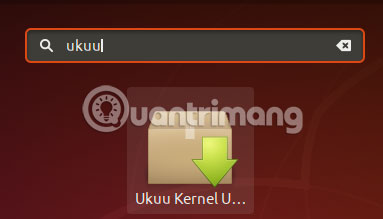
<p>Bây giờ, khởi chạy UKUU từ thanh Application Launcher của Ubuntu như sau hoặc truy cập trực tiếp từ danh sách ứng dụng:</p>

<p><img alt="Khởi chạy UKUU" data-i="5" data-src="https://st.quantrimang.com/photos/image/2019/06/27/cap-nhat-linux-kernel-bang-ukuu-6.jpg" data-was-processed="true" height="219" src="https://st.quantrimang.com/photos/image/2019/06/27/cap-nhat-linux-kernel-bang-ukuu-6.jpg" width="383" /></p>

<p>Bạn cũng có thể khởi chạy nó bằng cách nhập lệnh sau trong Terminal:</p>

<pre id="pre5">
<code>$ ukuu-gtk</code></pre>

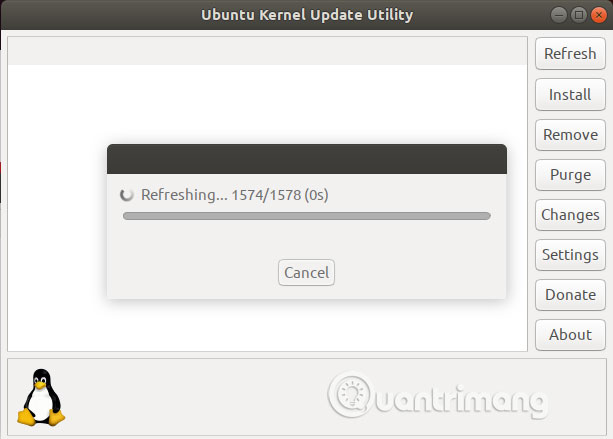
<p>Khi bạn khởi chạy phần mềm, UKUU sẽ bắt đầu tạo danh sách tất cả các kernel có sẵn từ Internet.</p>

<p><img alt="Tạo danh sách tất cả các kernel có sẵn" data-i="6" data-src="https://st.quantrimang.com/photos/image/2019/06/27/cap-nhat-linux-kernel-bang-ukuu-7.jpg" data-was-processed="true" height="439" src="https://st.quantrimang.com/photos/image/2019/06/27/cap-nhat-linux-kernel-bang-ukuu-7.jpg" width="613" /></p>

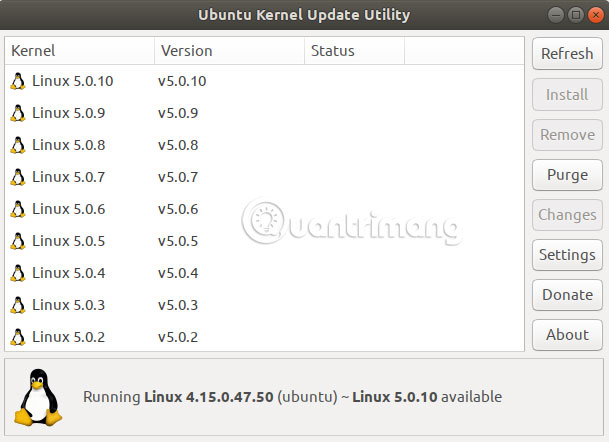
<p>Đây là cách danh sách được hiển thị:</p>

<p><img alt="Danh sách được hiển thị" data-i="7" data-src="https://st.quantrimang.com/photos/image/2019/06/27/cap-nhat-linux-kernel-bang-ukuu-8.jpg" data-was-processed="true" height="442" src="https://st.quantrimang.com/photos/image/2019/06/27/cap-nhat-linux-kernel-bang-ukuu-8.jpg" width="609" /></p>

<p>Phiên bản mới nhất có sẵn, tại thời điểm viết bài, là Linux 5.0.10. Tốt nhất là nghiên cứu một chút về những gì kernel bạn muốn nâng cấp sẽ cung cấp.</p>

<h2 id="mcetoc_1debf50vq5">Bước 6: Cài đặt và cập nhật lên phiên bản kernel mới hơn</h2>

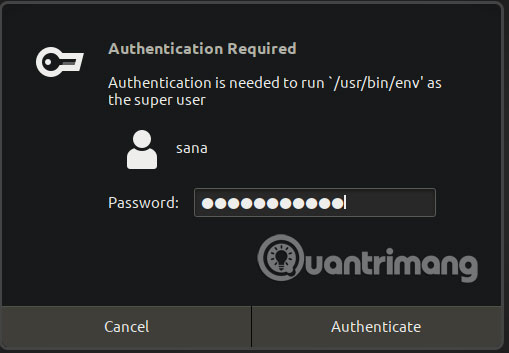
<p>Chọn phiên bản kernel bạn muốn nâng cấp từ danh sách và sau đó nhấp vào nút&nbsp;<strong>Install.</strong>&nbsp;Hộp thoại xác thực sau sẽ xuất hiện để bạn cung cấp chi tiết xác thực.</p>

<p><img alt="Chọn phiên bản kernel muốn nâng cấp" data-i="8" data-src="https://st.quantrimang.com/photos/image/2019/06/27/cap-nhat-linux-kernel-bang-ukuu-9.jpg" data-was-processed="true" height="353" src="https://st.quantrimang.com/photos/image/2019/06/27/cap-nhat-linux-kernel-bang-ukuu-9.jpg" width="509" /></p>

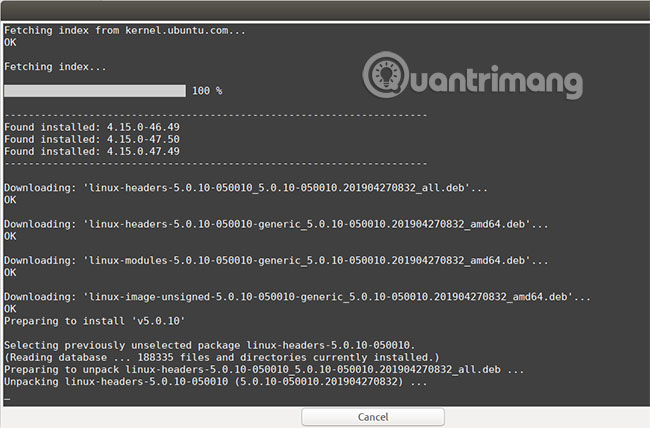
<p>Xin lưu ý rằng chỉ người dùng được ủy quyền mới có thể thêm/xóa và định cấu hình phần mềm trên Ubuntu. Nhập mật khẩu và nhấp vào nút&nbsp;<strong>Authenticate.</strong>&nbsp;Cửa sổ sau mở ra. Bạn sẽ thấy UKUU tải xuống và cài đặt kernel đã chọn trên hệ thống của bạn.</p>

<p><img alt="UKUU tải xuống và cài đặt kernel đã chọn trên hệ thống" data-i="9" data-src="https://st.quantrimang.com/photos/image/2019/06/27/cap-nhat-linux-kernel-bang-ukuu-10.jpg" data-was-processed="true" height="362" src="https://st.quantrimang.com/photos/image/2019/06/27/cap-nhat-linux-kernel-bang-ukuu-10.jpg" width="550" /></p>

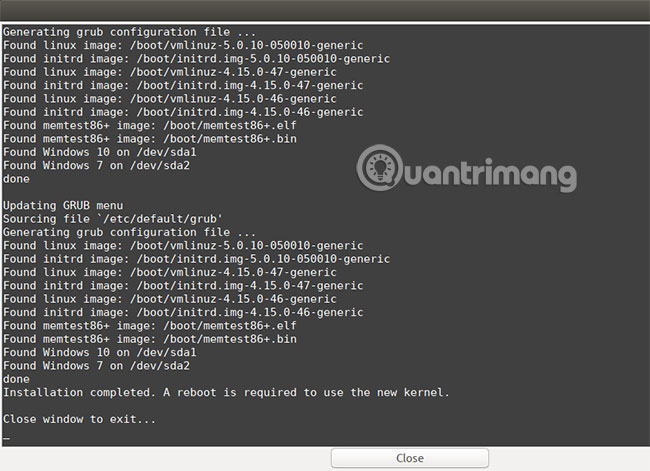
<p>Quá trình này có thể mất một chút thời gian tùy thuộc vào tốc độ Internet của bạn. Khi quá trình tải xuống và cài đặt hoàn tất, bạn sẽ có thể thấy nút&nbsp;<strong>Close</strong>&nbsp;ở cuối cửa sổ.</p>

<p><img alt="Nút Close ở cuối cửa sổ" data-i="10" data-src="https://st.quantrimang.com/photos/image/2019/06/27/cap-nhat-linux-kernel-bang-ukuu-11.jpg" data-was-processed="true" height="399" src="https://st.quantrimang.com/photos/image/2019/06/27/cap-nhat-linux-kernel-bang-ukuu-11.jpg" width="550" /></p>

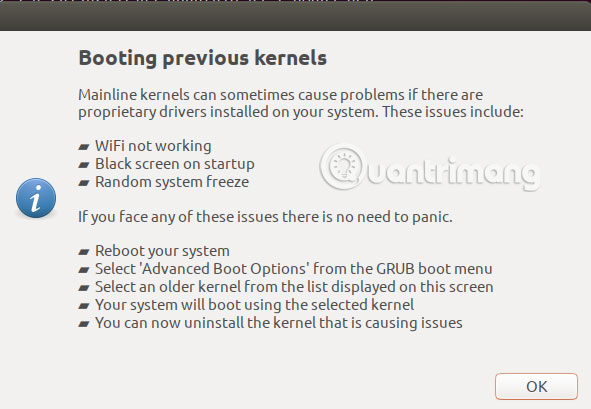
<p>Nhấp vào nút&nbsp;<strong>Close.</strong>&nbsp;Sau đó, bạn có thể thấy hộp thoại sau được trình bày:</p>

<p><img alt="Nhấp vào nút Close" data-i="11" data-src="https://st.quantrimang.com/photos/image/2019/06/27/cap-nhat-linux-kernel-bang-ukuu-12.jpg" data-was-processed="true" height="409" src="https://st.quantrimang.com/photos/image/2019/06/27/cap-nhat-linux-kernel-bang-ukuu-12.jpg" width="591" /></p>

<p>Vui lòng đọc kỹ thông tin này vì bạn có thể gặp phải một trong những vấn đề được đề cập. Nhấp vào&nbsp;<strong>OK</strong>&nbsp;sau khi đọc, nếu bạn gặp phải bất kỳ vấn đề nào như vậy.</p>

<h2 id="mcetoc_1debf50vq6">Bước 7: Khởi động lại hệ thống</h2>

<p>Để kernel mới hoạt động, hãy khởi động lại hệ thống.</p>

<p><strong>Lưu ý quan trọng</strong>: Nếu bạn gặp trục trặc khi khởi động hoặc sau khi đăng nhập, bạn có thể dễ dàng khởi động từ kernel cũ hơn. Khởi động lại hệ thống và nhấn&nbsp;<code>Shift</code>&nbsp;khi khởi động, một danh sách sẽ xuất hiện. Từ đó bạn có thể chọn phiên bản kernel cũ hơn để khởi động.</p>

<h2 id="mcetoc_1debf50vq7">Bước 8: Xác minh phiên bản kernel hiện tại</h2>

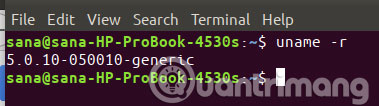
<p>Bây giờ bạn đã khởi động vào kernel mới hơn, hãy chạy lệnh sau trong ứng dụng Terminal để xác minh rằng phiên bản mới hơn đang thực sự chạy:</p>

<pre id="pre6">
<code>$ uname -r</code></pre>

<p><img alt="Xác minh xem bạn đã chạy phiên bản kernel mới chưa" data-i="12" data-src="https://st.quantrimang.com/photos/image/2019/06/27/cap-nhat-linux-kernel-bang-ukuu-13.jpg" data-was-processed="true" height="106" src="https://st.quantrimang.com/photos/image/2019/06/27/cap-nhat-linux-kernel-bang-ukuu-13.jpg" width="379" /></p>

<p>Bây giờ bạn đang chạy thành công phiên bản Linux kernel mới trên Ubuntu!</p>
		</div>
				<div id="author">
						<p>
				<strong>Nguồn tin:</strong>
				Quantrimang.com
			</p>
		</div>
	</div>
	<div id="footer" class="clearfix">
		<div id="url">
			<strong>URL của bản tin này: </strong><a href="https://www.nguoicodonvn2008.info/vi/news/savefile/kien-thuc-may-tinh/cap-nhat-linux-kernel-tren-ubuntu-thong-qua-ukuu-232.html" title="Cập nhật Linux kernel trên Ubuntu thông qua UKUU">https://www.nguoicodonvn2008.info/vi/news/savefile/kien-thuc-may-tinh/cap-nhat-linux-kernel-tren-ubuntu-thong-qua-ukuu-232.html</a>

		</div>
		<div class="clear"></div>
		<div class="copyright">
			&copy; .&#x3A; Nguoicodonvn2008.info - Cõi lòng người cô đơn &#x3A;.
		</div>
		<div id="contact">
			<a href="mailto:admin@nguoicodonvn2008.info">admin@nguoicodonvn2008.info</a>
		</div>
	</div>
</div>
        <div id="timeoutsess" class="chromeframe">
            Bạn đã không sử dụng Site, <a onclick="timeoutsesscancel();" href="https://www.nguoicodonvn2008.info/#">Bấm vào đây để duy trì trạng thái đăng nhập</a>. Thời gian chờ: <span id="secField"> 60 </span> giây
        </div>
        <div id="openidResult" class="nv-alert" style="display:none"></div>
        <div id="openidBt" data-result="" data-redirect=""></div>
		</script>
		<div class="car-top">
  <span><img src="https://www.nguoicodonvn2008.info/themes/default/images/car.png" alt=""></span>
</div>
<script src="https://www.nguoicodonvn2008.info/assets/js/jquery/jquery.min.js"></script>
<script>var nv_base_siteurl="/",nv_lang_data="vi",nv_lang_interface="vi",nv_name_variable="nv",nv_fc_variable="op",nv_lang_variable="language",nv_module_name="news",nv_func_name="savefile",nv_is_user=0, nv_my_ofs=-4,nv_my_abbr="EDT",nv_cookie_prefix="nv4c_e856T",nv_check_pass_mstime=1738000,nv_area_admin=0,nv_safemode=0,theme_responsive=0,nv_recaptcha_ver=2,nv_recaptcha_sitekey="",nv_recaptcha_type="image",XSSsanitize=1;</script>
<script src="https://www.nguoicodonvn2008.info/assets/js/language/vi.js"></script>
<script src="https://www.nguoicodonvn2008.info/assets/js/DOMPurify/purify3.js"></script>
<script src="https://www.nguoicodonvn2008.info/assets/js/global.js"></script>
<script src="https://www.nguoicodonvn2008.info/assets/js/site.js"></script>
<script src="https://www.nguoicodonvn2008.info/themes/default/js/news.js"></script>
<script src="https://www.nguoicodonvn2008.info/themes/default/js/main.js"></script>
<script src="https://www.nguoicodonvn2008.info/themes/default/js/custom.js"></script>
<script type="application/ld+json">
        {
            "@context": "https://schema.org",
            "@type": "Organization",
            "url": "https://www.nguoicodonvn2008.info",
            "logo": "https://www.nguoicodonvn2008.info/uploads/angel.gif"
        }
        </script>
<script src="https://www.nguoicodonvn2008.info/themes/default/js/bootstrap.min.js"></script>
<script type="text/javascript">
var $scrolltop = $('.car-top');
$scrolltop.on('click', function () {
    $('html,body').animate({
        scrollTop: 0
    }, 800);
    $(this).addClass("car-run");
    setTimeout(function(){ $scrolltop.removeClass('car-run');}, 1000);
    return false;
});
$(window).on('scroll', function ()
{ 
    if($(window).scrollTop() >= 200)
    {
        $scrolltop.addClass("show");
        $scrolltop.addClass("car-down");
    }
    else
    {
       $scrolltop.removeClass("show");
       setTimeout(function(){ $scrolltop.removeClass('car-down');}, 300);
    }
});
</script>
</body>
</html>