<!DOCTYPE html>
    <html lang="vi" xmlns="http://www.w3.org/1999/xhtml" prefix="og: http://ogp.me/ns#">
    <head>
<title>Cách xuất và xóa mật khẩu đã lưu trong Firefox</title>
<meta name="description" content="Cách xuất và xóa mật khẩu đã lưu trong Firefox - Savefile - Tin Tức -...">
<meta name="author" content=".: Nguoicodonvn2008.info - Cõi lòng người cô đơn :.">
<meta name="copyright" content=".: Nguoicodonvn2008.info - Cõi lòng người cô đơn :. [admin@nguoicodonvn2008.info]">
<meta name="robots" content="index, archive, follow, noodp">
<meta name="googlebot" content="index,archive,follow,noodp">
<meta name="msnbot" content="all,index,follow">
<meta name="generator" content="NukeViet v4.5">
<meta http-equiv="Content-Type" content="text/html; charset=utf-8">
<meta property="og:title" content="Cách xuất và xóa mật khẩu đã lưu trong Firefox">
<meta property="og:type" content="website">
<meta property="og:description" content="Savefile - Tin Tức - https&#x3A;&#x002F;&#x002F;www.nguoicodonvn2008.info&#x002F;vi&#x002F;news&#x002F;savefile&#x002F;kien-thuc-may-tinh&#x002F;cach-xuat-va-xoa-mat-khau-da-luu-trong-firefox-3817.html">
<meta property="og:site_name" content=".&#x3A; Nguoicodonvn2008.info - Cõi lòng người cô đơn &#x3A;.">
<meta property="og:url" content="https://www.nguoicodonvn2008.info/vi/news/savefile/kien-thuc-may-tinh/cach-xuat-va-xoa-mat-khau-da-luu-trong-firefox-3817.html">
<link rel="shortcut icon" href="https://www.nguoicodonvn2008.info/favicon.ico">
<link rel="canonical" href="https://www.nguoicodonvn2008.info/vi/news/savefile/kien-thuc-may-tinh/cach-xuat-va-xoa-mat-khau-da-luu-trong-firefox-3817.html">
<link rel="alternate" href="https://www.nguoicodonvn2008.info/vi/news/rss/" title="Tin Tức" type="application/rss+xml">
<link rel="alternate" href="https://www.nguoicodonvn2008.info/vi/news/rss/karaoke-dual/" title="Tin Tức - Karaoke Dual" type="application/rss+xml">
<link rel="alternate" href="https://www.nguoicodonvn2008.info/vi/news/rss/nhac-tre/" title="Tin Tức - Nhạc trẻ" type="application/rss+xml">
<link rel="alternate" href="https://www.nguoicodonvn2008.info/vi/news/rss/tru-tinh/" title="Tin Tức - Trữ tình" type="application/rss+xml">
<link rel="alternate" href="https://www.nguoicodonvn2008.info/vi/news/rss/nuoc-ngoai/" title="Tin Tức - Nước ngoài" type="application/rss+xml">
<link rel="alternate" href="https://www.nguoicodonvn2008.info/vi/news/rss/remix/" title="Tin Tức - Remix" type="application/rss+xml">
<link rel="alternate" href="https://www.nguoicodonvn2008.info/vi/news/rss/tam-su-tinh-yeu/" title="Tin Tức - Tâm sự tình yêu" type="application/rss+xml">
<link rel="alternate" href="https://www.nguoicodonvn2008.info/vi/news/rss/tho-suu-tam/" title="Tin Tức - Thơ sưu tầm" type="application/rss+xml">
<link rel="alternate" href="https://www.nguoicodonvn2008.info/vi/news/rss/cuoc-song/" title="Tin Tức - Cuộc sống" type="application/rss+xml">
<link rel="alternate" href="https://www.nguoicodonvn2008.info/vi/news/rss/phan-mem/" title="Tin Tức - Phần mềm" type="application/rss+xml">
<link rel="alternate" href="https://www.nguoicodonvn2008.info/vi/news/rss/kien-thuc-may-tinh/" title="Tin Tức - Kiến thức máy tính" type="application/rss+xml">
<link rel="alternate" href="https://www.nguoicodonvn2008.info/vi/news/rss/hoc-tap/" title="Tin Tức - Học tập" type="application/rss+xml">
<link rel="alternate" href="https://www.nguoicodonvn2008.info/vi/news/rss/tai-lieu/" title="Tin Tức - Tài liệu" type="application/rss+xml">
<link rel="alternate" href="https://www.nguoicodonvn2008.info/vi/news/rss/de-thi/" title="Tin Tức - Đề thi" type="application/rss+xml">
<link rel="preload" as="style" href="https://www.nguoicodonvn2008.info/assets/css/font-awesome.min.css" type="text/css">
<link rel="preload" as="style" href="https://www.nguoicodonvn2008.info/themes/default/css/bootstrap.non-responsive.css" type="text/css">
<link rel="preload" as="style" href="https://www.nguoicodonvn2008.info/themes/default/css/style.css" type="text/css">
<link rel="preload" as="style" href="https://www.nguoicodonvn2008.info/themes/default/css/style.non-responsive.css" type="text/css">
<link rel="preload" as="style" href="https://www.nguoicodonvn2008.info/themes/default/css/news.css" type="text/css">
<link rel="preload" as="style" href="https://www.nguoicodonvn2008.info/themes/default/css/custom.css" type="text/css">
<link rel="preload" as="script" href="https://www.nguoicodonvn2008.info/assets/js/jquery/jquery.min.js" type="text/javascript">
<link rel="preload" as="script" href="https://www.nguoicodonvn2008.info/assets/js/language/vi.js" type="text/javascript">
<link rel="preload" as="script" href="https://www.nguoicodonvn2008.info/assets/js/DOMPurify/purify3.js" type="text/javascript">
<link rel="preload" as="script" href="https://www.nguoicodonvn2008.info/assets/js/global.js" type="text/javascript">
<link rel="preload" as="script" href="https://www.nguoicodonvn2008.info/assets/js/site.js" type="text/javascript">
<link rel="preload" as="script" href="https://www.nguoicodonvn2008.info/themes/default/js/news.js" type="text/javascript">
<link rel="preload" as="script" href="https://www.nguoicodonvn2008.info/themes/default/js/main.js" type="text/javascript">
<link rel="preload" as="script" href="https://www.nguoicodonvn2008.info/themes/default/js/custom.js" type="text/javascript">
<link rel="preload" as="script" href="https://www.nguoicodonvn2008.info/themes/default/js/bootstrap.min.js" type="text/javascript">
<link rel="stylesheet" href="https://www.nguoicodonvn2008.info/assets/css/font-awesome.min.css">
<link rel="stylesheet" href="https://www.nguoicodonvn2008.info/themes/default/css/bootstrap.non-responsive.css">
<link rel="stylesheet" href="https://www.nguoicodonvn2008.info/themes/default/css/style.css">
<link rel="stylesheet" href="https://www.nguoicodonvn2008.info/themes/default/css/style.non-responsive.css">
<link rel="StyleSheet" href="https://www.nguoicodonvn2008.info/themes/default/css/news.css">
<link rel="stylesheet" href="https://www.nguoicodonvn2008.info/themes/default/css/custom.css">
<style type="text/css">
	body{background: #fff;}
</style>
    </head>
    <body>
<div id="print">
	<div id="hd_print">
		<h2 class="pull-left">.&#x3A; Nguoicodonvn2008.info - Cõi lòng người cô đơn &#x3A;.</h2>
		<p class="pull-right"><a title=".&#x3A; Nguoicodonvn2008.info - Cõi lòng người cô đơn &#x3A;." href="https://www.nguoicodonvn2008.info/">https://www.nguoicodonvn2008.info</a></p>
	</div>
	<div class="clear"></div>
	<hr />
	<div id="content">
		<h1>Cách xuất và xóa mật khẩu đã lưu trong Firefox</h1>
		<ul class="list-inline">
			<li>Thứ tư - 24/03/2021 01:20</li>
			<li class="hidden-print txtrequired"><em class="fa fa-print">&nbsp;</em><a title="In ra" href="javascript:;" onclick="window.print()">In ra</a></li>
			<li class="hidden-print txtrequired"><em class="fa fa-power-off">&nbsp;</em><a title="Đóng cửa sổ này" href="javascript:;" onclick="window.close()">Đóng cửa sổ này</a></li>
		</ul>
		<div class="clear"></div>
		<div id="hometext">
		</div>
				<div class="imghome">
			<img alt="Cách xuất và xóa mật khẩu đã lưu trong Firefox" src="https://st.quantrimang.com/photos/image/2021/03/18/xuat-va-xoa-mat-khau-da-luu-trong-firefox1.jpg" width="460" class="img-thumbnail" />
		</div>
		<div class="clear"></div>
		<div id="bodytext" class="clearfix">
			<p style="text-align: justify;">Trình duyệt Firefox được tích hợp sẵn một công cụ quản lý mật khẩu có tên là Lockwise vốn được đánh giá khá tốt. Nhưng nếu bạn có nhu cầu chuyển sang sử dụng một&nbsp;trình quản lý mật khẩu&nbsp;chuyên dụng của bên thứ ba, tốt nhất bạn nên xuất và xóa tất cả các mật khẩu mà mình đã lưu trong Firefox.</p>

<p style="text-align: justify;">Bạn có thể xuất&nbsp;danh sách mật khẩu đã lưu trên Firefox&nbsp;của mình thành một tệp CSV, rồi sau đó nhập chính tệp này vào các công cụ quản lý mật khẩu chuyên dụng như 1Password, LastPass hay Bitwarden… một cách tiện lợi.</p>

<h2 style="text-align: justify;">Xuất mật khẩu đã lưu trong Firefox</h2>

<p style="text-align: justify;">Đầu tiên, hãy xuất danh sách tất cả mật khẩu đã lưu trong Firefox của bạn sang tệp CSV.</p>

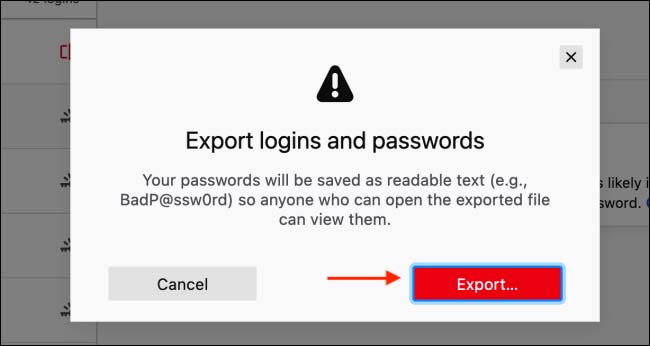
<p style="text-align: justify;">(<strong>Cảnh báo:</strong>&nbsp;Tệp này không được mã hóa và nó sẽ chứa tất cả tên người dùng cũng như mật khẩu của bạn ở định dạng văn bản thuần túy. Vì vậy, hãy đảm bảo bạn có thể giữ an toàn tuyệt đối cho tệp này).</p>

<div style="text-align: justify;">&nbsp;</div>

<p style="text-align: justify;">Trong bài viết này mình hướng dẫn trên Firefox sử dụng giao diện tiếng Anh. Nếu cần bạn có thể&nbsp;đổi Firefox sang tiếng Việt&nbsp;như hướng dẫn trước đây của Quantrimang nhé.</p>

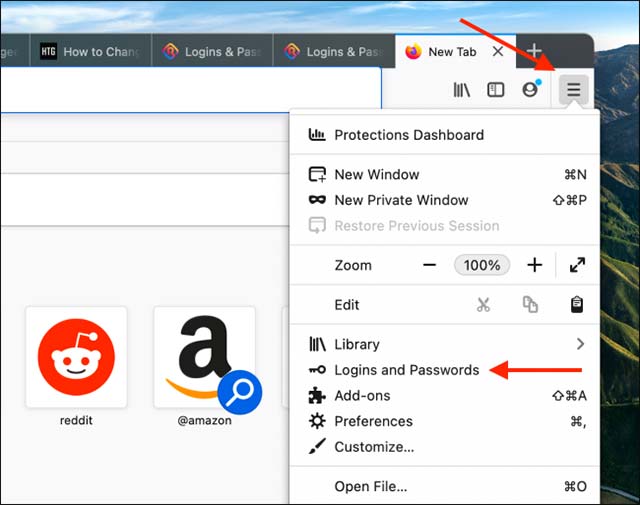
<p style="text-align: justify;"><strong>Bước 1:</strong>&nbsp;Mở Firefox trên máy tính, nhấn vào nút menu 3 dấu gạch ngang ≡ ở góc trên bên phải màn hình &gt; bấm vào tùy chọn &quot;<strong>Logins and Passwords</strong>”.</p>

<p style="text-align: justify;"><img alt="Bấm vào tùy chọn &#039;Logins and Passwords”" data-i="0" data-src="https://st.quantrimang.com/photos/image/2021/03/18/xuat-va-xoa-mat-khau-da-luu-trong-firefox1.jpg" data-was-processed="true" height="505" src="https://st.quantrimang.com/photos/image/2021/03/18/xuat-va-xoa-mat-khau-da-luu-trong-firefox1.jpg" width="640" /></p>

<p style="text-align: justify;">Thao tác này sẽ mở giao diện Firefox Lockwise. Tại đây, bạn sẽ thấy danh sách tất cả mật khẩu được lưu trữ cục bộ trong trình duyệt Firefox, cũng như mật khẩu đã được đồng bộ hóa trên các thiết bị của mình.</p>

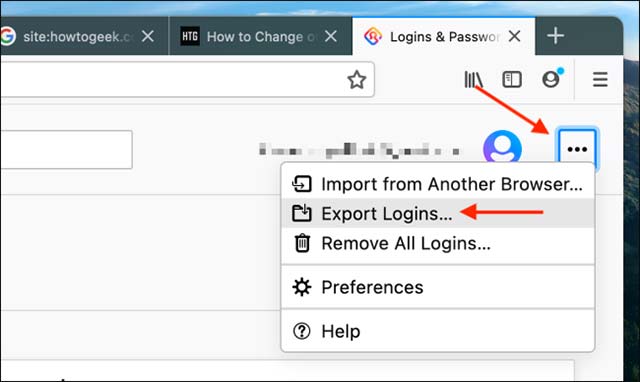
<p style="text-align: justify;"><strong>Bước 2:&nbsp;</strong>&nbsp;Trên màn hình này, hãy nhấp vào nút menu ba chấm&nbsp;<strong>⋯</strong>&nbsp;ở góc trên cùng bên phải và chọn&nbsp;<strong>Export Logins&nbsp;</strong>(Xuất thông tin đăng nhập).</p>

<p style="text-align: justify;"><img alt="Chọn tùy chọn “Export Logins”" data-i="1" data-src="https://st.quantrimang.com/photos/image/2021/03/18/xuat-va-xoa-mat-khau-da-luu-trong-firefox2.jpg" data-was-processed="true" height="382" src="https://st.quantrimang.com/photos/image/2021/03/18/xuat-va-xoa-mat-khau-da-luu-trong-firefox2.jpg" width="640" /></p>

<p style="text-align: justify;"><strong>Bước 3:</strong>&nbsp;Nhấp vào nút &quot;<strong>Export</strong>&quot; (Xuất...) trên thông báo bật lên.</p>

<p style="text-align: justify;"><img alt="Nhấp vào nút &#039;Export&#039;" data-i="2" data-src="https://st.quantrimang.com/photos/image/2021/03/18/xuat-va-xoa-mat-khau-da-luu-trong-firefox3.jpg" data-was-processed="true" height="346" src="https://st.quantrimang.com/photos/image/2021/03/18/xuat-va-xoa-mat-khau-da-luu-trong-firefox3.jpg" width="650" /></p>

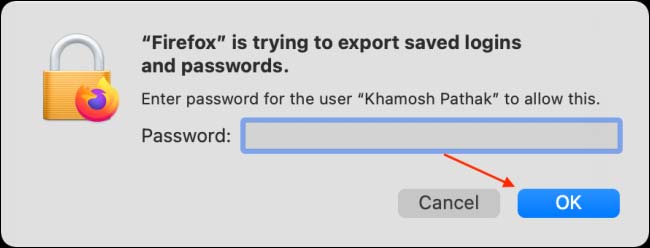
<p style="text-align: justify;"><strong>Bước 4:</strong>&nbsp;Nhập mật khẩu đăng nhập máy tính để xác thực, rồi nhấn OK.</p>

<p style="text-align: justify;"><img alt="Nhập mật khẩu hệ thống" data-i="3" data-src="https://st.quantrimang.com/photos/image/2021/03/18/xuat-va-xoa-mat-khau-da-luu-trong-firefox4.jpg" data-was-processed="true" height="248" src="https://st.quantrimang.com/photos/image/2021/03/18/xuat-va-xoa-mat-khau-da-luu-trong-firefox4.jpg" width="650" /></p>

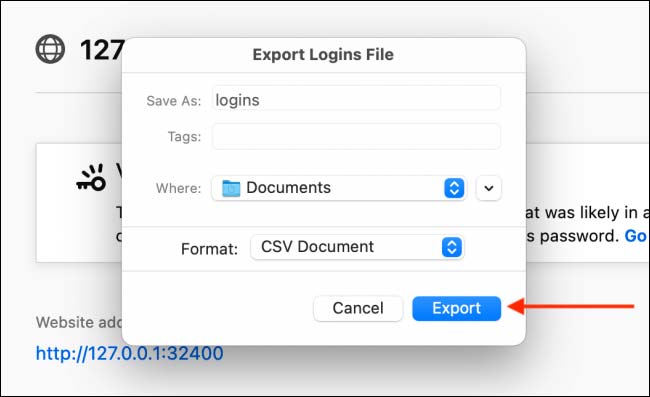
<p style="text-align: justify;"><strong>Bước 5:</strong>&nbsp;Trên màn hình tiếp theo, hãy chọn vị trí bạn muốn lưu tệp CSV và nhấp vào nút “<strong>Export</strong>”.</p>

<p style="text-align: justify;"><img alt="Bấm vào “Export”" data-i="4" data-src="https://st.quantrimang.com/photos/image/2021/03/18/xuat-va-xoa-mat-khau-da-luu-trong-firefox5.jpg" data-was-processed="true" height="397" src="https://st.quantrimang.com/photos/image/2021/03/18/xuat-va-xoa-mat-khau-da-luu-trong-firefox5.jpg" width="650" /></p>

<p style="text-align: justify;">Bây giờ Firefox sẽ xuất tất cả tên người dùng và mật khẩu đã lưu của bạn thành một&nbsp;<a href="https://quantrimang.com/file-csv-la-gi-175377" title="File CSV là gì?">tệp CSV</a>. Bạn có thể&nbsp;<a href="https://quantrimang.com/cach-mo-file-csv-khi-khong-cai-dat-microsoft-excel-130298" title="Các cách mở file CSV">mở file CSV</a>&nbsp;này bằng Excel, Google Sheet đều được nhé.</p>

<h2 style="text-align: justify;">Xóa mật khẩu đã lưu trong Firefox</h2>

<p style="text-align: justify;">Toàn bộ tên người dùng và mật khẩu của bạn đã được xuất sang tệp CSV, giờ đến lúc xóa chúng khỏi&nbsp;tài khoản Firefox&nbsp;của bạn.</p>

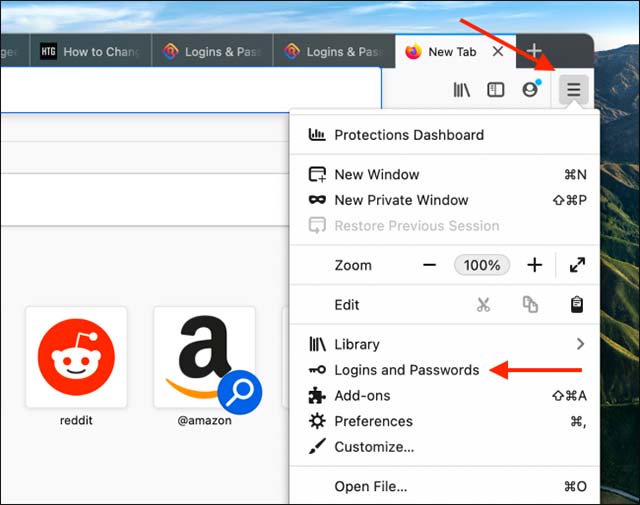
<p style="text-align: justify;">Đầu tiên, hãy nhấp vào nút menu ba dấu gạch ngang ở góc trên bên phải của thanh công cụ Firefox và chọn tùy chọn “<strong>Logins and Passwords</strong>”.</p>

<p style="text-align: justify;"><img alt="Chọn tùy chọn “Logins and Passwords”" data-i="5" data-src="https://st.quantrimang.com/photos/image/2021/03/18/xuat-va-xoa-mat-khau-da-luu-trong-firefox6.jpg" data-was-processed="true" height="505" src="https://st.quantrimang.com/photos/image/2021/03/18/xuat-va-xoa-mat-khau-da-luu-trong-firefox6.jpg" width="640" /></p>

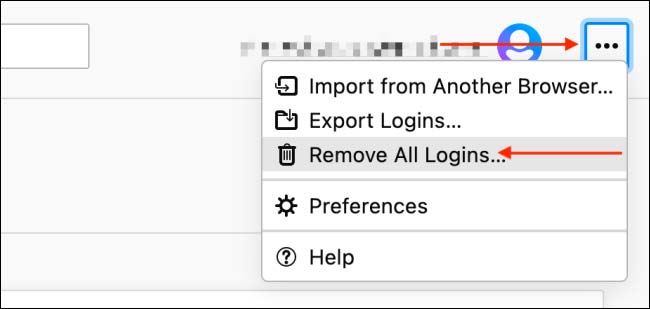
<p style="text-align: justify;">Trong màn hình Logins and Passwords, hãy nhấp vào nút menu ba chấm ở góc trên bên phải và chọn tùy chọn “<strong>Remove All Logins</strong>” (Xóa tất cả thông tin đăng nhập).</p>

<p style="text-align: justify;"><img alt="Chọn tùy chọn “Remove All Logins”" data-i="6" data-src="https://st.quantrimang.com/photos/image/2021/03/18/xuat-va-xoa-mat-khau-da-luu-trong-firefox7.jpg" data-was-processed="true" height="309" src="https://st.quantrimang.com/photos/image/2021/03/18/xuat-va-xoa-mat-khau-da-luu-trong-firefox7.jpg" width="650" /></p>

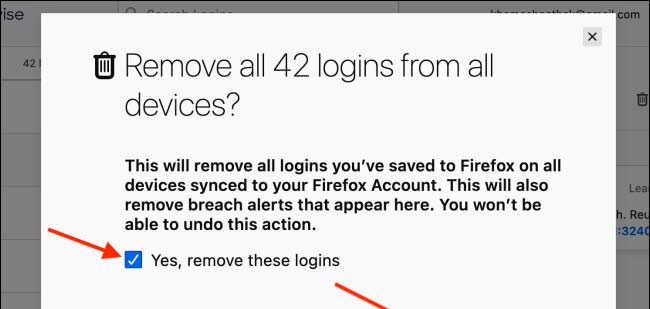
<p style="text-align: justify;">Từ thông báo bật lên, bạn tích vào “<strong>Yes, Remove All Logins</strong>” (Có, xóa thông tin đăng nhập này), sau đó nhấp vào nút “<strong>Remove All</strong>”.</p>

<p style="text-align: justify;"><img alt="Nhấp vào nút “Remove All”" data-i="7" data-src="https://st.quantrimang.com/photos/image/2021/03/18/xuat-va-xoa-mat-khau-da-luu-trong-firefox8.jpg" data-was-processed="true" height="309" src="https://st.quantrimang.com/photos/image/2021/03/18/xuat-va-xoa-mat-khau-da-luu-trong-firefox8.jpg" width="650" /></p>

<p style="text-align: justify;">Lưu ý rằng đây là một thao tác không thể hoàn nguyên, do đó, bạn hãy cân nhắc thật kỹ trước khi quyết định.</p>

<p style="text-align: justify;">Tất cả chỉ có vậy, toàn bộ dữ liệu tên người dùng và mật khẩu mà bạn đã lưu trong tài khoản Firefox này sẽ bị xóa bỏ hoàn toàn.</p>
		</div>
				<div id="author">
						<p>
				<strong>Nguồn tin:</strong>
				Quantrimang.com
			</p>
		</div>
	</div>
	<div id="footer" class="clearfix">
		<div id="url">
			<strong>URL của bản tin này: </strong><a href="https://www.nguoicodonvn2008.info/vi/news/savefile/kien-thuc-may-tinh/cach-xuat-va-xoa-mat-khau-da-luu-trong-firefox-3817.html" title="Cách xuất và xóa mật khẩu đã lưu trong Firefox">https://www.nguoicodonvn2008.info/vi/news/savefile/kien-thuc-may-tinh/cach-xuat-va-xoa-mat-khau-da-luu-trong-firefox-3817.html</a>

		</div>
		<div class="clear"></div>
		<div class="copyright">
			&copy; .&#x3A; Nguoicodonvn2008.info - Cõi lòng người cô đơn &#x3A;.
		</div>
		<div id="contact">
			<a href="mailto:admin@nguoicodonvn2008.info">admin@nguoicodonvn2008.info</a>
		</div>
	</div>
</div>
        <div id="timeoutsess" class="chromeframe">
            Bạn đã không sử dụng Site, <a onclick="timeoutsesscancel();" href="https://www.nguoicodonvn2008.info/#">Bấm vào đây để duy trì trạng thái đăng nhập</a>. Thời gian chờ: <span id="secField"> 60 </span> giây
        </div>
        <div id="openidResult" class="nv-alert" style="display:none"></div>
        <div id="openidBt" data-result="" data-redirect=""></div>
		</script>
		<div class="car-top">
  <span><img src="https://www.nguoicodonvn2008.info/themes/default/images/car.png" alt=""></span>
</div>
<script src="https://www.nguoicodonvn2008.info/assets/js/jquery/jquery.min.js"></script>
<script>var nv_base_siteurl="/",nv_lang_data="vi",nv_lang_interface="vi",nv_name_variable="nv",nv_fc_variable="op",nv_lang_variable="language",nv_module_name="news",nv_func_name="savefile",nv_is_user=0, nv_my_ofs=-4,nv_my_abbr="EDT",nv_cookie_prefix="nv4c_e856T",nv_check_pass_mstime=1738000,nv_area_admin=0,nv_safemode=0,theme_responsive=0,nv_recaptcha_ver=2,nv_recaptcha_sitekey="",nv_recaptcha_type="image",XSSsanitize=1;</script>
<script src="https://www.nguoicodonvn2008.info/assets/js/language/vi.js"></script>
<script src="https://www.nguoicodonvn2008.info/assets/js/DOMPurify/purify3.js"></script>
<script src="https://www.nguoicodonvn2008.info/assets/js/global.js"></script>
<script src="https://www.nguoicodonvn2008.info/assets/js/site.js"></script>
<script src="https://www.nguoicodonvn2008.info/themes/default/js/news.js"></script>
<script src="https://www.nguoicodonvn2008.info/themes/default/js/main.js"></script>
<script src="https://www.nguoicodonvn2008.info/themes/default/js/custom.js"></script>
<script type="application/ld+json">
        {
            "@context": "https://schema.org",
            "@type": "Organization",
            "url": "https://www.nguoicodonvn2008.info",
            "logo": "https://www.nguoicodonvn2008.info/uploads/angel.gif"
        }
        </script>
<script src="https://www.nguoicodonvn2008.info/themes/default/js/bootstrap.min.js"></script>
<script type="text/javascript">
var $scrolltop = $('.car-top');
$scrolltop.on('click', function () {
    $('html,body').animate({
        scrollTop: 0
    }, 800);
    $(this).addClass("car-run");
    setTimeout(function(){ $scrolltop.removeClass('car-run');}, 1000);
    return false;
});
$(window).on('scroll', function ()
{ 
    if($(window).scrollTop() >= 200)
    {
        $scrolltop.addClass("show");
        $scrolltop.addClass("car-down");
    }
    else
    {
       $scrolltop.removeClass("show");
       setTimeout(function(){ $scrolltop.removeClass('car-down');}, 300);
    }
});
</script>
</body>
</html>