<!DOCTYPE html>
    <html lang="vi" xmlns="http://www.w3.org/1999/xhtml" prefix="og: http://ogp.me/ns#">
    <head>
<title>Cách xóa tùy chọn CRC SHA khỏi menu ngữ cảnh trong Windows 10</title>
<meta name="description" content="Cách xóa tùy chọn CRC SHA khỏi menu ngữ cảnh trong Windows 10 - Savefile - Tin Tức -...">
<meta name="author" content=".: Nguoicodonvn2008.info - Cõi lòng người cô đơn :.">
<meta name="copyright" content=".: Nguoicodonvn2008.info - Cõi lòng người cô đơn :. [admin@nguoicodonvn2008.info]">
<meta name="robots" content="index, archive, follow, noodp">
<meta name="googlebot" content="index,archive,follow,noodp">
<meta name="msnbot" content="all,index,follow">
<meta name="generator" content="NukeViet v4.5">
<meta http-equiv="Content-Type" content="text/html; charset=utf-8">
<meta property="og:title" content="Cách xóa tùy chọn CRC SHA khỏi menu ngữ cảnh trong Windows 10">
<meta property="og:type" content="website">
<meta property="og:description" content="Savefile - Tin Tức - https&#x3A;&#x002F;&#x002F;www.nguoicodonvn2008.info&#x002F;vi&#x002F;news&#x002F;savefile&#x002F;kien-thuc-may-tinh&#x002F;cach-xoa-tuy-chon-crc-sha-khoi-menu-ngu-canh-trong-windows-10-2409.html">
<meta property="og:site_name" content=".&#x3A; Nguoicodonvn2008.info - Cõi lòng người cô đơn &#x3A;.">
<meta property="og:url" content="https://www.nguoicodonvn2008.info/vi/news/savefile/kien-thuc-may-tinh/cach-xoa-tuy-chon-crc-sha-khoi-menu-ngu-canh-trong-windows-10-2409.html">
<link rel="shortcut icon" href="https://www.nguoicodonvn2008.info/favicon.ico">
<link rel="canonical" href="https://www.nguoicodonvn2008.info/vi/news/savefile/kien-thuc-may-tinh/cach-xoa-tuy-chon-crc-sha-khoi-menu-ngu-canh-trong-windows-10-2409.html">
<link rel="alternate" href="https://www.nguoicodonvn2008.info/vi/news/rss/" title="Tin Tức" type="application/rss+xml">
<link rel="alternate" href="https://www.nguoicodonvn2008.info/vi/news/rss/karaoke-dual/" title="Tin Tức - Karaoke Dual" type="application/rss+xml">
<link rel="alternate" href="https://www.nguoicodonvn2008.info/vi/news/rss/nhac-tre/" title="Tin Tức - Nhạc trẻ" type="application/rss+xml">
<link rel="alternate" href="https://www.nguoicodonvn2008.info/vi/news/rss/tru-tinh/" title="Tin Tức - Trữ tình" type="application/rss+xml">
<link rel="alternate" href="https://www.nguoicodonvn2008.info/vi/news/rss/nuoc-ngoai/" title="Tin Tức - Nước ngoài" type="application/rss+xml">
<link rel="alternate" href="https://www.nguoicodonvn2008.info/vi/news/rss/remix/" title="Tin Tức - Remix" type="application/rss+xml">
<link rel="alternate" href="https://www.nguoicodonvn2008.info/vi/news/rss/tam-su-tinh-yeu/" title="Tin Tức - Tâm sự tình yêu" type="application/rss+xml">
<link rel="alternate" href="https://www.nguoicodonvn2008.info/vi/news/rss/tho-suu-tam/" title="Tin Tức - Thơ sưu tầm" type="application/rss+xml">
<link rel="alternate" href="https://www.nguoicodonvn2008.info/vi/news/rss/cuoc-song/" title="Tin Tức - Cuộc sống" type="application/rss+xml">
<link rel="alternate" href="https://www.nguoicodonvn2008.info/vi/news/rss/phan-mem/" title="Tin Tức - Phần mềm" type="application/rss+xml">
<link rel="alternate" href="https://www.nguoicodonvn2008.info/vi/news/rss/kien-thuc-may-tinh/" title="Tin Tức - Kiến thức máy tính" type="application/rss+xml">
<link rel="alternate" href="https://www.nguoicodonvn2008.info/vi/news/rss/hoc-tap/" title="Tin Tức - Học tập" type="application/rss+xml">
<link rel="alternate" href="https://www.nguoicodonvn2008.info/vi/news/rss/tai-lieu/" title="Tin Tức - Tài liệu" type="application/rss+xml">
<link rel="alternate" href="https://www.nguoicodonvn2008.info/vi/news/rss/de-thi/" title="Tin Tức - Đề thi" type="application/rss+xml">
<link rel="preload" as="style" href="https://www.nguoicodonvn2008.info/assets/css/font-awesome.min.css" type="text/css">
<link rel="preload" as="style" href="https://www.nguoicodonvn2008.info/themes/default/css/bootstrap.non-responsive.css" type="text/css">
<link rel="preload" as="style" href="https://www.nguoicodonvn2008.info/themes/default/css/style.css" type="text/css">
<link rel="preload" as="style" href="https://www.nguoicodonvn2008.info/themes/default/css/style.non-responsive.css" type="text/css">
<link rel="preload" as="style" href="https://www.nguoicodonvn2008.info/themes/default/css/news.css" type="text/css">
<link rel="preload" as="style" href="https://www.nguoicodonvn2008.info/themes/default/css/custom.css" type="text/css">
<link rel="preload" as="script" href="https://www.nguoicodonvn2008.info/assets/js/jquery/jquery.min.js" type="text/javascript">
<link rel="preload" as="script" href="https://www.nguoicodonvn2008.info/assets/js/language/vi.js" type="text/javascript">
<link rel="preload" as="script" href="https://www.nguoicodonvn2008.info/assets/js/DOMPurify/purify3.js" type="text/javascript">
<link rel="preload" as="script" href="https://www.nguoicodonvn2008.info/assets/js/global.js" type="text/javascript">
<link rel="preload" as="script" href="https://www.nguoicodonvn2008.info/assets/js/site.js" type="text/javascript">
<link rel="preload" as="script" href="https://www.nguoicodonvn2008.info/themes/default/js/news.js" type="text/javascript">
<link rel="preload" as="script" href="https://www.nguoicodonvn2008.info/themes/default/js/main.js" type="text/javascript">
<link rel="preload" as="script" href="https://www.nguoicodonvn2008.info/themes/default/js/custom.js" type="text/javascript">
<link rel="preload" as="script" href="https://www.nguoicodonvn2008.info/themes/default/js/bootstrap.min.js" type="text/javascript">
<link rel="stylesheet" href="https://www.nguoicodonvn2008.info/assets/css/font-awesome.min.css">
<link rel="stylesheet" href="https://www.nguoicodonvn2008.info/themes/default/css/bootstrap.non-responsive.css">
<link rel="stylesheet" href="https://www.nguoicodonvn2008.info/themes/default/css/style.css">
<link rel="stylesheet" href="https://www.nguoicodonvn2008.info/themes/default/css/style.non-responsive.css">
<link rel="StyleSheet" href="https://www.nguoicodonvn2008.info/themes/default/css/news.css">
<link rel="stylesheet" href="https://www.nguoicodonvn2008.info/themes/default/css/custom.css">
<style type="text/css">
	body{background: #fff;}
</style>
    </head>
    <body>
<div id="print">
	<div id="hd_print">
		<h2 class="pull-left">.&#x3A; Nguoicodonvn2008.info - Cõi lòng người cô đơn &#x3A;.</h2>
		<p class="pull-right"><a title=".&#x3A; Nguoicodonvn2008.info - Cõi lòng người cô đơn &#x3A;." href="https://www.nguoicodonvn2008.info/">https://www.nguoicodonvn2008.info</a></p>
	</div>
	<div class="clear"></div>
	<hr />
	<div id="content">
		<h1>Cách xóa tùy chọn CRC SHA khỏi menu ngữ cảnh trong Windows 10</h1>
		<ul class="list-inline">
			<li>Thứ hai - 27/07/2020 00:56</li>
			<li class="hidden-print txtrequired"><em class="fa fa-print">&nbsp;</em><a title="In ra" href="javascript:;" onclick="window.print()">In ra</a></li>
			<li class="hidden-print txtrequired"><em class="fa fa-power-off">&nbsp;</em><a title="Đóng cửa sổ này" href="javascript:;" onclick="window.close()">Đóng cửa sổ này</a></li>
		</ul>
		<div class="clear"></div>
		<div id="hometext">
		</div>
				<div class="imghome">
			<img alt="Cách xóa tùy chọn CRC SHA khỏi menu ngữ cảnh trong Windows 10" src="https://st.quantrimang.com/photos/image/2020/07/26/xoa-tuy-chon-crc-sha-4.jpg" width="460" class="img-thumbnail" />
		</div>
		<div class="clear"></div>
		<div id="bodytext" class="clearfix">
			<p style="text-align: justify;">Nếu bạn đang sử dụng 7-Zip để mở và tạo file ZIP, bạn có thể thấy một tùy chọn mới có tên&nbsp;<strong>&quot;CRC SHA&quot;</strong>&nbsp;trong menu ngữ cảnh khi nhấp chuột phải. Nếu bạn không thích nó, hãy làm theo các bước dưới đây để xóa CRC SHA khỏi menu ngữ cảnh trong Windows 10.</p>

<h2 style="text-align: justify;">CRC SHA là gì?</h2>

<p style="text-align: justify;">CRC SHA (Cyclic Redundancy Check, Secure Hash Algorithm) thường được sử dụng để&nbsp;kiểm tra tính toàn vẹn của file. Ví dụ, nếu bạn đã tải xuống một file từ Internet, bạn có thể sử dụng tính năng CRC SHA để tạo hash code cho file đó. Sau đó, bạn có thể so sánh hash code từ nhà phát triển với hash được tạo bởi 7-Zip. Nếu cả hai hash code đều giống nhau thì file không được sửa đổi.</p>

<p style="text-align: justify;">Nếu nội dung file bị sửa đổi theo bất kỳ cách nào, ngay cả khi đó là một thay đổi nhỏ, hash code cũng sẽ tự động thay đổi. Khi hash code không khớp, bạn có thể chắc chắn rằng file bị giả mạo.</p>

<p style="text-align: justify;">Điểm hay của tính năng này là nếu bạn đang gửi các file bí mật thì việc tạo và thêm hash code khá hữu ích. Sau khi nhận được file, bên kia có thể dễ dàng kiểm tra chéo hash code để xác minh tính toàn vẹn của file.</p>

<div style="text-align: justify;">&nbsp;</div>

<h2 style="text-align: justify;">Xóa CRC SHA khỏi menu ngữ cảnh</h2>

<p style="text-align: justify;">Rất may, bạn không phải chỉnh sửa registry hoặc thay đổi file hệ thống. 7-Zip cung cấp cho bạn các tùy chọn để chọn những tùy chọn mình thấy trong menu ngữ cảnh. Vì vậy, thật dễ dàng để loại bỏ CRC SHA khỏi menu ngữ cảnh.</p>

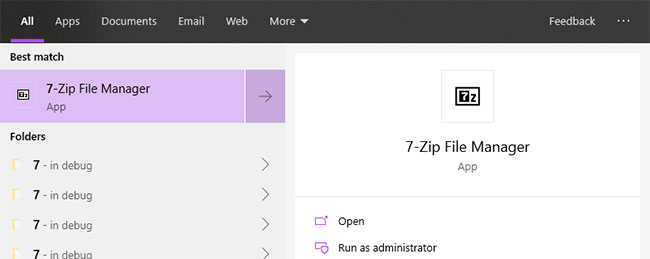
<p style="text-align: justify;">1. Đầu tiên, mở 7-ZIP bằng cách tìm kiếm &quot;<strong>7-Zip File Manager</strong>&quot; trong menu Start.</p>

<figure>
<div style="text-align: justify;"><img alt="Mở 7-ZIP" data-i="0" data-src="https://st.quantrimang.com/photos/image/2020/07/26/xoa-tuy-chon-crc-sha-1.jpg" data-was-processed="true" height="259" src="https://st.quantrimang.com/photos/image/2020/07/26/xoa-tuy-chon-crc-sha-1.jpg" width="650" /></div>

<figcaption>
<div style="text-align: justify;">Mở 7-ZIP</div>
</figcaption>
</figure>

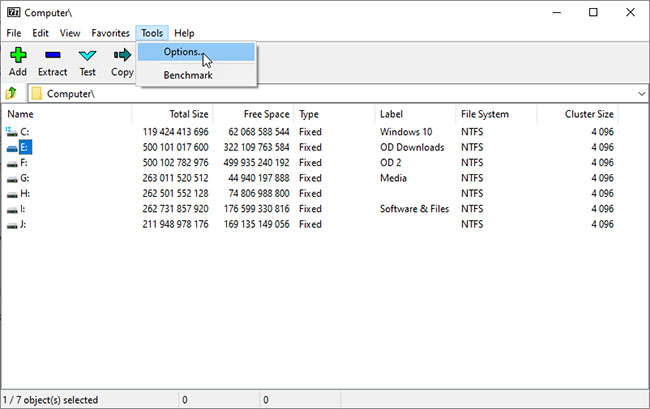
<p style="text-align: justify;">2. Trong cửa sổ 7-Zip, chọn tùy chọn&nbsp;<strong>Tools &gt; Options</strong>. Đây là nơi lưu trữ tất cả các cài đặt 7-Zip.</p>

<figure>
<div style="text-align: justify;"><img alt="Chọn tùy chọn Tools &gt; Options" data-i="1" data-src="https://st.quantrimang.com/photos/image/2020/07/26/xoa-tuy-chon-crc-sha-2.jpg" data-was-processed="true" height="409" src="https://st.quantrimang.com/photos/image/2020/07/26/xoa-tuy-chon-crc-sha-2.jpg" width="650" /></div>

<figcaption>
<div style="text-align: justify;">Chọn tùy chọn Tools &gt; Options</div>
</figcaption>
</figure>

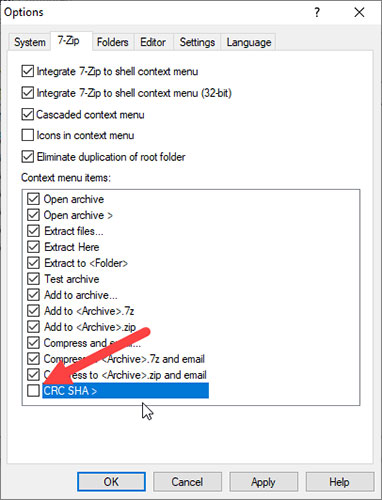
<p style="text-align: justify;">3. Ngay sau khi cửa sổ&nbsp;<strong>Options</strong>&nbsp;được mở, hãy chuyển đến tab&nbsp;<strong>&quot;7-Zip&quot;.</strong>&nbsp;Tại đây, bỏ chọn hộp kiểm&nbsp;<strong>CRC SHA</strong>&nbsp;và nhấp vào nút&nbsp;<strong>Apply &gt; OK</strong>&nbsp;để lưu các thay đổi.</p>

<figure>
<div style="text-align: justify;"><img alt="Bỏ chọn hộp kiểm CRC SHA" data-i="2" data-src="https://st.quantrimang.com/photos/image/2020/07/26/xoa-tuy-chon-crc-sha-3.jpg" data-was-processed="true" height="500" src="https://st.quantrimang.com/photos/image/2020/07/26/xoa-tuy-chon-crc-sha-3.jpg" width="382" /></div>

<figcaption>
<div style="text-align: justify;">Bỏ chọn hộp kiểm CRC SHA</div>
</figcaption>
</figure>

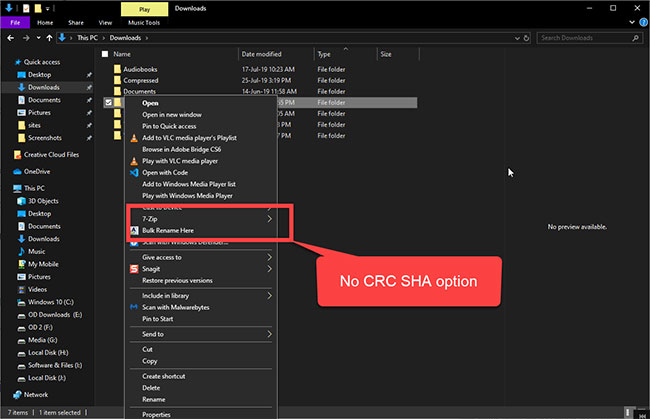
<p style="text-align: justify;">Thế là xong! Không cần khởi động lại. Tùy chọn CRC SHA đã bị xóa. Nếu bạn nhấp chuột phải vào bất kỳ thư mục hoặc file nào, bạn sẽ không còn thấy tùy chọn CRC SHA nữa.</p>

<figure>
<div style="text-align: justify;"><img alt="Tùy chọn CRC SHA đã bị xóa" data-i="3" data-src="https://st.quantrimang.com/photos/image/2020/07/26/xoa-tuy-chon-crc-sha-4.jpg" data-was-processed="true" height="419" src="https://st.quantrimang.com/photos/image/2020/07/26/xoa-tuy-chon-crc-sha-4.jpg" width="650" /></div>

<figcaption>
<div style="text-align: justify;">Tùy chọn CRC SHA đã bị xóa</div>
</figcaption>
</figure>

<p style="text-align: justify;">Nếu bạn muốn kích hoạt lại tùy chọn, chỉ cần chọn hộp kiểm CRC SHA ở bước 3 là xong.</p>
		</div>
				<div id="author">
						<p>
				<strong>Nguồn tin:</strong>
				Quantrimang.com
			</p>
		</div>
	</div>
	<div id="footer" class="clearfix">
		<div id="url">
			<strong>URL của bản tin này: </strong><a href="https://www.nguoicodonvn2008.info/vi/news/savefile/kien-thuc-may-tinh/cach-xoa-tuy-chon-crc-sha-khoi-menu-ngu-canh-trong-windows-10-2409.html" title="Cách xóa tùy chọn CRC SHA khỏi menu ngữ cảnh trong Windows 10">https://www.nguoicodonvn2008.info/vi/news/savefile/kien-thuc-may-tinh/cach-xoa-tuy-chon-crc-sha-khoi-menu-ngu-canh-trong-windows-10-2409.html</a>

		</div>
		<div class="clear"></div>
		<div class="copyright">
			&copy; .&#x3A; Nguoicodonvn2008.info - Cõi lòng người cô đơn &#x3A;.
		</div>
		<div id="contact">
			<a href="mailto:admin@nguoicodonvn2008.info">admin@nguoicodonvn2008.info</a>
		</div>
	</div>
</div>
        <div id="timeoutsess" class="chromeframe">
            Bạn đã không sử dụng Site, <a onclick="timeoutsesscancel();" href="https://www.nguoicodonvn2008.info/#">Bấm vào đây để duy trì trạng thái đăng nhập</a>. Thời gian chờ: <span id="secField"> 60 </span> giây
        </div>
        <div id="openidResult" class="nv-alert" style="display:none"></div>
        <div id="openidBt" data-result="" data-redirect=""></div>
		</script>
		<div class="car-top">
  <span><img src="https://www.nguoicodonvn2008.info/themes/default/images/car.png" alt=""></span>
</div>
<script src="https://www.nguoicodonvn2008.info/assets/js/jquery/jquery.min.js"></script>
<script>var nv_base_siteurl="/",nv_lang_data="vi",nv_lang_interface="vi",nv_name_variable="nv",nv_fc_variable="op",nv_lang_variable="language",nv_module_name="news",nv_func_name="savefile",nv_is_user=0, nv_my_ofs=-4,nv_my_abbr="EDT",nv_cookie_prefix="nv4c_e856T",nv_check_pass_mstime=1738000,nv_area_admin=0,nv_safemode=0,theme_responsive=0,nv_recaptcha_ver=2,nv_recaptcha_sitekey="",nv_recaptcha_type="image",XSSsanitize=1;</script>
<script src="https://www.nguoicodonvn2008.info/assets/js/language/vi.js"></script>
<script src="https://www.nguoicodonvn2008.info/assets/js/DOMPurify/purify3.js"></script>
<script src="https://www.nguoicodonvn2008.info/assets/js/global.js"></script>
<script src="https://www.nguoicodonvn2008.info/assets/js/site.js"></script>
<script src="https://www.nguoicodonvn2008.info/themes/default/js/news.js"></script>
<script src="https://www.nguoicodonvn2008.info/themes/default/js/main.js"></script>
<script src="https://www.nguoicodonvn2008.info/themes/default/js/custom.js"></script>
<script type="application/ld+json">
        {
            "@context": "https://schema.org",
            "@type": "Organization",
            "url": "https://www.nguoicodonvn2008.info",
            "logo": "https://www.nguoicodonvn2008.info/uploads/angel.gif"
        }
        </script>
<script src="https://www.nguoicodonvn2008.info/themes/default/js/bootstrap.min.js"></script>
<script type="text/javascript">
var $scrolltop = $('.car-top');
$scrolltop.on('click', function () {
    $('html,body').animate({
        scrollTop: 0
    }, 800);
    $(this).addClass("car-run");
    setTimeout(function(){ $scrolltop.removeClass('car-run');}, 1000);
    return false;
});
$(window).on('scroll', function ()
{ 
    if($(window).scrollTop() >= 200)
    {
        $scrolltop.addClass("show");
        $scrolltop.addClass("car-down");
    }
    else
    {
       $scrolltop.removeClass("show");
       setTimeout(function(){ $scrolltop.removeClass('car-down');}, 300);
    }
});
</script>
</body>
</html>