<!DOCTYPE html>
    <html lang="vi" xmlns="http://www.w3.org/1999/xhtml" prefix="og: http://ogp.me/ns#">
    <head>
<title>Cách xóa phiên bản File History cũ trong Windows 10</title>
<meta name="description" content="Cách xóa phiên bản File History cũ trong Windows 10 - Savefile - Tin Tức -...">
<meta name="author" content=".: Nguoicodonvn2008.info - Cõi lòng người cô đơn :.">
<meta name="copyright" content=".: Nguoicodonvn2008.info - Cõi lòng người cô đơn :. [admin@nguoicodonvn2008.info]">
<meta name="robots" content="index, archive, follow, noodp">
<meta name="googlebot" content="index,archive,follow,noodp">
<meta name="msnbot" content="all,index,follow">
<meta name="generator" content="NukeViet v4.5">
<meta http-equiv="Content-Type" content="text/html; charset=utf-8">
<meta property="og:title" content="Cách xóa phiên bản File History cũ trong Windows 10">
<meta property="og:type" content="website">
<meta property="og:description" content="Savefile - Tin Tức - https&#x3A;&#x002F;&#x002F;www.nguoicodonvn2008.info&#x002F;vi&#x002F;news&#x002F;savefile&#x002F;kien-thuc-may-tinh&#x002F;cach-xoa-phien-ban-file-history-cu-trong-windows-10-174.html">
<meta property="og:site_name" content=".&#x3A; Nguoicodonvn2008.info - Cõi lòng người cô đơn &#x3A;.">
<meta property="og:url" content="https://www.nguoicodonvn2008.info/vi/news/savefile/kien-thuc-may-tinh/cach-xoa-phien-ban-file-history-cu-trong-windows-10-174.html">
<link rel="shortcut icon" href="https://www.nguoicodonvn2008.info/favicon.ico">
<link rel="canonical" href="https://www.nguoicodonvn2008.info/vi/news/savefile/kien-thuc-may-tinh/cach-xoa-phien-ban-file-history-cu-trong-windows-10-174.html">
<link rel="alternate" href="https://www.nguoicodonvn2008.info/vi/news/rss/" title="Tin Tức" type="application/rss+xml">
<link rel="alternate" href="https://www.nguoicodonvn2008.info/vi/news/rss/karaoke-dual/" title="Tin Tức - Karaoke Dual" type="application/rss+xml">
<link rel="alternate" href="https://www.nguoicodonvn2008.info/vi/news/rss/nhac-tre/" title="Tin Tức - Nhạc trẻ" type="application/rss+xml">
<link rel="alternate" href="https://www.nguoicodonvn2008.info/vi/news/rss/tru-tinh/" title="Tin Tức - Trữ tình" type="application/rss+xml">
<link rel="alternate" href="https://www.nguoicodonvn2008.info/vi/news/rss/nuoc-ngoai/" title="Tin Tức - Nước ngoài" type="application/rss+xml">
<link rel="alternate" href="https://www.nguoicodonvn2008.info/vi/news/rss/remix/" title="Tin Tức - Remix" type="application/rss+xml">
<link rel="alternate" href="https://www.nguoicodonvn2008.info/vi/news/rss/tam-su-tinh-yeu/" title="Tin Tức - Tâm sự tình yêu" type="application/rss+xml">
<link rel="alternate" href="https://www.nguoicodonvn2008.info/vi/news/rss/tho-suu-tam/" title="Tin Tức - Thơ sưu tầm" type="application/rss+xml">
<link rel="alternate" href="https://www.nguoicodonvn2008.info/vi/news/rss/cuoc-song/" title="Tin Tức - Cuộc sống" type="application/rss+xml">
<link rel="alternate" href="https://www.nguoicodonvn2008.info/vi/news/rss/phan-mem/" title="Tin Tức - Phần mềm" type="application/rss+xml">
<link rel="alternate" href="https://www.nguoicodonvn2008.info/vi/news/rss/kien-thuc-may-tinh/" title="Tin Tức - Kiến thức máy tính" type="application/rss+xml">
<link rel="alternate" href="https://www.nguoicodonvn2008.info/vi/news/rss/hoc-tap/" title="Tin Tức - Học tập" type="application/rss+xml">
<link rel="alternate" href="https://www.nguoicodonvn2008.info/vi/news/rss/tai-lieu/" title="Tin Tức - Tài liệu" type="application/rss+xml">
<link rel="alternate" href="https://www.nguoicodonvn2008.info/vi/news/rss/de-thi/" title="Tin Tức - Đề thi" type="application/rss+xml">
<link rel="preload" as="style" href="https://www.nguoicodonvn2008.info/assets/css/font-awesome.min.css" type="text/css">
<link rel="preload" as="style" href="https://www.nguoicodonvn2008.info/themes/default/css/bootstrap.non-responsive.css" type="text/css">
<link rel="preload" as="style" href="https://www.nguoicodonvn2008.info/themes/default/css/style.css" type="text/css">
<link rel="preload" as="style" href="https://www.nguoicodonvn2008.info/themes/default/css/style.non-responsive.css" type="text/css">
<link rel="preload" as="style" href="https://www.nguoicodonvn2008.info/themes/default/css/news.css" type="text/css">
<link rel="preload" as="style" href="https://www.nguoicodonvn2008.info/themes/default/css/custom.css" type="text/css">
<link rel="preload" as="script" href="https://www.nguoicodonvn2008.info/assets/js/jquery/jquery.min.js" type="text/javascript">
<link rel="preload" as="script" href="https://www.nguoicodonvn2008.info/assets/js/language/vi.js" type="text/javascript">
<link rel="preload" as="script" href="https://www.nguoicodonvn2008.info/assets/js/DOMPurify/purify3.js" type="text/javascript">
<link rel="preload" as="script" href="https://www.nguoicodonvn2008.info/assets/js/global.js" type="text/javascript">
<link rel="preload" as="script" href="https://www.nguoicodonvn2008.info/assets/js/site.js" type="text/javascript">
<link rel="preload" as="script" href="https://www.nguoicodonvn2008.info/themes/default/js/news.js" type="text/javascript">
<link rel="preload" as="script" href="https://www.nguoicodonvn2008.info/themes/default/js/main.js" type="text/javascript">
<link rel="preload" as="script" href="https://www.nguoicodonvn2008.info/themes/default/js/custom.js" type="text/javascript">
<link rel="preload" as="script" href="https://www.nguoicodonvn2008.info/themes/default/js/bootstrap.min.js" type="text/javascript">
<link rel="stylesheet" href="https://www.nguoicodonvn2008.info/assets/css/font-awesome.min.css">
<link rel="stylesheet" href="https://www.nguoicodonvn2008.info/themes/default/css/bootstrap.non-responsive.css">
<link rel="stylesheet" href="https://www.nguoicodonvn2008.info/themes/default/css/style.css">
<link rel="stylesheet" href="https://www.nguoicodonvn2008.info/themes/default/css/style.non-responsive.css">
<link rel="StyleSheet" href="https://www.nguoicodonvn2008.info/themes/default/css/news.css">
<link rel="stylesheet" href="https://www.nguoicodonvn2008.info/themes/default/css/custom.css">
<style type="text/css">
	body{background: #fff;}
</style>
    </head>
    <body>
<div id="print">
	<div id="hd_print">
		<h2 class="pull-left">.&#x3A; Nguoicodonvn2008.info - Cõi lòng người cô đơn &#x3A;.</h2>
		<p class="pull-right"><a title=".&#x3A; Nguoicodonvn2008.info - Cõi lòng người cô đơn &#x3A;." href="https://www.nguoicodonvn2008.info/">https://www.nguoicodonvn2008.info</a></p>
	</div>
	<div class="clear"></div>
	<hr />
	<div id="content">
		<h1>Cách xóa phiên bản File History cũ trong Windows 10</h1>
		<ul class="list-inline">
			<li>Thứ bảy - 22/06/2019 01:10</li>
			<li class="hidden-print txtrequired"><em class="fa fa-print">&nbsp;</em><a title="In ra" href="javascript:;" onclick="window.print()">In ra</a></li>
			<li class="hidden-print txtrequired"><em class="fa fa-power-off">&nbsp;</em><a title="Đóng cửa sổ này" href="javascript:;" onclick="window.close()">Đóng cửa sổ này</a></li>
		</ul>
		<div class="clear"></div>
		<div id="hometext">
		</div>
				<div class="imghome">
			<img alt="Cách xóa phiên bản File History cũ trong Windows 10" src="https://st.quantrimang.com/photos/image/2019/06/20/xoa-phien-ban-cu-file-history-7.png" width="460" class="img-thumbnail" />
		</div>
		<div class="clear"></div>
		<div id="bodytext" class="clearfix">
			&nbsp;
<p>File History&nbsp;là một tính năng trong Windows 10 cho phép bạn khôi phục tài liệu đã sửa đổi về phiên bản cũ hơn hoặc khôi phục file vô tình xóa. Nó tương tự như&nbsp;Time Machine trên macOS&nbsp;và ban đầu được giới thiệu trong Windows 8. Thông thường, bạn sẽ thiết lập File History trên Windows 10 để sao lưu dữ liệu vào ổ USB ngoài dung lượng lớn hoặc trên network. Nhưng sau một thời gian, bạn cần thêm dung lượng trên ổ đĩa để tiếp tục sao lưu File History, vậy phải làm sao? Bài viết này sẽ hướng dẫn các bạn cách xem và xóa phiên bản cũ hơn của File History để lấy lại dung lượng ổ đĩa.<br  />
Cách xóa phiên bản File History cũ trong Windows 10</p>

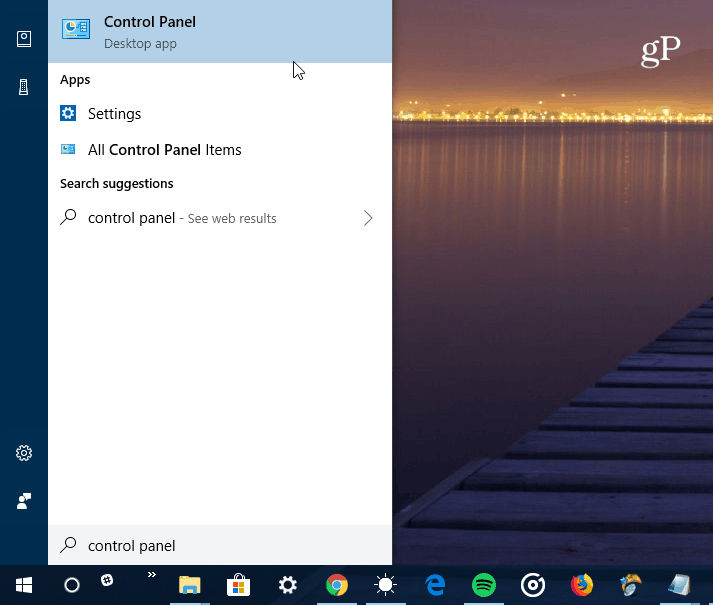
<p>Nhấn phím&nbsp;<code>Win</code>&nbsp;và gõ&nbsp;<strong>control panel</strong>, sau đó nhấn&nbsp;<strong>Enter</strong>&nbsp;hoặc chọn kết quả ở đầu để&nbsp;<a href="https://quantrimang.com/cach-mo-control-panel-tren-windows-10-8-7-vista-va-xp-152771" title="Cách mở Control Panel trên Windows 10, 8.1, 7">mở Control Panel</a>.</p>

<p><img alt="Mở Control Panel " data-i="0" data-src="https://st.quantrimang.com/photos/image/2019/06/20/xoa-phien-ban-cu-file-history-1.png" data-was-processed="true" height="605" src="https://st.quantrimang.com/photos/image/2019/06/20/xoa-phien-ban-cu-file-history-1.png" width="640&#039;" /></p>

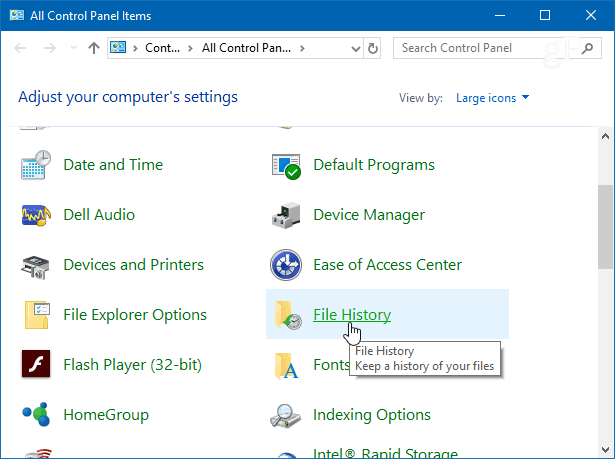
<p>Từ Control Panel, cuộn xuống và click vào&nbsp;<strong>File History</strong>.</p>

<p><img alt="Click vào File History" data-i="1" data-src="https://st.quantrimang.com/photos/image/2019/06/20/xoa-phien-ban-cu-file-history-2.png" data-was-processed="true" height="459" src="https://st.quantrimang.com/photos/image/2019/06/20/xoa-phien-ban-cu-file-history-2.png" width="615" /></p>

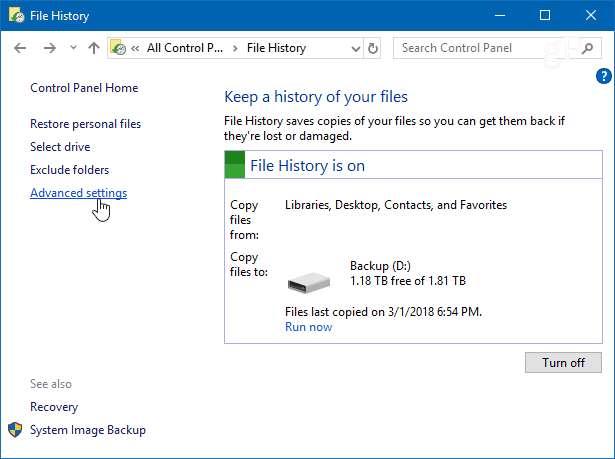
<p>Tiếp theo, click vào liên kết&nbsp;<strong>Advanced Settings</strong>&nbsp;từ danh sách bên trái.</p>

<p><img alt="Click vào liên kết Advanced Settings" data-i="2" data-src="https://st.quantrimang.com/photos/image/2019/06/20/xoa-phien-ban-cu-file-history-3.png" data-was-processed="true" height="459" src="https://st.quantrimang.com/photos/image/2019/06/20/xoa-phien-ban-cu-file-history-3.png" width="615" /></p>

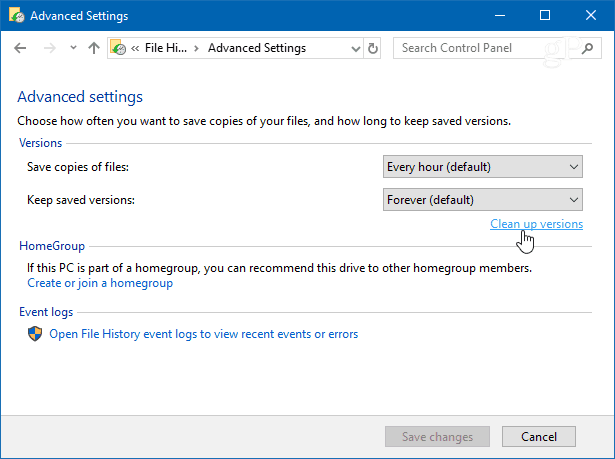
<p>Trong phần&nbsp;<strong>Versions</strong>&nbsp;trong&nbsp;<strong>Advanced Settings</strong>, click vào&nbsp;<strong>Clean up versions</strong>. Ngoài ra, bạn có thể quản lý tần suất tạo các bản sao chép file và độ dài phiên bản được lưu.</p>

<p><img alt="Click vào Clean up versions" data-i="3" data-src="https://st.quantrimang.com/photos/image/2019/06/20/xoa-phien-ban-cu-file-history-4.png" data-was-processed="true" height="459" src="https://st.quantrimang.com/photos/image/2019/06/20/xoa-phien-ban-cu-file-history-4.png" width="615" /></p>

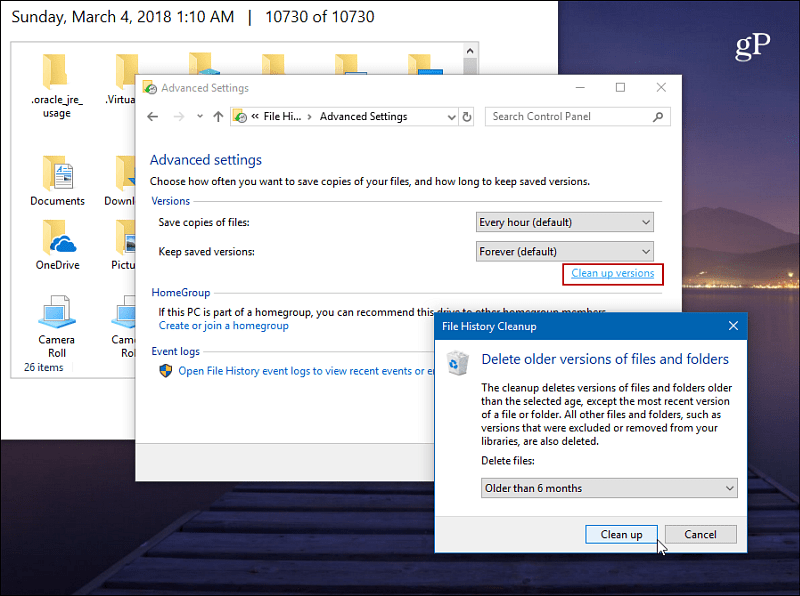
<p>Bây giờ, từ menu thả xuống, chọn khoảng thời gian bạn muốn xóa phiên bản file đã lưu. Bạn có thể chọn các bản cũ từ hơn hai năm đến một tháng gần đây. Ngoài ra, còn có một tùy chọn bạn có thể sử dụng là xóa tất cả các phiên bản ngoại trừ phiên bản mới nhất.</p>

<p><img alt="Chọn thời gian " data-i="4" data-src="https://st.quantrimang.com/photos/image/2019/06/20/xoa-phien-ban-cu-file-history-5.png" data-was-processed="true" height="477" src="https://st.quantrimang.com/photos/image/2019/06/20/xoa-phien-ban-cu-file-history-5.png" width="640" /></p>

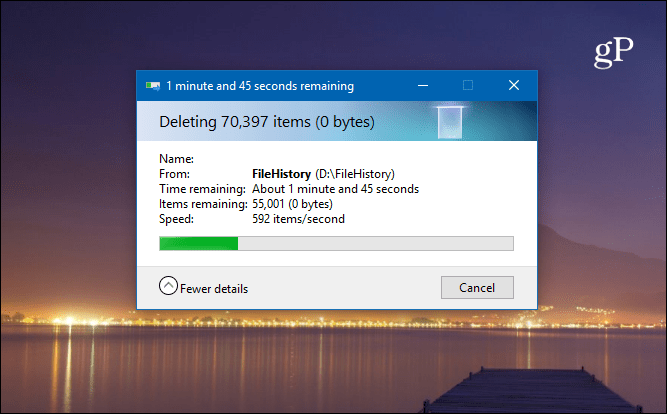
<p>Bạn sẽ nhận được thông báo tiến trình trong khi các phiên bản cũ hơn được xóa và thông báo cho biết quá trình xóa hoàn tất. Quá trình này thường rất nhanh nhưng nó sẽ thay đổi tùy thuộc vào dung lượng dữ liệu bạn muốn xóa và tốc độ máy tính.</p>

<p><img alt="Thông báo tiến trình xóa" data-i="5" data-src="https://st.quantrimang.com/photos/image/2019/06/20/xoa-phien-ban-cu-file-history-6.png" data-was-processed="true" height="397" src="https://st.quantrimang.com/photos/image/2019/06/20/xoa-phien-ban-cu-file-history-6.png" width="640" /></p>

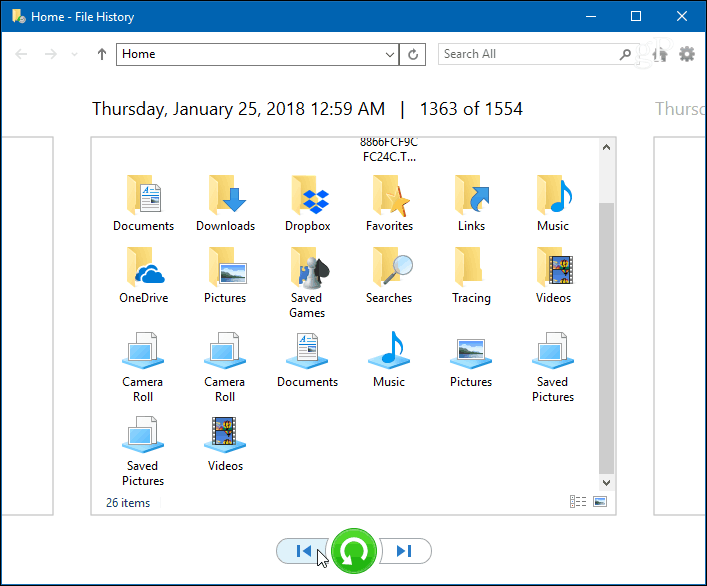
<p>Nếu muốn xem các file trước khi xóa, nhấn phím&nbsp;<code>Win</code>&nbsp;và gõ&nbsp;<strong>file history</strong>, sau đó nhấn&nbsp;<strong>Enter</strong>. Bạn có thể duyệt và nhìn vào ngày tháng file và thư mục được sao lưu.</p>

<p><img alt="Xem các file trong File History " data-i="6" data-src="https://st.quantrimang.com/photos/image/2019/06/20/xoa-phien-ban-cu-file-history-7.png" data-was-processed="true" height="530" src="https://st.quantrimang.com/photos/image/2019/06/20/xoa-phien-ban-cu-file-history-7.png" width="640" /></p>
		</div>
				<div id="author">
						<p>
				<strong>Nguồn tin:</strong>
				Quantrimang.com
			</p>
		</div>
	</div>
	<div id="footer" class="clearfix">
		<div id="url">
			<strong>URL của bản tin này: </strong><a href="https://www.nguoicodonvn2008.info/vi/news/savefile/kien-thuc-may-tinh/cach-xoa-phien-ban-file-history-cu-trong-windows-10-174.html" title="Cách xóa phiên bản File History cũ trong Windows 10">https://www.nguoicodonvn2008.info/vi/news/savefile/kien-thuc-may-tinh/cach-xoa-phien-ban-file-history-cu-trong-windows-10-174.html</a>

		</div>
		<div class="clear"></div>
		<div class="copyright">
			&copy; .&#x3A; Nguoicodonvn2008.info - Cõi lòng người cô đơn &#x3A;.
		</div>
		<div id="contact">
			<a href="mailto:admin@nguoicodonvn2008.info">admin@nguoicodonvn2008.info</a>
		</div>
	</div>
</div>
        <div id="timeoutsess" class="chromeframe">
            Bạn đã không sử dụng Site, <a onclick="timeoutsesscancel();" href="https://www.nguoicodonvn2008.info/#">Bấm vào đây để duy trì trạng thái đăng nhập</a>. Thời gian chờ: <span id="secField"> 60 </span> giây
        </div>
        <div id="openidResult" class="nv-alert" style="display:none"></div>
        <div id="openidBt" data-result="" data-redirect=""></div>
		</script>
		<div class="car-top">
  <span><img src="https://www.nguoicodonvn2008.info/themes/default/images/car.png" alt=""></span>
</div>
<div id="run_cronjobs" style="visibility:hidden;display:none;"><img alt="cron" src="/index.php?second=cronjobs&amp;p=p63zW3Fn" width="1" height="1" /></div>
<script src="https://www.nguoicodonvn2008.info/assets/js/jquery/jquery.min.js"></script>
<script>var nv_base_siteurl="/",nv_lang_data="vi",nv_lang_interface="vi",nv_name_variable="nv",nv_fc_variable="op",nv_lang_variable="language",nv_module_name="news",nv_func_name="savefile",nv_is_user=0, nv_my_ofs=-4,nv_my_abbr="EDT",nv_cookie_prefix="nv4c_e856T",nv_check_pass_mstime=1738000,nv_area_admin=0,nv_safemode=0,theme_responsive=0,nv_recaptcha_ver=2,nv_recaptcha_sitekey="",nv_recaptcha_type="image",XSSsanitize=1;</script>
<script src="https://www.nguoicodonvn2008.info/assets/js/language/vi.js"></script>
<script src="https://www.nguoicodonvn2008.info/assets/js/DOMPurify/purify3.js"></script>
<script src="https://www.nguoicodonvn2008.info/assets/js/global.js"></script>
<script src="https://www.nguoicodonvn2008.info/assets/js/site.js"></script>
<script src="https://www.nguoicodonvn2008.info/themes/default/js/news.js"></script>
<script src="https://www.nguoicodonvn2008.info/themes/default/js/main.js"></script>
<script src="https://www.nguoicodonvn2008.info/themes/default/js/custom.js"></script>
<script type="application/ld+json">
        {
            "@context": "https://schema.org",
            "@type": "Organization",
            "url": "https://www.nguoicodonvn2008.info",
            "logo": "https://www.nguoicodonvn2008.info/uploads/angel.gif"
        }
        </script>
<script src="https://www.nguoicodonvn2008.info/themes/default/js/bootstrap.min.js"></script>
<script type="text/javascript">
var $scrolltop = $('.car-top');
$scrolltop.on('click', function () {
    $('html,body').animate({
        scrollTop: 0
    }, 800);
    $(this).addClass("car-run");
    setTimeout(function(){ $scrolltop.removeClass('car-run');}, 1000);
    return false;
});
$(window).on('scroll', function ()
{ 
    if($(window).scrollTop() >= 200)
    {
        $scrolltop.addClass("show");
        $scrolltop.addClass("car-down");
    }
    else
    {
       $scrolltop.removeClass("show");
       setTimeout(function(){ $scrolltop.removeClass('car-down');}, 300);
    }
});
</script>
</body>
</html>