<!DOCTYPE html>
    <html lang="vi" xmlns="http://www.w3.org/1999/xhtml" prefix="og: http://ogp.me/ns#">
    <head>
<title>Cách xóa hình xăm bằng Photoshop</title>
<meta name="description" content="Cách xóa hình xăm bằng Photoshop - Savefile - Tin Tức - https&#x3A;&#x002F;&#x002F;www.nguoicodonvn2008.info&#x002F;vi&#x002F;news&#x002F;savefile&#x002F;kien-thuc-may-tinh&#x002F;cach-xoa-hinh-xam-bang-photoshop-1572.html">
<meta name="author" content=".: Nguoicodonvn2008.info - Cõi lòng người cô đơn :.">
<meta name="copyright" content=".: Nguoicodonvn2008.info - Cõi lòng người cô đơn :. [admin@nguoicodonvn2008.info]">
<meta name="robots" content="index, archive, follow, noodp">
<meta name="googlebot" content="index,archive,follow,noodp">
<meta name="msnbot" content="all,index,follow">
<meta name="generator" content="NukeViet v4.5">
<meta http-equiv="Content-Type" content="text/html; charset=utf-8">
<meta property="og:title" content="Cách xóa hình xăm bằng Photoshop">
<meta property="og:type" content="website">
<meta property="og:description" content="Savefile - Tin Tức - https&#x3A;&#x002F;&#x002F;www.nguoicodonvn2008.info&#x002F;vi&#x002F;news&#x002F;savefile&#x002F;kien-thuc-may-tinh&#x002F;cach-xoa-hinh-xam-bang-photoshop-1572.html">
<meta property="og:site_name" content=".&#x3A; Nguoicodonvn2008.info - Cõi lòng người cô đơn &#x3A;.">
<meta property="og:url" content="https://www.nguoicodonvn2008.info/vi/news/savefile/kien-thuc-may-tinh/cach-xoa-hinh-xam-bang-photoshop-1572.html">
<link rel="shortcut icon" href="https://www.nguoicodonvn2008.info/favicon.ico">
<link rel="canonical" href="https://www.nguoicodonvn2008.info/vi/news/savefile/kien-thuc-may-tinh/cach-xoa-hinh-xam-bang-photoshop-1572.html">
<link rel="alternate" href="https://www.nguoicodonvn2008.info/vi/news/rss/" title="Tin Tức" type="application/rss+xml">
<link rel="alternate" href="https://www.nguoicodonvn2008.info/vi/news/rss/karaoke-dual/" title="Tin Tức - Karaoke Dual" type="application/rss+xml">
<link rel="alternate" href="https://www.nguoicodonvn2008.info/vi/news/rss/nhac-tre/" title="Tin Tức - Nhạc trẻ" type="application/rss+xml">
<link rel="alternate" href="https://www.nguoicodonvn2008.info/vi/news/rss/tru-tinh/" title="Tin Tức - Trữ tình" type="application/rss+xml">
<link rel="alternate" href="https://www.nguoicodonvn2008.info/vi/news/rss/nuoc-ngoai/" title="Tin Tức - Nước ngoài" type="application/rss+xml">
<link rel="alternate" href="https://www.nguoicodonvn2008.info/vi/news/rss/remix/" title="Tin Tức - Remix" type="application/rss+xml">
<link rel="alternate" href="https://www.nguoicodonvn2008.info/vi/news/rss/tam-su-tinh-yeu/" title="Tin Tức - Tâm sự tình yêu" type="application/rss+xml">
<link rel="alternate" href="https://www.nguoicodonvn2008.info/vi/news/rss/tho-suu-tam/" title="Tin Tức - Thơ sưu tầm" type="application/rss+xml">
<link rel="alternate" href="https://www.nguoicodonvn2008.info/vi/news/rss/cuoc-song/" title="Tin Tức - Cuộc sống" type="application/rss+xml">
<link rel="alternate" href="https://www.nguoicodonvn2008.info/vi/news/rss/phan-mem/" title="Tin Tức - Phần mềm" type="application/rss+xml">
<link rel="alternate" href="https://www.nguoicodonvn2008.info/vi/news/rss/kien-thuc-may-tinh/" title="Tin Tức - Kiến thức máy tính" type="application/rss+xml">
<link rel="alternate" href="https://www.nguoicodonvn2008.info/vi/news/rss/hoc-tap/" title="Tin Tức - Học tập" type="application/rss+xml">
<link rel="alternate" href="https://www.nguoicodonvn2008.info/vi/news/rss/tai-lieu/" title="Tin Tức - Tài liệu" type="application/rss+xml">
<link rel="alternate" href="https://www.nguoicodonvn2008.info/vi/news/rss/de-thi/" title="Tin Tức - Đề thi" type="application/rss+xml">
<link rel="preload" as="style" href="https://www.nguoicodonvn2008.info/assets/css/font-awesome.min.css" type="text/css">
<link rel="preload" as="style" href="https://www.nguoicodonvn2008.info/themes/default/css/bootstrap.non-responsive.css" type="text/css">
<link rel="preload" as="style" href="https://www.nguoicodonvn2008.info/themes/default/css/style.css" type="text/css">
<link rel="preload" as="style" href="https://www.nguoicodonvn2008.info/themes/default/css/style.non-responsive.css" type="text/css">
<link rel="preload" as="style" href="https://www.nguoicodonvn2008.info/themes/default/css/news.css" type="text/css">
<link rel="preload" as="style" href="https://www.nguoicodonvn2008.info/themes/default/css/custom.css" type="text/css">
<link rel="preload" as="script" href="https://www.nguoicodonvn2008.info/assets/js/jquery/jquery.min.js" type="text/javascript">
<link rel="preload" as="script" href="https://www.nguoicodonvn2008.info/assets/js/language/vi.js" type="text/javascript">
<link rel="preload" as="script" href="https://www.nguoicodonvn2008.info/assets/js/DOMPurify/purify3.js" type="text/javascript">
<link rel="preload" as="script" href="https://www.nguoicodonvn2008.info/assets/js/global.js" type="text/javascript">
<link rel="preload" as="script" href="https://www.nguoicodonvn2008.info/assets/js/site.js" type="text/javascript">
<link rel="preload" as="script" href="https://www.nguoicodonvn2008.info/themes/default/js/news.js" type="text/javascript">
<link rel="preload" as="script" href="https://www.nguoicodonvn2008.info/themes/default/js/main.js" type="text/javascript">
<link rel="preload" as="script" href="https://www.nguoicodonvn2008.info/themes/default/js/custom.js" type="text/javascript">
<link rel="preload" as="script" href="https://www.nguoicodonvn2008.info/themes/default/js/bootstrap.min.js" type="text/javascript">
<link rel="stylesheet" href="https://www.nguoicodonvn2008.info/assets/css/font-awesome.min.css">
<link rel="stylesheet" href="https://www.nguoicodonvn2008.info/themes/default/css/bootstrap.non-responsive.css">
<link rel="stylesheet" href="https://www.nguoicodonvn2008.info/themes/default/css/style.css">
<link rel="stylesheet" href="https://www.nguoicodonvn2008.info/themes/default/css/style.non-responsive.css">
<link rel="StyleSheet" href="https://www.nguoicodonvn2008.info/themes/default/css/news.css">
<link rel="stylesheet" href="https://www.nguoicodonvn2008.info/themes/default/css/custom.css">
<style type="text/css">
	body{background: #fff;}
</style>
    </head>
    <body>
<div id="print">
	<div id="hd_print">
		<h2 class="pull-left">.&#x3A; Nguoicodonvn2008.info - Cõi lòng người cô đơn &#x3A;.</h2>
		<p class="pull-right"><a title=".&#x3A; Nguoicodonvn2008.info - Cõi lòng người cô đơn &#x3A;." href="https://www.nguoicodonvn2008.info/">https://www.nguoicodonvn2008.info</a></p>
	</div>
	<div class="clear"></div>
	<hr />
	<div id="content">
		<h1>Cách xóa hình xăm bằng Photoshop</h1>
		<ul class="list-inline">
			<li>Thứ năm - 23/01/2020 02:15</li>
			<li class="hidden-print txtrequired"><em class="fa fa-print">&nbsp;</em><a title="In ra" href="javascript:;" onclick="window.print()">In ra</a></li>
			<li class="hidden-print txtrequired"><em class="fa fa-power-off">&nbsp;</em><a title="Đóng cửa sổ này" href="javascript:;" onclick="window.close()">Đóng cửa sổ này</a></li>
		</ul>
		<div class="clear"></div>
		<div id="hometext">
		</div>
				<div class="imghome">
			<img alt="Cách xóa hình xăm bằng Photoshop" src="https://st.quantrimang.com/photos/image/2020/01/22/xoa-hinh-xam-bang-photoshop-2.jpg" width="460" class="img-thumbnail" />
		</div>
		<div class="clear"></div>
		<div id="bodytext" class="clearfix">
			<p style="text-align: justify;">Xóa hình xăm khỏi ảnh khá đơn giản bằng công cụ Healing Tool của&nbsp;Adobe Photoshop. Công cụ này hoạt động tốt nhất cho hình xăm nhỏ. Cùng&nbsp;<strong>Quantrimang.com</strong>&nbsp;tìm hiểu cách thực hiện qua bài viết sau đây!</p>

<p style="text-align: justify;"><strong>Bước 1</strong>: Mở Photoshop và mở hình ảnh bạn muốn chỉnh sửa. Nhập&nbsp;<code>L</code>&nbsp;để mở&nbsp;<strong>Lasso Tool.</strong>&nbsp;Vẽ một hình xung quanh hình xăm.</p>

<p style="text-align: justify;"><strong>Bước 2</strong>: Nhập&nbsp;<code>M</code>&nbsp;để mở&nbsp;<strong>Marquee Tool.</strong>&nbsp;Sử dụng công cụ, di chuyển vùng chọn đến một vùng da không có hình xăm.</p>

<p style="text-align: justify;"><strong>Bước 3</strong>: Nhập&nbsp;<code>CTRL</code>+<code>C</code>&nbsp;để sao chép khu vực và&nbsp;<code>CTRL</code>+<code>V</code>&nbsp;để dán khu vực đó. Bây giờ, di chuyển miếng da mới dán lên trên hình xăm. Nhập&nbsp;<code>CTRL</code>+<code>E</code>&nbsp;để hợp nhất layer đã dán với layer gốc.</p>

<p style="text-align: justify;"><strong>Bước 4</strong>: Nhập&nbsp;<code>J</code>&nbsp;để mở&nbsp;<strong>Healing Brush,</strong>&nbsp;đặt kích thước brush thành 15 và tích vào&nbsp;<strong>Aligned.</strong>&nbsp;Đây là nơi công việc thực sự bắt đầu.</p>

<p style="text-align: justify;"><strong>Bước 5</strong>: Đặt brush ngay tại rìa nơi bắt đầu phần da được dán. Di chuyển trở lại khoảng 20 pixel, rồi nhấn&nbsp;<code>ALT</code>&nbsp;và nhấp vào khu vực đó. Công cụ&nbsp;<strong>Healing Brush</strong>&nbsp;rất giống với công cụ&nbsp;<strong>Clone</strong>, nó nhân bản khu vực mà bạn đã nhấn&nbsp;<code>ALT</code>&nbsp;và nhấp vào ở trên. Sự khác biệt giữa&nbsp;<strong>Healing Brush</strong>&nbsp;và<strong>&nbsp;Clone</strong>&nbsp;là các khu vực mà bạn nhân bản được hợp nhất với màu sắc và ánh sáng xung quanh.</p>

<p style="text-align: justify;"><strong>Bước 6</strong>: Bắt đầu dùng chuột để sao chép vùng da xung quanh lên mép của phần da đã dán.</p>

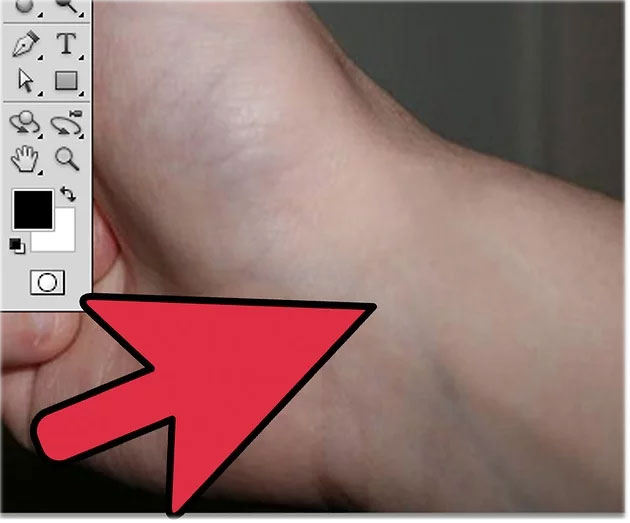
<p style="text-align: justify;"><strong>Bước 7</strong>: Xem vùng da đã dán bắt đầu hợp nhất vào vùng da xung quanh. Tiếp tục làm điều này xung quanh toàn bộ cạnh của phần da đã dán cho đến khi cạnh đó hòa vào vùng da xung quanh. Kết quả trông giống như sau:</p>

<figure>
<div style="text-align: justify;"><img alt="Vùng da đã dán bắt đầu hợp nhất vào vùng da xung quanh" data-i="0" data-src="https://st.quantrimang.com/photos/image/2020/01/22/xoa-hinh-xam-bang-photoshop-1.jpg" data-was-processed="true" height="486" src="https://st.quantrimang.com/photos/image/2020/01/22/xoa-hinh-xam-bang-photoshop-1.jpg" width="650" /></div>

<figcaption>
<div style="text-align: justify;">Vùng da đã dán bắt đầu hợp nhất vào vùng da xung quanh</div>
</figcaption>
</figure>

<p style="text-align: justify;"><strong>Bước 8</strong>: Tuy nhiên mọi thứ trông chưa được tự nhiên hoàn toàn. Vì vậy, sử dụng Healing Brush và bắt đầu tô lên toàn bộ vùng da đã dán. Bạn tùy chỉnh ánh sáng sao cho trông tự nhiên nhất. Bạn có thể phải nhấn&nbsp;<code>ALT</code>&nbsp;và nhấp vào các khu vực khác nhau của vùng da xung quanh để đảm bảo ánh sáng phù hợp.</p>

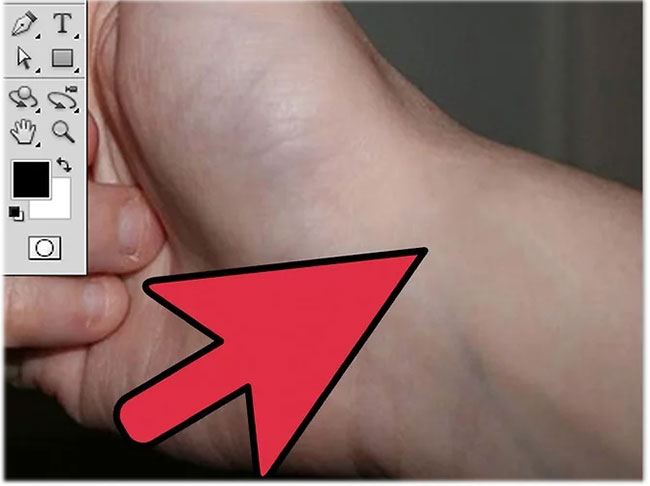
<p style="text-align: justify;"><strong>Bước 9</strong>: Tận hưởng thành quả cuối cùng thôi nào!</p>

<figure>
<div style="text-align: justify;"><img alt="Kết quả cuối cùng" data-i="1" data-src="https://st.quantrimang.com/photos/image/2020/01/22/xoa-hinh-xam-bang-photoshop-2.jpg" data-was-processed="true" height="523" src="https://st.quantrimang.com/photos/image/2020/01/22/xoa-hinh-xam-bang-photoshop-2.jpg" width="630" /></div>

<figcaption>
<div style="text-align: justify;">Kết quả cuối cùng</div>
</figcaption>
</figure>

<div style="text-align: justify;"><br  />
Thứ Tư, 22/01/2020 22:05<br  />
&nbsp;5&nbsp;★&nbsp;1&nbsp;👨&nbsp;57</div>
		</div>
				<div id="author">
						<p>
				<strong>Nguồn tin:</strong>
				Quantrimang.com
			</p>
		</div>
	</div>
	<div id="footer" class="clearfix">
		<div id="url">
			<strong>URL của bản tin này: </strong><a href="https://www.nguoicodonvn2008.info/vi/news/savefile/kien-thuc-may-tinh/cach-xoa-hinh-xam-bang-photoshop-1572.html" title="Cách xóa hình xăm bằng Photoshop">https://www.nguoicodonvn2008.info/vi/news/savefile/kien-thuc-may-tinh/cach-xoa-hinh-xam-bang-photoshop-1572.html</a>

		</div>
		<div class="clear"></div>
		<div class="copyright">
			&copy; .&#x3A; Nguoicodonvn2008.info - Cõi lòng người cô đơn &#x3A;.
		</div>
		<div id="contact">
			<a href="mailto:admin@nguoicodonvn2008.info">admin@nguoicodonvn2008.info</a>
		</div>
	</div>
</div>
        <div id="timeoutsess" class="chromeframe">
            Bạn đã không sử dụng Site, <a onclick="timeoutsesscancel();" href="https://www.nguoicodonvn2008.info/#">Bấm vào đây để duy trì trạng thái đăng nhập</a>. Thời gian chờ: <span id="secField"> 60 </span> giây
        </div>
        <div id="openidResult" class="nv-alert" style="display:none"></div>
        <div id="openidBt" data-result="" data-redirect=""></div>
		</script>
		<div class="car-top">
  <span><img src="https://www.nguoicodonvn2008.info/themes/default/images/car.png" alt=""></span>
</div>
<script src="https://www.nguoicodonvn2008.info/assets/js/jquery/jquery.min.js"></script>
<script>var nv_base_siteurl="/",nv_lang_data="vi",nv_lang_interface="vi",nv_name_variable="nv",nv_fc_variable="op",nv_lang_variable="language",nv_module_name="news",nv_func_name="savefile",nv_is_user=0, nv_my_ofs=-4,nv_my_abbr="EDT",nv_cookie_prefix="nv4c_e856T",nv_check_pass_mstime=1738000,nv_area_admin=0,nv_safemode=0,theme_responsive=0,nv_recaptcha_ver=2,nv_recaptcha_sitekey="",nv_recaptcha_type="image",XSSsanitize=1;</script>
<script src="https://www.nguoicodonvn2008.info/assets/js/language/vi.js"></script>
<script src="https://www.nguoicodonvn2008.info/assets/js/DOMPurify/purify3.js"></script>
<script src="https://www.nguoicodonvn2008.info/assets/js/global.js"></script>
<script src="https://www.nguoicodonvn2008.info/assets/js/site.js"></script>
<script src="https://www.nguoicodonvn2008.info/themes/default/js/news.js"></script>
<script src="https://www.nguoicodonvn2008.info/themes/default/js/main.js"></script>
<script src="https://www.nguoicodonvn2008.info/themes/default/js/custom.js"></script>
<script type="application/ld+json">
        {
            "@context": "https://schema.org",
            "@type": "Organization",
            "url": "https://www.nguoicodonvn2008.info",
            "logo": "https://www.nguoicodonvn2008.info/uploads/angel.gif"
        }
        </script>
<script src="https://www.nguoicodonvn2008.info/themes/default/js/bootstrap.min.js"></script>
<script type="text/javascript">
var $scrolltop = $('.car-top');
$scrolltop.on('click', function () {
    $('html,body').animate({
        scrollTop: 0
    }, 800);
    $(this).addClass("car-run");
    setTimeout(function(){ $scrolltop.removeClass('car-run');}, 1000);
    return false;
});
$(window).on('scroll', function ()
{ 
    if($(window).scrollTop() >= 200)
    {
        $scrolltop.addClass("show");
        $scrolltop.addClass("car-down");
    }
    else
    {
       $scrolltop.removeClass("show");
       setTimeout(function(){ $scrolltop.removeClass('car-down');}, 300);
    }
});
</script>
</body>
</html>