<!DOCTYPE html>
    <html lang="vi" xmlns="http://www.w3.org/1999/xhtml" prefix="og: http://ogp.me/ns#">
    <head>
<title>Cách xóa file thumbs.db trên Windows 10</title>
<meta name="description" content="Cách xóa file thumbs.db trên Windows 10 - Savefile - Tin Tức -...">
<meta name="author" content=".: Nguoicodonvn2008.info - Cõi lòng người cô đơn :.">
<meta name="copyright" content=".: Nguoicodonvn2008.info - Cõi lòng người cô đơn :. [admin@nguoicodonvn2008.info]">
<meta name="robots" content="index, archive, follow, noodp">
<meta name="googlebot" content="index,archive,follow,noodp">
<meta name="msnbot" content="all,index,follow">
<meta name="generator" content="NukeViet v4.5">
<meta http-equiv="Content-Type" content="text/html; charset=utf-8">
<meta property="og:title" content="Cách xóa file thumbs.db trên Windows 10">
<meta property="og:type" content="website">
<meta property="og:description" content="Savefile - Tin Tức - https&#x3A;&#x002F;&#x002F;www.nguoicodonvn2008.info&#x002F;vi&#x002F;news&#x002F;savefile&#x002F;kien-thuc-may-tinh&#x002F;cach-xoa-file-thumbs-db-tren-windows-10-1839.html">
<meta property="og:site_name" content=".&#x3A; Nguoicodonvn2008.info - Cõi lòng người cô đơn &#x3A;.">
<meta property="og:url" content="https://www.nguoicodonvn2008.info/vi/news/savefile/kien-thuc-may-tinh/cach-xoa-file-thumbs-db-tren-windows-10-1839.html">
<link rel="shortcut icon" href="https://www.nguoicodonvn2008.info/favicon.ico">
<link rel="canonical" href="https://www.nguoicodonvn2008.info/vi/news/savefile/kien-thuc-may-tinh/cach-xoa-file-thumbs-db-tren-windows-10-1839.html">
<link rel="alternate" href="https://www.nguoicodonvn2008.info/vi/news/rss/" title="Tin Tức" type="application/rss+xml">
<link rel="alternate" href="https://www.nguoicodonvn2008.info/vi/news/rss/karaoke-dual/" title="Tin Tức - Karaoke Dual" type="application/rss+xml">
<link rel="alternate" href="https://www.nguoicodonvn2008.info/vi/news/rss/nhac-tre/" title="Tin Tức - Nhạc trẻ" type="application/rss+xml">
<link rel="alternate" href="https://www.nguoicodonvn2008.info/vi/news/rss/tru-tinh/" title="Tin Tức - Trữ tình" type="application/rss+xml">
<link rel="alternate" href="https://www.nguoicodonvn2008.info/vi/news/rss/nuoc-ngoai/" title="Tin Tức - Nước ngoài" type="application/rss+xml">
<link rel="alternate" href="https://www.nguoicodonvn2008.info/vi/news/rss/remix/" title="Tin Tức - Remix" type="application/rss+xml">
<link rel="alternate" href="https://www.nguoicodonvn2008.info/vi/news/rss/tam-su-tinh-yeu/" title="Tin Tức - Tâm sự tình yêu" type="application/rss+xml">
<link rel="alternate" href="https://www.nguoicodonvn2008.info/vi/news/rss/tho-suu-tam/" title="Tin Tức - Thơ sưu tầm" type="application/rss+xml">
<link rel="alternate" href="https://www.nguoicodonvn2008.info/vi/news/rss/cuoc-song/" title="Tin Tức - Cuộc sống" type="application/rss+xml">
<link rel="alternate" href="https://www.nguoicodonvn2008.info/vi/news/rss/phan-mem/" title="Tin Tức - Phần mềm" type="application/rss+xml">
<link rel="alternate" href="https://www.nguoicodonvn2008.info/vi/news/rss/kien-thuc-may-tinh/" title="Tin Tức - Kiến thức máy tính" type="application/rss+xml">
<link rel="alternate" href="https://www.nguoicodonvn2008.info/vi/news/rss/hoc-tap/" title="Tin Tức - Học tập" type="application/rss+xml">
<link rel="alternate" href="https://www.nguoicodonvn2008.info/vi/news/rss/tai-lieu/" title="Tin Tức - Tài liệu" type="application/rss+xml">
<link rel="alternate" href="https://www.nguoicodonvn2008.info/vi/news/rss/de-thi/" title="Tin Tức - Đề thi" type="application/rss+xml">
<link rel="preload" as="style" href="https://www.nguoicodonvn2008.info/assets/css/font-awesome.min.css" type="text/css">
<link rel="preload" as="style" href="https://www.nguoicodonvn2008.info/themes/default/css/bootstrap.non-responsive.css" type="text/css">
<link rel="preload" as="style" href="https://www.nguoicodonvn2008.info/themes/default/css/style.css" type="text/css">
<link rel="preload" as="style" href="https://www.nguoicodonvn2008.info/themes/default/css/style.non-responsive.css" type="text/css">
<link rel="preload" as="style" href="https://www.nguoicodonvn2008.info/themes/default/css/news.css" type="text/css">
<link rel="preload" as="style" href="https://www.nguoicodonvn2008.info/themes/default/css/custom.css" type="text/css">
<link rel="preload" as="script" href="https://www.nguoicodonvn2008.info/assets/js/jquery/jquery.min.js" type="text/javascript">
<link rel="preload" as="script" href="https://www.nguoicodonvn2008.info/assets/js/language/vi.js" type="text/javascript">
<link rel="preload" as="script" href="https://www.nguoicodonvn2008.info/assets/js/DOMPurify/purify3.js" type="text/javascript">
<link rel="preload" as="script" href="https://www.nguoicodonvn2008.info/assets/js/global.js" type="text/javascript">
<link rel="preload" as="script" href="https://www.nguoicodonvn2008.info/assets/js/site.js" type="text/javascript">
<link rel="preload" as="script" href="https://www.nguoicodonvn2008.info/themes/default/js/news.js" type="text/javascript">
<link rel="preload" as="script" href="https://www.nguoicodonvn2008.info/themes/default/js/main.js" type="text/javascript">
<link rel="preload" as="script" href="https://www.nguoicodonvn2008.info/themes/default/js/custom.js" type="text/javascript">
<link rel="preload" as="script" href="https://www.nguoicodonvn2008.info/themes/default/js/bootstrap.min.js" type="text/javascript">
<link rel="stylesheet" href="https://www.nguoicodonvn2008.info/assets/css/font-awesome.min.css">
<link rel="stylesheet" href="https://www.nguoicodonvn2008.info/themes/default/css/bootstrap.non-responsive.css">
<link rel="stylesheet" href="https://www.nguoicodonvn2008.info/themes/default/css/style.css">
<link rel="stylesheet" href="https://www.nguoicodonvn2008.info/themes/default/css/style.non-responsive.css">
<link rel="StyleSheet" href="https://www.nguoicodonvn2008.info/themes/default/css/news.css">
<link rel="stylesheet" href="https://www.nguoicodonvn2008.info/themes/default/css/custom.css">
<style type="text/css">
	body{background: #fff;}
</style>
    </head>
    <body>
<div id="print">
	<div id="hd_print">
		<h2 class="pull-left">.&#x3A; Nguoicodonvn2008.info - Cõi lòng người cô đơn &#x3A;.</h2>
		<p class="pull-right"><a title=".&#x3A; Nguoicodonvn2008.info - Cõi lòng người cô đơn &#x3A;." href="https://www.nguoicodonvn2008.info/">https://www.nguoicodonvn2008.info</a></p>
	</div>
	<div class="clear"></div>
	<hr />
	<div id="content">
		<h1>Cách xóa file thumbs.db trên Windows 10</h1>
		<ul class="list-inline">
			<li>Thứ bảy - 14/03/2020 01:01</li>
			<li class="hidden-print txtrequired"><em class="fa fa-print">&nbsp;</em><a title="In ra" href="javascript:;" onclick="window.print()">In ra</a></li>
			<li class="hidden-print txtrequired"><em class="fa fa-power-off">&nbsp;</em><a title="Đóng cửa sổ này" href="javascript:;" onclick="window.close()">Đóng cửa sổ này</a></li>
		</ul>
		<div class="clear"></div>
		<div id="hometext">
		</div>
				<div class="imghome">
			<img alt="Cách xóa file thumbs.db trên Windows 10" src="https://st.quantrimang.com/photos/image/2020/03/13/xoa-file-thumbs-db-6.jpg" width="460" class="img-thumbnail" />
		</div>
		<div class="clear"></div>
		<div id="bodytext" class="clearfix">
			<p style="text-align: justify;">Trên Windows 10,&nbsp;thumbs.db&nbsp;là các file ẩn được tạo khi sử dụng Thumbnail Preview (xem trước bằng hình thu nhỏ) cho các thư mục trong File Explorer.</p>

<p style="text-align: justify;">Mặc dù các file này vô hại, nhưng đôi khi chúng có thể gây ra vấn đề. Ví dụ, nếu bạn đã chuyển nội dung từ thiết bị&nbsp;Windows 10&nbsp;sang mạng được chia sẻ, sau đó bạn muốn xóa thư mục, thì sẽ nhận được thông báo&nbsp;<em>“The action can’t be completed because the file is open in Windows Explorer”</em>, liên quan đến việc file thumbs.db ngăn bạn xóa thư mục.</p>

<p style="text-align: justify;">Trong hướng dẫn này, bạn được hướng dẫn từng bước để xóa file thumbs.db và loại bỏ các thư mục mạng trên Windows 10.</p>

<h2 style="text-align: justify;">Cách xóa file thumbs.db bằng File Explorer</h2>

<p style="text-align: justify;">Để xóa file thumbs.db:</p>

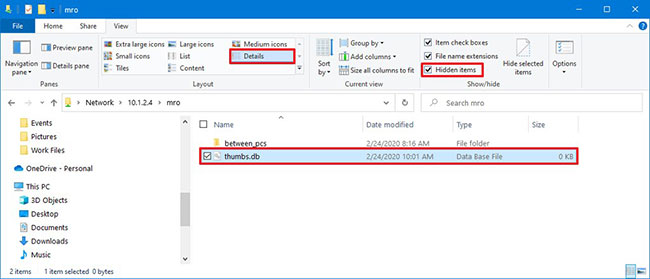
<p style="text-align: justify;">1. Mở&nbsp;<strong>File Explorer.</strong></p>

<p style="text-align: justify;">2. Điều hướng đến thư mục bạn muốn xóa.</p>

<p style="text-align: justify;">3. Nhấp vào tab&nbsp;<strong>View.</strong></p>

<p style="text-align: justify;">4. Chọn tùy chọn&nbsp;<strong>Hidden items.</strong></p>

<p style="text-align: justify;">5. Trong phần&nbsp;<strong>Layout</strong>, chọn tùy chọn chế độ xem&nbsp;<strong>Details.</strong></p>

<p style="text-align: justify;">6. Chọn file thumbs.db.</p>

<figure>
<div style="text-align: justify;"><img alt="Chọn file thumbs.db" data-i="0" data-src="https://st.quantrimang.com/photos/image/2020/03/13/xoa-file-thumbs-db-1.jpg" data-was-processed="true" height="279" src="https://st.quantrimang.com/photos/image/2020/03/13/xoa-file-thumbs-db-1.jpg" width="650" /></div>

<figcaption>
<div style="text-align: justify;">Chọn file thumbs.db</div>
</figcaption>
</figure>

<p style="text-align: justify;">7. Nhấp vào nút&nbsp;<strong>Delete</strong>&nbsp;từ tab&nbsp;<strong>View.</strong></p>

<p style="text-align: justify;">8. Nhấp vào nút&nbsp;<strong>Yes.</strong></p>

<p style="text-align: justify;">Khi bạn hoàn thành các bước, file thumbs.db sẽ được xóa mà không gặp vấn đề gì. Tuy nhiên, nếu các bước trên không có tác dụng, thì bạn có thể chuyển sang chế độ xem khác, sau đó chọn lại chế độ xem&nbsp;<strong>Details.</strong></p>

<h2 style="text-align: justify;">Cách xóa file thumbs.db bằng cách tắt Preview Cashing</h2>

<p style="text-align: justify;">Trong trường hợp thumbs.db không xóa được, thì bạn có thể thử tắt tính năng Thumbnail Previews trên Windows 10.</p>

<div style="text-align: justify;">&nbsp;</div>

<h3 style="text-align: justify;">Vô hiệu hóa thumbs.db với Group Policy</h3>

<p style="text-align: justify;">Để vô hiệu hóa tính năng ghi bộ nhớ cache thumbs.db cho các thư mục mạng, hãy làm theo những bước sau:</p>

<p style="text-align: justify;">1. Mở&nbsp;<strong>Start.</strong></p>

<p style="text-align: justify;">2. Tìm kiếm&nbsp;<strong>gpedit</strong>&nbsp;và nhấp vào kết quả đầu tiên, mở&nbsp;<strong>Group Policy Editor</strong>.</p>

<p style="text-align: justify;">3. Nhấp vào&nbsp;<strong>User Configuration</strong>&nbsp;từ bảng điều khiển bên trái.</p>

<p style="text-align: justify;">4. Duyệt theo đường dẫn sau:</p>

<pre id="pre0">
<code>Administrative Templates &gt; Windows Components &gt; File Explorer</code></pre>

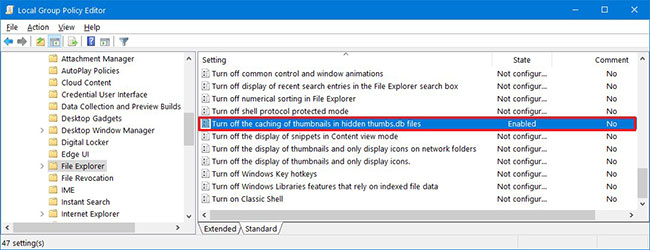
<p style="text-align: justify;">5. Bấm đúp vào policy&nbsp;<strong>Turn off the caching of thumbnails in hidden thumbs.db files</strong>.</p>

<figure>
<div style="text-align: justify;"><img alt="Bấm đúp vào policy Turn off the caching of thumbnails in hidden thumbs.db files" data-i="1" data-src="https://st.quantrimang.com/photos/image/2020/03/13/xoa-file-thumbs-db-2.jpg" data-was-processed="true" height="250" src="https://st.quantrimang.com/photos/image/2020/03/13/xoa-file-thumbs-db-2.jpg" width="650" /></div>

<figcaption>
<div style="text-align: justify;">Bấm đúp vào policy Turn off the caching of thumbnails in hidden thumbs.db files</div>
</figcaption>
</figure>

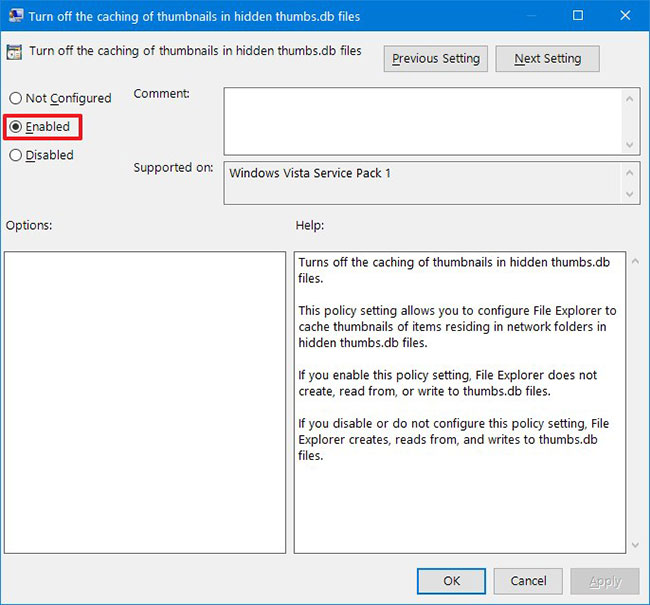
<p style="text-align: justify;">6. Chọn tùy chọn&nbsp;<strong>Enabled</strong>&nbsp;để tắt tính năng.</p>

<figure>
<div style="text-align: justify;"><img alt="Chọn tùy chọn Enabled để tắt tính năng" data-i="2" data-src="https://st.quantrimang.com/photos/image/2020/03/13/xoa-file-thumbs-db-3.jpg" data-was-processed="true" height="605" src="https://st.quantrimang.com/photos/image/2020/03/13/xoa-file-thumbs-db-3.jpg" width="650" /></div>

<figcaption>
<div style="text-align: justify;">Chọn tùy chọn Enabled để tắt tính năng</div>
</figcaption>
</figure>

<p style="text-align: justify;">7. Nhấp vào nút&nbsp;<strong>Apply.</strong></p>

<p style="text-align: justify;">8. Nhấp vào nút&nbsp;<strong>OK.</strong></p>

<p style="text-align: justify;">9. Khởi động lại máy tính.</p>

<p style="text-align: justify;">Sau khi bạn hoàn thành các bước, bây giờ bạn sẽ có thể xóa các file thumbs.db.</p>

<h3 style="text-align: justify;">Vô hiệu hóa thumbs.db với Registry</h3>

<p style="text-align: justify;">1. Mở&nbsp;<strong>Start.</strong></p>

<p style="text-align: justify;">2. Tìm kiếm&nbsp;<strong>regedit</strong>, nhấp chuột phải vào kết quả trên cùng và chọn tùy chọn&nbsp;<strong>Run as administrator</strong>.</p>

<p style="text-align: justify;">3. Duyệt đường dẫn sau:</p>

<pre id="pre1">
<code>HKEY_CURRENT_USER\Software\Policies\Microsoft\Windows</code></pre>

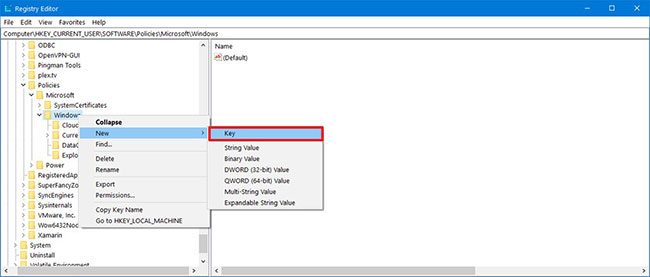
<p style="text-align: justify;">4. Bấm chuột phải vào thư mục Windows, chọn&nbsp;<strong>New</strong>&nbsp;và nhấp vào&nbsp;<strong>Key.</strong></p>

<figure>
<div style="text-align: justify;"><img alt="Chọn New và nhấp vào Key" data-i="3" data-src="https://st.quantrimang.com/photos/image/2020/03/13/xoa-file-thumbs-db-4.jpg" data-was-processed="true" height="277" src="https://st.quantrimang.com/photos/image/2020/03/13/xoa-file-thumbs-db-4.jpg" width="650" /></div>

<figcaption>
<div style="text-align: justify;">Chọn New và nhấp vào Key</div>
</figcaption>
</figure>

<p style="text-align: justify;">5. Đặt tên cho key&nbsp;<strong>Explorer</strong>&nbsp;và nhấn&nbsp;<code>Enter</code>.</p>

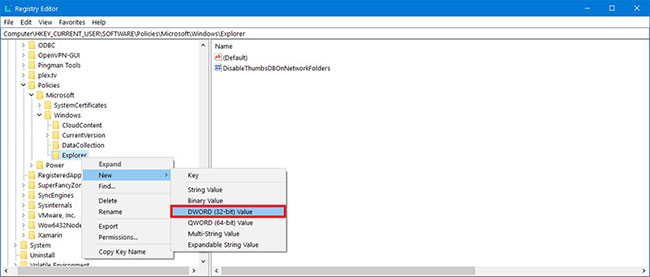
<p style="text-align: justify;">6. Bấm chuột phải vào key vừa tạo và chọn&nbsp;<strong>New</strong>, rồi nhấp vào tùy chọn&nbsp;<strong>DWORD (32-bit) Value</strong>.</p>

<figure>
<div style="text-align: justify;"><img alt="Nhấp vào tùy chọn DWORD (32-bit) Value" data-i="4" data-src="https://st.quantrimang.com/photos/image/2020/03/13/xoa-file-thumbs-db-5.jpg" data-was-processed="true" height="277" src="https://st.quantrimang.com/photos/image/2020/03/13/xoa-file-thumbs-db-5.jpg" width="650" /></div>

<figcaption>
<div style="text-align: justify;">Nhấp vào tùy chọn DWORD (32-bit) Value</div>
</figcaption>
</figure>

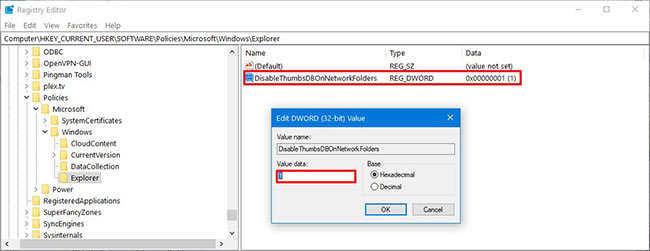
<p style="text-align: justify;">7. Nhấp đúp vào&nbsp;<strong>DWORD</strong>&nbsp;mới được tạo và thay đổi giá trị của nó từ&nbsp;<strong>0</strong>&nbsp;thành&nbsp;<strong>1</strong>.</p>

<p style="text-align: justify;">8. Nhấp vào nút&nbsp;<strong>OK.</strong></p>

<figure>
<div style="text-align: justify;"><img alt="Nhấp vào nút OK" data-i="5" data-src="https://st.quantrimang.com/photos/image/2020/03/13/xoa-file-thumbs-db-6.jpg" data-was-processed="true" height="251" src="https://st.quantrimang.com/photos/image/2020/03/13/xoa-file-thumbs-db-6.jpg" width="650" /></div>

<figcaption>
<div style="text-align: justify;">Nhấp vào nút OK</div>
</figcaption>
</figure>

<p style="text-align: justify;">9. Khởi động lại máy tính.</p>

<p style="text-align: justify;">Khi bạn hoàn thành các bước, các cài đặt mới sẽ được áp dụng và bây giờ bạn sẽ có thể xóa file thumbs.db mà không gặp phải thông báo&nbsp;<em>“The action can’t be completed because the file is open in Windows Explorer”</em>.</p>
		</div>
				<div id="author">
						<p>
				<strong>Nguồn tin:</strong>
				Quantrimang.com
			</p>
		</div>
	</div>
	<div id="footer" class="clearfix">
		<div id="url">
			<strong>URL của bản tin này: </strong><a href="https://www.nguoicodonvn2008.info/vi/news/savefile/kien-thuc-may-tinh/cach-xoa-file-thumbs-db-tren-windows-10-1839.html" title="Cách xóa file thumbs.db trên Windows 10">https://www.nguoicodonvn2008.info/vi/news/savefile/kien-thuc-may-tinh/cach-xoa-file-thumbs-db-tren-windows-10-1839.html</a>

		</div>
		<div class="clear"></div>
		<div class="copyright">
			&copy; .&#x3A; Nguoicodonvn2008.info - Cõi lòng người cô đơn &#x3A;.
		</div>
		<div id="contact">
			<a href="mailto:admin@nguoicodonvn2008.info">admin@nguoicodonvn2008.info</a>
		</div>
	</div>
</div>
        <div id="timeoutsess" class="chromeframe">
            Bạn đã không sử dụng Site, <a onclick="timeoutsesscancel();" href="https://www.nguoicodonvn2008.info/#">Bấm vào đây để duy trì trạng thái đăng nhập</a>. Thời gian chờ: <span id="secField"> 60 </span> giây
        </div>
        <div id="openidResult" class="nv-alert" style="display:none"></div>
        <div id="openidBt" data-result="" data-redirect=""></div>
		</script>
		<div class="car-top">
  <span><img src="https://www.nguoicodonvn2008.info/themes/default/images/car.png" alt=""></span>
</div>
<script src="https://www.nguoicodonvn2008.info/assets/js/jquery/jquery.min.js"></script>
<script>var nv_base_siteurl="/",nv_lang_data="vi",nv_lang_interface="vi",nv_name_variable="nv",nv_fc_variable="op",nv_lang_variable="language",nv_module_name="news",nv_func_name="savefile",nv_is_user=0, nv_my_ofs=-4,nv_my_abbr="EDT",nv_cookie_prefix="nv4c_e856T",nv_check_pass_mstime=1738000,nv_area_admin=0,nv_safemode=0,theme_responsive=0,nv_recaptcha_ver=2,nv_recaptcha_sitekey="",nv_recaptcha_type="image",XSSsanitize=1;</script>
<script src="https://www.nguoicodonvn2008.info/assets/js/language/vi.js"></script>
<script src="https://www.nguoicodonvn2008.info/assets/js/DOMPurify/purify3.js"></script>
<script src="https://www.nguoicodonvn2008.info/assets/js/global.js"></script>
<script src="https://www.nguoicodonvn2008.info/assets/js/site.js"></script>
<script src="https://www.nguoicodonvn2008.info/themes/default/js/news.js"></script>
<script src="https://www.nguoicodonvn2008.info/themes/default/js/main.js"></script>
<script src="https://www.nguoicodonvn2008.info/themes/default/js/custom.js"></script>
<script type="application/ld+json">
        {
            "@context": "https://schema.org",
            "@type": "Organization",
            "url": "https://www.nguoicodonvn2008.info",
            "logo": "https://www.nguoicodonvn2008.info/uploads/angel.gif"
        }
        </script>
<script src="https://www.nguoicodonvn2008.info/themes/default/js/bootstrap.min.js"></script>
<script type="text/javascript">
var $scrolltop = $('.car-top');
$scrolltop.on('click', function () {
    $('html,body').animate({
        scrollTop: 0
    }, 800);
    $(this).addClass("car-run");
    setTimeout(function(){ $scrolltop.removeClass('car-run');}, 1000);
    return false;
});
$(window).on('scroll', function ()
{ 
    if($(window).scrollTop() >= 200)
    {
        $scrolltop.addClass("show");
        $scrolltop.addClass("car-down");
    }
    else
    {
       $scrolltop.removeClass("show");
       setTimeout(function(){ $scrolltop.removeClass('car-down');}, 300);
    }
});
</script>
</body>
</html>