<!DOCTYPE html>
    <html lang="vi" xmlns="http://www.w3.org/1999/xhtml" prefix="og: http://ogp.me/ns#">
    <head>
<title>Cách xóa định dạng bảng trong Excel</title>
<meta name="description" content="Cách xóa định dạng bảng trong Excel - Savefile - Tin Tức -...">
<meta name="author" content=".: Nguoicodonvn2008.info - Cõi lòng người cô đơn :.">
<meta name="copyright" content=".: Nguoicodonvn2008.info - Cõi lòng người cô đơn :. [admin@nguoicodonvn2008.info]">
<meta name="robots" content="index, archive, follow, noodp">
<meta name="googlebot" content="index,archive,follow,noodp">
<meta name="msnbot" content="all,index,follow">
<meta name="generator" content="NukeViet v4.5">
<meta http-equiv="Content-Type" content="text/html; charset=utf-8">
<meta property="og:title" content="Cách xóa định dạng bảng trong Excel">
<meta property="og:type" content="website">
<meta property="og:description" content="Savefile - Tin Tức - https&#x3A;&#x002F;&#x002F;www.nguoicodonvn2008.info&#x002F;vi&#x002F;news&#x002F;savefile&#x002F;kien-thuc-may-tinh&#x002F;cach-xoa-dinh-dang-bang-trong-excel-7956.html">
<meta property="og:site_name" content=".&#x3A; Nguoicodonvn2008.info - Cõi lòng người cô đơn &#x3A;.">
<meta property="og:url" content="https://www.nguoicodonvn2008.info/vi/news/savefile/kien-thuc-may-tinh/cach-xoa-dinh-dang-bang-trong-excel-7956.html">
<link rel="shortcut icon" href="https://www.nguoicodonvn2008.info/favicon.ico">
<link rel="canonical" href="https://www.nguoicodonvn2008.info/vi/news/savefile/kien-thuc-may-tinh/cach-xoa-dinh-dang-bang-trong-excel-7956.html">
<link rel="alternate" href="https://www.nguoicodonvn2008.info/vi/news/rss/" title="Tin Tức" type="application/rss+xml">
<link rel="alternate" href="https://www.nguoicodonvn2008.info/vi/news/rss/karaoke-dual/" title="Tin Tức - Karaoke Dual" type="application/rss+xml">
<link rel="alternate" href="https://www.nguoicodonvn2008.info/vi/news/rss/nhac-tre/" title="Tin Tức - Nhạc trẻ" type="application/rss+xml">
<link rel="alternate" href="https://www.nguoicodonvn2008.info/vi/news/rss/tru-tinh/" title="Tin Tức - Trữ tình" type="application/rss+xml">
<link rel="alternate" href="https://www.nguoicodonvn2008.info/vi/news/rss/nuoc-ngoai/" title="Tin Tức - Nước ngoài" type="application/rss+xml">
<link rel="alternate" href="https://www.nguoicodonvn2008.info/vi/news/rss/remix/" title="Tin Tức - Remix" type="application/rss+xml">
<link rel="alternate" href="https://www.nguoicodonvn2008.info/vi/news/rss/tam-su-tinh-yeu/" title="Tin Tức - Tâm sự tình yêu" type="application/rss+xml">
<link rel="alternate" href="https://www.nguoicodonvn2008.info/vi/news/rss/tho-suu-tam/" title="Tin Tức - Thơ sưu tầm" type="application/rss+xml">
<link rel="alternate" href="https://www.nguoicodonvn2008.info/vi/news/rss/cuoc-song/" title="Tin Tức - Cuộc sống" type="application/rss+xml">
<link rel="alternate" href="https://www.nguoicodonvn2008.info/vi/news/rss/phan-mem/" title="Tin Tức - Phần mềm" type="application/rss+xml">
<link rel="alternate" href="https://www.nguoicodonvn2008.info/vi/news/rss/kien-thuc-may-tinh/" title="Tin Tức - Kiến thức máy tính" type="application/rss+xml">
<link rel="alternate" href="https://www.nguoicodonvn2008.info/vi/news/rss/hoc-tap/" title="Tin Tức - Học tập" type="application/rss+xml">
<link rel="alternate" href="https://www.nguoicodonvn2008.info/vi/news/rss/tai-lieu/" title="Tin Tức - Tài liệu" type="application/rss+xml">
<link rel="alternate" href="https://www.nguoicodonvn2008.info/vi/news/rss/de-thi/" title="Tin Tức - Đề thi" type="application/rss+xml">
<link rel="preload" as="style" href="https://www.nguoicodonvn2008.info/assets/css/font-awesome.min.css" type="text/css">
<link rel="preload" as="style" href="https://www.nguoicodonvn2008.info/themes/default/css/bootstrap.non-responsive.css" type="text/css">
<link rel="preload" as="style" href="https://www.nguoicodonvn2008.info/themes/default/css/style.css" type="text/css">
<link rel="preload" as="style" href="https://www.nguoicodonvn2008.info/themes/default/css/style.non-responsive.css" type="text/css">
<link rel="preload" as="style" href="https://www.nguoicodonvn2008.info/themes/default/css/news.css" type="text/css">
<link rel="preload" as="style" href="https://www.nguoicodonvn2008.info/themes/default/css/custom.css" type="text/css">
<link rel="preload" as="script" href="https://www.nguoicodonvn2008.info/assets/js/jquery/jquery.min.js" type="text/javascript">
<link rel="preload" as="script" href="https://www.nguoicodonvn2008.info/assets/js/language/vi.js" type="text/javascript">
<link rel="preload" as="script" href="https://www.nguoicodonvn2008.info/assets/js/DOMPurify/purify3.js" type="text/javascript">
<link rel="preload" as="script" href="https://www.nguoicodonvn2008.info/assets/js/global.js" type="text/javascript">
<link rel="preload" as="script" href="https://www.nguoicodonvn2008.info/assets/js/site.js" type="text/javascript">
<link rel="preload" as="script" href="https://www.nguoicodonvn2008.info/themes/default/js/news.js" type="text/javascript">
<link rel="preload" as="script" href="https://www.nguoicodonvn2008.info/themes/default/js/main.js" type="text/javascript">
<link rel="preload" as="script" href="https://www.nguoicodonvn2008.info/themes/default/js/custom.js" type="text/javascript">
<link rel="preload" as="script" href="https://www.nguoicodonvn2008.info/themes/default/js/bootstrap.min.js" type="text/javascript">
<link rel="stylesheet" href="https://www.nguoicodonvn2008.info/assets/css/font-awesome.min.css">
<link rel="stylesheet" href="https://www.nguoicodonvn2008.info/themes/default/css/bootstrap.non-responsive.css">
<link rel="stylesheet" href="https://www.nguoicodonvn2008.info/themes/default/css/style.css">
<link rel="stylesheet" href="https://www.nguoicodonvn2008.info/themes/default/css/style.non-responsive.css">
<link rel="StyleSheet" href="https://www.nguoicodonvn2008.info/themes/default/css/news.css">
<link rel="stylesheet" href="https://www.nguoicodonvn2008.info/themes/default/css/custom.css">
<style type="text/css">
	body{background: #fff;}
</style>
    </head>
    <body>
<div id="print">
	<div id="hd_print">
		<h2 class="pull-left">.&#x3A; Nguoicodonvn2008.info - Cõi lòng người cô đơn &#x3A;.</h2>
		<p class="pull-right"><a title=".&#x3A; Nguoicodonvn2008.info - Cõi lòng người cô đơn &#x3A;." href="https://www.nguoicodonvn2008.info/">https://www.nguoicodonvn2008.info</a></p>
	</div>
	<div class="clear"></div>
	<hr />
	<div id="content">
		<h1>Cách xóa định dạng bảng trong Excel</h1>
		<ul class="list-inline">
			<li>Chủ nhật - 14/01/2024 23:15</li>
			<li class="hidden-print txtrequired"><em class="fa fa-print">&nbsp;</em><a title="In ra" href="javascript:;" onclick="window.print()">In ra</a></li>
			<li class="hidden-print txtrequired"><em class="fa fa-power-off">&nbsp;</em><a title="Đóng cửa sổ này" href="javascript:;" onclick="window.close()">Đóng cửa sổ này</a></li>
		</ul>
		<div class="clear"></div>
		<div id="hometext">
		</div>
				<div class="imghome">
			<img alt="Cách xóa định dạng bảng trong Excel" src="https://st.quantrimang.com/photos/image/2024/01/15/xoa-dinh-dang-bang-trong-excel-3.jpg" width="460" class="img-thumbnail" />
		</div>
		<div class="clear"></div>
		<div id="bodytext" class="clearfix">
			<p style="text-align: justify;">Các bảng dữ liệu hoàn thành trên Excel thường được định dạng để giúp người dùng quản lý dữ liệu khoa học hơn. Chúng ta có thể lựa chọn nhiều bảng khác nhau, nhiều kiểu màu sắc khác cho các vùng dữ liệu, nội dung trong bảng tính. Điều này vừa thể hiện sự chuyên nghiệp của người làm, vừa tạo được độ sinh động cho bảng tính. Nhưng trong trường hợp chúng ta muốn sử dụng kiểu bảng khác, hoặc muốn đưa bảng về với vùng dữ liệu bình thường thì có thể xóa định dạng trong bảng Excel. Bài viết dưới đây sẽ hướng dẫn bạn đọc cách xóa định dạng bảng trên Excel.</p>

<div style="text-align: justify;">&nbsp;</div>

<h2 style="text-align: justify;">Điều gì sẽ bị loại bỏ khi xóa định dạng bảng trong Excel?</h2>

<p style="text-align: justify;">Khi bạn xóa định dạng bảng trong Excel, căn chỉnh văn bản cũng như màu văn bản và nền ô của bạn sẽ hoàn nguyên về cài đặt mặc định.</p>

<p style="text-align: justify;">Điều đáng lưu ý là việc xóa định dạng bảng không ảnh hưởng đến các biểu đồ được tạo từ dữ liệu bảng cũng như không xóa bất kỳ dữ liệu hoặc công thức nào. Quantrimang.com có hướng dẫn về&nbsp;cách hiển thị công thức trong Excel&nbsp;nếu bạn muốn xem dữ liệu trong ô của mình.</p>

<h2 style="text-align: justify;">Cách xóa định dạng bảng trong Excel</h2>

<p style="text-align: justify;">Quá trình xóa định dạng bảng trong Excel hơi khác một chút tùy thuộc vào việc bạn sử dụng máy tính hay thiết bị di động. Dưới đây, bạn sẽ tìm thấy các hướng dẫn riêng biệt mà bạn cần tuân theo cho cả hai hướng dẫn này.</p>

<h3 style="text-align: justify;">Cách xóa định dạng bảng trong Excel cho máy tính</h3>

<p style="text-align: justify;">Hãy làm theo các hướng dẫn sau để xóa định dạng bảng trong Excel khỏi máy tính của bạn:</p>

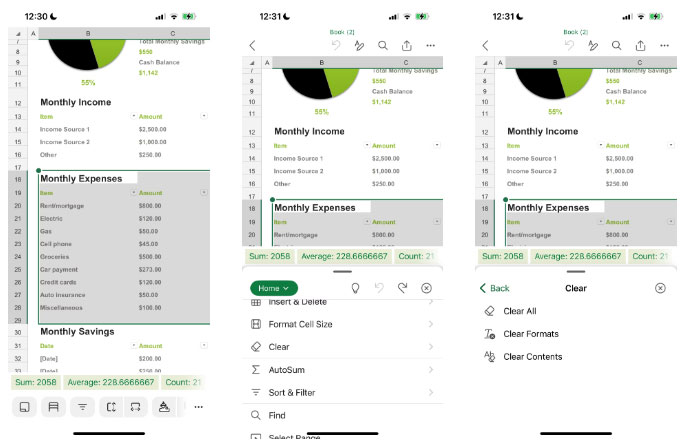
<p style="text-align: justify;">1. Chọn các ô bạn muốn xóa định dạng.</p>

<p style="text-align: justify;">2. Trong tab&nbsp;<strong>Home</strong>&nbsp;của ribbon, hãy tìm biểu tượng cục tẩy có nhãn&nbsp;<strong>Clear</strong>&nbsp;ở góc bên phải. Bấm vào đó.</p>

<figure>
<div style="text-align: justify;"><img alt="Highlight nội dung muốn xóa trong Microsoft Excel" data-i="0" data-src="https://st.quantrimang.com/photos/image/2024/01/15/xoa-dinh-dang-bang-trong-excel-1.jpg" data-was-processed="true" height="755" src="https://st.quantrimang.com/photos/image/2024/01/15/xoa-dinh-dang-bang-trong-excel-1.jpg" width="1500" /></div>

<figcaption>
<div style="text-align: justify;">Highlight nội dung muốn xóa trong Microsoft Excel</div>
</figcaption>
</figure>

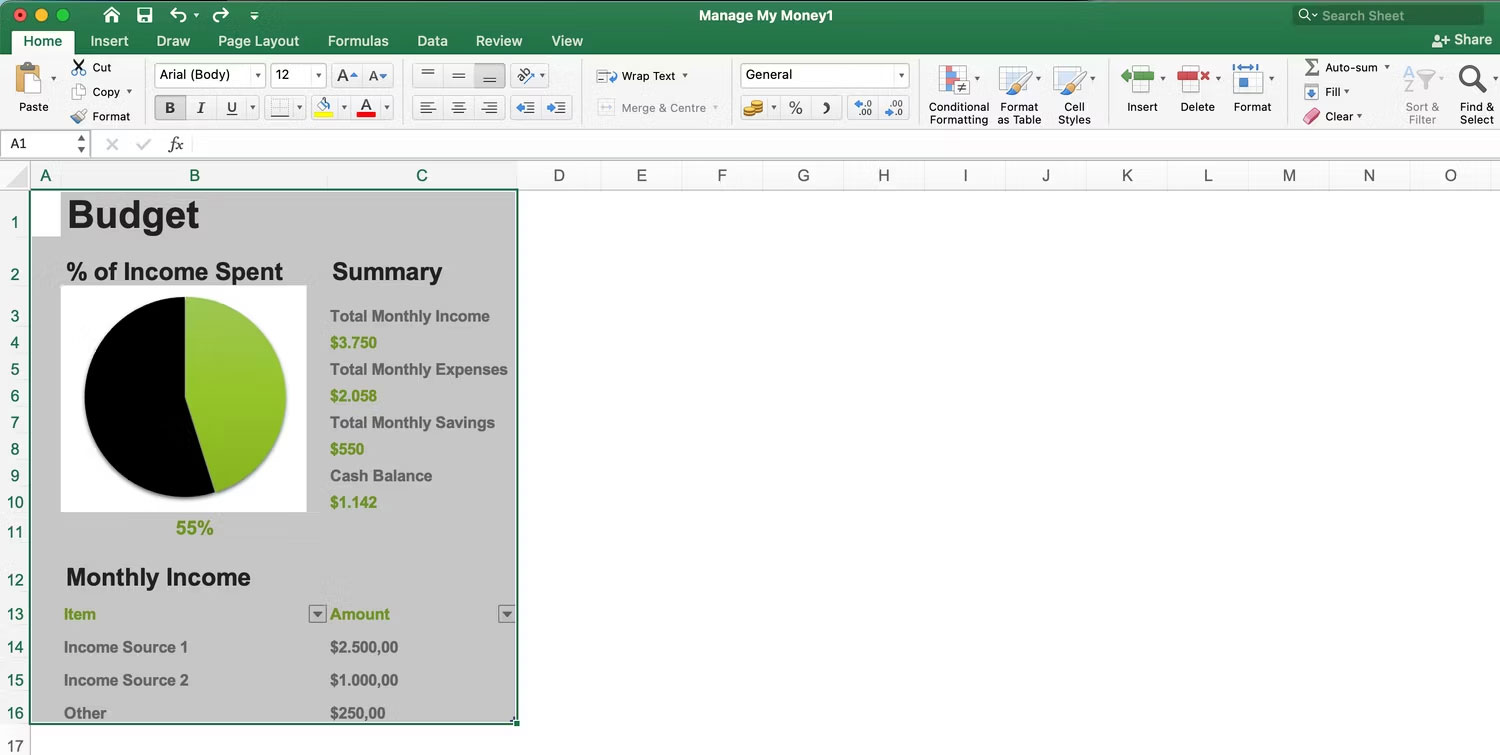
<p style="text-align: justify;">3. Một menu drop-down sẽ xuất hiện, từ đó bạn nên chọn&nbsp;<strong>Clear Formats</strong>.</p>

<figure>
<div style="text-align: justify;"><img alt="Xóa định dạng trong Microsoft Excel trên máy tính" data-i="1" data-src="https://st.quantrimang.com/photos/image/2024/01/15/xoa-dinh-dang-bang-trong-excel-2.jpg" data-was-processed="true" height="749" src="https://st.quantrimang.com/photos/image/2024/01/15/xoa-dinh-dang-bang-trong-excel-2.jpg" width="1500" /></div>

<figcaption>
<div style="text-align: justify;">Xóa định dạng trong Microsoft Excel trên máy tính</div>
</figcaption>
</figure>

<p style="text-align: justify;">Sau khi bạn xóa định dạng, định dạng ô sẽ reset về cài đặt mặc định. Điều này bao gồm căn chỉnh, phông chữ và kiểu ô.</p>

<h3 style="text-align: justify;">Cách xóa định dạng bảng trong Excel trên thiết bị di động</h3>

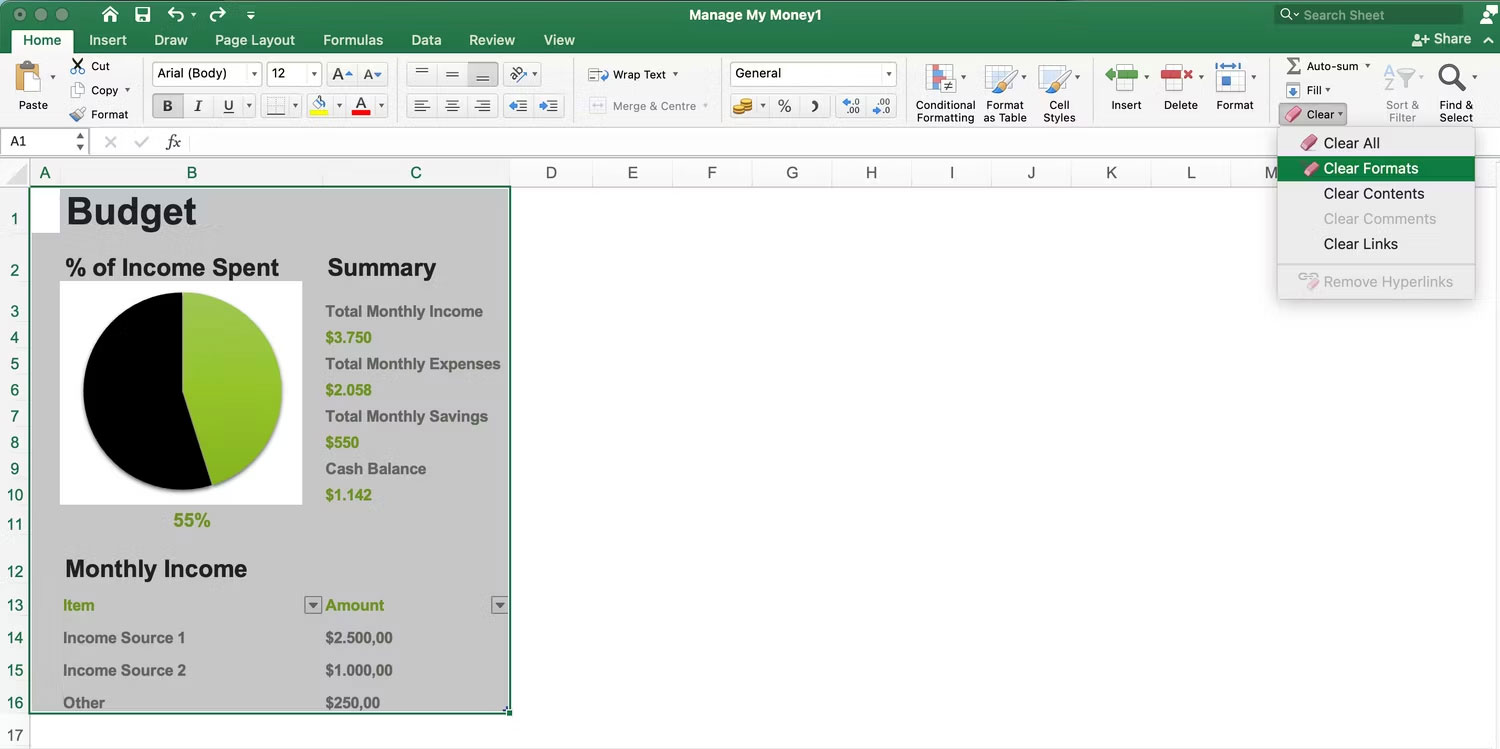
<p style="text-align: justify;">Bạn cần thực hiện thêm một số bước để xóa định dạng trong Excel trên điện thoại thông minh hoặc máy tính bảng của mình. Tuy nhiên, quá trình này vẫn khá dễ dàng. Dưới đây là các bước bạn cần phải làm theo:</p>

<ol>
	<li style="text-align: justify;">Highlight các khu vực bạn muốn xóa định dạng.</li>
	<li style="text-align: justify;">Nhấn vào biểu tượng ba chấm trên thanh công cụ phía dưới.</li>
	<li style="text-align: justify;">Cuộn xuống&nbsp;<strong>Clear</strong>&nbsp;và chọn tùy chọn này để hiển thị danh sách tùy chọn.</li>
	<li style="text-align: justify;">Nhấn vào&nbsp;<strong>Clear Formats</strong>. Nội dung trong bảng sau đó sẽ trở lại mặc định.</li>
</ol>

<figure>
<div style="text-align: justify;"><img alt="Xóa định dạng bảng trong Excel trên thiết bị di động" data-i="2" data-src="https://st.quantrimang.com/photos/image/2024/01/15/xoa-dinh-dang-bang-trong-excel-3.jpg" data-was-processed="true" height="448" src="https://st.quantrimang.com/photos/image/2024/01/15/xoa-dinh-dang-bang-trong-excel-3.jpg" width="686" /></div>

<figcaption>
<div style="text-align: justify;">Xóa định dạng bảng trong Excel trên thiết bị di động</div>
</figcaption>
</figure>

<p style="text-align: justify;">Sau khi xóa định dạng bảng Excel, bạn có thể dễ dàng sắp xếp lại bảng tính nếu cần. Và nếu bạn quyết định không muốn xóa định dạng bảng, bạn luôn có thể hoàn tác quy trình một cách dễ dàng.</p>

<p style="text-align: justify;">Chúc các bạn thực hiện thành công!</p>
		</div>
				<div id="author">
						<p>
				<strong>Nguồn tin:</strong>
				Quantrimang.com
			</p>
		</div>
	</div>
	<div id="footer" class="clearfix">
		<div id="url">
			<strong>URL của bản tin này: </strong><a href="https://www.nguoicodonvn2008.info/vi/news/savefile/kien-thuc-may-tinh/cach-xoa-dinh-dang-bang-trong-excel-7956.html" title="Cách xóa định dạng bảng trong Excel">https://www.nguoicodonvn2008.info/vi/news/savefile/kien-thuc-may-tinh/cach-xoa-dinh-dang-bang-trong-excel-7956.html</a>

		</div>
		<div class="clear"></div>
		<div class="copyright">
			&copy; .&#x3A; Nguoicodonvn2008.info - Cõi lòng người cô đơn &#x3A;.
		</div>
		<div id="contact">
			<a href="mailto:admin@nguoicodonvn2008.info">admin@nguoicodonvn2008.info</a>
		</div>
	</div>
</div>
        <div id="timeoutsess" class="chromeframe">
            Bạn đã không sử dụng Site, <a onclick="timeoutsesscancel();" href="https://www.nguoicodonvn2008.info/#">Bấm vào đây để duy trì trạng thái đăng nhập</a>. Thời gian chờ: <span id="secField"> 60 </span> giây
        </div>
        <div id="openidResult" class="nv-alert" style="display:none"></div>
        <div id="openidBt" data-result="" data-redirect=""></div>
		</script>
		<div class="car-top">
  <span><img src="https://www.nguoicodonvn2008.info/themes/default/images/car.png" alt=""></span>
</div>
<script src="https://www.nguoicodonvn2008.info/assets/js/jquery/jquery.min.js"></script>
<script>var nv_base_siteurl="/",nv_lang_data="vi",nv_lang_interface="vi",nv_name_variable="nv",nv_fc_variable="op",nv_lang_variable="language",nv_module_name="news",nv_func_name="savefile",nv_is_user=0, nv_my_ofs=-4,nv_my_abbr="EDT",nv_cookie_prefix="nv4c_e856T",nv_check_pass_mstime=1738000,nv_area_admin=0,nv_safemode=0,theme_responsive=0,nv_recaptcha_ver=2,nv_recaptcha_sitekey="",nv_recaptcha_type="image",XSSsanitize=1;</script>
<script src="https://www.nguoicodonvn2008.info/assets/js/language/vi.js"></script>
<script src="https://www.nguoicodonvn2008.info/assets/js/DOMPurify/purify3.js"></script>
<script src="https://www.nguoicodonvn2008.info/assets/js/global.js"></script>
<script src="https://www.nguoicodonvn2008.info/assets/js/site.js"></script>
<script src="https://www.nguoicodonvn2008.info/themes/default/js/news.js"></script>
<script src="https://www.nguoicodonvn2008.info/themes/default/js/main.js"></script>
<script src="https://www.nguoicodonvn2008.info/themes/default/js/custom.js"></script>
<script type="application/ld+json">
        {
            "@context": "https://schema.org",
            "@type": "Organization",
            "url": "https://www.nguoicodonvn2008.info",
            "logo": "https://www.nguoicodonvn2008.info/uploads/angel.gif"
        }
        </script>
<script src="https://www.nguoicodonvn2008.info/themes/default/js/bootstrap.min.js"></script>
<script type="text/javascript">
var $scrolltop = $('.car-top');
$scrolltop.on('click', function () {
    $('html,body').animate({
        scrollTop: 0
    }, 800);
    $(this).addClass("car-run");
    setTimeout(function(){ $scrolltop.removeClass('car-run');}, 1000);
    return false;
});
$(window).on('scroll', function ()
{ 
    if($(window).scrollTop() >= 200)
    {
        $scrolltop.addClass("show");
        $scrolltop.addClass("car-down");
    }
    else
    {
       $scrolltop.removeClass("show");
       setTimeout(function(){ $scrolltop.removeClass('car-down');}, 300);
    }
});
</script>
</body>
</html>