<!DOCTYPE html>
    <html lang="vi" xmlns="http://www.w3.org/1999/xhtml" prefix="og: http://ogp.me/ns#">
    <head>
<title>Cách xóa cùng lúc toàn bộ ghi chú trong bài trình chiếu Microsoft PowerPoint</title>
<meta name="description" content="Cách xóa cùng lúc toàn bộ ghi chú trong bài trình chiếu Microsoft PowerPoint - Savefile - Tin Tức -...">
<meta name="author" content=".: Nguoicodonvn2008.info - Cõi lòng người cô đơn :.">
<meta name="copyright" content=".: Nguoicodonvn2008.info - Cõi lòng người cô đơn :. [admin@nguoicodonvn2008.info]">
<meta name="robots" content="index, archive, follow, noodp">
<meta name="googlebot" content="index,archive,follow,noodp">
<meta name="msnbot" content="all,index,follow">
<meta name="generator" content="NukeViet v4.5">
<meta http-equiv="Content-Type" content="text/html; charset=utf-8">
<meta property="og:title" content="Cách xóa cùng lúc toàn bộ ghi chú trong bài trình chiếu Microsoft PowerPoint">
<meta property="og:type" content="website">
<meta property="og:description" content="Savefile - Tin Tức -...">
<meta property="og:site_name" content=".&#x3A; Nguoicodonvn2008.info - Cõi lòng người cô đơn &#x3A;.">
<meta property="og:url" content="https://www.nguoicodonvn2008.info/vi/news/savefile/kien-thuc-may-tinh/cach-xoa-cung-luc-toan-bo-ghi-chu-trong-bai-trinh-chieu-microsoft-powerpoint-4440.html">
<link rel="shortcut icon" href="https://www.nguoicodonvn2008.info/favicon.ico">
<link rel="canonical" href="https://www.nguoicodonvn2008.info/vi/news/savefile/kien-thuc-may-tinh/cach-xoa-cung-luc-toan-bo-ghi-chu-trong-bai-trinh-chieu-microsoft-powerpoint-4440.html">
<link rel="alternate" href="https://www.nguoicodonvn2008.info/vi/news/rss/" title="Tin Tức" type="application/rss+xml">
<link rel="alternate" href="https://www.nguoicodonvn2008.info/vi/news/rss/karaoke-dual/" title="Tin Tức - Karaoke Dual" type="application/rss+xml">
<link rel="alternate" href="https://www.nguoicodonvn2008.info/vi/news/rss/nhac-tre/" title="Tin Tức - Nhạc trẻ" type="application/rss+xml">
<link rel="alternate" href="https://www.nguoicodonvn2008.info/vi/news/rss/tru-tinh/" title="Tin Tức - Trữ tình" type="application/rss+xml">
<link rel="alternate" href="https://www.nguoicodonvn2008.info/vi/news/rss/nuoc-ngoai/" title="Tin Tức - Nước ngoài" type="application/rss+xml">
<link rel="alternate" href="https://www.nguoicodonvn2008.info/vi/news/rss/remix/" title="Tin Tức - Remix" type="application/rss+xml">
<link rel="alternate" href="https://www.nguoicodonvn2008.info/vi/news/rss/tam-su-tinh-yeu/" title="Tin Tức - Tâm sự tình yêu" type="application/rss+xml">
<link rel="alternate" href="https://www.nguoicodonvn2008.info/vi/news/rss/tho-suu-tam/" title="Tin Tức - Thơ sưu tầm" type="application/rss+xml">
<link rel="alternate" href="https://www.nguoicodonvn2008.info/vi/news/rss/cuoc-song/" title="Tin Tức - Cuộc sống" type="application/rss+xml">
<link rel="alternate" href="https://www.nguoicodonvn2008.info/vi/news/rss/phan-mem/" title="Tin Tức - Phần mềm" type="application/rss+xml">
<link rel="alternate" href="https://www.nguoicodonvn2008.info/vi/news/rss/kien-thuc-may-tinh/" title="Tin Tức - Kiến thức máy tính" type="application/rss+xml">
<link rel="alternate" href="https://www.nguoicodonvn2008.info/vi/news/rss/hoc-tap/" title="Tin Tức - Học tập" type="application/rss+xml">
<link rel="alternate" href="https://www.nguoicodonvn2008.info/vi/news/rss/tai-lieu/" title="Tin Tức - Tài liệu" type="application/rss+xml">
<link rel="alternate" href="https://www.nguoicodonvn2008.info/vi/news/rss/de-thi/" title="Tin Tức - Đề thi" type="application/rss+xml">
<link rel="preload" as="style" href="https://www.nguoicodonvn2008.info/assets/css/font-awesome.min.css" type="text/css">
<link rel="preload" as="style" href="https://www.nguoicodonvn2008.info/themes/default/css/bootstrap.non-responsive.css" type="text/css">
<link rel="preload" as="style" href="https://www.nguoicodonvn2008.info/themes/default/css/style.css" type="text/css">
<link rel="preload" as="style" href="https://www.nguoicodonvn2008.info/themes/default/css/style.non-responsive.css" type="text/css">
<link rel="preload" as="style" href="https://www.nguoicodonvn2008.info/themes/default/css/news.css" type="text/css">
<link rel="preload" as="style" href="https://www.nguoicodonvn2008.info/themes/default/css/custom.css" type="text/css">
<link rel="preload" as="script" href="https://www.nguoicodonvn2008.info/assets/js/jquery/jquery.min.js" type="text/javascript">
<link rel="preload" as="script" href="https://www.nguoicodonvn2008.info/assets/js/language/vi.js" type="text/javascript">
<link rel="preload" as="script" href="https://www.nguoicodonvn2008.info/assets/js/DOMPurify/purify3.js" type="text/javascript">
<link rel="preload" as="script" href="https://www.nguoicodonvn2008.info/assets/js/global.js" type="text/javascript">
<link rel="preload" as="script" href="https://www.nguoicodonvn2008.info/assets/js/site.js" type="text/javascript">
<link rel="preload" as="script" href="https://www.nguoicodonvn2008.info/themes/default/js/news.js" type="text/javascript">
<link rel="preload" as="script" href="https://www.nguoicodonvn2008.info/themes/default/js/main.js" type="text/javascript">
<link rel="preload" as="script" href="https://www.nguoicodonvn2008.info/themes/default/js/custom.js" type="text/javascript">
<link rel="preload" as="script" href="https://www.nguoicodonvn2008.info/themes/default/js/bootstrap.min.js" type="text/javascript">
<link rel="stylesheet" href="https://www.nguoicodonvn2008.info/assets/css/font-awesome.min.css">
<link rel="stylesheet" href="https://www.nguoicodonvn2008.info/themes/default/css/bootstrap.non-responsive.css">
<link rel="stylesheet" href="https://www.nguoicodonvn2008.info/themes/default/css/style.css">
<link rel="stylesheet" href="https://www.nguoicodonvn2008.info/themes/default/css/style.non-responsive.css">
<link rel="StyleSheet" href="https://www.nguoicodonvn2008.info/themes/default/css/news.css">
<link rel="stylesheet" href="https://www.nguoicodonvn2008.info/themes/default/css/custom.css">
<style type="text/css">
	body{background: #fff;}
</style>
    </head>
    <body>
<div id="print">
	<div id="hd_print">
		<h2 class="pull-left">.&#x3A; Nguoicodonvn2008.info - Cõi lòng người cô đơn &#x3A;.</h2>
		<p class="pull-right"><a title=".&#x3A; Nguoicodonvn2008.info - Cõi lòng người cô đơn &#x3A;." href="https://www.nguoicodonvn2008.info/">https://www.nguoicodonvn2008.info</a></p>
	</div>
	<div class="clear"></div>
	<hr />
	<div id="content">
		<h1>Cách xóa cùng lúc toàn bộ ghi chú trong bài trình chiếu Microsoft PowerPoint</h1>
		<ul class="list-inline">
			<li>Thứ sáu - 16/07/2021 00:50</li>
			<li class="hidden-print txtrequired"><em class="fa fa-print">&nbsp;</em><a title="In ra" href="javascript:;" onclick="window.print()">In ra</a></li>
			<li class="hidden-print txtrequired"><em class="fa fa-power-off">&nbsp;</em><a title="Đóng cửa sổ này" href="javascript:;" onclick="window.close()">Đóng cửa sổ này</a></li>
		</ul>
		<div class="clear"></div>
		<div id="hometext">
		</div>
				<div class="imghome">
			<img alt="Cách xóa cùng lúc toàn bộ ghi chú trong bài trình chiếu Microsoft PowerPoint" src="https://st.quantrimang.com/photos/image/2021/07/05/xoa-ghi-chu-microsoft-powerpoint7.jpg" width="460" class="img-thumbnail" />
		</div>
		<div class="clear"></div>
		<div id="bodytext" class="clearfix">
			<p style="text-align: justify;">Microsoft PowerPoint cho phép bạn tạo các ý kiến, ghi chú, cũng như chú thích hữu ích trực tiếp trên slide thuyết trình của mình một cách cực kỳ đơn giản. Tuy nhiên, nếu bạn đã tạo quá nhiều ghi chú, việc xóa bỏ từ cái một sẽ rất mất thời gian.</p>

<p style="text-align: justify;">Bài viết này sẽ hướng dẫn bạn cách xóa cùng lúc tất cả các ghi chú trên bản trình chiếu PowerPoint một cách nhanh gọn.</p>

<h2 style="text-align: justify;">Xóa bỏ từng ghi chú trong bài thuyết trình PowerPoint</h2>

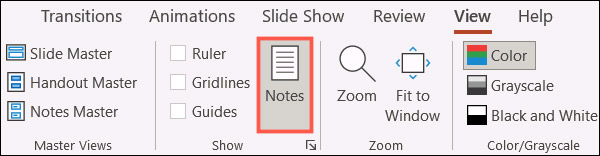
<p style="text-align: justify;">Xin nhắc lại, bạn có thể xóa ghi chú của từng người cộng tác trong slide của mình một cách dễ dàng. Mở ghi chú bằng cách nhấn vào nút&nbsp;<strong>Notes</strong>&nbsp;trong thanh trạng thái PowerPoint, hoặc bằng cách nhấp vào “<strong>Notes</strong>” trong trong tab&nbsp;<strong>View</strong>.</p>

<p style="text-align: justify;"><img alt="Nhấn vào nút Notes" data-i="0" data-src="https://st.quantrimang.com/photos/image/2021/07/05/xoa-ghi-chu-microsoft-powerpoint1.jpg" data-was-processed="true" height="156" src="https://st.quantrimang.com/photos/image/2021/07/05/xoa-ghi-chu-microsoft-powerpoint1.jpg" width="600" /></p>

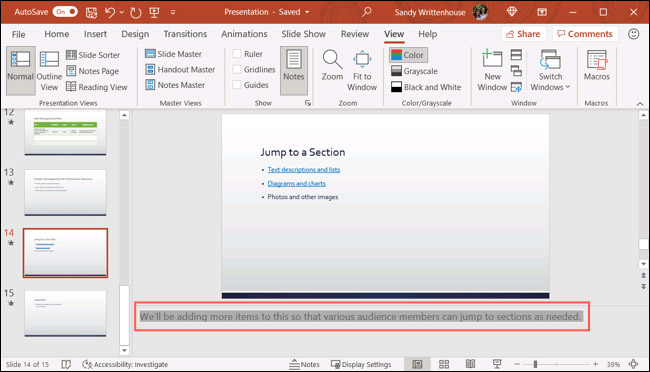
<p style="text-align: justify;">Đi tới trang trình chiếu có ghi chú mà bạn muốn xóa, bấm vào khu vực của ghi chú và xóa văn bản. Bạn có thể thực hiện việc này nhanh chóng bằng cách bôi đen toàn bộ văn bản và nhấn phím&nbsp;<strong>Delete</strong>.</p>

<p style="text-align: justify;"><img alt="Xóa ghi chú" data-i="1" data-src="https://st.quantrimang.com/photos/image/2021/07/05/xoa-ghi-chu-microsoft-powerpoint2.jpg" data-was-processed="true" height="372" src="https://st.quantrimang.com/photos/image/2021/07/05/xoa-ghi-chu-microsoft-powerpoint2.jpg" width="650" /></p>

<h2 style="text-align: justify;">Xóa bỏ toàn bộ ghi chú trong bài thuyết trình PowerPoint</h2>

<p style="text-align: justify;">Cách xóa từng ghi chủ theo cách thủ công như vậy không có gì phức tạp. Nhưng sẽ rất tốn thời gian nếu bạn có hàng chục trang trình chiếu, đi kèm với đó là hàng chục ghi chú cần xóa. Dưới đây là cách xóa tất cả ghi chú trên toàn bộ bài trình chiếu cùng lúc.</p>

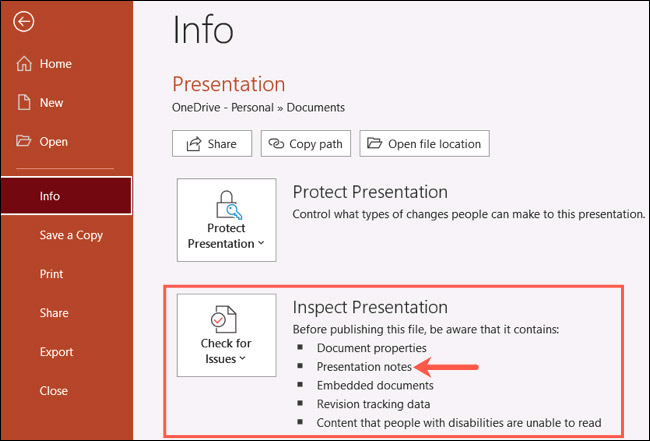
<p style="text-align: justify;">Trước tiên, hãy nhấp vào<strong>&nbsp;File &gt; Info</strong>. Trong phần&nbsp;<strong>Inspect Presentation</strong>, bạn sẽ thấy rằng bản trình chiếu của mình có chứa các ghi chú (<strong>presentation notes</strong>).</p>

<p style="text-align: justify;"><img alt="Inspect Presentation" data-i="2" data-src="https://st.quantrimang.com/photos/image/2021/07/05/xoa-ghi-chu-microsoft-powerpoint3.jpg" data-was-processed="true" height="441" src="https://st.quantrimang.com/photos/image/2021/07/05/xoa-ghi-chu-microsoft-powerpoint3.jpg" width="650" /></p>

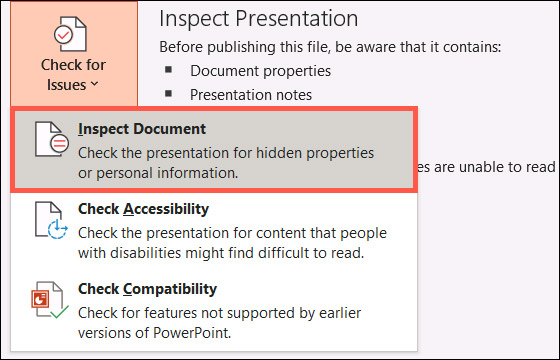
<p style="text-align: justify;">Nhấp vào hộp thả xuống có tiêu đề “<strong>Check for Issues</strong>”, sau đó bấm chọn “<strong>Inspect Document</strong>”.</p>

<p style="text-align: justify;"><img alt="Bấm chọn “Inspect Document”" data-i="3" data-src="https://st.quantrimang.com/photos/image/2021/07/05/xoa-ghi-chu-microsoft-powerpoint4.jpg" data-was-processed="true" height="360" src="https://st.quantrimang.com/photos/image/2021/07/05/xoa-ghi-chu-microsoft-powerpoint4.jpg" width="560" /></p>

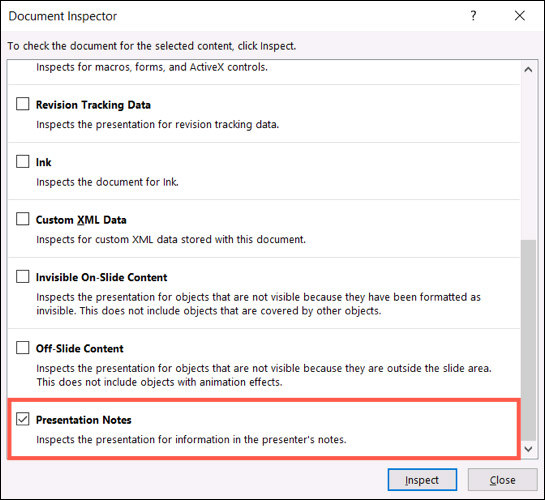
<p style="text-align: justify;">Sẽ có rất nhiều tùy chọn hữu ích ở đây. Tuy nhiên, để xóa bỏ toàn bộ ghi chú trong bài thuyết trình, bạn chỉ tích vào tùy chọn “<strong>Presentation Notes</strong>” ở dưới cùng, và bỏ tích các tùy chọn còn lại. Khi bạn đã sẵn sàng, hãy nhấp vào “<strong>Inspect</strong>”.</p>

<p style="text-align: justify;"><img alt="Chỉ tích vào tùy chọn “Presentation Notes”" data-i="4" data-src="https://st.quantrimang.com/photos/image/2021/07/05/xoa-ghi-chu-microsoft-powerpoint5.jpg" data-was-processed="true" height="500" src="https://st.quantrimang.com/photos/image/2021/07/05/xoa-ghi-chu-microsoft-powerpoint5.jpg" width="545" /></p>

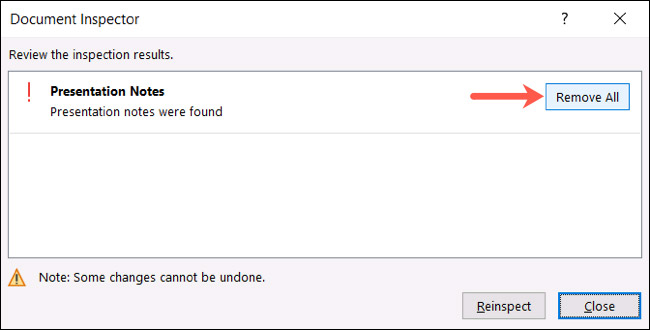
<p style="text-align: justify;">Sau một lúc, bạn sẽ thấy kết quả trả về cho biết các ghi chú trong bài trình chiếu đã được tìm thấy. Nhấp vào “<strong>Remove All</strong>”.</p>

<p style="text-align: justify;"><img alt="Nhấp vào “Remove All”" data-i="5" data-src="https://st.quantrimang.com/photos/image/2021/07/05/xoa-ghi-chu-microsoft-powerpoint6.jpg" data-was-processed="true" height="330" src="https://st.quantrimang.com/photos/image/2021/07/05/xoa-ghi-chu-microsoft-powerpoint6.jpg" width="650" /></p>

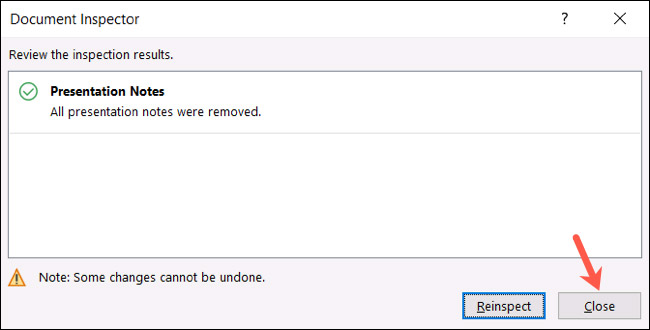
<p style="text-align: justify;">Toàn bộ ghi chú trong bài thuyết trình của bạn sẽ bị xóa bỏ hoàn toàn! Bạn có thể nhấn “<strong>Close</strong>” nếu đã hoàn tất công việc.</p>

<p style="text-align: justify;"><img alt="Nhấn Close" data-i="6" data-src="https://st.quantrimang.com/photos/image/2021/07/05/xoa-ghi-chu-microsoft-powerpoint7.jpg" data-was-processed="true" height="330" src="https://st.quantrimang.com/photos/image/2021/07/05/xoa-ghi-chu-microsoft-powerpoint7.jpg" width="650" /></p>

<p style="text-align: justify;">Bây giờ, hãy nhấp vào nút mũi tên ở trên cùng bên trái để quay lại trang trình chiếu của mình. Tất cả chỉ đơn giản có vậy!</p>
		</div>
				<div id="author">
						<p>
				<strong>Nguồn tin:</strong>
				Quantrimang.com
			</p>
		</div>
	</div>
	<div id="footer" class="clearfix">
		<div id="url">
			<strong>URL của bản tin này: </strong><a href="https://www.nguoicodonvn2008.info/vi/news/savefile/kien-thuc-may-tinh/cach-xoa-cung-luc-toan-bo-ghi-chu-trong-bai-trinh-chieu-microsoft-powerpoint-4440.html" title="Cách xóa cùng lúc toàn bộ ghi chú trong bài trình chiếu Microsoft PowerPoint">https://www.nguoicodonvn2008.info/vi/news/savefile/kien-thuc-may-tinh/cach-xoa-cung-luc-toan-bo-ghi-chu-trong-bai-trinh-chieu-microsoft-powerpoint-4440.html</a>

		</div>
		<div class="clear"></div>
		<div class="copyright">
			&copy; .&#x3A; Nguoicodonvn2008.info - Cõi lòng người cô đơn &#x3A;.
		</div>
		<div id="contact">
			<a href="mailto:admin@nguoicodonvn2008.info">admin@nguoicodonvn2008.info</a>
		</div>
	</div>
</div>
        <div id="timeoutsess" class="chromeframe">
            Bạn đã không sử dụng Site, <a onclick="timeoutsesscancel();" href="https://www.nguoicodonvn2008.info/#">Bấm vào đây để duy trì trạng thái đăng nhập</a>. Thời gian chờ: <span id="secField"> 60 </span> giây
        </div>
        <div id="openidResult" class="nv-alert" style="display:none"></div>
        <div id="openidBt" data-result="" data-redirect=""></div>
		</script>
		<div class="car-top">
  <span><img src="https://www.nguoicodonvn2008.info/themes/default/images/car.png" alt=""></span>
</div>
<script src="https://www.nguoicodonvn2008.info/assets/js/jquery/jquery.min.js"></script>
<script>var nv_base_siteurl="/",nv_lang_data="vi",nv_lang_interface="vi",nv_name_variable="nv",nv_fc_variable="op",nv_lang_variable="language",nv_module_name="news",nv_func_name="savefile",nv_is_user=0, nv_my_ofs=-4,nv_my_abbr="EDT",nv_cookie_prefix="nv4c_e856T",nv_check_pass_mstime=1738000,nv_area_admin=0,nv_safemode=0,theme_responsive=0,nv_recaptcha_ver=2,nv_recaptcha_sitekey="",nv_recaptcha_type="image",XSSsanitize=1;</script>
<script src="https://www.nguoicodonvn2008.info/assets/js/language/vi.js"></script>
<script src="https://www.nguoicodonvn2008.info/assets/js/DOMPurify/purify3.js"></script>
<script src="https://www.nguoicodonvn2008.info/assets/js/global.js"></script>
<script src="https://www.nguoicodonvn2008.info/assets/js/site.js"></script>
<script src="https://www.nguoicodonvn2008.info/themes/default/js/news.js"></script>
<script src="https://www.nguoicodonvn2008.info/themes/default/js/main.js"></script>
<script src="https://www.nguoicodonvn2008.info/themes/default/js/custom.js"></script>
<script type="application/ld+json">
        {
            "@context": "https://schema.org",
            "@type": "Organization",
            "url": "https://www.nguoicodonvn2008.info",
            "logo": "https://www.nguoicodonvn2008.info/uploads/angel.gif"
        }
        </script>
<script src="https://www.nguoicodonvn2008.info/themes/default/js/bootstrap.min.js"></script>
<script type="text/javascript">
var $scrolltop = $('.car-top');
$scrolltop.on('click', function () {
    $('html,body').animate({
        scrollTop: 0
    }, 800);
    $(this).addClass("car-run");
    setTimeout(function(){ $scrolltop.removeClass('car-run');}, 1000);
    return false;
});
$(window).on('scroll', function ()
{ 
    if($(window).scrollTop() >= 200)
    {
        $scrolltop.addClass("show");
        $scrolltop.addClass("car-down");
    }
    else
    {
       $scrolltop.removeClass("show");
       setTimeout(function(){ $scrolltop.removeClass('car-down');}, 300);
    }
});
</script>
</body>
</html>