<!DOCTYPE html>
    <html lang="vi" xmlns="http://www.w3.org/1999/xhtml" prefix="og: http://ogp.me/ns#">
    <head>
<title>Cách xóa các biểu tượng nhỏ xuất hiện trên thanh tìm kiếm của Windows 10</title>
<meta name="description" content="Cách xóa các biểu tượng nhỏ xuất hiện trên thanh tìm kiếm của Windows 10 - Savefile - Tin Tức -...">
<meta name="author" content=".: Nguoicodonvn2008.info - Cõi lòng người cô đơn :.">
<meta name="copyright" content=".: Nguoicodonvn2008.info - Cõi lòng người cô đơn :. [admin@nguoicodonvn2008.info]">
<meta name="robots" content="index, archive, follow, noodp">
<meta name="googlebot" content="index,archive,follow,noodp">
<meta name="msnbot" content="all,index,follow">
<meta name="generator" content="NukeViet v4.5">
<meta http-equiv="Content-Type" content="text/html; charset=utf-8">
<meta property="og:title" content="Cách xóa các biểu tượng nhỏ xuất hiện trên thanh tìm kiếm của Windows 10">
<meta property="og:type" content="website">
<meta property="og:description" content="Savefile - Tin Tức -...">
<meta property="og:site_name" content=".&#x3A; Nguoicodonvn2008.info - Cõi lòng người cô đơn &#x3A;.">
<meta property="og:url" content="https://www.nguoicodonvn2008.info/vi/news/savefile/kien-thuc-may-tinh/cach-xoa-cac-bieu-tuong-nho-xuat-hien-tren-thanh-tim-kiem-cua-windows-10-5780.html">
<link rel="shortcut icon" href="https://www.nguoicodonvn2008.info/favicon.ico">
<link rel="canonical" href="https://www.nguoicodonvn2008.info/vi/news/savefile/kien-thuc-may-tinh/cach-xoa-cac-bieu-tuong-nho-xuat-hien-tren-thanh-tim-kiem-cua-windows-10-5780.html">
<link rel="alternate" href="https://www.nguoicodonvn2008.info/vi/news/rss/" title="Tin Tức" type="application/rss+xml">
<link rel="alternate" href="https://www.nguoicodonvn2008.info/vi/news/rss/karaoke-dual/" title="Tin Tức - Karaoke Dual" type="application/rss+xml">
<link rel="alternate" href="https://www.nguoicodonvn2008.info/vi/news/rss/nhac-tre/" title="Tin Tức - Nhạc trẻ" type="application/rss+xml">
<link rel="alternate" href="https://www.nguoicodonvn2008.info/vi/news/rss/tru-tinh/" title="Tin Tức - Trữ tình" type="application/rss+xml">
<link rel="alternate" href="https://www.nguoicodonvn2008.info/vi/news/rss/nuoc-ngoai/" title="Tin Tức - Nước ngoài" type="application/rss+xml">
<link rel="alternate" href="https://www.nguoicodonvn2008.info/vi/news/rss/remix/" title="Tin Tức - Remix" type="application/rss+xml">
<link rel="alternate" href="https://www.nguoicodonvn2008.info/vi/news/rss/tam-su-tinh-yeu/" title="Tin Tức - Tâm sự tình yêu" type="application/rss+xml">
<link rel="alternate" href="https://www.nguoicodonvn2008.info/vi/news/rss/tho-suu-tam/" title="Tin Tức - Thơ sưu tầm" type="application/rss+xml">
<link rel="alternate" href="https://www.nguoicodonvn2008.info/vi/news/rss/cuoc-song/" title="Tin Tức - Cuộc sống" type="application/rss+xml">
<link rel="alternate" href="https://www.nguoicodonvn2008.info/vi/news/rss/phan-mem/" title="Tin Tức - Phần mềm" type="application/rss+xml">
<link rel="alternate" href="https://www.nguoicodonvn2008.info/vi/news/rss/kien-thuc-may-tinh/" title="Tin Tức - Kiến thức máy tính" type="application/rss+xml">
<link rel="alternate" href="https://www.nguoicodonvn2008.info/vi/news/rss/hoc-tap/" title="Tin Tức - Học tập" type="application/rss+xml">
<link rel="alternate" href="https://www.nguoicodonvn2008.info/vi/news/rss/tai-lieu/" title="Tin Tức - Tài liệu" type="application/rss+xml">
<link rel="alternate" href="https://www.nguoicodonvn2008.info/vi/news/rss/de-thi/" title="Tin Tức - Đề thi" type="application/rss+xml">
<link rel="preload" as="style" href="https://www.nguoicodonvn2008.info/assets/css/font-awesome.min.css" type="text/css">
<link rel="preload" as="style" href="https://www.nguoicodonvn2008.info/themes/default/css/bootstrap.non-responsive.css" type="text/css">
<link rel="preload" as="style" href="https://www.nguoicodonvn2008.info/themes/default/css/style.css" type="text/css">
<link rel="preload" as="style" href="https://www.nguoicodonvn2008.info/themes/default/css/style.non-responsive.css" type="text/css">
<link rel="preload" as="style" href="https://www.nguoicodonvn2008.info/themes/default/css/news.css" type="text/css">
<link rel="preload" as="style" href="https://www.nguoicodonvn2008.info/themes/default/css/custom.css" type="text/css">
<link rel="preload" as="script" href="https://www.nguoicodonvn2008.info/assets/js/jquery/jquery.min.js" type="text/javascript">
<link rel="preload" as="script" href="https://www.nguoicodonvn2008.info/assets/js/language/vi.js" type="text/javascript">
<link rel="preload" as="script" href="https://www.nguoicodonvn2008.info/assets/js/DOMPurify/purify3.js" type="text/javascript">
<link rel="preload" as="script" href="https://www.nguoicodonvn2008.info/assets/js/global.js" type="text/javascript">
<link rel="preload" as="script" href="https://www.nguoicodonvn2008.info/assets/js/site.js" type="text/javascript">
<link rel="preload" as="script" href="https://www.nguoicodonvn2008.info/themes/default/js/news.js" type="text/javascript">
<link rel="preload" as="script" href="https://www.nguoicodonvn2008.info/themes/default/js/main.js" type="text/javascript">
<link rel="preload" as="script" href="https://www.nguoicodonvn2008.info/themes/default/js/custom.js" type="text/javascript">
<link rel="preload" as="script" href="https://www.nguoicodonvn2008.info/themes/default/js/bootstrap.min.js" type="text/javascript">
<link rel="stylesheet" href="https://www.nguoicodonvn2008.info/assets/css/font-awesome.min.css">
<link rel="stylesheet" href="https://www.nguoicodonvn2008.info/themes/default/css/bootstrap.non-responsive.css">
<link rel="stylesheet" href="https://www.nguoicodonvn2008.info/themes/default/css/style.css">
<link rel="stylesheet" href="https://www.nguoicodonvn2008.info/themes/default/css/style.non-responsive.css">
<link rel="StyleSheet" href="https://www.nguoicodonvn2008.info/themes/default/css/news.css">
<link rel="stylesheet" href="https://www.nguoicodonvn2008.info/themes/default/css/custom.css">
<style type="text/css">
	body{background: #fff;}
</style>
    </head>
    <body>
<div id="print">
	<div id="hd_print">
		<h2 class="pull-left">.&#x3A; Nguoicodonvn2008.info - Cõi lòng người cô đơn &#x3A;.</h2>
		<p class="pull-right"><a title=".&#x3A; Nguoicodonvn2008.info - Cõi lòng người cô đơn &#x3A;." href="https://www.nguoicodonvn2008.info/">https://www.nguoicodonvn2008.info</a></p>
	</div>
	<div class="clear"></div>
	<hr />
	<div id="content">
		<h1>Cách xóa các biểu tượng nhỏ xuất hiện trên thanh tìm kiếm của Windows 10</h1>
		<ul class="list-inline">
			<li>Thứ ba - 28/06/2022 00:48</li>
			<li class="hidden-print txtrequired"><em class="fa fa-print">&nbsp;</em><a title="In ra" href="javascript:;" onclick="window.print()">In ra</a></li>
			<li class="hidden-print txtrequired"><em class="fa fa-power-off">&nbsp;</em><a title="Đóng cửa sổ này" href="javascript:;" onclick="window.close()">Đóng cửa sổ này</a></li>
		</ul>
		<div class="clear"></div>
		<div id="hometext">
		</div>
				<div class="imghome">
			<img alt="Cách xóa các biểu tượng nhỏ xuất hiện trên thanh tìm kiếm của Windows 10" src="https://st.quantrimang.com/photos/image/2022/06/19/xoa-cac-bieu-tuong-nho-tren-thanh-tim-kiem-windows-101.jpg" width="460" class="img-thumbnail" />
		</div>
		<div class="clear"></div>
		<div id="bodytext" class="clearfix">
			<p style="text-align: justify;">Nếu là người kỹ tính và hay để ý đến tiểu tiết, bạn có thể đã nhận thấy một biểu tượng nhỏ luôn thay đổi theo ngày/chủ đề xuất thiện trong hộp tìm kiếm trên thanh tác vụ của Windows 10. Đó chính là một phần của tính năng có tên “Search Highlight”.</p>

<p style="text-align: justify;">Nhìn chung, sự xuất hiện của biểu tượng này hoàn toàn không ảnh hưởng đến hiệu suất của hệ thống. Tuy nhiên nếu bạn cảm thấy khó chịu, cho thể loại bỏ nó chỉ với một vài thao tác đơn giản.</p>

<h2 style="text-align: justify;">Tại sao có biểu tượng “Search Highlight” trong thanh tìm kiếm của Windows?</h2>

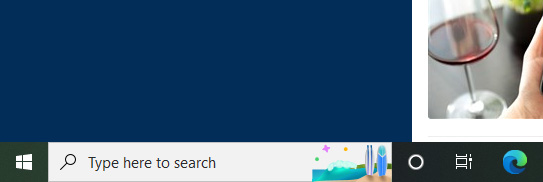
<p style="text-align: justify;">Như đã đề cập, biểu tượng này là một phần của tính năng “Search Highlight” mới được triển khai cho Windows 10 và Windows 11 như một phần của bản cập nhật tháng 4 năm 2022. Search Highlight đi kèm với một tập hợp các biểu tượng khác nhau nằm ở phía bên phải của thanh tìm kiếm trên góc trái màn hình. Tùy thuộc vào từng ngày cụ thể mà các biểu tượng này sẽ được hiển thị theo chủ đề nhất định. Hoặc nó sẽ hiển thị các biểu tượng chung chung hơn vào những ngày thông thường.</p>

<p style="text-align: justify;"><img alt="Biểu tượng “Search Highlight”" data-i="0" data-src="https://st.quantrimang.com/photos/image/2022/06/19/xoa-cac-bieu-tuong-nho-tren-thanh-tim-kiem-windows-101.jpg" data-was-processed="true" height="182" src="https://st.quantrimang.com/photos/image/2022/06/19/xoa-cac-bieu-tuong-nho-tren-thanh-tim-kiem-windows-101.jpg" width="543" /></p>

<p style="text-align: justify;">Ngoài việc đặt các biểu tượng theo chủ đề vào hộp tìm kiếm của Windows 10, tính năng “Search Highlight” cũng đưa nội dung “được highlight” vào menu tìm kiếm trên cả Windows 10 và Windows 11. Các nội dung nổi bật bao gồm tin tức, câu chuyện thịnh hành, cũng như ô tìm kiếm thịnh hành.</p>

<h2 style="text-align: justify;">Cách xóa biểu tượng “Search Highlight” trong thanh tìm kiếm của Windows</h2>

<p style="text-align: justify;">Trên Windows 10, nhấp chuột phải vào bất kỳ đâu trong tác vụ của bạn để hiển thị menu tùy chọn. Trên menu hiện ra, bạn nhấp vào “<strong>Search</strong>” và sau đó bỏ tích tùy chọn “<strong>Show search highlights</strong>” để loại bỏ các biểu tượng này.</p>

<p style="text-align: justify;"><img alt="" data-i="1" data-src="https://st.quantrimang.com/photos/image/2022/06/19/xoa-cac-bieu-tuong-nho-tren-thanh-tim-kiem-windows-101.jpg" data-was-processed="true" height="182" src="https://st.quantrimang.com/photos/image/2022/06/19/xoa-cac-bieu-tuong-nho-tren-thanh-tim-kiem-windows-101.jpg" width="543" /></p>

<p style="text-align: justify;">Trên Windows 11, mặc dù không hộp tìm kiếm đã bị loại bỏ (và do đó không có biểu tượng Search Highlight được hiển thị), bạn vẫn có thể tắt các mục nổi bật trong menu tìm kiếm. Chỉ cần mở ứng dụng Settings, sau đó điều hướng đến&nbsp;<strong>Privacy &amp; Security &gt; Search Permissions &gt; More Settings</strong>. Trong phần&nbsp;<strong>More Settings</strong>, chỉ cần tắt “<strong>Show Search Highlights</strong>”.</p>

<p style="text-align: justify;">Với những thay đổi đơn giản này, sẽ không còn bất kỳ biểu tượng nào xuất hiện trên thanh tìm kiếm hoặc tin tức nổi bật trong menu tìm kiếm của bạn.</p>
		</div>
				<div id="author">
						<p>
				<strong>Nguồn tin:</strong>
				Quantrimang.com
			</p>
		</div>
	</div>
	<div id="footer" class="clearfix">
		<div id="url">
			<strong>URL của bản tin này: </strong><a href="https://www.nguoicodonvn2008.info/vi/news/savefile/kien-thuc-may-tinh/cach-xoa-cac-bieu-tuong-nho-xuat-hien-tren-thanh-tim-kiem-cua-windows-10-5780.html" title="Cách xóa các biểu tượng nhỏ xuất hiện trên thanh tìm kiếm của Windows 10">https://www.nguoicodonvn2008.info/vi/news/savefile/kien-thuc-may-tinh/cach-xoa-cac-bieu-tuong-nho-xuat-hien-tren-thanh-tim-kiem-cua-windows-10-5780.html</a>

		</div>
		<div class="clear"></div>
		<div class="copyright">
			&copy; .&#x3A; Nguoicodonvn2008.info - Cõi lòng người cô đơn &#x3A;.
		</div>
		<div id="contact">
			<a href="mailto:admin@nguoicodonvn2008.info">admin@nguoicodonvn2008.info</a>
		</div>
	</div>
</div>
        <div id="timeoutsess" class="chromeframe">
            Bạn đã không sử dụng Site, <a onclick="timeoutsesscancel();" href="https://www.nguoicodonvn2008.info/#">Bấm vào đây để duy trì trạng thái đăng nhập</a>. Thời gian chờ: <span id="secField"> 60 </span> giây
        </div>
        <div id="openidResult" class="nv-alert" style="display:none"></div>
        <div id="openidBt" data-result="" data-redirect=""></div>
		</script>
		<div class="car-top">
  <span><img src="https://www.nguoicodonvn2008.info/themes/default/images/car.png" alt=""></span>
</div>
<script src="https://www.nguoicodonvn2008.info/assets/js/jquery/jquery.min.js"></script>
<script>var nv_base_siteurl="/",nv_lang_data="vi",nv_lang_interface="vi",nv_name_variable="nv",nv_fc_variable="op",nv_lang_variable="language",nv_module_name="news",nv_func_name="savefile",nv_is_user=0, nv_my_ofs=-4,nv_my_abbr="EDT",nv_cookie_prefix="nv4c_e856T",nv_check_pass_mstime=1738000,nv_area_admin=0,nv_safemode=0,theme_responsive=0,nv_recaptcha_ver=2,nv_recaptcha_sitekey="",nv_recaptcha_type="image",XSSsanitize=1;</script>
<script src="https://www.nguoicodonvn2008.info/assets/js/language/vi.js"></script>
<script src="https://www.nguoicodonvn2008.info/assets/js/DOMPurify/purify3.js"></script>
<script src="https://www.nguoicodonvn2008.info/assets/js/global.js"></script>
<script src="https://www.nguoicodonvn2008.info/assets/js/site.js"></script>
<script src="https://www.nguoicodonvn2008.info/themes/default/js/news.js"></script>
<script src="https://www.nguoicodonvn2008.info/themes/default/js/main.js"></script>
<script src="https://www.nguoicodonvn2008.info/themes/default/js/custom.js"></script>
<script type="application/ld+json">
        {
            "@context": "https://schema.org",
            "@type": "Organization",
            "url": "https://www.nguoicodonvn2008.info",
            "logo": "https://www.nguoicodonvn2008.info/uploads/angel.gif"
        }
        </script>
<script src="https://www.nguoicodonvn2008.info/themes/default/js/bootstrap.min.js"></script>
<script type="text/javascript">
var $scrolltop = $('.car-top');
$scrolltop.on('click', function () {
    $('html,body').animate({
        scrollTop: 0
    }, 800);
    $(this).addClass("car-run");
    setTimeout(function(){ $scrolltop.removeClass('car-run');}, 1000);
    return false;
});
$(window).on('scroll', function ()
{ 
    if($(window).scrollTop() >= 200)
    {
        $scrolltop.addClass("show");
        $scrolltop.addClass("car-down");
    }
    else
    {
       $scrolltop.removeClass("show");
       setTimeout(function(){ $scrolltop.removeClass('car-down');}, 300);
    }
});
</script>
</body>
</html>