<!DOCTYPE html>
    <html lang="vi" xmlns="http://www.w3.org/1999/xhtml" prefix="og: http://ogp.me/ns#">
    <head>
<title>Cách xem thời tiết trên máy tính Windows 10</title>
<meta name="description" content="Cách xem thời tiết trên máy tính Windows 10 - Savefile - Tin Tức -...">
<meta name="author" content=".: Nguoicodonvn2008.info - Cõi lòng người cô đơn :.">
<meta name="copyright" content=".: Nguoicodonvn2008.info - Cõi lòng người cô đơn :. [admin@nguoicodonvn2008.info]">
<meta name="robots" content="index, archive, follow, noodp">
<meta name="googlebot" content="index,archive,follow,noodp">
<meta name="msnbot" content="all,index,follow">
<meta name="generator" content="NukeViet v4.5">
<meta http-equiv="Content-Type" content="text/html; charset=utf-8">
<meta property="og:title" content="Cách xem thời tiết trên máy tính Windows 10">
<meta property="og:type" content="website">
<meta property="og:description" content="Savefile - Tin Tức - https&#x3A;&#x002F;&#x002F;www.nguoicodonvn2008.info&#x002F;vi&#x002F;news&#x002F;savefile&#x002F;kien-thuc-may-tinh&#x002F;cach-xem-thoi-tiet-tren-may-tinh-windows-10-860.html">
<meta property="og:site_name" content=".&#x3A; Nguoicodonvn2008.info - Cõi lòng người cô đơn &#x3A;.">
<meta property="og:url" content="https://www.nguoicodonvn2008.info/vi/news/savefile/kien-thuc-may-tinh/cach-xem-thoi-tiet-tren-may-tinh-windows-10-860.html">
<link rel="shortcut icon" href="https://www.nguoicodonvn2008.info/favicon.ico">
<link rel="canonical" href="https://www.nguoicodonvn2008.info/vi/news/savefile/kien-thuc-may-tinh/cach-xem-thoi-tiet-tren-may-tinh-windows-10-860.html">
<link rel="alternate" href="https://www.nguoicodonvn2008.info/vi/news/rss/" title="Tin Tức" type="application/rss+xml">
<link rel="alternate" href="https://www.nguoicodonvn2008.info/vi/news/rss/karaoke-dual/" title="Tin Tức - Karaoke Dual" type="application/rss+xml">
<link rel="alternate" href="https://www.nguoicodonvn2008.info/vi/news/rss/nhac-tre/" title="Tin Tức - Nhạc trẻ" type="application/rss+xml">
<link rel="alternate" href="https://www.nguoicodonvn2008.info/vi/news/rss/tru-tinh/" title="Tin Tức - Trữ tình" type="application/rss+xml">
<link rel="alternate" href="https://www.nguoicodonvn2008.info/vi/news/rss/nuoc-ngoai/" title="Tin Tức - Nước ngoài" type="application/rss+xml">
<link rel="alternate" href="https://www.nguoicodonvn2008.info/vi/news/rss/remix/" title="Tin Tức - Remix" type="application/rss+xml">
<link rel="alternate" href="https://www.nguoicodonvn2008.info/vi/news/rss/tam-su-tinh-yeu/" title="Tin Tức - Tâm sự tình yêu" type="application/rss+xml">
<link rel="alternate" href="https://www.nguoicodonvn2008.info/vi/news/rss/tho-suu-tam/" title="Tin Tức - Thơ sưu tầm" type="application/rss+xml">
<link rel="alternate" href="https://www.nguoicodonvn2008.info/vi/news/rss/cuoc-song/" title="Tin Tức - Cuộc sống" type="application/rss+xml">
<link rel="alternate" href="https://www.nguoicodonvn2008.info/vi/news/rss/phan-mem/" title="Tin Tức - Phần mềm" type="application/rss+xml">
<link rel="alternate" href="https://www.nguoicodonvn2008.info/vi/news/rss/kien-thuc-may-tinh/" title="Tin Tức - Kiến thức máy tính" type="application/rss+xml">
<link rel="alternate" href="https://www.nguoicodonvn2008.info/vi/news/rss/hoc-tap/" title="Tin Tức - Học tập" type="application/rss+xml">
<link rel="alternate" href="https://www.nguoicodonvn2008.info/vi/news/rss/tai-lieu/" title="Tin Tức - Tài liệu" type="application/rss+xml">
<link rel="alternate" href="https://www.nguoicodonvn2008.info/vi/news/rss/de-thi/" title="Tin Tức - Đề thi" type="application/rss+xml">
<link rel="preload" as="style" href="https://www.nguoicodonvn2008.info/assets/css/font-awesome.min.css" type="text/css">
<link rel="preload" as="style" href="https://www.nguoicodonvn2008.info/themes/default/css/bootstrap.non-responsive.css" type="text/css">
<link rel="preload" as="style" href="https://www.nguoicodonvn2008.info/themes/default/css/style.css" type="text/css">
<link rel="preload" as="style" href="https://www.nguoicodonvn2008.info/themes/default/css/style.non-responsive.css" type="text/css">
<link rel="preload" as="style" href="https://www.nguoicodonvn2008.info/themes/default/css/news.css" type="text/css">
<link rel="preload" as="style" href="https://www.nguoicodonvn2008.info/themes/default/css/custom.css" type="text/css">
<link rel="preload" as="script" href="https://www.nguoicodonvn2008.info/assets/js/jquery/jquery.min.js" type="text/javascript">
<link rel="preload" as="script" href="https://www.nguoicodonvn2008.info/assets/js/language/vi.js" type="text/javascript">
<link rel="preload" as="script" href="https://www.nguoicodonvn2008.info/assets/js/DOMPurify/purify3.js" type="text/javascript">
<link rel="preload" as="script" href="https://www.nguoicodonvn2008.info/assets/js/global.js" type="text/javascript">
<link rel="preload" as="script" href="https://www.nguoicodonvn2008.info/assets/js/site.js" type="text/javascript">
<link rel="preload" as="script" href="https://www.nguoicodonvn2008.info/themes/default/js/news.js" type="text/javascript">
<link rel="preload" as="script" href="https://www.nguoicodonvn2008.info/themes/default/js/main.js" type="text/javascript">
<link rel="preload" as="script" href="https://www.nguoicodonvn2008.info/themes/default/js/custom.js" type="text/javascript">
<link rel="preload" as="script" href="https://www.nguoicodonvn2008.info/themes/default/js/bootstrap.min.js" type="text/javascript">
<link rel="stylesheet" href="https://www.nguoicodonvn2008.info/assets/css/font-awesome.min.css">
<link rel="stylesheet" href="https://www.nguoicodonvn2008.info/themes/default/css/bootstrap.non-responsive.css">
<link rel="stylesheet" href="https://www.nguoicodonvn2008.info/themes/default/css/style.css">
<link rel="stylesheet" href="https://www.nguoicodonvn2008.info/themes/default/css/style.non-responsive.css">
<link rel="StyleSheet" href="https://www.nguoicodonvn2008.info/themes/default/css/news.css">
<link rel="stylesheet" href="https://www.nguoicodonvn2008.info/themes/default/css/custom.css">
<style type="text/css">
	body{background: #fff;}
</style>
    </head>
    <body>
<div id="print">
	<div id="hd_print">
		<h2 class="pull-left">.&#x3A; Nguoicodonvn2008.info - Cõi lòng người cô đơn &#x3A;.</h2>
		<p class="pull-right"><a title=".&#x3A; Nguoicodonvn2008.info - Cõi lòng người cô đơn &#x3A;." href="https://www.nguoicodonvn2008.info/">https://www.nguoicodonvn2008.info</a></p>
	</div>
	<div class="clear"></div>
	<hr />
	<div id="content">
		<h1>Cách xem thời tiết trên máy tính Windows 10</h1>
		<ul class="list-inline">
			<li>Thứ năm - 29/08/2019 01:51</li>
			<li class="hidden-print txtrequired"><em class="fa fa-print">&nbsp;</em><a title="In ra" href="javascript:;" onclick="window.print()">In ra</a></li>
			<li class="hidden-print txtrequired"><em class="fa fa-power-off">&nbsp;</em><a title="Đóng cửa sổ này" href="javascript:;" onclick="window.close()">Đóng cửa sổ này</a></li>
		</ul>
		<div class="clear"></div>
		<div id="hometext">
		</div>
				<div class="imghome">
			<img alt="Cách xem thời tiết trên máy tính Windows 10" src="https://st.quantrimang.com/photos/image/2019/08/28/xem-thoi-tiet-tren-windows-1.png" width="460" class="img-thumbnail" />
		</div>
		<div class="clear"></div>
		<div id="bodytext" class="clearfix">
			<p style="text-align: justify;">Cách nhanh nhất để kiểm tra thời tiết chính là tìm kiếm trên Google. Với tìm kiếm nhanh chóng, bạn sẽ nhận được tóm tắt từng giờ về nhiệt độ, lượng mưa và độ ẩm của bất kỳ đâu trên thế giới. Tuy nhiên, nếu dùng Windows 10, bạn có thể sử dụng một trong những ứng dụng dưới đây để kiểm tra thời tiết trên máy tính để bàn vì chúng cung cấp thông tin chi tiết hơn Google.</p>

<div style="text-align: justify;">&nbsp;</div>

<h2 style="text-align: justify;">1. Ứng dụng Weather mặc định Windows 10</h2>

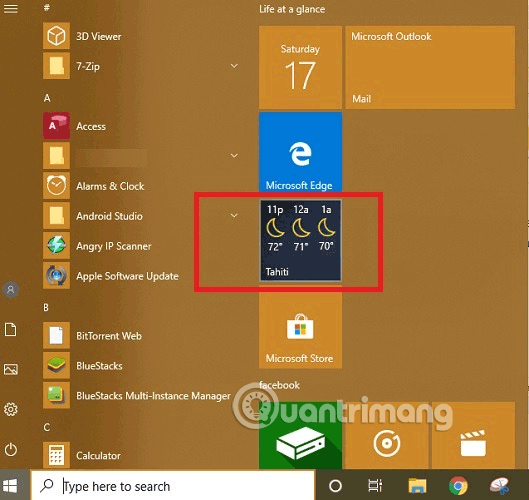
<p style="text-align: justify;">Ứng dụng Weather mặc định trên Windows 10 đi kèm với hệ điều hành và được cập nhật với từng phiên bản. Bạn có thể truy cập nó trực tiếp từ menu Start.</p>

<p style="text-align: justify;"><img alt="Tìm ứng dụng Weather từ menu Start" data-i="0" data-src="https://st.quantrimang.com/photos/image/2019/08/28/xem-thoi-tiet-tren-windows-1.png" data-was-processed="true" height="500" src="https://st.quantrimang.com/photos/image/2019/08/28/xem-thoi-tiet-tren-windows-1.png" width="529" /></p>

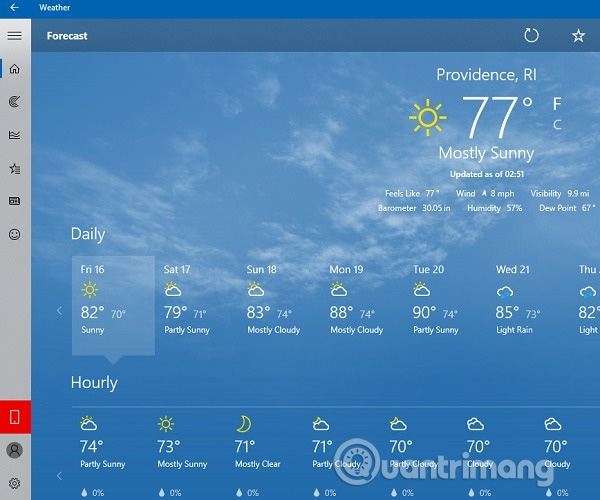
<p style="text-align: justify;">Nhập vị trí vào menu tìm kiếm, bạn sẽ nhận được hàng tấn thông tin liên quan đến thời tiết như nhiệt độ, tốc độ gió, tầm nhìn, áp suất khí quyển, độ ẩm.</p>

<p style="text-align: justify;"><img alt="Xem thời tiết với ứng dụng Weather mặc định của Windows 10" data-i="1" data-src="https://st.quantrimang.com/photos/image/2019/08/28/xem-thoi-tiet-tren-windows-2.jpg" data-was-processed="true" height="500" src="https://st.quantrimang.com/photos/image/2019/08/28/xem-thoi-tiet-tren-windows-2.jpg" width="600" /></p>

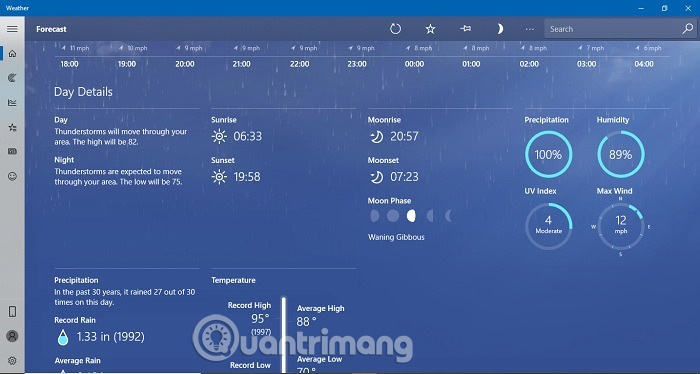
<p style="text-align: justify;">Các bản tóm tắt chi tiết trải dài theo cập nhật từng giờ, xu hướng mưa, dự đoán giông bão, chỉ số cực tím, thời gian lúc trăng lên, trăng lặn và chu kỳ trăng.</p>

<p style="text-align: justify;"><img alt="Bản tóm tắt thời tiết" data-i="2" data-src="https://st.quantrimang.com/photos/image/2019/08/28/xem-thoi-tiet-tren-windows-3.jpg" data-was-processed="true" height="342" src="https://st.quantrimang.com/photos/image/2019/08/28/xem-thoi-tiet-tren-windows-3.jpg" width="640" /></p>

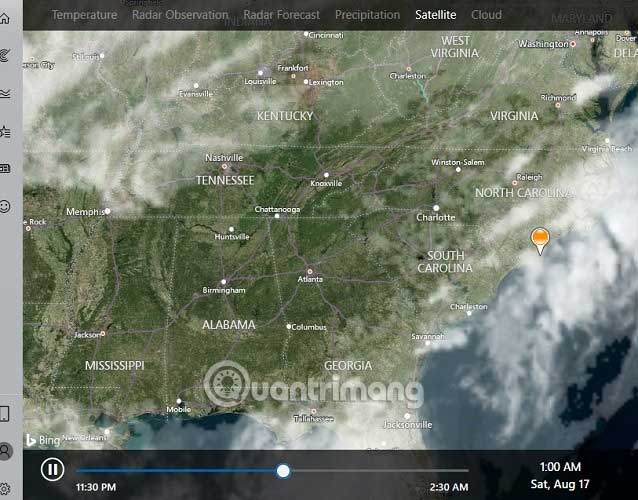
<p style="text-align: justify;">Nó thậm chí còn tốt hơn với các báo cáo vệ tinh, dự báo thời tiết radar và độ mây che phủ.&nbsp;</p>

<p style="text-align: justify;"><img alt="Dự báo thời tiết radar" data-i="3" data-src="https://st.quantrimang.com/photos/image/2019/08/28/xem-thoi-tiet-tren-windows-4.jpg" data-was-processed="true" height="500" src="https://st.quantrimang.com/photos/image/2019/08/28/xem-thoi-tiet-tren-windows-4.jpg" width="638" /></p>

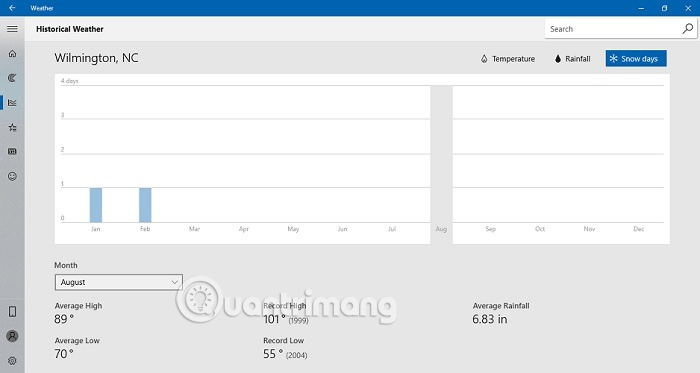
<p style="text-align: justify;">Các kiểu thời tiết trước đây, số ngày tuyết và xu hướng mưa là một trong những tính năng khác của ứng dụng này.</p>

<p style="text-align: justify;"><img alt="Xem dự báo ngày tuyết" data-i="4" data-src="https://st.quantrimang.com/photos/image/2019/08/28/xem-thoi-tiet-tren-windows-5.png" data-was-processed="true" height="341" src="https://st.quantrimang.com/photos/image/2019/08/28/xem-thoi-tiet-tren-windows-5.png" width="640" /></p>

<p style="text-align: justify;">Do ứng dụng thời tiết tích hợp sẵn của Microsoft hoàn toàn miễn phí sử dụng, nên nó rất được khuyến khích và cũng là một trong những công cụ máy tính để bàn tốt nhất của hãng.</p>

<h2 style="text-align: justify;">2. WeatherBug</h2>

<ul>
	<li style="text-align: justify;">Tải WeatherBug cho Windows&nbsp;</li>
</ul>

<div style="text-align: justify;"><span style="color:rgb(192, 57, 43);"><strong>download.com.vn/weatherbug/download</strong></span></div>

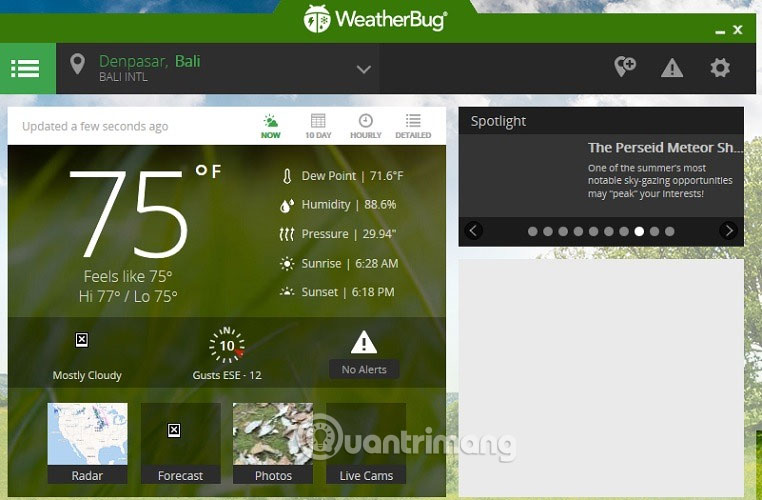
<p style="text-align: justify;">Theo sát gót của ứng dụng Windows, WeatherBug được đánh giá cao nhờ sự chú ý tuyệt đối đến từng chi tiết. Ứng dụng này nhỏ gọn và không chiếm nhiều dung lượng trên máy tính (chỉ 2,8 MB). Tuy nhiên, nó vẫn cung cấp thông tin thời tiết hữu ích.</p>

<p style="text-align: justify;"><img alt="Ứng dụng WeatherBug" data-i="5" data-src="https://st.quantrimang.com/photos/image/2019/08/28/xem-thoi-tiet-tren-windows-6.jpg" data-was-processed="true" height="420" src="https://st.quantrimang.com/photos/image/2019/08/28/xem-thoi-tiet-tren-windows-6.jpg" width="640" /></p>

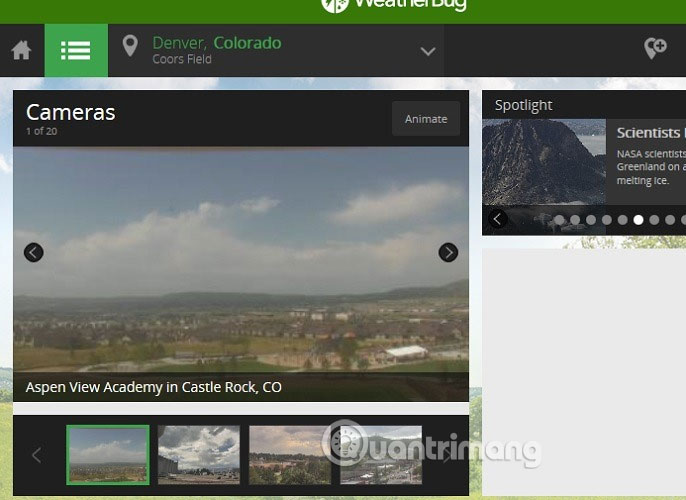
<p style="text-align: justify;">Ngoài dự báo thời tiết 10 ngày và hàng giờ, dữ liệu nhiệt độ, độ ẩm, áp suất, bạn còn có chế độ xem camera trực tiếp để có thể lên kế hoạch du lịch dựa trên nguồn cấp dữ liệu thời tiết trực tiếp trên camera.</p>

<p style="text-align: justify;"><img alt="Chế độ xem camera trực tiếp " data-i="6" data-src="https://st.quantrimang.com/photos/image/2019/08/28/xem-thoi-tiet-tren-windows-7.jpg" data-was-processed="true" height="466" src="https://st.quantrimang.com/photos/image/2019/08/28/xem-thoi-tiet-tren-windows-7.jpg" width="640" /></p>

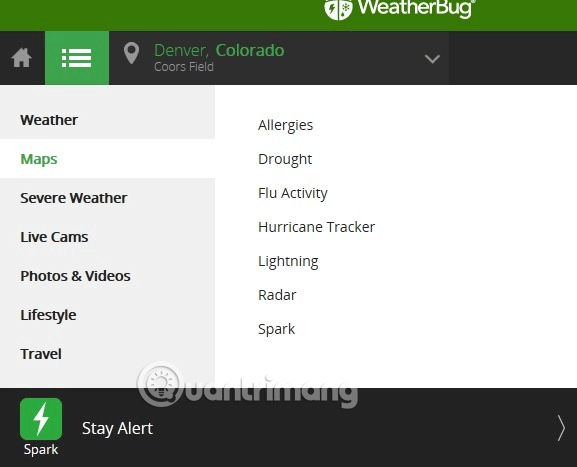
<p style="text-align: justify;">Ngoài ra, ứng dụng này còn có tính năng của Maps, cung cấp thêm thông tin về dị ứng, hạn hán, cúm và theo dõi báo và sét.</p>

<p style="text-align: justify;"><img alt="Ứng dụng có tính năng của Maps" data-i="7" data-src="https://st.quantrimang.com/photos/image/2019/08/28/xem-thoi-tiet-tren-windows-8.png" data-was-processed="true" height="467" src="https://st.quantrimang.com/photos/image/2019/08/28/xem-thoi-tiet-tren-windows-8.png" width="577" /></p>

<p style="text-align: justify;">Rõ ràng, WeatherBug là một ứng dụng thời tiết tuyệt vời và vẫn miễn phí sử dụng.</p>

<div style="text-align: justify;">&nbsp;</div>

<h2 style="text-align: justify;">3. 8-Bit Weather</h2>

<ul>
	<li style="text-align: justify;">Tải 8-Bit Weather cho Windows</li>
</ul>

<div style="text-align: justify;"><span style="color:rgb(192, 57, 43);"><strong>download.com.vn/8-bit-weather/download​​​​​​​</strong></span></div>

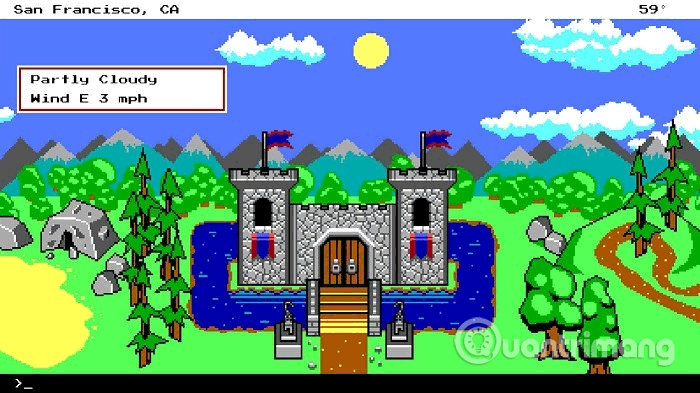
<p style="text-align: justify;"><img alt="Ứng dụng 8-Bit Weather" data-i="8" data-src="https://st.quantrimang.com/photos/image/2019/08/28/xem-thoi-tiet-tren-windows-9.png" data-was-processed="true" height="359" src="https://st.quantrimang.com/photos/image/2019/08/28/xem-thoi-tiet-tren-windows-9.png" width="640" /></p>

<p style="text-align: justify;">Những người yêu thích trò chơi điện tử chắc sẽ thích ứng dụng thời tiết này. 8-bit Weather sử dụng khung vẽ video game mang tính biểu tượng để cung cấp thông tin chi tiết về thời tiết chính xác và cập nhật liên tục.</p>

<h2 style="text-align: justify;">4. Forecast</h2>

<ul>
	<li style="text-align: justify;">Tải Forecast cho Windows</li>
</ul>

<div style="text-align: justify;"><span style="color:rgb(192, 57, 43);"><strong>download.com.vn/forecast/download​​​​​​​</strong></span></div>

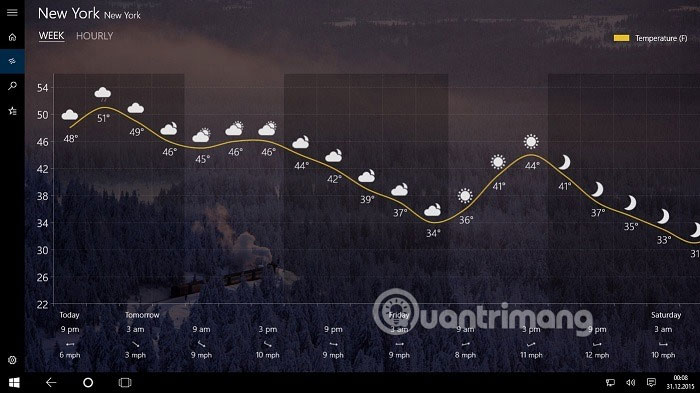
<p style="text-align: justify;">Nếu muốn thay đổi ứng dụng mặc định của Windows 10, bạn có thể sử dụng Forecast trông rất giống nhau. Chỉ có sẵn với giá 1,49 USB tại Microsoft Store, ứng dụng này cung cấp các biểu đồ tỉ mỉ hơn nắm bắt &quot;tâm trạng&quot; của các vị thần thời tiết một cách chính xác.&nbsp;</p>

<p style="text-align: justify;"><img alt="Ứng dụng Forecast" data-i="9" data-src="https://st.quantrimang.com/photos/image/2019/08/28/xem-thoi-tiet-tren-windows-10.jpg" data-was-processed="true" height="359" src="https://st.quantrimang.com/photos/image/2019/08/28/xem-thoi-tiet-tren-windows-10.jpg" width="640" /></p>

<p style="text-align: justify;">Bạn không chỉ nhận được thông tin chi tiết hơn một chút so với ứng dụng mặc định của Windows, mà còn có nhiều theme hơn để lựa chọn. Chỉ vì thời tiết ảm đạm bên ngoài không có nghĩa là theme máy tính cũng ảm đảm theo.</p>
		</div>
				<div id="author">
						<p>
				<strong>Nguồn tin:</strong>
				Quantrimang.com
			</p>
		</div>
	</div>
	<div id="footer" class="clearfix">
		<div id="url">
			<strong>URL của bản tin này: </strong><a href="https://www.nguoicodonvn2008.info/vi/news/savefile/kien-thuc-may-tinh/cach-xem-thoi-tiet-tren-may-tinh-windows-10-860.html" title="Cách xem thời tiết trên máy tính Windows 10">https://www.nguoicodonvn2008.info/vi/news/savefile/kien-thuc-may-tinh/cach-xem-thoi-tiet-tren-may-tinh-windows-10-860.html</a>

		</div>
		<div class="clear"></div>
		<div class="copyright">
			&copy; .&#x3A; Nguoicodonvn2008.info - Cõi lòng người cô đơn &#x3A;.
		</div>
		<div id="contact">
			<a href="mailto:admin@nguoicodonvn2008.info">admin@nguoicodonvn2008.info</a>
		</div>
	</div>
</div>
        <div id="timeoutsess" class="chromeframe">
            Bạn đã không sử dụng Site, <a onclick="timeoutsesscancel();" href="https://www.nguoicodonvn2008.info/#">Bấm vào đây để duy trì trạng thái đăng nhập</a>. Thời gian chờ: <span id="secField"> 60 </span> giây
        </div>
        <div id="openidResult" class="nv-alert" style="display:none"></div>
        <div id="openidBt" data-result="" data-redirect=""></div>
		</script>
		<div class="car-top">
  <span><img src="https://www.nguoicodonvn2008.info/themes/default/images/car.png" alt=""></span>
</div>
<div id="run_cronjobs" style="visibility:hidden;display:none;"><img alt="cron" src="/index.php?second=cronjobs&amp;p=t8EBS83i" width="1" height="1" /></div>
<script src="https://www.nguoicodonvn2008.info/assets/js/jquery/jquery.min.js"></script>
<script>var nv_base_siteurl="/",nv_lang_data="vi",nv_lang_interface="vi",nv_name_variable="nv",nv_fc_variable="op",nv_lang_variable="language",nv_module_name="news",nv_func_name="savefile",nv_is_user=0, nv_my_ofs=-4,nv_my_abbr="EDT",nv_cookie_prefix="nv4c_e856T",nv_check_pass_mstime=1738000,nv_area_admin=0,nv_safemode=0,theme_responsive=0,nv_recaptcha_ver=2,nv_recaptcha_sitekey="",nv_recaptcha_type="image",XSSsanitize=1;</script>
<script src="https://www.nguoicodonvn2008.info/assets/js/language/vi.js"></script>
<script src="https://www.nguoicodonvn2008.info/assets/js/DOMPurify/purify3.js"></script>
<script src="https://www.nguoicodonvn2008.info/assets/js/global.js"></script>
<script src="https://www.nguoicodonvn2008.info/assets/js/site.js"></script>
<script src="https://www.nguoicodonvn2008.info/themes/default/js/news.js"></script>
<script src="https://www.nguoicodonvn2008.info/themes/default/js/main.js"></script>
<script src="https://www.nguoicodonvn2008.info/themes/default/js/custom.js"></script>
<script type="application/ld+json">
        {
            "@context": "https://schema.org",
            "@type": "Organization",
            "url": "https://www.nguoicodonvn2008.info",
            "logo": "https://www.nguoicodonvn2008.info/uploads/angel.gif"
        }
        </script>
<script src="https://www.nguoicodonvn2008.info/themes/default/js/bootstrap.min.js"></script>
<script type="text/javascript">
var $scrolltop = $('.car-top');
$scrolltop.on('click', function () {
    $('html,body').animate({
        scrollTop: 0
    }, 800);
    $(this).addClass("car-run");
    setTimeout(function(){ $scrolltop.removeClass('car-run');}, 1000);
    return false;
});
$(window).on('scroll', function ()
{ 
    if($(window).scrollTop() >= 200)
    {
        $scrolltop.addClass("show");
        $scrolltop.addClass("car-down");
    }
    else
    {
       $scrolltop.removeClass("show");
       setTimeout(function(){ $scrolltop.removeClass('car-down');}, 300);
    }
});
</script>
</body>
</html>