<!DOCTYPE html>
    <html lang="vi" xmlns="http://www.w3.org/1999/xhtml" prefix="og: http://ogp.me/ns#">
    <head>
<title>Cách xem các máy tính kết nối mạng trên Windows 10</title>
<meta name="description" content="Cách xem các máy tính kết nối mạng trên Windows 10 - Savefile - Tin Tức -...">
<meta name="author" content=".: Nguoicodonvn2008.info - Cõi lòng người cô đơn :.">
<meta name="copyright" content=".: Nguoicodonvn2008.info - Cõi lòng người cô đơn :. [admin@nguoicodonvn2008.info]">
<meta name="robots" content="index, archive, follow, noodp">
<meta name="googlebot" content="index,archive,follow,noodp">
<meta name="msnbot" content="all,index,follow">
<meta name="generator" content="NukeViet v4.5">
<meta http-equiv="Content-Type" content="text/html; charset=utf-8">
<meta property="og:title" content="Cách xem các máy tính kết nối mạng trên Windows 10">
<meta property="og:type" content="website">
<meta property="og:description" content="Savefile - Tin Tức - https&#x3A;&#x002F;&#x002F;www.nguoicodonvn2008.info&#x002F;vi&#x002F;news&#x002F;savefile&#x002F;kien-thuc-may-tinh&#x002F;cach-xem-cac-may-tinh-ket-noi-mang-tren-windows-10-2423.html">
<meta property="og:site_name" content=".&#x3A; Nguoicodonvn2008.info - Cõi lòng người cô đơn &#x3A;.">
<meta property="og:url" content="https://www.nguoicodonvn2008.info/vi/news/savefile/kien-thuc-may-tinh/cach-xem-cac-may-tinh-ket-noi-mang-tren-windows-10-2423.html">
<link rel="shortcut icon" href="https://www.nguoicodonvn2008.info/favicon.ico">
<link rel="canonical" href="https://www.nguoicodonvn2008.info/vi/news/savefile/kien-thuc-may-tinh/cach-xem-cac-may-tinh-ket-noi-mang-tren-windows-10-2423.html">
<link rel="alternate" href="https://www.nguoicodonvn2008.info/vi/news/rss/" title="Tin Tức" type="application/rss+xml">
<link rel="alternate" href="https://www.nguoicodonvn2008.info/vi/news/rss/karaoke-dual/" title="Tin Tức - Karaoke Dual" type="application/rss+xml">
<link rel="alternate" href="https://www.nguoicodonvn2008.info/vi/news/rss/nhac-tre/" title="Tin Tức - Nhạc trẻ" type="application/rss+xml">
<link rel="alternate" href="https://www.nguoicodonvn2008.info/vi/news/rss/tru-tinh/" title="Tin Tức - Trữ tình" type="application/rss+xml">
<link rel="alternate" href="https://www.nguoicodonvn2008.info/vi/news/rss/nuoc-ngoai/" title="Tin Tức - Nước ngoài" type="application/rss+xml">
<link rel="alternate" href="https://www.nguoicodonvn2008.info/vi/news/rss/remix/" title="Tin Tức - Remix" type="application/rss+xml">
<link rel="alternate" href="https://www.nguoicodonvn2008.info/vi/news/rss/tam-su-tinh-yeu/" title="Tin Tức - Tâm sự tình yêu" type="application/rss+xml">
<link rel="alternate" href="https://www.nguoicodonvn2008.info/vi/news/rss/tho-suu-tam/" title="Tin Tức - Thơ sưu tầm" type="application/rss+xml">
<link rel="alternate" href="https://www.nguoicodonvn2008.info/vi/news/rss/cuoc-song/" title="Tin Tức - Cuộc sống" type="application/rss+xml">
<link rel="alternate" href="https://www.nguoicodonvn2008.info/vi/news/rss/phan-mem/" title="Tin Tức - Phần mềm" type="application/rss+xml">
<link rel="alternate" href="https://www.nguoicodonvn2008.info/vi/news/rss/kien-thuc-may-tinh/" title="Tin Tức - Kiến thức máy tính" type="application/rss+xml">
<link rel="alternate" href="https://www.nguoicodonvn2008.info/vi/news/rss/hoc-tap/" title="Tin Tức - Học tập" type="application/rss+xml">
<link rel="alternate" href="https://www.nguoicodonvn2008.info/vi/news/rss/tai-lieu/" title="Tin Tức - Tài liệu" type="application/rss+xml">
<link rel="alternate" href="https://www.nguoicodonvn2008.info/vi/news/rss/de-thi/" title="Tin Tức - Đề thi" type="application/rss+xml">
<link rel="preload" as="style" href="https://www.nguoicodonvn2008.info/assets/css/font-awesome.min.css" type="text/css">
<link rel="preload" as="style" href="https://www.nguoicodonvn2008.info/themes/default/css/bootstrap.non-responsive.css" type="text/css">
<link rel="preload" as="style" href="https://www.nguoicodonvn2008.info/themes/default/css/style.css" type="text/css">
<link rel="preload" as="style" href="https://www.nguoicodonvn2008.info/themes/default/css/style.non-responsive.css" type="text/css">
<link rel="preload" as="style" href="https://www.nguoicodonvn2008.info/themes/default/css/news.css" type="text/css">
<link rel="preload" as="style" href="https://www.nguoicodonvn2008.info/themes/default/css/custom.css" type="text/css">
<link rel="preload" as="script" href="https://www.nguoicodonvn2008.info/assets/js/jquery/jquery.min.js" type="text/javascript">
<link rel="preload" as="script" href="https://www.nguoicodonvn2008.info/assets/js/language/vi.js" type="text/javascript">
<link rel="preload" as="script" href="https://www.nguoicodonvn2008.info/assets/js/DOMPurify/purify3.js" type="text/javascript">
<link rel="preload" as="script" href="https://www.nguoicodonvn2008.info/assets/js/global.js" type="text/javascript">
<link rel="preload" as="script" href="https://www.nguoicodonvn2008.info/assets/js/site.js" type="text/javascript">
<link rel="preload" as="script" href="https://www.nguoicodonvn2008.info/themes/default/js/news.js" type="text/javascript">
<link rel="preload" as="script" href="https://www.nguoicodonvn2008.info/themes/default/js/main.js" type="text/javascript">
<link rel="preload" as="script" href="https://www.nguoicodonvn2008.info/themes/default/js/custom.js" type="text/javascript">
<link rel="preload" as="script" href="https://www.nguoicodonvn2008.info/themes/default/js/bootstrap.min.js" type="text/javascript">
<link rel="stylesheet" href="https://www.nguoicodonvn2008.info/assets/css/font-awesome.min.css">
<link rel="stylesheet" href="https://www.nguoicodonvn2008.info/themes/default/css/bootstrap.non-responsive.css">
<link rel="stylesheet" href="https://www.nguoicodonvn2008.info/themes/default/css/style.css">
<link rel="stylesheet" href="https://www.nguoicodonvn2008.info/themes/default/css/style.non-responsive.css">
<link rel="StyleSheet" href="https://www.nguoicodonvn2008.info/themes/default/css/news.css">
<link rel="stylesheet" href="https://www.nguoicodonvn2008.info/themes/default/css/custom.css">
<style type="text/css">
	body{background: #fff;}
</style>
    </head>
    <body>
<div id="print">
	<div id="hd_print">
		<h2 class="pull-left">.&#x3A; Nguoicodonvn2008.info - Cõi lòng người cô đơn &#x3A;.</h2>
		<p class="pull-right"><a title=".&#x3A; Nguoicodonvn2008.info - Cõi lòng người cô đơn &#x3A;." href="https://www.nguoicodonvn2008.info/">https://www.nguoicodonvn2008.info</a></p>
	</div>
	<div class="clear"></div>
	<hr />
	<div id="content">
		<h1>Cách xem các máy tính kết nối mạng trên Windows 10</h1>
		<ul class="list-inline">
			<li>Thứ tư - 29/07/2020 00:25</li>
			<li class="hidden-print txtrequired"><em class="fa fa-print">&nbsp;</em><a title="In ra" href="javascript:;" onclick="window.print()">In ra</a></li>
			<li class="hidden-print txtrequired"><em class="fa fa-power-off">&nbsp;</em><a title="Đóng cửa sổ này" href="javascript:;" onclick="window.close()">Đóng cửa sổ này</a></li>
		</ul>
		<div class="clear"></div>
		<div id="hometext">
		</div>
				<div class="imghome">
			<img alt="Cách xem các máy tính kết nối mạng trên Windows 10" src="https://st.quantrimang.com/photos/image/2020/07/28/xem-cac-may-tinh-ket-noi-mang-tren-win-10-3.jpg" width="460" class="img-thumbnail" />
		</div>
		<div class="clear"></div>
		<div id="bodytext" class="clearfix">
			<p style="text-align: justify;">Trên Windows 10, khả năng nhìn thấy các máy tính khác trong mạng cục bộ có thể có ích trong nhiều tình huống. Ví dụ, khi bạn cần truy cập vào một thư mục chia sẻ hoặc máy in, hay khi bạn cần truy cập một ứng dụng đặc biệt được lưu trữ trên một máy tính từ xa.</p>

<p style="text-align: justify;">Dù lý do có thể là gì, bạn luôn có thể sử dụng File Explorer để nhanh chóng tìm và truy cập các thiết bị trong mạng.</p>

<p style="text-align: justify;">Trong hướng dẫn này, bạn sẽ học các bước dễ dàng để nhanh chóng tìm thấy các máy tính khác được kết nối trong mạng cục bộ trên Windows 10.</p>

<h2 style="text-align: justify;">Tìm các máy tính khác trong mạng bằng File Explorer</h2>

<p style="text-align: justify;">Để tìm các thiết bị khác trong mạng, hãy làm theo các bước sau:</p>

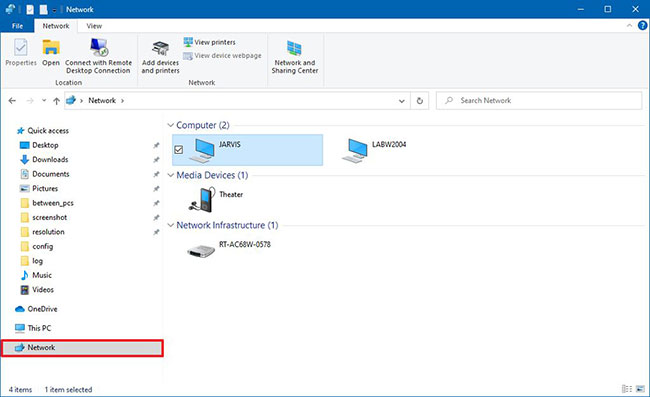
<p style="text-align: justify;">1.&nbsp;Mở File Explorer.</p>

<p style="text-align: justify;">2. Bấm vào&nbsp;<strong>Network</strong>&nbsp;ở bên trái.</p>

<p style="text-align: justify;">3. Xem các máy tính có sẵn trong mạng cục bộ.</p>

<figure>
<div style="text-align: justify;"><img alt="Xem các máy tính có sẵn trong mạng cục bộ" data-i="0" data-src="https://st.quantrimang.com/photos/image/2020/07/28/xem-cac-may-tinh-ket-noi-mang-tren-win-10-1.jpg" data-was-processed="true" height="397" src="https://st.quantrimang.com/photos/image/2020/07/28/xem-cac-may-tinh-ket-noi-mang-tren-win-10-1.jpg" width="650" /></div>

<figcaption>
<div style="text-align: justify;">Xem các máy tính có sẵn trong mạng cục bộ</div>
</figcaption>
</figure>

<p style="text-align: justify;">4. Bấm đúp vào thiết bị để truy cập các tài nguyên được chia sẻ, như thư mục hoặc máy in dùng chung.</p>

<p style="text-align: justify;">Khi bạn hoàn thành các bước, bạn sẽ có thể truy cập thiết bị. Tuy nhiên, bạn sẽ chỉ có thể truy cập các tài nguyên được chia sẻ miễn là thiết bị từ xa có cùng tài khoản và mật khẩu. Nếu không, thì bạn sẽ cần xác thực bằng tên người dùng và mật khẩu tài khoản admin có sẵn trong thiết bị từ xa để truy cập.</p>

<div style="text-align: justify;">&nbsp;</div>

<h2 style="text-align: justify;">Kích hoạt Network Discovery trên Windows 10</h2>

<p style="text-align: justify;">Nếu bạn không thể nhìn thấy bất kỳ máy tính nào trong mạng, thì đó có lẽ là vì tính năng Network Discovery không được kích hoạt.</p>

<p style="text-align: justify;">Để bật Network Discovery trên Windows 10, hãy làm theo các bước sau:</p>

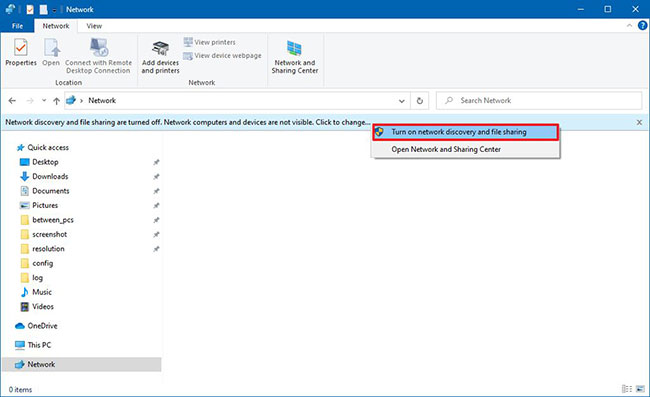
<p style="text-align: justify;">1. Mở&nbsp;<strong>File Explorer.</strong></p>

<p style="text-align: justify;">2. Bấm vào&nbsp;<strong>Network</strong>&nbsp;ở bên trái.</p>

<p style="text-align: justify;">3. Nhấp vào tin nhắn ở dưới cùng của ribbon và chọn tùy chọn&nbsp;<strong>Turn on network discovery and file sharing</strong>.</p>

<figure>
<div style="text-align: justify;"><img alt="Chọn tùy chọn Turn on network discovery and file sharing" data-i="1" data-src="https://st.quantrimang.com/photos/image/2020/07/28/xem-cac-may-tinh-ket-noi-mang-tren-win-10-2.jpg" data-was-processed="true" height="397" src="https://st.quantrimang.com/photos/image/2020/07/28/xem-cac-may-tinh-ket-noi-mang-tren-win-10-2.jpg" width="650" /></div>

<figcaption>
<div style="text-align: justify;">Chọn tùy chọn Turn on network discovery and file sharing</div>
</figcaption>
</figure>

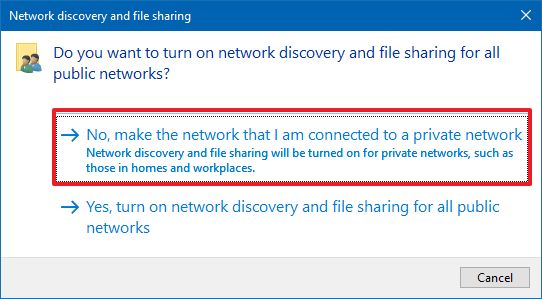
<p style="text-align: justify;">4. Nhấp vào tùy chọn&nbsp;<strong>No, make the network that I am connected to a private network</strong>.</p>

<figure>
<div style="text-align: justify;"><img alt="Nhấp vào tùy chọn No, make the network that I am connected to a private network" data-i="2" data-src="https://st.quantrimang.com/photos/image/2020/07/28/xem-cac-may-tinh-ket-noi-mang-tren-win-10-3.jpg" data-was-processed="true" height="299" src="https://st.quantrimang.com/photos/image/2020/07/28/xem-cac-may-tinh-ket-noi-mang-tren-win-10-3.jpg" width="542" /></div>

<figcaption>
<div style="text-align: justify;">Nhấp vào tùy chọn No, make the network that I am connected to a private network</div>
</figcaption>
</figure>

<p style="text-align: justify;">Sau khi bạn hoàn thành các bước, bây giờ, bạn sẽ có thể thấy các thiết bị trong mạng.</p>

<p style="text-align: justify;">&nbsp;</p>

<p style="text-align: justify;">Sau khi bạn hoàn thành các bước, bây giờ bạn sẽ có thể tìm thấy các máy tính khác trong mạng cục bộ.</p>
		</div>
				<div id="author">
						<p>
				<strong>Nguồn tin:</strong>
				Quantrimang.com
			</p>
		</div>
	</div>
	<div id="footer" class="clearfix">
		<div id="url">
			<strong>URL của bản tin này: </strong><a href="https://www.nguoicodonvn2008.info/vi/news/savefile/kien-thuc-may-tinh/cach-xem-cac-may-tinh-ket-noi-mang-tren-windows-10-2423.html" title="Cách xem các máy tính kết nối mạng trên Windows 10">https://www.nguoicodonvn2008.info/vi/news/savefile/kien-thuc-may-tinh/cach-xem-cac-may-tinh-ket-noi-mang-tren-windows-10-2423.html</a>

		</div>
		<div class="clear"></div>
		<div class="copyright">
			&copy; .&#x3A; Nguoicodonvn2008.info - Cõi lòng người cô đơn &#x3A;.
		</div>
		<div id="contact">
			<a href="mailto:admin@nguoicodonvn2008.info">admin@nguoicodonvn2008.info</a>
		</div>
	</div>
</div>
        <div id="timeoutsess" class="chromeframe">
            Bạn đã không sử dụng Site, <a onclick="timeoutsesscancel();" href="https://www.nguoicodonvn2008.info/#">Bấm vào đây để duy trì trạng thái đăng nhập</a>. Thời gian chờ: <span id="secField"> 60 </span> giây
        </div>
        <div id="openidResult" class="nv-alert" style="display:none"></div>
        <div id="openidBt" data-result="" data-redirect=""></div>
		</script>
		<div class="car-top">
  <span><img src="https://www.nguoicodonvn2008.info/themes/default/images/car.png" alt=""></span>
</div>
<script src="https://www.nguoicodonvn2008.info/assets/js/jquery/jquery.min.js"></script>
<script>var nv_base_siteurl="/",nv_lang_data="vi",nv_lang_interface="vi",nv_name_variable="nv",nv_fc_variable="op",nv_lang_variable="language",nv_module_name="news",nv_func_name="savefile",nv_is_user=0, nv_my_ofs=-4,nv_my_abbr="EDT",nv_cookie_prefix="nv4c_e856T",nv_check_pass_mstime=1738000,nv_area_admin=0,nv_safemode=0,theme_responsive=0,nv_recaptcha_ver=2,nv_recaptcha_sitekey="",nv_recaptcha_type="image",XSSsanitize=1;</script>
<script src="https://www.nguoicodonvn2008.info/assets/js/language/vi.js"></script>
<script src="https://www.nguoicodonvn2008.info/assets/js/DOMPurify/purify3.js"></script>
<script src="https://www.nguoicodonvn2008.info/assets/js/global.js"></script>
<script src="https://www.nguoicodonvn2008.info/assets/js/site.js"></script>
<script src="https://www.nguoicodonvn2008.info/themes/default/js/news.js"></script>
<script src="https://www.nguoicodonvn2008.info/themes/default/js/main.js"></script>
<script src="https://www.nguoicodonvn2008.info/themes/default/js/custom.js"></script>
<script type="application/ld+json">
        {
            "@context": "https://schema.org",
            "@type": "Organization",
            "url": "https://www.nguoicodonvn2008.info",
            "logo": "https://www.nguoicodonvn2008.info/uploads/angel.gif"
        }
        </script>
<script src="https://www.nguoicodonvn2008.info/themes/default/js/bootstrap.min.js"></script>
<script type="text/javascript">
var $scrolltop = $('.car-top');
$scrolltop.on('click', function () {
    $('html,body').animate({
        scrollTop: 0
    }, 800);
    $(this).addClass("car-run");
    setTimeout(function(){ $scrolltop.removeClass('car-run');}, 1000);
    return false;
});
$(window).on('scroll', function ()
{ 
    if($(window).scrollTop() >= 200)
    {
        $scrolltop.addClass("show");
        $scrolltop.addClass("car-down");
    }
    else
    {
       $scrolltop.removeClass("show");
       setTimeout(function(){ $scrolltop.removeClass('car-down');}, 300);
    }
});
</script>
</body>
</html>