<!DOCTYPE html>
    <html lang="vi" xmlns="http://www.w3.org/1999/xhtml" prefix="og: http://ogp.me/ns#">
    <head>
<title>Cách vô hiệu hóa Microsoft Compatibility Telemetry &#40;CompatTelRunner.exe&#41;</title>
<meta name="description" content="Cách vô hiệu hóa Microsoft Compatibility Telemetry &#40;CompatTelRunner.exe&#41; - Savefile - Tin Tức -...">
<meta name="author" content=".: Nguoicodonvn2008.info - Cõi lòng người cô đơn :.">
<meta name="copyright" content=".: Nguoicodonvn2008.info - Cõi lòng người cô đơn :. [admin@nguoicodonvn2008.info]">
<meta name="robots" content="index, archive, follow, noodp">
<meta name="googlebot" content="index,archive,follow,noodp">
<meta name="msnbot" content="all,index,follow">
<meta name="generator" content="NukeViet v4.5">
<meta http-equiv="Content-Type" content="text/html; charset=utf-8">
<meta property="og:title" content="Cách vô hiệu hóa Microsoft Compatibility Telemetry &#40;CompatTelRunner.exe&#41;">
<meta property="og:type" content="website">
<meta property="og:description" content="Savefile - Tin Tức -...">
<meta property="og:site_name" content=".&#x3A; Nguoicodonvn2008.info - Cõi lòng người cô đơn &#x3A;.">
<meta property="og:url" content="https://www.nguoicodonvn2008.info/vi/news/savefile/kien-thuc-may-tinh/cach-vo-hieu-hoa-microsoft-compatibility-telemetry-compattelrunner-exe-2830.html">
<link rel="shortcut icon" href="https://www.nguoicodonvn2008.info/favicon.ico">
<link rel="canonical" href="https://www.nguoicodonvn2008.info/vi/news/savefile/kien-thuc-may-tinh/cach-vo-hieu-hoa-microsoft-compatibility-telemetry-compattelrunner-exe-2830.html">
<link rel="alternate" href="https://www.nguoicodonvn2008.info/vi/news/rss/" title="Tin Tức" type="application/rss+xml">
<link rel="alternate" href="https://www.nguoicodonvn2008.info/vi/news/rss/karaoke-dual/" title="Tin Tức - Karaoke Dual" type="application/rss+xml">
<link rel="alternate" href="https://www.nguoicodonvn2008.info/vi/news/rss/nhac-tre/" title="Tin Tức - Nhạc trẻ" type="application/rss+xml">
<link rel="alternate" href="https://www.nguoicodonvn2008.info/vi/news/rss/tru-tinh/" title="Tin Tức - Trữ tình" type="application/rss+xml">
<link rel="alternate" href="https://www.nguoicodonvn2008.info/vi/news/rss/nuoc-ngoai/" title="Tin Tức - Nước ngoài" type="application/rss+xml">
<link rel="alternate" href="https://www.nguoicodonvn2008.info/vi/news/rss/remix/" title="Tin Tức - Remix" type="application/rss+xml">
<link rel="alternate" href="https://www.nguoicodonvn2008.info/vi/news/rss/tam-su-tinh-yeu/" title="Tin Tức - Tâm sự tình yêu" type="application/rss+xml">
<link rel="alternate" href="https://www.nguoicodonvn2008.info/vi/news/rss/tho-suu-tam/" title="Tin Tức - Thơ sưu tầm" type="application/rss+xml">
<link rel="alternate" href="https://www.nguoicodonvn2008.info/vi/news/rss/cuoc-song/" title="Tin Tức - Cuộc sống" type="application/rss+xml">
<link rel="alternate" href="https://www.nguoicodonvn2008.info/vi/news/rss/phan-mem/" title="Tin Tức - Phần mềm" type="application/rss+xml">
<link rel="alternate" href="https://www.nguoicodonvn2008.info/vi/news/rss/kien-thuc-may-tinh/" title="Tin Tức - Kiến thức máy tính" type="application/rss+xml">
<link rel="alternate" href="https://www.nguoicodonvn2008.info/vi/news/rss/hoc-tap/" title="Tin Tức - Học tập" type="application/rss+xml">
<link rel="alternate" href="https://www.nguoicodonvn2008.info/vi/news/rss/tai-lieu/" title="Tin Tức - Tài liệu" type="application/rss+xml">
<link rel="alternate" href="https://www.nguoicodonvn2008.info/vi/news/rss/de-thi/" title="Tin Tức - Đề thi" type="application/rss+xml">
<link rel="preload" as="style" href="https://www.nguoicodonvn2008.info/assets/css/font-awesome.min.css" type="text/css">
<link rel="preload" as="style" href="https://www.nguoicodonvn2008.info/themes/default/css/bootstrap.non-responsive.css" type="text/css">
<link rel="preload" as="style" href="https://www.nguoicodonvn2008.info/themes/default/css/style.css" type="text/css">
<link rel="preload" as="style" href="https://www.nguoicodonvn2008.info/themes/default/css/style.non-responsive.css" type="text/css">
<link rel="preload" as="style" href="https://www.nguoicodonvn2008.info/themes/default/css/news.css" type="text/css">
<link rel="preload" as="style" href="https://www.nguoicodonvn2008.info/themes/default/css/custom.css" type="text/css">
<link rel="preload" as="script" href="https://www.nguoicodonvn2008.info/assets/js/jquery/jquery.min.js" type="text/javascript">
<link rel="preload" as="script" href="https://www.nguoicodonvn2008.info/assets/js/language/vi.js" type="text/javascript">
<link rel="preload" as="script" href="https://www.nguoicodonvn2008.info/assets/js/DOMPurify/purify3.js" type="text/javascript">
<link rel="preload" as="script" href="https://www.nguoicodonvn2008.info/assets/js/global.js" type="text/javascript">
<link rel="preload" as="script" href="https://www.nguoicodonvn2008.info/assets/js/site.js" type="text/javascript">
<link rel="preload" as="script" href="https://www.nguoicodonvn2008.info/themes/default/js/news.js" type="text/javascript">
<link rel="preload" as="script" href="https://www.nguoicodonvn2008.info/themes/default/js/main.js" type="text/javascript">
<link rel="preload" as="script" href="https://www.nguoicodonvn2008.info/themes/default/js/custom.js" type="text/javascript">
<link rel="preload" as="script" href="https://www.nguoicodonvn2008.info/themes/default/js/bootstrap.min.js" type="text/javascript">
<link rel="stylesheet" href="https://www.nguoicodonvn2008.info/assets/css/font-awesome.min.css">
<link rel="stylesheet" href="https://www.nguoicodonvn2008.info/themes/default/css/bootstrap.non-responsive.css">
<link rel="stylesheet" href="https://www.nguoicodonvn2008.info/themes/default/css/style.css">
<link rel="stylesheet" href="https://www.nguoicodonvn2008.info/themes/default/css/style.non-responsive.css">
<link rel="StyleSheet" href="https://www.nguoicodonvn2008.info/themes/default/css/news.css">
<link rel="stylesheet" href="https://www.nguoicodonvn2008.info/themes/default/css/custom.css">
<style type="text/css">
	body{background: #fff;}
</style>
    </head>
    <body>
<div id="print">
	<div id="hd_print">
		<h2 class="pull-left">.&#x3A; Nguoicodonvn2008.info - Cõi lòng người cô đơn &#x3A;.</h2>
		<p class="pull-right"><a title=".&#x3A; Nguoicodonvn2008.info - Cõi lòng người cô đơn &#x3A;." href="https://www.nguoicodonvn2008.info/">https://www.nguoicodonvn2008.info</a></p>
	</div>
	<div class="clear"></div>
	<hr />
	<div id="content">
		<h1>Cách vô hiệu hóa Microsoft Compatibility Telemetry &#40;CompatTelRunner.exe&#41;</h1>
		<ul class="list-inline">
			<li>Thứ bảy - 03/10/2020 00:52</li>
			<li class="hidden-print txtrequired"><em class="fa fa-print">&nbsp;</em><a title="In ra" href="javascript:;" onclick="window.print()">In ra</a></li>
			<li class="hidden-print txtrequired"><em class="fa fa-power-off">&nbsp;</em><a title="Đóng cửa sổ này" href="javascript:;" onclick="window.close()">Đóng cửa sổ này</a></li>
		</ul>
		<div class="clear"></div>
		<div id="hometext">
		</div>
				<div class="imghome">
			<img alt="Cách vô hiệu hóa Microsoft Compatibility Telemetry &#40;CompatTelRunner.exe&#41;" src="https://st.quantrimang.com/photos/image/2020/10/02/vo-hieu-hoa-compattelrunner-exe-3.png" width="460" class="img-thumbnail" />
		</div>
		<div class="clear"></div>
		<div id="bodytext" class="clearfix">
			<p style="text-align: justify;">Nếu CompatTelRunner.exe hoặc Microsoft Compatibility Telemetry đang sử dụng CPU ở mức cao, bạn có thể vô hiệu hóa nó. Làm theo các bước sau để vô hiệu hóa Microsoft Compatibility Telemetry trong Windows 10.</p>

<h2 style="text-align: justify;">Vô hiệu hóa tiến trình Microsoft Compatibility Telemetry trong Task Scheduler</h2>

<p style="text-align: justify;">Windows 10 sử dụng một tác vụ đã lên lịch để khởi chạy tiến trình Microsoft Compatibility Telemetry. Bằng cách tắt tác vụ đã lên lịch này, bạn có thể vô hiệu hóa tiến trình CompatTelRunner.exe một cách an toàn. Dưới đây là các bước bạn cần làm theo.</p>

<p style="text-align: justify;">1. Mở menu&nbsp;<strong>Start.</strong></p>

<p style="text-align: justify;">2. Sau khi mở nó, gõ&nbsp;<strong>&quot;Task Scheduler&quot;</strong>&nbsp;và nhấn&nbsp;<strong>Enter</strong>&nbsp;để&nbsp;mở Task Scheduler.</p>

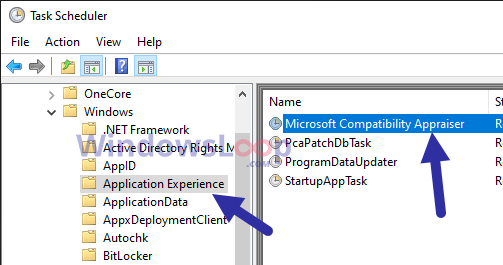
<p style="text-align: justify;">3. Trong&nbsp;<strong>Task Scheduler</strong>, hãy chuyển đến thư mục&nbsp;<strong>Task Scheduler Library &gt; Microsoft &gt; Windows &gt; Application Experience</strong>. Bạn sẽ tìm thấy cây thư mục trên bảng điều khiển bên trái.</p>

<div style="text-align: justify;">&nbsp;</div>

<p style="text-align: justify;">4. Tìm và nhấp chuột phải vào tác vụ &quot;<strong>Microsoft Compatibility Appraiser</strong>&quot;. Bạn sẽ tìm thấy nó trong bảng điều khiển ở giữa.</p>

<figure>
<div style="text-align: justify;"><img alt="Tìm và nhấp chuột phải vào tác vụ &#039;Microsoft Compatibility Appraiser&#039;" data-i="0" data-src="https://st.quantrimang.com/photos/image/2020/10/02/vo-hieu-hoa-compattelrunner-exe-1.png" data-was-processed="true" height="265" src="https://st.quantrimang.com/photos/image/2020/10/02/vo-hieu-hoa-compattelrunner-exe-1.png" width="503" /></div>

<figcaption>
<div style="text-align: justify;">Tìm và nhấp chuột phải vào tác vụ &quot;Microsoft Compatibility Appraiser&quot;</div>
</figcaption>
</figure>

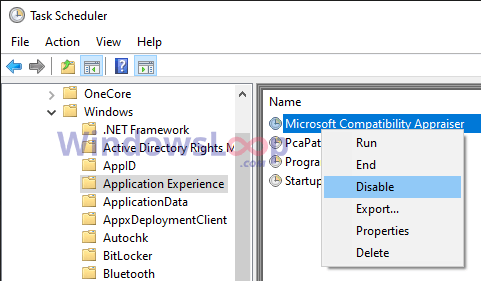
<p style="text-align: justify;">5. Chọn&nbsp;<strong>Disable</strong>&nbsp;từ tùy chọn nhấp chuột phải.</p>

<figure>
<div style="text-align: justify;"><img alt="Chọn Disable" data-i="1" data-src="https://st.quantrimang.com/photos/image/2020/10/02/vo-hieu-hoa-compattelrunner-exe-2.png" data-was-processed="true" height="281" src="https://st.quantrimang.com/photos/image/2020/10/02/vo-hieu-hoa-compattelrunner-exe-2.png" width="481" /></div>

<figcaption>
<div style="text-align: justify;">Chọn Disable</div>
</figcaption>
</figure>

<p style="text-align: justify;">6. Đóng&nbsp;<strong>Task Scheduler.</strong></p>

<p style="text-align: justify;">7. Khởi động lại Windows 10.</p>

<p style="text-align: justify;">Vì tác vụ đã lên lịch bị vô hiệu hóa, nên Microsoft Compatibility Telemetry sẽ không tự động bắt đầu. Điều này có nghĩa là bạn sẽ không gặp bất kỳ vấn đề nào nữa với tiến trình CompatTelRunner.exe. Hãy nhớ rằng bạn hoặc bất kỳ chương trình nào khác có thể khởi chạy tiến trình theo cách thủ công khi cần thiết.</p>

<div style="text-align: justify;">&nbsp;</div>

<h2 style="text-align: justify;">Tắt Microsoft Compatibility Telemetry qua Group Policy</h2>

<p style="text-align: justify;">Nếu bạn muốn vô hiệu hóa hoàn toàn tiến trình CompatTelRunner.exe, bạn có thể sử dụng tùy chọn tắt toàn bộ tính năng qua Group Policy.</p>

<p style="text-align: justify;">1. Mở hộp thoại&nbsp;<strong>Run</strong>&nbsp;bằng phím tắt&nbsp;<strong>Win + R</strong>.</p>

<p style="text-align: justify;">2. Nhập&nbsp;<strong>&quot;gpedit.msc&quot;</strong>&nbsp;và nhấn&nbsp;<strong>Enter</strong>&nbsp;để&nbsp;mờ Group Policy Editor.</p>

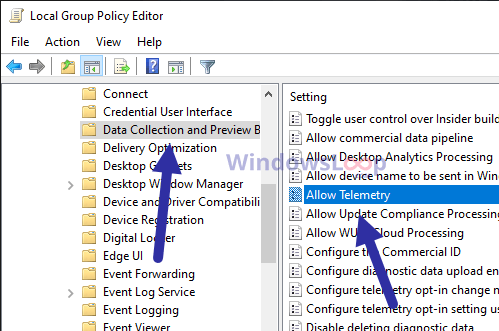
<p style="text-align: justify;">3. Trong&nbsp;<strong>Group Policy Editor</strong>, đi tới thư mục&nbsp;<strong>Computer Configuration &gt; Administrative Templates &gt; Windows Components &gt; Data Collection and Preview Builds</strong>.</p>

<p style="text-align: justify;">4. Nhấp đúp vào policy&nbsp;<strong>Allow Telemetry</strong>. Bạn sẽ tìm thấy nó trên bảng điều khiển bên phải.</p>

<figure>
<div style="text-align: justify;"><img alt="Nhấp đúp vào policy Allow Telemetry" data-i="2" data-src="https://st.quantrimang.com/photos/image/2020/10/02/vo-hieu-hoa-compattelrunner-exe-3.png" data-was-processed="true" height="331" src="https://st.quantrimang.com/photos/image/2020/10/02/vo-hieu-hoa-compattelrunner-exe-3.png" width="499" /></div>

<figcaption>
<div style="text-align: justify;">Nhấp đúp vào policy Allow Telemetry</div>
</figcaption>
</figure>

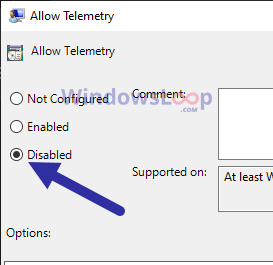
<p style="text-align: justify;">5. Chọn tùy chọn&nbsp;<strong>Disabled.</strong></p>

<figure>
<div style="text-align: justify;"><img alt="Chọn tùy chọn Disabled" data-i="3" data-src="https://st.quantrimang.com/photos/image/2020/10/02/vo-hieu-hoa-compattelrunner-exe-4.png" data-was-processed="true" height="265" src="https://st.quantrimang.com/photos/image/2020/10/02/vo-hieu-hoa-compattelrunner-exe-4.png" width="273" /></div>

<figcaption>
<div style="text-align: justify;">Chọn tùy chọn Disabled</div>
</figcaption>
</figure>

<p style="text-align: justify;">6. Nhấp vào&nbsp;<strong>Apply &gt; OK</strong>.</p>

<p style="text-align: justify;">7. Đóng&nbsp;<strong>Group Policy Editor</strong>.</p>

<p style="text-align: justify;">8. Khởi động lại Windows 10.</p>

<p style="text-align: justify;"><strong>Lưu ý</strong>: Trừ khi tiến trình Microsoft Compatibility Telemetry đang gây ra sự cố lớn và bạn biết mình đang làm gì, bài viết khuyên bạn không nên tắt toàn bộ tính năng này. Tốt hơn là chỉ nên làm theo phương pháp đầu tiên.</p>
		</div>
				<div id="author">
						<p>
				<strong>Nguồn tin:</strong>
				Quantrimang.com
			</p>
		</div>
	</div>
	<div id="footer" class="clearfix">
		<div id="url">
			<strong>URL của bản tin này: </strong><a href="https://www.nguoicodonvn2008.info/vi/news/savefile/kien-thuc-may-tinh/cach-vo-hieu-hoa-microsoft-compatibility-telemetry-compattelrunner-exe-2830.html" title="Cách vô hiệu hóa Microsoft Compatibility Telemetry &#40;CompatTelRunner.exe&#41;">https://www.nguoicodonvn2008.info/vi/news/savefile/kien-thuc-may-tinh/cach-vo-hieu-hoa-microsoft-compatibility-telemetry-compattelrunner-exe-2830.html</a>

		</div>
		<div class="clear"></div>
		<div class="copyright">
			&copy; .&#x3A; Nguoicodonvn2008.info - Cõi lòng người cô đơn &#x3A;.
		</div>
		<div id="contact">
			<a href="mailto:admin@nguoicodonvn2008.info">admin@nguoicodonvn2008.info</a>
		</div>
	</div>
</div>
        <div id="timeoutsess" class="chromeframe">
            Bạn đã không sử dụng Site, <a onclick="timeoutsesscancel();" href="https://www.nguoicodonvn2008.info/#">Bấm vào đây để duy trì trạng thái đăng nhập</a>. Thời gian chờ: <span id="secField"> 60 </span> giây
        </div>
        <div id="openidResult" class="nv-alert" style="display:none"></div>
        <div id="openidBt" data-result="" data-redirect=""></div>
		</script>
		<div class="car-top">
  <span><img src="https://www.nguoicodonvn2008.info/themes/default/images/car.png" alt=""></span>
</div>
<script src="https://www.nguoicodonvn2008.info/assets/js/jquery/jquery.min.js"></script>
<script>var nv_base_siteurl="/",nv_lang_data="vi",nv_lang_interface="vi",nv_name_variable="nv",nv_fc_variable="op",nv_lang_variable="language",nv_module_name="news",nv_func_name="savefile",nv_is_user=0, nv_my_ofs=-4,nv_my_abbr="EDT",nv_cookie_prefix="nv4c_e856T",nv_check_pass_mstime=1738000,nv_area_admin=0,nv_safemode=0,theme_responsive=0,nv_recaptcha_ver=2,nv_recaptcha_sitekey="",nv_recaptcha_type="image",XSSsanitize=1;</script>
<script src="https://www.nguoicodonvn2008.info/assets/js/language/vi.js"></script>
<script src="https://www.nguoicodonvn2008.info/assets/js/DOMPurify/purify3.js"></script>
<script src="https://www.nguoicodonvn2008.info/assets/js/global.js"></script>
<script src="https://www.nguoicodonvn2008.info/assets/js/site.js"></script>
<script src="https://www.nguoicodonvn2008.info/themes/default/js/news.js"></script>
<script src="https://www.nguoicodonvn2008.info/themes/default/js/main.js"></script>
<script src="https://www.nguoicodonvn2008.info/themes/default/js/custom.js"></script>
<script type="application/ld+json">
        {
            "@context": "https://schema.org",
            "@type": "Organization",
            "url": "https://www.nguoicodonvn2008.info",
            "logo": "https://www.nguoicodonvn2008.info/uploads/angel.gif"
        }
        </script>
<script src="https://www.nguoicodonvn2008.info/themes/default/js/bootstrap.min.js"></script>
<script type="text/javascript">
var $scrolltop = $('.car-top');
$scrolltop.on('click', function () {
    $('html,body').animate({
        scrollTop: 0
    }, 800);
    $(this).addClass("car-run");
    setTimeout(function(){ $scrolltop.removeClass('car-run');}, 1000);
    return false;
});
$(window).on('scroll', function ()
{ 
    if($(window).scrollTop() >= 200)
    {
        $scrolltop.addClass("show");
        $scrolltop.addClass("car-down");
    }
    else
    {
       $scrolltop.removeClass("show");
       setTimeout(function(){ $scrolltop.removeClass('car-down');}, 300);
    }
});
</script>
</body>
</html>