<!DOCTYPE html>
    <html lang="vi" xmlns="http://www.w3.org/1999/xhtml" prefix="og: http://ogp.me/ns#">
    <head>
<title>Cách vô hiệu hóa Fast Startup trên Windows</title>
<meta name="description" content="Cách vô hiệu hóa Fast Startup trên Windows - Savefile - Tin Tức -...">
<meta name="author" content=".: Nguoicodonvn2008.info - Cõi lòng người cô đơn :.">
<meta name="copyright" content=".: Nguoicodonvn2008.info - Cõi lòng người cô đơn :. [admin@nguoicodonvn2008.info]">
<meta name="robots" content="index, archive, follow, noodp">
<meta name="googlebot" content="index,archive,follow,noodp">
<meta name="msnbot" content="all,index,follow">
<meta name="generator" content="NukeViet v4.5">
<meta http-equiv="Content-Type" content="text/html; charset=utf-8">
<meta property="og:title" content="Cách vô hiệu hóa Fast Startup trên Windows">
<meta property="og:type" content="website">
<meta property="og:description" content="Savefile - Tin Tức - https&#x3A;&#x002F;&#x002F;www.nguoicodonvn2008.info&#x002F;vi&#x002F;news&#x002F;savefile&#x002F;kien-thuc-may-tinh&#x002F;cach-vo-hieu-hoa-fast-startup-tren-windows-10975.html">
<meta property="og:site_name" content=".&#x3A; Nguoicodonvn2008.info - Cõi lòng người cô đơn &#x3A;.">
<meta property="og:url" content="https://www.nguoicodonvn2008.info/vi/news/savefile/kien-thuc-may-tinh/cach-vo-hieu-hoa-fast-startup-tren-windows-10975.html">
<link rel="shortcut icon" href="https://www.nguoicodonvn2008.info/favicon.ico">
<link rel="canonical" href="https://www.nguoicodonvn2008.info/vi/news/savefile/kien-thuc-may-tinh/cach-vo-hieu-hoa-fast-startup-tren-windows-10975.html">
<link rel="alternate" href="https://www.nguoicodonvn2008.info/vi/news/rss/" title="Tin Tức" type="application/rss+xml">
<link rel="alternate" href="https://www.nguoicodonvn2008.info/vi/news/rss/karaoke-dual/" title="Tin Tức - Karaoke Dual" type="application/rss+xml">
<link rel="alternate" href="https://www.nguoicodonvn2008.info/vi/news/rss/nhac-tre/" title="Tin Tức - Nhạc trẻ" type="application/rss+xml">
<link rel="alternate" href="https://www.nguoicodonvn2008.info/vi/news/rss/tru-tinh/" title="Tin Tức - Trữ tình" type="application/rss+xml">
<link rel="alternate" href="https://www.nguoicodonvn2008.info/vi/news/rss/nuoc-ngoai/" title="Tin Tức - Nước ngoài" type="application/rss+xml">
<link rel="alternate" href="https://www.nguoicodonvn2008.info/vi/news/rss/remix/" title="Tin Tức - Remix" type="application/rss+xml">
<link rel="alternate" href="https://www.nguoicodonvn2008.info/vi/news/rss/tam-su-tinh-yeu/" title="Tin Tức - Tâm sự tình yêu" type="application/rss+xml">
<link rel="alternate" href="https://www.nguoicodonvn2008.info/vi/news/rss/tho-suu-tam/" title="Tin Tức - Thơ sưu tầm" type="application/rss+xml">
<link rel="alternate" href="https://www.nguoicodonvn2008.info/vi/news/rss/cuoc-song/" title="Tin Tức - Cuộc sống" type="application/rss+xml">
<link rel="alternate" href="https://www.nguoicodonvn2008.info/vi/news/rss/phan-mem/" title="Tin Tức - Phần mềm" type="application/rss+xml">
<link rel="alternate" href="https://www.nguoicodonvn2008.info/vi/news/rss/kien-thuc-may-tinh/" title="Tin Tức - Kiến thức máy tính" type="application/rss+xml">
<link rel="alternate" href="https://www.nguoicodonvn2008.info/vi/news/rss/hoc-tap/" title="Tin Tức - Học tập" type="application/rss+xml">
<link rel="alternate" href="https://www.nguoicodonvn2008.info/vi/news/rss/tai-lieu/" title="Tin Tức - Tài liệu" type="application/rss+xml">
<link rel="alternate" href="https://www.nguoicodonvn2008.info/vi/news/rss/de-thi/" title="Tin Tức - Đề thi" type="application/rss+xml">
<link rel="preload" as="style" href="https://www.nguoicodonvn2008.info/assets/css/font-awesome.min.css" type="text/css">
<link rel="preload" as="style" href="https://www.nguoicodonvn2008.info/themes/default/css/bootstrap.non-responsive.css" type="text/css">
<link rel="preload" as="style" href="https://www.nguoicodonvn2008.info/themes/default/css/style.css" type="text/css">
<link rel="preload" as="style" href="https://www.nguoicodonvn2008.info/themes/default/css/style.non-responsive.css" type="text/css">
<link rel="preload" as="style" href="https://www.nguoicodonvn2008.info/themes/default/css/news.css" type="text/css">
<link rel="preload" as="style" href="https://www.nguoicodonvn2008.info/themes/default/css/custom.css" type="text/css">
<link rel="preload" as="script" href="https://www.nguoicodonvn2008.info/assets/js/jquery/jquery.min.js" type="text/javascript">
<link rel="preload" as="script" href="https://www.nguoicodonvn2008.info/assets/js/language/vi.js" type="text/javascript">
<link rel="preload" as="script" href="https://www.nguoicodonvn2008.info/assets/js/DOMPurify/purify3.js" type="text/javascript">
<link rel="preload" as="script" href="https://www.nguoicodonvn2008.info/assets/js/global.js" type="text/javascript">
<link rel="preload" as="script" href="https://www.nguoicodonvn2008.info/assets/js/site.js" type="text/javascript">
<link rel="preload" as="script" href="https://www.nguoicodonvn2008.info/themes/default/js/news.js" type="text/javascript">
<link rel="preload" as="script" href="https://www.nguoicodonvn2008.info/themes/default/js/main.js" type="text/javascript">
<link rel="preload" as="script" href="https://www.nguoicodonvn2008.info/themes/default/js/custom.js" type="text/javascript">
<link rel="preload" as="script" href="https://www.nguoicodonvn2008.info/themes/default/js/bootstrap.min.js" type="text/javascript">
<link rel="stylesheet" href="https://www.nguoicodonvn2008.info/assets/css/font-awesome.min.css">
<link rel="stylesheet" href="https://www.nguoicodonvn2008.info/themes/default/css/bootstrap.non-responsive.css">
<link rel="stylesheet" href="https://www.nguoicodonvn2008.info/themes/default/css/style.css">
<link rel="stylesheet" href="https://www.nguoicodonvn2008.info/themes/default/css/style.non-responsive.css">
<link rel="StyleSheet" href="https://www.nguoicodonvn2008.info/themes/default/css/news.css">
<link rel="stylesheet" href="https://www.nguoicodonvn2008.info/themes/default/css/custom.css">
<style type="text/css">
	body{background: #fff;}
</style>
    </head>
    <body>
<div id="print">
	<div id="hd_print">
		<h2 class="pull-left">.&#x3A; Nguoicodonvn2008.info - Cõi lòng người cô đơn &#x3A;.</h2>
		<p class="pull-right"><a title=".&#x3A; Nguoicodonvn2008.info - Cõi lòng người cô đơn &#x3A;." href="https://www.nguoicodonvn2008.info/">https://www.nguoicodonvn2008.info</a></p>
	</div>
	<div class="clear"></div>
	<hr />
	<div id="content">
		<h1>Cách vô hiệu hóa Fast Startup trên Windows</h1>
		<ul class="list-inline">
			<li>Thứ năm - 14/08/2025 07:21</li>
			<li class="hidden-print txtrequired"><em class="fa fa-print">&nbsp;</em><a title="In ra" href="javascript:;" onclick="window.print()">In ra</a></li>
			<li class="hidden-print txtrequired"><em class="fa fa-power-off">&nbsp;</em><a title="Đóng cửa sổ này" href="javascript:;" onclick="window.close()">Đóng cửa sổ này</a></li>
		</ul>
		<div class="clear"></div>
		<div id="hometext">
		</div>
				<div class="imghome">
			<img alt="Cách vô hiệu hóa Fast Startup trên Windows" src="https://st.quantrimang.com/photos/image/2025/08/12/vo-hieu-hoa-Fast-Startup-windows-11-6.jpg" width="460" class="img-thumbnail" />
		</div>
		<div class="clear"></div>
		<div id="bodytext" class="clearfix">
			<p style="text-align: justify;">Fast Startup Windows 11 giúp máy tính khởi động nhanh hơn so với thông thường, nhưng cũng có thể là nguyên nhân dẫn tới việc máy tính&nbsp;Windows không tắt hoàn toàn. Nếu bạn muốn đảm bảo máy tính của mình thực sự tắt nguồn mỗi lần, bạn nên vô hiệu hóa Fast Startup theo bài viết dưới đây.</p>

<h2 style="text-align: justify;">Cách tắt tính năng Fast Startup Windows 11</h2>

<p style="text-align: justify;"><strong>Bước 1:</strong></p>

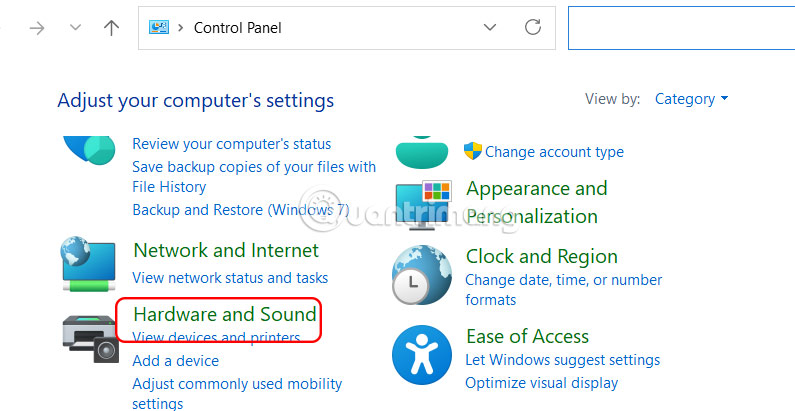
<p style="text-align: justify;">Bạn mở Control Panel trên máy tính rồi nhấn vào<strong>&nbsp;Hardware and Sound</strong>.</p>

<p style="text-align: justify;"><img alt="Hardware and Sound Windows 11" data-i="0" data-src="https://st.quantrimang.com/photos/image/2025/08/12/vo-hieu-hoa-Fast-Startup-windows-11-1.jpg" data-was-processed="true" height="310" src="https://st.quantrimang.com/photos/image/2025/08/12/vo-hieu-hoa-Fast-Startup-windows-11-1.jpg" width="600" /></p>

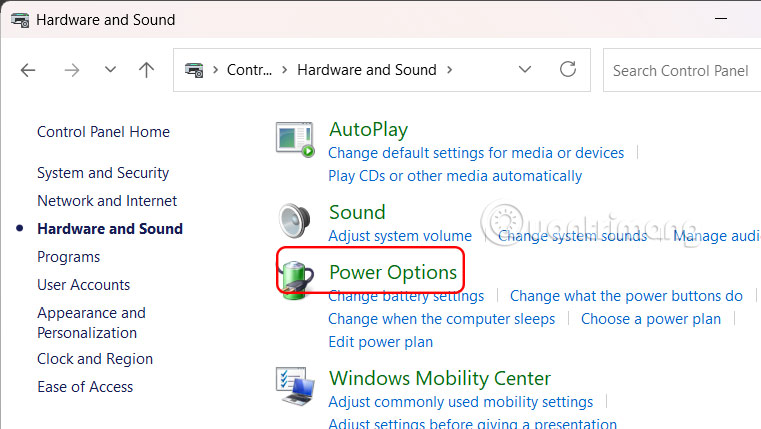
<p style="text-align: justify;">Tiếp đến bạn nhấn chọn&nbsp;<strong>Power Options</strong>.</p>

<p style="text-align: justify;"><img alt="Power Options Windows 11" data-i="1" data-src="https://st.quantrimang.com/photos/image/2025/08/12/vo-hieu-hoa-Fast-Startup-windows-11-2.jpg" data-was-processed="true" height="310" src="https://st.quantrimang.com/photos/image/2025/08/12/vo-hieu-hoa-Fast-Startup-windows-11-2.jpg" width="550" /></p>

<p style="text-align: justify;"><strong>Bước 2:</strong></p>

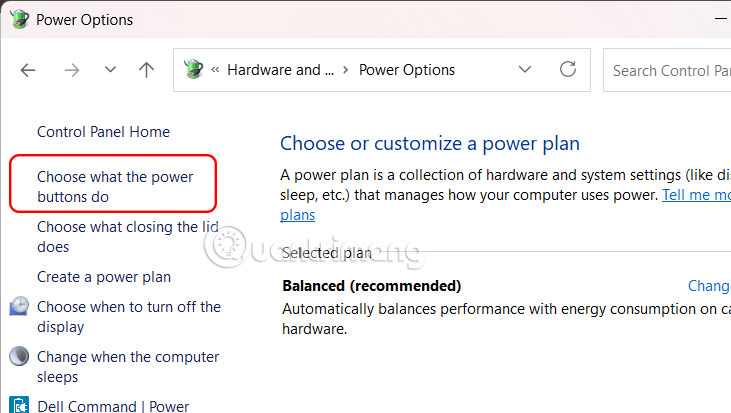
<p style="text-align: justify;">Trong giao diện mới, người dùng nhấn vào<strong>&nbsp;mục Choose what the power buttons do</strong>.</p>

<p style="text-align: justify;"><img alt="Choose what the power buttons do Windows 11" data-i="2" data-src="https://st.quantrimang.com/photos/image/2025/08/12/vo-hieu-hoa-Fast-Startup-windows-11-3.jpg" data-was-processed="true" height="339" src="https://st.quantrimang.com/photos/image/2025/08/12/vo-hieu-hoa-Fast-Startup-windows-11-3.jpg" width="600" /></p>

<p style="text-align: justify;"><strong>Bước 3:</strong></p>

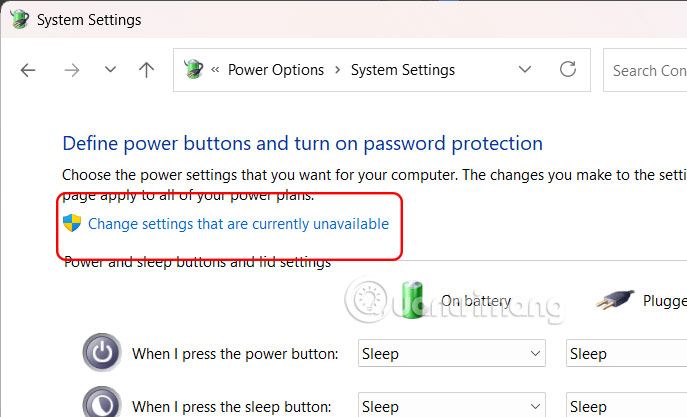
<p style="text-align: justify;">Chúng ta&nbsp;<strong>click vào Change settings that are currently unavailable</strong>&nbsp;ở bên trên giao diện.</p>

<p style="text-align: justify;"><img alt="Change settings that are currently unavailable Windows 11" data-i="3" data-src="https://st.quantrimang.com/photos/image/2025/08/12/vo-hieu-hoa-Fast-Startup-windows-11-4.jpg" data-was-processed="true" height="352" src="https://st.quantrimang.com/photos/image/2025/08/12/vo-hieu-hoa-Fast-Startup-windows-11-4.jpg" width="580" /></p>

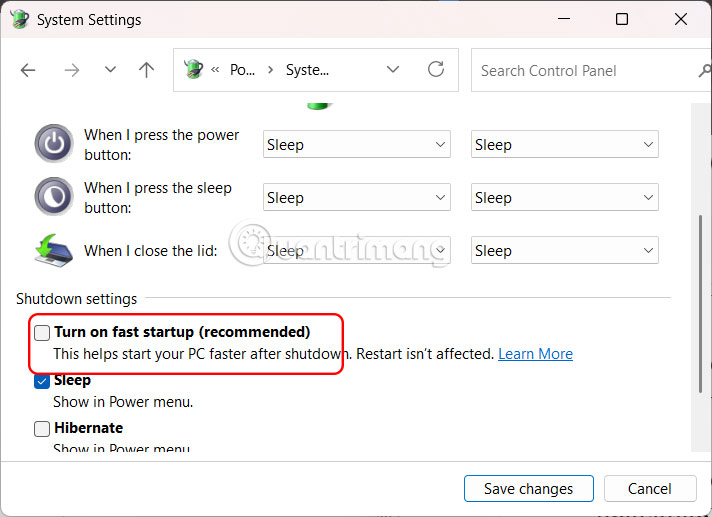
<p style="text-align: justify;">Lúc này ở bên dưới hiển thị tùy chọn, chúng ta sẽ&nbsp;<strong>tắt thiết lập Turn on fast startup (recommended)</strong>&nbsp;tại phần Shutdown settings.</p>

<p style="text-align: justify;">Cuối cùng bạn&nbsp;<strong>nhấn Save change</strong>&nbsp;để lưu lại thiết lập mới.</p>

<p style="text-align: justify;"><img alt="Tắt tính năng Fast Startup Windows 11 Windows 11" data-i="4" data-src="https://st.quantrimang.com/photos/image/2025/08/12/vo-hieu-hoa-Fast-Startup-windows-11-5.jpg" data-was-processed="true" height="399" src="https://st.quantrimang.com/photos/image/2025/08/12/vo-hieu-hoa-Fast-Startup-windows-11-5.jpg" width="550" /></p>

<p style="text-align: justify;"><strong>Bước 4:</strong></p>

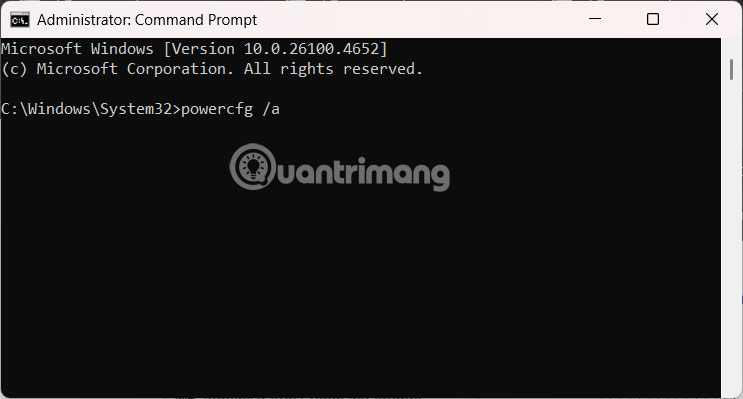
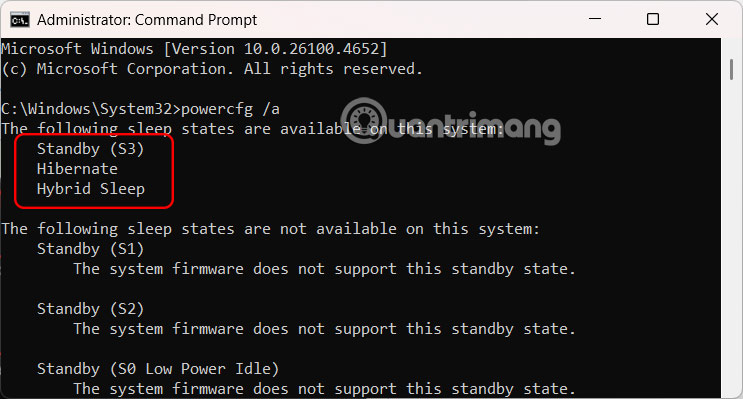
<p style="text-align: justify;">Bạn<strong>&nbsp;mở Command Prompt bằng quyền Admin&nbsp;</strong>trên máy tính rồi nhập lệnh dưới đây để kiểm tra Fast Startup đã tắt hay chưa.</p>

<pre id="pre0">
<code>powercfg /a</code></pre>

<p style="text-align: justify;"><img alt="Nhập lệnh kiểm tra Windows 11" data-i="5" data-src="https://st.quantrimang.com/photos/image/2025/08/12/vo-hieu-hoa-Fast-Startup-windows-11-6.jpg" data-was-processed="true" height="338" src="https://st.quantrimang.com/photos/image/2025/08/12/vo-hieu-hoa-Fast-Startup-windows-11-6.jpg" width="630" /></p>

<p style="text-align: justify;">Nếu bạn thấy hiển thị danh sách các trạng thái ngủ khả dụng trên máy tính không có Fast Startup, thì tính năng này đã bị vô hiệu hóa hoàn toàn.</p>

<p style="text-align: justify;"><img alt="Vô hiệu hóa Fast Startup Windows 11" data-i="6" data-src="https://st.quantrimang.com/photos/image/2025/08/12/vo-hieu-hoa-Fast-Startup-windows-11-7.jpg" data-was-processed="true" height="344" src="https://st.quantrimang.com/photos/image/2025/08/12/vo-hieu-hoa-Fast-Startup-windows-11-7.jpg" width="640" /></p>

<p style="text-align: justify;">Nếu máy tính sử dụng ổ SSD bạn nên tắt Fast Startup. Vì SSD vốn đã có tốc độ khởi động rất nhanh, việc tắt Fast Startup có thể giúp đảm bảo hệ thống tắt hoàn toàn và tránh các sự cố tiềm ẩn liên quan đến trình điều khiển hoặc cập nhật.</p>

<p style="text-align: justify;">Mặt khác, nếu máy tính của bạn vẫn sử dụng ổ cứng HDD thì hãy bật chế độ Fast Startup để tăng tốc độ khởi động máy tính.</p>

<div style="text-align: justify;">&nbsp;</div>
		</div>
				<div id="author">
						<p>
				<strong>Nguồn tin:</strong>
				Quantrimang.com:
			</p>
		</div>
	</div>
	<div id="footer" class="clearfix">
		<div id="url">
			<strong>URL của bản tin này: </strong><a href="https://www.nguoicodonvn2008.info/vi/news/savefile/kien-thuc-may-tinh/cach-vo-hieu-hoa-fast-startup-tren-windows-10975.html" title="Cách vô hiệu hóa Fast Startup trên Windows">https://www.nguoicodonvn2008.info/vi/news/savefile/kien-thuc-may-tinh/cach-vo-hieu-hoa-fast-startup-tren-windows-10975.html</a>

		</div>
		<div class="clear"></div>
		<div class="copyright">
			&copy; .&#x3A; Nguoicodonvn2008.info - Cõi lòng người cô đơn &#x3A;.
		</div>
		<div id="contact">
			<a href="mailto:admin@nguoicodonvn2008.info">admin@nguoicodonvn2008.info</a>
		</div>
	</div>
</div>
        <div id="timeoutsess" class="chromeframe">
            Bạn đã không sử dụng Site, <a onclick="timeoutsesscancel();" href="https://www.nguoicodonvn2008.info/#">Bấm vào đây để duy trì trạng thái đăng nhập</a>. Thời gian chờ: <span id="secField"> 60 </span> giây
        </div>
        <div id="openidResult" class="nv-alert" style="display:none"></div>
        <div id="openidBt" data-result="" data-redirect=""></div>
		</script>
		<div class="car-top">
  <span><img src="https://www.nguoicodonvn2008.info/themes/default/images/car.png" alt=""></span>
</div>
<script src="https://www.nguoicodonvn2008.info/assets/js/jquery/jquery.min.js"></script>
<script>var nv_base_siteurl="/",nv_lang_data="vi",nv_lang_interface="vi",nv_name_variable="nv",nv_fc_variable="op",nv_lang_variable="language",nv_module_name="news",nv_func_name="savefile",nv_is_user=0, nv_my_ofs=-4,nv_my_abbr="EDT",nv_cookie_prefix="nv4c_e856T",nv_check_pass_mstime=1738000,nv_area_admin=0,nv_safemode=0,theme_responsive=0,nv_recaptcha_ver=2,nv_recaptcha_sitekey="",nv_recaptcha_type="image",XSSsanitize=1;</script>
<script src="https://www.nguoicodonvn2008.info/assets/js/language/vi.js"></script>
<script src="https://www.nguoicodonvn2008.info/assets/js/DOMPurify/purify3.js"></script>
<script src="https://www.nguoicodonvn2008.info/assets/js/global.js"></script>
<script src="https://www.nguoicodonvn2008.info/assets/js/site.js"></script>
<script src="https://www.nguoicodonvn2008.info/themes/default/js/news.js"></script>
<script src="https://www.nguoicodonvn2008.info/themes/default/js/main.js"></script>
<script src="https://www.nguoicodonvn2008.info/themes/default/js/custom.js"></script>
<script type="application/ld+json">
        {
            "@context": "https://schema.org",
            "@type": "Organization",
            "url": "https://www.nguoicodonvn2008.info",
            "logo": "https://www.nguoicodonvn2008.info/uploads/angel.gif"
        }
        </script>
<script src="https://www.nguoicodonvn2008.info/themes/default/js/bootstrap.min.js"></script>
<script type="text/javascript">
var $scrolltop = $('.car-top');
$scrolltop.on('click', function () {
    $('html,body').animate({
        scrollTop: 0
    }, 800);
    $(this).addClass("car-run");
    setTimeout(function(){ $scrolltop.removeClass('car-run');}, 1000);
    return false;
});
$(window).on('scroll', function ()
{ 
    if($(window).scrollTop() >= 200)
    {
        $scrolltop.addClass("show");
        $scrolltop.addClass("car-down");
    }
    else
    {
       $scrolltop.removeClass("show");
       setTimeout(function(){ $scrolltop.removeClass('car-down');}, 300);
    }
});
</script>
</body>
</html>