<!DOCTYPE html>
    <html lang="vi" xmlns="http://www.w3.org/1999/xhtml" prefix="og: http://ogp.me/ns#">
    <head>
<title>Cách vô hiệu hóa cảnh báo “These Files Might Be Harmful to Your Computer”</title>
<meta name="description" content="Cách vô hiệu hóa cảnh báo “These Files Might Be Harmful to Your Computer” - Savefile - Tin Tức -...">
<meta name="author" content=".: Nguoicodonvn2008.info - Cõi lòng người cô đơn :.">
<meta name="copyright" content=".: Nguoicodonvn2008.info - Cõi lòng người cô đơn :. [admin@nguoicodonvn2008.info]">
<meta name="robots" content="index, archive, follow, noodp">
<meta name="googlebot" content="index,archive,follow,noodp">
<meta name="msnbot" content="all,index,follow">
<meta name="generator" content="NukeViet v4.5">
<meta http-equiv="Content-Type" content="text/html; charset=utf-8">
<meta property="og:title" content="Cách vô hiệu hóa cảnh báo “These Files Might Be Harmful to Your Computer”">
<meta property="og:type" content="website">
<meta property="og:description" content="Savefile - Tin Tức -...">
<meta property="og:site_name" content=".&#x3A; Nguoicodonvn2008.info - Cõi lòng người cô đơn &#x3A;.">
<meta property="og:url" content="https://www.nguoicodonvn2008.info/vi/news/savefile/kien-thuc-may-tinh/cach-vo-hieu-hoa-canh-bao-these-files-might-be-harmful-to-your-computer-9835.html">
<link rel="shortcut icon" href="https://www.nguoicodonvn2008.info/favicon.ico">
<link rel="canonical" href="https://www.nguoicodonvn2008.info/vi/news/savefile/kien-thuc-may-tinh/cach-vo-hieu-hoa-canh-bao-these-files-might-be-harmful-to-your-computer-9835.html">
<link rel="alternate" href="https://www.nguoicodonvn2008.info/vi/news/rss/" title="Tin Tức" type="application/rss+xml">
<link rel="alternate" href="https://www.nguoicodonvn2008.info/vi/news/rss/karaoke-dual/" title="Tin Tức - Karaoke Dual" type="application/rss+xml">
<link rel="alternate" href="https://www.nguoicodonvn2008.info/vi/news/rss/nhac-tre/" title="Tin Tức - Nhạc trẻ" type="application/rss+xml">
<link rel="alternate" href="https://www.nguoicodonvn2008.info/vi/news/rss/tru-tinh/" title="Tin Tức - Trữ tình" type="application/rss+xml">
<link rel="alternate" href="https://www.nguoicodonvn2008.info/vi/news/rss/nuoc-ngoai/" title="Tin Tức - Nước ngoài" type="application/rss+xml">
<link rel="alternate" href="https://www.nguoicodonvn2008.info/vi/news/rss/remix/" title="Tin Tức - Remix" type="application/rss+xml">
<link rel="alternate" href="https://www.nguoicodonvn2008.info/vi/news/rss/tam-su-tinh-yeu/" title="Tin Tức - Tâm sự tình yêu" type="application/rss+xml">
<link rel="alternate" href="https://www.nguoicodonvn2008.info/vi/news/rss/tho-suu-tam/" title="Tin Tức - Thơ sưu tầm" type="application/rss+xml">
<link rel="alternate" href="https://www.nguoicodonvn2008.info/vi/news/rss/cuoc-song/" title="Tin Tức - Cuộc sống" type="application/rss+xml">
<link rel="alternate" href="https://www.nguoicodonvn2008.info/vi/news/rss/phan-mem/" title="Tin Tức - Phần mềm" type="application/rss+xml">
<link rel="alternate" href="https://www.nguoicodonvn2008.info/vi/news/rss/kien-thuc-may-tinh/" title="Tin Tức - Kiến thức máy tính" type="application/rss+xml">
<link rel="alternate" href="https://www.nguoicodonvn2008.info/vi/news/rss/hoc-tap/" title="Tin Tức - Học tập" type="application/rss+xml">
<link rel="alternate" href="https://www.nguoicodonvn2008.info/vi/news/rss/tai-lieu/" title="Tin Tức - Tài liệu" type="application/rss+xml">
<link rel="alternate" href="https://www.nguoicodonvn2008.info/vi/news/rss/de-thi/" title="Tin Tức - Đề thi" type="application/rss+xml">
<link rel="preload" as="style" href="https://www.nguoicodonvn2008.info/assets/css/font-awesome.min.css" type="text/css">
<link rel="preload" as="style" href="https://www.nguoicodonvn2008.info/themes/default/css/bootstrap.non-responsive.css" type="text/css">
<link rel="preload" as="style" href="https://www.nguoicodonvn2008.info/themes/default/css/style.css" type="text/css">
<link rel="preload" as="style" href="https://www.nguoicodonvn2008.info/themes/default/css/style.non-responsive.css" type="text/css">
<link rel="preload" as="style" href="https://www.nguoicodonvn2008.info/themes/default/css/news.css" type="text/css">
<link rel="preload" as="style" href="https://www.nguoicodonvn2008.info/themes/default/css/custom.css" type="text/css">
<link rel="preload" as="script" href="https://www.nguoicodonvn2008.info/assets/js/jquery/jquery.min.js" type="text/javascript">
<link rel="preload" as="script" href="https://www.nguoicodonvn2008.info/assets/js/language/vi.js" type="text/javascript">
<link rel="preload" as="script" href="https://www.nguoicodonvn2008.info/assets/js/DOMPurify/purify3.js" type="text/javascript">
<link rel="preload" as="script" href="https://www.nguoicodonvn2008.info/assets/js/global.js" type="text/javascript">
<link rel="preload" as="script" href="https://www.nguoicodonvn2008.info/assets/js/site.js" type="text/javascript">
<link rel="preload" as="script" href="https://www.nguoicodonvn2008.info/themes/default/js/news.js" type="text/javascript">
<link rel="preload" as="script" href="https://www.nguoicodonvn2008.info/themes/default/js/main.js" type="text/javascript">
<link rel="preload" as="script" href="https://www.nguoicodonvn2008.info/themes/default/js/custom.js" type="text/javascript">
<link rel="preload" as="script" href="https://www.nguoicodonvn2008.info/themes/default/js/bootstrap.min.js" type="text/javascript">
<link rel="stylesheet" href="https://www.nguoicodonvn2008.info/assets/css/font-awesome.min.css">
<link rel="stylesheet" href="https://www.nguoicodonvn2008.info/themes/default/css/bootstrap.non-responsive.css">
<link rel="stylesheet" href="https://www.nguoicodonvn2008.info/themes/default/css/style.css">
<link rel="stylesheet" href="https://www.nguoicodonvn2008.info/themes/default/css/style.non-responsive.css">
<link rel="StyleSheet" href="https://www.nguoicodonvn2008.info/themes/default/css/news.css">
<link rel="stylesheet" href="https://www.nguoicodonvn2008.info/themes/default/css/custom.css">
<style type="text/css">
	body{background: #fff;}
</style>
    </head>
    <body>
<div id="print">
	<div id="hd_print">
		<h2 class="pull-left">.&#x3A; Nguoicodonvn2008.info - Cõi lòng người cô đơn &#x3A;.</h2>
		<p class="pull-right"><a title=".&#x3A; Nguoicodonvn2008.info - Cõi lòng người cô đơn &#x3A;." href="https://www.nguoicodonvn2008.info/">https://www.nguoicodonvn2008.info</a></p>
	</div>
	<div class="clear"></div>
	<hr />
	<div id="content">
		<h1>Cách vô hiệu hóa cảnh báo “These Files Might Be Harmful to Your Computer”</h1>
		<ul class="list-inline">
			<li>Thứ hai - 17/02/2025 22:14</li>
			<li class="hidden-print txtrequired"><em class="fa fa-print">&nbsp;</em><a title="In ra" href="javascript:;" onclick="window.print()">In ra</a></li>
			<li class="hidden-print txtrequired"><em class="fa fa-power-off">&nbsp;</em><a title="Đóng cửa sổ này" href="javascript:;" onclick="window.close()">Đóng cửa sổ này</a></li>
		</ul>
		<div class="clear"></div>
		<div id="hometext">
		</div>
				<div class="imghome">
			<img alt="Cách vô hiệu hóa cảnh báo “These Files Might Be Harmful to Your Computer”" src="https://st.quantrimang.com/photos/image/2025/02/17/vo-hieu-hoa-canh-bao-these-files-might-be-harmful-to-your-computer-1.jpg" width="460" class="img-thumbnail" />
		</div>
		<div class="clear"></div>
		<div id="bodytext" class="clearfix">
			<p style="text-align: justify;">Windows Security giám sát các file được thêm vào PC của bạn, đặc biệt là những file từ&nbsp;Internet. Nếu một file có vẻ có hại, bạn sẽ thấy cảnh báo &quot;These files might be harmful to your computer&quot;. Mặc dù bạn có thể bỏ qua cảnh báo này, nhưng những lời nhắc thường xuyên có thể gây khó chịu. May mắn thay, bạn có thể dễ dàng tắt chúng.</p>

<h2 style="text-align: justify;">Tại sao Windows hiển thị cảnh báo &quot;These files might be harmful to your computer&quot;?</h2>

<p style="text-align: justify;">Bạn có thể thấy cảnh báo này khi chuyển file từ máy tính khác trên mạng gia đình hoặc di chuyển file giữa các ổ đĩa trên cùng một PC.</p>

<p style="text-align: justify;">Điều này có thể không phải là vấn đề nếu bạn thỉnh thoảng xử lý một vài file. Tuy nhiên, nếu bạn đang cố gắng di chuyển hàng tấn file từ ổ này sang ổ khác, việc chấp nhận cảnh báo cho tất cả các file có thể trở nên khó chịu.</p>

<p style="text-align: justify;">Bản sửa lỗi tùy thuộc vào tình huống. Đối với ổ mạng, việc thêm địa chỉ DNS của bạn vào Intranet Zone có thể vô hiệu hóa cảnh báo. Đối với việc chuyển ổ cục bộ, bạn sẽ cần thử các giải pháp khác nhau để xem giải pháp nào hiệu quả nhất.</p>

<h2 style="text-align: justify;">Thêm địa chỉ IP vào Intranet Zone</h2>

<p style="text-align: justify;">Nếu gặp cảnh báo bảo mật này khi truy cập file từ PC mạng cục bộ hoặc Network Attached Storage (NAS), bạn có thể thêm địa chỉ IP hoặc tên DNS được liên kết với thiết bị vào Intranet Zone cục bộ.</p>

<ul>
	<li style="text-align: justify;">Nhấn&nbsp;<strong>Win + R&nbsp;</strong>để&nbsp;mở Run.</li>
	<li style="text-align: justify;">Nhập&nbsp;<strong>control</strong>&nbsp;và nhấp vào&nbsp;<strong>OK</strong>&nbsp;để&nbsp;mở Control Panel.</li>
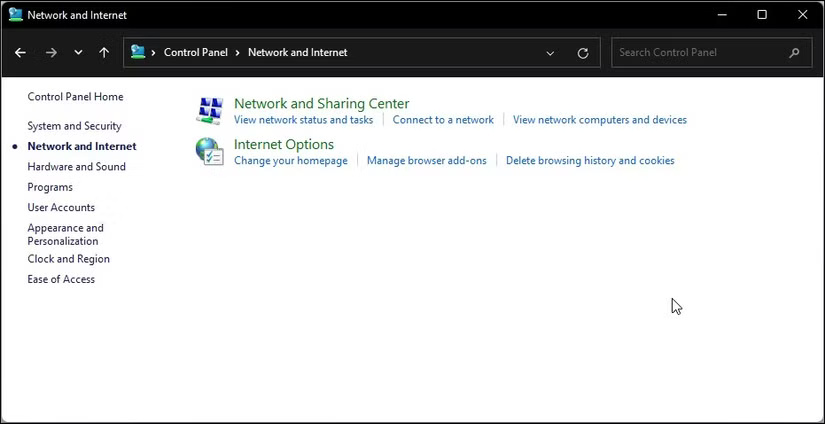
	<li style="text-align: justify;">Trong Control Panel, hãy đi tới&nbsp;<strong>Network and Internet &gt; Internet Options</strong>.</li>
</ul>

<figure>
<div style="text-align: justify;"><img alt="Tùy chọn Network and Internet trong Control Panel trên Windows 11" data-i="0" data-src="https://st.quantrimang.com/photos/image/2025/02/17/vo-hieu-hoa-canh-bao-these-files-might-be-harmful-to-your-computer-1.jpg" data-was-processed="true" height="424" src="https://st.quantrimang.com/photos/image/2025/02/17/vo-hieu-hoa-canh-bao-these-files-might-be-harmful-to-your-computer-1.jpg" width="825" /></div>

<figcaption>
<div style="text-align: justify;">Tùy chọn Network and Internet trong Control Panel trên Windows 11</div>
</figcaption>
</figure>

<ul>
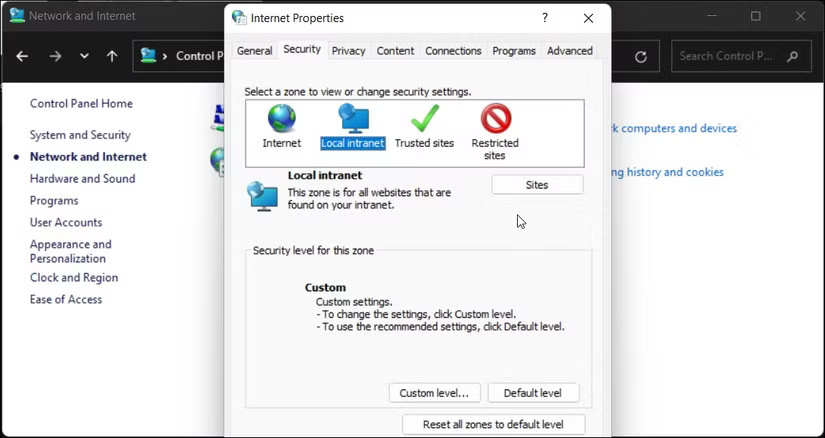
	<li style="text-align: justify;">Trong hộp thoại&nbsp;<strong>Internet Properties</strong>, hãy mở tab&nbsp;<strong>Security</strong>.</li>
	<li style="text-align: justify;">Tiếp theo, chọn tùy chọn&nbsp;<strong>Local intranet</strong>&nbsp;rồi nhấp vào nút&nbsp;<strong>Sites</strong>&nbsp;cho&nbsp;<strong>Local intranet</strong>.</li>
</ul>

<figure>
<div style="text-align: justify;"><img alt="Hộp thoại Internet Properties với tab Security được chọn trong Windows 11" data-adbro-processed="true" data-i="1" data-src="https://st.quantrimang.com/photos/image/2025/02/17/vo-hieu-hoa-canh-bao-these-files-might-be-harmful-to-your-computer-2.jpg" data-was-processed="true" height="438" src="https://st.quantrimang.com/photos/image/2025/02/17/vo-hieu-hoa-canh-bao-these-files-might-be-harmful-to-your-computer-2.jpg" width="825" /></div>

<figcaption>
<div style="text-align: justify;">Hộp thoại Internet Properties với tab Security được chọn trong Windows 11</div>
</figcaption>
</figure>

<ul>
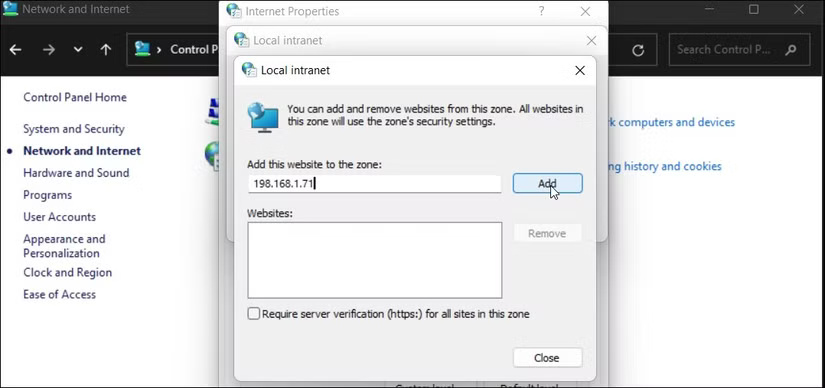
	<li style="text-align: justify;">Trong cửa sổ mới, hãy nhấp vào nút&nbsp;<strong>Advanced</strong>.</li>
</ul>

<figure>
<div style="text-align: justify;"><img alt="Hộp thoại Local Intranet trên Windows 11" data-i="2" data-src="https://st.quantrimang.com/photos/image/2025/02/17/vo-hieu-hoa-canh-bao-these-files-might-be-harmful-to-your-computer-3.jpg" data-was-processed="true" height="388" src="https://st.quantrimang.com/photos/image/2025/02/17/vo-hieu-hoa-canh-bao-these-files-might-be-harmful-to-your-computer-3.jpg" width="825" /></div>

<figcaption>
<div style="text-align: justify;">Hộp thoại Local Intranet trên Windows 11</div>
</figcaption>
</figure>

<ul>
	<li style="text-align: justify;">Trong trường&nbsp;<strong>Add this website to the zone</strong>, bạn cần thêm địa chỉ IP đã ánh xạ của mình và nhấp vào&nbsp;<strong>Add</strong>.</li>
	<li style="text-align: justify;">Nhấp vào&nbsp;<strong>Close</strong>&nbsp;và&nbsp;<strong>OK</strong>&nbsp;để lưu các thay đổi.</li>
</ul>

<p style="text-align: justify;">Khi bạn thêm địa chỉ IP được ánh xạ vào vùng Internet cục bộ, Windows sẽ coi các kết nối từ mạng này là đáng tin cậy và ngừng hiển thị cảnh báo bảo mật.</p>

<h2 style="text-align: justify;">Tắt cảnh báo bằng Group Policy Editor</h2>

<p style="text-align: justify;">Bạn cũng có thể tắt cảnh báo này thông qua Group Policy Editor (GPEdit), một cách trực tiếp để quản lý cài đặt bảo mật. Tuy nhiên, GPEdit chỉ khả dụng theo mặc định trên các phiên bản Windows Pro, Enterprise và Education.</p>

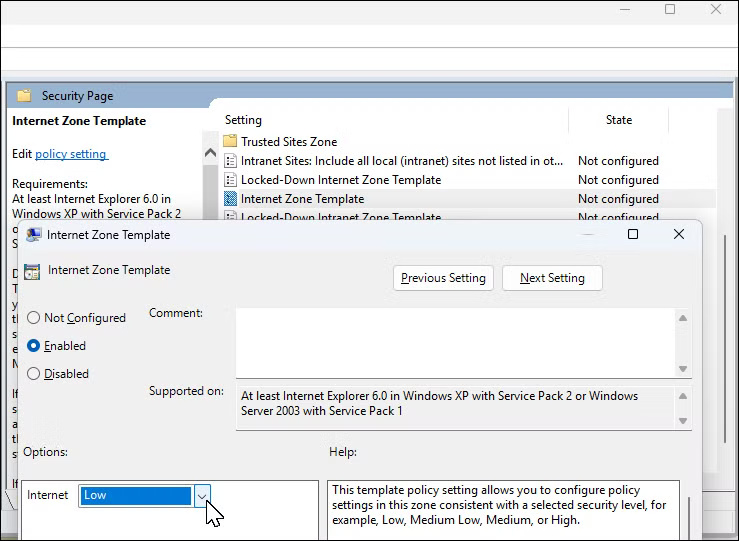
<p style="text-align: justify;">Nhấn&nbsp;<strong>Win + R</strong>&nbsp;để mở Run, nhập&nbsp;<strong>gpedit.msc</strong>&nbsp;và nhấp vào&nbsp;<strong>OK</strong>&nbsp;để mở Group Policy Editor. Trong ứng dụng GPEdit, điều hướng đến vị trí sau:</p>

<p style="text-align: justify;"><em>User Configuration &gt; Administrative Templates &gt; Windows Components &gt; Internet Explorer &gt; Internet Control Panel &gt; Security Page&nbsp;</em></p>

<p style="text-align: justify;">Nhấp đúp để policy&nbsp;<strong>Internet Zone Template</strong>&nbsp;và đặt thành&nbsp;<strong>Enabled</strong>. Sau đó, nhấp vào menu drop-down bên dưới&nbsp;<strong>Options</strong>&nbsp;và chọn&nbsp;<strong>Low</strong>. Nhấp vào&nbsp;<strong>OK &gt; Apply</strong>&nbsp;để lưu các thay đổi.</p>

<figure>
<div style="text-align: justify;"><img alt="Cài đặt policy Internet Zone Template trong Group Policy Editor" data-i="3" data-src="https://st.quantrimang.com/photos/image/2025/02/17/vo-hieu-hoa-canh-bao-these-files-might-be-harmful-to-your-computer-4.jpg" data-was-processed="true" height="541" src="https://st.quantrimang.com/photos/image/2025/02/17/vo-hieu-hoa-canh-bao-these-files-might-be-harmful-to-your-computer-4.jpg" width="739" /></div>

<figcaption>
<div style="text-align: justify;">Cài đặt policy Internet Zone Template trong Group Policy Editor</div>
</figcaption>
</figure>

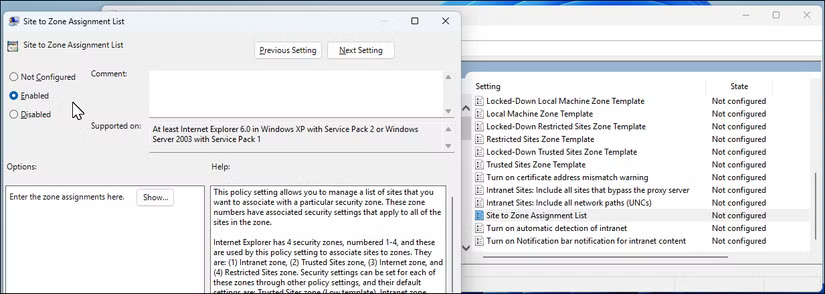
<p style="text-align: justify;">Tiếp theo, nhấp đúp để mở policy&nbsp;<strong>Site to Zone Assignment List</strong>. Đặt thành&nbsp;<strong>Enabled</strong>. Sau đó, trong&nbsp;<strong>Options</strong>, chọn nút<strong>&nbsp;Show</strong>. Thêm tên máy chủ, URL hoặc địa chỉ IP để thêm chúng vào danh sách cho phép và đặt giá trị thành 1. Nhấp vào&nbsp;<strong>OK</strong>, sau đó nhấp vào&nbsp;<strong>Apply &gt; OK</strong>&nbsp;để lưu các thay đổi.</p>

<figure>
<div style="text-align: justify;"><img alt="Cài đặt policy Site to Zone Assignment List mở trong Group Policy Editor" data-i="4" data-src="https://st.quantrimang.com/photos/image/2025/02/17/vo-hieu-hoa-canh-bao-these-files-might-be-harmful-to-your-computer-5.jpg" data-was-processed="true" height="294" src="https://st.quantrimang.com/photos/image/2025/02/17/vo-hieu-hoa-canh-bao-these-files-might-be-harmful-to-your-computer-5.jpg" width="825" /></div>

<figcaption>
<div style="text-align: justify;">Cài đặt policy Site to Zone Assignment List mở trong Group Policy Editor</div>
</figcaption>
</figure>

<p style="text-align: justify;">Giải pháp để dừng cảnh báo bảo mật này phụ thuộc vào việc bạn đang di chuyển file từ ổ mạng hay cục bộ. Bạn có thể tạm thời tắt cài đặt UAC để bỏ qua cảnh báo hoặc, trên các phiên bản Windows 11 cũ hơn, hãy xóa Internet Explorer để giải quyết sự cố.</p>

<div style="text-align: justify;">&nbsp;</div>
		</div>
				<div id="author">
						<p>
				<strong>Nguồn tin:</strong>
				Quantrimang.com:
			</p>
		</div>
	</div>
	<div id="footer" class="clearfix">
		<div id="url">
			<strong>URL của bản tin này: </strong><a href="https://www.nguoicodonvn2008.info/vi/news/savefile/kien-thuc-may-tinh/cach-vo-hieu-hoa-canh-bao-these-files-might-be-harmful-to-your-computer-9835.html" title="Cách vô hiệu hóa cảnh báo “These Files Might Be Harmful to Your Computer”">https://www.nguoicodonvn2008.info/vi/news/savefile/kien-thuc-may-tinh/cach-vo-hieu-hoa-canh-bao-these-files-might-be-harmful-to-your-computer-9835.html</a>

		</div>
		<div class="clear"></div>
		<div class="copyright">
			&copy; .&#x3A; Nguoicodonvn2008.info - Cõi lòng người cô đơn &#x3A;.
		</div>
		<div id="contact">
			<a href="mailto:admin@nguoicodonvn2008.info">admin@nguoicodonvn2008.info</a>
		</div>
	</div>
</div>
        <div id="timeoutsess" class="chromeframe">
            Bạn đã không sử dụng Site, <a onclick="timeoutsesscancel();" href="https://www.nguoicodonvn2008.info/#">Bấm vào đây để duy trì trạng thái đăng nhập</a>. Thời gian chờ: <span id="secField"> 60 </span> giây
        </div>
        <div id="openidResult" class="nv-alert" style="display:none"></div>
        <div id="openidBt" data-result="" data-redirect=""></div>
		</script>
		<div class="car-top">
  <span><img src="https://www.nguoicodonvn2008.info/themes/default/images/car.png" alt=""></span>
</div>
<div id="run_cronjobs" style="visibility:hidden;display:none;"><img alt="cron" src="/index.php?second=cronjobs&amp;p=c83p60ri" width="1" height="1" /></div>
<script src="https://www.nguoicodonvn2008.info/assets/js/jquery/jquery.min.js"></script>
<script>var nv_base_siteurl="/",nv_lang_data="vi",nv_lang_interface="vi",nv_name_variable="nv",nv_fc_variable="op",nv_lang_variable="language",nv_module_name="news",nv_func_name="savefile",nv_is_user=0, nv_my_ofs=-4,nv_my_abbr="EDT",nv_cookie_prefix="nv4c_e856T",nv_check_pass_mstime=1738000,nv_area_admin=0,nv_safemode=0,theme_responsive=0,nv_recaptcha_ver=2,nv_recaptcha_sitekey="",nv_recaptcha_type="image",XSSsanitize=1;</script>
<script src="https://www.nguoicodonvn2008.info/assets/js/language/vi.js"></script>
<script src="https://www.nguoicodonvn2008.info/assets/js/DOMPurify/purify3.js"></script>
<script src="https://www.nguoicodonvn2008.info/assets/js/global.js"></script>
<script src="https://www.nguoicodonvn2008.info/assets/js/site.js"></script>
<script src="https://www.nguoicodonvn2008.info/themes/default/js/news.js"></script>
<script src="https://www.nguoicodonvn2008.info/themes/default/js/main.js"></script>
<script src="https://www.nguoicodonvn2008.info/themes/default/js/custom.js"></script>
<script type="application/ld+json">
        {
            "@context": "https://schema.org",
            "@type": "Organization",
            "url": "https://www.nguoicodonvn2008.info",
            "logo": "https://www.nguoicodonvn2008.info/uploads/angel.gif"
        }
        </script>
<script src="https://www.nguoicodonvn2008.info/themes/default/js/bootstrap.min.js"></script>
<script type="text/javascript">
var $scrolltop = $('.car-top');
$scrolltop.on('click', function () {
    $('html,body').animate({
        scrollTop: 0
    }, 800);
    $(this).addClass("car-run");
    setTimeout(function(){ $scrolltop.removeClass('car-run');}, 1000);
    return false;
});
$(window).on('scroll', function ()
{ 
    if($(window).scrollTop() >= 200)
    {
        $scrolltop.addClass("show");
        $scrolltop.addClass("car-down");
    }
    else
    {
       $scrolltop.removeClass("show");
       setTimeout(function(){ $scrolltop.removeClass('car-down');}, 300);
    }
});
</script>
</body>
</html>