<!DOCTYPE html>
    <html lang="vi" xmlns="http://www.w3.org/1999/xhtml" prefix="og: http://ogp.me/ns#">
    <head>
<title>Cách tùy chỉnh đồng hồ trong khay hệ thống Windows</title>
<meta name="description" content="Cách tùy chỉnh đồng hồ trong khay hệ thống Windows - Savefile - Tin Tức -...">
<meta name="author" content=".: Nguoicodonvn2008.info - Cõi lòng người cô đơn :.">
<meta name="copyright" content=".: Nguoicodonvn2008.info - Cõi lòng người cô đơn :. [admin@nguoicodonvn2008.info]">
<meta name="robots" content="index, archive, follow, noodp">
<meta name="googlebot" content="index,archive,follow,noodp">
<meta name="msnbot" content="all,index,follow">
<meta name="generator" content="NukeViet v4.5">
<meta http-equiv="Content-Type" content="text/html; charset=utf-8">
<meta property="og:title" content="Cách tùy chỉnh đồng hồ trong khay hệ thống Windows">
<meta property="og:type" content="website">
<meta property="og:description" content="Savefile - Tin Tức - https&#x3A;&#x002F;&#x002F;www.nguoicodonvn2008.info&#x002F;vi&#x002F;news&#x002F;savefile&#x002F;kien-thuc-may-tinh&#x002F;cach-tuy-chinh-dong-ho-trong-khay-he-thong-windows-5333.html">
<meta property="og:site_name" content=".&#x3A; Nguoicodonvn2008.info - Cõi lòng người cô đơn &#x3A;.">
<meta property="og:url" content="https://www.nguoicodonvn2008.info/vi/news/savefile/kien-thuc-may-tinh/cach-tuy-chinh-dong-ho-trong-khay-he-thong-windows-5333.html">
<link rel="shortcut icon" href="https://www.nguoicodonvn2008.info/favicon.ico">
<link rel="canonical" href="https://www.nguoicodonvn2008.info/vi/news/savefile/kien-thuc-may-tinh/cach-tuy-chinh-dong-ho-trong-khay-he-thong-windows-5333.html">
<link rel="alternate" href="https://www.nguoicodonvn2008.info/vi/news/rss/" title="Tin Tức" type="application/rss+xml">
<link rel="alternate" href="https://www.nguoicodonvn2008.info/vi/news/rss/karaoke-dual/" title="Tin Tức - Karaoke Dual" type="application/rss+xml">
<link rel="alternate" href="https://www.nguoicodonvn2008.info/vi/news/rss/nhac-tre/" title="Tin Tức - Nhạc trẻ" type="application/rss+xml">
<link rel="alternate" href="https://www.nguoicodonvn2008.info/vi/news/rss/tru-tinh/" title="Tin Tức - Trữ tình" type="application/rss+xml">
<link rel="alternate" href="https://www.nguoicodonvn2008.info/vi/news/rss/nuoc-ngoai/" title="Tin Tức - Nước ngoài" type="application/rss+xml">
<link rel="alternate" href="https://www.nguoicodonvn2008.info/vi/news/rss/remix/" title="Tin Tức - Remix" type="application/rss+xml">
<link rel="alternate" href="https://www.nguoicodonvn2008.info/vi/news/rss/tam-su-tinh-yeu/" title="Tin Tức - Tâm sự tình yêu" type="application/rss+xml">
<link rel="alternate" href="https://www.nguoicodonvn2008.info/vi/news/rss/tho-suu-tam/" title="Tin Tức - Thơ sưu tầm" type="application/rss+xml">
<link rel="alternate" href="https://www.nguoicodonvn2008.info/vi/news/rss/cuoc-song/" title="Tin Tức - Cuộc sống" type="application/rss+xml">
<link rel="alternate" href="https://www.nguoicodonvn2008.info/vi/news/rss/phan-mem/" title="Tin Tức - Phần mềm" type="application/rss+xml">
<link rel="alternate" href="https://www.nguoicodonvn2008.info/vi/news/rss/kien-thuc-may-tinh/" title="Tin Tức - Kiến thức máy tính" type="application/rss+xml">
<link rel="alternate" href="https://www.nguoicodonvn2008.info/vi/news/rss/hoc-tap/" title="Tin Tức - Học tập" type="application/rss+xml">
<link rel="alternate" href="https://www.nguoicodonvn2008.info/vi/news/rss/tai-lieu/" title="Tin Tức - Tài liệu" type="application/rss+xml">
<link rel="alternate" href="https://www.nguoicodonvn2008.info/vi/news/rss/de-thi/" title="Tin Tức - Đề thi" type="application/rss+xml">
<link rel="preload" as="style" href="https://www.nguoicodonvn2008.info/assets/css/font-awesome.min.css" type="text/css">
<link rel="preload" as="style" href="https://www.nguoicodonvn2008.info/themes/default/css/bootstrap.non-responsive.css" type="text/css">
<link rel="preload" as="style" href="https://www.nguoicodonvn2008.info/themes/default/css/style.css" type="text/css">
<link rel="preload" as="style" href="https://www.nguoicodonvn2008.info/themes/default/css/style.non-responsive.css" type="text/css">
<link rel="preload" as="style" href="https://www.nguoicodonvn2008.info/themes/default/css/news.css" type="text/css">
<link rel="preload" as="style" href="https://www.nguoicodonvn2008.info/themes/default/css/custom.css" type="text/css">
<link rel="preload" as="script" href="https://www.nguoicodonvn2008.info/assets/js/jquery/jquery.min.js" type="text/javascript">
<link rel="preload" as="script" href="https://www.nguoicodonvn2008.info/assets/js/language/vi.js" type="text/javascript">
<link rel="preload" as="script" href="https://www.nguoicodonvn2008.info/assets/js/DOMPurify/purify3.js" type="text/javascript">
<link rel="preload" as="script" href="https://www.nguoicodonvn2008.info/assets/js/global.js" type="text/javascript">
<link rel="preload" as="script" href="https://www.nguoicodonvn2008.info/assets/js/site.js" type="text/javascript">
<link rel="preload" as="script" href="https://www.nguoicodonvn2008.info/themes/default/js/news.js" type="text/javascript">
<link rel="preload" as="script" href="https://www.nguoicodonvn2008.info/themes/default/js/main.js" type="text/javascript">
<link rel="preload" as="script" href="https://www.nguoicodonvn2008.info/themes/default/js/custom.js" type="text/javascript">
<link rel="preload" as="script" href="https://www.nguoicodonvn2008.info/themes/default/js/bootstrap.min.js" type="text/javascript">
<link rel="stylesheet" href="https://www.nguoicodonvn2008.info/assets/css/font-awesome.min.css">
<link rel="stylesheet" href="https://www.nguoicodonvn2008.info/themes/default/css/bootstrap.non-responsive.css">
<link rel="stylesheet" href="https://www.nguoicodonvn2008.info/themes/default/css/style.css">
<link rel="stylesheet" href="https://www.nguoicodonvn2008.info/themes/default/css/style.non-responsive.css">
<link rel="StyleSheet" href="https://www.nguoicodonvn2008.info/themes/default/css/news.css">
<link rel="stylesheet" href="https://www.nguoicodonvn2008.info/themes/default/css/custom.css">
<style type="text/css">
	body{background: #fff;}
</style>
    </head>
    <body>
<div id="print">
	<div id="hd_print">
		<h2 class="pull-left">.&#x3A; Nguoicodonvn2008.info - Cõi lòng người cô đơn &#x3A;.</h2>
		<p class="pull-right"><a title=".&#x3A; Nguoicodonvn2008.info - Cõi lòng người cô đơn &#x3A;." href="https://www.nguoicodonvn2008.info/">https://www.nguoicodonvn2008.info</a></p>
	</div>
	<div class="clear"></div>
	<hr />
	<div id="content">
		<h1>Cách tùy chỉnh đồng hồ trong khay hệ thống Windows</h1>
		<ul class="list-inline">
			<li>Thứ năm - 24/03/2022 23:52</li>
			<li class="hidden-print txtrequired"><em class="fa fa-print">&nbsp;</em><a title="In ra" href="javascript:;" onclick="window.print()">In ra</a></li>
			<li class="hidden-print txtrequired"><em class="fa fa-power-off">&nbsp;</em><a title="Đóng cửa sổ này" href="javascript:;" onclick="window.close()">Đóng cửa sổ này</a></li>
		</ul>
		<div class="clear"></div>
		<div id="hometext">
		</div>
				<div class="imghome">
			<img alt="Cách tùy chỉnh đồng hồ trong khay hệ thống Windows" src="https://st.quantrimang.com/photos/image/2022/03/24/tuy-chinh-dong-ho-trong-khay-he-thong-windows-4.jpg" width="460" class="img-thumbnail" />
		</div>
		<div class="clear"></div>
		<div id="bodytext" class="clearfix">
			<p style="text-align: justify;">Đồng hồ trên khay hệ thống, nằm ở phía bên phải của thanh tác vụ Windows, hơi nhàm chán. Sẽ thật tuyệt nếu bạn có thể chọn nhiều giao diện khác nhau cho đồng hồ khay hệ thống và tùy chỉnh nó một chút phải không? Thật tiếc, Windows không cho phép bạn làm điều đó theo mặc định, và thay vào đó sẽ buộc bạn gắn bó với đồng hồ cơ bản nhạt nhẽo.</p>

<p style="text-align: justify;">Nhưng đừng vội thất vọng, bạn có thể thay đổi giao diện của đồng hồ khay hệ thống bằng một ứng dụng có tên Free Desktop Clock. Đó là một chương trình phần mềm miễn phí bao gồm 9 giao diện thay thế cho đồng hồ khay hệ thống. Và với ứng dụng này, bạn có thể thay đổi giao diện của đồng hồ hệ thống trên Windows 10, 8, 7 và XP.</p>

<h2 style="text-align: justify;">Cách cài đặt Free Desktop Clock</h2>

<p style="text-align: justify;">Để tải Free Desktop Clock, hãy truy cập liên kết sau trong trình duyệt yêu thích:</p>

<pre id="pre0">
<code>http://drive-software.com/freedesktopclock.html</code></pre>

<p style="text-align: justify;">Sau đó, nhấp vào nút&nbsp;<strong>Download</strong>&nbsp;màu xanh lam để lưu trình hướng dẫn thiết lập của chương trình.</p>

<p style="text-align: justify;">Sau khi tải xuống file, hãy nhấp đúp vào file&nbsp;<strong>freeclock.exe</strong>&nbsp;để mở trình hướng dẫn thiết lập và cài đặt phần mềm.</p>

<h2 style="text-align: justify;">Cách chọn giao diện đồng hồ khay hệ thống mới</h2>

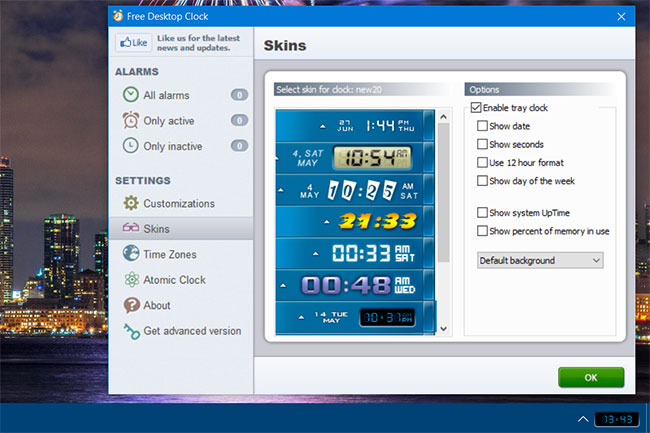
<p style="text-align: justify;">Khi mọi thứ đã thiết lập xong, hãy mở cửa sổ Free Desktop Clock. Nhấp vào&nbsp;<strong>Skins</strong>&nbsp;ở bên trái cửa sổ. Chọn&nbsp;<strong>Enable tray clock</strong>&nbsp;nếu tùy chọn đó chưa được chọn. Sau đó, chọn một trong các giao diện trên tab đó và nhấp vào&nbsp;<strong>OK</strong>&nbsp;để thêm nó vào đồng hồ khay hệ thống như trong ảnh chụp màn hình bên dưới.</p>

<figure>
<div style="text-align: justify;"><img alt="Chọn 1 trong các giao diện" data-i="0" data-src="https://st.quantrimang.com/photos/image/2022/03/24/tuy-chinh-dong-ho-trong-khay-he-thong-windows-1.jpg" data-was-processed="true" height="433" src="https://st.quantrimang.com/photos/image/2022/03/24/tuy-chinh-dong-ho-trong-khay-he-thong-windows-1.jpg" width="650" /></div>

<figcaption>
<div style="text-align: justify;">Chọn 1 trong các giao diện</div>
</figcaption>
</figure>

<p style="text-align: justify;">Bạn có thể thêm các chi tiết khác vào đồng hồ khay hệ thống với những cài đặt bổ sung. Nhấp vào&nbsp;<strong>Show date</strong>&nbsp;và&nbsp;<strong>Show day of the week&nbsp;</strong>để bao gồm chi tiết ngày cùng với đồng hồ. Chọn&nbsp;<strong>Show percent of memory in use</strong>&nbsp;sẽ hiển thị phần trăm sử dụng&nbsp;<a href="https://quantrimang.com/ram-laptop-va-nhung-dieu-can-biet-54747" title="RAM là gì? Tất tần tật về RAM laptop và những điều bạn cần biết">RAM</a>&nbsp;trên PC.</p>

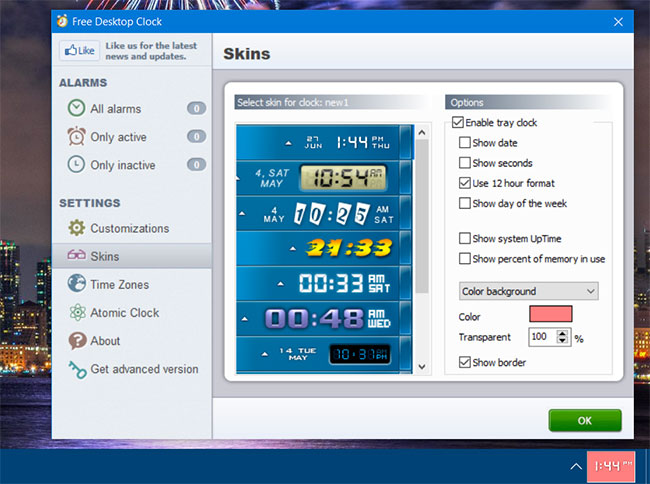
<p style="text-align: justify;">Để thay đổi màu nền của đồng hồ, hãy nhấp vào menu drop-down&nbsp;<strong>Default background.</strong>&nbsp;Chọn tùy chọn&nbsp;<strong>Color background.</strong>&nbsp;Sau đó nhấp vào hộp bảng màu để chọn một màu khác từ đó. Bạn cũng có thể áp dụng một mức độ trong suốt cho đồng hồ bằng cách điều chỉnh giá trị cho cài đặt&nbsp;<strong>Transparent.</strong></p>

<figure>
<div style="text-align: justify;"><img alt="Điều chỉnh độ trong suốt của đồng hồ" data-i="1" data-src="https://st.quantrimang.com/photos/image/2022/03/24/tuy-chinh-dong-ho-trong-khay-he-thong-windows-2.jpg" data-was-processed="true" height="484" src="https://st.quantrimang.com/photos/image/2022/03/24/tuy-chinh-dong-ho-trong-khay-he-thong-windows-2.jpg" width="650" /></div>

<figcaption>
<div style="text-align: justify;">Điều chỉnh độ trong suốt của đồng hồ</div>
</figcaption>
</figure>

<h2 style="text-align: justify;">Cách thêm nhiều đồng hồ múi giờ khác nhau</h2>

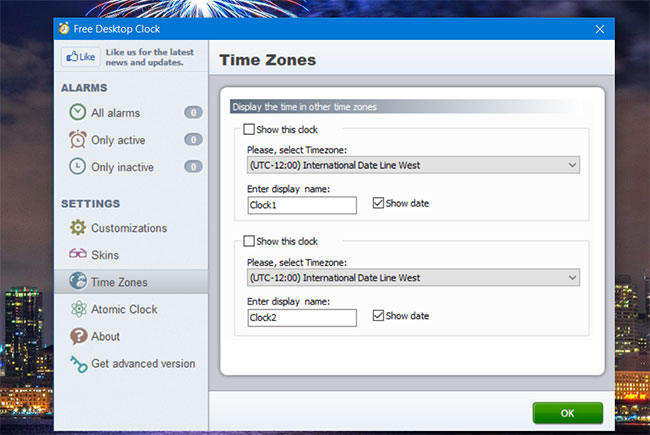
<p style="text-align: justify;">Free Desktop Clock bao gồm các tùy chọn hiển thị đồng hồ cho nhiều múi giờ khác nhau. Những chiếc đồng hồ như vậy có thể hữu ích nếu bạn cần kiểm tra thời gian ở một quốc gia khác trước khi thực hiện cuộc gọi điện thoại quốc tế. Nhấp vào tab&nbsp;<strong>Time Zones</strong>&nbsp;để xem các tùy chọn đó.</p>

<figure>
<div style="text-align: justify;"><img alt="Nhấp vào tab Time Zones" data-i="2" data-src="https://st.quantrimang.com/photos/image/2022/03/24/tuy-chinh-dong-ho-trong-khay-he-thong-windows-3.jpg" data-was-processed="true" height="435" src="https://st.quantrimang.com/photos/image/2022/03/24/tuy-chinh-dong-ho-trong-khay-he-thong-windows-3.jpg" width="650" /></div>

<figcaption>
<div style="text-align: justify;">Nhấp vào tab Time Zones</div>
</figcaption>
</figure>

<p style="text-align: justify;">Để bật đồng hồ múi giờ, hãy chọn hộp kiểm&nbsp;<strong>Show this clock</strong>. Chọn một khu vực trong menu drop-down&nbsp;<strong>Timezone.</strong>&nbsp;Bạn cũng có thể nhập tiêu đề đồng hồ vào hộp&nbsp;<strong>Enter display name</strong>.</p>

<h2 style="text-align: justify;">Cách tạo thông báo thời gian hàng giờ</h2>

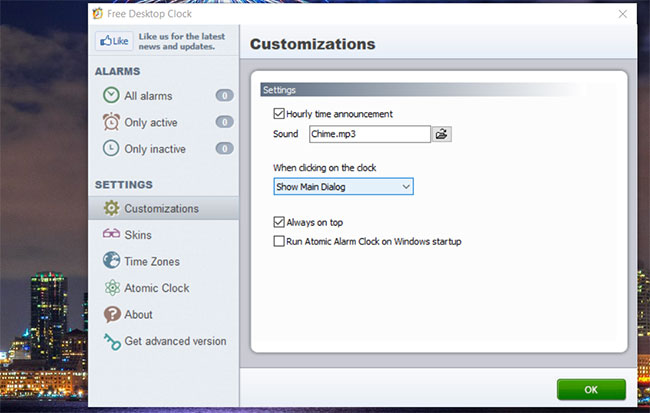
<p style="text-align: justify;">Free Desktop Clock cũng có cài đặt thông báo thời gian hàng giờ. Tùy chọn này, sau khi được bật, sẽ kêu mỗi giờ. Đó là một cách hay để theo dõi thời gian trôi qua mà không cần nhìn đồng hồ.</p>

<figure>
<div style="text-align: justify;"><img alt="Tab Customizations" data-i="3" data-src="https://st.quantrimang.com/photos/image/2022/03/24/tuy-chinh-dong-ho-trong-khay-he-thong-windows-4.jpg" data-was-processed="true" height="413" src="https://st.quantrimang.com/photos/image/2022/03/24/tuy-chinh-dong-ho-trong-khay-he-thong-windows-4.jpg" width="650" /></div>

<figcaption>
<div style="text-align: justify;">Tab Customizations</div>
</figcaption>
</figure>

<p style="text-align: justify;">Tab&nbsp;<strong>Customizations</strong>&nbsp;bao gồm cài đặt đó. Nhấp vào hộp kiểm&nbsp;<strong>Hourly time announcement</strong>&nbsp;trên tab đó để chọn tùy chọn. Sau đó nhấn nút bên cạnh hộp&nbsp;<strong>Sound</strong>&nbsp;để chọn file âm thanh cho thông báo.</p>

<h2 style="text-align: justify;">Các tính năng bổ sung trong Atomic Alarm Clock</h2>

<p style="text-align: justify;">Bạn có thể sẽ nhận thấy các tab báo thức trên cửa sổ Free Desktop Clock. Đó là những tính năng bổ sung chỉ có trong phần mềm Atomic Alarm Clock tiên tiến hơn, hiện đang được bán ở mức giá $14,95. Phần mềm đó cho phép bạn đặt báo thức cho những thời điểm cụ thể và bao gồm nhiều giao diện đồng hồ trên khay hệ thống hơn để lựa chọn. Bạn cũng có thể chọn đồng bộ đồng hồ với time server internet trong phiên bản trả phí.</p>

<p style="text-align: justify;">Như bạn đã thấy, không cần phải gắn bó với đồng hồ khay hệ thống cũ kỹ trong Windows 10/8/7/XP. Thay vào đó, bạn có thể nhanh chóng và dễ dàng chọn một giao diện khác cho nó với Free Desktop Clock (hoặc Atomic Alarm Clock). Khi đã hiểu rõ về phần mềm, bạn có thể thêm đồng hồ trực quan hấp dẫn hơn nhiều vào khay hệ thống Windows và tùy chỉnh chúng thêm với các cài đặt bổ sung.</p>
		</div>
				<div id="author">
						<p>
				<strong>Nguồn tin:</strong>
				Quantrimang.com
			</p>
		</div>
	</div>
	<div id="footer" class="clearfix">
		<div id="url">
			<strong>URL của bản tin này: </strong><a href="https://www.nguoicodonvn2008.info/vi/news/savefile/kien-thuc-may-tinh/cach-tuy-chinh-dong-ho-trong-khay-he-thong-windows-5333.html" title="Cách tùy chỉnh đồng hồ trong khay hệ thống Windows">https://www.nguoicodonvn2008.info/vi/news/savefile/kien-thuc-may-tinh/cach-tuy-chinh-dong-ho-trong-khay-he-thong-windows-5333.html</a>

		</div>
		<div class="clear"></div>
		<div class="copyright">
			&copy; .&#x3A; Nguoicodonvn2008.info - Cõi lòng người cô đơn &#x3A;.
		</div>
		<div id="contact">
			<a href="mailto:admin@nguoicodonvn2008.info">admin@nguoicodonvn2008.info</a>
		</div>
	</div>
</div>
        <div id="timeoutsess" class="chromeframe">
            Bạn đã không sử dụng Site, <a onclick="timeoutsesscancel();" href="https://www.nguoicodonvn2008.info/#">Bấm vào đây để duy trì trạng thái đăng nhập</a>. Thời gian chờ: <span id="secField"> 60 </span> giây
        </div>
        <div id="openidResult" class="nv-alert" style="display:none"></div>
        <div id="openidBt" data-result="" data-redirect=""></div>
		</script>
		<div class="car-top">
  <span><img src="https://www.nguoicodonvn2008.info/themes/default/images/car.png" alt=""></span>
</div>
<div id="run_cronjobs" style="visibility:hidden;display:none;"><img alt="cron" src="/index.php?second=cronjobs&amp;p=m318Ue64" width="1" height="1" /></div>
<script src="https://www.nguoicodonvn2008.info/assets/js/jquery/jquery.min.js"></script>
<script>var nv_base_siteurl="/",nv_lang_data="vi",nv_lang_interface="vi",nv_name_variable="nv",nv_fc_variable="op",nv_lang_variable="language",nv_module_name="news",nv_func_name="savefile",nv_is_user=0, nv_my_ofs=-4,nv_my_abbr="EDT",nv_cookie_prefix="nv4c_e856T",nv_check_pass_mstime=1738000,nv_area_admin=0,nv_safemode=0,theme_responsive=0,nv_recaptcha_ver=2,nv_recaptcha_sitekey="",nv_recaptcha_type="image",XSSsanitize=1;</script>
<script src="https://www.nguoicodonvn2008.info/assets/js/language/vi.js"></script>
<script src="https://www.nguoicodonvn2008.info/assets/js/DOMPurify/purify3.js"></script>
<script src="https://www.nguoicodonvn2008.info/assets/js/global.js"></script>
<script src="https://www.nguoicodonvn2008.info/assets/js/site.js"></script>
<script src="https://www.nguoicodonvn2008.info/themes/default/js/news.js"></script>
<script src="https://www.nguoicodonvn2008.info/themes/default/js/main.js"></script>
<script src="https://www.nguoicodonvn2008.info/themes/default/js/custom.js"></script>
<script type="application/ld+json">
        {
            "@context": "https://schema.org",
            "@type": "Organization",
            "url": "https://www.nguoicodonvn2008.info",
            "logo": "https://www.nguoicodonvn2008.info/uploads/angel.gif"
        }
        </script>
<script src="https://www.nguoicodonvn2008.info/themes/default/js/bootstrap.min.js"></script>
<script type="text/javascript">
var $scrolltop = $('.car-top');
$scrolltop.on('click', function () {
    $('html,body').animate({
        scrollTop: 0
    }, 800);
    $(this).addClass("car-run");
    setTimeout(function(){ $scrolltop.removeClass('car-run');}, 1000);
    return false;
});
$(window).on('scroll', function ()
{ 
    if($(window).scrollTop() >= 200)
    {
        $scrolltop.addClass("show");
        $scrolltop.addClass("car-down");
    }
    else
    {
       $scrolltop.removeClass("show");
       setTimeout(function(){ $scrolltop.removeClass('car-down');}, 300);
    }
});
</script>
</body>
</html>