<!DOCTYPE html>
    <html lang="vi" xmlns="http://www.w3.org/1999/xhtml" prefix="og: http://ogp.me/ns#">
    <head>
<title>Cách tự động xóa các tập tin tạm thời trên Windows 11</title>
<meta name="description" content="Cách tự động xóa các tập tin tạm thời trên Windows 11 - Savefile - Tin Tức -...">
<meta name="author" content=".: Nguoicodonvn2008.info - Cõi lòng người cô đơn :.">
<meta name="copyright" content=".: Nguoicodonvn2008.info - Cõi lòng người cô đơn :. [admin@nguoicodonvn2008.info]">
<meta name="robots" content="index, archive, follow, noodp">
<meta name="googlebot" content="index,archive,follow,noodp">
<meta name="msnbot" content="all,index,follow">
<meta name="generator" content="NukeViet v4.5">
<meta http-equiv="Content-Type" content="text/html; charset=utf-8">
<meta property="og:title" content="Cách tự động xóa các tập tin tạm thời trên Windows 11">
<meta property="og:type" content="website">
<meta property="og:description" content="Savefile - Tin Tức - https&#x3A;&#x002F;&#x002F;www.nguoicodonvn2008.info&#x002F;vi&#x002F;news&#x002F;savefile&#x002F;kien-thuc-may-tinh&#x002F;cach-tu-dong-xoa-cac-tap-tin-tam-thoi-tren-windows-11-10537.html">
<meta property="og:site_name" content=".&#x3A; Nguoicodonvn2008.info - Cõi lòng người cô đơn &#x3A;.">
<meta property="og:url" content="https://www.nguoicodonvn2008.info/vi/news/savefile/kien-thuc-may-tinh/cach-tu-dong-xoa-cac-tap-tin-tam-thoi-tren-windows-11-10537.html">
<link rel="shortcut icon" href="https://www.nguoicodonvn2008.info/favicon.ico">
<link rel="canonical" href="https://www.nguoicodonvn2008.info/vi/news/savefile/kien-thuc-may-tinh/cach-tu-dong-xoa-cac-tap-tin-tam-thoi-tren-windows-11-10537.html">
<link rel="alternate" href="https://www.nguoicodonvn2008.info/vi/news/rss/" title="Tin Tức" type="application/rss+xml">
<link rel="alternate" href="https://www.nguoicodonvn2008.info/vi/news/rss/karaoke-dual/" title="Tin Tức - Karaoke Dual" type="application/rss+xml">
<link rel="alternate" href="https://www.nguoicodonvn2008.info/vi/news/rss/nhac-tre/" title="Tin Tức - Nhạc trẻ" type="application/rss+xml">
<link rel="alternate" href="https://www.nguoicodonvn2008.info/vi/news/rss/tru-tinh/" title="Tin Tức - Trữ tình" type="application/rss+xml">
<link rel="alternate" href="https://www.nguoicodonvn2008.info/vi/news/rss/nuoc-ngoai/" title="Tin Tức - Nước ngoài" type="application/rss+xml">
<link rel="alternate" href="https://www.nguoicodonvn2008.info/vi/news/rss/remix/" title="Tin Tức - Remix" type="application/rss+xml">
<link rel="alternate" href="https://www.nguoicodonvn2008.info/vi/news/rss/tam-su-tinh-yeu/" title="Tin Tức - Tâm sự tình yêu" type="application/rss+xml">
<link rel="alternate" href="https://www.nguoicodonvn2008.info/vi/news/rss/tho-suu-tam/" title="Tin Tức - Thơ sưu tầm" type="application/rss+xml">
<link rel="alternate" href="https://www.nguoicodonvn2008.info/vi/news/rss/cuoc-song/" title="Tin Tức - Cuộc sống" type="application/rss+xml">
<link rel="alternate" href="https://www.nguoicodonvn2008.info/vi/news/rss/phan-mem/" title="Tin Tức - Phần mềm" type="application/rss+xml">
<link rel="alternate" href="https://www.nguoicodonvn2008.info/vi/news/rss/kien-thuc-may-tinh/" title="Tin Tức - Kiến thức máy tính" type="application/rss+xml">
<link rel="alternate" href="https://www.nguoicodonvn2008.info/vi/news/rss/hoc-tap/" title="Tin Tức - Học tập" type="application/rss+xml">
<link rel="alternate" href="https://www.nguoicodonvn2008.info/vi/news/rss/tai-lieu/" title="Tin Tức - Tài liệu" type="application/rss+xml">
<link rel="alternate" href="https://www.nguoicodonvn2008.info/vi/news/rss/de-thi/" title="Tin Tức - Đề thi" type="application/rss+xml">
<link rel="preload" as="style" href="https://www.nguoicodonvn2008.info/assets/css/font-awesome.min.css" type="text/css">
<link rel="preload" as="style" href="https://www.nguoicodonvn2008.info/themes/default/css/bootstrap.non-responsive.css" type="text/css">
<link rel="preload" as="style" href="https://www.nguoicodonvn2008.info/themes/default/css/style.css" type="text/css">
<link rel="preload" as="style" href="https://www.nguoicodonvn2008.info/themes/default/css/style.non-responsive.css" type="text/css">
<link rel="preload" as="style" href="https://www.nguoicodonvn2008.info/themes/default/css/news.css" type="text/css">
<link rel="preload" as="style" href="https://www.nguoicodonvn2008.info/themes/default/css/custom.css" type="text/css">
<link rel="preload" as="script" href="https://www.nguoicodonvn2008.info/assets/js/jquery/jquery.min.js" type="text/javascript">
<link rel="preload" as="script" href="https://www.nguoicodonvn2008.info/assets/js/language/vi.js" type="text/javascript">
<link rel="preload" as="script" href="https://www.nguoicodonvn2008.info/assets/js/DOMPurify/purify3.js" type="text/javascript">
<link rel="preload" as="script" href="https://www.nguoicodonvn2008.info/assets/js/global.js" type="text/javascript">
<link rel="preload" as="script" href="https://www.nguoicodonvn2008.info/assets/js/site.js" type="text/javascript">
<link rel="preload" as="script" href="https://www.nguoicodonvn2008.info/themes/default/js/news.js" type="text/javascript">
<link rel="preload" as="script" href="https://www.nguoicodonvn2008.info/themes/default/js/main.js" type="text/javascript">
<link rel="preload" as="script" href="https://www.nguoicodonvn2008.info/themes/default/js/custom.js" type="text/javascript">
<link rel="preload" as="script" href="https://www.nguoicodonvn2008.info/themes/default/js/bootstrap.min.js" type="text/javascript">
<link rel="stylesheet" href="https://www.nguoicodonvn2008.info/assets/css/font-awesome.min.css">
<link rel="stylesheet" href="https://www.nguoicodonvn2008.info/themes/default/css/bootstrap.non-responsive.css">
<link rel="stylesheet" href="https://www.nguoicodonvn2008.info/themes/default/css/style.css">
<link rel="stylesheet" href="https://www.nguoicodonvn2008.info/themes/default/css/style.non-responsive.css">
<link rel="StyleSheet" href="https://www.nguoicodonvn2008.info/themes/default/css/news.css">
<link rel="stylesheet" href="https://www.nguoicodonvn2008.info/themes/default/css/custom.css">
<style type="text/css">
	body{background: #fff;}
</style>
    </head>
    <body>
<div id="print">
	<div id="hd_print">
		<h2 class="pull-left">.&#x3A; Nguoicodonvn2008.info - Cõi lòng người cô đơn &#x3A;.</h2>
		<p class="pull-right"><a title=".&#x3A; Nguoicodonvn2008.info - Cõi lòng người cô đơn &#x3A;." href="https://www.nguoicodonvn2008.info/">https://www.nguoicodonvn2008.info</a></p>
	</div>
	<div class="clear"></div>
	<hr />
	<div id="content">
		<h1>Cách tự động xóa các tập tin tạm thời trên Windows 11</h1>
		<ul class="list-inline">
			<li>Thứ ba - 10/06/2025 02:38</li>
			<li class="hidden-print txtrequired"><em class="fa fa-print">&nbsp;</em><a title="In ra" href="javascript:;" onclick="window.print()">In ra</a></li>
			<li class="hidden-print txtrequired"><em class="fa fa-power-off">&nbsp;</em><a title="Đóng cửa sổ này" href="javascript:;" onclick="window.close()">Đóng cửa sổ này</a></li>
		</ul>
		<div class="clear"></div>
		<div id="hometext">
		</div>
				<div class="imghome">
			<img alt="Cách tự động xóa các tập tin tạm thời trên Windows 11" src="https://st.quantrimang.com/photos/image/2025/06/06/xoa-tu-dong-tep-tam-thoi-Windows-8.jpg" width="460" class="img-thumbnail" />
		</div>
		<div class="clear"></div>
		<div id="bodytext" class="clearfix">
			<p style="text-align: justify;">Windows 11 lưu trữ dung lượng lớn các tệp tạm thời theo thời gian sử dụng, từ đó gây ra một số ảnh hưởng như máy tính hoạt động chậm, ứng dụng không phản hồi,... Để giải phóng dung lượng cho máy tính, tăng tốc máy tính thì bạn nên kiểm tra và&nbsp;xóa một số thư mục Windows tạm thời&nbsp;hay có thể thiết lập xóa các tập tin tạm thời trên Windows 11, theo bài hướng dẫn dưới đây.</p>

<h2 style="text-align: justify;">Hướng dẫn tự động xóa tập tin tạm thời Windows 11</h2>

<p style="text-align: justify;"><strong>Bước 1:</strong></p>

<p style="text-align: justify;">Đầu tiên chúng ta tiến hành tạo lệnh xóa các tệp tạm thời khỏi thư mục tạm thời của tài khoản người dùng cũng như thư mục tạm thời trên toàn hệ thống.</p>

<p style="text-align: justify;">Bạn mở Notepad rồi nhập lệnh dưới đây.</p>

<pre id="pre0">
<code>@echo off
echo Cleaning system and user temp files...
del /s /f /q %TEMP%\*.* &gt;nul 2&gt;&amp;1
rd /s /q %TEMP% &gt;nul 2&gt;&amp;1
md %TEMP%

del /s /f /q C:\Windows\Temp\*.* &gt;nul 2&gt;&amp;1
rd /s /q C:\Windows\Temp &gt;nul 2&gt;&amp;1
md C:\Windows\Temp

echo Temporary files cleared!</code></pre>

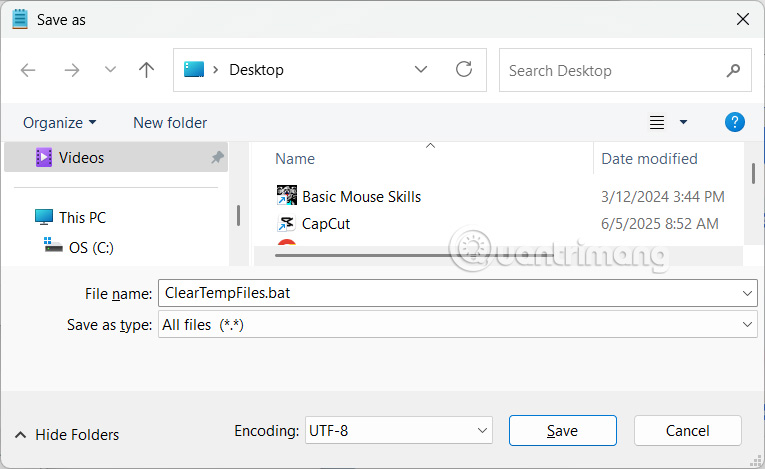
<p style="text-align: justify;">Trong giao diện<strong>&nbsp;lưu tại File name</strong>&nbsp;nhập&nbsp;<strong>ClearTempFiles.bat</strong>&nbsp;và nhấn Save.</p>

<p style="text-align: justify;"><img alt="Nhập lệnh xóa tệp tạm thời tự động" data-i="0" data-src="https://st.quantrimang.com/photos/image/2025/06/06/xoa-tu-dong-tep-tam-thoi-Windows-1.jpg" data-was-processed="true" height="368" src="https://st.quantrimang.com/photos/image/2025/06/06/xoa-tu-dong-tep-tam-thoi-Windows-1.jpg" width="600" /></p>

<p style="text-align: justify;"><strong>Bước 2:</strong></p>

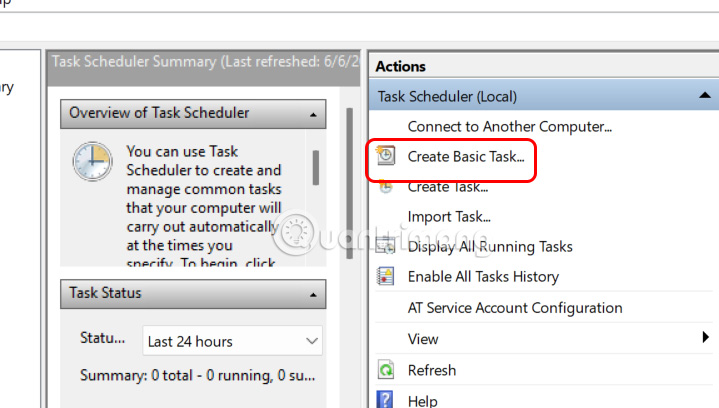
<p style="text-align: justify;">Sau đó người dùng<strong>&nbsp;mở Task Scheduler</strong>&nbsp;rồi&nbsp;<strong>nhấn Create Basic Task</strong>&nbsp;để tạo tác vụ mới.</p>

<p style="text-align: justify;"><img alt="Create Basic Task" data-i="1" data-src="https://st.quantrimang.com/photos/image/2025/06/06/xoa-tu-dong-tep-tam-thoi-Windows-2.jpg" data-was-processed="true" height="312" src="https://st.quantrimang.com/photos/image/2025/06/06/xoa-tu-dong-tep-tam-thoi-Windows-2.jpg" width="550" /></p>

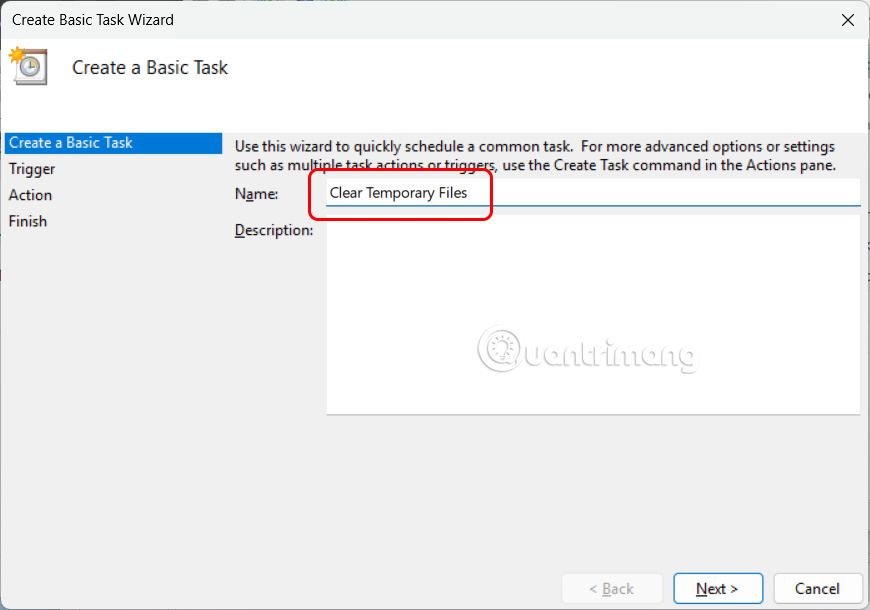
<p style="text-align: justify;">Tại Name chúng ta&nbsp;<strong>nhập Clear Temporary Files</strong>&nbsp;sau đó&nbsp;<strong>nhấn Next</strong>&nbsp;để tiếp tục.</p>

<p style="text-align: justify;"><img alt=" Clear Temporary Files " data-i="2" data-src="https://st.quantrimang.com/photos/image/2025/06/06/xoa-tu-dong-tep-tam-thoi-Windows-3.jpg" data-was-processed="true" height="407" src="https://st.quantrimang.com/photos/image/2025/06/06/xoa-tu-dong-tep-tam-thoi-Windows-3.jpg" width="580" /></p>

<p style="text-align: justify;"><strong>Bước 3:</strong></p>

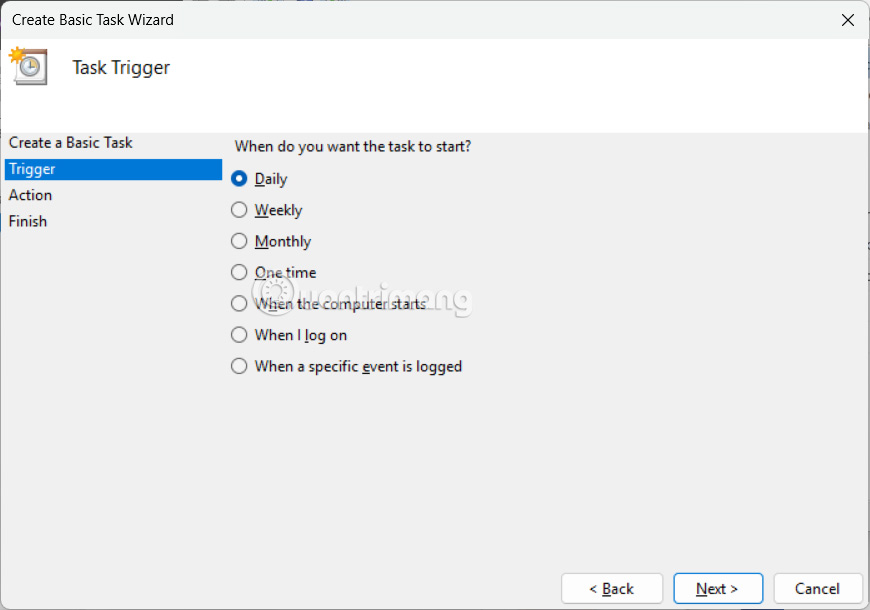
<p style="text-align: justify;">Người dùng&nbsp;<strong>nhấn chọn tần suất&nbsp;</strong>muốn xóa các tập tin tạm thời trên máy tính để thực hiện và nhấn Next để thực hiện.</p>

<p style="text-align: justify;"><img alt="Tần suất muốn xóa tệp tạm thời" data-i="3" data-src="https://st.quantrimang.com/photos/image/2025/06/06/xoa-tu-dong-tep-tam-thoi-Windows-4.jpg" data-was-processed="true" height="386" src="https://st.quantrimang.com/photos/image/2025/06/06/xoa-tu-dong-tep-tam-thoi-Windows-4.jpg" width="550" /></p>

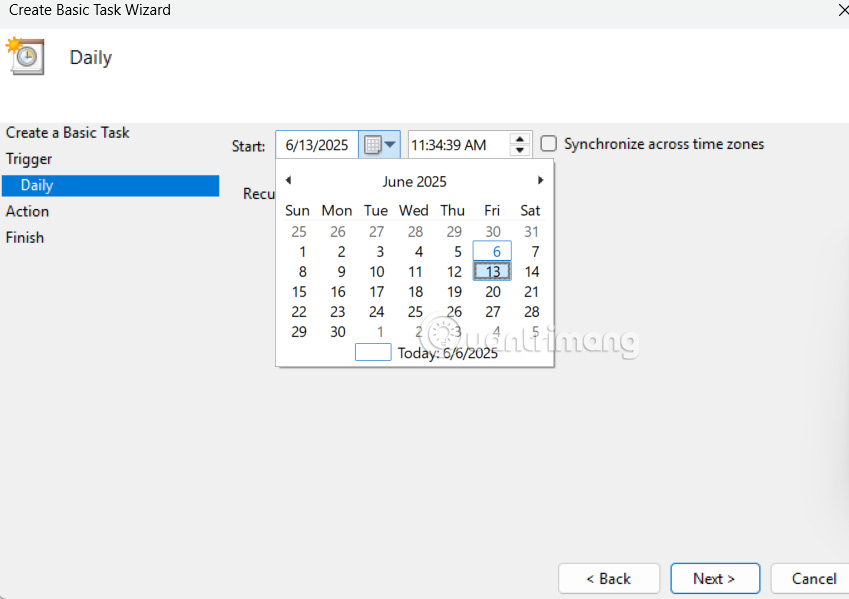
<p style="text-align: justify;">Tiếp theo chọn thời gian bắt đầu mà tác vụ này sẽ diễn ra rồi nhấn Next để tiếp tục.</p>

<p style="text-align: justify;"><img alt="Thời gian bắt đầu xóa tệp tạm thời" data-i="4" data-src="https://st.quantrimang.com/photos/image/2025/06/06/xoa-tu-dong-tep-tam-thoi-Windows-5.jpg" data-was-processed="true" height="353" src="https://st.quantrimang.com/photos/image/2025/06/06/xoa-tu-dong-tep-tam-thoi-Windows-5.jpg" width="500" /></p>

<p style="text-align: justify;"><strong>Bước 4:</strong></p>

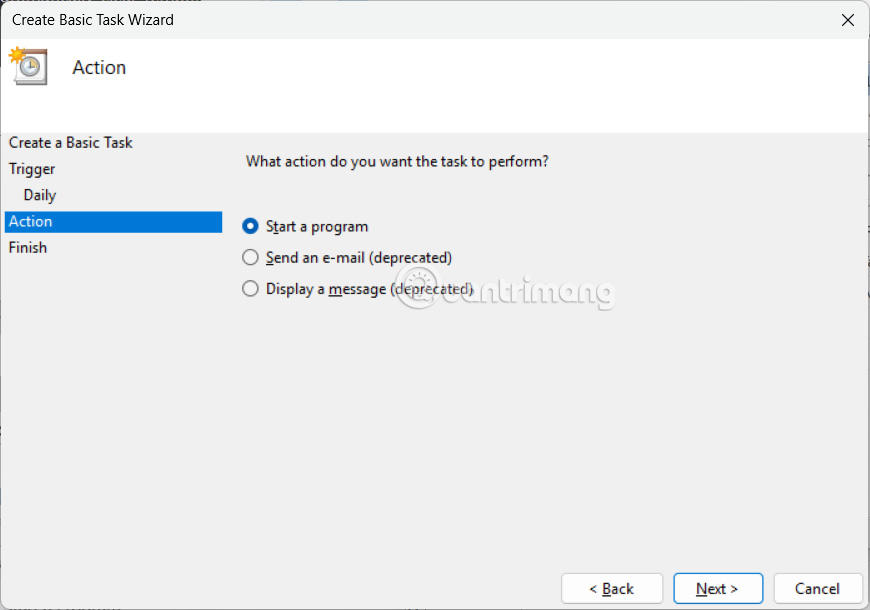
<p style="text-align: justify;">Người dùng&nbsp;<strong>chọn Start a Program</strong>&nbsp;rồi nhấn Next ở bên dưới để tiếp tục.</p>

<p style="text-align: justify;"><img alt="Start a Program" data-i="5" data-src="https://st.quantrimang.com/photos/image/2025/06/06/xoa-tu-dong-tep-tam-thoi-Windows-6.jpg" data-was-processed="true" height="351" src="https://st.quantrimang.com/photos/image/2025/06/06/xoa-tu-dong-tep-tam-thoi-Windows-6.jpg" width="500" /></p>

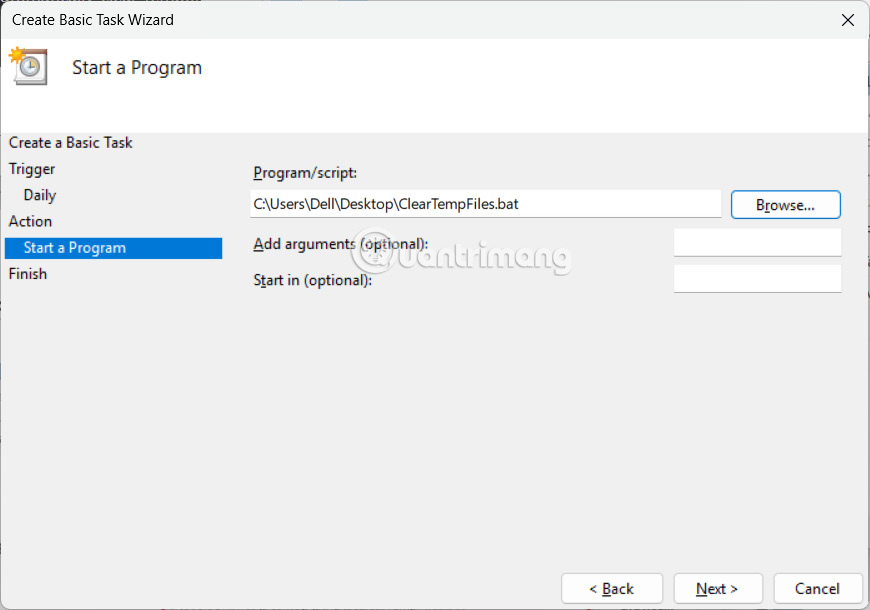
<p style="text-align: justify;">Tại&nbsp;<strong>trường Program/Script</strong>, bạn&nbsp;<strong>nhấn nút Browse</strong>&nbsp;rồi&nbsp;<strong>chọn file bat</strong>&nbsp;mà bạn mới lưu trước đó.</p>

<p style="text-align: justify;"><img alt="Chọn file chứa lệnh xóa tệp tin tạm thời" data-i="6" data-src="https://st.quantrimang.com/photos/image/2025/06/06/xoa-tu-dong-tep-tam-thoi-Windows-7.jpg" data-was-processed="true" height="386" src="https://st.quantrimang.com/photos/image/2025/06/06/xoa-tu-dong-tep-tam-thoi-Windows-7.jpg" width="550" /></p>

<p style="text-align: justify;"><strong>Bước 5:</strong></p>

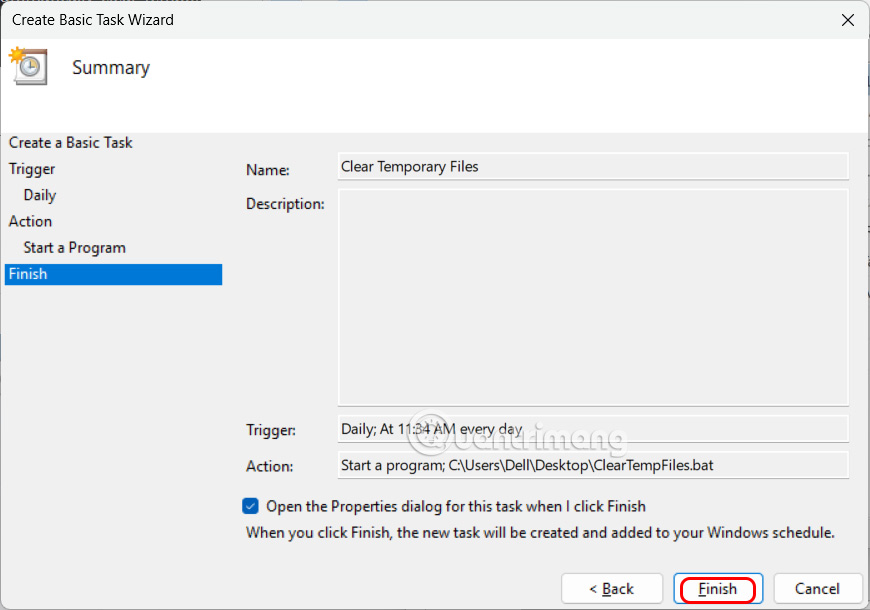
<p style="text-align: justify;">Chuyển sang giao diện mới, chúng ta&nbsp;<strong>nhấn chọn vào Open the Properties Dialog For This Task When I click Finish</strong>&nbsp;và nhấn Finish để thực hiện.</p>

<p style="text-align: justify;">Trong giao diện hộp thoại mới, bạn<strong>&nbsp;tích chọn Run With Highest Privileges</strong>&nbsp;rồi nhấn OK để hoàn thành là xong.</p>

<p style="text-align: justify;"><img alt="Thao tác thực hiện khi kết thúc " data-i="7" data-src="https://st.quantrimang.com/photos/image/2025/06/06/xoa-tu-dong-tep-tam-thoi-Windows-8.jpg" data-was-processed="true" height="386" src="https://st.quantrimang.com/photos/image/2025/06/06/xoa-tu-dong-tep-tam-thoi-Windows-8.jpg" width="550" /></p>

<p style="text-align: justify;"><strong>Bước 6:</strong></p>

<p style="text-align: justify;">Tệp lệnh ở trên chỉ xóa các tệp tạm thời trên Windows 11. Nếu bạn muốn xóa các tệp khác, hãy thêm các phần mở rộng sau vào tập lệnh dưới đây.</p>

<p style="text-align: justify;">Để&nbsp;<strong>tập lệnh của bạn xóa cả nội dung trong Thùng rác</strong>&nbsp;thì thêm lệnh dưới đây.</p>

<pre id="pre1">
<code>PowerShell.exe -Command &quot;Clear-RecycleBin -Force&quot;</code></pre>

<p style="text-align: justify;">Để<strong>&nbsp;xóa bộ nhớ đệm Windows Update</strong>, bạn nhập lệnh dưới đây.</p>

<pre id="pre2">
<code>net stop wuauserv

rd /s /q C:\Windows\SoftwareDistribution\Download

net start wuauserv</code></pre>

<p style="text-align: justify;">Bạn có thể&nbsp;<strong>xóa các tệp pretech</strong>&nbsp;bằng mã sau:</p>

<pre id="pre3">
<code>del /s /f /q C:\Windows\Prefetch\*.* &gt;nul 2&gt;&amp;1</code></pre>

<div style="text-align: justify;">&nbsp;</div>
		</div>
				<div id="author">
						<p>
				<strong>Nguồn tin:</strong>
				Quantrimang.com:
			</p>
		</div>
	</div>
	<div id="footer" class="clearfix">
		<div id="url">
			<strong>URL của bản tin này: </strong><a href="https://www.nguoicodonvn2008.info/vi/news/savefile/kien-thuc-may-tinh/cach-tu-dong-xoa-cac-tap-tin-tam-thoi-tren-windows-11-10537.html" title="Cách tự động xóa các tập tin tạm thời trên Windows 11">https://www.nguoicodonvn2008.info/vi/news/savefile/kien-thuc-may-tinh/cach-tu-dong-xoa-cac-tap-tin-tam-thoi-tren-windows-11-10537.html</a>

		</div>
		<div class="clear"></div>
		<div class="copyright">
			&copy; .&#x3A; Nguoicodonvn2008.info - Cõi lòng người cô đơn &#x3A;.
		</div>
		<div id="contact">
			<a href="mailto:admin@nguoicodonvn2008.info">admin@nguoicodonvn2008.info</a>
		</div>
	</div>
</div>
        <div id="timeoutsess" class="chromeframe">
            Bạn đã không sử dụng Site, <a onclick="timeoutsesscancel();" href="https://www.nguoicodonvn2008.info/#">Bấm vào đây để duy trì trạng thái đăng nhập</a>. Thời gian chờ: <span id="secField"> 60 </span> giây
        </div>
        <div id="openidResult" class="nv-alert" style="display:none"></div>
        <div id="openidBt" data-result="" data-redirect=""></div>
		</script>
		<div class="car-top">
  <span><img src="https://www.nguoicodonvn2008.info/themes/default/images/car.png" alt=""></span>
</div>
<script src="https://www.nguoicodonvn2008.info/assets/js/jquery/jquery.min.js"></script>
<script>var nv_base_siteurl="/",nv_lang_data="vi",nv_lang_interface="vi",nv_name_variable="nv",nv_fc_variable="op",nv_lang_variable="language",nv_module_name="news",nv_func_name="savefile",nv_is_user=0, nv_my_ofs=-4,nv_my_abbr="EDT",nv_cookie_prefix="nv4c_e856T",nv_check_pass_mstime=1738000,nv_area_admin=0,nv_safemode=0,theme_responsive=0,nv_recaptcha_ver=2,nv_recaptcha_sitekey="",nv_recaptcha_type="image",XSSsanitize=1;</script>
<script src="https://www.nguoicodonvn2008.info/assets/js/language/vi.js"></script>
<script src="https://www.nguoicodonvn2008.info/assets/js/DOMPurify/purify3.js"></script>
<script src="https://www.nguoicodonvn2008.info/assets/js/global.js"></script>
<script src="https://www.nguoicodonvn2008.info/assets/js/site.js"></script>
<script src="https://www.nguoicodonvn2008.info/themes/default/js/news.js"></script>
<script src="https://www.nguoicodonvn2008.info/themes/default/js/main.js"></script>
<script src="https://www.nguoicodonvn2008.info/themes/default/js/custom.js"></script>
<script type="application/ld+json">
        {
            "@context": "https://schema.org",
            "@type": "Organization",
            "url": "https://www.nguoicodonvn2008.info",
            "logo": "https://www.nguoicodonvn2008.info/uploads/angel.gif"
        }
        </script>
<script src="https://www.nguoicodonvn2008.info/themes/default/js/bootstrap.min.js"></script>
<script type="text/javascript">
var $scrolltop = $('.car-top');
$scrolltop.on('click', function () {
    $('html,body').animate({
        scrollTop: 0
    }, 800);
    $(this).addClass("car-run");
    setTimeout(function(){ $scrolltop.removeClass('car-run');}, 1000);
    return false;
});
$(window).on('scroll', function ()
{ 
    if($(window).scrollTop() >= 200)
    {
        $scrolltop.addClass("show");
        $scrolltop.addClass("car-down");
    }
    else
    {
       $scrolltop.removeClass("show");
       setTimeout(function(){ $scrolltop.removeClass('car-down');}, 300);
    }
});
</script>
</body>
</html>