<!DOCTYPE html>
    <html lang="vi" xmlns="http://www.w3.org/1999/xhtml" prefix="og: http://ogp.me/ns#">
    <head>
<title>Cách truy cập cài đặt router WiFi</title>
<meta name="description" content="Cách truy cập cài đặt router WiFi - Savefile - Tin Tức - https&#x3A;&#x002F;&#x002F;www.nguoicodonvn2008.info&#x002F;vi&#x002F;news&#x002F;savefile&#x002F;kien-thuc-may-tinh&#x002F;cach-truy-cap-cai-dat-router-wifi-3216.html">
<meta name="author" content=".: Nguoicodonvn2008.info - Cõi lòng người cô đơn :.">
<meta name="copyright" content=".: Nguoicodonvn2008.info - Cõi lòng người cô đơn :. [admin@nguoicodonvn2008.info]">
<meta name="robots" content="index, archive, follow, noodp">
<meta name="googlebot" content="index,archive,follow,noodp">
<meta name="msnbot" content="all,index,follow">
<meta name="generator" content="NukeViet v4.5">
<meta http-equiv="Content-Type" content="text/html; charset=utf-8">
<meta property="og:title" content="Cách truy cập cài đặt router WiFi">
<meta property="og:type" content="website">
<meta property="og:description" content="Savefile - Tin Tức - https&#x3A;&#x002F;&#x002F;www.nguoicodonvn2008.info&#x002F;vi&#x002F;news&#x002F;savefile&#x002F;kien-thuc-may-tinh&#x002F;cach-truy-cap-cai-dat-router-wifi-3216.html">
<meta property="og:site_name" content=".&#x3A; Nguoicodonvn2008.info - Cõi lòng người cô đơn &#x3A;.">
<meta property="og:url" content="https://www.nguoicodonvn2008.info/vi/news/savefile/kien-thuc-may-tinh/cach-truy-cap-cai-dat-router-wifi-3216.html">
<link rel="shortcut icon" href="https://www.nguoicodonvn2008.info/favicon.ico">
<link rel="canonical" href="https://www.nguoicodonvn2008.info/vi/news/savefile/kien-thuc-may-tinh/cach-truy-cap-cai-dat-router-wifi-3216.html">
<link rel="alternate" href="https://www.nguoicodonvn2008.info/vi/news/rss/" title="Tin Tức" type="application/rss+xml">
<link rel="alternate" href="https://www.nguoicodonvn2008.info/vi/news/rss/karaoke-dual/" title="Tin Tức - Karaoke Dual" type="application/rss+xml">
<link rel="alternate" href="https://www.nguoicodonvn2008.info/vi/news/rss/nhac-tre/" title="Tin Tức - Nhạc trẻ" type="application/rss+xml">
<link rel="alternate" href="https://www.nguoicodonvn2008.info/vi/news/rss/tru-tinh/" title="Tin Tức - Trữ tình" type="application/rss+xml">
<link rel="alternate" href="https://www.nguoicodonvn2008.info/vi/news/rss/nuoc-ngoai/" title="Tin Tức - Nước ngoài" type="application/rss+xml">
<link rel="alternate" href="https://www.nguoicodonvn2008.info/vi/news/rss/remix/" title="Tin Tức - Remix" type="application/rss+xml">
<link rel="alternate" href="https://www.nguoicodonvn2008.info/vi/news/rss/tam-su-tinh-yeu/" title="Tin Tức - Tâm sự tình yêu" type="application/rss+xml">
<link rel="alternate" href="https://www.nguoicodonvn2008.info/vi/news/rss/tho-suu-tam/" title="Tin Tức - Thơ sưu tầm" type="application/rss+xml">
<link rel="alternate" href="https://www.nguoicodonvn2008.info/vi/news/rss/cuoc-song/" title="Tin Tức - Cuộc sống" type="application/rss+xml">
<link rel="alternate" href="https://www.nguoicodonvn2008.info/vi/news/rss/phan-mem/" title="Tin Tức - Phần mềm" type="application/rss+xml">
<link rel="alternate" href="https://www.nguoicodonvn2008.info/vi/news/rss/kien-thuc-may-tinh/" title="Tin Tức - Kiến thức máy tính" type="application/rss+xml">
<link rel="alternate" href="https://www.nguoicodonvn2008.info/vi/news/rss/hoc-tap/" title="Tin Tức - Học tập" type="application/rss+xml">
<link rel="alternate" href="https://www.nguoicodonvn2008.info/vi/news/rss/tai-lieu/" title="Tin Tức - Tài liệu" type="application/rss+xml">
<link rel="alternate" href="https://www.nguoicodonvn2008.info/vi/news/rss/de-thi/" title="Tin Tức - Đề thi" type="application/rss+xml">
<link rel="preload" as="style" href="https://www.nguoicodonvn2008.info/assets/css/font-awesome.min.css" type="text/css">
<link rel="preload" as="style" href="https://www.nguoicodonvn2008.info/themes/default/css/bootstrap.non-responsive.css" type="text/css">
<link rel="preload" as="style" href="https://www.nguoicodonvn2008.info/themes/default/css/style.css" type="text/css">
<link rel="preload" as="style" href="https://www.nguoicodonvn2008.info/themes/default/css/style.non-responsive.css" type="text/css">
<link rel="preload" as="style" href="https://www.nguoicodonvn2008.info/themes/default/css/news.css" type="text/css">
<link rel="preload" as="style" href="https://www.nguoicodonvn2008.info/themes/default/css/custom.css" type="text/css">
<link rel="preload" as="script" href="https://www.nguoicodonvn2008.info/assets/js/jquery/jquery.min.js" type="text/javascript">
<link rel="preload" as="script" href="https://www.nguoicodonvn2008.info/assets/js/language/vi.js" type="text/javascript">
<link rel="preload" as="script" href="https://www.nguoicodonvn2008.info/assets/js/DOMPurify/purify3.js" type="text/javascript">
<link rel="preload" as="script" href="https://www.nguoicodonvn2008.info/assets/js/global.js" type="text/javascript">
<link rel="preload" as="script" href="https://www.nguoicodonvn2008.info/assets/js/site.js" type="text/javascript">
<link rel="preload" as="script" href="https://www.nguoicodonvn2008.info/themes/default/js/news.js" type="text/javascript">
<link rel="preload" as="script" href="https://www.nguoicodonvn2008.info/themes/default/js/main.js" type="text/javascript">
<link rel="preload" as="script" href="https://www.nguoicodonvn2008.info/themes/default/js/custom.js" type="text/javascript">
<link rel="preload" as="script" href="https://www.nguoicodonvn2008.info/themes/default/js/bootstrap.min.js" type="text/javascript">
<link rel="stylesheet" href="https://www.nguoicodonvn2008.info/assets/css/font-awesome.min.css">
<link rel="stylesheet" href="https://www.nguoicodonvn2008.info/themes/default/css/bootstrap.non-responsive.css">
<link rel="stylesheet" href="https://www.nguoicodonvn2008.info/themes/default/css/style.css">
<link rel="stylesheet" href="https://www.nguoicodonvn2008.info/themes/default/css/style.non-responsive.css">
<link rel="StyleSheet" href="https://www.nguoicodonvn2008.info/themes/default/css/news.css">
<link rel="stylesheet" href="https://www.nguoicodonvn2008.info/themes/default/css/custom.css">
<style type="text/css">
	body{background: #fff;}
</style>
    </head>
    <body>
<div id="print">
	<div id="hd_print">
		<h2 class="pull-left">.&#x3A; Nguoicodonvn2008.info - Cõi lòng người cô đơn &#x3A;.</h2>
		<p class="pull-right"><a title=".&#x3A; Nguoicodonvn2008.info - Cõi lòng người cô đơn &#x3A;." href="https://www.nguoicodonvn2008.info/">https://www.nguoicodonvn2008.info</a></p>
	</div>
	<div class="clear"></div>
	<hr />
	<div id="content">
		<h1>Cách truy cập cài đặt router WiFi</h1>
		<ul class="list-inline">
			<li>Thứ ba - 08/12/2020 23:55</li>
			<li class="hidden-print txtrequired"><em class="fa fa-print">&nbsp;</em><a title="In ra" href="javascript:;" onclick="window.print()">In ra</a></li>
			<li class="hidden-print txtrequired"><em class="fa fa-power-off">&nbsp;</em><a title="Đóng cửa sổ này" href="javascript:;" onclick="window.close()">Đóng cửa sổ này</a></li>
		</ul>
		<div class="clear"></div>
		<div id="hometext">
		</div>
				<div class="imghome">
			<img alt="Cách truy cập cài đặt router WiFi" src="https://st.quantrimang.com/photos/image/2020/12/08/cau-hinh-router-1.jpg" width="460" class="img-thumbnail" />
		</div>
		<div class="clear"></div>
		<div id="bodytext" class="clearfix">
			<p style="text-align: justify;">Router&nbsp;lưu các cài đặt cho mạng WiFi gia đình. Vì vậy, nếu muốn thay đổi điều gì đó, bạn phải đăng nhập vào phần mềm của router, còn được gọi là&nbsp;firmware. Từ đó, bạn có thể đổi tên mạng, thay đổi mật khẩu, điều chỉnh mức độ bảo mật, tạo mạng khách và thiết lập hoặc sửa đổi nhiều tùy chọn khác. Nhưng làm thế nào để bạn truy cập vào router của mình để thực hiện những thay đổi đó?</p>

<h2 style="text-align: justify;">Đăng nhập vào firmware của router</h2>

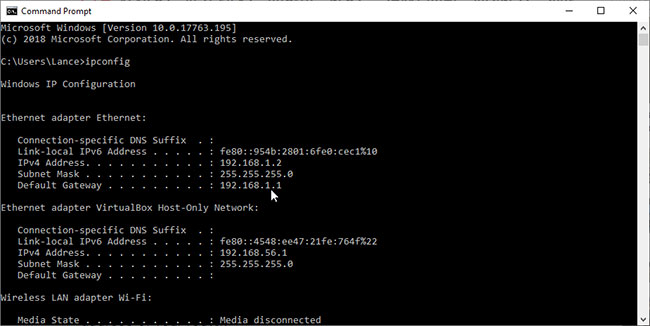
<p style="text-align: justify;">Bạn đăng nhập vào firmware của router thông qua trình duyệt. Tại trường địa chỉ, nhập địa chỉ IP của router. Hầu hết các router sử dụng địa chỉ là&nbsp;<strong>192.168.1.1.</strong>&nbsp;Nhưng không phải lúc nào cũng vậy, vì vậy trước tiên bạn muốn xác nhận địa chỉ router của mình.&nbsp;</p>

<figure>
<div style="text-align: justify;"><img alt="Trước tiên cần tìm địa chỉ IP của router" data-i="0" data-src="https://st.quantrimang.com/photos/image/2020/12/08/cau-hinh-router-1.jpg" data-was-processed="true" height="326" src="https://st.quantrimang.com/photos/image/2020/12/08/cau-hinh-router-1.jpg" width="650" /></div>

<figcaption>
<div style="text-align: justify;">Trước tiên cần tìm địa chỉ IP của router</div>
</figcaption>
</figure>

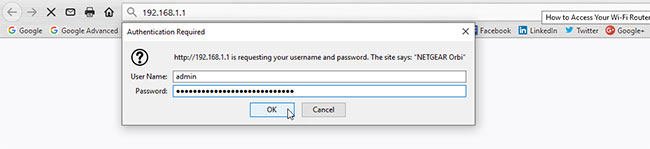
<p style="text-align: justify;">Nhập địa chỉ IP của router vào trường địa chỉ của trình duyệt web và nhấn&nbsp;<strong>Enter.</strong>&nbsp;Bạn được yêu cầu nhập tên người dùng và mật khẩu để truy cập vào firmware của router. Đây là tên người dùng và mật khẩu mặc định cho router hoặc tên người dùng và mật khẩu mà bạn có thể đã tạo khi thiết lập router.</p>

<div style="text-align: justify;">&nbsp;</div>

<figure>
<div style="text-align: justify;"><img alt="Nhập tên người dùng và mật khẩu phù hợp" data-i="1" data-src="https://st.quantrimang.com/photos/image/2020/12/08/cau-hinh-router-2.jpg" data-was-processed="true" height="149" src="https://st.quantrimang.com/photos/image/2020/12/08/cau-hinh-router-2.jpg" width="650" /></div>

<figcaption>
<div style="text-align: justify;">Nhập tên người dùng và mật khẩu phù hợp</div>
</figcaption>
</figure>

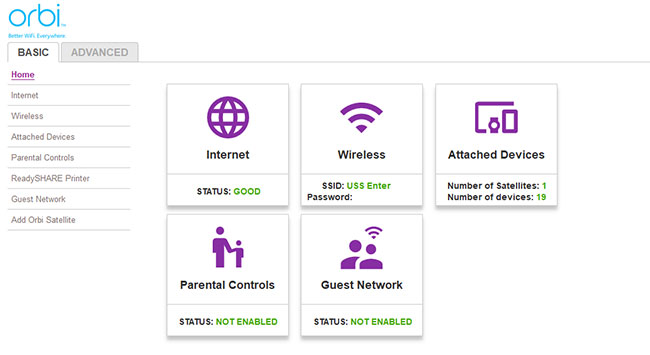
<p style="text-align: justify;">Nếu bạn đã tạo một tên người dùng + mật khẩu mới và nhớ chúng là gì, điều đó thật tuyệt. Chỉ cần nhập chúng vào các trường thích hợp và cài đặt firmware của router sẽ xuất hiện. Bây giờ, bạn có thể thay đổi bất kỳ yếu tố nào mình muốn, thường là qua từng màn hình. Trên mỗi màn hình, bạn có thể cần áp dụng bất kỳ thay đổi nào trước khi chuyển sang màn hình tiếp theo. Khi hoàn tất, bạn có thể được yêu cầu đăng nhập lại vào router. Sau khi thực hiện xong, chỉ cần đóng trình duyệt.</p>

<figure>
<div style="text-align: justify;"><img alt="Cài đặt firmware của router sẽ xuất hiện" data-i="2" data-src="https://st.quantrimang.com/photos/image/2020/12/08/cau-hinh-router-3.jpg" data-was-processed="true" height="355" src="https://st.quantrimang.com/photos/image/2020/12/08/cau-hinh-router-3.jpg" width="650" /></div>

<figcaption>
<div style="text-align: justify;">Cài đặt firmware của router sẽ xuất hiện</div>
</figcaption>
</figure>

<p style="text-align: justify;">Nhưng điều gì sẽ xảy ra nếu bạn không biết tên người dùng và mật khẩu để đăng nhập vào router của mình? Nhiều router sử dụng tên người dùng mặc định&nbsp;<strong>admin</strong>&nbsp;và mật khẩu mặc định&nbsp;<strong>password</strong>. Bạn có thể thử những cái đó để xem chúng có giúp ích gì không.</p>

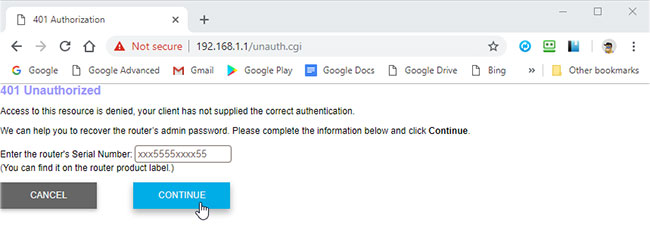
<p style="text-align: justify;">Nếu không, một số router cung cấp tính năng khôi phục mật khẩu. Nếu điều này đúng với router của bạn, tùy chọn này sẽ xuất hiện nếu bạn nhập sai tên người dùng và mật khẩu. Thông thường, cửa sổ này sẽ hỏi số sê-ri của router, bạn có thể tìm thấy số này ở dưới cùng hoặc bên cạnh router.</p>

<figure>
<div style="text-align: justify;"><img alt="Có thể dùng số sê-ri để khôi phục mật khẩu router" data-i="3" data-src="https://st.quantrimang.com/photos/image/2020/12/08/cau-hinh-router-4.jpg" data-was-processed="true" height="230" src="https://st.quantrimang.com/photos/image/2020/12/08/cau-hinh-router-4.jpg" width="650" /></div>

<figcaption>
<div style="text-align: justify;">Có thể dùng số sê-ri để khôi phục mật khẩu router</div>
</figcaption>
</figure>

<p style="text-align: justify;">Nếu vẫn không vào được, bạn sẽ cần tìm tên người dùng và mật khẩu mặc định cho router của mình. Tốt nhất là tìm kiếm trên web với tên thương hiệu router, sau đó là cụm&nbsp;<em>“default username and password”</em>, chẳng hạn như&nbsp;<em>&quot;netgear router default username and password&quot;</em>&nbsp;hoặc<em>&nbsp;&quot;linksys router default username and password&quot;</em>.</p>

<p style="text-align: justify;">Kết quả tìm kiếm sẽ hiển thị tên người dùng và mật khẩu mặc định. Bây giờ hãy thử đăng nhập vào router bằng các thông tin đăng nhập mặc định đó. Hy vọng rằng điều đó sẽ giúp ích cho bạn. Nếu không, điều đó có thể nghĩa là bạn hoặc ai đó đã thay đổi tên người dùng và mật khẩu mặc định tại một số điểm. Trong trường hợp đó, bạn có thể reset lại router của mình để tất cả các cài đặt trở về mặc định. Bạn thường sẽ tìm thấy một nút&nbsp;<strong>Reset</strong>&nbsp;nhỏ trên router. Sử dụng một vật nhọn như bút hoặc kẹp giấy để ấn vào và giữ nút&nbsp;<strong>Reset</strong>&nbsp;trong khoảng 10 giây. Sau đó, nhả nút này ra.</p>

<h2 style="text-align: justify;">Xem và sửa đổi các cài đặt cần thiết</h2>

<p style="text-align: justify;">Bây giờ, bạn có thể đăng nhập vào router của mình bằng tên người dùng và mật khẩu mặc định. Bạn có thể thay đổi tên mạng, mật khẩu mạng và cấp độ bảo mật. Bạn cũng nên xem qua từng màn hình để xem có cài đặt nào khác mà bạn muốn sửa đổi không. Tài liệu và trợ giúp tích hợp sẵn có để hỗ trợ bạn với những màn hình này nếu không chắc chắn về cách đặt chúng. Hầu hết các router hiện tại hoặc được sản xuất gần đây cũng có trình hướng dẫn thiết lập có thể đảm nhận một số công việc cho bạn.</p>

<p style="text-align: justify;">Quy trình đăng nhập vào router sẽ giống nhau cho dù bạn sử dụng router của nhà cung cấp Internet hay mua router riêng, router chuyên dụng hay&nbsp;thiết bị modem/router kết hợp&nbsp;do IPS cung cấp.</p>

<div style="text-align: justify;">&nbsp;</div>

<p style="text-align: justify;">Cuối cùng, bạn có thể và nên thay đổi tên người dùng và mật khẩu mặc định của router. Điều này giúp&nbsp;bảo mật tốt hơn cho router&nbsp;để chỉ bạn mới có thể truy cập vào firmware. Chỉ cần nhớ thông tin đăng nhập mới để bạn không phải vất vả tìm chúng hoặc thậm chí là&nbsp;reset lại router&nbsp;trong tương lai.</p>
		</div>
				<div id="author">
						<p>
				<strong>Nguồn tin:</strong>
				Quantrimang.com
			</p>
		</div>
	</div>
	<div id="footer" class="clearfix">
		<div id="url">
			<strong>URL của bản tin này: </strong><a href="https://www.nguoicodonvn2008.info/vi/news/savefile/kien-thuc-may-tinh/cach-truy-cap-cai-dat-router-wifi-3216.html" title="Cách truy cập cài đặt router WiFi">https://www.nguoicodonvn2008.info/vi/news/savefile/kien-thuc-may-tinh/cach-truy-cap-cai-dat-router-wifi-3216.html</a>

		</div>
		<div class="clear"></div>
		<div class="copyright">
			&copy; .&#x3A; Nguoicodonvn2008.info - Cõi lòng người cô đơn &#x3A;.
		</div>
		<div id="contact">
			<a href="mailto:admin@nguoicodonvn2008.info">admin@nguoicodonvn2008.info</a>
		</div>
	</div>
</div>
        <div id="timeoutsess" class="chromeframe">
            Bạn đã không sử dụng Site, <a onclick="timeoutsesscancel();" href="https://www.nguoicodonvn2008.info/#">Bấm vào đây để duy trì trạng thái đăng nhập</a>. Thời gian chờ: <span id="secField"> 60 </span> giây
        </div>
        <div id="openidResult" class="nv-alert" style="display:none"></div>
        <div id="openidBt" data-result="" data-redirect=""></div>
		</script>
		<div class="car-top">
  <span><img src="https://www.nguoicodonvn2008.info/themes/default/images/car.png" alt=""></span>
</div>
<script src="https://www.nguoicodonvn2008.info/assets/js/jquery/jquery.min.js"></script>
<script>var nv_base_siteurl="/",nv_lang_data="vi",nv_lang_interface="vi",nv_name_variable="nv",nv_fc_variable="op",nv_lang_variable="language",nv_module_name="news",nv_func_name="savefile",nv_is_user=0, nv_my_ofs=-4,nv_my_abbr="EDT",nv_cookie_prefix="nv4c_e856T",nv_check_pass_mstime=1738000,nv_area_admin=0,nv_safemode=0,theme_responsive=0,nv_recaptcha_ver=2,nv_recaptcha_sitekey="",nv_recaptcha_type="image",XSSsanitize=1;</script>
<script src="https://www.nguoicodonvn2008.info/assets/js/language/vi.js"></script>
<script src="https://www.nguoicodonvn2008.info/assets/js/DOMPurify/purify3.js"></script>
<script src="https://www.nguoicodonvn2008.info/assets/js/global.js"></script>
<script src="https://www.nguoicodonvn2008.info/assets/js/site.js"></script>
<script src="https://www.nguoicodonvn2008.info/themes/default/js/news.js"></script>
<script src="https://www.nguoicodonvn2008.info/themes/default/js/main.js"></script>
<script src="https://www.nguoicodonvn2008.info/themes/default/js/custom.js"></script>
<script type="application/ld+json">
        {
            "@context": "https://schema.org",
            "@type": "Organization",
            "url": "https://www.nguoicodonvn2008.info",
            "logo": "https://www.nguoicodonvn2008.info/uploads/angel.gif"
        }
        </script>
<script src="https://www.nguoicodonvn2008.info/themes/default/js/bootstrap.min.js"></script>
<script type="text/javascript">
var $scrolltop = $('.car-top');
$scrolltop.on('click', function () {
    $('html,body').animate({
        scrollTop: 0
    }, 800);
    $(this).addClass("car-run");
    setTimeout(function(){ $scrolltop.removeClass('car-run');}, 1000);
    return false;
});
$(window).on('scroll', function ()
{ 
    if($(window).scrollTop() >= 200)
    {
        $scrolltop.addClass("show");
        $scrolltop.addClass("car-down");
    }
    else
    {
       $scrolltop.removeClass("show");
       setTimeout(function(){ $scrolltop.removeClass('car-down');}, 300);
    }
});
</script>
</body>
</html>