<!DOCTYPE html>
    <html lang="vi" xmlns="http://www.w3.org/1999/xhtml" prefix="og: http://ogp.me/ns#">
    <head>
<title>Cách tìm các file lớn trên Linux</title>
<meta name="description" content="Cách tìm các file lớn trên Linux - Savefile - Tin Tức - https&#x3A;&#x002F;&#x002F;www.nguoicodonvn2008.info&#x002F;vi&#x002F;news&#x002F;savefile&#x002F;kien-thuc-may-tinh&#x002F;cach-tim-cac-file-lon-tren-linux-8995.html">
<meta name="author" content=".: Nguoicodonvn2008.info - Cõi lòng người cô đơn :.">
<meta name="copyright" content=".: Nguoicodonvn2008.info - Cõi lòng người cô đơn :. [admin@nguoicodonvn2008.info]">
<meta name="robots" content="index, archive, follow, noodp">
<meta name="googlebot" content="index,archive,follow,noodp">
<meta name="msnbot" content="all,index,follow">
<meta name="generator" content="NukeViet v4.5">
<meta http-equiv="Content-Type" content="text/html; charset=utf-8">
<meta property="og:title" content="Cách tìm các file lớn trên Linux">
<meta property="og:type" content="website">
<meta property="og:description" content="Savefile - Tin Tức - https&#x3A;&#x002F;&#x002F;www.nguoicodonvn2008.info&#x002F;vi&#x002F;news&#x002F;savefile&#x002F;kien-thuc-may-tinh&#x002F;cach-tim-cac-file-lon-tren-linux-8995.html">
<meta property="og:site_name" content=".&#x3A; Nguoicodonvn2008.info - Cõi lòng người cô đơn &#x3A;.">
<meta property="og:url" content="https://www.nguoicodonvn2008.info/vi/news/savefile/kien-thuc-may-tinh/cach-tim-cac-file-lon-tren-linux-8995.html">
<link rel="shortcut icon" href="https://www.nguoicodonvn2008.info/favicon.ico">
<link rel="canonical" href="https://www.nguoicodonvn2008.info/vi/news/savefile/kien-thuc-may-tinh/cach-tim-cac-file-lon-tren-linux-8995.html">
<link rel="alternate" href="https://www.nguoicodonvn2008.info/vi/news/rss/" title="Tin Tức" type="application/rss+xml">
<link rel="alternate" href="https://www.nguoicodonvn2008.info/vi/news/rss/karaoke-dual/" title="Tin Tức - Karaoke Dual" type="application/rss+xml">
<link rel="alternate" href="https://www.nguoicodonvn2008.info/vi/news/rss/nhac-tre/" title="Tin Tức - Nhạc trẻ" type="application/rss+xml">
<link rel="alternate" href="https://www.nguoicodonvn2008.info/vi/news/rss/tru-tinh/" title="Tin Tức - Trữ tình" type="application/rss+xml">
<link rel="alternate" href="https://www.nguoicodonvn2008.info/vi/news/rss/nuoc-ngoai/" title="Tin Tức - Nước ngoài" type="application/rss+xml">
<link rel="alternate" href="https://www.nguoicodonvn2008.info/vi/news/rss/remix/" title="Tin Tức - Remix" type="application/rss+xml">
<link rel="alternate" href="https://www.nguoicodonvn2008.info/vi/news/rss/tam-su-tinh-yeu/" title="Tin Tức - Tâm sự tình yêu" type="application/rss+xml">
<link rel="alternate" href="https://www.nguoicodonvn2008.info/vi/news/rss/tho-suu-tam/" title="Tin Tức - Thơ sưu tầm" type="application/rss+xml">
<link rel="alternate" href="https://www.nguoicodonvn2008.info/vi/news/rss/cuoc-song/" title="Tin Tức - Cuộc sống" type="application/rss+xml">
<link rel="alternate" href="https://www.nguoicodonvn2008.info/vi/news/rss/phan-mem/" title="Tin Tức - Phần mềm" type="application/rss+xml">
<link rel="alternate" href="https://www.nguoicodonvn2008.info/vi/news/rss/kien-thuc-may-tinh/" title="Tin Tức - Kiến thức máy tính" type="application/rss+xml">
<link rel="alternate" href="https://www.nguoicodonvn2008.info/vi/news/rss/hoc-tap/" title="Tin Tức - Học tập" type="application/rss+xml">
<link rel="alternate" href="https://www.nguoicodonvn2008.info/vi/news/rss/tai-lieu/" title="Tin Tức - Tài liệu" type="application/rss+xml">
<link rel="alternate" href="https://www.nguoicodonvn2008.info/vi/news/rss/de-thi/" title="Tin Tức - Đề thi" type="application/rss+xml">
<link rel="preload" as="style" href="https://www.nguoicodonvn2008.info/assets/css/font-awesome.min.css" type="text/css">
<link rel="preload" as="style" href="https://www.nguoicodonvn2008.info/themes/default/css/bootstrap.non-responsive.css" type="text/css">
<link rel="preload" as="style" href="https://www.nguoicodonvn2008.info/themes/default/css/style.css" type="text/css">
<link rel="preload" as="style" href="https://www.nguoicodonvn2008.info/themes/default/css/style.non-responsive.css" type="text/css">
<link rel="preload" as="style" href="https://www.nguoicodonvn2008.info/themes/default/css/news.css" type="text/css">
<link rel="preload" as="style" href="https://www.nguoicodonvn2008.info/themes/default/css/custom.css" type="text/css">
<link rel="preload" as="script" href="https://www.nguoicodonvn2008.info/assets/js/jquery/jquery.min.js" type="text/javascript">
<link rel="preload" as="script" href="https://www.nguoicodonvn2008.info/assets/js/language/vi.js" type="text/javascript">
<link rel="preload" as="script" href="https://www.nguoicodonvn2008.info/assets/js/DOMPurify/purify3.js" type="text/javascript">
<link rel="preload" as="script" href="https://www.nguoicodonvn2008.info/assets/js/global.js" type="text/javascript">
<link rel="preload" as="script" href="https://www.nguoicodonvn2008.info/assets/js/site.js" type="text/javascript">
<link rel="preload" as="script" href="https://www.nguoicodonvn2008.info/themes/default/js/news.js" type="text/javascript">
<link rel="preload" as="script" href="https://www.nguoicodonvn2008.info/themes/default/js/main.js" type="text/javascript">
<link rel="preload" as="script" href="https://www.nguoicodonvn2008.info/themes/default/js/custom.js" type="text/javascript">
<link rel="preload" as="script" href="https://www.nguoicodonvn2008.info/themes/default/js/bootstrap.min.js" type="text/javascript">
<link rel="stylesheet" href="https://www.nguoicodonvn2008.info/assets/css/font-awesome.min.css">
<link rel="stylesheet" href="https://www.nguoicodonvn2008.info/themes/default/css/bootstrap.non-responsive.css">
<link rel="stylesheet" href="https://www.nguoicodonvn2008.info/themes/default/css/style.css">
<link rel="stylesheet" href="https://www.nguoicodonvn2008.info/themes/default/css/style.non-responsive.css">
<link rel="StyleSheet" href="https://www.nguoicodonvn2008.info/themes/default/css/news.css">
<link rel="stylesheet" href="https://www.nguoicodonvn2008.info/themes/default/css/custom.css">
<style type="text/css">
	body{background: #fff;}
</style>
    </head>
    <body>
<div id="print">
	<div id="hd_print">
		<h2 class="pull-left">.&#x3A; Nguoicodonvn2008.info - Cõi lòng người cô đơn &#x3A;.</h2>
		<p class="pull-right"><a title=".&#x3A; Nguoicodonvn2008.info - Cõi lòng người cô đơn &#x3A;." href="https://www.nguoicodonvn2008.info/">https://www.nguoicodonvn2008.info</a></p>
	</div>
	<div class="clear"></div>
	<hr />
	<div id="content">
		<h1>Cách tìm các file lớn trên Linux</h1>
		<ul class="list-inline">
			<li>Thứ sáu - 13/09/2024 22:47</li>
			<li class="hidden-print txtrequired"><em class="fa fa-print">&nbsp;</em><a title="In ra" href="javascript:;" onclick="window.print()">In ra</a></li>
			<li class="hidden-print txtrequired"><em class="fa fa-power-off">&nbsp;</em><a title="Đóng cửa sổ này" href="javascript:;" onclick="window.close()">Đóng cửa sổ này</a></li>
		</ul>
		<div class="clear"></div>
		<div id="hometext">
		</div>
				<div class="imghome">
			<img alt="Cách tìm các file lớn trên Linux" src="https://st.quantrimang.com/photos/image/2024/07/27/tim-file-lon-tren-linux-15.jpg" width="460" class="img-thumbnail" />
		</div>
		<div class="clear"></div>
		<div id="bodytext" class="clearfix">
			<p style="text-align: justify;">Bạn có thể làm gì nếu bộ nhớ trên máy&nbsp;Linuxx gần đầy? Bạn có thể giải phóng dung lượng bằng cách xóa hoặc di chuyển một số file và có lẽ nên bắt đầu với những file lớn nhất. Khám phá cách tìm file lớn và file trùng lặp để có thêm dung lượng sử dụng được và cải thiện hiệu suất hệ thống.</p>

<h2 style="text-align: justify;">&nbsp;</h2>

<h2 id="mcetoc_1i7lfpj4u6h" style="text-align: justify;">Tìm file lớn bằng công cụ GUI</h2>

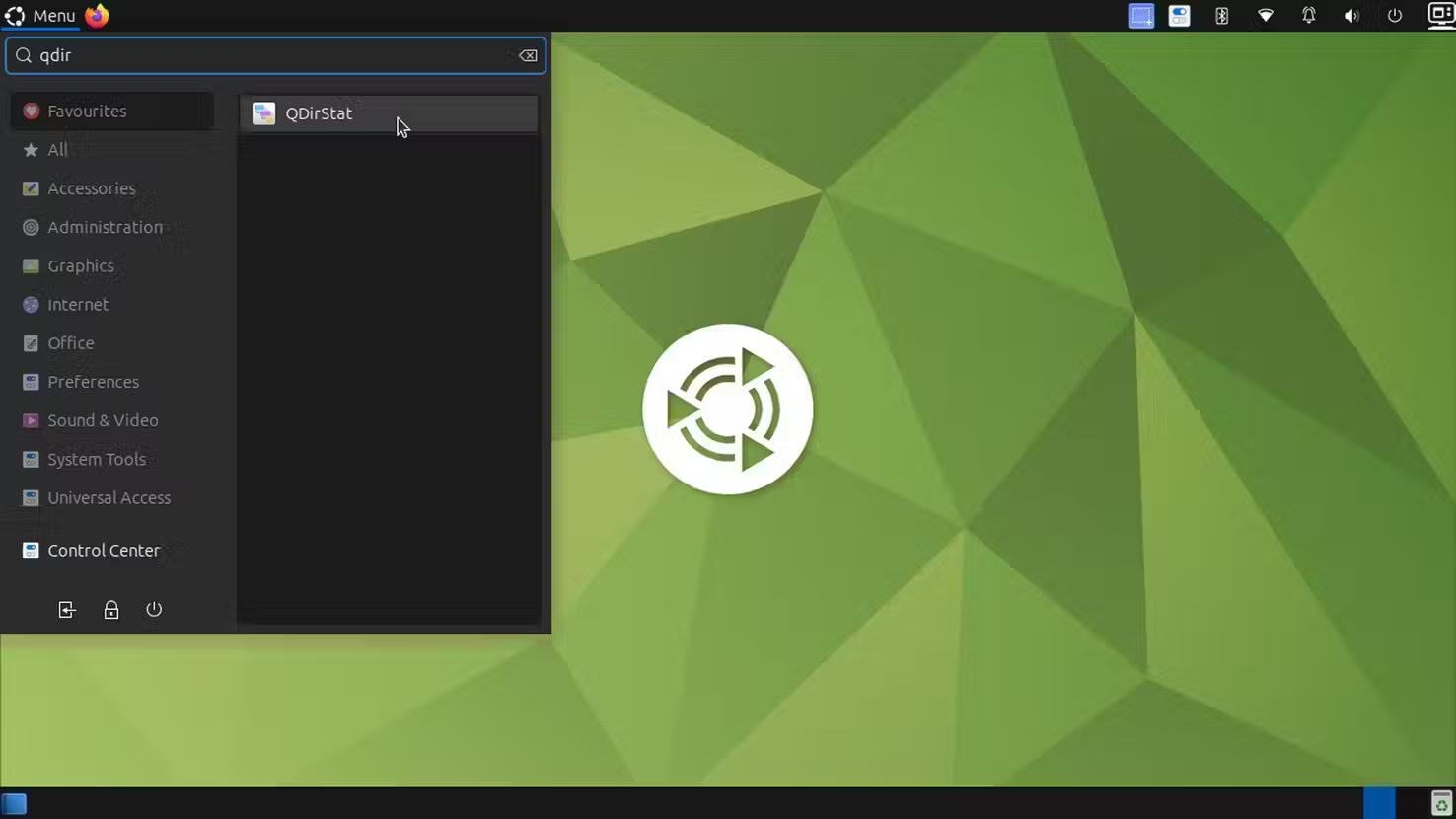
<p style="text-align: justify;">Cách dễ dàng trước tiên. QDirStat là ứng dụng GUI cho desktop Linux mà bạn có thể cài đặt bằng lệnh terminal này:</p>

<pre id="pre0">
<code>sudo apt install qdirstat</code></pre>

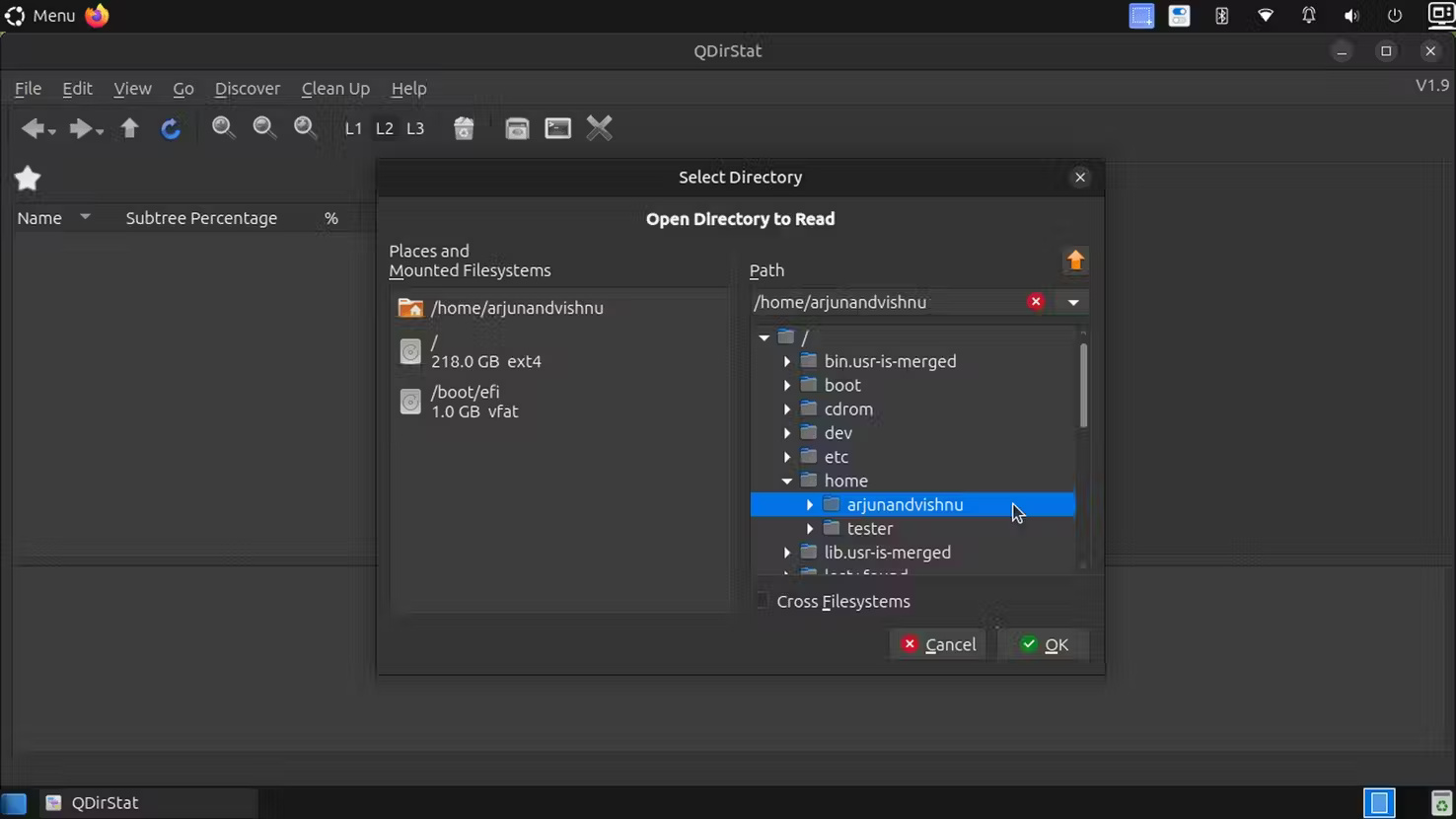
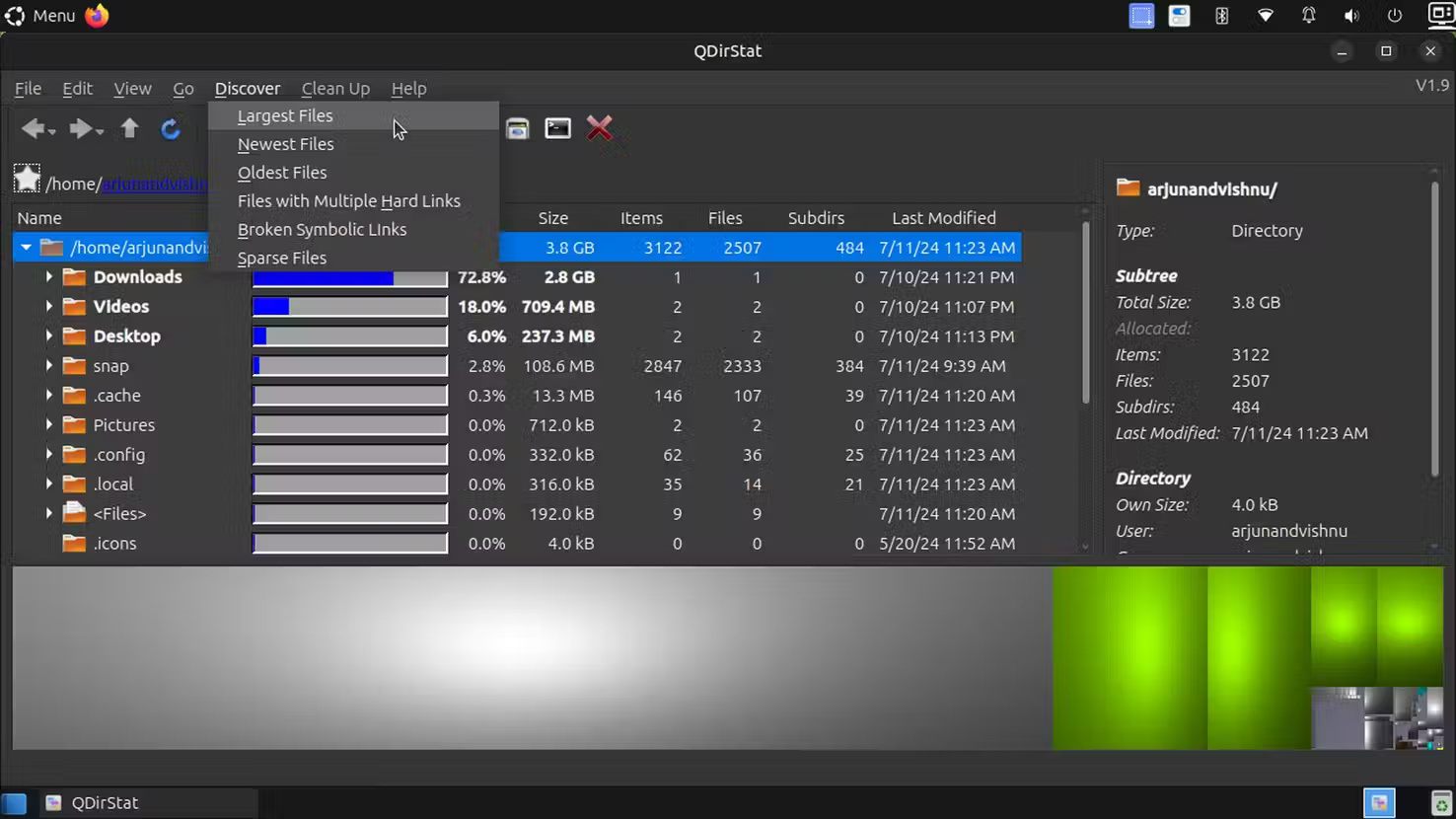
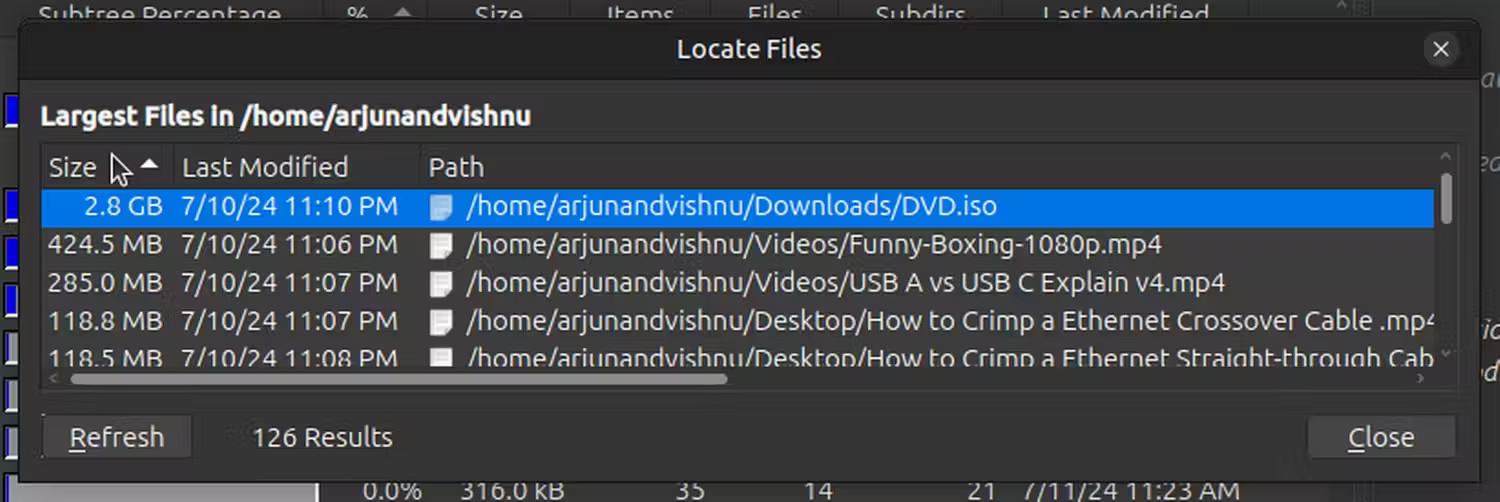
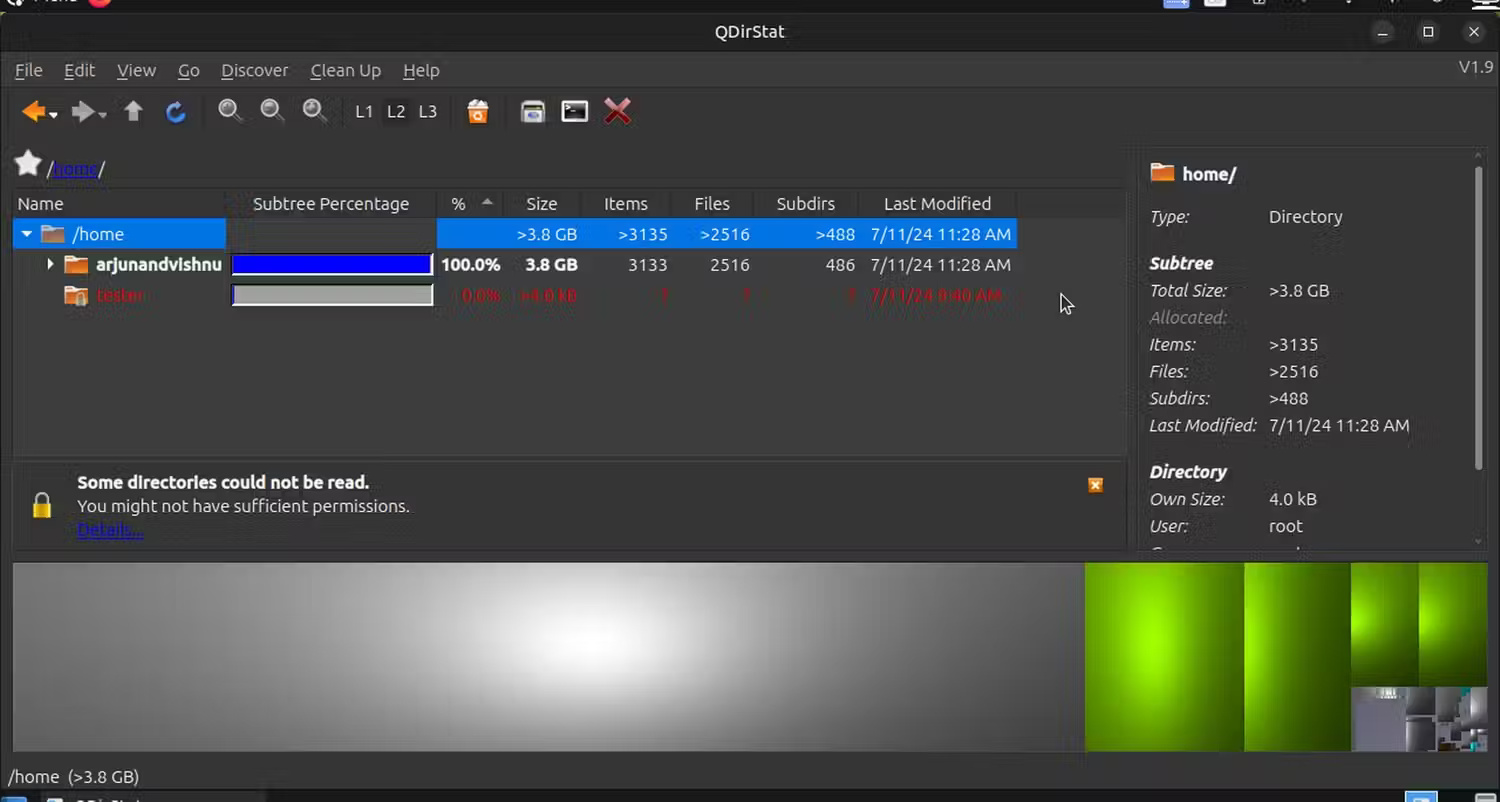
<p style="text-align: justify;">Khi chạy QDirStat, nó sẽ yêu cầu bạn chọn thư mục để quét trước khi liệt kê kích thước của thư mục và các file trong đó. Sau đó, bạn có thể sử dụng mục menu&nbsp;<strong>Discover &gt; Largest Files</strong>&nbsp;để tìm các file lớn nhất. Trong cửa sổ&nbsp;<strong>Locate Files</strong>, hãy sắp xếp chúng theo&nbsp;<strong>Size</strong>&nbsp;và bạn sẽ thấy các file lớn nhất theo thứ tự giảm dần.</p>

<figure>
<div style="text-align: justify;"><img alt="" data-i="0" data-src="https://st.quantrimang.com/photos/image/2024/07/27/tim-file-lon-tren-linux-1.jpg" data-was-processed="true" height="830" src="https://st.quantrimang.com/photos/image/2024/07/27/tim-file-lon-tren-linux-1.jpg" width="1476" /></div>
</figure>

<figure>
<div style="text-align: justify;"><img alt="" data-i="1" data-src="https://st.quantrimang.com/photos/image/2024/07/27/tim-file-lon-tren-linux-2.jpg" data-was-processed="true" height="830" src="https://st.quantrimang.com/photos/image/2024/07/27/tim-file-lon-tren-linux-2.jpg" width="1476" /></div>
</figure>

<figure>
<div style="text-align: justify;"><img alt="" data-i="2" data-src="https://st.quantrimang.com/photos/image/2024/07/27/tim-file-lon-tren-linux-3.jpg" data-was-processed="true" height="830" src="https://st.quantrimang.com/photos/image/2024/07/27/tim-file-lon-tren-linux-3.jpg" width="1476" /></div>
</figure>

<figure>
<div style="text-align: justify;"><img alt="" data-i="3" data-src="https://st.quantrimang.com/photos/image/2024/07/27/tim-file-lon-tren-linux-4.jpg" data-was-processed="true" height="502" src="https://st.quantrimang.com/photos/image/2024/07/27/tim-file-lon-tren-linux-4.jpg" width="1500" /></div>
</figure>

<div style="text-align: justify;">&nbsp;</div>

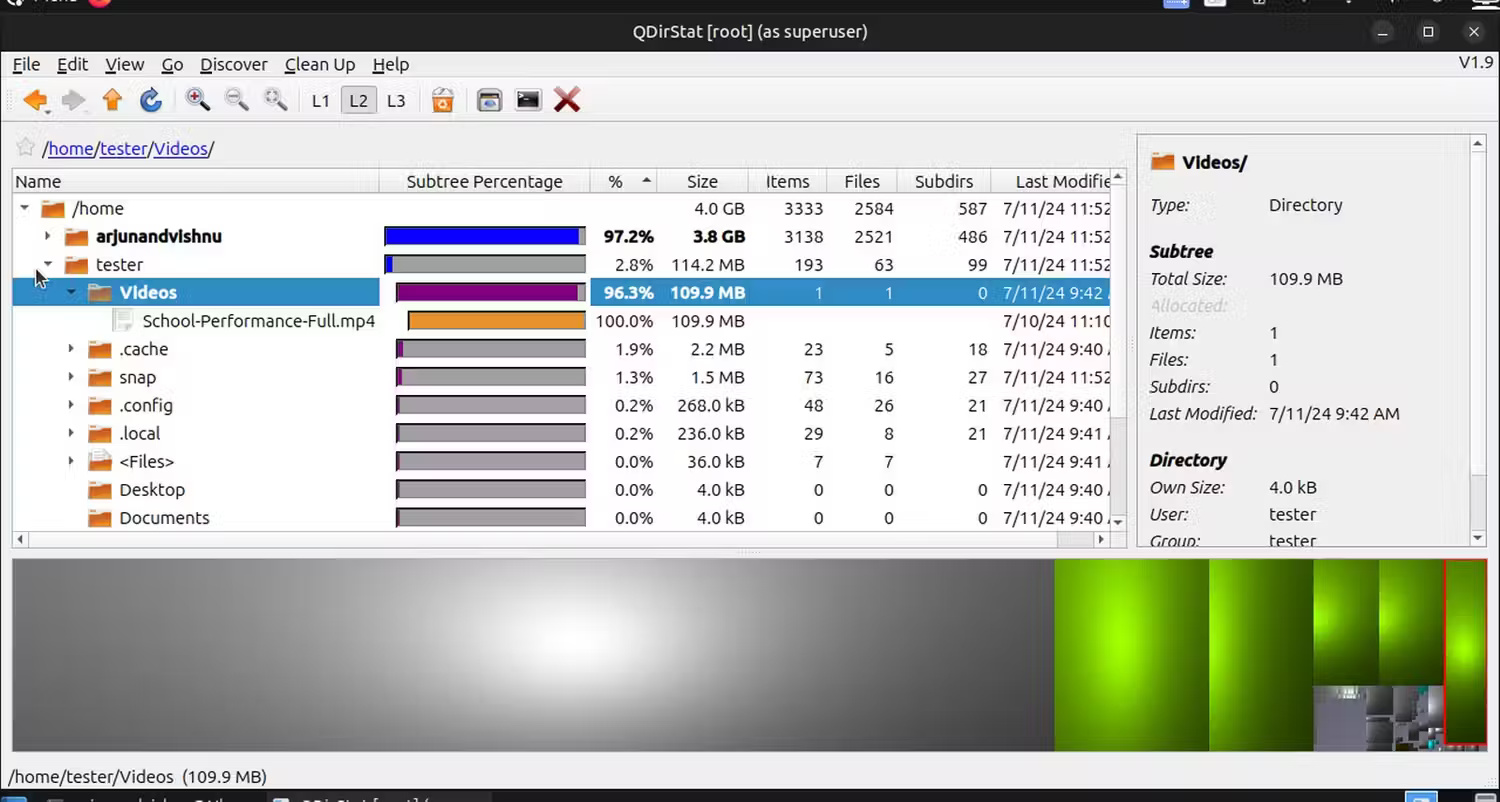
<p style="text-align: justify;">Bạn có thể nhận thấy rằng QDirStat hiển thị một số thư mục có màu đỏ. Điều này có nghĩa là bạn không có quyền đọc để truy cập vào các thư mục đó.</p>

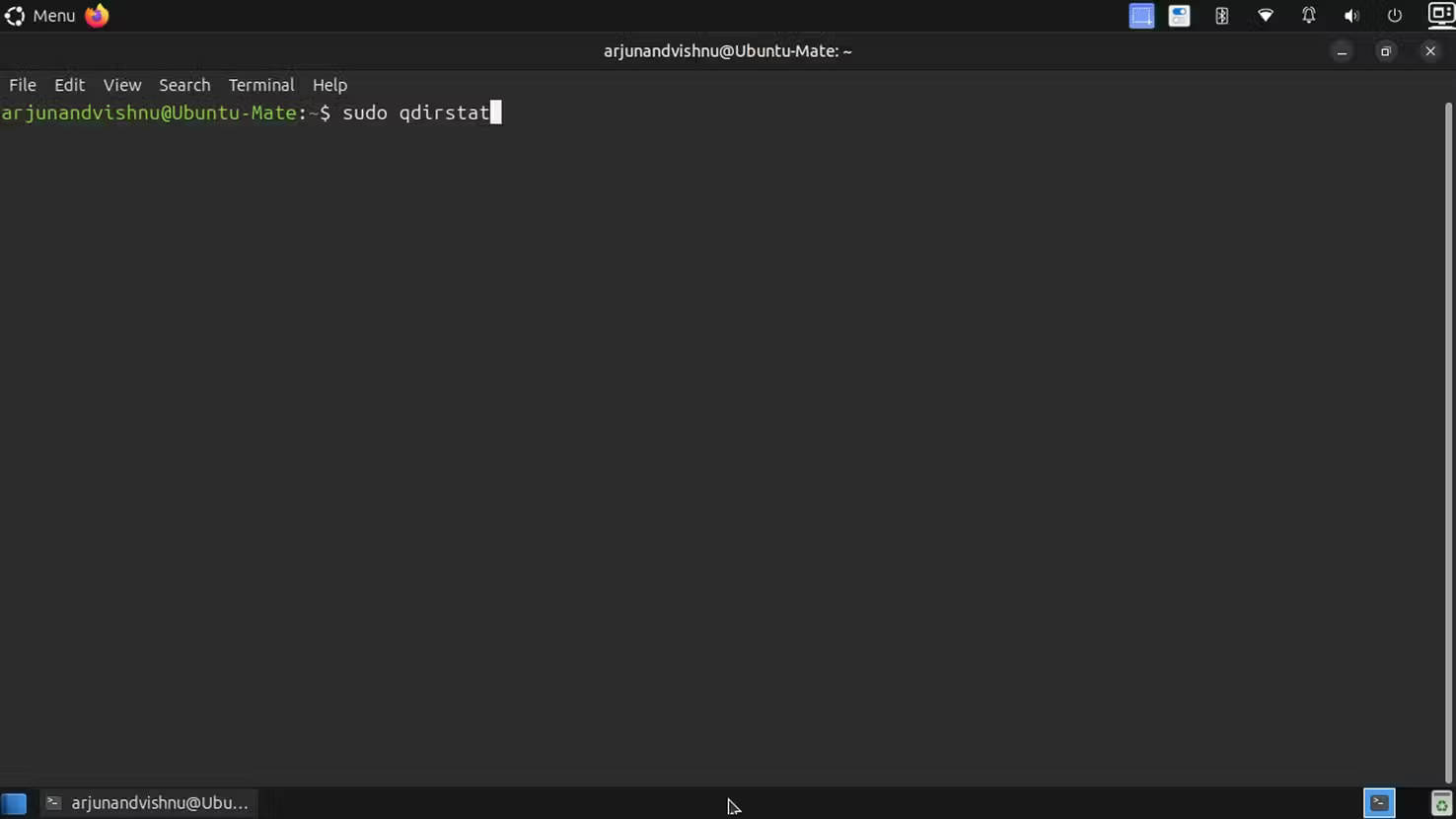
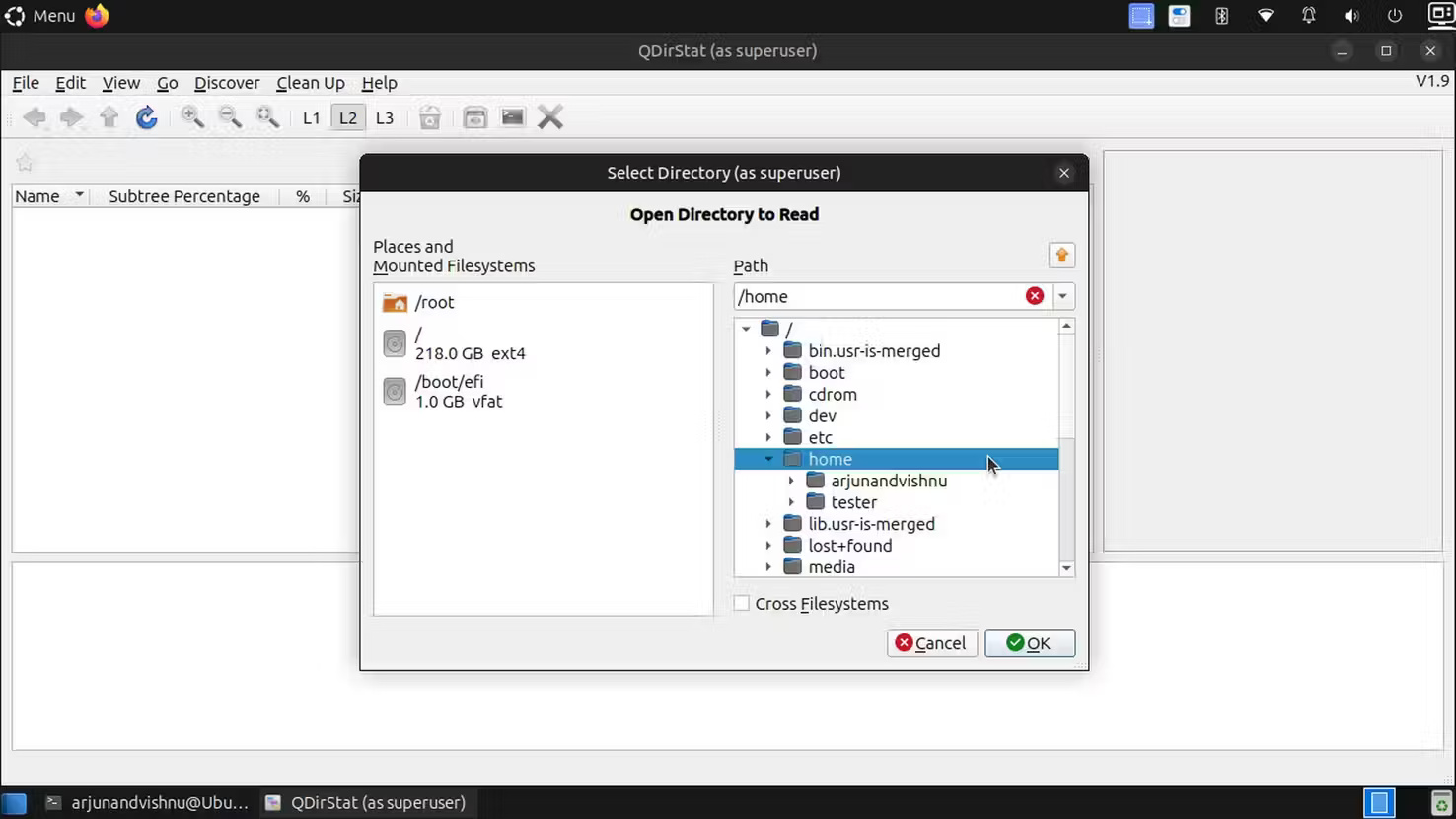
<p style="text-align: justify;">Để giải quyết vấn đề, hãy chạy chương trình với quyền superuser như sau:</p>

<pre id="pre1">
<code>sudo qdirstat</code></pre>

<figure>
<div style="text-align: justify;"><img alt="" data-i="4" data-src="https://st.quantrimang.com/photos/image/2024/07/27/tim-file-lon-tren-linux-5.jpg" data-was-processed="true" height="802" src="https://st.quantrimang.com/photos/image/2024/07/27/tim-file-lon-tren-linux-5.jpg" width="1500" /></div>
</figure>

<figure>
<div style="text-align: justify;"><img alt="" data-i="5" data-src="https://st.quantrimang.com/photos/image/2024/07/27/tim-file-lon-tren-linux-6.jpg" data-was-processed="true" height="830" src="https://st.quantrimang.com/photos/image/2024/07/27/tim-file-lon-tren-linux-6.jpg" width="1476" /></div>
</figure>

<figure>
<div style="text-align: justify;"><img alt="" data-i="6" data-src="https://st.quantrimang.com/photos/image/2024/07/27/tim-file-lon-tren-linux-7.jpg" data-was-processed="true" height="830" src="https://st.quantrimang.com/photos/image/2024/07/27/tim-file-lon-tren-linux-7.jpg" width="1476" /></div>
</figure>

<figure>
<div style="text-align: justify;"><img alt="" data-i="7" data-src="https://st.quantrimang.com/photos/image/2024/07/27/tim-file-lon-tren-linux-8.jpg" data-was-processed="true" height="802" src="https://st.quantrimang.com/photos/image/2024/07/27/tim-file-lon-tren-linux-8.jpg" width="1500" /></div>
</figure>

<h2 id="mcetoc_1i7lfpj4u6i" style="text-align: justify;">Tìm file lớn bằng phần mềm FTP</h2>

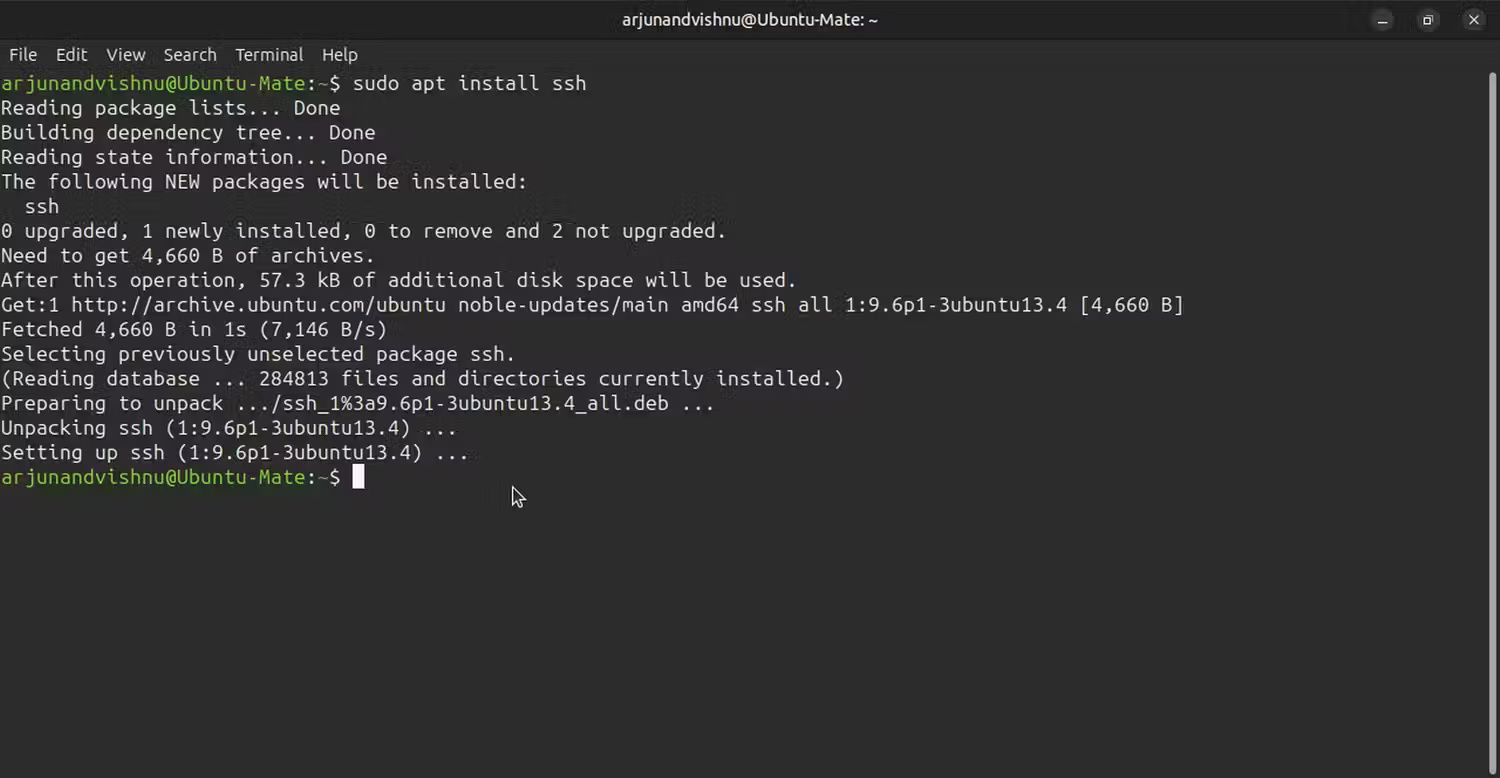
<p style="text-align: justify;">Ứng dụng FileZilla FTP có các tính năng tìm kiếm file tuyệt vời mà bạn có thể sử dụng trên máy cục bộ của mình. Đảm bảo rằng&nbsp;<a data-type="internal" href="https://quantrimang.com/cong-nghe/tim-hieu-ve-ssh-154483" title="SSH là gì?">SSH</a>&nbsp;đã được cài đặt, hoặc cài đặt bằng:</p>

<pre id="pre2">
<code>sudo apt install ssh</code></pre>

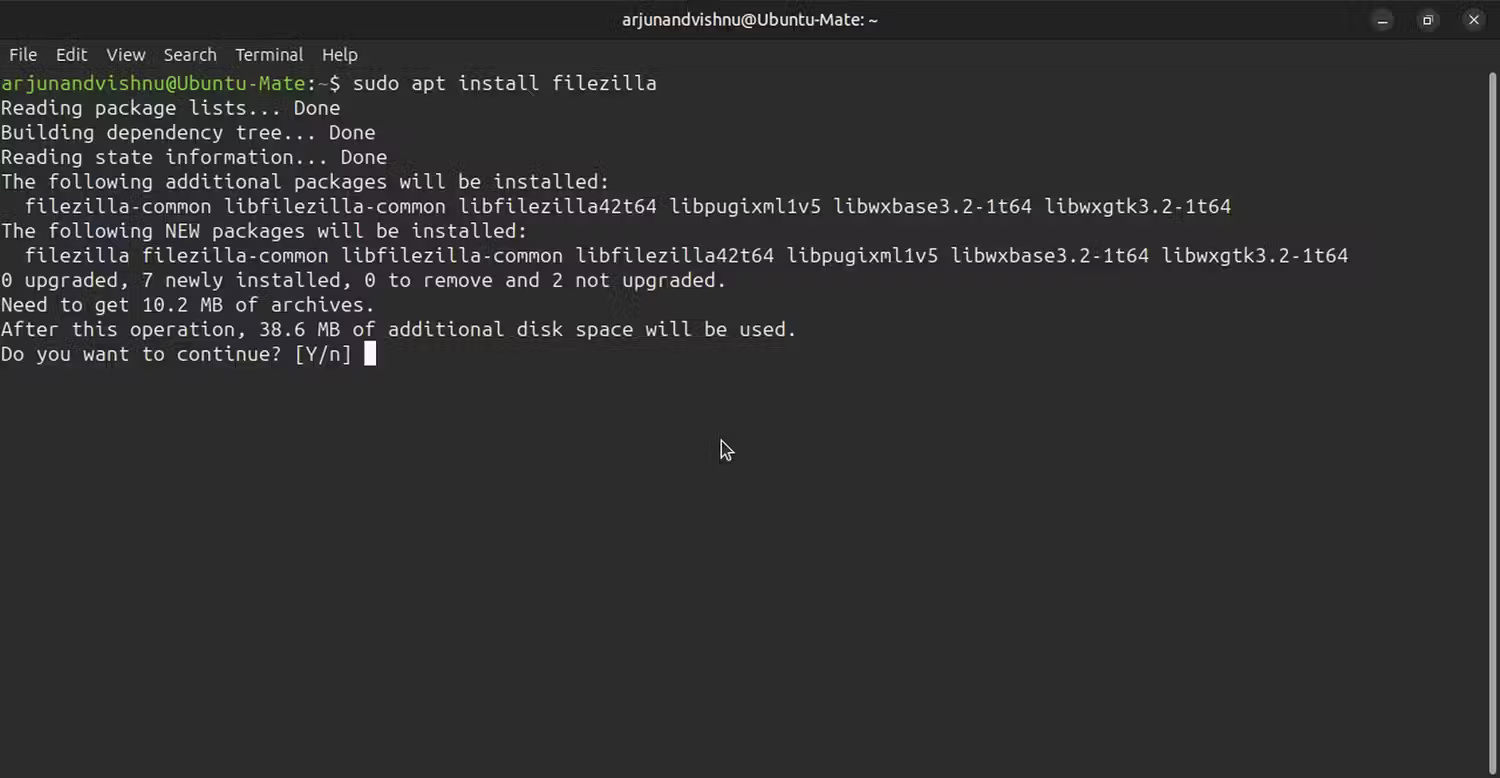
<p style="text-align: justify;">Tiếp theo, cài đặt FileZilla bằng lệnh này:</p>

<pre id="pre3">
<code>sudo apt install filezilla</code></pre>

<figure>
<div style="text-align: justify;"><img alt="" data-i="8" data-src="https://st.quantrimang.com/photos/image/2024/07/27/tim-file-lon-tren-linux-9.jpg" data-was-processed="true" height="778" src="https://st.quantrimang.com/photos/image/2024/07/27/tim-file-lon-tren-linux-9.jpg" width="1500" /></div>
</figure>

<figure>
<div style="text-align: justify;"><img alt="" data-i="9" data-src="https://st.quantrimang.com/photos/image/2024/07/27/tim-file-lon-tren-linux-10.jpg" data-was-processed="true" height="778" src="https://st.quantrimang.com/photos/image/2024/07/27/tim-file-lon-tren-linux-10.jpg" width="1500" /></div>
</figure>

<figure>
<div style="text-align: justify;"><img alt="" data-i="10" data-src="https://st.quantrimang.com/photos/image/2024/07/27/tim-file-lon-tren-linux-11.jpg" data-was-processed="true" height="830" src="https://st.quantrimang.com/photos/image/2024/07/27/tim-file-lon-tren-linux-11.jpg" width="1476" /></div>
</figure>

<div style="text-align: justify;">&nbsp;</div>

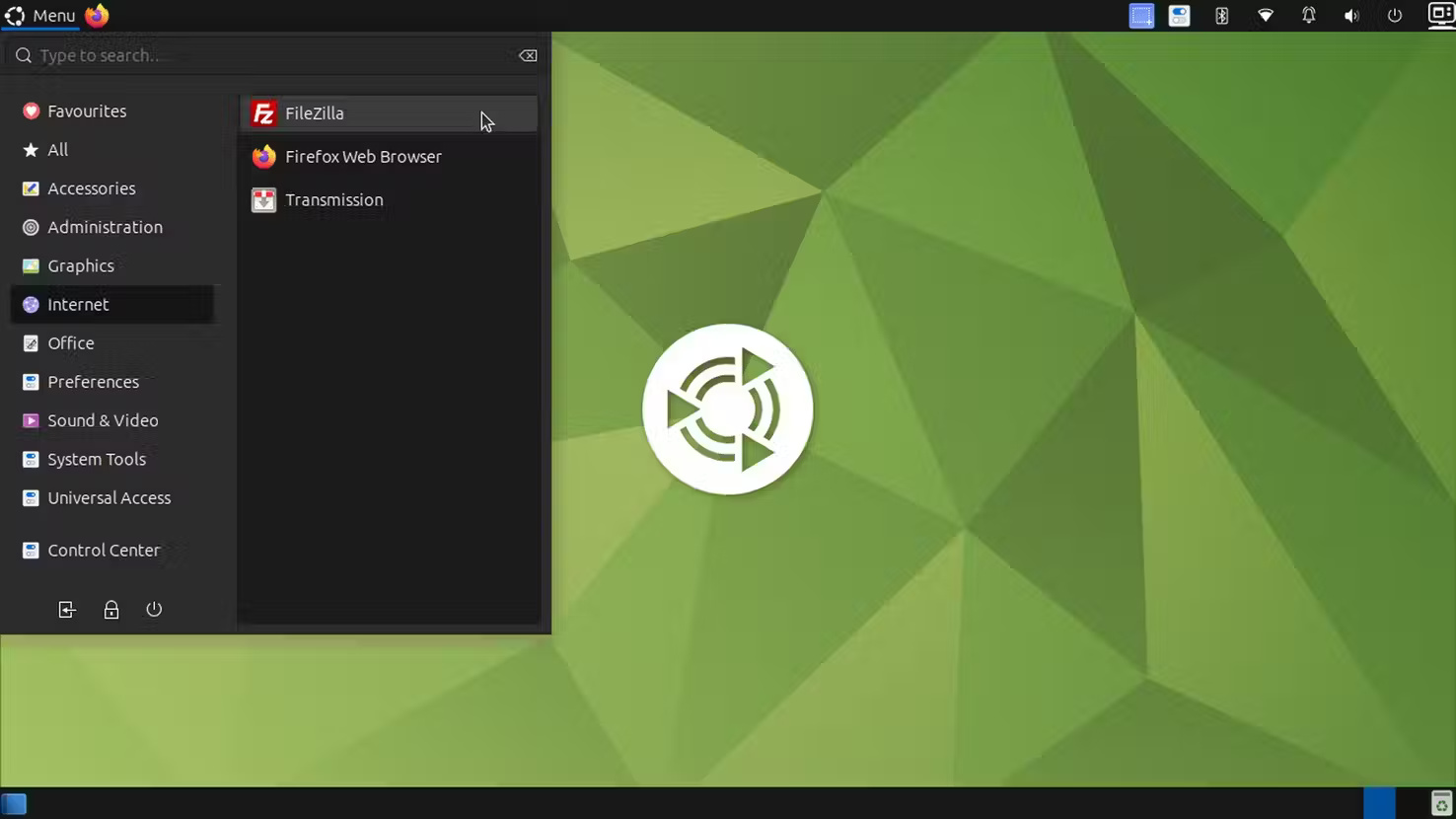
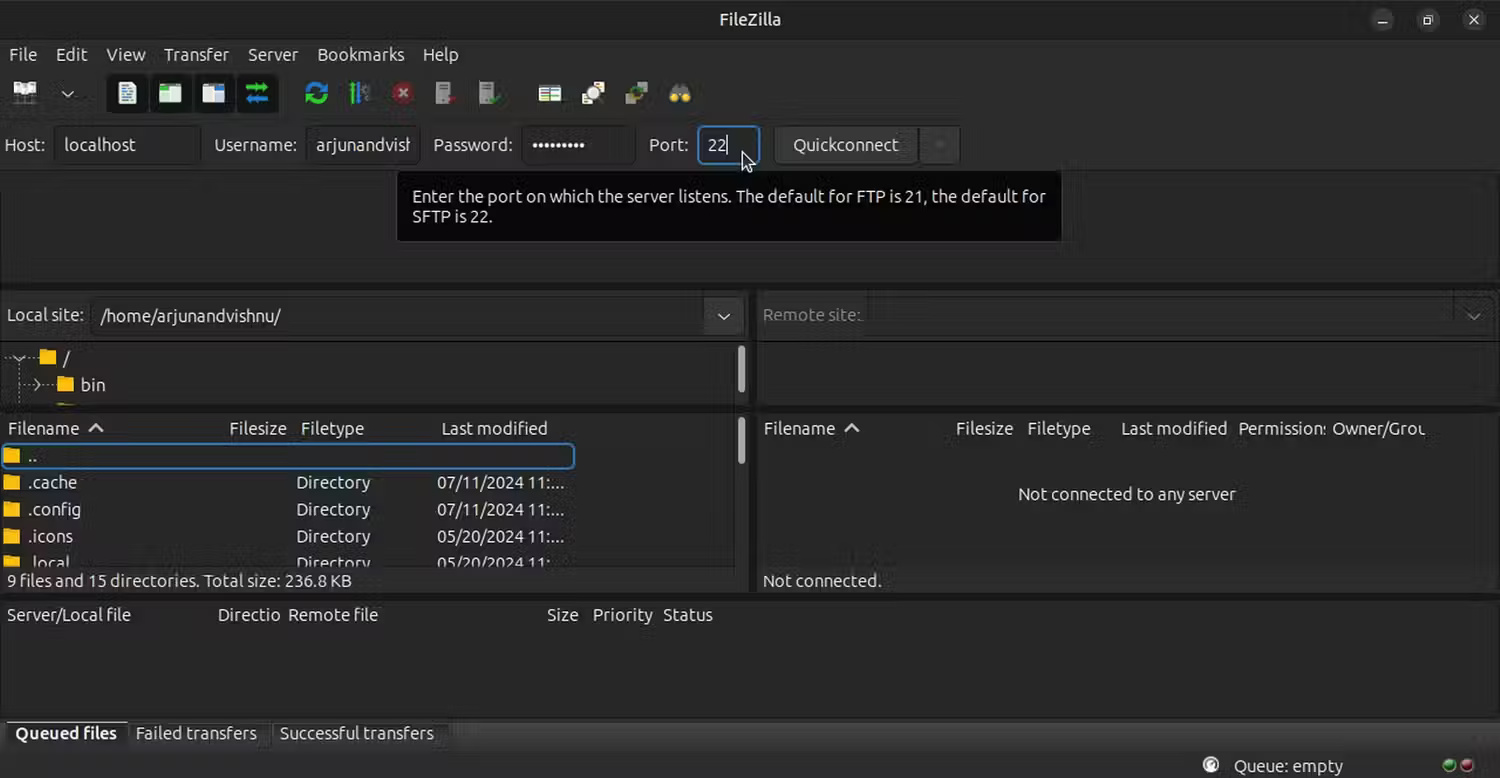
<p style="text-align: justify;">Sau khi cài đặt FileZilla, bạn có thể sử dụng nó để tìm kiếm các file cục bộ của mình:</p>

<p style="text-align: justify;">1. Mở FileZilla và kết nối bằng các thông tin đăng nhập sau:</p>

<table align="" border="1" summary="">
	<tbody>
		<tr>
			<td>
			<p style="text-align: justify;">Host:</p>
			</td>
			<td>
			<p style="text-align: justify;">localhost</p>
			</td>
		</tr>
		<tr>
			<td>
			<p style="text-align: justify;">Username:</p>
			</td>
			<td>
			<p style="text-align: justify;"><em>Username của bạn</em></p>
			</td>
		</tr>
		<tr>
			<td>
			<p style="text-align: justify;">Password:</p>
			</td>
			<td>
			<p style="text-align: justify;"><em>Mật khẩu của bạn</em></p>
			</td>
		</tr>
		<tr>
			<td>
			<p style="text-align: justify;">Port:</p>
			</td>
			<td>
			<p style="text-align: justify;">22</p>
			</td>
		</tr>
	</tbody>
</table>

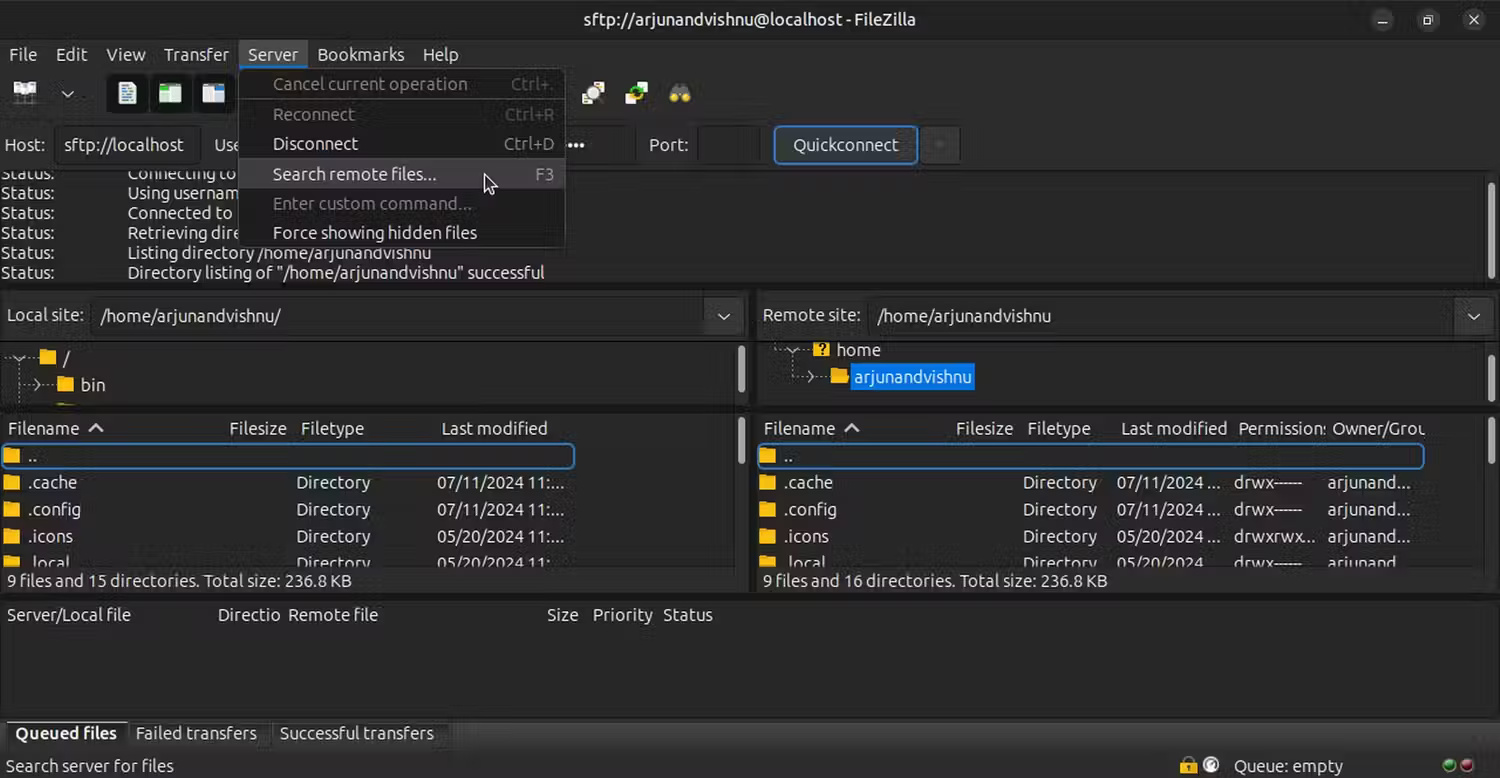
<p style="text-align: justify;">2. Khi bạn đã kết nối, hãy chọn&nbsp;<strong>Server</strong>&nbsp;từ menu, sau đó chọn&nbsp;<strong>Search remote files</strong>.</p>

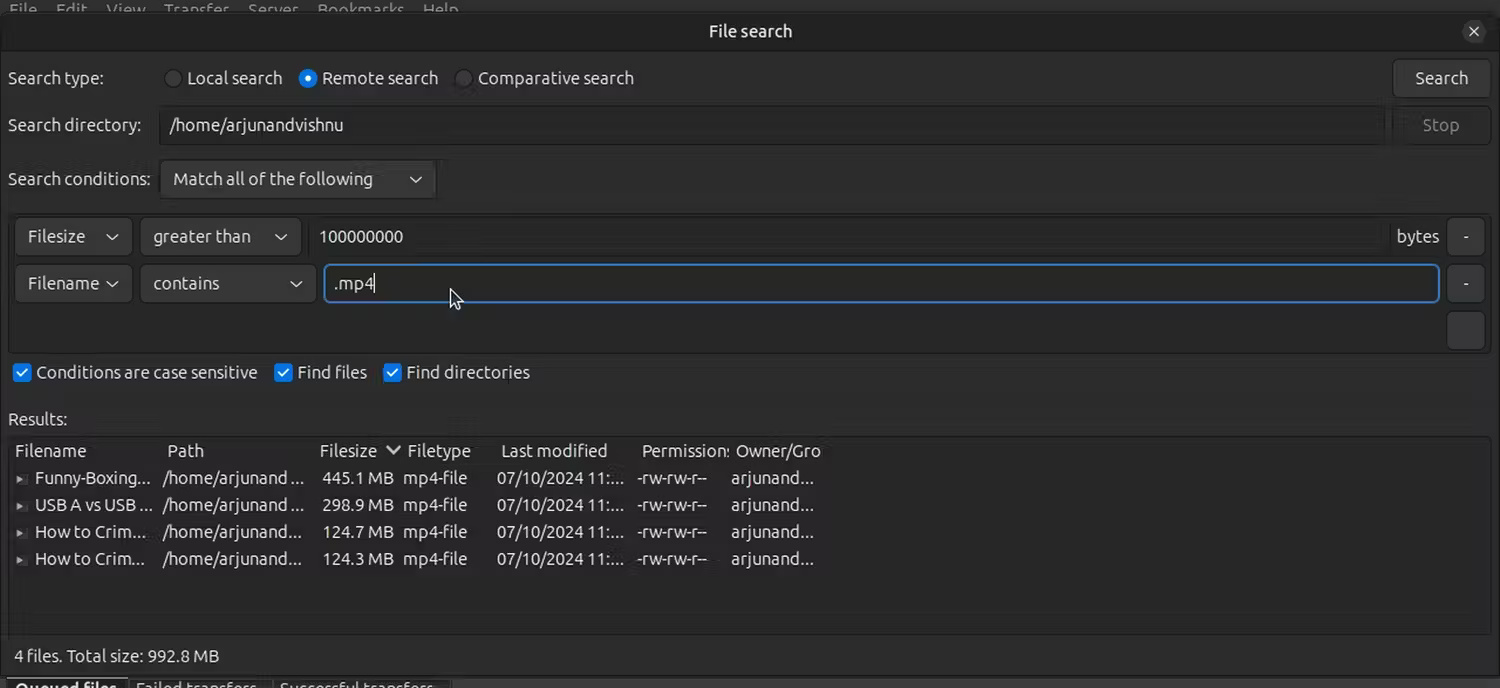
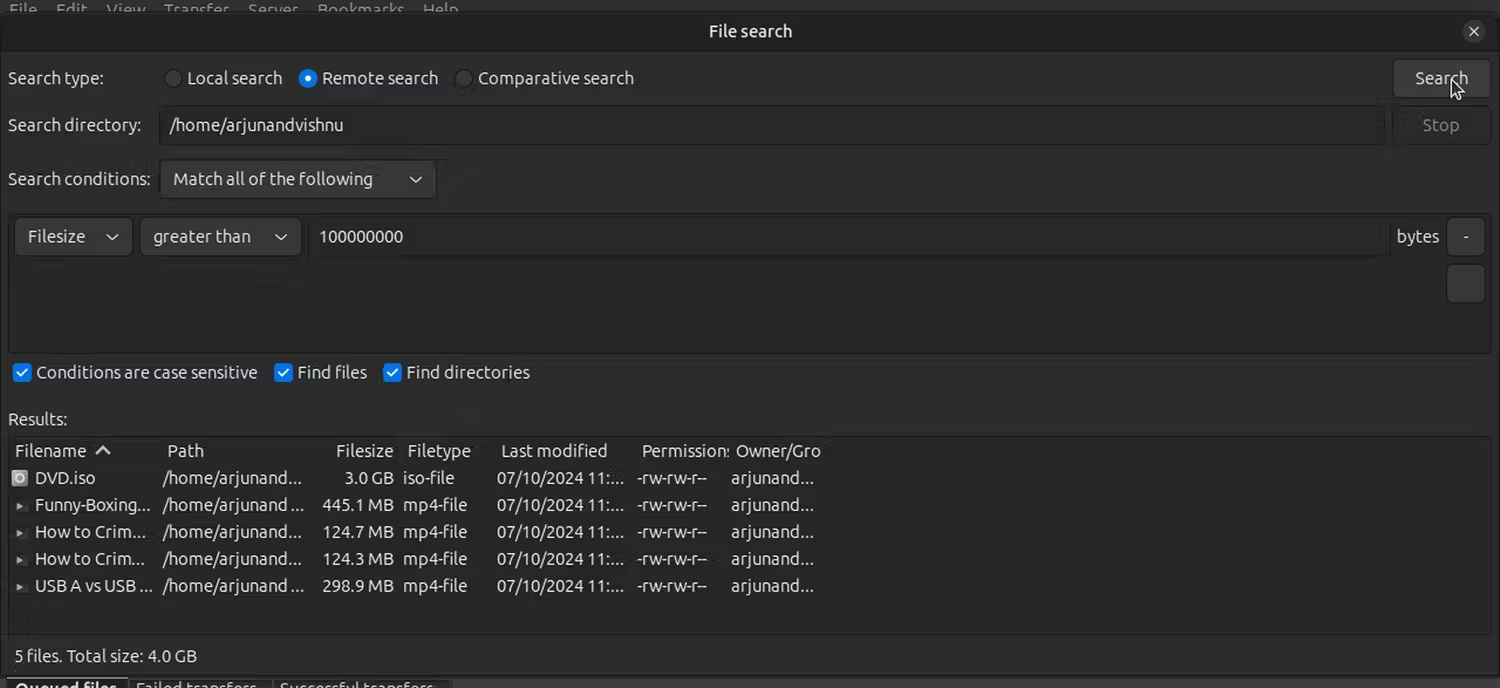
<p style="text-align: justify;">3. Chọn thư mục&nbsp;<strong>Search</strong>&nbsp;và trong&nbsp;<strong>Search conditions</strong>, hãy chọn&nbsp;<strong>File size</strong>&nbsp;từ hộp drop-down và, ví dụ, lớn hơn 100MB.</p>

<p style="text-align: justify;">4. Nhấp vào&nbsp;<strong>Search</strong>&nbsp;sẽ chỉ hiển thị cho bạn các file có kích thước mong muốn.</p>

<p style="text-align: justify;">Bạn có thể lọc tìm kiếm xa hơn bằng cách thêm điều kiện, ví dụ như file video có phần mở rộng&nbsp;MP4.</p>

<figure>
<div style="text-align: justify;"><img alt="" data-i="11" data-src="https://st.quantrimang.com/photos/image/2024/07/27/tim-file-lon-tren-linux-12.jpg" data-was-processed="true" height="778" src="https://st.quantrimang.com/photos/image/2024/07/27/tim-file-lon-tren-linux-12.jpg" width="1500" /></div>
</figure>

<figure>
<div style="text-align: justify;"><img alt="" data-i="12" data-src="https://st.quantrimang.com/photos/image/2024/07/27/tim-file-lon-tren-linux-13.jpg" data-was-processed="true" height="778" src="https://st.quantrimang.com/photos/image/2024/07/27/tim-file-lon-tren-linux-13.jpg" width="1500" /></div>
</figure>

<figure>
<div style="text-align: justify;"><img alt="" data-i="13" data-src="https://st.quantrimang.com/photos/image/2024/07/27/tim-file-lon-tren-linux-14.jpg" data-was-processed="true" height="688" src="https://st.quantrimang.com/photos/image/2024/07/27/tim-file-lon-tren-linux-14.jpg" width="1500" /></div>
</figure>

<figure>
<div style="text-align: justify;"><img alt="" data-i="14" data-src="https://st.quantrimang.com/photos/image/2024/07/27/tim-file-lon-tren-linux-15.jpg" data-was-processed="true" height="688" src="https://st.quantrimang.com/photos/image/2024/07/27/tim-file-lon-tren-linux-15.jpg" width="1500" /></div>
</figure>

<p style="text-align: justify;"><strong>Mẹo</strong>: Quá trình này cũng hữu ích khi bạn muốn tìm kiếm các file lớn trên máy chủ Linux từ xa, đặc biệt là nếu không có quyền truy cập vào terminal. Bạn sẽ cần thay thế thông tin xác thực bằng thông tin chi tiết FTP.</p>

<h2 id="mcetoc_1i7lfpj4u6j" style="text-align: justify;">Tìm file lớn bằng dòng lệnh</h2>

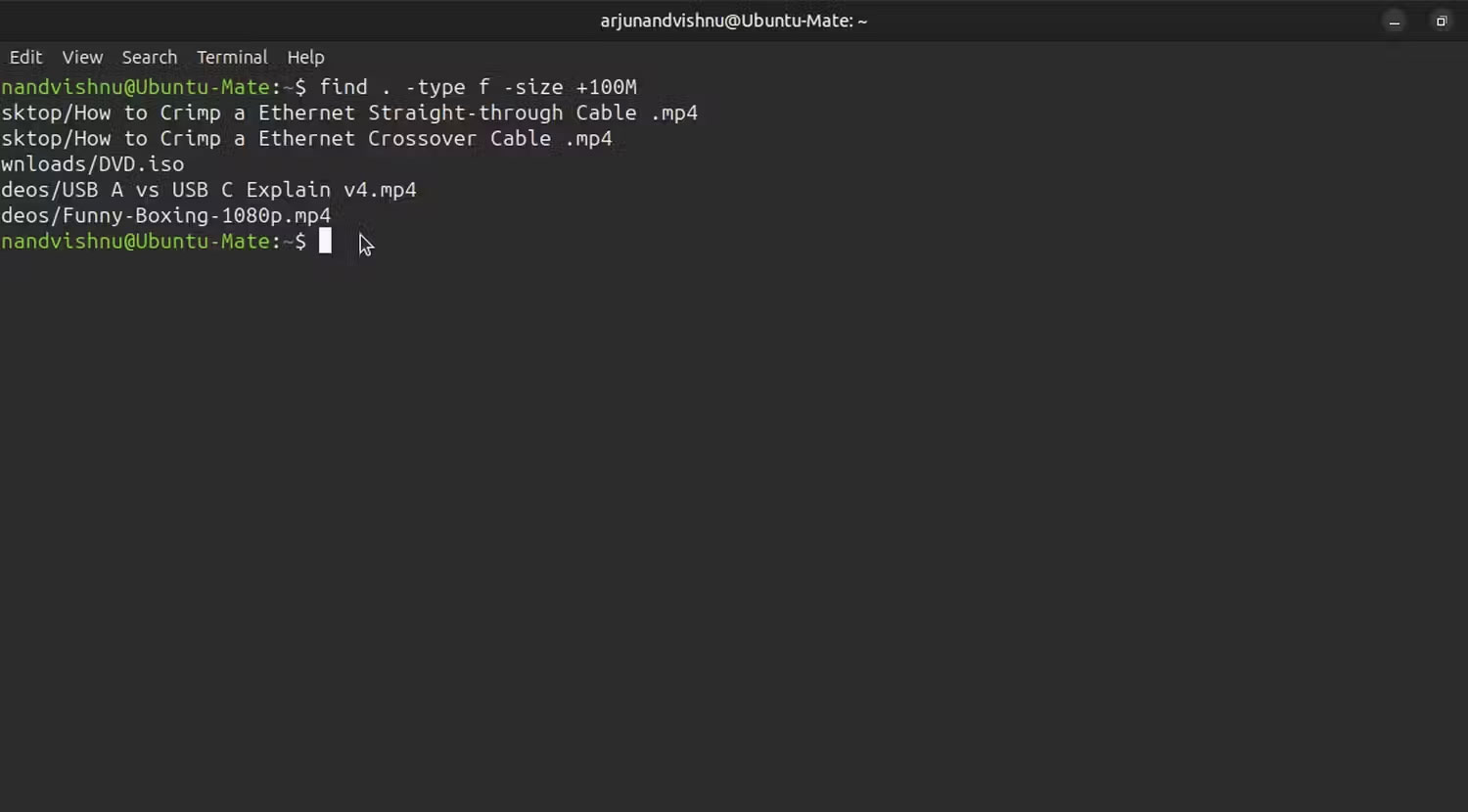
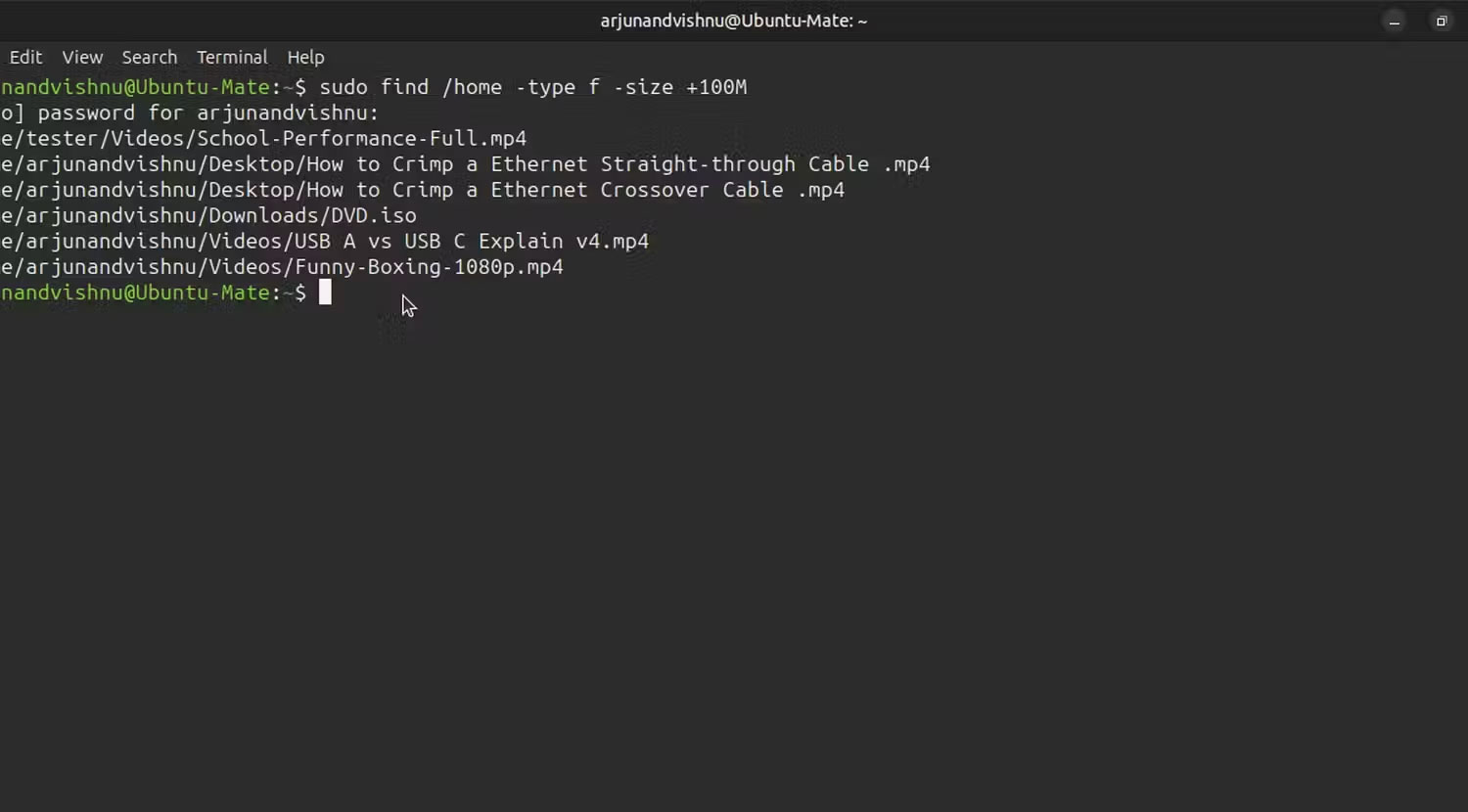
<p style="text-align: justify;">Cách nhanh nhất để tìm file lớn là&nbsp;sử dụng lệnh find. Sau đây là ví dụ cho thấy cách liệt kê tất cả các file trên 100MB:</p>

<pre id="pre4">
<code>find . -type f -size +100M</code></pre>

<p style="text-align: justify;">Dấu chấm sẽ bắt đầu tìm kiếm của bạn từ thư mục hiện tại. Nếu bạn muốn tìm kiếm từ một thư mục khác, hãy thay thế . bằng một đường dẫn khác:</p>

<pre id="pre5">
<code>find /home -type f -size +100M</code></pre>

<p style="text-align: justify;">Bạn có thể tìm kiếm toàn bộ hệ thống file, với các đặc quyền nâng cao, như thế này:</p>

<pre id="pre6">
<code>sudo find / -type f -size +100M</code></pre>

<figure>
<div style="text-align: justify;"><img alt="" data-i="15" data-src="https://st.quantrimang.com/photos/image/2024/09/13/tim-file-lon-tren-linux-1.jpg" data-was-processed="true" height="830" src="https://st.quantrimang.com/photos/image/2024/09/13/tim-file-lon-tren-linux-1.jpg" width="1500" /></div>
</figure>

<figure>
<div style="text-align: justify;"><br />
<img alt="" data-adbro-processed="true" data-i="16" data-src="https://st.quantrimang.com/photos/image/2024/09/13/tim-file-lon-tren-linux-2.jpg" data-was-processed="true" height="830" src="https://st.quantrimang.com/photos/image/2024/09/13/tim-file-lon-tren-linux-2.jpg" width="1500" /></div>
</figure>

<p style="text-align: justify;">Có một số lệnh khác để tìm file lớn trên Linux; ví dụ, fd là một giải pháp thay thế nhanh hơn. Nhưng find thường được cài đặt theo mặc định và thường cung cấp tất cả những gì bạn cần.</p>
		</div>
				<div id="author">
						<p>
				<strong>Nguồn tin:</strong>
				Quantrimang.com:
			</p>
		</div>
	</div>
	<div id="footer" class="clearfix">
		<div id="url">
			<strong>URL của bản tin này: </strong><a href="https://www.nguoicodonvn2008.info/vi/news/savefile/kien-thuc-may-tinh/cach-tim-cac-file-lon-tren-linux-8995.html" title="Cách tìm các file lớn trên Linux">https://www.nguoicodonvn2008.info/vi/news/savefile/kien-thuc-may-tinh/cach-tim-cac-file-lon-tren-linux-8995.html</a>

		</div>
		<div class="clear"></div>
		<div class="copyright">
			&copy; .&#x3A; Nguoicodonvn2008.info - Cõi lòng người cô đơn &#x3A;.
		</div>
		<div id="contact">
			<a href="mailto:admin@nguoicodonvn2008.info">admin@nguoicodonvn2008.info</a>
		</div>
	</div>
</div>
        <div id="timeoutsess" class="chromeframe">
            Bạn đã không sử dụng Site, <a onclick="timeoutsesscancel();" href="https://www.nguoicodonvn2008.info/#">Bấm vào đây để duy trì trạng thái đăng nhập</a>. Thời gian chờ: <span id="secField"> 60 </span> giây
        </div>
        <div id="openidResult" class="nv-alert" style="display:none"></div>
        <div id="openidBt" data-result="" data-redirect=""></div>
		</script>
		<div class="car-top">
  <span><img src="https://www.nguoicodonvn2008.info/themes/default/images/car.png" alt=""></span>
</div>
<script src="https://www.nguoicodonvn2008.info/assets/js/jquery/jquery.min.js"></script>
<script>var nv_base_siteurl="/",nv_lang_data="vi",nv_lang_interface="vi",nv_name_variable="nv",nv_fc_variable="op",nv_lang_variable="language",nv_module_name="news",nv_func_name="savefile",nv_is_user=0, nv_my_ofs=-4,nv_my_abbr="EDT",nv_cookie_prefix="nv4c_e856T",nv_check_pass_mstime=1738000,nv_area_admin=0,nv_safemode=0,theme_responsive=0,nv_recaptcha_ver=2,nv_recaptcha_sitekey="",nv_recaptcha_type="image",XSSsanitize=1;</script>
<script src="https://www.nguoicodonvn2008.info/assets/js/language/vi.js"></script>
<script src="https://www.nguoicodonvn2008.info/assets/js/DOMPurify/purify3.js"></script>
<script src="https://www.nguoicodonvn2008.info/assets/js/global.js"></script>
<script src="https://www.nguoicodonvn2008.info/assets/js/site.js"></script>
<script src="https://www.nguoicodonvn2008.info/themes/default/js/news.js"></script>
<script src="https://www.nguoicodonvn2008.info/themes/default/js/main.js"></script>
<script src="https://www.nguoicodonvn2008.info/themes/default/js/custom.js"></script>
<script type="application/ld+json">
        {
            "@context": "https://schema.org",
            "@type": "Organization",
            "url": "https://www.nguoicodonvn2008.info",
            "logo": "https://www.nguoicodonvn2008.info/uploads/angel.gif"
        }
        </script>
<script src="https://www.nguoicodonvn2008.info/themes/default/js/bootstrap.min.js"></script>
<script type="text/javascript">
var $scrolltop = $('.car-top');
$scrolltop.on('click', function () {
    $('html,body').animate({
        scrollTop: 0
    }, 800);
    $(this).addClass("car-run");
    setTimeout(function(){ $scrolltop.removeClass('car-run');}, 1000);
    return false;
});
$(window).on('scroll', function ()
{ 
    if($(window).scrollTop() >= 200)
    {
        $scrolltop.addClass("show");
        $scrolltop.addClass("car-down");
    }
    else
    {
       $scrolltop.removeClass("show");
       setTimeout(function(){ $scrolltop.removeClass('car-down');}, 300);
    }
});
</script>
</body>
</html>