<!DOCTYPE html>
    <html lang="vi" xmlns="http://www.w3.org/1999/xhtml" prefix="og: http://ogp.me/ns#">
    <head>
<title>Cách tìm BitLocker Recovery Key trong Windows 10</title>
<meta name="description" content="Cách tìm BitLocker Recovery Key trong Windows 10 - Savefile - Tin Tức -...">
<meta name="author" content=".: Nguoicodonvn2008.info - Cõi lòng người cô đơn :.">
<meta name="copyright" content=".: Nguoicodonvn2008.info - Cõi lòng người cô đơn :. [admin@nguoicodonvn2008.info]">
<meta name="robots" content="index, archive, follow, noodp">
<meta name="googlebot" content="index,archive,follow,noodp">
<meta name="msnbot" content="all,index,follow">
<meta name="generator" content="NukeViet v4.5">
<meta http-equiv="Content-Type" content="text/html; charset=utf-8">
<meta property="og:title" content="Cách tìm BitLocker Recovery Key trong Windows 10">
<meta property="og:type" content="website">
<meta property="og:description" content="Savefile - Tin Tức - https&#x3A;&#x002F;&#x002F;www.nguoicodonvn2008.info&#x002F;vi&#x002F;news&#x002F;savefile&#x002F;kien-thuc-may-tinh&#x002F;cach-tim-bitlocker-recovery-key-trong-windows-10-5789.html">
<meta property="og:site_name" content=".&#x3A; Nguoicodonvn2008.info - Cõi lòng người cô đơn &#x3A;.">
<meta property="og:url" content="https://www.nguoicodonvn2008.info/vi/news/savefile/kien-thuc-may-tinh/cach-tim-bitlocker-recovery-key-trong-windows-10-5789.html">
<link rel="shortcut icon" href="https://www.nguoicodonvn2008.info/favicon.ico">
<link rel="canonical" href="https://www.nguoicodonvn2008.info/vi/news/savefile/kien-thuc-may-tinh/cach-tim-bitlocker-recovery-key-trong-windows-10-5789.html">
<link rel="alternate" href="https://www.nguoicodonvn2008.info/vi/news/rss/" title="Tin Tức" type="application/rss+xml">
<link rel="alternate" href="https://www.nguoicodonvn2008.info/vi/news/rss/karaoke-dual/" title="Tin Tức - Karaoke Dual" type="application/rss+xml">
<link rel="alternate" href="https://www.nguoicodonvn2008.info/vi/news/rss/nhac-tre/" title="Tin Tức - Nhạc trẻ" type="application/rss+xml">
<link rel="alternate" href="https://www.nguoicodonvn2008.info/vi/news/rss/tru-tinh/" title="Tin Tức - Trữ tình" type="application/rss+xml">
<link rel="alternate" href="https://www.nguoicodonvn2008.info/vi/news/rss/nuoc-ngoai/" title="Tin Tức - Nước ngoài" type="application/rss+xml">
<link rel="alternate" href="https://www.nguoicodonvn2008.info/vi/news/rss/remix/" title="Tin Tức - Remix" type="application/rss+xml">
<link rel="alternate" href="https://www.nguoicodonvn2008.info/vi/news/rss/tam-su-tinh-yeu/" title="Tin Tức - Tâm sự tình yêu" type="application/rss+xml">
<link rel="alternate" href="https://www.nguoicodonvn2008.info/vi/news/rss/tho-suu-tam/" title="Tin Tức - Thơ sưu tầm" type="application/rss+xml">
<link rel="alternate" href="https://www.nguoicodonvn2008.info/vi/news/rss/cuoc-song/" title="Tin Tức - Cuộc sống" type="application/rss+xml">
<link rel="alternate" href="https://www.nguoicodonvn2008.info/vi/news/rss/phan-mem/" title="Tin Tức - Phần mềm" type="application/rss+xml">
<link rel="alternate" href="https://www.nguoicodonvn2008.info/vi/news/rss/kien-thuc-may-tinh/" title="Tin Tức - Kiến thức máy tính" type="application/rss+xml">
<link rel="alternate" href="https://www.nguoicodonvn2008.info/vi/news/rss/hoc-tap/" title="Tin Tức - Học tập" type="application/rss+xml">
<link rel="alternate" href="https://www.nguoicodonvn2008.info/vi/news/rss/tai-lieu/" title="Tin Tức - Tài liệu" type="application/rss+xml">
<link rel="alternate" href="https://www.nguoicodonvn2008.info/vi/news/rss/de-thi/" title="Tin Tức - Đề thi" type="application/rss+xml">
<link rel="preload" as="style" href="https://www.nguoicodonvn2008.info/assets/css/font-awesome.min.css" type="text/css">
<link rel="preload" as="style" href="https://www.nguoicodonvn2008.info/themes/default/css/bootstrap.non-responsive.css" type="text/css">
<link rel="preload" as="style" href="https://www.nguoicodonvn2008.info/themes/default/css/style.css" type="text/css">
<link rel="preload" as="style" href="https://www.nguoicodonvn2008.info/themes/default/css/style.non-responsive.css" type="text/css">
<link rel="preload" as="style" href="https://www.nguoicodonvn2008.info/themes/default/css/news.css" type="text/css">
<link rel="preload" as="style" href="https://www.nguoicodonvn2008.info/themes/default/css/custom.css" type="text/css">
<link rel="preload" as="script" href="https://www.nguoicodonvn2008.info/assets/js/jquery/jquery.min.js" type="text/javascript">
<link rel="preload" as="script" href="https://www.nguoicodonvn2008.info/assets/js/language/vi.js" type="text/javascript">
<link rel="preload" as="script" href="https://www.nguoicodonvn2008.info/assets/js/DOMPurify/purify3.js" type="text/javascript">
<link rel="preload" as="script" href="https://www.nguoicodonvn2008.info/assets/js/global.js" type="text/javascript">
<link rel="preload" as="script" href="https://www.nguoicodonvn2008.info/assets/js/site.js" type="text/javascript">
<link rel="preload" as="script" href="https://www.nguoicodonvn2008.info/themes/default/js/news.js" type="text/javascript">
<link rel="preload" as="script" href="https://www.nguoicodonvn2008.info/themes/default/js/main.js" type="text/javascript">
<link rel="preload" as="script" href="https://www.nguoicodonvn2008.info/themes/default/js/custom.js" type="text/javascript">
<link rel="preload" as="script" href="https://www.nguoicodonvn2008.info/themes/default/js/bootstrap.min.js" type="text/javascript">
<link rel="stylesheet" href="https://www.nguoicodonvn2008.info/assets/css/font-awesome.min.css">
<link rel="stylesheet" href="https://www.nguoicodonvn2008.info/themes/default/css/bootstrap.non-responsive.css">
<link rel="stylesheet" href="https://www.nguoicodonvn2008.info/themes/default/css/style.css">
<link rel="stylesheet" href="https://www.nguoicodonvn2008.info/themes/default/css/style.non-responsive.css">
<link rel="StyleSheet" href="https://www.nguoicodonvn2008.info/themes/default/css/news.css">
<link rel="stylesheet" href="https://www.nguoicodonvn2008.info/themes/default/css/custom.css">
<style type="text/css">
	body{background: #fff;}
</style>
    </head>
    <body>
<div id="print">
	<div id="hd_print">
		<h2 class="pull-left">.&#x3A; Nguoicodonvn2008.info - Cõi lòng người cô đơn &#x3A;.</h2>
		<p class="pull-right"><a title=".&#x3A; Nguoicodonvn2008.info - Cõi lòng người cô đơn &#x3A;." href="https://www.nguoicodonvn2008.info/">https://www.nguoicodonvn2008.info</a></p>
	</div>
	<div class="clear"></div>
	<hr />
	<div id="content">
		<h1>Cách tìm BitLocker Recovery Key trong Windows 10</h1>
		<ul class="list-inline">
			<li>Thứ tư - 29/06/2022 00:49</li>
			<li class="hidden-print txtrequired"><em class="fa fa-print">&nbsp;</em><a title="In ra" href="javascript:;" onclick="window.print()">In ra</a></li>
			<li class="hidden-print txtrequired"><em class="fa fa-power-off">&nbsp;</em><a title="Đóng cửa sổ này" href="javascript:;" onclick="window.close()">Đóng cửa sổ này</a></li>
		</ul>
		<div class="clear"></div>
		<div id="hometext">
		</div>
				<div class="imghome">
			<img alt="Cách tìm BitLocker Recovery Key trong Windows 10" src="https://st.quantrimang.com/photos/image/2022/06/27/tim-bitlocker-recovery-key-trong-windows-2.jpg" width="460" class="img-thumbnail" />
		</div>
		<div class="clear"></div>
		<div id="bodytext" class="clearfix">
			<p style="text-align: justify;">BitLocker là một công cụ mã hóa toàn ổ đĩa có sẵn cho người dùng Windows 10 Pro, Enterprise và Education. Bạn có thể&nbsp;sử dụng nó để khóa nội dung trong ổ cứng của mình trước những con mắt tò mò, đảm bảo an toàn với khả năng bảo mật liên kết toán học gần như không thể phá vỡ.</p>

<p style="text-align: justify;">BitLocker bảo mật các ổ của bạn bằng một&nbsp;mật khẩu mạnh&nbsp;và duy nhất, mật khẩu này đóng vai trò như một key mã hóa. Tuy nhiên, điều gì sẽ xảy ra nếu bạn mất mật khẩu BitLocker? Bạn có bị mất dữ liệu của mình mãi mãi không?</p>

<p style="text-align: justify;">Rất may, bạn có thể sử dụng Bitlocker Recovery Key (key khôi phục BitLocker) để mở khóa ổ của mình một lần nữa. Đây là cách bạn tìm thấy key khôi phục BitLocker trên Windows 10 và tài khoản Microsoft của bạn.</p>

<h2 style="text-align: justify;">BitLocker Recovery Key là gì?</h2>

<p style="text-align: justify;">BitLocker Recovery Key, còn gọi là key khôi phục Microsoft hoặc key khôi phục Windows, là một key đặc biệt được tạo tự động khi thiết lập mã hóa BitLocker trên một ổ cụ thể.</p>

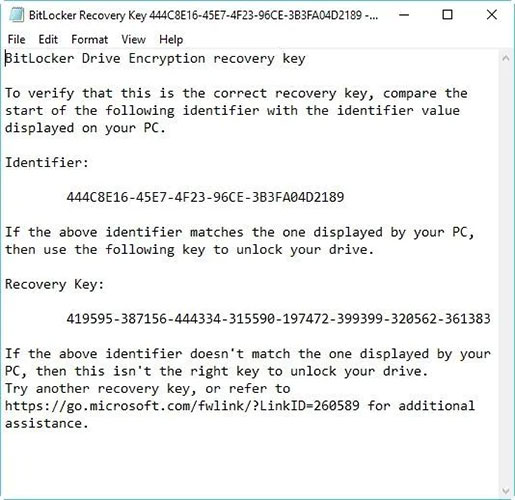
<p style="text-align: justify;">BitLocker Recovery Key được lưu trữ trong file .BEK có tên dạng&nbsp;<em>BitLocker Recovery Key 444C8E16-45E7-4F23-96CE-3B3FA04D2189.BEK</em>&nbsp;như bên dưới:</p>

<figure>
<div style="text-align: justify;"><img alt="BitLocker Recovery Key" data-i="0" data-src="https://st.quantrimang.com/photos/image/2022/06/27/tim-bitlocker-recovery-key-trong-windows-1.jpg" data-was-processed="true" height="500" src="https://st.quantrimang.com/photos/image/2022/06/27/tim-bitlocker-recovery-key-trong-windows-1.jpg" width="515" /></div>

<figcaption>
<div style="text-align: justify;">BitLocker Recovery Key</div>
</figcaption>
</figure>

<p style="text-align: justify;">Định dạng key khôi phục BitLocker: 419595-387156-44334-315590-197472-399399-320562-361383.</p>

<p style="text-align: justify;">Key khôi phục BitLocker được sử dụng để mở khóa ổ được mã hóa BitLocker khi bạn quên mật khẩu BitLocker hoặc mật khẩu BitLocker không hoạt động.</p>

<h2 style="text-align: justify;">Tìm BitLocker Recovery Key ở đâu và như thế nào?</h2>

<p style="text-align: justify;">Quá trình mã hóa ổ BitLocker của Microsoft luôn buộc bạn phải lưu key khôi phục BitLocker khi thiết lập. Bạn có thể đã lưu trữ trực tuyến bằng tài khoản Microsoft, lưu vào USB, lưu vào file hoặc in key khôi phục đó ra, v.v… Do đó, bạn có thể tìm key khôi phục theo nhiều cách khác nhau.</p>

<p style="text-align: justify;">Làm cách nào để tìm key khôi phục BitLocker? Tham khảo 6 cách sau:</p>

<h3 style="text-align: justify;">Tùy chọn 1: Trong tài khoản Microsoft của bạn</h3>

<p style="text-align: justify;">Để truy xuất key khôi phục được lưu trữ trực tuyến bằng tài khoản Microsoft, hãy truy cập trang web: https:&nbsp;<em>//account.microsoft.com/devices/recoverykey</em>&nbsp;(Trang trước kia là&nbsp;<em>http://windows.microsoft.com/recoverykey</em>).</p>

<p style="text-align: justify;">Đăng nhập bằng tài khoản Microsoft của bạn và sau đó, bạn sẽ thấy key khôi phục.</p>

<h3 style="text-align: justify;">Tùy chọn 2: Tìm key khôi phục BitLocker trên USB</h3>

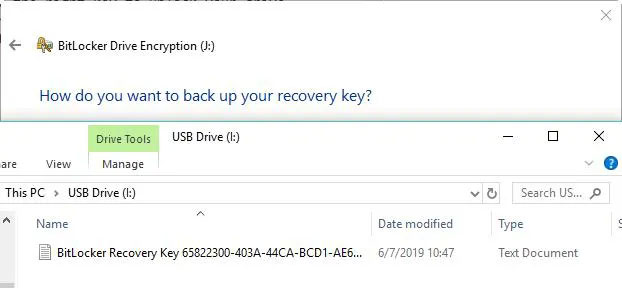
<p style="text-align: justify;">Để tìm key khôi phục BitLocker, hãy cắm USB đó vào máy tính của bạn và xem nó.</p>

<figure>
<div style="text-align: justify;"><img alt="Tìm key khôi phục BitLocker trên USB" data-i="1" data-src="https://st.quantrimang.com/photos/image/2022/06/27/tim-bitlocker-recovery-key-trong-windows-2.jpg" data-was-processed="true" height="288" src="https://st.quantrimang.com/photos/image/2022/06/27/tim-bitlocker-recovery-key-trong-windows-2.jpg" width="622" /></div>

<figcaption>
<div style="text-align: justify;">Tìm key khôi phục BitLocker trên USB</div>
</figcaption>
</figure>

<h3 style="text-align: justify;">Tùy chọn 3: Tìm key khôi phục BitLocker trong file txt</h3>

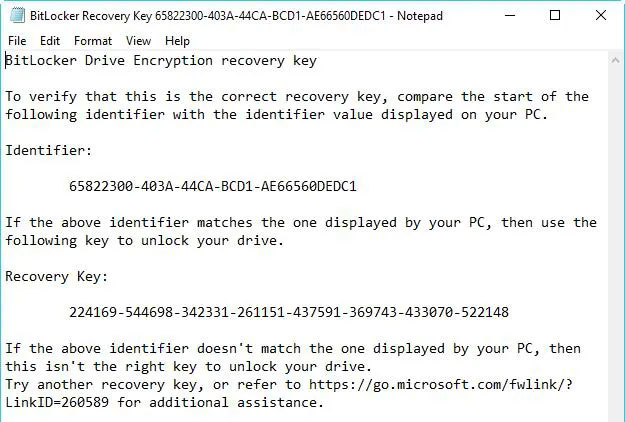
<p style="text-align: justify;">Key khôi phục BitLocker có thể được lưu dưới dạng&nbsp;<a href="https://quantrimang.com/file-txt-la-gi-175379" title="File .txt là gì? Cách mở file .txt">file txt</a>&nbsp;trên máy tính của bạn. Nếu bạn chưa xóa nó, hãy tìm kiếm&nbsp;<em>BitLocker Recovery Key.txt</em>&nbsp;trên máy tính của bạn.</p>

<figure>
<div style="text-align: justify;"><img alt="Tìm key khôi phục BitLocker trong file txt" data-i="2" data-src="https://st.quantrimang.com/photos/image/2022/06/27/tim-bitlocker-recovery-key-trong-windows-3.jpg" data-was-processed="true" height="422" src="https://st.quantrimang.com/photos/image/2022/06/27/tim-bitlocker-recovery-key-trong-windows-3.jpg" width="625" /></div>

<figcaption>
<div style="text-align: justify;">Tìm key khôi phục BitLocker trong file txt</div>
</figcaption>
</figure>

<p style="text-align: justify;">Nếu bạn đã xóa file BitLocker Recovery Key.txt đó, hãy&nbsp;tải xuống phần mềm khôi phục dữ liệu miễn phí iBoysoft Data Recovery:&nbsp;<span style="color:rgb(192, 57, 43);"><strong>https://download.iboysoft.com/download/iboysoftdatarecovery.exe</strong></span>&nbsp;để quét máy tính của bạn ngay bây giờ để khôi phục.</p>

<h3 style="text-align: justify;">Tùy chọn 4: Tìm key khôi phục BitLocker trong tài liệu</h3>

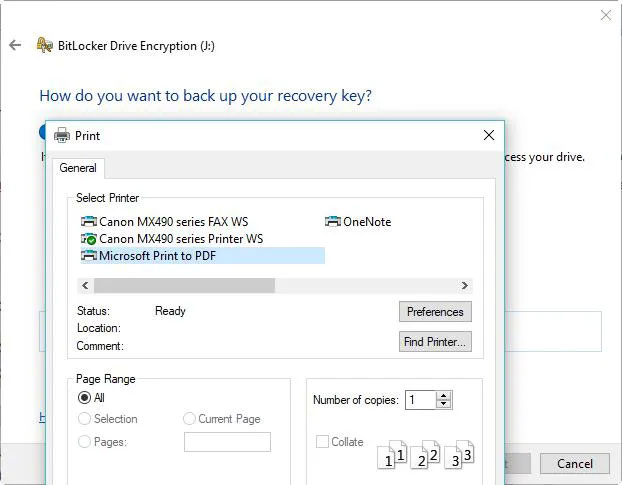
<p style="text-align: justify;">Nếu bạn đã in khóa khôi phục BitLocker bằng &quot;Microsoft Print to PDF&quot;, hãy tìm kiếm&nbsp;file pdf&nbsp;trên máy tính của bạn.</p>

<figure>
<div style="text-align: justify;"><img alt="Tìm key khôi phục BitLocker trong tài liệu" data-i="3" data-src="https://st.quantrimang.com/photos/image/2022/06/27/tim-bitlocker-recovery-key-trong-windows-4.jpg" data-was-processed="true" height="485" src="https://st.quantrimang.com/photos/image/2022/06/27/tim-bitlocker-recovery-key-trong-windows-4.jpg" width="622" /></div>

<figcaption>
<div style="text-align: justify;">Tìm key khôi phục BitLocker trong tài liệu</div>
</figcaption>
</figure>

<p style="text-align: justify;">Nếu bạn không tìm thấy file pdf đó bằng chức năng tìm kiếm của Windows, hãy tải xuống phần mềm khôi phục dữ liệu miễn phí iBoysoft Data Recovery để quét máy tính của bạn ngay bây giờ để lấy lại file pdf bị mất.</p>

<h3 style="text-align: justify;">Tùy chọn 5: Tìm key khôi phục BitLocker trong Active Directory</h3>

<p style="text-align: justify;">Nếu bạn là người dùng domain, key khôi phục BitLocker có thể được lưu vào&nbsp;Active Directory (AD), hãy liên hệ với admin của bạn để lấy.</p>

<p style="text-align: justify;">BitLocker Recovery Password Viewer có thể định vị và xem key khôi phục BitLocker được lưu trữ trong Active Directory (AD).</p>

<p style="text-align: justify;">Hướng dẫn xem key khôi phục BitLocker trong Active Directory:</p>

<ul>
	<li style="text-align: justify;">Trong&nbsp;<strong>Active Directory Users and Computers</strong>, xác định vị trí và sau đó bấm vào container chứa máy tính. Ví dụ, nhấp vào container&nbsp;<strong>Computers.</strong></li>
	<li style="text-align: justify;">Bấm chuột phải vào đối tượng máy tính, rồi chọn&nbsp;<strong>Properties.</strong></li>
	<li style="text-align: justify;">Trong hộp thoại&nbsp;<strong>ComputerName Properties</strong>, nhấp vào tab&nbsp;<strong>BitLocker Recovery</strong>&nbsp;để xem các key khôi phục BitLocker được liên kết với máy tính cụ thể.</li>
</ul>

<h3 style="text-align: justify;">Tùy chọn 6: Trong tài khoản Azure Active Directory của bạn</h3>

<p style="text-align: justify;">Đối với PC tại nơi làm việc mà bạn đăng nhập bằng tài khoản Azure Active Directory, hãy xem thông tin thiết bị cho tài khoản Microsoft Azure của bạn và nhận key khôi phục.</p>

<h2 style="text-align: justify;">Cách xác minh xem key khôi phục BitLocker có đúng không</h2>

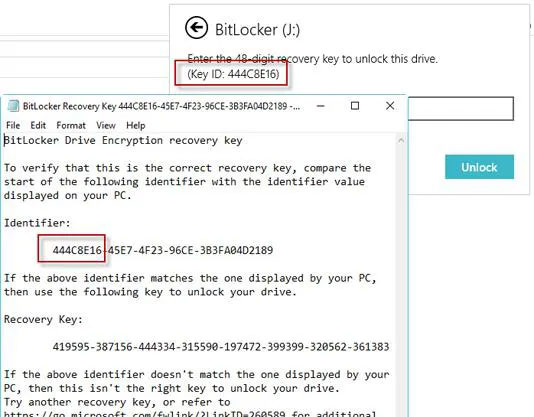
<p style="text-align: justify;">Để xác minh xem key khôi phục BitLocker có chính xác hay không, hãy so sánh phần bắt đầu của mã nhận dạng key khôi phục BitLocker đầy đủ với giá trị ID key khôi phục. Xem ví dụ dưới đây:</p>

<figure>
<div style="text-align: justify;"><img alt="So sánh key" data-i="4" data-src="https://st.quantrimang.com/photos/image/2022/06/27/tim-bitlocker-recovery-key-trong-windows-5.jpg" data-was-processed="true" height="417" src="https://st.quantrimang.com/photos/image/2022/06/27/tim-bitlocker-recovery-key-trong-windows-5.jpg" width="534" /></div>

<figcaption>
<div style="text-align: justify;">So sánh key</div>
</figcaption>
</figure>

<p style="text-align: justify;">BitLocker Recovery Key ID là mã nhận dạng key khôi phục BitLocker. Nếu BitLocker Recovery Key ID khớp với ID hiển thị trên ổ của bạn, bạn có thể mở khóa ổ đó.</p>

<p style="text-align: justify;">Nếu BitLocker Recovery Key ID không khớp với ID hiển thị trên ổ của bạn, thì key khôi phục BitLocker không khớp với ổ này và không thể mở khóa ổ. Trong trường hợp đó, bạn cần tìm đúng key khôi phục BitLocker.</p>

<h2 style="text-align: justify;">Làm cách nào để tìm giá trị BitLocker Recovery Key ID?</h2>

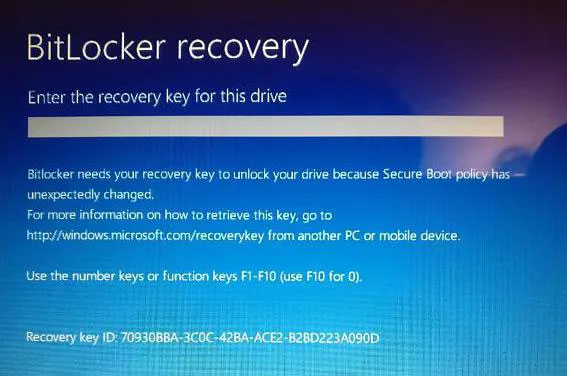
<p style="text-align: justify;">Đối với volume hệ điều hành được mã hóa BitLocker, BitLocker Recovery Key ID được hiển thị trên màn hình khôi phục BitLocker.</p>

<figure>
<div style="text-align: justify;"><img alt="Tìm giá trị BitLocker Recovery Key ID" data-i="5" data-src="https://st.quantrimang.com/photos/image/2022/06/27/tim-bitlocker-recovery-key-trong-windows-6.jpg" data-was-processed="true" height="376" src="https://st.quantrimang.com/photos/image/2022/06/27/tim-bitlocker-recovery-key-trong-windows-6.jpg" width="567" /></div>

<figcaption>
<div style="text-align: justify;">Tìm giá trị BitLocker Recovery Key ID</div>
</figcaption>
</figure>

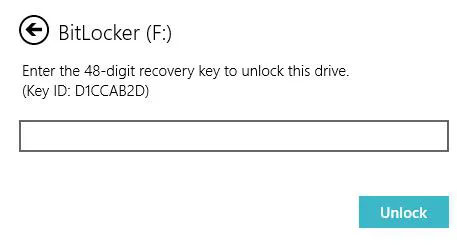
<p style="text-align: justify;">Đối với ổ dữ liệu được mã hóa BitLocker, BitLocker Recovery Key ID được hiển thị khi người dùng nhấp vào&nbsp;<strong>&quot;More options&quot;</strong>, sau đó nhập key khôi phục trong trình hướng dẫn để mở khóa ổ được mã hóa BitLocker.</p>

<figure>
<div style="text-align: justify;"><img alt="Nhập key khôi phục" data-i="6" data-src="https://st.quantrimang.com/photos/image/2022/06/27/tim-bitlocker-recovery-key-trong-windows-7.jpg" data-was-processed="true" height="245" src="https://st.quantrimang.com/photos/image/2022/06/27/tim-bitlocker-recovery-key-trong-windows-7.jpg" width="457" /></div>

<figcaption>
<div style="text-align: justify;">Nhập key khôi phục</div>
</figcaption>
</figure>

<h2 style="text-align: justify;">Cách sử dụng BitLocker Recovery Key ID để mở khóa ổ</h2>

<p style="text-align: justify;">BitLocker Recovery Key ID chỉ là mã nhận dạng key khôi phục BitLocker, nó không thể mở khóa ổ được mã hóa BitLocker. Trong trường hợp này, bạn vẫn cần tìm key khôi phục BitLocker theo key ID.</p>

<h2 style="text-align: justify;">Cách lấy BitLocker Recovery Key với key ID</h2>

<p style="text-align: justify;">Nếu bạn có thể tìm thấy file txt key khôi phục BitLocker hoặc đã lưu key khôi phục BitLocker trong tài khoản Microsoft, AD hoặc Azure AD của mình, bạn có thể tìm thấy key khôi phục BitLocker chính xác theo key ID. Nếu không, không có cách nào để lấy được key khôi phục BitLocker.</p>
		</div>
				<div id="author">
						<p>
				<strong>Nguồn tin:</strong>
				Quantrimang.com
			</p>
		</div>
	</div>
	<div id="footer" class="clearfix">
		<div id="url">
			<strong>URL của bản tin này: </strong><a href="https://www.nguoicodonvn2008.info/vi/news/savefile/kien-thuc-may-tinh/cach-tim-bitlocker-recovery-key-trong-windows-10-5789.html" title="Cách tìm BitLocker Recovery Key trong Windows 10">https://www.nguoicodonvn2008.info/vi/news/savefile/kien-thuc-may-tinh/cach-tim-bitlocker-recovery-key-trong-windows-10-5789.html</a>

		</div>
		<div class="clear"></div>
		<div class="copyright">
			&copy; .&#x3A; Nguoicodonvn2008.info - Cõi lòng người cô đơn &#x3A;.
		</div>
		<div id="contact">
			<a href="mailto:admin@nguoicodonvn2008.info">admin@nguoicodonvn2008.info</a>
		</div>
	</div>
</div>
        <div id="timeoutsess" class="chromeframe">
            Bạn đã không sử dụng Site, <a onclick="timeoutsesscancel();" href="https://www.nguoicodonvn2008.info/#">Bấm vào đây để duy trì trạng thái đăng nhập</a>. Thời gian chờ: <span id="secField"> 60 </span> giây
        </div>
        <div id="openidResult" class="nv-alert" style="display:none"></div>
        <div id="openidBt" data-result="" data-redirect=""></div>
		</script>
		<div class="car-top">
  <span><img src="https://www.nguoicodonvn2008.info/themes/default/images/car.png" alt=""></span>
</div>
<script src="https://www.nguoicodonvn2008.info/assets/js/jquery/jquery.min.js"></script>
<script>var nv_base_siteurl="/",nv_lang_data="vi",nv_lang_interface="vi",nv_name_variable="nv",nv_fc_variable="op",nv_lang_variable="language",nv_module_name="news",nv_func_name="savefile",nv_is_user=0, nv_my_ofs=-4,nv_my_abbr="EDT",nv_cookie_prefix="nv4c_e856T",nv_check_pass_mstime=1738000,nv_area_admin=0,nv_safemode=0,theme_responsive=0,nv_recaptcha_ver=2,nv_recaptcha_sitekey="",nv_recaptcha_type="image",XSSsanitize=1;</script>
<script src="https://www.nguoicodonvn2008.info/assets/js/language/vi.js"></script>
<script src="https://www.nguoicodonvn2008.info/assets/js/DOMPurify/purify3.js"></script>
<script src="https://www.nguoicodonvn2008.info/assets/js/global.js"></script>
<script src="https://www.nguoicodonvn2008.info/assets/js/site.js"></script>
<script src="https://www.nguoicodonvn2008.info/themes/default/js/news.js"></script>
<script src="https://www.nguoicodonvn2008.info/themes/default/js/main.js"></script>
<script src="https://www.nguoicodonvn2008.info/themes/default/js/custom.js"></script>
<script type="application/ld+json">
        {
            "@context": "https://schema.org",
            "@type": "Organization",
            "url": "https://www.nguoicodonvn2008.info",
            "logo": "https://www.nguoicodonvn2008.info/uploads/angel.gif"
        }
        </script>
<script src="https://www.nguoicodonvn2008.info/themes/default/js/bootstrap.min.js"></script>
<script type="text/javascript">
var $scrolltop = $('.car-top');
$scrolltop.on('click', function () {
    $('html,body').animate({
        scrollTop: 0
    }, 800);
    $(this).addClass("car-run");
    setTimeout(function(){ $scrolltop.removeClass('car-run');}, 1000);
    return false;
});
$(window).on('scroll', function ()
{ 
    if($(window).scrollTop() >= 200)
    {
        $scrolltop.addClass("show");
        $scrolltop.addClass("car-down");
    }
    else
    {
       $scrolltop.removeClass("show");
       setTimeout(function(){ $scrolltop.removeClass('car-down');}, 300);
    }
});
</script>
</body>
</html>