<!DOCTYPE html>
    <html lang="vi" xmlns="http://www.w3.org/1999/xhtml" prefix="og: http://ogp.me/ns#">
    <head>
<title>Cách thu phóng màn hình máy Mac</title>
<meta name="description" content="Cách thu phóng màn hình máy Mac - Savefile - Tin Tức - https&#x3A;&#x002F;&#x002F;www.nguoicodonvn2008.info&#x002F;vi&#x002F;news&#x002F;savefile&#x002F;kien-thuc-may-tinh&#x002F;cach-thu-phong-man-hinh-may-mac-4355.html">
<meta name="author" content=".: Nguoicodonvn2008.info - Cõi lòng người cô đơn :.">
<meta name="copyright" content=".: Nguoicodonvn2008.info - Cõi lòng người cô đơn :. [admin@nguoicodonvn2008.info]">
<meta name="robots" content="index, archive, follow, noodp">
<meta name="googlebot" content="index,archive,follow,noodp">
<meta name="msnbot" content="all,index,follow">
<meta name="generator" content="NukeViet v4.5">
<meta http-equiv="Content-Type" content="text/html; charset=utf-8">
<meta property="og:title" content="Cách thu phóng màn hình máy Mac">
<meta property="og:type" content="website">
<meta property="og:description" content="Savefile - Tin Tức - https&#x3A;&#x002F;&#x002F;www.nguoicodonvn2008.info&#x002F;vi&#x002F;news&#x002F;savefile&#x002F;kien-thuc-may-tinh&#x002F;cach-thu-phong-man-hinh-may-mac-4355.html">
<meta property="og:site_name" content=".&#x3A; Nguoicodonvn2008.info - Cõi lòng người cô đơn &#x3A;.">
<meta property="og:url" content="https://www.nguoicodonvn2008.info/vi/news/savefile/kien-thuc-may-tinh/cach-thu-phong-man-hinh-may-mac-4355.html">
<link rel="shortcut icon" href="https://www.nguoicodonvn2008.info/favicon.ico">
<link rel="canonical" href="https://www.nguoicodonvn2008.info/vi/news/savefile/kien-thuc-may-tinh/cach-thu-phong-man-hinh-may-mac-4355.html">
<link rel="alternate" href="https://www.nguoicodonvn2008.info/vi/news/rss/" title="Tin Tức" type="application/rss+xml">
<link rel="alternate" href="https://www.nguoicodonvn2008.info/vi/news/rss/karaoke-dual/" title="Tin Tức - Karaoke Dual" type="application/rss+xml">
<link rel="alternate" href="https://www.nguoicodonvn2008.info/vi/news/rss/nhac-tre/" title="Tin Tức - Nhạc trẻ" type="application/rss+xml">
<link rel="alternate" href="https://www.nguoicodonvn2008.info/vi/news/rss/tru-tinh/" title="Tin Tức - Trữ tình" type="application/rss+xml">
<link rel="alternate" href="https://www.nguoicodonvn2008.info/vi/news/rss/nuoc-ngoai/" title="Tin Tức - Nước ngoài" type="application/rss+xml">
<link rel="alternate" href="https://www.nguoicodonvn2008.info/vi/news/rss/remix/" title="Tin Tức - Remix" type="application/rss+xml">
<link rel="alternate" href="https://www.nguoicodonvn2008.info/vi/news/rss/tam-su-tinh-yeu/" title="Tin Tức - Tâm sự tình yêu" type="application/rss+xml">
<link rel="alternate" href="https://www.nguoicodonvn2008.info/vi/news/rss/tho-suu-tam/" title="Tin Tức - Thơ sưu tầm" type="application/rss+xml">
<link rel="alternate" href="https://www.nguoicodonvn2008.info/vi/news/rss/cuoc-song/" title="Tin Tức - Cuộc sống" type="application/rss+xml">
<link rel="alternate" href="https://www.nguoicodonvn2008.info/vi/news/rss/phan-mem/" title="Tin Tức - Phần mềm" type="application/rss+xml">
<link rel="alternate" href="https://www.nguoicodonvn2008.info/vi/news/rss/kien-thuc-may-tinh/" title="Tin Tức - Kiến thức máy tính" type="application/rss+xml">
<link rel="alternate" href="https://www.nguoicodonvn2008.info/vi/news/rss/hoc-tap/" title="Tin Tức - Học tập" type="application/rss+xml">
<link rel="alternate" href="https://www.nguoicodonvn2008.info/vi/news/rss/tai-lieu/" title="Tin Tức - Tài liệu" type="application/rss+xml">
<link rel="alternate" href="https://www.nguoicodonvn2008.info/vi/news/rss/de-thi/" title="Tin Tức - Đề thi" type="application/rss+xml">
<link rel="preload" as="style" href="https://www.nguoicodonvn2008.info/assets/css/font-awesome.min.css" type="text/css">
<link rel="preload" as="style" href="https://www.nguoicodonvn2008.info/themes/default/css/bootstrap.non-responsive.css" type="text/css">
<link rel="preload" as="style" href="https://www.nguoicodonvn2008.info/themes/default/css/style.css" type="text/css">
<link rel="preload" as="style" href="https://www.nguoicodonvn2008.info/themes/default/css/style.non-responsive.css" type="text/css">
<link rel="preload" as="style" href="https://www.nguoicodonvn2008.info/themes/default/css/news.css" type="text/css">
<link rel="preload" as="style" href="https://www.nguoicodonvn2008.info/themes/default/css/custom.css" type="text/css">
<link rel="preload" as="script" href="https://www.nguoicodonvn2008.info/assets/js/jquery/jquery.min.js" type="text/javascript">
<link rel="preload" as="script" href="https://www.nguoicodonvn2008.info/assets/js/language/vi.js" type="text/javascript">
<link rel="preload" as="script" href="https://www.nguoicodonvn2008.info/assets/js/DOMPurify/purify3.js" type="text/javascript">
<link rel="preload" as="script" href="https://www.nguoicodonvn2008.info/assets/js/global.js" type="text/javascript">
<link rel="preload" as="script" href="https://www.nguoicodonvn2008.info/assets/js/site.js" type="text/javascript">
<link rel="preload" as="script" href="https://www.nguoicodonvn2008.info/themes/default/js/news.js" type="text/javascript">
<link rel="preload" as="script" href="https://www.nguoicodonvn2008.info/themes/default/js/main.js" type="text/javascript">
<link rel="preload" as="script" href="https://www.nguoicodonvn2008.info/themes/default/js/custom.js" type="text/javascript">
<link rel="preload" as="script" href="https://www.nguoicodonvn2008.info/themes/default/js/bootstrap.min.js" type="text/javascript">
<link rel="stylesheet" href="https://www.nguoicodonvn2008.info/assets/css/font-awesome.min.css">
<link rel="stylesheet" href="https://www.nguoicodonvn2008.info/themes/default/css/bootstrap.non-responsive.css">
<link rel="stylesheet" href="https://www.nguoicodonvn2008.info/themes/default/css/style.css">
<link rel="stylesheet" href="https://www.nguoicodonvn2008.info/themes/default/css/style.non-responsive.css">
<link rel="StyleSheet" href="https://www.nguoicodonvn2008.info/themes/default/css/news.css">
<link rel="stylesheet" href="https://www.nguoicodonvn2008.info/themes/default/css/custom.css">
<style type="text/css">
	body{background: #fff;}
</style>
    </head>
    <body>
<div id="print">
	<div id="hd_print">
		<h2 class="pull-left">.&#x3A; Nguoicodonvn2008.info - Cõi lòng người cô đơn &#x3A;.</h2>
		<p class="pull-right"><a title=".&#x3A; Nguoicodonvn2008.info - Cõi lòng người cô đơn &#x3A;." href="https://www.nguoicodonvn2008.info/">https://www.nguoicodonvn2008.info</a></p>
	</div>
	<div class="clear"></div>
	<hr />
	<div id="content">
		<h1>Cách thu phóng màn hình máy Mac</h1>
		<ul class="list-inline">
			<li>Thứ sáu - 02/07/2021 00:48</li>
			<li class="hidden-print txtrequired"><em class="fa fa-print">&nbsp;</em><a title="In ra" href="javascript:;" onclick="window.print()">In ra</a></li>
			<li class="hidden-print txtrequired"><em class="fa fa-power-off">&nbsp;</em><a title="Đóng cửa sổ này" href="javascript:;" onclick="window.close()">Đóng cửa sổ này</a></li>
		</ul>
		<div class="clear"></div>
		<div id="hometext">
		</div>
				<div class="imghome">
			<img alt="Cách thu phóng màn hình máy Mac" src="https://st.quantrimang.com/photos/image/2021/06/22/thu-phong-man-hinh-may-mac4.jpg" width="460" class="img-thumbnail" />
		</div>
		<div class="clear"></div>
		<div id="bodytext" class="clearfix">
			<p style="text-align: justify;">Màn hình hiện đại có độ phân giải cao không chỉ mang đến chất lượng hiển thị sắc nét hơn, mà còn cho phép bạn xem nội dung với độ chi tiết cao ngay cả trong các chế độ phu phóng. Trong bài viết này, chúng ta sẽ cùng tìm hiểu các thu phóng màn hình máy Mac để xem nội dung thuận tiện hơn.</p>

<p style="text-align: justify;">macOS bao gồm nhiều tùy chọn cho phép bạn thu phóng nội dung trên màn hình, tùy thuộc vào nhu cầu cá nhân của mình.</p>

<h2 style="text-align: justify;">Thu phóng màn hình bằng trackpad</h2>

<p style="text-align: justify;">Trackpad là công cụ hỗ trợ điều hướng tuyệt vời trên MacBook. Bạn có thể thực hiện hàng loạt tác vụ khác nhau chỉ với các thao tác tay đơn giản, trong đó có thu phóng màn hình.</p>

<p style="text-align: justify;">Cách đơn giản nhất để phóng to và thu nhỏ màn hình MacBook với trackpad là chụm và mở 2 đầu ngón tay như trên màn hình iPhone. Điều này cung cấp cho bạn khả năng kiểm soát trực quan đối với mức độ thu phóng trên màn hình.</p>

<div style="text-align: justify;">&nbsp;</div>

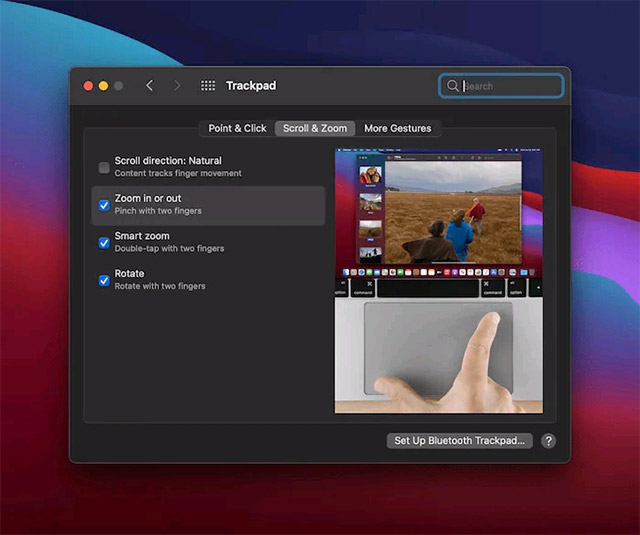
<p style="text-align: justify;">Tuy nhiên, nếu bạn đã thử làm mà không hiệu quả, hãy điều hướng đến mục quản lý bàn di chuột trong System Preferences.</p>

<p style="text-align: justify;"><img alt="Mục quản lý bàn di chuột" data-i="0" data-src="https://st.quantrimang.com/photos/image/2021/06/22/thu-phong-man-hinh-may-mac1.jpg" data-was-processed="true" height="535" src="https://st.quantrimang.com/photos/image/2021/06/22/thu-phong-man-hinh-may-mac1.jpg" width="640" /></p>

<p style="text-align: justify;">Trong phần “<strong>Scroll &amp; Zoom</strong>”, bạn có thể chuyển đổi chức năng thu phóng cùng với một số cử chỉ khác.</p>

<p style="text-align: justify;">Một tính năng khác cũng rất hữu ích là&nbsp;<strong>Smart Zoom</strong>. Sau khi bật tùy chọn này, bạn có thể nhấn đúp nhanh trên trackpad để phóng to 100%. Một lần nhấn đúp khác sẽ thu nhỏ màn hình.</p>

<div style="text-align: justify;">&nbsp;</div>

<p style="text-align: justify;"><strong>Lưu ý:</strong>&nbsp;Tính năng này sẽ chỉ hoạt động trên các tệp PDF, hình ảnh, trong trình duyệt và một số nơi khác. Ngược lại, nó sẽ không hoạt động trên các ngăn tùy chọn và các màn hình hệ thống.</p>

<h2 style="text-align: justify;">Sử dụng các tùy chọn trợ năng</h2>

<p style="text-align: justify;">macOS cũng hỗ trợ một số tính năng trợ năng liên quan đến thu phóng màn hình, được phát triển dành cho những người có thị lực hạn chế, nhưng bất cứ ai cũng có thể sử dụng.</p>

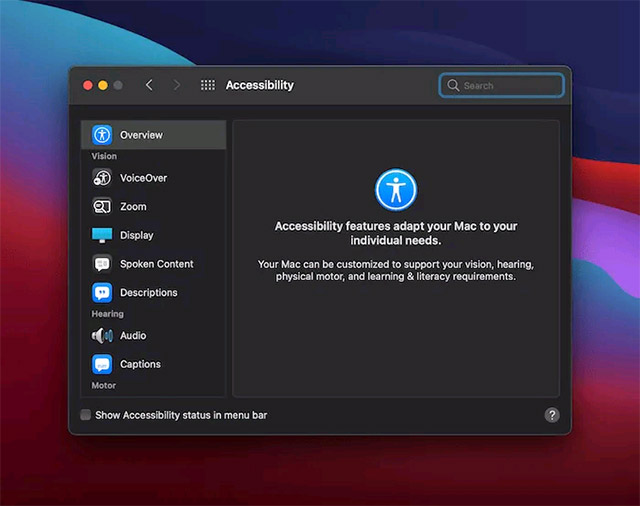
<p style="text-align: justify;">Trước tiên, hãy điều hướng tới mục&nbsp;<strong>Accessibility</strong>&nbsp;trong&nbsp;<strong>System Preferences</strong>.</p>

<p style="text-align: justify;"><img alt="Điều hướng tới mục Accessibility trong System Preferences." data-i="1" data-src="https://st.quantrimang.com/photos/image/2021/06/22/thu-phong-man-hinh-may-mac2.jpg" data-was-processed="true" height="506" src="https://st.quantrimang.com/photos/image/2021/06/22/thu-phong-man-hinh-may-mac2.jpg" width="640" /></p>

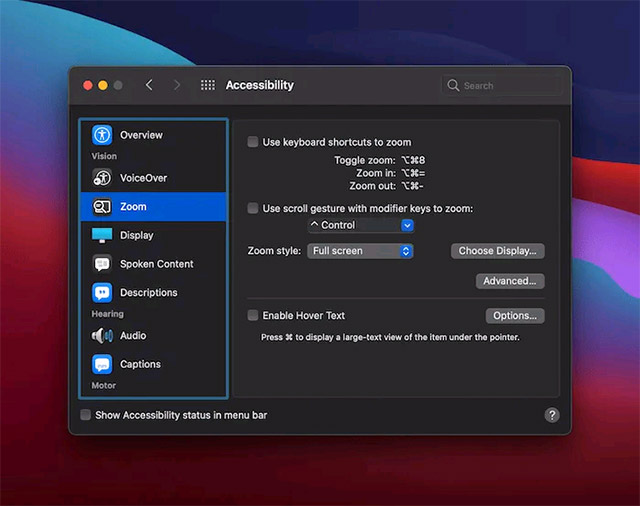
<p style="text-align: justify;">Bảng điều khiển đầu tiên ở đây là Zoom, cung cấp cho bạn ba tùy chọn để giúp phóng to và thu nhỏ màn hình, tập trung vào các phím tắt.</p>

<p style="text-align: justify;"><img alt="Các tùy chọn Zoom" data-i="2" data-src="https://st.quantrimang.com/photos/image/2021/06/22/thu-phong-man-hinh-may-mac3.jpg" data-was-processed="true" height="506" src="https://st.quantrimang.com/photos/image/2021/06/22/thu-phong-man-hinh-may-mac3.jpg" width="640" /></p>

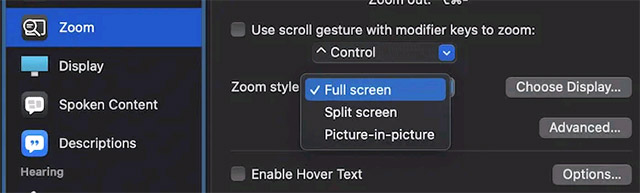
<p style="text-align: justify;">Ví dụ: bạn có thể bật chức năng thu phóng bằng phím tắt. Hoặc bạn cũng có thể kết hợp các cử chỉ với phím bổ trợ để phóng to và thu nhỏ. Một tính năng thú vị ở đây là chọn kiểu thu phóng (<strong>Zoom Style</strong>): Cho phép bạn xem nội dung được thu phóng trong các dạng trình bày khác nhau.</p>

<p style="text-align: justify;"><img alt="Zoom Style" data-i="3" data-src="https://st.quantrimang.com/photos/image/2021/06/22/thu-phong-man-hinh-may-mac4.jpg" data-was-processed="true" height="193" src="https://st.quantrimang.com/photos/image/2021/06/22/thu-phong-man-hinh-may-mac4.jpg" width="640" /></p>

<p style="text-align: justify;">Ngoài ra, còn có tính năng&nbsp;<strong>Hover Text</strong>, cho phép phóng to bất cứ nội dung nào mà con trỏ chuột lướt qua, cũng khá hữu ích.</p>
		</div>
				<div id="author">
						<p>
				<strong>Nguồn tin:</strong>
				Quantrimang.com
			</p>
		</div>
	</div>
	<div id="footer" class="clearfix">
		<div id="url">
			<strong>URL của bản tin này: </strong><a href="https://www.nguoicodonvn2008.info/vi/news/savefile/kien-thuc-may-tinh/cach-thu-phong-man-hinh-may-mac-4355.html" title="Cách thu phóng màn hình máy Mac">https://www.nguoicodonvn2008.info/vi/news/savefile/kien-thuc-may-tinh/cach-thu-phong-man-hinh-may-mac-4355.html</a>

		</div>
		<div class="clear"></div>
		<div class="copyright">
			&copy; .&#x3A; Nguoicodonvn2008.info - Cõi lòng người cô đơn &#x3A;.
		</div>
		<div id="contact">
			<a href="mailto:admin@nguoicodonvn2008.info">admin@nguoicodonvn2008.info</a>
		</div>
	</div>
</div>
        <div id="timeoutsess" class="chromeframe">
            Bạn đã không sử dụng Site, <a onclick="timeoutsesscancel();" href="https://www.nguoicodonvn2008.info/#">Bấm vào đây để duy trì trạng thái đăng nhập</a>. Thời gian chờ: <span id="secField"> 60 </span> giây
        </div>
        <div id="openidResult" class="nv-alert" style="display:none"></div>
        <div id="openidBt" data-result="" data-redirect=""></div>
		</script>
		<div class="car-top">
  <span><img src="https://www.nguoicodonvn2008.info/themes/default/images/car.png" alt=""></span>
</div>
<script src="https://www.nguoicodonvn2008.info/assets/js/jquery/jquery.min.js"></script>
<script>var nv_base_siteurl="/",nv_lang_data="vi",nv_lang_interface="vi",nv_name_variable="nv",nv_fc_variable="op",nv_lang_variable="language",nv_module_name="news",nv_func_name="savefile",nv_is_user=0, nv_my_ofs=-4,nv_my_abbr="EDT",nv_cookie_prefix="nv4c_e856T",nv_check_pass_mstime=1738000,nv_area_admin=0,nv_safemode=0,theme_responsive=0,nv_recaptcha_ver=2,nv_recaptcha_sitekey="",nv_recaptcha_type="image",XSSsanitize=1;</script>
<script src="https://www.nguoicodonvn2008.info/assets/js/language/vi.js"></script>
<script src="https://www.nguoicodonvn2008.info/assets/js/DOMPurify/purify3.js"></script>
<script src="https://www.nguoicodonvn2008.info/assets/js/global.js"></script>
<script src="https://www.nguoicodonvn2008.info/assets/js/site.js"></script>
<script src="https://www.nguoicodonvn2008.info/themes/default/js/news.js"></script>
<script src="https://www.nguoicodonvn2008.info/themes/default/js/main.js"></script>
<script src="https://www.nguoicodonvn2008.info/themes/default/js/custom.js"></script>
<script type="application/ld+json">
        {
            "@context": "https://schema.org",
            "@type": "Organization",
            "url": "https://www.nguoicodonvn2008.info",
            "logo": "https://www.nguoicodonvn2008.info/uploads/angel.gif"
        }
        </script>
<script src="https://www.nguoicodonvn2008.info/themes/default/js/bootstrap.min.js"></script>
<script type="text/javascript">
var $scrolltop = $('.car-top');
$scrolltop.on('click', function () {
    $('html,body').animate({
        scrollTop: 0
    }, 800);
    $(this).addClass("car-run");
    setTimeout(function(){ $scrolltop.removeClass('car-run');}, 1000);
    return false;
});
$(window).on('scroll', function ()
{ 
    if($(window).scrollTop() >= 200)
    {
        $scrolltop.addClass("show");
        $scrolltop.addClass("car-down");
    }
    else
    {
       $scrolltop.removeClass("show");
       setTimeout(function(){ $scrolltop.removeClass('car-down');}, 300);
    }
});
</script>
</body>
</html>