<!DOCTYPE html>
    <html lang="vi" xmlns="http://www.w3.org/1999/xhtml" prefix="og: http://ogp.me/ns#">
    <head>
<title>Cách thiết lập và liệt kê các biến môi trường trong Linux</title>
<meta name="description" content="Cách thiết lập và liệt kê các biến môi trường trong Linux - Savefile - Tin Tức -...">
<meta name="author" content=".: Nguoicodonvn2008.info - Cõi lòng người cô đơn :.">
<meta name="copyright" content=".: Nguoicodonvn2008.info - Cõi lòng người cô đơn :. [admin@nguoicodonvn2008.info]">
<meta name="robots" content="index, archive, follow, noodp">
<meta name="googlebot" content="index,archive,follow,noodp">
<meta name="msnbot" content="all,index,follow">
<meta name="generator" content="NukeViet v4.5">
<meta http-equiv="Content-Type" content="text/html; charset=utf-8">
<meta property="og:title" content="Cách thiết lập và liệt kê các biến môi trường trong Linux">
<meta property="og:type" content="website">
<meta property="og:description" content="Savefile - Tin Tức - https&#x3A;&#x002F;&#x002F;www.nguoicodonvn2008.info&#x002F;vi&#x002F;news&#x002F;savefile&#x002F;kien-thuc-may-tinh&#x002F;cach-thiet-lap-va-liet-ke-cac-bien-moi-truong-trong-linux-916.html">
<meta property="og:site_name" content=".&#x3A; Nguoicodonvn2008.info - Cõi lòng người cô đơn &#x3A;.">
<meta property="og:url" content="https://www.nguoicodonvn2008.info/vi/news/savefile/kien-thuc-may-tinh/cach-thiet-lap-va-liet-ke-cac-bien-moi-truong-trong-linux-916.html">
<link rel="shortcut icon" href="https://www.nguoicodonvn2008.info/favicon.ico">
<link rel="canonical" href="https://www.nguoicodonvn2008.info/vi/news/savefile/kien-thuc-may-tinh/cach-thiet-lap-va-liet-ke-cac-bien-moi-truong-trong-linux-916.html">
<link rel="alternate" href="https://www.nguoicodonvn2008.info/vi/news/rss/" title="Tin Tức" type="application/rss+xml">
<link rel="alternate" href="https://www.nguoicodonvn2008.info/vi/news/rss/karaoke-dual/" title="Tin Tức - Karaoke Dual" type="application/rss+xml">
<link rel="alternate" href="https://www.nguoicodonvn2008.info/vi/news/rss/nhac-tre/" title="Tin Tức - Nhạc trẻ" type="application/rss+xml">
<link rel="alternate" href="https://www.nguoicodonvn2008.info/vi/news/rss/tru-tinh/" title="Tin Tức - Trữ tình" type="application/rss+xml">
<link rel="alternate" href="https://www.nguoicodonvn2008.info/vi/news/rss/nuoc-ngoai/" title="Tin Tức - Nước ngoài" type="application/rss+xml">
<link rel="alternate" href="https://www.nguoicodonvn2008.info/vi/news/rss/remix/" title="Tin Tức - Remix" type="application/rss+xml">
<link rel="alternate" href="https://www.nguoicodonvn2008.info/vi/news/rss/tam-su-tinh-yeu/" title="Tin Tức - Tâm sự tình yêu" type="application/rss+xml">
<link rel="alternate" href="https://www.nguoicodonvn2008.info/vi/news/rss/tho-suu-tam/" title="Tin Tức - Thơ sưu tầm" type="application/rss+xml">
<link rel="alternate" href="https://www.nguoicodonvn2008.info/vi/news/rss/cuoc-song/" title="Tin Tức - Cuộc sống" type="application/rss+xml">
<link rel="alternate" href="https://www.nguoicodonvn2008.info/vi/news/rss/phan-mem/" title="Tin Tức - Phần mềm" type="application/rss+xml">
<link rel="alternate" href="https://www.nguoicodonvn2008.info/vi/news/rss/kien-thuc-may-tinh/" title="Tin Tức - Kiến thức máy tính" type="application/rss+xml">
<link rel="alternate" href="https://www.nguoicodonvn2008.info/vi/news/rss/hoc-tap/" title="Tin Tức - Học tập" type="application/rss+xml">
<link rel="alternate" href="https://www.nguoicodonvn2008.info/vi/news/rss/tai-lieu/" title="Tin Tức - Tài liệu" type="application/rss+xml">
<link rel="alternate" href="https://www.nguoicodonvn2008.info/vi/news/rss/de-thi/" title="Tin Tức - Đề thi" type="application/rss+xml">
<link rel="preload" as="style" href="https://www.nguoicodonvn2008.info/assets/css/font-awesome.min.css" type="text/css">
<link rel="preload" as="style" href="https://www.nguoicodonvn2008.info/themes/default/css/bootstrap.non-responsive.css" type="text/css">
<link rel="preload" as="style" href="https://www.nguoicodonvn2008.info/themes/default/css/style.css" type="text/css">
<link rel="preload" as="style" href="https://www.nguoicodonvn2008.info/themes/default/css/style.non-responsive.css" type="text/css">
<link rel="preload" as="style" href="https://www.nguoicodonvn2008.info/themes/default/css/news.css" type="text/css">
<link rel="preload" as="style" href="https://www.nguoicodonvn2008.info/themes/default/css/custom.css" type="text/css">
<link rel="preload" as="script" href="https://www.nguoicodonvn2008.info/assets/js/jquery/jquery.min.js" type="text/javascript">
<link rel="preload" as="script" href="https://www.nguoicodonvn2008.info/assets/js/language/vi.js" type="text/javascript">
<link rel="preload" as="script" href="https://www.nguoicodonvn2008.info/assets/js/DOMPurify/purify3.js" type="text/javascript">
<link rel="preload" as="script" href="https://www.nguoicodonvn2008.info/assets/js/global.js" type="text/javascript">
<link rel="preload" as="script" href="https://www.nguoicodonvn2008.info/assets/js/site.js" type="text/javascript">
<link rel="preload" as="script" href="https://www.nguoicodonvn2008.info/themes/default/js/news.js" type="text/javascript">
<link rel="preload" as="script" href="https://www.nguoicodonvn2008.info/themes/default/js/main.js" type="text/javascript">
<link rel="preload" as="script" href="https://www.nguoicodonvn2008.info/themes/default/js/custom.js" type="text/javascript">
<link rel="preload" as="script" href="https://www.nguoicodonvn2008.info/themes/default/js/bootstrap.min.js" type="text/javascript">
<link rel="stylesheet" href="https://www.nguoicodonvn2008.info/assets/css/font-awesome.min.css">
<link rel="stylesheet" href="https://www.nguoicodonvn2008.info/themes/default/css/bootstrap.non-responsive.css">
<link rel="stylesheet" href="https://www.nguoicodonvn2008.info/themes/default/css/style.css">
<link rel="stylesheet" href="https://www.nguoicodonvn2008.info/themes/default/css/style.non-responsive.css">
<link rel="StyleSheet" href="https://www.nguoicodonvn2008.info/themes/default/css/news.css">
<link rel="stylesheet" href="https://www.nguoicodonvn2008.info/themes/default/css/custom.css">
<style type="text/css">
	body{background: #fff;}
</style>
    </head>
    <body>
<div id="print">
	<div id="hd_print">
		<h2 class="pull-left">.&#x3A; Nguoicodonvn2008.info - Cõi lòng người cô đơn &#x3A;.</h2>
		<p class="pull-right"><a title=".&#x3A; Nguoicodonvn2008.info - Cõi lòng người cô đơn &#x3A;." href="https://www.nguoicodonvn2008.info/">https://www.nguoicodonvn2008.info</a></p>
	</div>
	<div class="clear"></div>
	<hr />
	<div id="content">
		<h1>Cách thiết lập và liệt kê các biến môi trường trong Linux</h1>
		<ul class="list-inline">
			<li>Thứ bảy - 07/09/2019 01:50</li>
			<li class="hidden-print txtrequired"><em class="fa fa-print">&nbsp;</em><a title="In ra" href="javascript:;" onclick="window.print()">In ra</a></li>
			<li class="hidden-print txtrequired"><em class="fa fa-power-off">&nbsp;</em><a title="Đóng cửa sổ này" href="javascript:;" onclick="window.close()">Đóng cửa sổ này</a></li>
		</ul>
		<div class="clear"></div>
		<div id="hometext">
		</div>
				<div class="imghome">
			<img alt="Cách thiết lập và liệt kê các biến môi trường trong Linux" src="https://st.quantrimang.com/photos/image/2019/09/07/thiet-lap-va-liet-ke-bien-moi-truong-trong-linux-1.jpg" width="460" class="img-thumbnail" />
		</div>
		<div class="clear"></div>
		<div id="bodytext" class="clearfix">
			<p style="text-align: justify;">Trước đây, để sử dụng&nbsp;Linux, bạn cần ngay lập tức làm quen với dòng lệnh. Các môi trường desktop như GNOME và KDE đã giúp sử dụng Linux dễ dàng hơn nhiều cho người mới bắt đầu. Bạn có thể sử dụng Linux trong một thời gian dài mà không cần biết một lệnh terminal nào.</p>

<p style="text-align: justify;">Tuy nhiên, nếu muốn làm một cái gì đó yêu cầu sử dụng dòng lệnh, bạn vẫn sẽ cần phải biết về các biến môi trường. Điều này có vẻ như là một thuật ngữ phức tạp, nhưng thực ra các biến môi trường rất dễ hiểu.</p>

<h2 style="text-align: justify;">Biến môi trường là gì?</h2>

<p style="text-align: justify;">Biến môi trường cho phép bạn đặt những tùy chọn trên các chương trình khác nhau mà không phải chỉnh sửa file cấu hình đã cho của ứng dụng. Điều này được áp dụng trên toàn hệ thống, vì vậy chúng không chỉ có hiệu lực trong các chương trình mà còn trong shell và thậm chí cả những tiến trình con.</p>

<p style="text-align: justify;">Chúng được sử dụng để giúp các lệnh khác nhau biết thư mục&nbsp;<strong>Home</strong>&nbsp;ở đâu, tên người dùng là gì và shell bạn hiện đang sử dụng. Bạn cũng có thể đặt các tùy chọn khác nhau như màu terminal bằng các biến môi trường.</p>

<div style="text-align: justify;">&nbsp;</div>

<h2 style="text-align: justify;">Liệt kê các biến môi trường</h2>

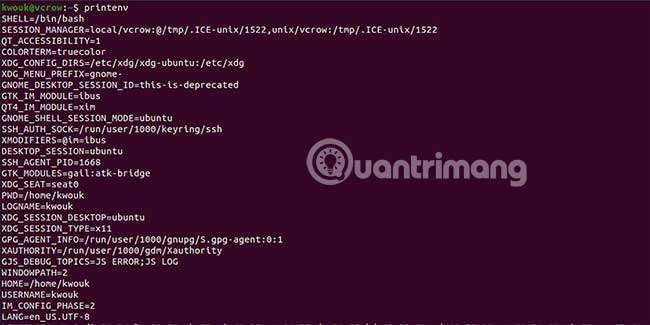
<p style="text-align: justify;">Trong thực tế, bạn có thể dành nhiều thời gian để thiết lập các biến môi trường khác nhau hơn là liệt kê chúng. Nếu bạn khắc phục sự cố cho một vấn đề nào đó, sẽ rất hữu ích khi biết cách các biến nhất định được đặt hoặc liệu chúng có được thiết lập hay không.</p>

<p style="text-align: justify;"><img alt="Liệt kê các biến môi trường" data-i="0" data-src="https://st.quantrimang.com/photos/image/2019/09/07/thiet-lap-va-liet-ke-bien-moi-truong-trong-linux-1.jpg" data-was-processed="true" height="325" src="https://st.quantrimang.com/photos/image/2019/09/07/thiet-lap-va-liet-ke-bien-moi-truong-trong-linux-1.jpg" width="650" /></p>

<p style="text-align: justify;">Khía cạnh này có hai phần. Bạn có thể liệt kê tất cả các biến môi trường hiện tại hoặc chọn chỉ xem xét một giá trị biến duy nhất. Để liệt kê tất cả các biến môi trường hiện được thiết lập, hãy chạy lệnh&nbsp;<strong>printenv</strong>&nbsp;không có đối số:</p>

<pre id="pre0">
<code>printenv</code></pre>

<p style="text-align: justify;">Lệnh này sẽ cung cấp cho bạn một cái nhìn tổng quan cấp cao về nhiều biến môi trường khác nhau. Bạn có thể sử dụng lệnh này để xem những gì đã được thiết lập hoặc sử dụng nó với một công cụ khác như&nbsp;<strong>grep</strong>&nbsp;để tìm kiếm các chuỗi văn bản nhất định.</p>

<p style="text-align: justify;">Nếu chỉ muốn xem giá trị của một biến nào đó, hãy chạy&nbsp;<strong>printenv</strong>&nbsp;với tên biến bạn chọn làm đối số:</p>

<pre id="pre1">
<code>printenv HOME</code></pre>

<p style="text-align: justify;">Nếu thay vào đó, bạn muốn kiểm tra một vài biến khác nhau, hãy chuyển tất cả chúng dưới dạng đối số như ví dụ sau:</p>

<pre id="pre2">
<code>printenv HOME PWD</code></pre>

<p style="text-align: justify;">Để truyền giá trị của biến môi trường, hãy tham chiếu nó với ký tự&nbsp;<strong>$</strong>&nbsp;như ví dụ sau:</p>

<pre id="pre3">
<code>ls $HOME</code></pre>

<h2 style="text-align: justify;">Thiết lập biến môi trường</h2>

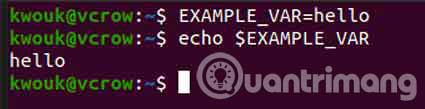
<p style="text-align: justify;">Thiết lập một biến môi trường cũng khá dễ dàng. Sử dụng tên không có toán tử&nbsp;<strong>$</strong>&nbsp;và gán bằng toán tử&nbsp;<strong>=</strong>. Ví dụ, để đặt&nbsp;<strong>“EXAMPLE_VAR”</strong>&nbsp;thành&nbsp;<strong>“hello”,</strong>&nbsp;bạn sẽ chạy lệnh sau:</p>

<pre id="pre4">
<code>EXAMPLE_VAR=hello</code></pre>

<p style="text-align: justify;">Bây giờ, bạn có thể truy cập biến này như trên bằng cách sử dụng toán tử&nbsp;<strong>$</strong>.</p>

<pre id="pre5">
<code>echo $EXAMPLE_VAR</code></pre>

<p style="text-align: justify;">Điều này sẽ chỉ đặt biến cho phiên hiện tại. Khi bạn đăng xuất hoặc khởi động lại máy tính, biến này sẽ biến mất. Điều này tốt cho việc thử nghiệm hoặc nếu bạn chỉ cần tạm thời đặt một giá trị nhất định.</p>

<p style="text-align: justify;"><img alt="Thiết lập biến môi trường" data-i="1" data-src="https://st.quantrimang.com/photos/image/2019/09/07/thiet-lap-va-liet-ke-bien-moi-truong-trong-linux-2.jpg" data-was-processed="true" height="109" src="https://st.quantrimang.com/photos/image/2019/09/07/thiet-lap-va-liet-ke-bien-moi-truong-trong-linux-2.jpg" width="425" /></p>

<p style="text-align: justify;">Để đảm bảo các biến môi trường này tồn tại, bạn cần đặt chúng vào file cấu hình phù hợp. Bạn có thể sử dụng file&nbsp;<strong>“/etc/environment”</strong>&nbsp;cho các biến trên toàn hệ thống, trong khi đó,&nbsp;<strong>“/etc/profile”</strong>&nbsp;thiết lập các biến shell.</p>

<p style="text-align: justify;">Đối với mục đích sử dụng cá nhân, bạn có thể đặt các biến trong trong&nbsp;<strong>“~/.bashrc”</strong>&nbsp;hoặc một file tương tự, nếu bạn sử dụng shell khác. Để thiết lập chúng, hãy sử dụng định dạng tương tự như trên.</p>

<p style="text-align: justify;">Với các công cụ dòng lệnh ở trên, bạn sẽ có những điều cơ bản cho gần như mọi thứ cần làm với các biến môi trường. Bạn có thể bắt đầu bằng cách tùy chỉnh các phần của shell hoặc những tùy chọn khởi động khác, sau đó mở rộng từ đó.</p>

<p style="text-align: justify;">Tất nhiên, nếu mới sử dụng Linux, bạn cần biết nhiều thứ hơn là chỉ các biến môi trường để tận dụng tối đa dòng lệnh.&nbsp;</p>

<p style="text-align: justify;">Chúc bạn thành công!</p>
		</div>
				<div id="author">
						<p>
				<strong>Nguồn tin:</strong>
				Quantrimang.com
			</p>
		</div>
	</div>
	<div id="footer" class="clearfix">
		<div id="url">
			<strong>URL của bản tin này: </strong><a href="https://www.nguoicodonvn2008.info/vi/news/savefile/kien-thuc-may-tinh/cach-thiet-lap-va-liet-ke-cac-bien-moi-truong-trong-linux-916.html" title="Cách thiết lập và liệt kê các biến môi trường trong Linux">https://www.nguoicodonvn2008.info/vi/news/savefile/kien-thuc-may-tinh/cach-thiet-lap-va-liet-ke-cac-bien-moi-truong-trong-linux-916.html</a>

		</div>
		<div class="clear"></div>
		<div class="copyright">
			&copy; .&#x3A; Nguoicodonvn2008.info - Cõi lòng người cô đơn &#x3A;.
		</div>
		<div id="contact">
			<a href="mailto:admin@nguoicodonvn2008.info">admin@nguoicodonvn2008.info</a>
		</div>
	</div>
</div>
        <div id="timeoutsess" class="chromeframe">
            Bạn đã không sử dụng Site, <a onclick="timeoutsesscancel();" href="https://www.nguoicodonvn2008.info/#">Bấm vào đây để duy trì trạng thái đăng nhập</a>. Thời gian chờ: <span id="secField"> 60 </span> giây
        </div>
        <div id="openidResult" class="nv-alert" style="display:none"></div>
        <div id="openidBt" data-result="" data-redirect=""></div>
		</script>
		<div class="car-top">
  <span><img src="https://www.nguoicodonvn2008.info/themes/default/images/car.png" alt=""></span>
</div>
<script src="https://www.nguoicodonvn2008.info/assets/js/jquery/jquery.min.js"></script>
<script>var nv_base_siteurl="/",nv_lang_data="vi",nv_lang_interface="vi",nv_name_variable="nv",nv_fc_variable="op",nv_lang_variable="language",nv_module_name="news",nv_func_name="savefile",nv_is_user=0, nv_my_ofs=-4,nv_my_abbr="EDT",nv_cookie_prefix="nv4c_e856T",nv_check_pass_mstime=1738000,nv_area_admin=0,nv_safemode=0,theme_responsive=0,nv_recaptcha_ver=2,nv_recaptcha_sitekey="",nv_recaptcha_type="image",XSSsanitize=1;</script>
<script src="https://www.nguoicodonvn2008.info/assets/js/language/vi.js"></script>
<script src="https://www.nguoicodonvn2008.info/assets/js/DOMPurify/purify3.js"></script>
<script src="https://www.nguoicodonvn2008.info/assets/js/global.js"></script>
<script src="https://www.nguoicodonvn2008.info/assets/js/site.js"></script>
<script src="https://www.nguoicodonvn2008.info/themes/default/js/news.js"></script>
<script src="https://www.nguoicodonvn2008.info/themes/default/js/main.js"></script>
<script src="https://www.nguoicodonvn2008.info/themes/default/js/custom.js"></script>
<script type="application/ld+json">
        {
            "@context": "https://schema.org",
            "@type": "Organization",
            "url": "https://www.nguoicodonvn2008.info",
            "logo": "https://www.nguoicodonvn2008.info/uploads/angel.gif"
        }
        </script>
<script src="https://www.nguoicodonvn2008.info/themes/default/js/bootstrap.min.js"></script>
<script type="text/javascript">
var $scrolltop = $('.car-top');
$scrolltop.on('click', function () {
    $('html,body').animate({
        scrollTop: 0
    }, 800);
    $(this).addClass("car-run");
    setTimeout(function(){ $scrolltop.removeClass('car-run');}, 1000);
    return false;
});
$(window).on('scroll', function ()
{ 
    if($(window).scrollTop() >= 200)
    {
        $scrolltop.addClass("show");
        $scrolltop.addClass("car-down");
    }
    else
    {
       $scrolltop.removeClass("show");
       setTimeout(function(){ $scrolltop.removeClass('car-down');}, 300);
    }
});
</script>
</body>
</html>