<!DOCTYPE html>
    <html lang="vi" xmlns="http://www.w3.org/1999/xhtml" prefix="og: http://ogp.me/ns#">
    <head>
<title>Cách thiết lập không lưu email đã gửi trong Microsoft Outlook</title>
<meta name="description" content="Cách thiết lập không lưu email đã gửi trong Microsoft Outlook - Savefile - Tin Tức -...">
<meta name="author" content=".: Nguoicodonvn2008.info - Cõi lòng người cô đơn :.">
<meta name="copyright" content=".: Nguoicodonvn2008.info - Cõi lòng người cô đơn :. [admin@nguoicodonvn2008.info]">
<meta name="robots" content="index, archive, follow, noodp">
<meta name="googlebot" content="index,archive,follow,noodp">
<meta name="msnbot" content="all,index,follow">
<meta name="generator" content="NukeViet v4.5">
<meta http-equiv="Content-Type" content="text/html; charset=utf-8">
<meta property="og:title" content="Cách thiết lập không lưu email đã gửi trong Microsoft Outlook">
<meta property="og:type" content="website">
<meta property="og:description" content="Savefile - Tin Tức - https&#x3A;&#x002F;&#x002F;www.nguoicodonvn2008.info&#x002F;vi&#x002F;news&#x002F;savefile&#x002F;kien-thuc-may-tinh&#x002F;cach-thiet-lap-khong-luu-email-da-gui-trong-microsoft-outlook-3448.html">
<meta property="og:site_name" content=".&#x3A; Nguoicodonvn2008.info - Cõi lòng người cô đơn &#x3A;.">
<meta property="og:url" content="https://www.nguoicodonvn2008.info/vi/news/savefile/kien-thuc-may-tinh/cach-thiet-lap-khong-luu-email-da-gui-trong-microsoft-outlook-3448.html">
<link rel="shortcut icon" href="https://www.nguoicodonvn2008.info/favicon.ico">
<link rel="canonical" href="https://www.nguoicodonvn2008.info/vi/news/savefile/kien-thuc-may-tinh/cach-thiet-lap-khong-luu-email-da-gui-trong-microsoft-outlook-3448.html">
<link rel="alternate" href="https://www.nguoicodonvn2008.info/vi/news/rss/" title="Tin Tức" type="application/rss+xml">
<link rel="alternate" href="https://www.nguoicodonvn2008.info/vi/news/rss/karaoke-dual/" title="Tin Tức - Karaoke Dual" type="application/rss+xml">
<link rel="alternate" href="https://www.nguoicodonvn2008.info/vi/news/rss/nhac-tre/" title="Tin Tức - Nhạc trẻ" type="application/rss+xml">
<link rel="alternate" href="https://www.nguoicodonvn2008.info/vi/news/rss/tru-tinh/" title="Tin Tức - Trữ tình" type="application/rss+xml">
<link rel="alternate" href="https://www.nguoicodonvn2008.info/vi/news/rss/nuoc-ngoai/" title="Tin Tức - Nước ngoài" type="application/rss+xml">
<link rel="alternate" href="https://www.nguoicodonvn2008.info/vi/news/rss/remix/" title="Tin Tức - Remix" type="application/rss+xml">
<link rel="alternate" href="https://www.nguoicodonvn2008.info/vi/news/rss/tam-su-tinh-yeu/" title="Tin Tức - Tâm sự tình yêu" type="application/rss+xml">
<link rel="alternate" href="https://www.nguoicodonvn2008.info/vi/news/rss/tho-suu-tam/" title="Tin Tức - Thơ sưu tầm" type="application/rss+xml">
<link rel="alternate" href="https://www.nguoicodonvn2008.info/vi/news/rss/cuoc-song/" title="Tin Tức - Cuộc sống" type="application/rss+xml">
<link rel="alternate" href="https://www.nguoicodonvn2008.info/vi/news/rss/phan-mem/" title="Tin Tức - Phần mềm" type="application/rss+xml">
<link rel="alternate" href="https://www.nguoicodonvn2008.info/vi/news/rss/kien-thuc-may-tinh/" title="Tin Tức - Kiến thức máy tính" type="application/rss+xml">
<link rel="alternate" href="https://www.nguoicodonvn2008.info/vi/news/rss/hoc-tap/" title="Tin Tức - Học tập" type="application/rss+xml">
<link rel="alternate" href="https://www.nguoicodonvn2008.info/vi/news/rss/tai-lieu/" title="Tin Tức - Tài liệu" type="application/rss+xml">
<link rel="alternate" href="https://www.nguoicodonvn2008.info/vi/news/rss/de-thi/" title="Tin Tức - Đề thi" type="application/rss+xml">
<link rel="preload" as="style" href="https://www.nguoicodonvn2008.info/assets/css/font-awesome.min.css" type="text/css">
<link rel="preload" as="style" href="https://www.nguoicodonvn2008.info/themes/default/css/bootstrap.non-responsive.css" type="text/css">
<link rel="preload" as="style" href="https://www.nguoicodonvn2008.info/themes/default/css/style.css" type="text/css">
<link rel="preload" as="style" href="https://www.nguoicodonvn2008.info/themes/default/css/style.non-responsive.css" type="text/css">
<link rel="preload" as="style" href="https://www.nguoicodonvn2008.info/themes/default/css/news.css" type="text/css">
<link rel="preload" as="style" href="https://www.nguoicodonvn2008.info/themes/default/css/custom.css" type="text/css">
<link rel="preload" as="script" href="https://www.nguoicodonvn2008.info/assets/js/jquery/jquery.min.js" type="text/javascript">
<link rel="preload" as="script" href="https://www.nguoicodonvn2008.info/assets/js/language/vi.js" type="text/javascript">
<link rel="preload" as="script" href="https://www.nguoicodonvn2008.info/assets/js/DOMPurify/purify3.js" type="text/javascript">
<link rel="preload" as="script" href="https://www.nguoicodonvn2008.info/assets/js/global.js" type="text/javascript">
<link rel="preload" as="script" href="https://www.nguoicodonvn2008.info/assets/js/site.js" type="text/javascript">
<link rel="preload" as="script" href="https://www.nguoicodonvn2008.info/themes/default/js/news.js" type="text/javascript">
<link rel="preload" as="script" href="https://www.nguoicodonvn2008.info/themes/default/js/main.js" type="text/javascript">
<link rel="preload" as="script" href="https://www.nguoicodonvn2008.info/themes/default/js/custom.js" type="text/javascript">
<link rel="preload" as="script" href="https://www.nguoicodonvn2008.info/themes/default/js/bootstrap.min.js" type="text/javascript">
<link rel="stylesheet" href="https://www.nguoicodonvn2008.info/assets/css/font-awesome.min.css">
<link rel="stylesheet" href="https://www.nguoicodonvn2008.info/themes/default/css/bootstrap.non-responsive.css">
<link rel="stylesheet" href="https://www.nguoicodonvn2008.info/themes/default/css/style.css">
<link rel="stylesheet" href="https://www.nguoicodonvn2008.info/themes/default/css/style.non-responsive.css">
<link rel="StyleSheet" href="https://www.nguoicodonvn2008.info/themes/default/css/news.css">
<link rel="stylesheet" href="https://www.nguoicodonvn2008.info/themes/default/css/custom.css">
<style type="text/css">
	body{background: #fff;}
</style>
    </head>
    <body>
<div id="print">
	<div id="hd_print">
		<h2 class="pull-left">.&#x3A; Nguoicodonvn2008.info - Cõi lòng người cô đơn &#x3A;.</h2>
		<p class="pull-right"><a title=".&#x3A; Nguoicodonvn2008.info - Cõi lòng người cô đơn &#x3A;." href="https://www.nguoicodonvn2008.info/">https://www.nguoicodonvn2008.info</a></p>
	</div>
	<div class="clear"></div>
	<hr />
	<div id="content">
		<h1>Cách thiết lập không lưu email đã gửi trong Microsoft Outlook</h1>
		<ul class="list-inline">
			<li>Thứ ba - 12/01/2021 23:47</li>
			<li class="hidden-print txtrequired"><em class="fa fa-print">&nbsp;</em><a title="In ra" href="javascript:;" onclick="window.print()">In ra</a></li>
			<li class="hidden-print txtrequired"><em class="fa fa-power-off">&nbsp;</em><a title="Đóng cửa sổ này" href="javascript:;" onclick="window.close()">Đóng cửa sổ này</a></li>
		</ul>
		<div class="clear"></div>
		<div id="hometext">
		</div>
				<div class="imghome">
			<img alt="Cách thiết lập không lưu email đã gửi trong Microsoft Outlook" src="https://st.quantrimang.com/photos/image/2021/01/13/khong-luu-email-da-gui-trong-outlook3.jpg" width="460" class="img-thumbnail" />
		</div>
		<div class="clear"></div>
		<div id="bodytext" class="clearfix">
			<p style="text-align: justify;">Nếu thường xuyên sử dụng Outlook, bạn chắc hẳn biết rằng việc xóa thư mục Sent items có nghĩa là xóa tất cả các email hoặc chuyển chúng vào một kho lưu trữ khác. Dưới đây là phương thức tự động hóa quy trình bằng cách thiết lập để Outlook không lưu các email đã gửi hoặc lưu chúng vào một thư mục khác.</p>

<p style="text-align: justify;">Khi bạn gửi email, Outlook sẽ gửi email gốc đến người nhận và lưu trữ bản sao của email đó trong thư mục Sent Items. Đây là một quy trình mặc định, nhưng bạn vẫn có thể thay đổi nếu muốn. Outlook cho phép bạn tắt tính năng này nếu không muốn lưu trữ bản sao của các email đã gửi trong thư mục Sent Items.</p>

<h2 style="text-align: justify;">Cách thiết lập Outlook ngừng lưu email đã gửi</h2>

<p style="text-align: justify;">1. Để thiết lập Microsoft Outlook dừng lưu bản sao các email mà bạn đã gửi đi, đầu tiên, hãy truy cập&nbsp;<strong>File &gt; Options</strong>.</p>

<p style="text-align: justify;"><img alt="File &gt; Options" data-i="0" data-src="https://st.quantrimang.com/photos/image/2021/01/13/khong-luu-email-da-gui-trong-outlook2.jpg" data-was-processed="true" height="432" src="https://st.quantrimang.com/photos/image/2021/01/13/khong-luu-email-da-gui-trong-outlook2.jpg" width="146" /></p>

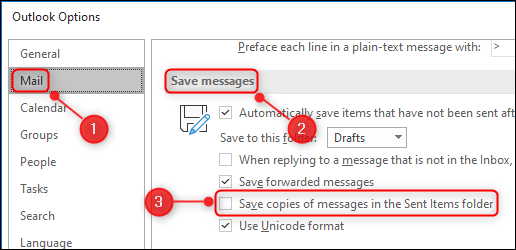
<p style="text-align: justify;">2. Trong tab “<strong>Mail</strong>”, bạn cuộn xuống phần “<strong>Save Messages</strong>” và bỏ tích tùy chọn “<strong>Save copies of messages in the Sent Items folder</strong>”.</p>

<p style="text-align: justify;"><img alt="Bỏ tích “Save copies of messages in the Sent Items folder”" data-i="1" data-src="https://st.quantrimang.com/photos/image/2021/01/13/khong-luu-email-da-gui-trong-outlook3.jpg" data-was-processed="true" height="250" src="https://st.quantrimang.com/photos/image/2021/01/13/khong-luu-email-da-gui-trong-outlook3.jpg" width="516" /></p>

<p style="text-align: justify;">(<strong>Lưu ý:</strong>&nbsp;Trong mục “<strong>Save Messages</strong>”, bên cạnh “<strong>Save copies of messages in the Sent Items folder</strong>”, còn có hai tùy chọn quan trọng khác mà bạn có thể quan tâm, bao gồm:</p>

<ul>
	<li style="text-align: justify;"><strong>Automatically save items that have not been sent after this many minutes</strong>: tùy chọn này cho các email không được gửi đi hoặc cần thời gian dài để gửi. Chúng ta cũng có thể thay đổi khoảng thời gian trì hoãn gửi email trên Outlook trước khi lưu thư đó.</li>
	<li style="text-align: justify;"><strong>Save forwarded messages: bỏ chọn để không lưu các email chuyển tiếp</strong>. Bản sao của email gốc vẫn sẽ có trong hộp thư gửi đến. Tuy nhiên, trong quá trình chuyển tiếp thư và email bạn lưu là các thư đã gửi, đồng nghĩa chúng ta đã lưu thư đó 2 lần).</li>
</ul>

<p style="text-align: justify;">3. Bây giờ nhấp vào “<strong>OK</strong>” ở góc dưới bên phải của cửa sổ “Options” để lưu các thay đổi.</p>

<p style="text-align: justify;"><img alt="Bấm vào OK" data-i="2" data-src="https://st.quantrimang.com/photos/image/2021/01/13/khong-luu-email-da-gui-trong-outlook4.jpg" data-was-processed="true" height="253" src="https://st.quantrimang.com/photos/image/2021/01/13/khong-luu-email-da-gui-trong-outlook4.jpg" width="531" /></p>

<p style="text-align: justify;">Nếu bạn chỉ muốn Outlook ngừng lưu các email đã gửi, đó là tất cả những gì bạn cần làm.</p>

<p style="text-align: justify;">Còn nếu bạn muốn lưu lại những email đã gửi thì chỉ cần tích lại vào &quot;<strong>Save copies of messages in the Sent Items folder</strong>&quot; là được.</p>

<div style="text-align: justify;">&nbsp;</div>

<p style="text-align: justify;">Lưu ý, Thiết lập trên sẽ khiến tất cả các email mà bạn đã gửi đi đều sẽ không được lưu lại. Trong trường hợp bạn chỉ không muốn lưu trữ một email cụ thể nào đó, chỉ cần thực hiện những thao tác đơn giản sau:</p>

<ol>
	<li style="text-align: justify;">Mở ứng dụng Outlook</li>
	<li style="text-align: justify;">Điều hướng đến tab “<strong>Options</strong>”.</li>
	<li style="text-align: justify;">Tìm tùy chọn “<strong>Save Sent Item To</strong>” và nhấp nào nó. thao tác này sẽ cung cấp cho bạn tùy chọn chỉ định lưu email đã gửi vào một thư mục cụ thể hoặc không lưu trữ email đó.</li>
	<li style="text-align: justify;">Bấm vào “<strong>Do not save</strong>”.</li>
</ol>

<p style="text-align: justify;"><img alt="Không lưu trữ một email cụ thể" data-i="3" data-src="https://st.quantrimang.com/photos/image/2021/01/13/khong-luu-email-da-gui-trong-outlook1.jpg" data-was-processed="true" height="267" src="https://st.quantrimang.com/photos/image/2021/01/13/khong-luu-email-da-gui-trong-outlook1.jpg" width="526" /></p>
		</div>
				<div id="author">
						<p>
				<strong>Nguồn tin:</strong>
				Quantrimang.com
			</p>
		</div>
	</div>
	<div id="footer" class="clearfix">
		<div id="url">
			<strong>URL của bản tin này: </strong><a href="https://www.nguoicodonvn2008.info/vi/news/savefile/kien-thuc-may-tinh/cach-thiet-lap-khong-luu-email-da-gui-trong-microsoft-outlook-3448.html" title="Cách thiết lập không lưu email đã gửi trong Microsoft Outlook">https://www.nguoicodonvn2008.info/vi/news/savefile/kien-thuc-may-tinh/cach-thiet-lap-khong-luu-email-da-gui-trong-microsoft-outlook-3448.html</a>

		</div>
		<div class="clear"></div>
		<div class="copyright">
			&copy; .&#x3A; Nguoicodonvn2008.info - Cõi lòng người cô đơn &#x3A;.
		</div>
		<div id="contact">
			<a href="mailto:admin@nguoicodonvn2008.info">admin@nguoicodonvn2008.info</a>
		</div>
	</div>
</div>
        <div id="timeoutsess" class="chromeframe">
            Bạn đã không sử dụng Site, <a onclick="timeoutsesscancel();" href="https://www.nguoicodonvn2008.info/#">Bấm vào đây để duy trì trạng thái đăng nhập</a>. Thời gian chờ: <span id="secField"> 60 </span> giây
        </div>
        <div id="openidResult" class="nv-alert" style="display:none"></div>
        <div id="openidBt" data-result="" data-redirect=""></div>
		</script>
		<div class="car-top">
  <span><img src="https://www.nguoicodonvn2008.info/themes/default/images/car.png" alt=""></span>
</div>
<script src="https://www.nguoicodonvn2008.info/assets/js/jquery/jquery.min.js"></script>
<script>var nv_base_siteurl="/",nv_lang_data="vi",nv_lang_interface="vi",nv_name_variable="nv",nv_fc_variable="op",nv_lang_variable="language",nv_module_name="news",nv_func_name="savefile",nv_is_user=0, nv_my_ofs=-4,nv_my_abbr="EDT",nv_cookie_prefix="nv4c_e856T",nv_check_pass_mstime=1738000,nv_area_admin=0,nv_safemode=0,theme_responsive=0,nv_recaptcha_ver=2,nv_recaptcha_sitekey="",nv_recaptcha_type="image",XSSsanitize=1;</script>
<script src="https://www.nguoicodonvn2008.info/assets/js/language/vi.js"></script>
<script src="https://www.nguoicodonvn2008.info/assets/js/DOMPurify/purify3.js"></script>
<script src="https://www.nguoicodonvn2008.info/assets/js/global.js"></script>
<script src="https://www.nguoicodonvn2008.info/assets/js/site.js"></script>
<script src="https://www.nguoicodonvn2008.info/themes/default/js/news.js"></script>
<script src="https://www.nguoicodonvn2008.info/themes/default/js/main.js"></script>
<script src="https://www.nguoicodonvn2008.info/themes/default/js/custom.js"></script>
<script type="application/ld+json">
        {
            "@context": "https://schema.org",
            "@type": "Organization",
            "url": "https://www.nguoicodonvn2008.info",
            "logo": "https://www.nguoicodonvn2008.info/uploads/angel.gif"
        }
        </script>
<script src="https://www.nguoicodonvn2008.info/themes/default/js/bootstrap.min.js"></script>
<script type="text/javascript">
var $scrolltop = $('.car-top');
$scrolltop.on('click', function () {
    $('html,body').animate({
        scrollTop: 0
    }, 800);
    $(this).addClass("car-run");
    setTimeout(function(){ $scrolltop.removeClass('car-run');}, 1000);
    return false;
});
$(window).on('scroll', function ()
{ 
    if($(window).scrollTop() >= 200)
    {
        $scrolltop.addClass("show");
        $scrolltop.addClass("car-down");
    }
    else
    {
       $scrolltop.removeClass("show");
       setTimeout(function(){ $scrolltop.removeClass('car-down');}, 300);
    }
});
</script>
</body>
</html>