<!DOCTYPE html>
    <html lang="vi" xmlns="http://www.w3.org/1999/xhtml" prefix="og: http://ogp.me/ns#">
    <head>
<title>Cách thêm&#x002F;xóa Quick Access trong ngăn điều hướng File Explorer trên Windows 10</title>
<meta name="description" content="Cách thêm&#x002F;xóa Quick Access trong ngăn điều hướng File Explorer trên Windows 10 - Savefile - Tin Tức -...">
<meta name="author" content=".: Nguoicodonvn2008.info - Cõi lòng người cô đơn :.">
<meta name="copyright" content=".: Nguoicodonvn2008.info - Cõi lòng người cô đơn :. [admin@nguoicodonvn2008.info]">
<meta name="robots" content="index, archive, follow, noodp">
<meta name="googlebot" content="index,archive,follow,noodp">
<meta name="msnbot" content="all,index,follow">
<meta name="generator" content="NukeViet v4.5">
<meta http-equiv="Content-Type" content="text/html; charset=utf-8">
<meta property="og:title" content="Cách thêm&#x002F;xóa Quick Access trong ngăn điều hướng File Explorer trên Windows 10">
<meta property="og:type" content="website">
<meta property="og:description" content="Savefile - Tin Tức -...">
<meta property="og:site_name" content=".&#x3A; Nguoicodonvn2008.info - Cõi lòng người cô đơn &#x3A;.">
<meta property="og:url" content="https://www.nguoicodonvn2008.info/vi/news/savefile/kien-thuc-may-tinh/cach-them-xoa-quick-access-trong-ngan-dieu-huong-file-explorer-tren-windows-10-2700.html">
<link rel="shortcut icon" href="https://www.nguoicodonvn2008.info/favicon.ico">
<link rel="canonical" href="https://www.nguoicodonvn2008.info/vi/news/savefile/kien-thuc-may-tinh/cach-them-xoa-quick-access-trong-ngan-dieu-huong-file-explorer-tren-windows-10-2700.html">
<link rel="alternate" href="https://www.nguoicodonvn2008.info/vi/news/rss/" title="Tin Tức" type="application/rss+xml">
<link rel="alternate" href="https://www.nguoicodonvn2008.info/vi/news/rss/karaoke-dual/" title="Tin Tức - Karaoke Dual" type="application/rss+xml">
<link rel="alternate" href="https://www.nguoicodonvn2008.info/vi/news/rss/nhac-tre/" title="Tin Tức - Nhạc trẻ" type="application/rss+xml">
<link rel="alternate" href="https://www.nguoicodonvn2008.info/vi/news/rss/tru-tinh/" title="Tin Tức - Trữ tình" type="application/rss+xml">
<link rel="alternate" href="https://www.nguoicodonvn2008.info/vi/news/rss/nuoc-ngoai/" title="Tin Tức - Nước ngoài" type="application/rss+xml">
<link rel="alternate" href="https://www.nguoicodonvn2008.info/vi/news/rss/remix/" title="Tin Tức - Remix" type="application/rss+xml">
<link rel="alternate" href="https://www.nguoicodonvn2008.info/vi/news/rss/tam-su-tinh-yeu/" title="Tin Tức - Tâm sự tình yêu" type="application/rss+xml">
<link rel="alternate" href="https://www.nguoicodonvn2008.info/vi/news/rss/tho-suu-tam/" title="Tin Tức - Thơ sưu tầm" type="application/rss+xml">
<link rel="alternate" href="https://www.nguoicodonvn2008.info/vi/news/rss/cuoc-song/" title="Tin Tức - Cuộc sống" type="application/rss+xml">
<link rel="alternate" href="https://www.nguoicodonvn2008.info/vi/news/rss/phan-mem/" title="Tin Tức - Phần mềm" type="application/rss+xml">
<link rel="alternate" href="https://www.nguoicodonvn2008.info/vi/news/rss/kien-thuc-may-tinh/" title="Tin Tức - Kiến thức máy tính" type="application/rss+xml">
<link rel="alternate" href="https://www.nguoicodonvn2008.info/vi/news/rss/hoc-tap/" title="Tin Tức - Học tập" type="application/rss+xml">
<link rel="alternate" href="https://www.nguoicodonvn2008.info/vi/news/rss/tai-lieu/" title="Tin Tức - Tài liệu" type="application/rss+xml">
<link rel="alternate" href="https://www.nguoicodonvn2008.info/vi/news/rss/de-thi/" title="Tin Tức - Đề thi" type="application/rss+xml">
<link rel="preload" as="style" href="https://www.nguoicodonvn2008.info/assets/css/font-awesome.min.css" type="text/css">
<link rel="preload" as="style" href="https://www.nguoicodonvn2008.info/themes/default/css/bootstrap.non-responsive.css" type="text/css">
<link rel="preload" as="style" href="https://www.nguoicodonvn2008.info/themes/default/css/style.css" type="text/css">
<link rel="preload" as="style" href="https://www.nguoicodonvn2008.info/themes/default/css/style.non-responsive.css" type="text/css">
<link rel="preload" as="style" href="https://www.nguoicodonvn2008.info/themes/default/css/news.css" type="text/css">
<link rel="preload" as="style" href="https://www.nguoicodonvn2008.info/themes/default/css/custom.css" type="text/css">
<link rel="preload" as="script" href="https://www.nguoicodonvn2008.info/assets/js/jquery/jquery.min.js" type="text/javascript">
<link rel="preload" as="script" href="https://www.nguoicodonvn2008.info/assets/js/language/vi.js" type="text/javascript">
<link rel="preload" as="script" href="https://www.nguoicodonvn2008.info/assets/js/DOMPurify/purify3.js" type="text/javascript">
<link rel="preload" as="script" href="https://www.nguoicodonvn2008.info/assets/js/global.js" type="text/javascript">
<link rel="preload" as="script" href="https://www.nguoicodonvn2008.info/assets/js/site.js" type="text/javascript">
<link rel="preload" as="script" href="https://www.nguoicodonvn2008.info/themes/default/js/news.js" type="text/javascript">
<link rel="preload" as="script" href="https://www.nguoicodonvn2008.info/themes/default/js/main.js" type="text/javascript">
<link rel="preload" as="script" href="https://www.nguoicodonvn2008.info/themes/default/js/custom.js" type="text/javascript">
<link rel="preload" as="script" href="https://www.nguoicodonvn2008.info/themes/default/js/bootstrap.min.js" type="text/javascript">
<link rel="stylesheet" href="https://www.nguoicodonvn2008.info/assets/css/font-awesome.min.css">
<link rel="stylesheet" href="https://www.nguoicodonvn2008.info/themes/default/css/bootstrap.non-responsive.css">
<link rel="stylesheet" href="https://www.nguoicodonvn2008.info/themes/default/css/style.css">
<link rel="stylesheet" href="https://www.nguoicodonvn2008.info/themes/default/css/style.non-responsive.css">
<link rel="StyleSheet" href="https://www.nguoicodonvn2008.info/themes/default/css/news.css">
<link rel="stylesheet" href="https://www.nguoicodonvn2008.info/themes/default/css/custom.css">
<style type="text/css">
	body{background: #fff;}
</style>
    </head>
    <body>
<div id="print">
	<div id="hd_print">
		<h2 class="pull-left">.&#x3A; Nguoicodonvn2008.info - Cõi lòng người cô đơn &#x3A;.</h2>
		<p class="pull-right"><a title=".&#x3A; Nguoicodonvn2008.info - Cõi lòng người cô đơn &#x3A;." href="https://www.nguoicodonvn2008.info/">https://www.nguoicodonvn2008.info</a></p>
	</div>
	<div class="clear"></div>
	<hr />
	<div id="content">
		<h1>Cách thêm&#x002F;xóa Quick Access trong ngăn điều hướng File Explorer trên Windows 10</h1>
		<ul class="list-inline">
			<li>Thứ bảy - 12/09/2020 00:28</li>
			<li class="hidden-print txtrequired"><em class="fa fa-print">&nbsp;</em><a title="In ra" href="javascript:;" onclick="window.print()">In ra</a></li>
			<li class="hidden-print txtrequired"><em class="fa fa-power-off">&nbsp;</em><a title="Đóng cửa sổ này" href="javascript:;" onclick="window.close()">Đóng cửa sổ này</a></li>
		</ul>
		<div class="clear"></div>
		<div id="hometext">
		</div>
				<div class="imghome">
			<img alt="Cách thêm&#x002F;xóa Quick Access trong ngăn điều hướng File Explorer trên Windows 10" src="https://st.quantrimang.com/photos/image/2020/09/11/them-xoa-quick-access-2.png" width="460" class="img-thumbnail" />
		</div>
		<div class="clear"></div>
		<div id="bodytext" class="clearfix">
			<p style="text-align: justify;">Windows 10 đã thay thế mục&nbsp;<strong>Favorites</strong>&nbsp;từ phiên bản Windows trước bằng&nbsp;<strong>Quick Access</strong>. Quick Access là con đường ngắn nhất đến các file bạn đang làm việc và những thư mục bạn thường sử dụng. Đây là các thư mục thường xuyên truy cập và những file gần đây của bạn.</p>

<h2 style="text-align: justify;">Quick Access trong File Explorer</h2>

<p style="text-align: justify;">Trong Windows 10, File Explorer mở Quick Access theo mặc định, hiển thị&nbsp;<strong>Frequent folders</strong>&nbsp;và<strong>&nbsp;Recent files</strong>.</p>

<ul>
	<li style="text-align: justify;"><strong>Frequent folders</strong>&nbsp;= Hiển thị tối đa 10 thư mục mà bạn thường xuyên mở trên hệ thống.</li>
	<li style="text-align: justify;"><strong>Recent files</strong>&nbsp;= Hiển thị tối đa 20 file mà bạn đã mở gần đây nhất.</li>
</ul>

<p style="text-align: justify;">Hướng dẫn này sẽ chỉ cho bạn cách thêm hoặc xóa Quick Access trong ngăn điều hướng File Explorer cho tất cả người dùng trong Windows 10.</p>

<p style="text-align: justify;"><strong>Lưu ý</strong>:</p>

<p style="text-align: justify;">- Bạn phải đăng nhập với tư cách quản trị viên để có thể thêm hoặc xóa Quick Access trong ngăn điều hướng.</p>

<p style="text-align: justify;">- Xóa Quick Access khỏi ngăn điều hướng sẽ không xóa lịch sử của Frequent folders và Recent files.</p>

<div style="text-align: justify;">&nbsp;</div>

<h2 style="text-align: justify;">Thêm hoặc Xóa hoàn toàn Quick Access trong ngăn điều hướng File Explorer</h2>

<p style="text-align: justify;">Tùy chọn này sẽ loại bỏ hoàn toàn Quick Access khỏi tất cả các vị trí, nhưng làm như vậy cũng sẽ vô hiệu hóa tính năng kéo và thả vào ngăn điều hướng.</p>

<p style="text-align: justify;">1. Nhấn phím&nbsp;<strong>Win + R</strong>&nbsp;để mở&nbsp;<strong>Run</strong>, nhập&nbsp;<strong>regedit</strong>&nbsp;vào&nbsp;<strong>Run</strong>&nbsp;và nhấn&nbsp;<strong>OK</strong>&nbsp;để&nbsp;mở Registry Editor.</p>

<p style="text-align: justify;">2. Nếu được&nbsp;<a href="https://quantrimang.com/tim-hieu-ve-ban-chat-uac-cua-windows-va-tai-sao-chung-ta-khong-nen-tat-bo-tinh-nang-nay-76293" title="Tìm hiểu về bản chất UAC của Windows và tại sao chúng ta không nên tắt bỏ tính năng này">UAC</a>&nbsp;nhắc, hãy nhấp vào&nbsp;<strong>Yes.</strong></p>

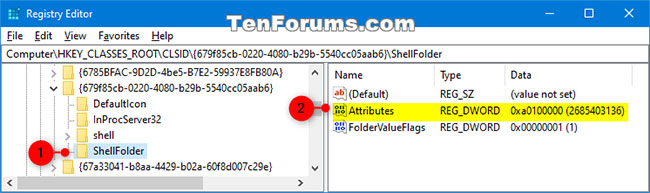
<p style="text-align: justify;">3. Trong&nbsp;<strong>Registry Editor</strong>, điều hướng đến vị trí bên dưới:</p>

<pre id="pre0">
<code>HKEY_CLASSES_ROOT\CLSID\{679f85cb-0220-4080-b29b-5540cc05aab6}\ShellFolder</code></pre>

<figure data-inimage-loaded="true">
<div style="text-align: justify;"><br />
<img alt="Điều hướng đến vị trí key trong Registry Editor" data-i="1" data-src="https://st.quantrimang.com/photos/image/2020/09/11/them-xoa-quick-access-1.jpg" data-was-processed="true" height="193" src="https://st.quantrimang.com/photos/image/2020/09/11/them-xoa-quick-access-1.jpg" width="650" /></div>

<figcaption>
<div style="text-align: justify;">Điều hướng đến vị trí key trong Registry Editor</div>
</figcaption>
</figure>

<p style="text-align: justify;">4. Nếu bạn chưa làm như vậy, trước tiên bạn cần thay đổi chủ sở hữu của registry key&nbsp;<strong>ShellFolder</strong>&nbsp;trong ngăn bên trái thành nhóm&nbsp;<strong>Administrators.</strong></p>

<p style="text-align: justify;">5. Nếu chưa thực hiện, bạn sẽ cần thiết lập quyền lần thứ 2 cho registry key&nbsp;<strong>ShellFolder</strong>&nbsp;trong ngăn bên trái để cho phép nhóm&nbsp;<strong>Administrators</strong>&nbsp;có toàn quyền kiểm soát (<strong>Full control</strong>).</p>

<p style="text-align: justify;">6. Trong ngăn bên phải của&nbsp;<strong>ShellFolder</strong>, nhấp đúp vào DWORD&nbsp;<strong>Attributes</strong>&nbsp;để sửa đổi nó.</p>

<p style="text-align: justify;">7. Thực hiện bước 8 (để loại bỏ) hoặc bước 9 (để thêm) bên dưới, tùy theo những gì bạn muốn.</p>

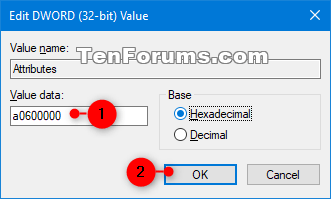
<p style="text-align: justify;">8. Để xóa Quick Access khỏi ngăn điều hướng, nhập&nbsp;<strong>a0600000</strong>, nhấp vào&nbsp;<strong>OK</strong>&nbsp;và chuyển sang bước 10 bên dưới.</p>

<figure>
<div style="text-align: justify;"><img alt="Xóa Quick Access khỏi ngăn điều hướng" data-i="2" data-src="https://st.quantrimang.com/photos/image/2020/09/11/them-xoa-quick-access-2.png" data-was-processed="true" height="199" src="https://st.quantrimang.com/photos/image/2020/09/11/them-xoa-quick-access-2.png" width="331" /></div>

<figcaption>
<div style="text-align: justify;">Xóa Quick Access khỏi ngăn điều hướng</div>
</figcaption>
</figure>

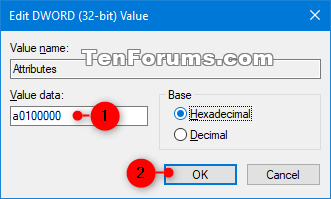
<p style="text-align: justify;">9. Để thêm Quick Access vào ngăn điều hướng, nhập&nbsp;<strong>a0100000</strong>, nhấn&nbsp;<strong>OK</strong>&nbsp;và chuyển sang bước 10 bên dưới.</p>

<figure>
<div style="text-align: justify;"><img alt="Thêm Quick Access vào ngăn điều hướng" data-i="3" data-src="https://st.quantrimang.com/photos/image/2020/09/11/them-xoa-quick-access-3.png" data-was-processed="true" height="199" src="https://st.quantrimang.com/photos/image/2020/09/11/them-xoa-quick-access-3.png" width="331" /></div>

<figcaption>
<div style="text-align: justify;">Thêm Quick Access vào ngăn điều hướng</div>
</figcaption>
</figure>

<p style="text-align: justify;">10. Khi hoàn tất, hãy đóng Registry Editor.</p>

<p style="text-align: justify;">11. Khởi động lại Explorer, đăng xuất và đăng nhập hoặc&nbsp;khởi động lại máy tính&nbsp;để áp dụng thay đổi.</p>
		</div>
				<div id="author">
						<p>
				<strong>Nguồn tin:</strong>
				Quantrimang.com
			</p>
		</div>
	</div>
	<div id="footer" class="clearfix">
		<div id="url">
			<strong>URL của bản tin này: </strong><a href="https://www.nguoicodonvn2008.info/vi/news/savefile/kien-thuc-may-tinh/cach-them-xoa-quick-access-trong-ngan-dieu-huong-file-explorer-tren-windows-10-2700.html" title="Cách thêm&#x002F;xóa Quick Access trong ngăn điều hướng File Explorer trên Windows 10">https://www.nguoicodonvn2008.info/vi/news/savefile/kien-thuc-may-tinh/cach-them-xoa-quick-access-trong-ngan-dieu-huong-file-explorer-tren-windows-10-2700.html</a>

		</div>
		<div class="clear"></div>
		<div class="copyright">
			&copy; .&#x3A; Nguoicodonvn2008.info - Cõi lòng người cô đơn &#x3A;.
		</div>
		<div id="contact">
			<a href="mailto:admin@nguoicodonvn2008.info">admin@nguoicodonvn2008.info</a>
		</div>
	</div>
</div>
        <div id="timeoutsess" class="chromeframe">
            Bạn đã không sử dụng Site, <a onclick="timeoutsesscancel();" href="https://www.nguoicodonvn2008.info/#">Bấm vào đây để duy trì trạng thái đăng nhập</a>. Thời gian chờ: <span id="secField"> 60 </span> giây
        </div>
        <div id="openidResult" class="nv-alert" style="display:none"></div>
        <div id="openidBt" data-result="" data-redirect=""></div>
		</script>
		<div class="car-top">
  <span><img src="https://www.nguoicodonvn2008.info/themes/default/images/car.png" alt=""></span>
</div>
<div id="run_cronjobs" style="visibility:hidden;display:none;"><img alt="cron" src="/index.php?second=cronjobs&amp;p=r4JfOX6R" width="1" height="1" /></div>
<script src="https://www.nguoicodonvn2008.info/assets/js/jquery/jquery.min.js"></script>
<script>var nv_base_siteurl="/",nv_lang_data="vi",nv_lang_interface="vi",nv_name_variable="nv",nv_fc_variable="op",nv_lang_variable="language",nv_module_name="news",nv_func_name="savefile",nv_is_user=0, nv_my_ofs=-4,nv_my_abbr="EDT",nv_cookie_prefix="nv4c_e856T",nv_check_pass_mstime=1738000,nv_area_admin=0,nv_safemode=0,theme_responsive=0,nv_recaptcha_ver=2,nv_recaptcha_sitekey="",nv_recaptcha_type="image",XSSsanitize=1;</script>
<script src="https://www.nguoicodonvn2008.info/assets/js/language/vi.js"></script>
<script src="https://www.nguoicodonvn2008.info/assets/js/DOMPurify/purify3.js"></script>
<script src="https://www.nguoicodonvn2008.info/assets/js/global.js"></script>
<script src="https://www.nguoicodonvn2008.info/assets/js/site.js"></script>
<script src="https://www.nguoicodonvn2008.info/themes/default/js/news.js"></script>
<script src="https://www.nguoicodonvn2008.info/themes/default/js/main.js"></script>
<script src="https://www.nguoicodonvn2008.info/themes/default/js/custom.js"></script>
<script type="application/ld+json">
        {
            "@context": "https://schema.org",
            "@type": "Organization",
            "url": "https://www.nguoicodonvn2008.info",
            "logo": "https://www.nguoicodonvn2008.info/uploads/angel.gif"
        }
        </script>
<script src="https://www.nguoicodonvn2008.info/themes/default/js/bootstrap.min.js"></script>
<script type="text/javascript">
var $scrolltop = $('.car-top');
$scrolltop.on('click', function () {
    $('html,body').animate({
        scrollTop: 0
    }, 800);
    $(this).addClass("car-run");
    setTimeout(function(){ $scrolltop.removeClass('car-run');}, 1000);
    return false;
});
$(window).on('scroll', function ()
{ 
    if($(window).scrollTop() >= 200)
    {
        $scrolltop.addClass("show");
        $scrolltop.addClass("car-down");
    }
    else
    {
       $scrolltop.removeClass("show");
       setTimeout(function(){ $scrolltop.removeClass('car-down');}, 300);
    }
});
</script>
</body>
</html>