<!DOCTYPE html>
    <html lang="vi" xmlns="http://www.w3.org/1999/xhtml" prefix="og: http://ogp.me/ns#">
    <head>
<title>Cách thêm tab Copilot mới vào trình duyệt Microsoft Edge</title>
<meta name="description" content="Cách thêm tab Copilot mới vào trình duyệt Microsoft Edge - Savefile - Tin Tức -...">
<meta name="author" content=".: Nguoicodonvn2008.info - Cõi lòng người cô đơn :.">
<meta name="copyright" content=".: Nguoicodonvn2008.info - Cõi lòng người cô đơn :. [admin@nguoicodonvn2008.info]">
<meta name="robots" content="index, archive, follow, noodp">
<meta name="googlebot" content="index,archive,follow,noodp">
<meta name="msnbot" content="all,index,follow">
<meta name="generator" content="NukeViet v4.5">
<meta http-equiv="Content-Type" content="text/html; charset=utf-8">
<meta property="og:title" content="Cách thêm tab Copilot mới vào trình duyệt Microsoft Edge">
<meta property="og:type" content="website">
<meta property="og:description" content="Savefile - Tin Tức - https&#x3A;&#x002F;&#x002F;www.nguoicodonvn2008.info&#x002F;vi&#x002F;news&#x002F;savefile&#x002F;kien-thuc-may-tinh&#x002F;cach-them-tab-copilot-moi-vao-trinh-duyet-microsoft-edge-10251.html">
<meta property="og:site_name" content=".&#x3A; Nguoicodonvn2008.info - Cõi lòng người cô đơn &#x3A;.">
<meta property="og:url" content="https://www.nguoicodonvn2008.info/vi/news/savefile/kien-thuc-may-tinh/cach-them-tab-copilot-moi-vao-trinh-duyet-microsoft-edge-10251.html">
<link rel="shortcut icon" href="https://www.nguoicodonvn2008.info/favicon.ico">
<link rel="canonical" href="https://www.nguoicodonvn2008.info/vi/news/savefile/kien-thuc-may-tinh/cach-them-tab-copilot-moi-vao-trinh-duyet-microsoft-edge-10251.html">
<link rel="alternate" href="https://www.nguoicodonvn2008.info/vi/news/rss/" title="Tin Tức" type="application/rss+xml">
<link rel="alternate" href="https://www.nguoicodonvn2008.info/vi/news/rss/karaoke-dual/" title="Tin Tức - Karaoke Dual" type="application/rss+xml">
<link rel="alternate" href="https://www.nguoicodonvn2008.info/vi/news/rss/nhac-tre/" title="Tin Tức - Nhạc trẻ" type="application/rss+xml">
<link rel="alternate" href="https://www.nguoicodonvn2008.info/vi/news/rss/tru-tinh/" title="Tin Tức - Trữ tình" type="application/rss+xml">
<link rel="alternate" href="https://www.nguoicodonvn2008.info/vi/news/rss/nuoc-ngoai/" title="Tin Tức - Nước ngoài" type="application/rss+xml">
<link rel="alternate" href="https://www.nguoicodonvn2008.info/vi/news/rss/remix/" title="Tin Tức - Remix" type="application/rss+xml">
<link rel="alternate" href="https://www.nguoicodonvn2008.info/vi/news/rss/tam-su-tinh-yeu/" title="Tin Tức - Tâm sự tình yêu" type="application/rss+xml">
<link rel="alternate" href="https://www.nguoicodonvn2008.info/vi/news/rss/tho-suu-tam/" title="Tin Tức - Thơ sưu tầm" type="application/rss+xml">
<link rel="alternate" href="https://www.nguoicodonvn2008.info/vi/news/rss/cuoc-song/" title="Tin Tức - Cuộc sống" type="application/rss+xml">
<link rel="alternate" href="https://www.nguoicodonvn2008.info/vi/news/rss/phan-mem/" title="Tin Tức - Phần mềm" type="application/rss+xml">
<link rel="alternate" href="https://www.nguoicodonvn2008.info/vi/news/rss/kien-thuc-may-tinh/" title="Tin Tức - Kiến thức máy tính" type="application/rss+xml">
<link rel="alternate" href="https://www.nguoicodonvn2008.info/vi/news/rss/hoc-tap/" title="Tin Tức - Học tập" type="application/rss+xml">
<link rel="alternate" href="https://www.nguoicodonvn2008.info/vi/news/rss/tai-lieu/" title="Tin Tức - Tài liệu" type="application/rss+xml">
<link rel="alternate" href="https://www.nguoicodonvn2008.info/vi/news/rss/de-thi/" title="Tin Tức - Đề thi" type="application/rss+xml">
<link rel="preload" as="style" href="https://www.nguoicodonvn2008.info/assets/css/font-awesome.min.css" type="text/css">
<link rel="preload" as="style" href="https://www.nguoicodonvn2008.info/themes/default/css/bootstrap.non-responsive.css" type="text/css">
<link rel="preload" as="style" href="https://www.nguoicodonvn2008.info/themes/default/css/style.css" type="text/css">
<link rel="preload" as="style" href="https://www.nguoicodonvn2008.info/themes/default/css/style.non-responsive.css" type="text/css">
<link rel="preload" as="style" href="https://www.nguoicodonvn2008.info/themes/default/css/news.css" type="text/css">
<link rel="preload" as="style" href="https://www.nguoicodonvn2008.info/themes/default/css/custom.css" type="text/css">
<link rel="preload" as="script" href="https://www.nguoicodonvn2008.info/assets/js/jquery/jquery.min.js" type="text/javascript">
<link rel="preload" as="script" href="https://www.nguoicodonvn2008.info/assets/js/language/vi.js" type="text/javascript">
<link rel="preload" as="script" href="https://www.nguoicodonvn2008.info/assets/js/DOMPurify/purify3.js" type="text/javascript">
<link rel="preload" as="script" href="https://www.nguoicodonvn2008.info/assets/js/global.js" type="text/javascript">
<link rel="preload" as="script" href="https://www.nguoicodonvn2008.info/assets/js/site.js" type="text/javascript">
<link rel="preload" as="script" href="https://www.nguoicodonvn2008.info/themes/default/js/news.js" type="text/javascript">
<link rel="preload" as="script" href="https://www.nguoicodonvn2008.info/themes/default/js/main.js" type="text/javascript">
<link rel="preload" as="script" href="https://www.nguoicodonvn2008.info/themes/default/js/custom.js" type="text/javascript">
<link rel="preload" as="script" href="https://www.nguoicodonvn2008.info/themes/default/js/bootstrap.min.js" type="text/javascript">
<link rel="stylesheet" href="https://www.nguoicodonvn2008.info/assets/css/font-awesome.min.css">
<link rel="stylesheet" href="https://www.nguoicodonvn2008.info/themes/default/css/bootstrap.non-responsive.css">
<link rel="stylesheet" href="https://www.nguoicodonvn2008.info/themes/default/css/style.css">
<link rel="stylesheet" href="https://www.nguoicodonvn2008.info/themes/default/css/style.non-responsive.css">
<link rel="StyleSheet" href="https://www.nguoicodonvn2008.info/themes/default/css/news.css">
<link rel="stylesheet" href="https://www.nguoicodonvn2008.info/themes/default/css/custom.css">
<style type="text/css">
	body{background: #fff;}
</style>
    </head>
    <body>
<div id="print">
	<div id="hd_print">
		<h2 class="pull-left">.&#x3A; Nguoicodonvn2008.info - Cõi lòng người cô đơn &#x3A;.</h2>
		<p class="pull-right"><a title=".&#x3A; Nguoicodonvn2008.info - Cõi lòng người cô đơn &#x3A;." href="https://www.nguoicodonvn2008.info/">https://www.nguoicodonvn2008.info</a></p>
	</div>
	<div class="clear"></div>
	<hr />
	<div id="content">
		<h1>Cách thêm tab Copilot mới vào trình duyệt Microsoft Edge</h1>
		<ul class="list-inline">
			<li>Thứ năm - 24/04/2025 22:56</li>
			<li class="hidden-print txtrequired"><em class="fa fa-print">&nbsp;</em><a title="In ra" href="javascript:;" onclick="window.print()">In ra</a></li>
			<li class="hidden-print txtrequired"><em class="fa fa-power-off">&nbsp;</em><a title="Đóng cửa sổ này" href="javascript:;" onclick="window.close()">Đóng cửa sổ này</a></li>
		</ul>
		<div class="clear"></div>
		<div id="hometext">
		</div>
				<div class="imghome">
			<img alt="Cách thêm tab Copilot mới vào trình duyệt Microsoft Edge" src="https://st.quantrimang.com/photos/image/2025/04/24/them-tab-copilot-moi-vao-microsoft-edge-1.jpg" width="460" class="img-thumbnail" />
		</div>
		<div class="clear"></div>
		<div id="bodytext" class="clearfix">
			<p style="text-align: justify;">Trong trình duyệt Edge trên&nbsp;&nbsp;Windows, bạn có thể đặt&nbsp;Copilot&nbsp;làm trải nghiệm mặc định cho các tab mới. Tính năng này bị tắt theo mặc định và nhiều người dùng Edge thích như vậy. Tuy nhiên, nếu bạn là người dùng Copilot thường xuyên, tính năng này sẽ nâng cao trải nghiệm duyệt web vượt ra ngoài thanh địa chỉ truyền thống. Tìm hiểu cách bật tính năng ẩn này của Copilot cho các tab mới trong&nbsp;Microsoft Edge.</p>

<h2 style="text-align: justify;">Thêm Copilot làm tab mới trong trình duyệt Edge</h2>

<p style="text-align: justify;">Microsoft đã thêm giao diện trò chuyện Copilot vào các tab mới trong trình duyệt Edge (phiên bản Edge Canary). Vì người dùng Edge thông thường có thể thấy tính năng này gây gián đoạn nên Microsoft vẫn giữ nguyên tính năng này ở chế độ mặc định, yêu cầu kích hoạt thủ công như hình dưới đây.</p>

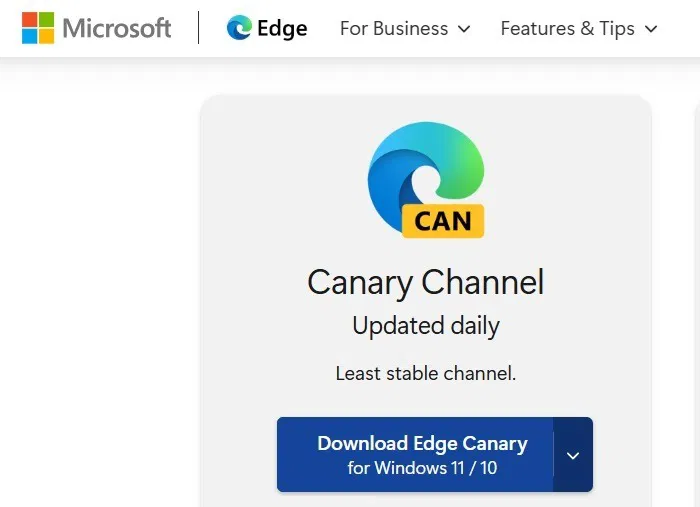
<p style="text-align: justify;">Bạn phải&nbsp;tải xuống Canary Channel&nbsp;từ trang web chính thức của Edge. Trong khi tải xuống, hãy nhấp vào&nbsp;<strong>Agree and download</strong>&nbsp;trên trang cấp phép.<br />
<span style="color:rgb(192, 57, 43);"><strong>https://www.microsoft.com/en-us/edge/download/insider?cc=1&amp;cs=4112006293&amp;form=MA13FJ</strong></span></p>

<figure>
<div style="text-align: justify;"><img alt="Tải Edge Canary trên các thiết bị Windows." data-i="0" data-src="https://st.quantrimang.com/photos/image/2025/04/24/them-tab-copilot-moi-vao-microsoft-edge-1.jpg" data-was-processed="true" height="507" src="https://st.quantrimang.com/photos/image/2025/04/24/them-tab-copilot-moi-vao-microsoft-edge-1.jpg" width="700" /></div>

<figcaption>
<div style="text-align: justify;">Tải Edge Canary trên các thiết bị&nbsp;&nbsp;Windows.</div>
</figcaption>
</figure>

<div style="text-align: justify;">&nbsp;</div>

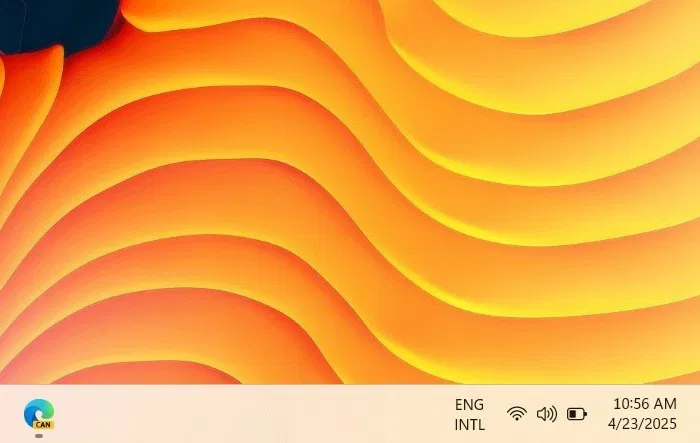
<p style="text-align: justify;">Sau khi bạn cài đặt phiên bản trình duyệt nâng cao, Edge Canary sẽ mở trên thanh tác vụ giống như bất kỳ biểu tượng Edge nào khác. Tính năng này sẽ không làm gián đoạn trải nghiệm duyệt web thông thường của bạn, không giống như các phiên bản Beta hoặc Dev.</p>

<figure>
<div style="text-align: justify;"><img alt="Edge Canary dưới dạng biểu tượng menu trên thanh tác vụ Windows." data-i="1" data-src="https://st.quantrimang.com/photos/image/2025/04/24/them-tab-copilot-moi-vao-microsoft-edge-2.jpg" data-was-processed="true" height="443" src="https://st.quantrimang.com/photos/image/2025/04/24/them-tab-copilot-moi-vao-microsoft-edge-2.jpg" width="700" /></div>

<figcaption>
<div style="text-align: justify;">Edge Canary dưới dạng biểu tượng menu trên thanh tác vụ Windows.</div>
</figcaption>
</figure>

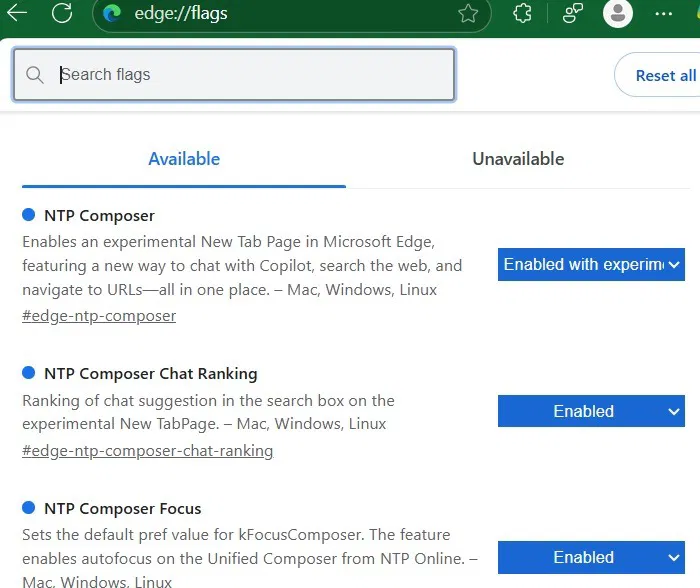
<p style="text-align: justify;">Tiếp theo, hãy vào trang flag Edge bằng cách nhập&nbsp;<strong>edge://flags.</strong>&nbsp;Tại đây, hãy tìm kiếm “NTP Composer”.</p>

<p style="text-align: justify;">Đối với flag đầu tiên,&nbsp;<strong>NTP Composer</strong>, cài đặt là&nbsp;<strong>Default</strong>. Hãy đổi thành&nbsp;<strong>Enabled with experimental features</strong>. Bạn sẽ tìm thấy nhiều flag liên quan hơn được bắt đầu bằng “NTP” như&nbsp;<strong>Chat Ranking</strong>,&nbsp;<strong>Composer Focus</strong>&nbsp;và&nbsp;<strong>Copilot Search</strong>. Áp dụng&nbsp;<strong>Enable</strong>&nbsp;cho tất cả.</p>

<figure>
<div style="text-align: justify;"><img alt="Biến NTP Composer làm flag Edge." data-i="2" data-src="https://st.quantrimang.com/photos/image/2025/04/24/them-tab-copilot-moi-vao-microsoft-edge-3.jpg" data-was-processed="true" height="588" src="https://st.quantrimang.com/photos/image/2025/04/24/them-tab-copilot-moi-vao-microsoft-edge-3.jpg" width="700" /></div>

<figcaption>
<div style="text-align: justify;">Biến NTP Composer làm flag Edge.</div>
</figcaption>
</figure>

<div style="text-align: justify;">&nbsp;</div>

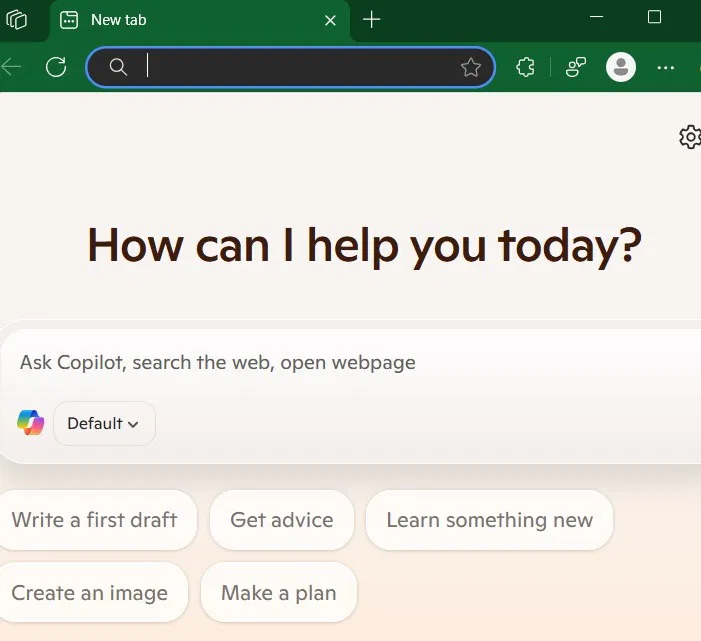
<p style="text-align: justify;">Sau khi bật flag, hãy khởi động lại trình duyệt. Bây giờ, bạn sẽ thấy cửa sổ trò chuyện Copilot ở phía trước và chính giữa. Nếu bạn không muốn sử dụng trong tương lai, chỉ cần tắt flag hoặc reset trang Flags về mặc định.</p>

<figure>
<div style="text-align: justify;"><img alt="Copilot được bật làm mặc định trong trang New Tab trên trình duyệt Edge." data-i="3" data-src="https://st.quantrimang.com/photos/image/2025/04/24/them-tab-copilot-moi-vao-microsoft-edge-4.jpg" data-was-processed="true" height="641" src="https://st.quantrimang.com/photos/image/2025/04/24/them-tab-copilot-moi-vao-microsoft-edge-4.jpg" width="701" /></div>

<figcaption>
<div style="text-align: justify;">Copilot được bật làm mặc định trong trang New Tab trên trình duyệt Edge.</div>
</figcaption>
</figure>

<h2 style="text-align: justify;">Lợi ích của Copilot trong trang tab mới của Edge</h2>

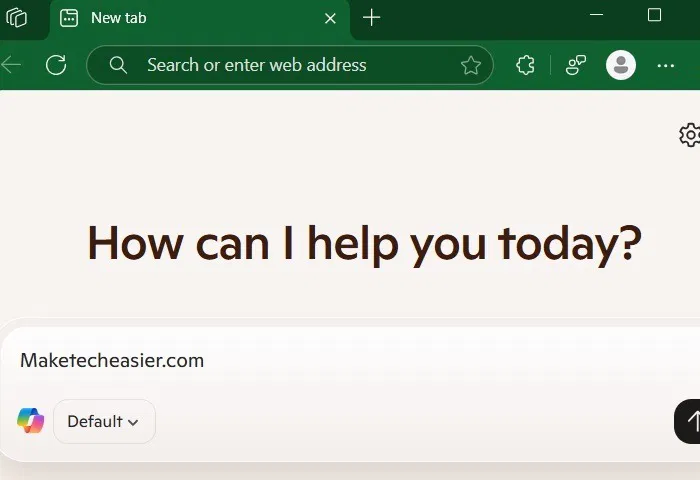
<p style="text-align: justify;">Ban đầu, bạn có thể nghĩ rằng thanh địa chỉ Edge quen thuộc bị thiếu, nhưng nó nằm ngay trên cùng. Bạn cũng có thể truy cập nó từ chính Copilot ở chế độ&nbsp;<strong>Default</strong>. Điều này có nghĩa là có hai cách để mở bất kỳ URL nào trực tiếp, thay vì một. Bạn cũng nhận được các đề xuất drop-down về các chủ đề tương tự như trước đây.</p>

<figure>
<div style="text-align: justify;"><img alt="Mở URL web bình thường trong Copilot ở chế độ mặc định." data-i="4" data-src="https://st.quantrimang.com/photos/image/2025/04/24/them-tab-copilot-moi-vao-microsoft-edge-5.jpg" data-was-processed="true" height="480" src="https://st.quantrimang.com/photos/image/2025/04/24/them-tab-copilot-moi-vao-microsoft-edge-5.jpg" width="700" /></div>

<figcaption>
<div style="text-align: justify;">Mở URL web bình thường trong Copilot ở chế độ mặc định.</div>
</figcaption>
</figure>

<p style="text-align: justify;">Có hai lợi ích bổ sung. Có Copilot trên mọi tab mới mang lại trải nghiệm duyệt web tự nhiên hơn so với các trình duyệt thông thường.</p>

<ul>
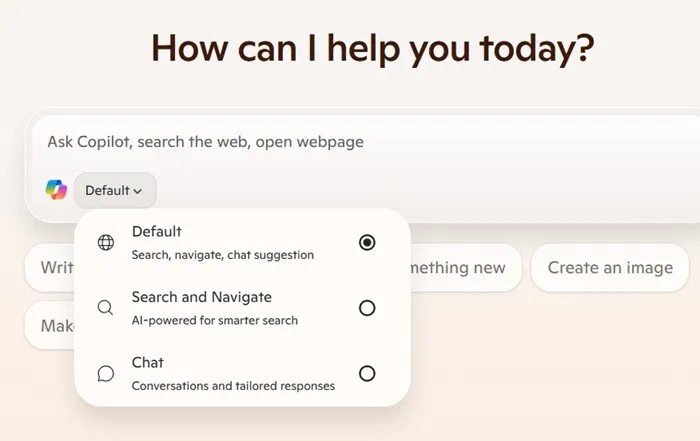
	<li style="text-align: justify;"><strong>Search and Navigate</strong>&nbsp;sử dụng Copilot để tìm hiểu sâu hơn về các tìm kiếm của bạn. Trước đây là một tính năng phụ trong công cụ tìm kiếm Bing, giờ đây bạn có thể đưa nó lên vị trí trung tâm trên mọi trang tab mới trong Edge. Có nhiều lý do tại sao tìm kiếm Bing Copilot hoạt động tốt hơn Google AI Overviews.</li>
	<li style="text-align: justify;"><strong>Chat</strong>&nbsp;cho phép bạn sử dụng ngôn ngữ tự nhiên cho các truy vấn. Thay vì sử dụng từ khóa, bạn có thể giải thích đầy đủ những gì bạn cần trên trang tab mới bằng giọng điệu trò chuyện của con người. Điều này vượt trội hơn bất kỳ điều gì bạn nhận được với kết quả của công cụ tìm kiếm.</li>
</ul>

<figure>
<div style="text-align: justify;"><img alt="3 chế độ tìm kiếm trong Copilot New Tab" data-i="5" data-src="https://st.quantrimang.com/photos/image/2025/04/24/them-tab-copilot-moi-vao-microsoft-edge-6.jpg" data-was-processed="true" height="441" src="https://st.quantrimang.com/photos/image/2025/04/24/them-tab-copilot-moi-vao-microsoft-edge-6.jpg" width="700" /></div>

<figcaption>
<div style="text-align: justify;">3 chế độ tìm kiếm trong Copilot New Tab</div>
</figcaption>
</figure>

<p style="text-align: justify;">Kể từ những ngày đầu của Internet, thanh địa chỉ vẫn là một hằng số trong các trình duyệt web. Việc Microsoft làm cho Copilot nổi bật hơn thay vì thanh địa chỉ mặc định ở trên cùng có vẻ lạ, nhưng nếu bạn xem xét kỹ, thì đó là một thay đổi rất hữu ích, ít nhất là đối với những người dùng Copilot thường xuyên.</p>

<p style="text-align: justify;">Tiềm năng của các công cụ AI như Copilot đang phát triển, trong nhiều lĩnh vực. Ví dụ, bạn có thể sử dụng nó để dễ dàng điều khiển Android từ&nbsp;&nbsp;máy tính&nbsp;của mình. Tuy nhiên, có nhiều người trong chúng ta không thích sử dụng các công cụ AI này và bạn có thể dễ dàng&nbsp;xóa Copilot&nbsp;khỏi trải nghiệm Microsoft của mình.</p>

<div style="text-align: justify;">Linh kiện máy tính</div>
		</div>
				<div id="author">
						<p>
				<strong>Nguồn tin:</strong>
				Quantrimang.com:
			</p>
		</div>
	</div>
	<div id="footer" class="clearfix">
		<div id="url">
			<strong>URL của bản tin này: </strong><a href="https://www.nguoicodonvn2008.info/vi/news/savefile/kien-thuc-may-tinh/cach-them-tab-copilot-moi-vao-trinh-duyet-microsoft-edge-10251.html" title="Cách thêm tab Copilot mới vào trình duyệt Microsoft Edge">https://www.nguoicodonvn2008.info/vi/news/savefile/kien-thuc-may-tinh/cach-them-tab-copilot-moi-vao-trinh-duyet-microsoft-edge-10251.html</a>

		</div>
		<div class="clear"></div>
		<div class="copyright">
			&copy; .&#x3A; Nguoicodonvn2008.info - Cõi lòng người cô đơn &#x3A;.
		</div>
		<div id="contact">
			<a href="mailto:admin@nguoicodonvn2008.info">admin@nguoicodonvn2008.info</a>
		</div>
	</div>
</div>
        <div id="timeoutsess" class="chromeframe">
            Bạn đã không sử dụng Site, <a onclick="timeoutsesscancel();" href="https://www.nguoicodonvn2008.info/#">Bấm vào đây để duy trì trạng thái đăng nhập</a>. Thời gian chờ: <span id="secField"> 60 </span> giây
        </div>
        <div id="openidResult" class="nv-alert" style="display:none"></div>
        <div id="openidBt" data-result="" data-redirect=""></div>
		</script>
		<div class="car-top">
  <span><img src="https://www.nguoicodonvn2008.info/themes/default/images/car.png" alt=""></span>
</div>
<script src="https://www.nguoicodonvn2008.info/assets/js/jquery/jquery.min.js"></script>
<script>var nv_base_siteurl="/",nv_lang_data="vi",nv_lang_interface="vi",nv_name_variable="nv",nv_fc_variable="op",nv_lang_variable="language",nv_module_name="news",nv_func_name="savefile",nv_is_user=0, nv_my_ofs=-4,nv_my_abbr="EDT",nv_cookie_prefix="nv4c_e856T",nv_check_pass_mstime=1738000,nv_area_admin=0,nv_safemode=0,theme_responsive=0,nv_recaptcha_ver=2,nv_recaptcha_sitekey="",nv_recaptcha_type="image",XSSsanitize=1;</script>
<script src="https://www.nguoicodonvn2008.info/assets/js/language/vi.js"></script>
<script src="https://www.nguoicodonvn2008.info/assets/js/DOMPurify/purify3.js"></script>
<script src="https://www.nguoicodonvn2008.info/assets/js/global.js"></script>
<script src="https://www.nguoicodonvn2008.info/assets/js/site.js"></script>
<script src="https://www.nguoicodonvn2008.info/themes/default/js/news.js"></script>
<script src="https://www.nguoicodonvn2008.info/themes/default/js/main.js"></script>
<script src="https://www.nguoicodonvn2008.info/themes/default/js/custom.js"></script>
<script type="application/ld+json">
        {
            "@context": "https://schema.org",
            "@type": "Organization",
            "url": "https://www.nguoicodonvn2008.info",
            "logo": "https://www.nguoicodonvn2008.info/uploads/angel.gif"
        }
        </script>
<script src="https://www.nguoicodonvn2008.info/themes/default/js/bootstrap.min.js"></script>
<script type="text/javascript">
var $scrolltop = $('.car-top');
$scrolltop.on('click', function () {
    $('html,body').animate({
        scrollTop: 0
    }, 800);
    $(this).addClass("car-run");
    setTimeout(function(){ $scrolltop.removeClass('car-run');}, 1000);
    return false;
});
$(window).on('scroll', function ()
{ 
    if($(window).scrollTop() >= 200)
    {
        $scrolltop.addClass("show");
        $scrolltop.addClass("car-down");
    }
    else
    {
       $scrolltop.removeClass("show");
       setTimeout(function(){ $scrolltop.removeClass('car-down');}, 300);
    }
});
</script>
</body>
</html>