<!DOCTYPE html>
    <html lang="vi" xmlns="http://www.w3.org/1999/xhtml" prefix="og: http://ogp.me/ns#">
    <head>
<title>Cách thêm nền tối trong app Vue bằng biến CSS</title>
<meta name="description" content="Cách thêm nền tối trong app Vue bằng biến CSS - Savefile - Tin Tức -...">
<meta name="author" content=".: Nguoicodonvn2008.info - Cõi lòng người cô đơn :.">
<meta name="copyright" content=".: Nguoicodonvn2008.info - Cõi lòng người cô đơn :. [admin@nguoicodonvn2008.info]">
<meta name="robots" content="index, archive, follow, noodp">
<meta name="googlebot" content="index,archive,follow,noodp">
<meta name="msnbot" content="all,index,follow">
<meta name="generator" content="NukeViet v4.5">
<meta http-equiv="Content-Type" content="text/html; charset=utf-8">
<meta property="og:title" content="Cách thêm nền tối trong app Vue bằng biến CSS">
<meta property="og:type" content="website">
<meta property="og:description" content="Savefile - Tin Tức - https&#x3A;&#x002F;&#x002F;www.nguoicodonvn2008.info&#x002F;vi&#x002F;news&#x002F;savefile&#x002F;kien-thuc-may-tinh&#x002F;cach-them-nen-toi-trong-app-vue-bang-bien-css-7667.html">
<meta property="og:site_name" content=".&#x3A; Nguoicodonvn2008.info - Cõi lòng người cô đơn &#x3A;.">
<meta property="og:url" content="https://www.nguoicodonvn2008.info/vi/news/savefile/kien-thuc-may-tinh/cach-them-nen-toi-trong-app-vue-bang-bien-css-7667.html">
<link rel="shortcut icon" href="https://www.nguoicodonvn2008.info/favicon.ico">
<link rel="canonical" href="https://www.nguoicodonvn2008.info/vi/news/savefile/kien-thuc-may-tinh/cach-them-nen-toi-trong-app-vue-bang-bien-css-7667.html">
<link rel="alternate" href="https://www.nguoicodonvn2008.info/vi/news/rss/" title="Tin Tức" type="application/rss+xml">
<link rel="alternate" href="https://www.nguoicodonvn2008.info/vi/news/rss/karaoke-dual/" title="Tin Tức - Karaoke Dual" type="application/rss+xml">
<link rel="alternate" href="https://www.nguoicodonvn2008.info/vi/news/rss/nhac-tre/" title="Tin Tức - Nhạc trẻ" type="application/rss+xml">
<link rel="alternate" href="https://www.nguoicodonvn2008.info/vi/news/rss/tru-tinh/" title="Tin Tức - Trữ tình" type="application/rss+xml">
<link rel="alternate" href="https://www.nguoicodonvn2008.info/vi/news/rss/nuoc-ngoai/" title="Tin Tức - Nước ngoài" type="application/rss+xml">
<link rel="alternate" href="https://www.nguoicodonvn2008.info/vi/news/rss/remix/" title="Tin Tức - Remix" type="application/rss+xml">
<link rel="alternate" href="https://www.nguoicodonvn2008.info/vi/news/rss/tam-su-tinh-yeu/" title="Tin Tức - Tâm sự tình yêu" type="application/rss+xml">
<link rel="alternate" href="https://www.nguoicodonvn2008.info/vi/news/rss/tho-suu-tam/" title="Tin Tức - Thơ sưu tầm" type="application/rss+xml">
<link rel="alternate" href="https://www.nguoicodonvn2008.info/vi/news/rss/cuoc-song/" title="Tin Tức - Cuộc sống" type="application/rss+xml">
<link rel="alternate" href="https://www.nguoicodonvn2008.info/vi/news/rss/phan-mem/" title="Tin Tức - Phần mềm" type="application/rss+xml">
<link rel="alternate" href="https://www.nguoicodonvn2008.info/vi/news/rss/kien-thuc-may-tinh/" title="Tin Tức - Kiến thức máy tính" type="application/rss+xml">
<link rel="alternate" href="https://www.nguoicodonvn2008.info/vi/news/rss/hoc-tap/" title="Tin Tức - Học tập" type="application/rss+xml">
<link rel="alternate" href="https://www.nguoicodonvn2008.info/vi/news/rss/tai-lieu/" title="Tin Tức - Tài liệu" type="application/rss+xml">
<link rel="alternate" href="https://www.nguoicodonvn2008.info/vi/news/rss/de-thi/" title="Tin Tức - Đề thi" type="application/rss+xml">
<link rel="preload" as="style" href="https://www.nguoicodonvn2008.info/assets/css/font-awesome.min.css" type="text/css">
<link rel="preload" as="style" href="https://www.nguoicodonvn2008.info/themes/default/css/bootstrap.non-responsive.css" type="text/css">
<link rel="preload" as="style" href="https://www.nguoicodonvn2008.info/themes/default/css/style.css" type="text/css">
<link rel="preload" as="style" href="https://www.nguoicodonvn2008.info/themes/default/css/style.non-responsive.css" type="text/css">
<link rel="preload" as="style" href="https://www.nguoicodonvn2008.info/themes/default/css/news.css" type="text/css">
<link rel="preload" as="style" href="https://www.nguoicodonvn2008.info/themes/default/css/custom.css" type="text/css">
<link rel="preload" as="script" href="https://www.nguoicodonvn2008.info/assets/js/jquery/jquery.min.js" type="text/javascript">
<link rel="preload" as="script" href="https://www.nguoicodonvn2008.info/assets/js/language/vi.js" type="text/javascript">
<link rel="preload" as="script" href="https://www.nguoicodonvn2008.info/assets/js/DOMPurify/purify3.js" type="text/javascript">
<link rel="preload" as="script" href="https://www.nguoicodonvn2008.info/assets/js/global.js" type="text/javascript">
<link rel="preload" as="script" href="https://www.nguoicodonvn2008.info/assets/js/site.js" type="text/javascript">
<link rel="preload" as="script" href="https://www.nguoicodonvn2008.info/themes/default/js/news.js" type="text/javascript">
<link rel="preload" as="script" href="https://www.nguoicodonvn2008.info/themes/default/js/main.js" type="text/javascript">
<link rel="preload" as="script" href="https://www.nguoicodonvn2008.info/themes/default/js/custom.js" type="text/javascript">
<link rel="preload" as="script" href="https://www.nguoicodonvn2008.info/themes/default/js/bootstrap.min.js" type="text/javascript">
<link rel="stylesheet" href="https://www.nguoicodonvn2008.info/assets/css/font-awesome.min.css">
<link rel="stylesheet" href="https://www.nguoicodonvn2008.info/themes/default/css/bootstrap.non-responsive.css">
<link rel="stylesheet" href="https://www.nguoicodonvn2008.info/themes/default/css/style.css">
<link rel="stylesheet" href="https://www.nguoicodonvn2008.info/themes/default/css/style.non-responsive.css">
<link rel="StyleSheet" href="https://www.nguoicodonvn2008.info/themes/default/css/news.css">
<link rel="stylesheet" href="https://www.nguoicodonvn2008.info/themes/default/css/custom.css">
<style type="text/css">
	body{background: #fff;}
</style>
    </head>
    <body>
<div id="print">
	<div id="hd_print">
		<h2 class="pull-left">.&#x3A; Nguoicodonvn2008.info - Cõi lòng người cô đơn &#x3A;.</h2>
		<p class="pull-right"><a title=".&#x3A; Nguoicodonvn2008.info - Cõi lòng người cô đơn &#x3A;." href="https://www.nguoicodonvn2008.info/">https://www.nguoicodonvn2008.info</a></p>
	</div>
	<div class="clear"></div>
	<hr />
	<div id="content">
		<h1>Cách thêm nền tối trong app Vue bằng biến CSS</h1>
		<ul class="list-inline">
			<li>Thứ bảy - 21/10/2023 10:10</li>
			<li class="hidden-print txtrequired"><em class="fa fa-print">&nbsp;</em><a title="In ra" href="javascript:;" onclick="window.print()">In ra</a></li>
			<li class="hidden-print txtrequired"><em class="fa fa-power-off">&nbsp;</em><a title="Đóng cửa sổ này" href="javascript:;" onclick="window.close()">Đóng cửa sổ này</a></li>
		</ul>
		<div class="clear"></div>
		<div id="hometext">
		</div>
				<div class="imghome">
			<img alt="Cách thêm nền tối trong app Vue bằng biến CSS" src="https://st.quantrimang.com/photos/image/2023/10/21/app-vue-dark-mode.jpg" width="460" class="img-thumbnail" />
		</div>
		<div class="clear"></div>
		<div id="bodytext" class="clearfix">
			<p style="text-align: justify;">Triển khai nền tối hiện đã trở thành một phần không thể thiếu khi phát triển ứng dụng web. Dưới đây là&nbsp;<strong>cách làm nền tối cho app Vue bằng các biến CSS</strong>.</p>

<p style="text-align: justify;"><img alt="Lập trình CSS" data-i="0" data-src="https://st.quantrimang.com/photos/image/2023/10/21/css-dark-mode-vue-7.jpg" data-was-processed="true" height="340" src="https://st.quantrimang.com/photos/image/2023/10/21/css-dark-mode-vue-7.jpg" width="650" /></p>

<p style="text-align: justify;">Nền tối cung cấp bảng màu tối hơn cho giao diện người dùng, khiến màn hình dịu mắt hơn ở điều kiện ánh sáng thấp. Nền tối cũng giúp tiết kiệm pin trên các thiết bị màn hình OLED hoặc AMOLED.</p>

<p style="text-align: justify;">Chính những ưu điểm đó đã khiến nhiều người thích chuyển sang nền tối khi lướt web.</p>

<h2 style="text-align: justify;">Thiết lập ứng dụng thử nghiệm</h2>

<p style="text-align: justify;">Để hiểu rõ hơn về cách thêm nền tối trong Vue, bạn cần tạo một app Vue đơn giản để chạy thử sản phẩm của bạn.</p>

<p style="text-align: justify;">Để khởi tạo app Vue mới, chạy lệnh sau từ terminal:</p>

<pre id="pre0" style="text-align: justify;">
npm init vue@latest</pre>

<p style="text-align: justify;">Lệnh này sẽ cài đặt phiên bản mới nhất của package&nbsp;<strong>create-vue</strong>, gói này dùng để khởi tạo app Vue mới. Nó cũng yêu cầu bạn chọn một nhóm tính năng cụ thể. Bạn không nhất thiết phải chọn 1 vì chúng không thực sự cần thiết cho hướng dẫn này.</p>

<p style="text-align: justify;">Thêm mẫu sau cho file&nbsp;<strong>App.vue</strong>&nbsp;trong thư mục src của ứng dụng:</p>

<pre id="pre1" style="text-align: justify;">
&lt;!-- App.vue --&gt;
&lt;template&gt;
  &lt;div&gt;
    &lt;h1 class=&quot;header&quot;&gt;Welcome to My Vue App&lt;/h1&gt;
    &lt;p&gt;This is a simple Vue app with some text and styles.&lt;/p&gt;
    &lt;div class=&quot;styled-box&quot;&gt;
      &lt;p class=&quot;styled-text&quot;&gt;Styled Text&lt;/p&gt;
    &lt;/div&gt;

    &lt;button class=&quot;toggle-button&quot;&gt;Toggle Dark Mode&lt;/button&gt;
  &lt;/div&gt;
&lt;/template&gt;</pre>

<p style="text-align: justify;">Khối code trên mô tả toàn bộ ứng dụng trong HTML bình thường, không script hoặc khối tạo kiểu. Bạn sẽ dùng class này trong mẫu trên cho mục đích tạo kiểu. Khi triển khai nền tối, cấu trúc của ứng dụng sẽ thay đổi.</p>

<h2 style="text-align: justify;">Tạo kiểu ứng dụng thử nghiệm bằng các biến CSS</h2>

<p style="text-align: justify;">Các biến CSS là những giá trị năng động mà bạn có thể xác định trong bảng style. Các biến CSS cung cấp công cụ tuyệt vời cho tạo theme vì chúng cho phép bạn xác định và quản lý các giá trị như màu sắc và kích thước font ở cùng một nơi.</p>

<p style="text-align: justify;">Bạn sẽ dùng biến CSS và bộ chọn pseudo-class để thêm một nền thông thường và một chế độ tối cho ứng dụng Vue. Trong thư mục&nbsp;<strong>src/assets</strong>, tạo một file&nbsp;<strong>styles.css</strong>.</p>

<p style="text-align: justify;">Thêm các kiểu sau vào file styles.css:</p>

<pre id="pre2" style="text-align: justify;">
/* styles.css */
:root {
  --background-color: #ffffff; /* White */
  --text-color: #333333; /* Dark Gray */
  --box-background: #007bff; /* Royal Blue */
  --box-text-color: #ffffff; /* White */
  --toggle-button: #007bff; /* Royal Blue */
}
&#91;data-theme=&#039;true&#039;&#93; {
  --background-color: #333333; /* Dark Gray */
  --text-color: #ffffff; /* White */
  --box-background: #000000; /* Black */
  --box-text-color: #ffffff; /* White */
  --toggle-button: #000000; /* Black */
}</pre>

<p style="text-align: justify;">Những khai báo này chứa một bộ chọn pseudo-class đặc biệt (<strong>:root</strong>) và bộ chọn thuộc tính (<strong>&#91;data-theme=&#039;true&#039;&#93;</strong>). Các kiểu bạn bao gồm trong một bộ chọn gốc nhắm mục tiêu thành phần cha cao nhất. Nó hoạt động như việc tạo kiểu mặc định cho trang web.</p>

<p style="text-align: justify;">Bộ chọn&nbsp;<strong>data-theme</strong>&nbsp;nhắm mục tiêu các phần tử HTML với thuộc tính được thiết lập sang&nbsp;<strong>true</strong>. Trong bộ chọn thuộc tính này, bạn có thể xác định các kiểu cho theme nền tối, để ghi đè theme nền sáng mặc định.</p>

<p style="text-align: justify;">Tất cả những khai báo trên đều xác định các biến CSS bằng tiền tố<strong>&nbsp;--</strong>. Chúng chứa các giá trị màu mà sau đó bạn có thể dùng để tạo kiểu ứng dụng cho nền sáng và tối.</p>

<p style="text-align: justify;">Chỉnh sửa file<strong>&nbsp;src/main.js</strong>&nbsp;và nhập file&nbsp;<strong>styles.css</strong>:</p>

<pre id="pre3" style="text-align: justify;">
// main.js
import &#039;./assets/styles.css&#039;
import { createApp } from &#039;vue&#039;
import App from &#039;./App.vue&#039;

createApp(App).mount(&#039;#app&#039;)</pre>

<p style="text-align: justify;">Giờ thêm một số kiểu trong&nbsp;<strong>styles.css</strong>, bên dưới bộ chọn&nbsp;<strong>data-theme</strong>. Một vài trong số những định nghĩa này sẽ tham chiếu biến màu bằng từ khóa&nbsp;<strong>var</strong>. Điều này cho phép bạn thay đổi màu sắc sử dụng chỉ bằng cách chuyển đổi giá trị của từng biến, giống như kiểu ban đầu.</p>

<pre id="pre4" style="text-align: justify;">
* {
    background-color: var(--background-color);
    text-align: center;
    color: var(--text-color);
    padding: 20px;
    font-family: Arial, sans-serif;
    transition: background-color 0.3s, color 0.3s;
}
.header {
    font-size: 24px;
    margin-bottom: 20px;
}
.styled-box {
    background-color: var(--box-background);
    color: var(--box-text-color);
    padding: 10px;
    border-radius: 5px;
    margin: 20px 0;
}
.styled-text {
    font-size: 18px;
    font-weight: bold;
}
.toggle-button {
    background-color: var(--toggle-button);
    color: #fff;
    border: none;
    border-radius: 3px;
    cursor: pointer;
    padding: 5px 10px;
}</pre>

<p style="text-align: justify;">Bạn có thể đặt một thuộc tính chuyển tiếp trên tất cả các thành phần bằng bộ chọn CSS phổ thông (*) để tạo hiệu ứng mượt mà khi chuyển các chế độ:</p>

<pre id="pre5" style="text-align: justify;">
* {
  /* Thêm nhiều chuyển tiếp hơn khi cần */
  transition: background-color 0.3s, color 0.3s;
}</pre>

<p style="text-align: justify;">Những chuyển tiếp này tạo một thay đổi dần dần trong màu nền và văn bản khi bật chế độ tối, tạo ra một hiệu ứng đẹp mắt.</p>

<h2 style="text-align: justify;">Triển khai logic chế độ tối</h2>

<p style="text-align: justify;">Để triển khai chế độ nền tối, bạn cần logic JavaScript để chuyển giữa nền sáng và tối. Trong file&nbsp;<strong>App.vue</strong>, dán khối script sau bên dưới khối mẫu được viết trong API Composition của Vue:</p>

<pre id="pre6" style="text-align: justify;">
&lt;!-- App.vue --&gt;
&lt;script setup&gt;
import { ref } from &#039;vue&#039;;

// Hàm lấy tùy chọn chế độ tối ban đầu từ lưu trữ cục bộ
const getInitialDarkMode = () =&gt; {
  const userPreference = localStorage.getItem(&#039;darkMode&#039;);
  return userPreference === &#039;true&#039; ? true : false;
};

// Xác định ref cho darkMode và khởi tạo nó bằng tùy chọn người dùng
// hoặc false
const darkMode = ref(getInitialDarkMode());

// Hàm lưu tùy chọn chế độ tối cho lưu trữ nội bộ
const saveDarkModePreference = (isDarkMode) =&gt; {
  localStorage.setItem(&#039;darkMode&#039;, isDarkMode);
};

// Hàm bật chế độ tối và update tùy chọn lưu trữ cục bộ
const toggleDarkMode = () =&gt; {
  darkMode.value = !darkMode.value;
  saveDarkModePreference(darkMode.value);
};
&lt;/script&gt;</pre>

<p style="text-align: justify;">Tập lệnh trên bao gồm tất cả logic JavaScript dành cho chuyển đổi giữa chế độ sáng và tối trong app web. Script này bắt đầu bằng lệnh&nbsp;<strong>import</strong>&nbsp;để nhập hàm<strong>&nbsp;ref&nbsp;</strong>để xử lý dữ liệu động trong Vue.</p>

<p style="text-align: justify;">Tiếp theo, nó xác định một hàm&nbsp;<strong>getInitialDarkMode</strong>&nbsp;mà truy xuất tùy chọn chế độ tối của người dùng từ&nbsp;<strong>LocalStorage&nbsp;</strong>của trình duyệt. Nó khai báo ref&nbsp;<strong>darkMode</strong>, khởi tạo nó bằng lựa chọn được truy xuất bởi hàm&nbsp;<strong>getInitialDarkMode</strong>.</p>

<p style="text-align: justify;">Hàm<strong>&nbsp;saveDarkModePreference</strong>&nbsp;update tùy chọn chế độ tối của người dùng trong LocalStorage của trình duyệt bằng phương thức<strong>&nbsp;setItem</strong>. Cuối cùng, hàm&nbsp;<strong>toggleDarkMode</strong>&nbsp;sẽ cho phép người dùng bật chế độ tối và update giá trị&nbsp;<strong>LocalStorage</strong>&nbsp;của trình duyệt cho chế độ tối.</p>

<h2 style="text-align: justify;">Áp dụng theme dark mode và kiểm tra ứng dụng</h2>

<p style="text-align: justify;">Giờ trong khối template của file&nbsp;<strong>App.vue</strong>, thêm bộ chọn thuộc tính data-theme vào thành phần gốc để áp dụng nền tối theo điều kiện dựa trên logic của bạn:</p>

<pre id="pre7" style="text-align: justify;">
&lt;!-- App.vue --&gt;
&lt;template&gt;
  &lt;!-- thêm bộ chọn thuộc tính theme dữ liệu để áp dụng nền tối theo điều kiện --&gt;
  &lt;div :data-theme=&quot;darkMode&quot;&gt; 
    &lt;h1 class=&quot;header&quot;&gt;Welcome to My Vue App&lt;/h1&gt;
    &lt;p&gt;This is a simple Vue app with some text and styles.&lt;/p&gt;
    &lt;div class=&quot;styled-box&quot;&gt;
      &lt;p class=&quot;styled-text&quot;&gt;Styled Text&lt;/p&gt;
    &lt;/div&gt;

    &lt;!--thêm nút chuyển chế độ tối--&gt; 
    &lt;button @click=&quot;toggleDarkMode&quot; class=&quot;toggle-button&quot;&gt;
      Toggle Dark Mode
    &lt;/button&gt; 
  &lt;/div&gt;
&lt;/template&gt;</pre>

<p style="text-align: justify;">Tại đây, bạn đang liên kết bộ chọn data-theme với darkMode ref. Điều này đảm bảo ràng khi darkMode là true, nền tối sẽ được áp dụng. Trình nghe sự kiện click trên nút bấm chuyển đổi giữa chế độ sáng và tối.</p>

<p style="text-align: justify;">Chạy lệnh sau trong terminal để xem trước ứng dụng:</p>

<pre id="pre8" style="text-align: justify;">
npm run dev</pre>

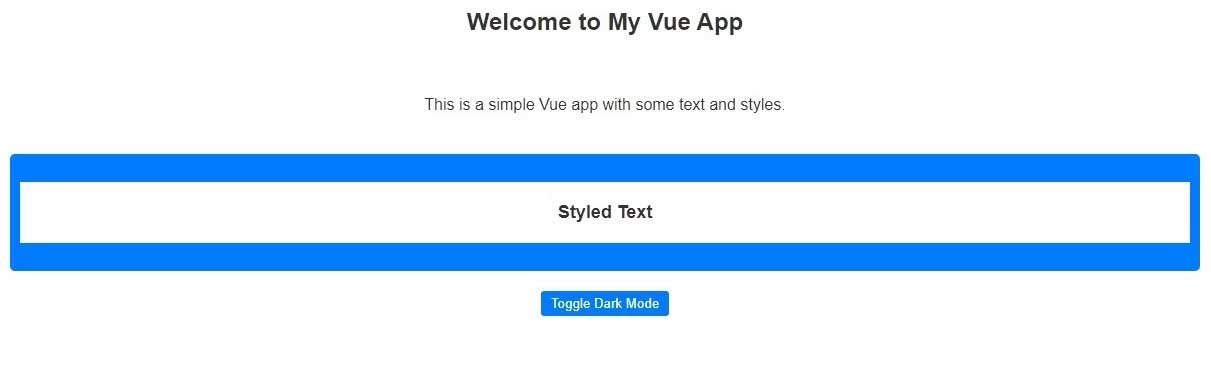
<p style="text-align: justify;">Bạn sẽ thấy màn hình như thế này:</p>

<p style="text-align: justify;"><img alt="Chào mừng tới app Vue" data-i="1" data-src="https://st.quantrimang.com/photos/image/2023/10/21/app-vue.jpg" data-was-processed="true" height="203" src="https://st.quantrimang.com/photos/image/2023/10/21/app-vue.jpg" width="650" /></p>

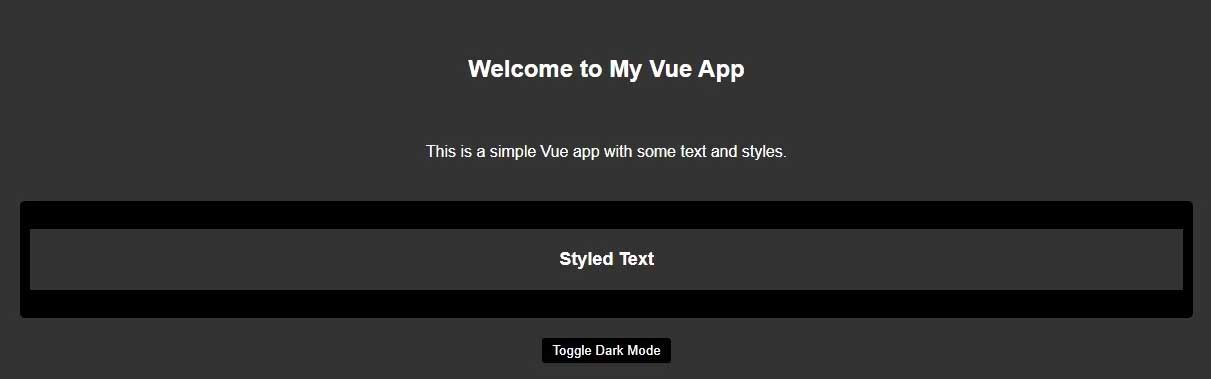
<p style="text-align: justify;">Khi click nút bấm, app sẽ chuyển giữa nền sáng và tối:</p>

<p style="text-align: justify;"><img alt="Chế độ tối trong app Vue" data-i="2" data-src="https://st.quantrimang.com/photos/image/2023/10/21/app-vue-dark-mode.jpg" data-was-processed="true" height="203" src="https://st.quantrimang.com/photos/image/2023/10/21/app-vue-dark-mode.jpg" width="650" /></p>

<p style="text-align: justify;">Như bạn thấy&nbsp;<strong>các biến CSS và LocalStorage API&nbsp;</strong>khiến việc thêm nền tối cho ứng dụng Vue trở nên thật dễ dàng. Chúc các bạn thành công!</p>
		</div>
				<div id="author">
						<p>
				<strong>Nguồn tin:</strong>
				Quantrimang.com
			</p>
		</div>
	</div>
	<div id="footer" class="clearfix">
		<div id="url">
			<strong>URL của bản tin này: </strong><a href="https://www.nguoicodonvn2008.info/vi/news/savefile/kien-thuc-may-tinh/cach-them-nen-toi-trong-app-vue-bang-bien-css-7667.html" title="Cách thêm nền tối trong app Vue bằng biến CSS">https://www.nguoicodonvn2008.info/vi/news/savefile/kien-thuc-may-tinh/cach-them-nen-toi-trong-app-vue-bang-bien-css-7667.html</a>

		</div>
		<div class="clear"></div>
		<div class="copyright">
			&copy; .&#x3A; Nguoicodonvn2008.info - Cõi lòng người cô đơn &#x3A;.
		</div>
		<div id="contact">
			<a href="mailto:admin@nguoicodonvn2008.info">admin@nguoicodonvn2008.info</a>
		</div>
	</div>
</div>
        <div id="timeoutsess" class="chromeframe">
            Bạn đã không sử dụng Site, <a onclick="timeoutsesscancel();" href="https://www.nguoicodonvn2008.info/#">Bấm vào đây để duy trì trạng thái đăng nhập</a>. Thời gian chờ: <span id="secField"> 60 </span> giây
        </div>
        <div id="openidResult" class="nv-alert" style="display:none"></div>
        <div id="openidBt" data-result="" data-redirect=""></div>
		</script>
		<div class="car-top">
  <span><img src="https://www.nguoicodonvn2008.info/themes/default/images/car.png" alt=""></span>
</div>
<script src="https://www.nguoicodonvn2008.info/assets/js/jquery/jquery.min.js"></script>
<script>var nv_base_siteurl="/",nv_lang_data="vi",nv_lang_interface="vi",nv_name_variable="nv",nv_fc_variable="op",nv_lang_variable="language",nv_module_name="news",nv_func_name="savefile",nv_is_user=0, nv_my_ofs=-4,nv_my_abbr="EDT",nv_cookie_prefix="nv4c_e856T",nv_check_pass_mstime=1738000,nv_area_admin=0,nv_safemode=0,theme_responsive=0,nv_recaptcha_ver=2,nv_recaptcha_sitekey="",nv_recaptcha_type="image",XSSsanitize=1;</script>
<script src="https://www.nguoicodonvn2008.info/assets/js/language/vi.js"></script>
<script src="https://www.nguoicodonvn2008.info/assets/js/DOMPurify/purify3.js"></script>
<script src="https://www.nguoicodonvn2008.info/assets/js/global.js"></script>
<script src="https://www.nguoicodonvn2008.info/assets/js/site.js"></script>
<script src="https://www.nguoicodonvn2008.info/themes/default/js/news.js"></script>
<script src="https://www.nguoicodonvn2008.info/themes/default/js/main.js"></script>
<script src="https://www.nguoicodonvn2008.info/themes/default/js/custom.js"></script>
<script type="application/ld+json">
        {
            "@context": "https://schema.org",
            "@type": "Organization",
            "url": "https://www.nguoicodonvn2008.info",
            "logo": "https://www.nguoicodonvn2008.info/uploads/angel.gif"
        }
        </script>
<script src="https://www.nguoicodonvn2008.info/themes/default/js/bootstrap.min.js"></script>
<script type="text/javascript">
var $scrolltop = $('.car-top');
$scrolltop.on('click', function () {
    $('html,body').animate({
        scrollTop: 0
    }, 800);
    $(this).addClass("car-run");
    setTimeout(function(){ $scrolltop.removeClass('car-run');}, 1000);
    return false;
});
$(window).on('scroll', function ()
{ 
    if($(window).scrollTop() >= 200)
    {
        $scrolltop.addClass("show");
        $scrolltop.addClass("car-down");
    }
    else
    {
       $scrolltop.removeClass("show");
       setTimeout(function(){ $scrolltop.removeClass('car-down');}, 300);
    }
});
</script>
</body>
</html>