<!DOCTYPE html>
    <html lang="vi" xmlns="http://www.w3.org/1999/xhtml" prefix="og: http://ogp.me/ns#">
    <head>
<title>Cách thêm menu ngữ cảnh trong suốt vào Windows 11</title>
<meta name="description" content="Cách thêm menu ngữ cảnh trong suốt vào Windows 11 - Savefile - Tin Tức -...">
<meta name="author" content=".: Nguoicodonvn2008.info - Cõi lòng người cô đơn :.">
<meta name="copyright" content=".: Nguoicodonvn2008.info - Cõi lòng người cô đơn :. [admin@nguoicodonvn2008.info]">
<meta name="robots" content="index, archive, follow, noodp">
<meta name="googlebot" content="index,archive,follow,noodp">
<meta name="msnbot" content="all,index,follow">
<meta name="generator" content="NukeViet v4.5">
<meta http-equiv="Content-Type" content="text/html; charset=utf-8">
<meta property="og:title" content="Cách thêm menu ngữ cảnh trong suốt vào Windows 11">
<meta property="og:type" content="website">
<meta property="og:description" content="Savefile - Tin Tức - https&#x3A;&#x002F;&#x002F;www.nguoicodonvn2008.info&#x002F;vi&#x002F;news&#x002F;savefile&#x002F;kien-thuc-may-tinh&#x002F;cach-them-menu-ngu-canh-trong-suot-vao-windows-11-6325.html">
<meta property="og:site_name" content=".&#x3A; Nguoicodonvn2008.info - Cõi lòng người cô đơn &#x3A;.">
<meta property="og:url" content="https://www.nguoicodonvn2008.info/vi/news/savefile/kien-thuc-may-tinh/cach-them-menu-ngu-canh-trong-suot-vao-windows-11-6325.html">
<link rel="shortcut icon" href="https://www.nguoicodonvn2008.info/favicon.ico">
<link rel="canonical" href="https://www.nguoicodonvn2008.info/vi/news/savefile/kien-thuc-may-tinh/cach-them-menu-ngu-canh-trong-suot-vao-windows-11-6325.html">
<link rel="alternate" href="https://www.nguoicodonvn2008.info/vi/news/rss/" title="Tin Tức" type="application/rss+xml">
<link rel="alternate" href="https://www.nguoicodonvn2008.info/vi/news/rss/karaoke-dual/" title="Tin Tức - Karaoke Dual" type="application/rss+xml">
<link rel="alternate" href="https://www.nguoicodonvn2008.info/vi/news/rss/nhac-tre/" title="Tin Tức - Nhạc trẻ" type="application/rss+xml">
<link rel="alternate" href="https://www.nguoicodonvn2008.info/vi/news/rss/tru-tinh/" title="Tin Tức - Trữ tình" type="application/rss+xml">
<link rel="alternate" href="https://www.nguoicodonvn2008.info/vi/news/rss/nuoc-ngoai/" title="Tin Tức - Nước ngoài" type="application/rss+xml">
<link rel="alternate" href="https://www.nguoicodonvn2008.info/vi/news/rss/remix/" title="Tin Tức - Remix" type="application/rss+xml">
<link rel="alternate" href="https://www.nguoicodonvn2008.info/vi/news/rss/tam-su-tinh-yeu/" title="Tin Tức - Tâm sự tình yêu" type="application/rss+xml">
<link rel="alternate" href="https://www.nguoicodonvn2008.info/vi/news/rss/tho-suu-tam/" title="Tin Tức - Thơ sưu tầm" type="application/rss+xml">
<link rel="alternate" href="https://www.nguoicodonvn2008.info/vi/news/rss/cuoc-song/" title="Tin Tức - Cuộc sống" type="application/rss+xml">
<link rel="alternate" href="https://www.nguoicodonvn2008.info/vi/news/rss/phan-mem/" title="Tin Tức - Phần mềm" type="application/rss+xml">
<link rel="alternate" href="https://www.nguoicodonvn2008.info/vi/news/rss/kien-thuc-may-tinh/" title="Tin Tức - Kiến thức máy tính" type="application/rss+xml">
<link rel="alternate" href="https://www.nguoicodonvn2008.info/vi/news/rss/hoc-tap/" title="Tin Tức - Học tập" type="application/rss+xml">
<link rel="alternate" href="https://www.nguoicodonvn2008.info/vi/news/rss/tai-lieu/" title="Tin Tức - Tài liệu" type="application/rss+xml">
<link rel="alternate" href="https://www.nguoicodonvn2008.info/vi/news/rss/de-thi/" title="Tin Tức - Đề thi" type="application/rss+xml">
<link rel="preload" as="style" href="https://www.nguoicodonvn2008.info/assets/css/font-awesome.min.css" type="text/css">
<link rel="preload" as="style" href="https://www.nguoicodonvn2008.info/themes/default/css/bootstrap.non-responsive.css" type="text/css">
<link rel="preload" as="style" href="https://www.nguoicodonvn2008.info/themes/default/css/style.css" type="text/css">
<link rel="preload" as="style" href="https://www.nguoicodonvn2008.info/themes/default/css/style.non-responsive.css" type="text/css">
<link rel="preload" as="style" href="https://www.nguoicodonvn2008.info/themes/default/css/news.css" type="text/css">
<link rel="preload" as="style" href="https://www.nguoicodonvn2008.info/themes/default/css/custom.css" type="text/css">
<link rel="preload" as="script" href="https://www.nguoicodonvn2008.info/assets/js/jquery/jquery.min.js" type="text/javascript">
<link rel="preload" as="script" href="https://www.nguoicodonvn2008.info/assets/js/language/vi.js" type="text/javascript">
<link rel="preload" as="script" href="https://www.nguoicodonvn2008.info/assets/js/DOMPurify/purify3.js" type="text/javascript">
<link rel="preload" as="script" href="https://www.nguoicodonvn2008.info/assets/js/global.js" type="text/javascript">
<link rel="preload" as="script" href="https://www.nguoicodonvn2008.info/assets/js/site.js" type="text/javascript">
<link rel="preload" as="script" href="https://www.nguoicodonvn2008.info/themes/default/js/news.js" type="text/javascript">
<link rel="preload" as="script" href="https://www.nguoicodonvn2008.info/themes/default/js/main.js" type="text/javascript">
<link rel="preload" as="script" href="https://www.nguoicodonvn2008.info/themes/default/js/custom.js" type="text/javascript">
<link rel="preload" as="script" href="https://www.nguoicodonvn2008.info/themes/default/js/bootstrap.min.js" type="text/javascript">
<link rel="stylesheet" href="https://www.nguoicodonvn2008.info/assets/css/font-awesome.min.css">
<link rel="stylesheet" href="https://www.nguoicodonvn2008.info/themes/default/css/bootstrap.non-responsive.css">
<link rel="stylesheet" href="https://www.nguoicodonvn2008.info/themes/default/css/style.css">
<link rel="stylesheet" href="https://www.nguoicodonvn2008.info/themes/default/css/style.non-responsive.css">
<link rel="StyleSheet" href="https://www.nguoicodonvn2008.info/themes/default/css/news.css">
<link rel="stylesheet" href="https://www.nguoicodonvn2008.info/themes/default/css/custom.css">
<style type="text/css">
	body{background: #fff;}
</style>
    </head>
    <body>
<div id="print">
	<div id="hd_print">
		<h2 class="pull-left">.&#x3A; Nguoicodonvn2008.info - Cõi lòng người cô đơn &#x3A;.</h2>
		<p class="pull-right"><a title=".&#x3A; Nguoicodonvn2008.info - Cõi lòng người cô đơn &#x3A;." href="https://www.nguoicodonvn2008.info/">https://www.nguoicodonvn2008.info</a></p>
	</div>
	<div class="clear"></div>
	<hr />
	<div id="content">
		<h1>Cách thêm menu ngữ cảnh trong suốt vào Windows 11</h1>
		<ul class="list-inline">
			<li>Thứ hai - 14/11/2022 23:51</li>
			<li class="hidden-print txtrequired"><em class="fa fa-print">&nbsp;</em><a title="In ra" href="javascript:;" onclick="window.print()">In ra</a></li>
			<li class="hidden-print txtrequired"><em class="fa fa-power-off">&nbsp;</em><a title="Đóng cửa sổ này" href="javascript:;" onclick="window.close()">Đóng cửa sổ này</a></li>
		</ul>
		<div class="clear"></div>
		<div id="hometext">
		</div>
				<div class="imghome">
			<img alt="Cách thêm menu ngữ cảnh trong suốt vào Windows 11" src="https://st.quantrimang.com/photos/image/2022/11/14/cach-them-menu-ngu-canh-trong-suot-vao-windows-11-4.jpg" width="460" class="img-thumbnail" />
		</div>
		<div class="clear"></div>
		<div id="bodytext" class="clearfix">
			<p style="text-align: justify;">Có thể bạn thấy rằng tùy chọn trong suốt mặc định trên&nbsp;Windows 11&nbsp;có khá nhiều thiếu sót. Bạn không thể nhìn xuyên qua nó một cách hoàn toàn và không có cách nào để điều chỉnh, thay đổi nó.</p>

<p style="text-align: justify;">Nếu bạn muốn có menu ngữ cảnh trong suốt thì đây là cách để làm.</p>

<h2 style="text-align: justify;">Bạn có thể thêm menu ngữ cảnh trong suốt vào Windows 11 không?</h2>

<p style="text-align: justify;"><img alt="Bạn có thể thêm menu ngữ cảnh trong suốt vào Windows 11 không?" data-i="0" data-src="https://st.quantrimang.com/photos/image/2022/11/14/cach-them-menu-ngu-canh-trong-suot-vao-windows-11-4.jpg" data-was-processed="true" height="330" src="https://st.quantrimang.com/photos/image/2022/11/14/cach-them-menu-ngu-canh-trong-suot-vao-windows-11-4.jpg" width="660" /></p>

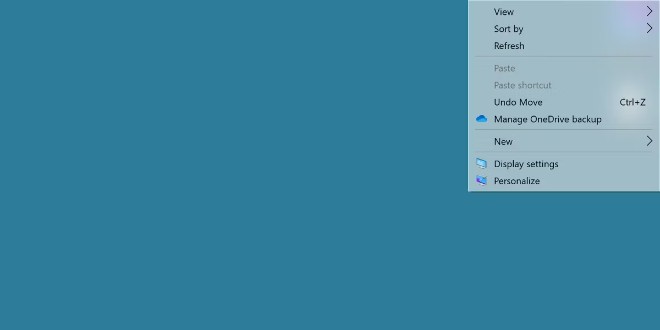
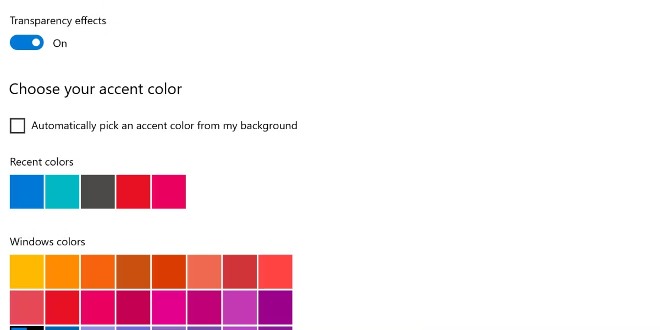
<p style="text-align: justify;">Windows 11 có sẵn một tùy chọn chỉnh theme trong suốt. Nếu bạn chưa biết, bạn có thể tham khảo cách kích hoạt tại đây:</p>

<div style="text-align: justify;">&nbsp;</div>

<p style="text-align: justify;">Hiệu ứng này trông cũng được nhưng không hề cung cấp khả năng tùy chỉnh và cũng không cho chúng ta nhìn xuyên qua menu ngữ cảnh quá nhiều. Tệ hơn là nhiều menu pop-out không có hiệu ứng này.</p>

<p style="text-align: justify;">Trước khi thêm tùy chọn trong suốt cho menu ngữ cảnh, bạn cần bật hiệu ứng trong suốt cho toàn bộ hệ điều hành Windows 11.</p>

<h2 style="text-align: justify;">Cách thêm hiệu ứng trong suốt cho menu ngữ cảnh và pop-out</h2>

<p style="text-align: justify;"><img alt="Cách thêm hiệu ứng trong suốt cho menu ngữ cảnh và pop-out" data-i="1" data-src="https://st.quantrimang.com/photos/image/2022/11/14/cach-them-menu-ngu-canh-trong-suot-vao-windows-11.jpg" data-was-processed="true" height="330" src="https://st.quantrimang.com/photos/image/2022/11/14/cach-them-menu-ngu-canh-trong-suot-vao-windows-11.jpg" width="660" /></p>

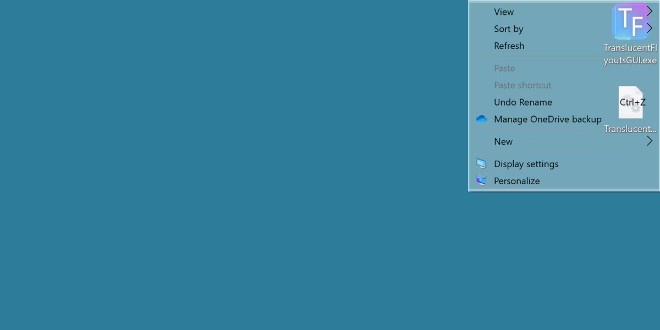
<p style="text-align: justify;">Để làm điều này, chúng ta sẽ sử dụng một công cụ có tên TranslucentFlyouts. Truy cập vào GitHub để tải về công cụ này:</p>

<ul>
	<li style="text-align: justify;">Tải TranslucentFlyouts:&nbsp;<span style="color:rgb(192, 57, 43);"><strong>https://github.com/ALTaleX531/TranslucentFlyouts</strong></span></li>
</ul>

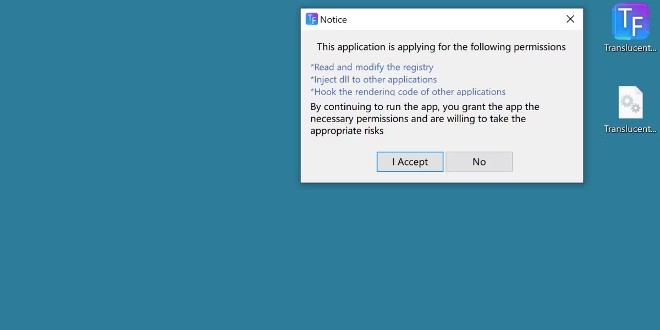
<p style="text-align: justify;">Sau khi tải về và chạy file thực thi, bạn sẽ được chào đón bởi một cảnh báo giải thích rằng công cụ này sẽ can thiệp vào hệ thống.</p>

<p style="text-align: justify;"><img alt="Bạn nhấn I Accept để chạy chương trình" data-i="2" data-src="https://st.quantrimang.com/photos/image/2022/11/14/cach-them-menu-ngu-canh-trong-suot-vao-windows-11-2.jpg" data-was-processed="true" height="330" src="https://st.quantrimang.com/photos/image/2022/11/14/cach-them-menu-ngu-canh-trong-suot-vao-windows-11-2.jpg" width="660" /></p>

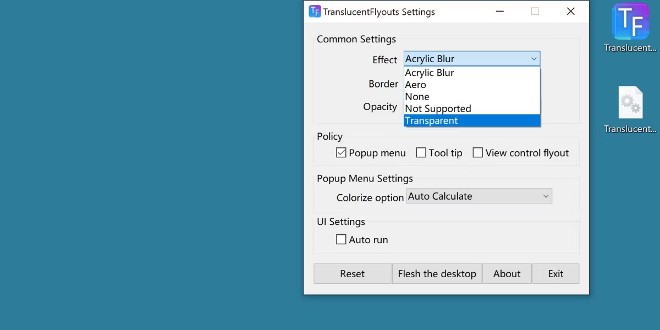
<p style="text-align: justify;">Bạn nhấn&nbsp;<strong>I Accept</strong>&nbsp;để chạy chương trình. Công cụ này cung cấp nhiều tùy chọn nhưng phổ biến nhất chính là chỉnh Effect sang Transparent (trong suốt).</p>

<p style="text-align: justify;"><img alt="Ngoài ra, bạn cũng sẽ có các tùy chọn khác như thêm bóng, thêm độ mờ đục, thêm hiệu ứng vào các hộp thoại khác." data-i="3" data-src="https://st.quantrimang.com/photos/image/2022/11/14/cach-them-menu-ngu-canh-trong-suot-vao-windows-11-3.jpg" data-was-processed="true" height="330" src="https://st.quantrimang.com/photos/image/2022/11/14/cach-them-menu-ngu-canh-trong-suot-vao-windows-11-3.jpg" width="660" /></p>

<p style="text-align: justify;">Hiệu ứng này sẽ được áp dụng ngay. Bạn nhấn chuột phải vào màn hình để mở menu ngữ cảnh xem sự thay đổi. Ngoài ra, bạn cũng sẽ có các tùy chọn khác như thêm bóng, thêm độ mờ đục, thêm hiệu ứng vào các hộp thoại khác.</p>

<h2 style="text-align: justify;">Windows liệu có cung cấp tính năng này theo mặc định?</h2>

<p style="text-align: justify;">Thực tế thì Windows 11 đã cung cấp tính năng này nhưng nhiều người dùng vẫn không cảm thấy hài lòng theo một cách nào đó. Vì thế, chẳng có gì hợp lý khi hy vọng vào một bản cập nhật tăng cường khả năng trong suốt của hệ thống Windows 11 trong tương lai.</p>

<p style="text-align: justify;"><img alt="Windows liệu có cung cấp tính năng này theo mặc định?" data-i="4" data-src="https://st.quantrimang.com/photos/image/2022/11/14/cach-them-menu-ngu-canh-trong-suot-vao-windows-11-1.jpg" data-was-processed="true" height="330" src="https://st.quantrimang.com/photos/image/2022/11/14/cach-them-menu-ngu-canh-trong-suot-vao-windows-11-1.jpg" width="660" /></p>

<p style="text-align: justify;">Còn nếu điều đó không xảy ra thì bạn vẫn có những chương trình nhẹ mà hữu ích như TranslucentFlyouts.</p>
		</div>
				<div id="author">
						<p>
				<strong>Nguồn tin:</strong>
				Quantrimang.com
			</p>
		</div>
	</div>
	<div id="footer" class="clearfix">
		<div id="url">
			<strong>URL của bản tin này: </strong><a href="https://www.nguoicodonvn2008.info/vi/news/savefile/kien-thuc-may-tinh/cach-them-menu-ngu-canh-trong-suot-vao-windows-11-6325.html" title="Cách thêm menu ngữ cảnh trong suốt vào Windows 11">https://www.nguoicodonvn2008.info/vi/news/savefile/kien-thuc-may-tinh/cach-them-menu-ngu-canh-trong-suot-vao-windows-11-6325.html</a>

		</div>
		<div class="clear"></div>
		<div class="copyright">
			&copy; .&#x3A; Nguoicodonvn2008.info - Cõi lòng người cô đơn &#x3A;.
		</div>
		<div id="contact">
			<a href="mailto:admin@nguoicodonvn2008.info">admin@nguoicodonvn2008.info</a>
		</div>
	</div>
</div>
        <div id="timeoutsess" class="chromeframe">
            Bạn đã không sử dụng Site, <a onclick="timeoutsesscancel();" href="https://www.nguoicodonvn2008.info/#">Bấm vào đây để duy trì trạng thái đăng nhập</a>. Thời gian chờ: <span id="secField"> 60 </span> giây
        </div>
        <div id="openidResult" class="nv-alert" style="display:none"></div>
        <div id="openidBt" data-result="" data-redirect=""></div>
		</script>
		<div class="car-top">
  <span><img src="https://www.nguoicodonvn2008.info/themes/default/images/car.png" alt=""></span>
</div>
<script src="https://www.nguoicodonvn2008.info/assets/js/jquery/jquery.min.js"></script>
<script>var nv_base_siteurl="/",nv_lang_data="vi",nv_lang_interface="vi",nv_name_variable="nv",nv_fc_variable="op",nv_lang_variable="language",nv_module_name="news",nv_func_name="savefile",nv_is_user=0, nv_my_ofs=-4,nv_my_abbr="EDT",nv_cookie_prefix="nv4c_e856T",nv_check_pass_mstime=1738000,nv_area_admin=0,nv_safemode=0,theme_responsive=0,nv_recaptcha_ver=2,nv_recaptcha_sitekey="",nv_recaptcha_type="image",XSSsanitize=1;</script>
<script src="https://www.nguoicodonvn2008.info/assets/js/language/vi.js"></script>
<script src="https://www.nguoicodonvn2008.info/assets/js/DOMPurify/purify3.js"></script>
<script src="https://www.nguoicodonvn2008.info/assets/js/global.js"></script>
<script src="https://www.nguoicodonvn2008.info/assets/js/site.js"></script>
<script src="https://www.nguoicodonvn2008.info/themes/default/js/news.js"></script>
<script src="https://www.nguoicodonvn2008.info/themes/default/js/main.js"></script>
<script src="https://www.nguoicodonvn2008.info/themes/default/js/custom.js"></script>
<script type="application/ld+json">
        {
            "@context": "https://schema.org",
            "@type": "Organization",
            "url": "https://www.nguoicodonvn2008.info",
            "logo": "https://www.nguoicodonvn2008.info/uploads/angel.gif"
        }
        </script>
<script src="https://www.nguoicodonvn2008.info/themes/default/js/bootstrap.min.js"></script>
<script type="text/javascript">
var $scrolltop = $('.car-top');
$scrolltop.on('click', function () {
    $('html,body').animate({
        scrollTop: 0
    }, 800);
    $(this).addClass("car-run");
    setTimeout(function(){ $scrolltop.removeClass('car-run');}, 1000);
    return false;
});
$(window).on('scroll', function ()
{ 
    if($(window).scrollTop() >= 200)
    {
        $scrolltop.addClass("show");
        $scrolltop.addClass("car-down");
    }
    else
    {
       $scrolltop.removeClass("show");
       setTimeout(function(){ $scrolltop.removeClass('car-down');}, 300);
    }
});
</script>
</body>
</html>